Social Media APIs in 2026: A Builder's Guide to Every Platform
Social media APIs in 2026: what each platform costs, direct vs unified APIs, and how to post to 9 networks from one endpoint.
I’ve been shipping on social media APIs for years now. (Here’s my background if you want context on where I’m coming from.) Every guide I read while building out Blotato treats them like a help-doc reference: here’s the endpoint, here’s the rate limit, good luck. Almost none of them tell you what these platforms actually cost to build on, where the cliff edges are, or which ones quietly shifted the rules in the last 12 months.
This is the version I wish I’d had. A 2026 view of every major social media API, what each one lets you do, what it really costs at scale, and the gotchas that don’t make it into the docs.
If you just want to publish content to social platforms, the honest answer at the bottom is going to be: don’t build directly on any of these. I’ll show you why.
What is a social media API? It’s the official interface a platform gives developers to publish, read, and manage content programmatically instead of through the app. In 2026 they range from free-but-gated (Meta, Bluesky, Pinterest) to metered (YouTube quota units, X pay-per-use at $0.20 per post with a URL, Reddit at roughly $0.24 per 1,000 calls for commercial use). The catch for anyone who just wants to post everywhere: each one runs its own auth flow and review queue. A unified layer like Blotato covers 9 platforms from one endpoint, and its MCP server lets Claude and other AI agents publish natively without touching a single OAuth handshake. If you’re deciding between the two approaches, this breaks down how an API and MCP actually differ.
What Is a Social Media API?
A social media API is the official interface a platform gives developers to publish, read, and manage content programmatically instead of through the app. Instead of logging in and clicking “post,” your code sends a request to the platform and the platform acts on it. Every major network has one, and each behaves differently.
The three types of social media APIs
- Open (public) APIs are documented and available to any registered developer, usually with rate limits and an approval step. Most social platforms sit here.
- Partner APIs unlock higher limits or restricted actions but require a formal application and review, like LinkedIn’s Community Management partner tier or TikTok’s Content Posting audit.
- Internal APIs are the private endpoints a platform uses for its own apps. They are undocumented, unstable, and against the terms of service to use, so skip them.
How social media API authentication works
Almost every social media API authenticates with OAuth. You register a developer app, the user authorizes it, and the platform returns an access token your code sends with each request. Some APIs also issue a long-lived API key for server-to-server calls. Tokens expire, so a real integration also stores a refresh token and renews access in the background. This handshake is the part builders underestimate, because you repeat it, and maintain it, for every platform you add.
Direct APIs vs a Unified Social Media API
There are two ways to post to social platforms in code, and picking the right one saves months.
A direct (native) API is you building on each platform’s own API. You get full control and no middle layer, but you also own every auth flow, every review queue, and every breaking change across all of them. Nine platforms means nine integrations to build and keep alive.
A unified social media API is a single endpoint that fans your request out to many platforms. You connect your accounts once, then send one consistent request shape and the provider translates it per network. You trade some low-level control for one auth model, one code path, and someone else absorbing the maintenance when a platform shifts its rules.
If your product IS the platform integration (an analytics tool, a research database), build direct. If you just want to publish reliably everywhere, a unified API is almost always the right layer.
Unified social media API providers compared
The honest landscape in 2026. Platform counts and prices are from each provider’s own site, verified in August 2026.
| Provider | Platforms | Pricing entry | AI agent / MCP | Best for |
|---|---|---|---|---|
| Blotato | 9 | $29/mo flat | Hosted MCP server | Flat, predictable cost and native Claude/AI-agent posting |
| Ayrshare | 14+ | $149/mo | Action MCP that publishes, plus a separate docs-only server | Multi-profile agencies at scale |
| Outstand | 11 | $19/mo base + per-post | 27 MCP tools | High-volume, pay-per-post billing |
| Zernio | 15 | Free for 2 accounts, then per-account | AI-agent REST API | The widest platform count |
Read this honestly. Blotato covers the fewest platforms of the four at 9, so if you need Snapchat, Telegram, or Google Business, Ayrshare or Zernio reach further. I compared the two head to head in Blotato vs Zernio. Blotato’s edge is a flat $29 price with no per-post tax and a hosted MCP server so Claude and other agents can publish natively. Outstand wins if your volume is spiky and you would rather pay per post. Pick the one whose pricing model matches how you actually publish. If flat-versus-per-profile is your deciding factor, I broke that down in the best Ayrshare alternatives. And if X is the platform driving your costs, note that some unified APIs hand X back to you as a bring-your-own-keys integration rather than brokering it, which I worked through in the best Postproxy alternatives.
TL;DR: Social Media APIs in 2026
In 2026, X is pay-per-use ($0.20 per post with a URL), Meta (Instagram, Facebook, Threads) is free but gated by App Review, LinkedIn’s Community Management API requires MDP partner approval, TikTok forces a sandbox audit, YouTube prices in quota units, Reddit meters commercial use at roughly $0.24 per 1,000 calls, Bluesky is free with a 5,000-points-per-hour rate cap, and Pinterest is free but rate-limited per category. None of them are friendly to a publisher who just wants to post to all of them. A unified API like Blotato covers 9 platforms from one endpoint and skips every review queue.
Social Media APIs at a Glance (2026)
| Platform | Free / entry tier | Approval friction | The biggest gotcha |
|---|---|---|---|
| X (Twitter) | Pay-per-use, no flat free tier | Same-day | $0.20 per post containing a URL |
| Business/Creator accounts only | Weeks for App Review | 100 posts per 24 hours per account | |
| Pages only, no personal profiles | Weeks for App Review | API publishing is Pages-only, and personal-profile publishing is no longer available | |
| Community Management Dev Tier: 500 req/app, 100 req/member, daily | Standard tier requires partner application + screencast | Sales Navigator API isn’t onboarding new SNAP partners | |
| TikTok | Sandbox mode forces private posts | 1 to 2 weeks for first-pass audit | Sandbox-mode posts are private only, audit gate decides public access |
| YouTube | 10,000 quota units/day | Quota increase review takes weeks | Search burns 100 units per call, the new expensive operation post-December 2025 |
| Threads | Free, no published paid tier | Standard Meta App Review | Inherits Meta’s BUC rate-limit math |
| Bluesky | Free, no published paid tier | None (open AT Protocol) | 5,000 points/hour per account, OAuth still in dev preview |
| Free Trial and Standard tiers | Video-demo review for Standard | Trial pins are hidden from the public web | |
| 100 req/min OAuth, non-commercial | OAuth app registration | Commercial use is metered at roughly $0.24 per 1,000 calls |
What Changed in the Last Twelve Months
Six shifts you need to know before you start building on any of these.
X retired its flat-rate plans for new developers. As of February 2026, pay-per-use is the only on-ramp. Legacy Basic ($200/mo) and Pro ($5,000/mo) have both since been deprecated, with Pro subscribers automatically migrating to pay-per-use after September 1, 2026. I cover the full pricing math in the X API pricing breakdown. The headline: a post containing a URL now costs $0.20 versus $0.015 for a plain-text post. Auto-publish a newsletter link 100 times a month and you’ve spent $20 on what used to be a $1.50 line item. If you want that math against your own posting volume, the social media API cost calculator runs it across every platform in this guide.
Instagram’s Basic Display API was sunset on December 4, 2024. Personal-account access is gone. Everything now flows through the Instagram Graph API, which means a Business or Creator account, a Meta Developer App, and App Review. If you have a side project that read user content via Basic Display, it stopped working over a year ago.
LinkedIn published explicit Community Management Development tier defaults. Per the Community Management overview, Dev Tier now defaults to 500 requests per app and 100 requests per member, daily, resetting at midnight UTC. Production tier limits are negotiated with your partner manager and visible only inside the LinkedIn Developer Portal Analytics tab. Old guides that quote a flat 150 calls/day are stale.
YouTube re-priced and then re-bucketed videos.insert. Google cut the upload cost from roughly 1,600 units to roughly 100 on December 4, 2025, then gave uploads their own daily bucket on June 1, 2026. The current quota reference puts an upload at 1 unit against a limit of 100 calls a day, so the free tier covers 100 uploads instead of six. Search is now the expensive operation. The YouTube API pricing guide covers the new math.
Pinterest published its per-category rate limits. After years of “see your dashboard,” the official rate-limits page now lists the exact ceilings per category (1,000 req/min for ads_read on Standard, 400 for ads_write, 25 for advanced_auction_write). The shape of your integration now determines whether Standard access is enough or whether you need an MDP partner conversation.
Bluesky moved AT Protocol to OAuth (still in developer preview). Bluesky announced OAuth on September 25, 2024 and asked developers to stop using App Passwords for new projects. OAuth has been in developer preview through 2025 with broader auth-scope work ongoing. If you’re starting a new Bluesky integration in 2026, OAuth is the path.
The pattern across all six: platforms are quietly raising the floor for commercial use. Plan for it.
X (Twitter) API
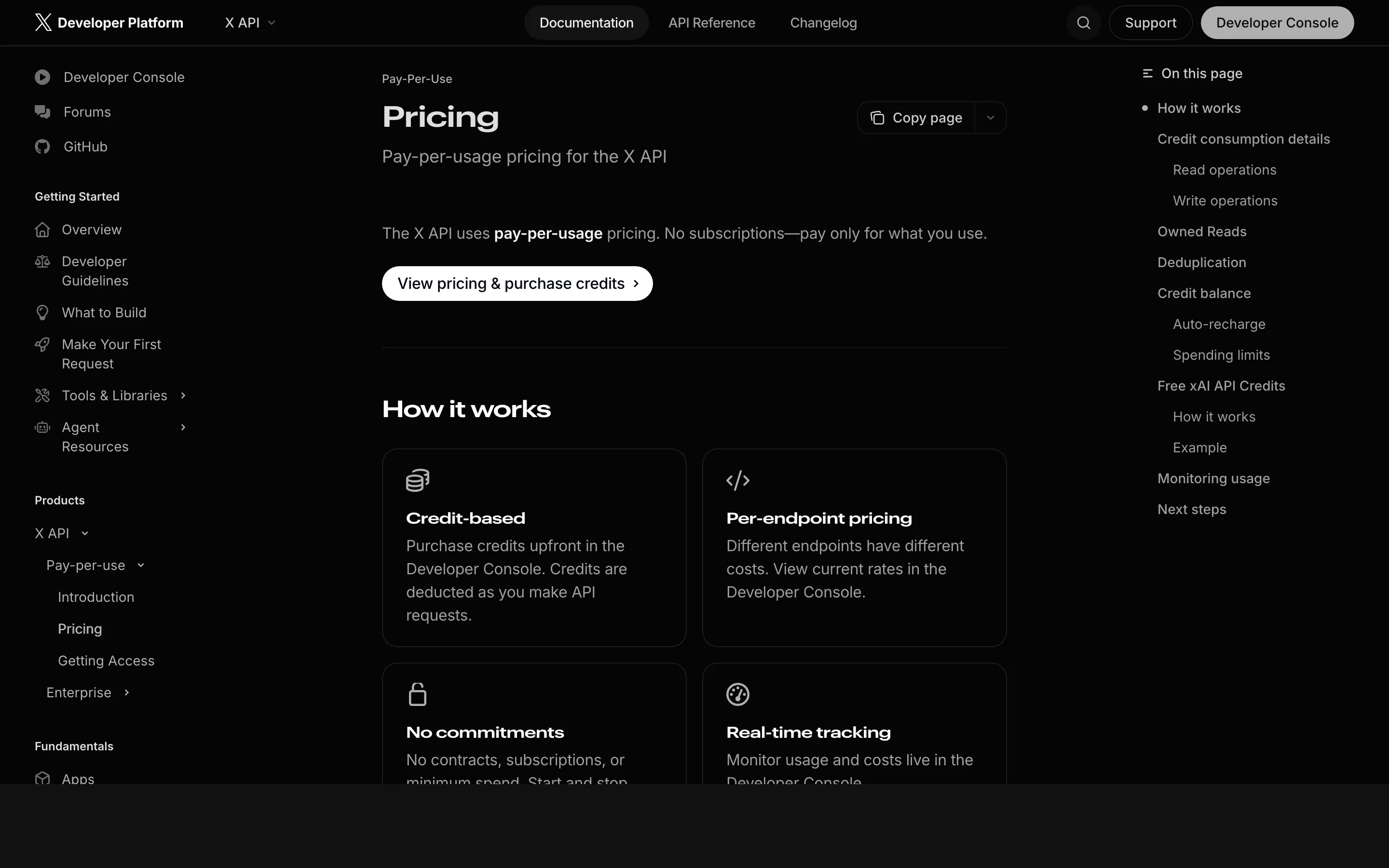
X is the most transparent of the major social media APIs. You can sign up at developer.x.com, load credits, and make your first call the same day. The price you pay for that openness is per-resource billing on every action.
The pricing in 2026:
- $0.001 per owned read (your own posts, bookmarks, followers)
- $0.005 per third-party post read
- $0.010 per user, follower, or trend read
- $0.015 per standard write (text or media post without a URL)
- $0.20 per post that contains a URL
- Following, liking, and quote-posting are Enterprise-only
There’s a hard ceiling of 3 million post reads per month on pay-per-use. Above that, you’re looking at an Enterprise contract starting around $42,000/month.
For the full math (real-world cost examples, the 3M cap, the xAI credit kickback), see the X API pricing guide - and if the math sends you shopping, I tested seven tools that wrap the X API.
Instagram Graph API
Instagram requires the most up-front work of any API on this list, but it’s stable once you’re through it. Personal accounts are gone. Everything routes through Business or Creator accounts via Meta’s developer platform.
What you can do:
- Publish single images, carousels, reels, and stories
- Read and reply to comments
- Pull post and account insights
- Search by hashtag (with limits)
- Receive webhooks for new comments and mentions
What it actually takes to ship:
- A Meta Developer account
- A Meta App in your developer console
- Business or Creator account on the Instagram side
- App Review for any meaningful permission (
instagram_content_publish,pages_show_list)
Plan weeks for review, not days. Meta is consistent but not fast, and any AI-related disclosure adds another round.
The headline gotcha: 100 API-published posts per 24 hours per account, on a rolling window, with a carousel counting as a single post. Meta raised this from the old 25-post ceiling, so any guide still quoting 25 is working from a stale number. Worth knowing the limit is enforced on the publish call itself, and you can query an account’s current usage before you queue a batch. For the container flow, the dev-mode shortcut, and the current publishing limit, see the full Instagram posting API guide. For the full cost picture (App Review timelines, the BUC rate-limit formula, and third-party scraper pricing), see my Instagram API pricing breakdown.
Facebook Graph API
Facebook shares Meta’s developer infrastructure with Instagram. Same dev account, same App Review, same dashboard. The thing to remember: API publishing is Pages-only. Personal-profile publishing is no longer available through the Graph API and isn’t coming back.
What you can do on Pages:
- Publish text, images, and video
- Manage and respond to comments
- Pull Page Insights (reach, engagement, audience)
- Manage events
- Receive real-time webhooks
- Run ad campaigns through the Marketing API
Rate limits use Meta’s Business Use Case (BUC) tier system, layered on top of app-level and page-level caps. The numbers scale with your app’s usage history, so a brand-new app gets aggressively throttled until it earns its way up. Plan for that during onboarding.
For the WhatsApp Cloud API per-message rates, Marketing API access tiers, and the time-cost of Meta’s app review, see the full Facebook API pricing breakdown.
LinkedIn API
LinkedIn has the highest approval bar of any platform on this list. There are three products you actually care about:
- Sign In with LinkedIn: Basic OAuth and profile read. Usable without partner approval but very restricted in what you can do with it.
- Marketing Developer Platform (MDP): Advertising, analytics, and the Community Management API live under this umbrella. Requires a partner application.
- Community Management API: The product you want for posting and engagement on organization pages. This is where the work is.
The Community Management API has two tiers. Development tier defaults to 500 requests per app and 100 requests per member, daily, resetting at midnight UTC - good enough to build against test pages and confirm your integration works. Standard tier is the production surface, and you apply for it through the same MDP increasing-access flow:
- A formal access form
- A screen recording demonstrating your integration end-to-end
- Test credentials for LinkedIn’s review team
- A clearly defined commercial use case
LinkedIn rejects applications that look like generic schedulers. If you’re building a consumer-grade publishing tool, expect a hard road. If you’re building enterprise workflow software with a real customer story, you can get through it. I have. It takes time. One thing worth flagging in 2026: LinkedIn isn’t onboarding new SNAP partners for Sales Navigator API access at all right now, so even the “apply and wait” option is closed there until the official Sales API landing page updates.
For the full free-tier vs Marketing Partner vs Sales Navigator breakdown, see the LinkedIn API pricing guide.
TikTok API
TikTok publishes two separate APIs that get conflated in most write-ups. They are not the same product.
Content Posting API. For publishing video and photo posts to authenticated accounts. This is what you want if you’re shipping a publisher tool. The catch: there are two phases to your access.
- Sandbox mode (default state for new clients): Every post is forced to private visibility regardless of the OAuth scope or what the user selects. You can build and test, you cannot ship public content. Each app supports up to five sandboxes, each shareable with up to ten TikTok accounts.
- Audited: Post publicly, multi-user, normal throughput, subject to TikTok’s 6 requests per minute posting cap. Community reports in 2026 put a clean first-pass audit at roughly one to two weeks. Messy submissions take longer.
Research API. Read access to public post and user data. Available only to approved academic researchers in the US and EU. Not a commercial product. If you see a “social listening” pitch built on the TikTok Research API, ask hard questions.
The sandbox-mode trap is the single most common reason TikTok integrations look broken on day one. Posts go up, but no one can see them. Confirm your app has cleared audit before you debug anything else.
For the full sandbox audit walkthrough, scraper rate comparisons, and the 6-per-minute posting cap math, see TikTok API pricing in 2026.
YouTube Data API
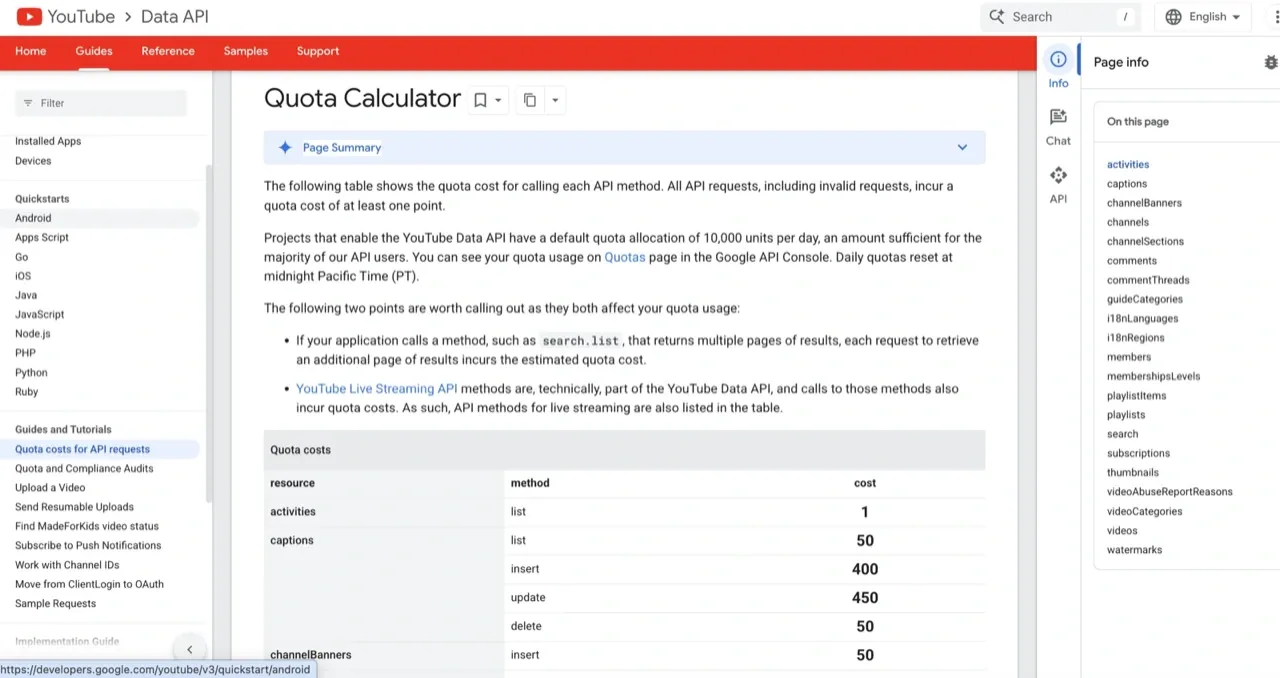
YouTube prices its API in quota units, not requests. Every account starts with 10,000 quota units per day, resetting at midnight Pacific time. Each operation has a fixed unit cost.
| Operation | Quota cost |
|---|---|
| List videos / metadata | 1 unit |
| List playlists | 1 unit |
| Search request | 100 units |
| Comment insert | 50 units |
| Video upload (current) | 1 unit, own bucket of 100 calls/day |
Before December 4, 2025, a single videos.insert call cost ~1,600 units, which capped the default free tier at six uploads a day and forced any production publisher into the Quota Extension queue. Google reduced it to ~100 units that day, then moved uploads to their own bucket on June 1, 2026 at 1 unit per call with a 100-call daily limit. The binding constraint has shifted from units to call count. If your workflow is search-heavy, the Quota Extension Form is still the only path above 10,000 units a day, and Google’s review runs a few weeks to multiple months.
The quirk no one talks about: search is expensive (100 units) and easy to over-call during development. I’ve watched team members blow through a day’s quota in a single afternoon iterating on a search-driven feature. Cache aggressively or build with mocked responses until you’re sure of the call patterns.
For the December 2025 quota changes, the quota-increase application process, and real-world cost examples for publisher workflows, see the YouTube API pricing guide.
Reddit API
Reddit’s API was effectively free for commercial use until 2023, when the platform introduced paid tiers after the Apollo controversy. The structure today:
- Free / non-commercial: 100 requests per minute with OAuth, 10 without. Personal projects, academic research, and non-commercial use only.
- Commercial: metered at roughly $0.24 per 1,000 API calls, arranged through a contract with Reddit rather than self-serve signup. At real scale that adds up fast, which is the whole reason the 2023 change caused an uproar.
- Enterprise: Custom pricing, direct contract.
If your product reads Reddit data at any volume and your business model isn’t academic, you owe Reddit a check. The “Reddit API is free” narrative you’ll see in older guides hasn’t been true for two and a half years.
A few subreddit-level things to know on top of the API tier: many communities ban API-posted content outright, spam detection is aggressive on automated accounts, and rate limits are enforced both globally and per-subreddit.
Threads API
Threads runs on Meta’s developer infrastructure, the same dashboard you’d use for Instagram or Facebook. There’s no published paid tier and no per-call fee. The friction is the same Meta App Review process and the Business Use Case rate-limit math layered on top of app-level and account-level caps.
What you can do:
- Publish text, image, and video posts to your Threads account (500-character text cap)
- Read, reply to, and manage your own posts
- Pull post and account insights
The catch: the Threads API is newer than Instagram or Facebook, so the available endpoints are narrower and the docs lag the platform. Long-lived tokens cap at 60 days, and refresh requires the user to re-engage with your app before they expire. If your build requires anything outside the standard publish-and-engage loop, expect to wait for endpoints that haven’t shipped yet. For the rate-limit formula, the 24-hour caps, and current wrapper options, see the Threads API pricing guide.
Bluesky API
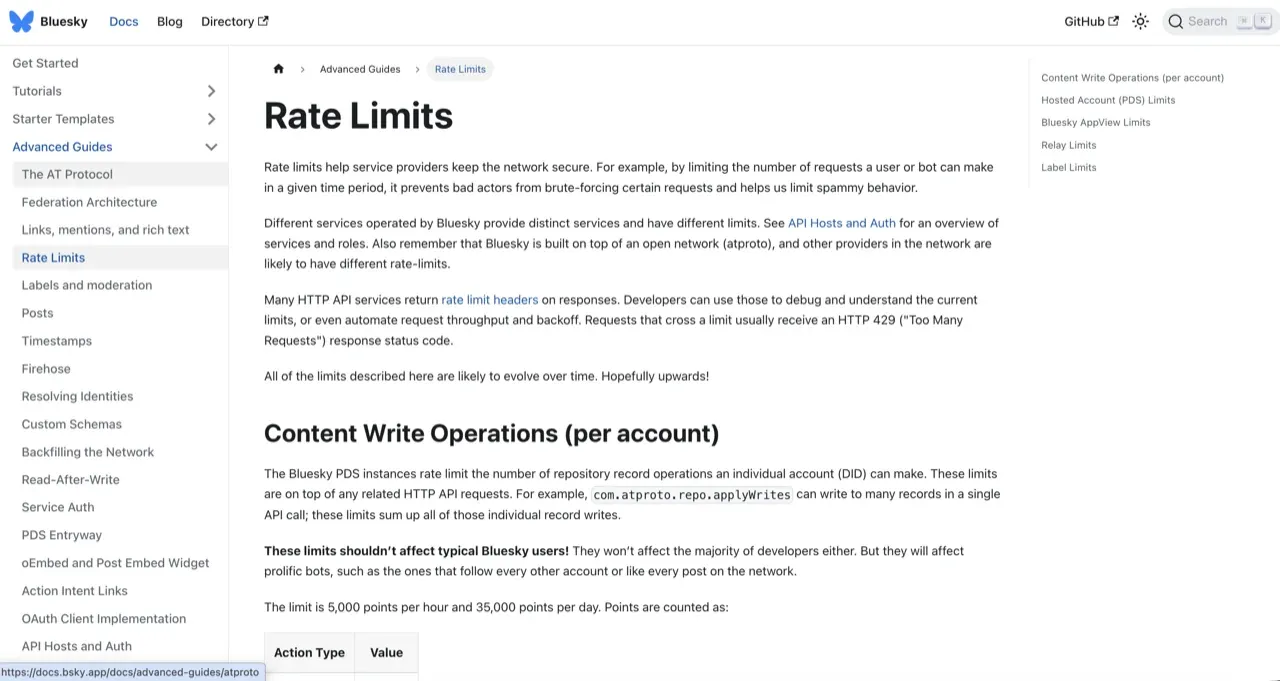
Bluesky is the simplest social media API in this list: no published paid tier, no per-call fee, no App Review. The official AT Protocol API charges in rate-limit points instead of dollars. Every account gets 5,000 points per hour and 35,000 per day. Each record write (post, like, follow, repost) costs 3 points, so a write-heavy bot burns through the hour budget faster than you’d expect.
What you can do:
- Publish posts, threads, and replies through your account’s PDS
- Read public feeds, profiles, and the firehose through the AppView
- Build custom feeds and third-party clients on AT Protocol
- Federate against third-party PDS instances if you don’t want to run on
bsky.social
The two operational decisions: OAuth versus the legacy App Password flow (OAuth is the path for new builds), and Bluesky-hosted PDS versus your own. For the points math, the OAuth rollout timeline, and third-party wrapper pricing, see the Bluesky API pricing guide.
Pinterest API
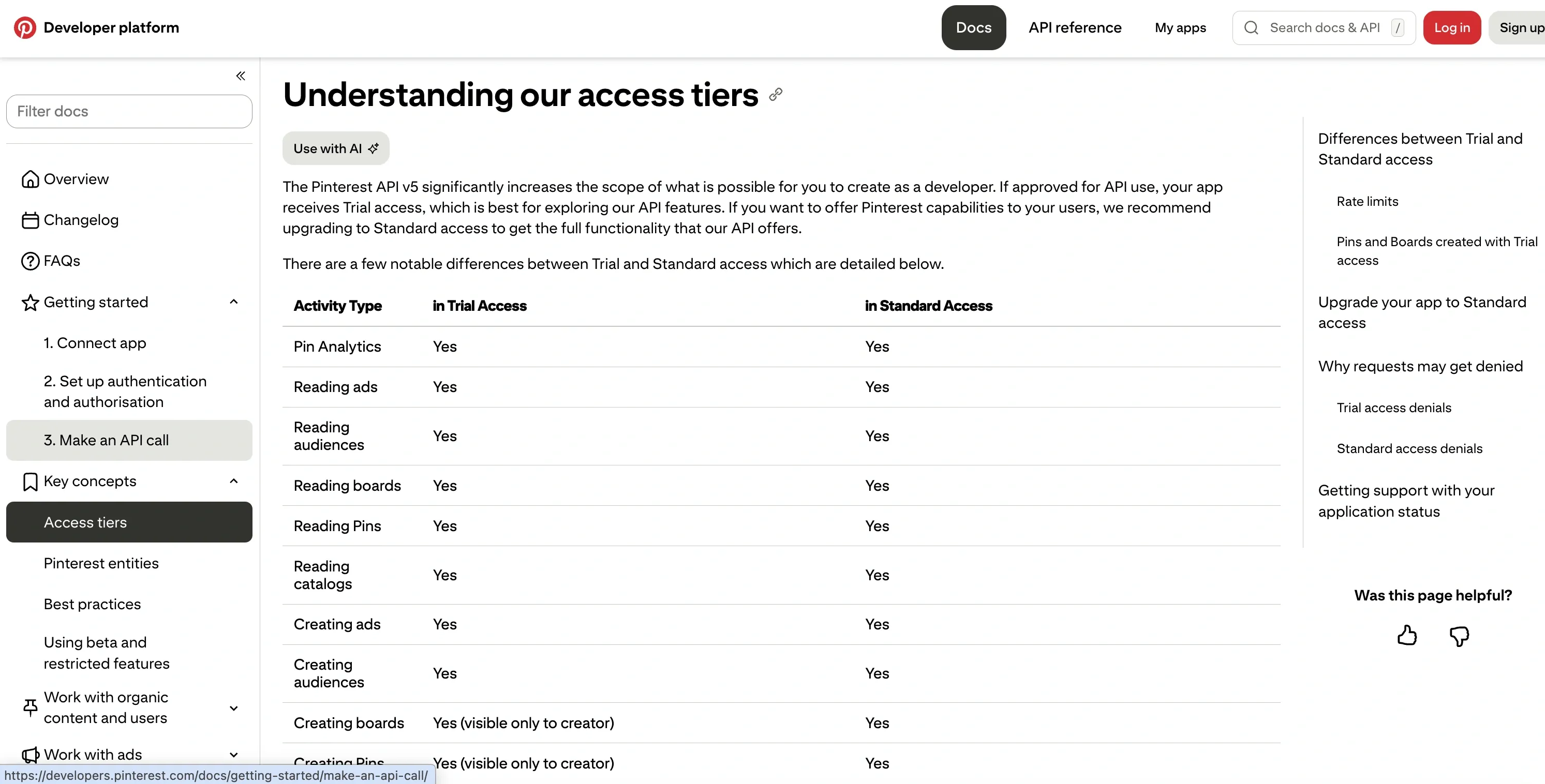
Pinterest doesn’t sell its API. The v5 API is free at both Trial and Standard tiers. The real cost is the video-demo review to move from Trial to Standard, and the per-category rate ceilings that depend on the shape of your integration.
The two-tier structure:
- Trial access: Caps are per day - a universal 1,000 requests/day per app, with
ads_writeandorg_writestricter at 300/day. Pins created in Trial are hidden from the public web - your code path succeeds, the Pin exists, nobody outside the app can see it. - Standard access: Production publishing, ads, catalogs, analytics. Reached via a video-demo review with no published timeline. Most rejections come from three patterns: demo doesn’t show the OAuth flow, app description is vague, privacy policy is inaccurate or inaccessible.
On Standard, the caps switch to per minute per user, and the category dictates what you can build: ads_read and org_read sit at 1,000 req/min, ads_write at 400/min, advanced_auction_write at 25/min. For the full tier breakdown, MDP partner track, and the storage-rule gotcha that kills certain product shapes, see the Pinterest API pricing guide.
Patterns That Apply to Every Social Media API
After enough years of this, the patterns matter more than the per-platform details:
- Approval is the slow part, not the code. The integration itself takes a sprint. App Review, partner approval, and audit cycles take weeks to months. Build the boring approval timeline into your project plan from day one.
- Rate limits are layered. Almost every platform stacks a daily cap, a per-minute cap, and an account-level cap on top of each other. Hitting any one of them throttles you. Backoff logic is non-optional. I pulled the exact ceilings for all nine platforms, quoted from each vendor’s own docs, into a separate breakdown of what actually breaks at scale.
- Webhooks are the exception. Meta gives you webhooks on Instagram and Facebook. The rest mostly require polling. That’s an architecture decision that compounds.
- Pricing scales aggressively at the upper end. Every free tier is sized for a hobby project. Every paid tier prices for an enterprise. The middle is where you’ll feel the squeeze.
- AI and automated-content rules are tightening everywhere. Every platform added disclosure requirements or restrictions in the last 18 months. Read each ToS before you ship.
The Honest Pitch: Skip the Platform APIs Entirely
Here’s the thing nobody publishing a “best social media APIs” listicle will tell you. If your goal is to publish content, every API on this list is more friction than the problem warrants.
Building directly on these platforms means signing up for:
- A Meta Developer account, App Review, and Business account verification
- A LinkedIn Partner Program application with a screen recording
- A TikTok audit process with no committed timeline
- A pay-per-use credit balance and per-call billing on X
- A YouTube quota increase review
- A metered commercial contract for Reddit access, billed per API call
- OAuth flows, refresh tokens, retry logic, and queueing for every single one of them
- And then the ongoing work of keeping all of it alive as each platform shifts its rules
I’ve done the work. I built Blotato because I was tired of stitching ten APIs together to ship one piece of content.
What you get with Blotato instead:
- One API key, every platform. Publish to X, Instagram, Facebook, LinkedIn, TikTok, YouTube, Threads, Bluesky, and Pinterest with a single consistent endpoint.
- No app review queues. Connect accounts via standard OAuth. Start posting the same day.
- Rate limits and retries handled. No backoff math, no silent failures, no per-minute math against three different ceilings.
- Flat subscription, not per-call billing. No URL-post tax, no quota units, no per-call metering on top.
- MCP server included. Claude and other AI agents can publish through Blotato natively at
https://mcp.blotato.com/mcp.
If you’re comparing the unified-API options at this layer, I ranked the best Ayrshare alternatives on flat versus per-profile pricing, since that billing model is what sends most builders looking.
A minimal post via the Blotato API, in three languages. This is the shape of a unified call: one request, one auth header, and only the targetType changes per network.
curl -X POST https://backend.blotato.com/v2/posts \
  -H "blotato-api-key: YOUR_API_KEY" \
  -H "Content-Type: application/json" \
  -d '{
    "post": {
      "accountId": "YOUR_ACCOUNT_ID",
      "target": { "targetType": "twitter" },
      "content": { "text": "Hello from the Blotato API." }
    }
  }'
import requests
requests.post(
"https://backend.blotato.com/v2/posts",
headers={"blotato-api-key": "YOUR_API_KEY"},
json={
"post": {
"accountId": "YOUR_ACCOUNT_ID",
"target": {"targetType": "twitter"},
"content": {"text": "Hello from the Blotato API."},
}
},
)await fetch("https://backend.blotato.com/v2/posts", {
method: "POST",
headers: {
"blotato-api-key": "YOUR_API_KEY",
"Content-Type": "application/json",
},
body: JSON.stringify({
post: {
accountId: "YOUR_ACCOUNT_ID",
target: { targetType: "twitter" },
content: { text: "Hello from the Blotato API." },
},
}),
});Change targetType to instagram, linkedin, tiktok, or any other supported platform. Same payload shape, same auth, same code path. Full reference at help.blotato.com/api/start.
Handling Rate Limits, Webhooks, and Retries
Every social media API will throttle you, and each one counts differently. X meters per-post and per-URL, YouTube burns quota units, Bluesky spends points per hour, and Meta applies a moving Business Use Case limit. Building direct means tracking all of these ceilings at once.
Two patterns keep an integration healthy:
- Exponential backoff. When a platform returns a 429 (too many requests), wait and retry with a growing delay rather than hammering the endpoint. Read the
Retry-Afterheader when the platform sends one. - Webhooks over polling. Where a platform supports webhooks, subscribe to them so you are notified of a status change instead of asking on a loop. Polling burns your rate budget on questions the platform could just answer. Not every network offers webhooks, so a real integration mixes both.
A unified API handles this layer for you. Blotato absorbs the per-platform backoff math and retry logic, so a 429 on one network does not become a silent failure in your pipeline. If an agent rather than a person is driving that retry logic, the safeguards change shape and idempotency stops being optional.
Social Media APIs and AI Agents (MCP)
The newest shift in this space is that the caller is often an AI agent, not a traditional backend. An agent like Claude does not want to read ten sets of API docs and write ten integrations. It wants one tool it can call in plain language.
That is what the Model Context Protocol (MCP) provides. An MCP server sits between the agent and the platforms and exposes actions like “list my accounts” or “post this” as tools the agent calls directly. A REST API answers “how does my code talk to this platform.” MCP answers “how does my agent take this action.”
Blotato runs a hosted MCP server at https://mcp.blotato.com/mcp, so Claude, Claude Code, or any MCP client can publish to all 9 platforms without you writing a single HTTP request. If you are building agent workflows, this is the layer to reach for, and how an API and MCP differ is worth understanding before you pick one.
Sabrina’s Take
The major social media APIs in 2026 are developer products, not publisher products. They exist to feed analytics tools, research databases, and enterprise data buyers. If that’s your build, you do the work, eat the cost, and budget the approval cycles.
If you just want to publish content reliably across every platform that matters, the official APIs are the wrong layer. They were the right answer in 2016. They aren’t anymore.
Pick the level of abstraction that matches the problem you’re solving. For most builders, that isn’t an OAuth handshake with ten platforms. It’s one API call.
FAQs
Which social media API is cheapest in 2026?
Bluesky and Threads have no published paid tier and no per-call fee, which makes them the cheapest in dollar terms. Pinterest is free at both Trial and Standard tiers. Meta’s Graph API for Instagram and Facebook is also free at the API level, with App Review as the gating cost. The platforms that actually charge are X (pay-per-use, starting at $0.001 per owned read and $0.20 per post containing a URL) and Reddit (metered at roughly $0.24 per 1,000 calls for commercial use). YouTube is free but capped at 10,000 quota units per day by default, with uploads and searches each billing to their own 100-call daily bucket since June 1, 2026, so the ceiling on uploads is the call count rather than units.
Which social media API has the worst approval process?
LinkedIn. The Community Management API runs on a Development-to-Standard tier flow, and the Standard application is gated by a formal access form, a screen recording of your integration, test credentials for the review team, and a clearly defined commercial use case. Generic schedulers get rejected. TikTok’s sandbox-to-audited audit is a close second because outcomes are inconsistent and a clean first-pass audit still runs one to two weeks. Meta’s App Review is slow (plan weeks, not days) but predictable.
Can I post to every social platform with one API?
Not through the official APIs. Each platform runs its own auth flow, rate-limit shape, and content rules. A unified API like Blotato wraps the underlying platform APIs behind a single endpoint that publishes to X, Instagram, Facebook, LinkedIn, TikTok, YouTube, Threads, Bluesky, and Pinterest. You connect accounts via OAuth, hit one endpoint, and skip every platform’s review queue.
Do I need App Review for the Instagram and Facebook APIs?
Yes, for any meaningful permission. instagram_content_publish, pages_show_list, and the equivalent Facebook permissions all require Meta App Review before they work on accounts other than your own. Plan weeks, not days. AI-related disclosures add another round.
What’s the difference between TikTok’s Content Posting API and Research API?
The Content Posting API is for publishing video and photo posts to authenticated accounts (the product you want if you’re shipping a publisher tool). The Research API is read-only access to public TikTok data, available only to approved academic researchers in the US and EU. They’re often conflated in older write-ups. The Research API is not a commercial product.
Is the Reddit API still free in 2026?
Only for non-commercial use. The free tier gives you 100 requests per minute with OAuth (10 without) for personal projects, academic research, and non-commercial workflows. Commercial use is metered at roughly $0.24 per 1,000 API calls, arranged through a contract with Reddit rather than self-serve. The “Reddit API is free” framing from older guides hasn’t been true since 2023.
What is the best social media scheduling API?
A scheduling API is a publishing API that also holds the queue, so the post goes out at the time you set whether or not your code, your agent, or your laptop is still running. That distinction matters more than any feature list: if the scheduler lives in your own cron job rather than the vendor’s infrastructure, you own every retry, timezone bug, and missed window. Blotato schedules across all nine platforms from one endpoint at $29/mo flat, and the bill does not move with volume. Ayrshare schedules across a wider network list and bills per connected profile, which wins when you resell to many client accounts. Outstand bills per post, which is cheaper at low volume and climbs with activity. Postiz schedules from either its hosted cloud plans or an instance you run yourself, so the maintenance burden is your choice rather than a given. Model your real account count and posting frequency at twelve months before picking, because the shape of the bill decides this more than the feature grid does. The side-by-side of eight scheduling APIs has the per-vendor timezone handling and horizon limits if you need to compare those directly.
Can I schedule social media posts from an AI agent?
Yes, and the scheduling should happen on the API rather than inside the agent. If you ask an agent to “post this Thursday at 9am,” the durable version of that is the agent calling a scheduling endpoint that queues the post on the vendor’s side, not the agent trying to stay alive until Thursday. Blotato exposes this to agents through a hosted MCP server at mcp.blotato.com/mcp, so Claude Code, Claude Desktop, ChatGPT, Cursor, and Codex can queue and edit scheduled posts in plain language. The full agent-side setup is on the AI agents hub.
Which social media APIs support webhooks?
Instagram and Facebook do, through Meta’s Graph API webhooks. Most of the others require polling. That’s an architecture decision that compounds: a polling-based integration is more expensive to run, harder to make real-time, and burns more rate-limit budget than the same workflow on webhooks. Bluesky’s firehose is the closest non-Meta equivalent, but it streams the public network rather than your own account events.