Pinterest API Pricing: Complete Guide for 2026
Pinterest API pricing in 2026: free Trial vs Standard access, per-category rate limits, common rejection patterns, and when to use a wrapper.
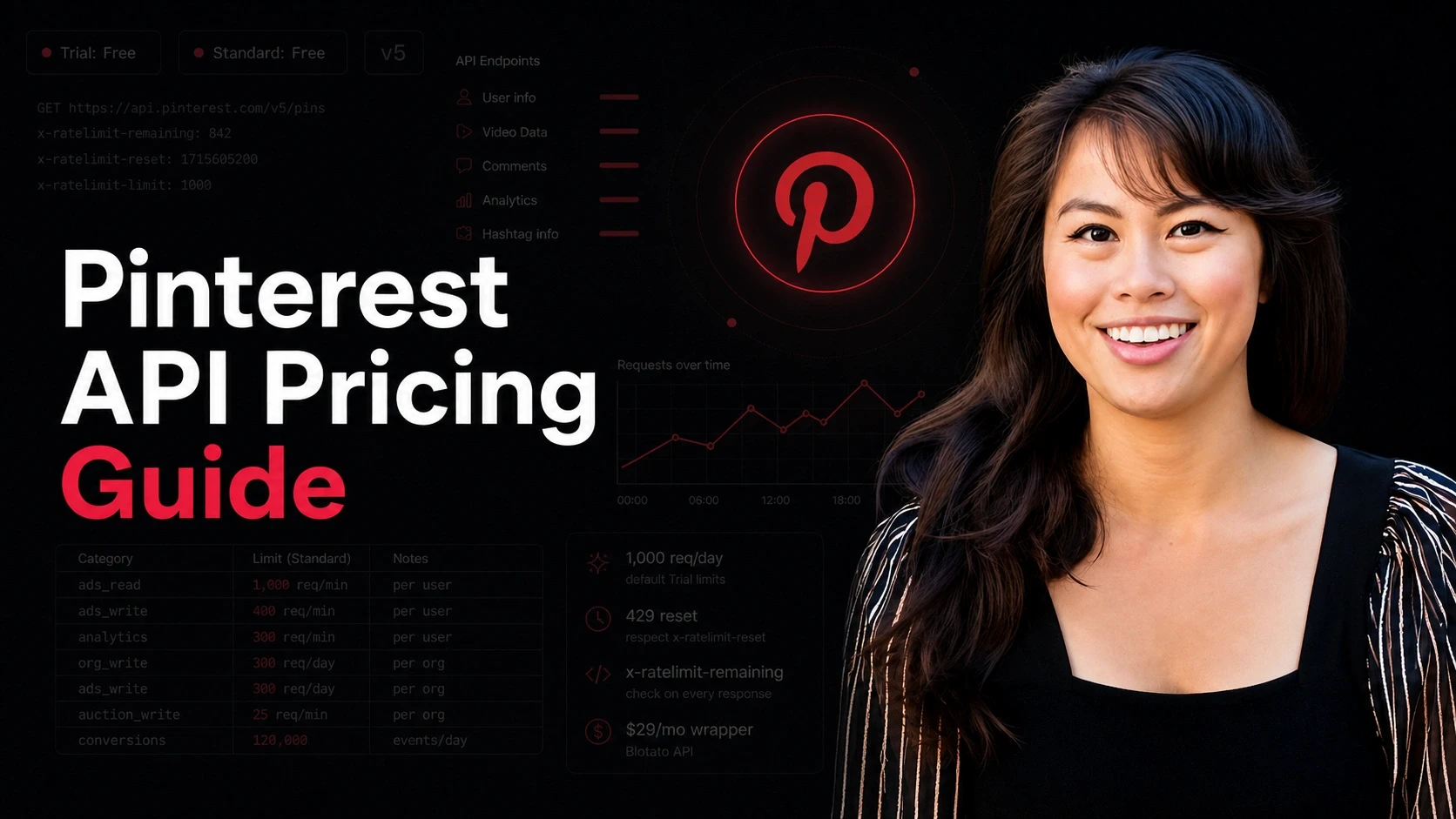
Pinterest API pricing is easy to answer on paper and harder in practice. The headline is short: Pinterest does not publish API access fees for v5. No price card, no per-call meter, no subscription fee.
Is the Pinterest API free in 2026? Both the Trial and Standard tiers cost nothing, so on price the answer is a flat yes. The three things that actually gate you are non-monetary: the Trial-to-Standard video-demo review, the per-category rate ceilings, and a data-storage rule that bars caching most API data and quietly breaks a few product designs. If you only need to create and schedule Pins, a unified layer like Blotato skips the review entirely, and its Pinterest MCP server lets Claude Code and other AI agents post to Pinterest without an OAuth flow of your own.
I’ve been shipping on social media APIs for years. Pinterest is the rare platform where “free” is true and also misleading, and each of those three gates has a sharp edge once you build against it in practice.
This guide is the honest 2026 breakdown: every tier, what each one unlocks, the rate-limit numbers Pinterest publishes, how the Standard review usually goes wrong, the MDP partner track, and when it makes more sense to skip the Developer Portal entirely.
Pinterest API Pricing at a Glance (2026)
| Access tier | Cost | Best for | Key friction |
|---|---|---|---|
| Trial access (v5) | Free | Building and testing against a sandbox before launch | Universal cap of 1,000 req/day per app across all endpoints, with ads_write stricter at 300/day. Pins are hidden from the public. Product-limited test tokens expire after 24 hours |
| Standard access (v5) | Free | Production publishing, ads, catalogs, analytics | Manual review of a video demo, approval criteria are not published as a fixed checklist |
| Marketing Developer Partners (MDP) | Not publicly priced. Limited, curated program. | Software companies publishing on behalf of brands at scale | Pinterest’s own description calls MDP a “limited, carefully selected group of developer partners” |
| Ads API (inside v5, Standard tier) | Free | Building and reporting on Pinterest ad campaigns at scale | Standard access required, must comply with the developer guidelines’ fee-disclosure rules |
| Third-party read APIs (Bright Data, scraper services) | Pricing varies by vendor and volume | Off-platform research, competitive data, public-pin discovery at scale | Outside Pinterest’s terms in many cases, check each vendor’s compliance posture before you build on top |
Pinterest doesn’t sell its API. The cost you should plan for is the Standard-access review (most rejections come from the same three reasons), the per-category rate ceilings (different for ads_write, catalogs_read, trends_read, and so on), and the developer guideline that bars you from storing API data outside of campaign analytics. That last one is the one most teams miss until they’re three weeks into a build.
If you only need to post and schedule to Pinterest (boards plus pins) and eight other platforms, Blotato’s unified API starts at $29/month on the Starter plan and skips the review cycle entirely.
Free 7-day dashboard trial · Cancel anytime · API access on paid plans only
Pins, Boards, Catalogs, Ad Accounts: The Four Objects
A Pinterest integration can pass every test you run and still be publishing into a void. That is the failure mode to design against, and it comes from the access tier rather than the code.
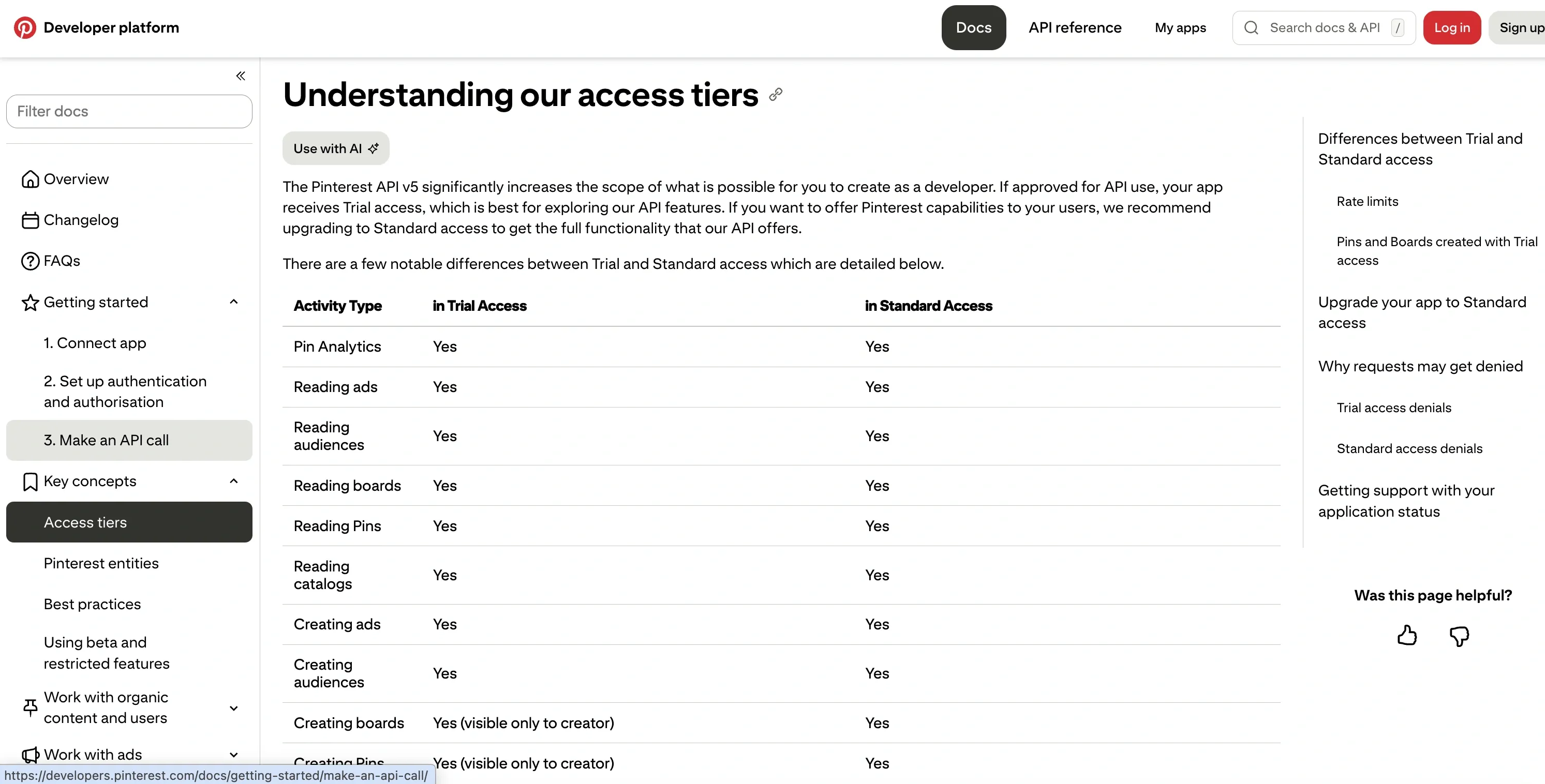
Trial access is where every new app starts, and Pins and Boards created with Trial credentials are visible only to their creator. Logged in as yourself, everything renders correctly. Nobody else sees any of it. Verify from a logged-out browser or a second account before concluding that publishing works.
Standard access is what makes Pins public. Getting there means re-verifying your app details and privacy policy and, in Pinterest’s own words, you “Prepare a video recording of your app completing an action using the Pinterest API,” covering the OAuth flow end to end. Pinterest publishes no turnaround time for that review, which makes it the step in a launch hardest to put a date on.
The API itself hangs off four objects. A Pin is one piece of content with an image or video and a destination link. A Board is the collection it lives on, and every Pin needs one. A Catalog turns a product feed into Pins automatically, which is how most ecommerce integrations run. An Ad Account wraps campaigns, ad groups and targeting. Around them sit Pin and account analytics, Trends keyword data, and a separate Conversions API for sending server-side events back for ad attribution.
What Changed in 2026
Two things changed in 2026 that matter if you’ve shipped on Pinterest before.
The per-category rate limit table is now published. For years, Pinterest left exact Standard-tier limits as “see your dashboard” or “contact support.” The current rate limits page lists them per category, in plain numbers. ads_read and org_read sit at 1,000 requests/minute per user per app. ads_write sits at 400. advanced_auction_write sits at 25. ads_conversions is the outlier at 120,000 per ad account per minute. The shape of your integration (mostly reads, mostly writes, mostly bidding actions) decides whether you can run on Standard at all or whether you need a partner conversation.
Trial caps stack: universal + per-category. Pinterest enforces a universal Trial cap of 1,000 requests/day per app across all endpoints, AND stricter per-category caps. Most categories run at 1,000 requests/day per app on Trial, and the rate-limits page calls out ads_write dropping to 300/day. Trial is for verifying your auth flow and walking through the publish path once. It is not a usable staging environment for a real customer-facing product.
Outside those two, the rest of the surface is roughly where it was at the end of 2025. v5 is the only supported version. v3 was deprecated in June 2023, so if you maintain a v3 codebase, migrate.
Pinterest Access Tiers, in Plain English
Here is what each tier actually gets you, with no marketing language.
Trial access (Free)
Pinterest hands every approved developer Trial access after the first review. The point of Trial is to let you call real endpoints with a real OAuth token before you ship.
You get the full endpoint surface (pins, boards, ads, catalogs, analytics, trends) at per-category caps. Test tokens expire after 24 hours, which is the right design for a sandbox and the wrong shape for testing a multi-day workflow.
The catch most teams hit late: Pins created in Trial are hidden from the public. Your code path succeeds, the API returns a Pin ID, the Pin exists in the account, and nobody outside the app can see it. If your QA loop is “post it and check it on the live web,” you’ll think the integration is broken when it isn’t.
Use Trial to confirm OAuth scopes, walk through publish flows once per shape, and record the demo video you’ll need for Standard.
Standard access (Free)
Standard is where production lives. The price is still zero. What changes is the rate-limit shape and the Pin visibility.
To upgrade, you submit a video demo of your app calling the API end-to-end per Pinterest’s access-tiers upgrade requirements, then wait for a manual review. There is no published timeline. Builders I’ve talked to see the first review come back inside a week when the application is clean and inside three to four weeks when reviewers want changes.
The three rejection patterns that come up over and over:
- Demo doesn’t show the OAuth flow. Reviewers want to see the user-authorization screen, the token exchange, and an authenticated API call in the same recording. If your video starts after the token already exists, expect a denial.
- App description is vague. “Schedules pins” is not enough. Write the use case the way you’d write a partner-pitch one-pager: who the user is, what the app does on their behalf, what data the app pulls and why.
- Privacy policy is inaccurate or not accessible. That’s Pinterest’s official denial wording. In practice, the version of this that gets flagged most often is a privacy-policy link that doesn’t load, doesn’t render publicly, or sits on a free hosting domain that has no obvious connection to your brand.
Get those three right and the path is short. Get any of them wrong and you’ll go through two or three revision cycles.
Ads API (inside Standard)
The Ads API rides on Standard access. There’s no separate tier and no separate cost. Once approved, the ads_read, ads_write, ads_analytics, ads_conversions, advanced_auction_read, and advanced_auction_write categories are available subject to their per-category rate limits.
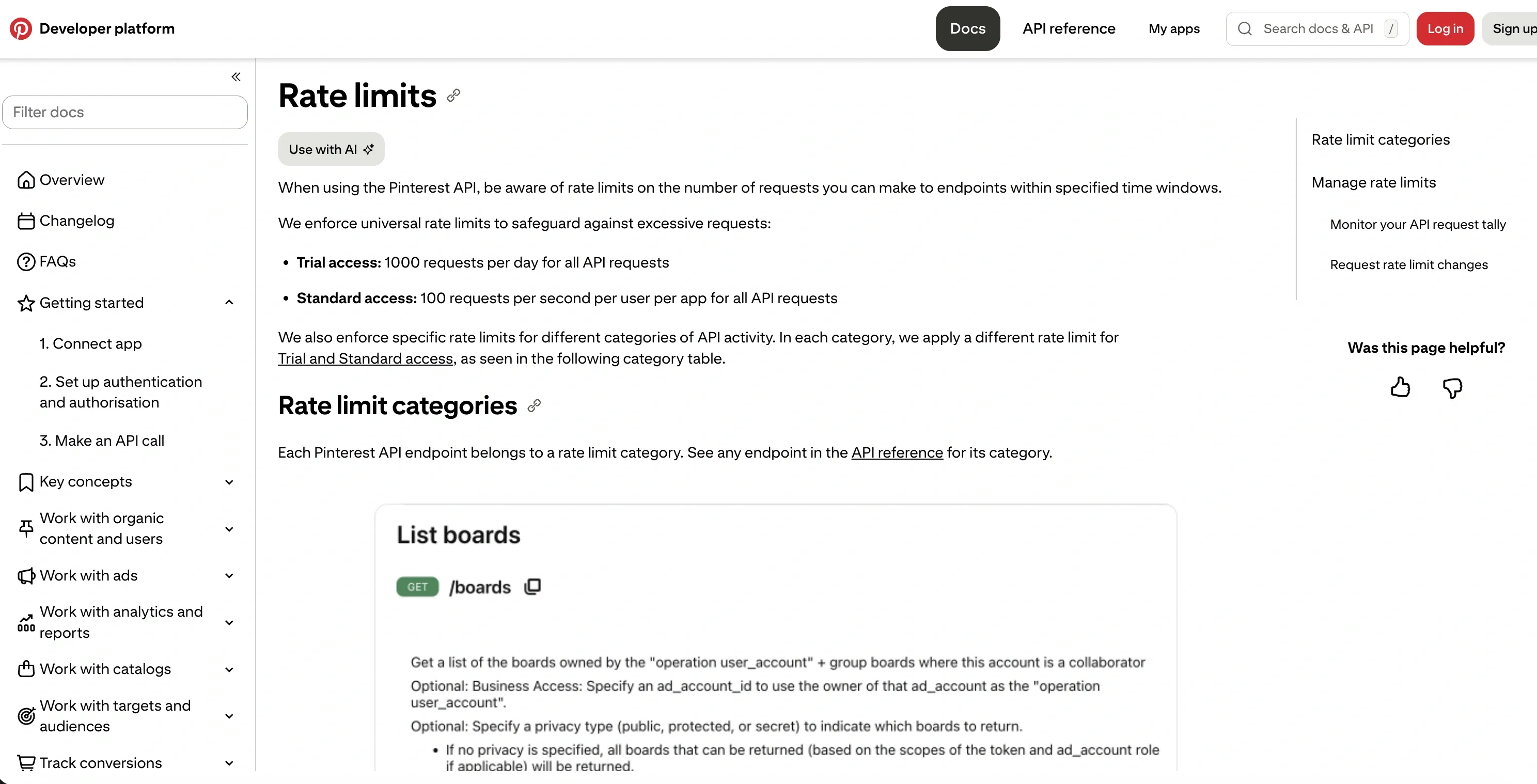
On Standard, every app sits under a universal ceiling of 100 requests/second per user per app across all endpoints. On top of that, each category has its own per-minute cap:
| Category | Limit |
|---|---|
| ads_read | 1,000 req/min per user per app |
| ads_write | 400 req/min per user per app |
| ads_analytics | 300 req/min per user per app |
| ads_conversions | 120,000 req/min per ad account per app |
| advanced_auction_read | 50 req/min per user per app |
| advanced_auction_write | 25 req/min per user per app |
| catalogs_read / catalogs_write | 100 req/min per user per app |
| trends_read / org_analytics | 60 req/min per user per app |
| org_read | 1,000 req/min per user per app |
| org_write | 100 req/min per user per app (creating, editing, or deleting boards, board sections, or Pins) |
The auction-side numbers are the throttle you’ll feel first if you’re building a real-time bidder. Plan the request shape (batched updates, cached reads) around those caps from day one.
If you’re providing advertising services to other brands, re-read the developer guidelines. Apps offering ads management must display multi-touch attribution alongside last-click, separate platform fees from media spend transparently, and not use Pinterest data to target ads off-platform.
Marketing Developer Partners (MDP)
The partner track for software companies publishing to Pinterest on behalf of brands at scale. Pinterest launched MDP in 2015 with a small set of partners (Buffer, Tailwind, Sprinklr, and a handful of others) and has kept the program small since.
There’s no public price tag and no public application form. Pinterest positions MDP as a curated partner program, not an open application, which is the polite way to say most independent teams will not get in.
MDP partners typically get higher per-user limits, a deeper publishing surface for managing many brand accounts at once, and a direct partner-manager relationship for review escalations. Exact terms are negotiated privately and aren’t publicly documented. If you’re a solo builder or a small team, the v5 public API on Standard access is your real path.
The Data-Storage Rule That Kills Caching
Pinterest’s developer guidelines are explicit: developers cannot store information accessed through Pinterest APIs except for campaign analytics. Apps must call the API each time you need to access information.
This kills the obvious caching architectures. If your design assumed you’d warehouse pin metadata to render fast lists, you’ll need to redesign before launch. Most production apps render through a thin proxy layer that calls Pinterest on demand and caches only IDs.
A few other rules from the same guidelines worth re-reading: no automated scraping or extraction except where Pinterest explicitly permits, no selling or sharing API data with third parties, and no actions taken on behalf of a user without explicit consent. Audit any older codebase that predates the current guidelines version.
The Rate Limit Question
Pinterest publishes the numbers. Use them.
Per the official rate-limits page, every response includes three headers worth wiring into your client: x-ratelimit-limit, x-ratelimit-remaining, and x-ratelimit-reset. Standard also enforces a universal ceiling of 100 requests/second per user per app on top of the per-category caps, so a single hot-path can throttle even when no individual category is exhausted.
Build against the headers, not against the numbers in this post. Pinterest can change the per-category ceilings without re-issuing the docs page.
Two practical patterns:
- Backoff on the reset header. A 429 response is your hard signal. The reset header tells you exactly when to retry.
- Track per-category usage separately. A worker calling
ads_writeis on a different counter from a worker callingads_read. Many teams build a single global rate limiter and end up artificially throttled because of it.
Real-World Access Examples
Three patterns I see most often. The approval-timeline ranges below reflect what I’ve seen across builders and clients, not figures Pinterest publishes.
The Indie Builder
You’re shipping a content tool, a personal CRM for creators, or a Pinterest-first scheduling product. Solo or small team. You want Pinterest publishing live in the next two weeks.
- Build a Pinterest app, get Trial access: $0, approval in a business day or two
- Record a demo video and submit for Standard: $0, one to four weeks of review
- Or skip the queue with Blotato for posting and scheduling on the same Pinterest account plus eight other platforms: $0 API + $29/month wrapper = $29 month one, day-one access
Indie builders make it through Pinterest’s Standard review more often than they do on LinkedIn or Meta. The question is whether the two-to-four-week wait is acceptable for your launch date.
The Agency Running Client Accounts
You’re managing 30 client Pinterest accounts. You need scheduling, reporting, and a unified workflow across Pinterest plus the other big platforms.
- Buy into an existing agency-grade tool with built-in Pinterest support: $200 to $800/month per seat
- Use Blotato Creator ($97/month, 40 social accounts) or Agency ($499/month, multi-brand workflows): flat fee, no per-seat math, no review queue
- Apply for v5 Standard yourself and build the agency wrapper from scratch: two-to-four-week review + months of engineering on top
Most agencies pick the tool or the wrapper. Building your own only makes sense when you have a dedicated engineering team and a multi-quarter runway.
The Brand Monitor
You’re building a tool that tracks brand mentions, competitor activity, or trends on Pinterest.
- Apply for v5 Standard with a monitoring use case: $0, but the data-storage rule means you cannot warehouse what you pull, and Pinterest is sensitive to anything that looks like aggregation for resale
- Stack a third-party read API (Bright Data, Apify-style scrapers) for public-pin data: $0 API + $vendor/month read layer = $vendor total, pricing varies by vendor and volume, many operate in gray-area territory relative to Pinterest’s terms
- Pair with
trends_readon your own user’s authenticated account: $0
If you only need to monitor your own brand, do it inside Pinterest Business Hub directly. Don’t stand up an integration for one account.
Many of these patterns repeat across other social APIs. I cover the parallel story in Facebook API Pricing, the opposite end of the effort scale in Bluesky API Pricing (no App Review at all), and the cross-platform view in the Social Media APIs developer guide.
The Honest Pitch: Skip the Pinterest API and Use Blotato
I’d be a bad founder if I didn’t tell you the trade-off up front.
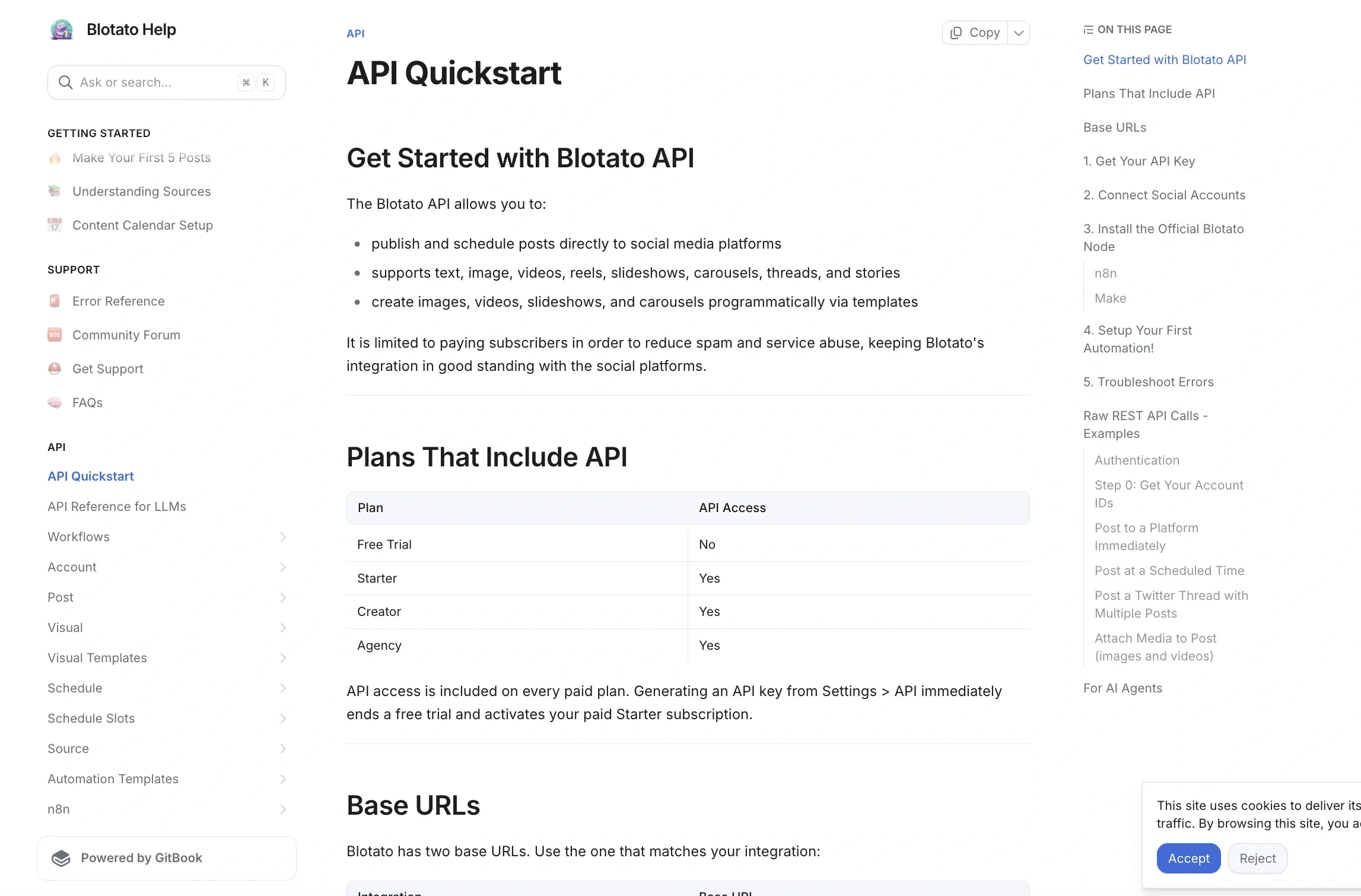
For the publishing use case (creating Pins, scheduling to boards, plus eight other platforms), Blotato gives you a unified API on paid plans starting at $29/month. No Trial-to-Standard review. No video demo. One auth flow. One endpoint shape. One bill.
One API. Every social platform.
Here is what posting to Pinterest looks like end-to-end:
The boardId lookup, the pin payload, and the 10-a-day cap are on the Pinterest posting API page.
curl -X POST https://backend.blotato.com/v2/posts \
  -H "blotato-api-key: YOUR_API_KEY" \
  -H "Content-Type: application/json" \
  -d '{
    "post": {
      "accountId": "YOUR_PINTEREST_ACCOUNT_ID",
      "target": {
        "targetType": "pinterest",
        "boardId": "YOUR_BOARD_ID"
      },
      "content": {
        "text": "Posted via the Blotato API.",
        "mediaUrls": ["https://example.com/your-image.jpg"],
        "platform": "pinterest"
      }
    }
  }'
That’s the whole integration for an image Pin. For video, pass a publicly accessible URL in mediaUrls. If you only have a local file, upload it through Blotato’s Presigned Upload endpoint first and use the returned URL. Pinterest needs a boardId because every Pin belongs to a board. The endpoint itself is rate-limited at 30 requests/minute, which is plenty for normal publishing and worth budgeting around if you’re firing a bulk backfill. Full reference is in the Blotato API quickstart docs.
One Pinterest-specific note whether you build direct or through a wrapper: per Blotato’s official help docs, new Pinterest accounts need a 2-week warm-up before you connect them to any third-party posting tool. Post 1 pin per day manually, then ramp up to 2, then 3, until the account passes 100+ monthly views, before flipping on the API layer. Skip this and you’ll trip spam-detection signals.
Where Blotato stops: publishing and scheduling are the whole product. It does not pull deep Pinterest analytics, ads-account data, or run real-time bidders. If your product depends on those, you still need v5 Standard or the MDP partner track.
Get Blotato API access from $29/month
Sabrina’s Take
I’ll be upfront: I run Blotato. So this section is the founder talking about her own product. I built it because nine separate API integrations is the wrong layer for most teams to own.
Pinterest is the friendliest of the bunch on paper. Free API, published rate limits, a Standard review that is short and surgical. If all you need is Pinterest, going direct is genuinely fine.
Where the math gets ugly fast is when Pinterest is one of nine destinations. Nine auth flows, nine rate-limit shapes, nine review cycles. That is the layer a wrapper like Blotato is built for. $29/month and one cURL call across all nine. Whether that trade favors you depends entirely on how many platforms you actually publish to, so it is worth putting your own platform count and posting volume through the numbers rather than taking my word for the break-even.
FAQs
Is there a free Pinterest API tier in 2026?
Pinterest does not publish API access fees for either tier, so both Trial and Standard are effectively free. Trial access starts you off (universal cap of 1,000 requests/day per app across all endpoints, plus stricter per-category caps, Pins hidden from the public, product-limited test tokens that expire after 24 hours). Standard is the production tier, with per-category rate limits published on the official rate-limits page sitting under a universal 100 req/sec per user per app ceiling. There is no paid tier of the Pinterest API.
How do I get access to the Pinterest API?
Create a Pinterest business account, accept the developer terms, register your app in My Apps, and submit for Trial access. Trial applications are reviewed each business day. Once Trial is approved, record a video demo of your app’s full OAuth flow and a live API call, then submit for Standard access (which is reviewed on no published schedule).
Why did Pinterest publish per-category rate limits?
For years, Standard-tier limits were hidden behind “see your dashboard.” The published table makes the design decisions cleaner: you can see upfront whether ads_write at 400 req/min/user or advanced_auction_write at 25 req/min/user fits the shape of what you’re building. The headers (x-ratelimit-limit, x-ratelimit-remaining, x-ratelimit-reset) are still the source of truth at request time.
What happens if I hit a Pinterest rate limit?
You get a 429 response. The x-ratelimit-reset header tells you exactly when the window resets, so back off until then before retrying. Build per-category counters in your client because each category has its own budget that you can exhaust independently.
What does the Pinterest API do?
It creates and reads Pins and Boards, syncs product catalogs, runs and reports on ad campaigns, returns Pin and account analytics, and exposes Trends keyword data. It is a full publishing and advertising surface rather than a read-only data feed. What it will not underwrite is an off-platform research product built on harvested Pin data, because Pinterest’s developer guidelines restrict storing API data beyond campaign analytics, so a design that depends on building your own copy of the corpus runs into policy rather than rate limits.
Do Pins created through the API look different from Pins created in the app?
On Standard access, no. A Pin created through POST /pins is an ordinary Pin. On Trial access the difference is invisible from the inside: Pins and Boards created with Trial credentials render normally for the account that made them and are not visible to anyone else. A Trial integration therefore passes every test you run while logged in as yourself. Verify from a logged-out browser or a second account before you conclude publishing works.
Can I still use the legacy Pinterest v3 API?
No. v3 was deprecated in June 2023 per the official Pinterest API migration notice, and Pinterest deactivated v3 endpoints with the cutover beginning July 2023. If you’re maintaining a v3 codebase, budget the migration to v5. The v5 surface is where Pinterest is publishing all new capabilities and where the rate-limits page is kept current.