TikTok API Pricing: Full Breakdown for 2026
TikTok API pricing in 2026: the official APIs are free, plus the sandbox audit gate, the 6/min posting cap, and when a wrapper beats going direct.
TikTok API pricing in 2026 is free. TikTok publishes no paid tier, no per-call fee, and no subscription anywhere on the developer portal for the Content Posting API, the Display API, the Research API, or the Marketing API.
Is the TikTok API free in 2026? In dollars, yes, on every official API. What you actually pay is an audit: until TikTok reviews your app, every post you publish is forced to private visibility, and the Research API stays closed to commercial users entirely. That review gate, not a price tag, is the real cost.
If you just need to publish to TikTok, a unified layer like Blotato has already cleared the audit, and its MCP server lets Claude Code and other AI agents post to TikTok without you running the OAuth flow or the review at all. It is not the only one: several publishing tools now ship MCP servers, and the API-versus-MCP tradeoff is worth understanding before you pick a lane.
TikTok is the platform where “free” hides the most calendar time. Instagram’s API is also free but the friction lives in Meta App Review. Threads is free too, with most of that friction trimmed. TikTok sits in between, with a sandbox mode that lets you build immediately and a separate audit gate that decides whether your app can post publicly or only inside the sandbox.
This guide covers what the TikTok API costs in 2026, the sandbox-to-production audit that catches most builders, the 6 requests per minute posting cap, the 24-hour access token plus 365-day refresh token lifecycle, the scraper market that fills in the gaps the official API does not, and when a wrapper makes more sense than wiring TikTok’s auth flow yourself.
TikTok API Pricing at a Glance (2026)
| Access path | Cost | Best for | Key friction |
|---|---|---|---|
| TikTok Content Posting API | No paid tier or per-call fee published | Direct posting and uploads to your own or audited users’ TikTok accounts | Sandbox-only posts are forced private until app passes audit, 6 req/min per user, URL-prefix verification for PULL_FROM_URL |
| TikTok Display API | No paid tier or per-call fee published | Reading public user info, video lists, and video metadata | 600 req/min per endpoint, production access still requires audit |
| TikTok Research API | No paid tier or per-call fee published | Academic and non-profit research on public TikTok data | Eligibility limited to qualifying universities and non-profits in the US, Europe, Canada, and Brazil, replies typically within 4 weeks, 1,000 req/day default |
| TikTok Marketing / Business API | API access is free, ad spend separate | Programmatic ad campaign management, audiences, reporting | TikTok for Business account, app approval, no read access to public content |
| TikAPI (unofficial wrapper) | Tiered monthly plans, roughly $29 to $189/mo | Read scraping with some posting in regions where TikAPI supports it | Unofficial, no Meta-style SLA, scraping ToS risk, pricing page does not render for automated checks |
| TikHub | $0.001 to $0.01 per request by endpoint | Mixed read endpoints across 16 platforms including TikTok, Instagram, and YouTube | Pay-per-request budgeting, unofficial endpoint |
| EnsembleData TikTok endpoints | Free 50 units/day, then $100/mo Wood up to ~$1,400/mo Platinum, Diamond custom | Bulk public-data extraction at predictable monthly cost | Read-only, units consume at 1-10 per call |
| Apify (clockworks/tiktok-scraper) | $1.70 per 1,000 results, pay-per-event, free trial | Ad-hoc scraping jobs with no monthly commitment | Read-only, no posting, scraping ToS risk |
| Blotato unified API | Starter $29/mo, Creator $97/mo, Agency $499/mo | Posting TikTok + 8 other platforms from one endpoint | API access on paid plans only, generating a key ends the free trial |
The honest answer is that every official TikTok API is free in dollar terms. Free in dollars is not the same as free. Once TikTok is one destination among several, the cost moves from invoices to engineering time, which is what a cost comparison across platforms is built to surface. The catch is that production posting requires passing TikTok’s app audit, the Research API is closed to commercial users, and the per-user posting limit is 6 requests per minute, which is generous for one creator and tight for a tool that posts on behalf of many users. The per-minute limit bites during bursts and TikTok’s daily cap of roughly 15 posts per creator bites on volume, the same two-layer pattern I trace across every platform’s posting limits.
For teams that just need to publish to TikTok (and eight other platforms), Blotato wires the whole posting layer up behind one endpoint, so the sandbox-to-production timeline stops being your problem. Two limits still apply on that path: Blotato’s own guidance is to warm a brand-new TikTok account manually for about four weeks before connecting it to any third-party tool, and the Starter plan posts to at most 3 TikTok accounts in a rolling 24 hours, 10 posts each (Creator and Agency lift that cap). The dashboard has a 7-day free trial. The Blotato API runs on paid plans starting at $29/month.
Dashboard trial: 7 days · API access: paid plans only
What Changes If You Go Through a Hosted API Instead
The question this post gets asked most: if you use a hosted publishing API or MCP server, do you still have to do TikTok’s paperwork? Here is the honest split, using Blotato as the example.
| Requirement | Building your own TikTok app | Going through a hosted API |
|---|---|---|
| TikTok developer app | You create and own it | Not needed |
| App audit + demo video | You submit, you resubmit | Already done at the provider level |
| OAuth flow | You build and maintain it | You connect your account once |
| URL ownership verification | Required for PULL_FROM_URL | Not needed, pass any public media URL |
| 24-hour token refresh job | You build it | Handled for you |
| 6 requests per minute | Per user token you hold | Still per connected account, so one creator’s ceiling does not move |
| Daily posting cap | TikTok’s own, typically around 15 posts per creator per day | The same TikTok cap, plus 3 accounts x 10 posts per 24 hours on Blotato Starter |
| Posts visible publicly | Only after audit passes | Immediately |
The thing you cannot outsource: if you need posts attributed to your own TikTok client, you own the audit no matter which tool you use. A hosted provider only removes the audit when you are publishing through its client.
TikTok’s 2026 Content Posting API Changes
Four things shaped the TikTok developer surface you are building against in 2026.
The first is photo posting on the Content Posting API. The endpoint that used to accept only MP4 videos now accepts photo posts alongside video uploads, which closes a gap that previously pushed image-heavy tools to scrape instead of publish. If slideshows are your format, the TikTok slideshow automation guide covers that workflow end to end.
The second is sandbox mode becoming the standard pre-audit testing path. Up to five sandboxes per app, each shareable with up to ten TikTok accounts, no review required. The trade-off is that any content posted from a non-audited client is forced to private visibility regardless of what the user picked in the OAuth consent screen.
The third only matters if you are an academic: an EU vetted-researcher data-access pathway arrived in late 2025 (TikTok published it in October and opened the application in December), separate from TikTok’s own Research API.
The fourth is the unofficial wrapper market splitting in two. TikAPI moved to a balance-and-bundle pricing model with tiered monthly plans. TikHub launched a pay-as-you-go model, currently $0.001 to $0.01 per request depending on the endpoint, that competes with EnsembleData’s monthly Wood-through-Platinum tiers ($100 to $1,400). Both target the read-and-scrape use case the official API cannot serve at volume.
Worth knowing what did not change: TikTok’s developer changelog has two entries since June 4, 2026, on August 19 and August 25, and both cover the Data Portability API and its Login Kit setup rather than the four APIs here. If you are pricing a build this quarter, none of the four has a listed change since June. Ignore anything you see about an is_ai_generated flag or an August 2026 retirement date, since both belong to the TikTok Shop and Business API product line, not the four developer APIs covered here.
TikTok API Pricing, in Plain English
Each access path, in dev-to-dev terms.
Content Posting API (no published paid tier)
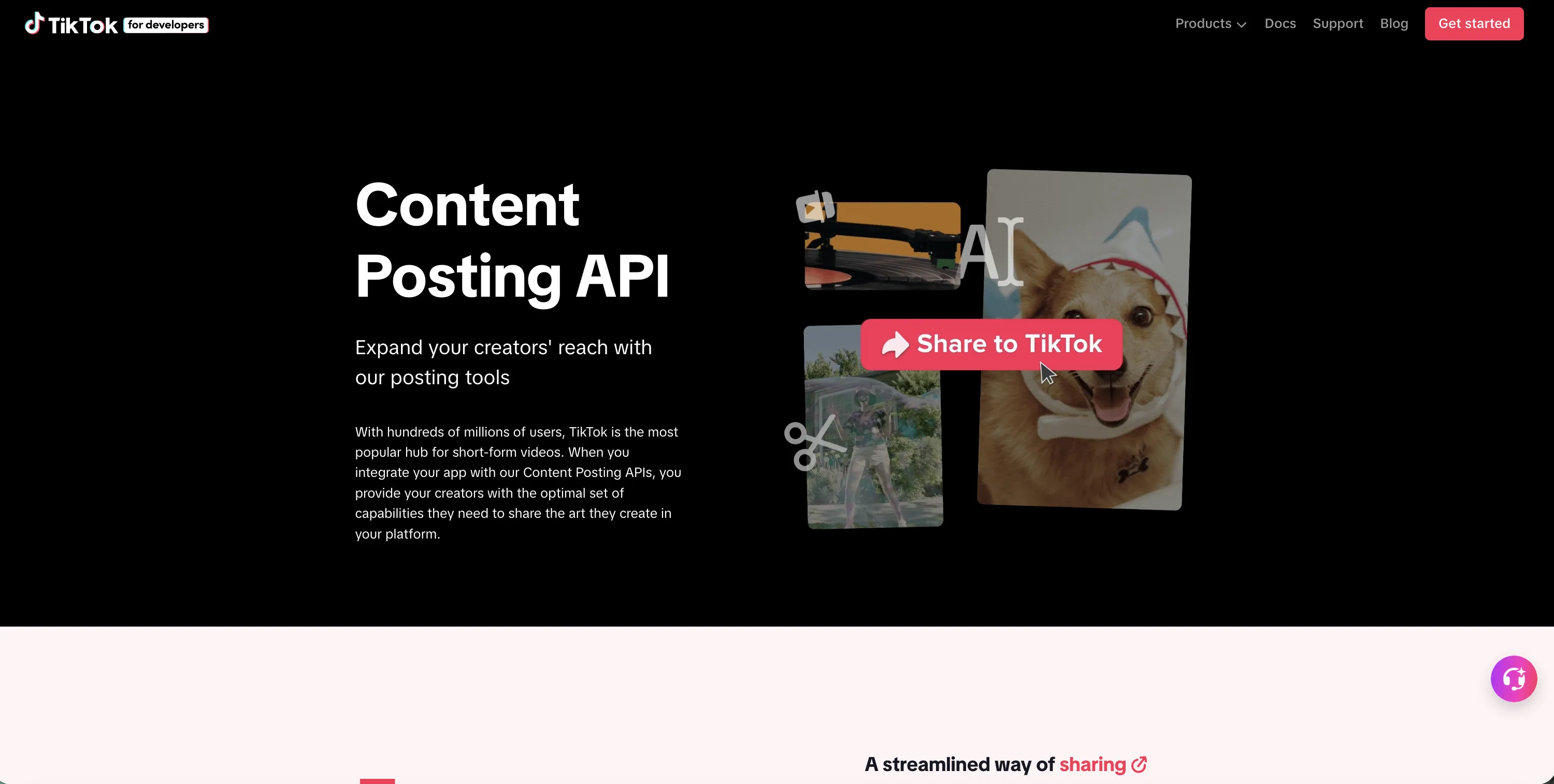
The Content Posting API is TikTok’s official path for programmatic uploads and direct posts. There is no monthly subscription, no per-call fee, and no paid quota-increase product anywhere on the Content Posting API product page.
The catch is two-fold. First, the scope you request matters: video.publish for direct posts that go straight live, video.upload for uploads that drop into the user’s TikTok inbox for manual confirmation. The Direct Post path is the one most builders want, and it is the path that requires app audit. Second, for the PULL_FROM_URL transfer method, your media must live on a URL whose ownership you have verified through “Manage URL properties” in the developer portal, per TikTok’s content sharing guidelines. TikTok’s media transfer guide recommends verifying a domain by adding a signature string to its DNS records, which then covers every path under that domain. The media URL must use https, must not redirect, and has to stay reachable for the whole download, which times out one hour after it starts.
Once your app is approved, it can act on any user who completes the OAuth flow, subject to the rate-limit math below and the 24-hour daily caps.
Display API (read public data, login kit)
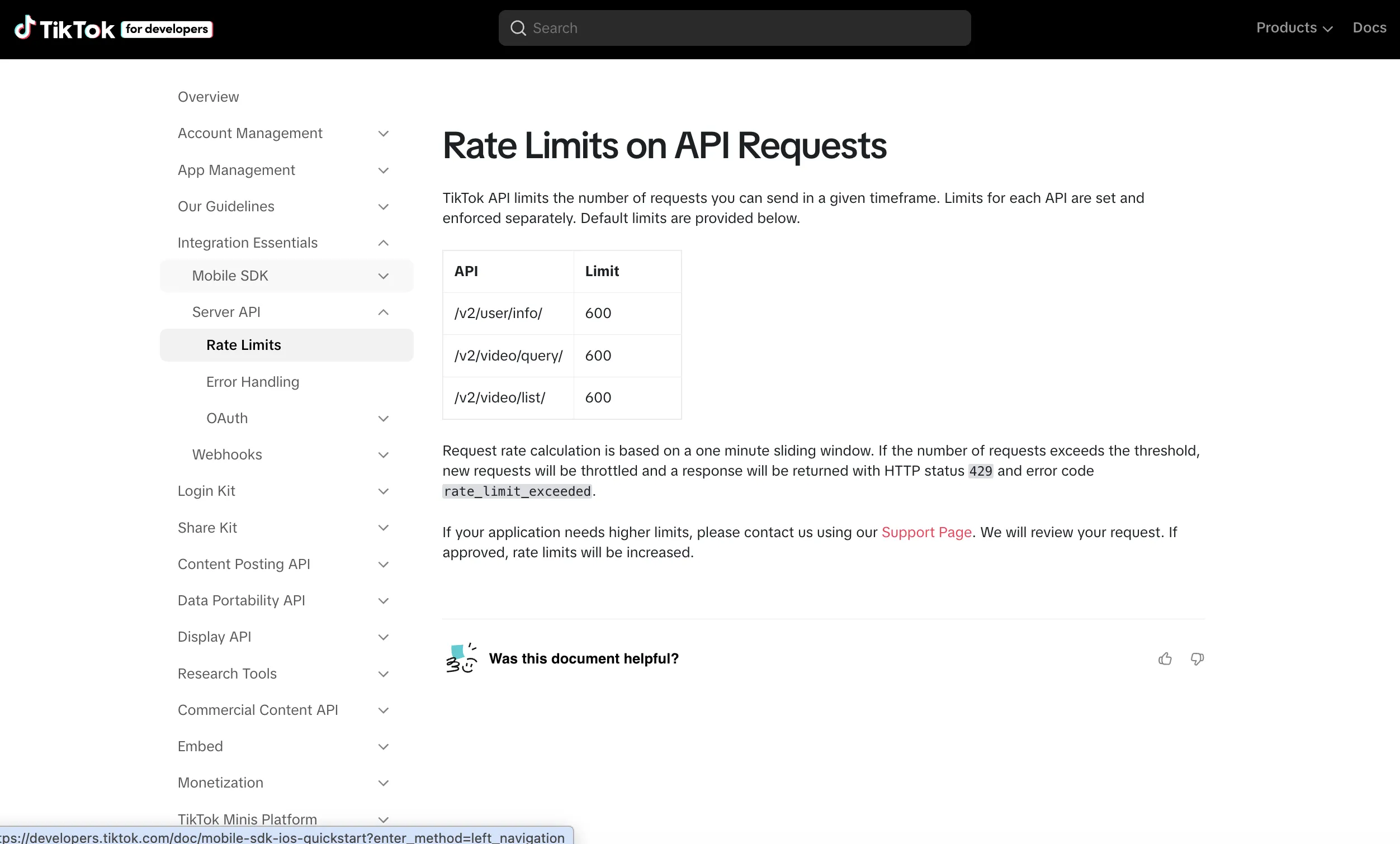
The Display API serves the read side: user info, video list, and video query. The rate limit is 600 requests per minute per endpoint, counted in a one-minute sliding window, per the official rate-limit doc. Returns HTTP 429 with rate_limit_exceeded if you push past it. Free at the dollar level, audit-gated for production at the access level.
Research API (academic and non-profit only)
The Research API is free, with a 1,000 requests per day default and up to 100,000 records per day. Eligibility is limited to qualifying academic and non-profit researchers in the US, Europe, Canada, and Brazil, and commercial users, creators, and advertisers are explicitly ineligible, per the Research API FAQ. An EU vetted-researcher pathway now runs alongside it. TikTok says to expect a reply within 4 weeks of applying.
If you are building a product rather than a study, this API is not available to you, and the wrapper market below is where commercial read access actually lives.
Marketing / Business API (you pay ads, not API access)
The TikTok for Business API at business-api.tiktok.com is free at the endpoint level. You pay for ad spend on the TikTok Ads platform itself. Access requires a TikTok for Business account and an approved developer app, but no per-call charge.
Third-party wrappers (TikAPI, TikHub, EnsembleData)
These vendors fill in the use cases the official APIs cannot serve at volume, mostly read-side scraping. Four to know:
| Vendor | Pricing | Notes |
|---|---|---|
| TikAPI | Tiered monthly plans, roughly $29 to $189/mo by daily request allowance | Pricing page is JavaScript-only and does not render for automated checks, so confirm current tiers yourself before budgeting |
| TikHub | $0.001 to $0.01 per request depending on endpoint, volume discounts to $0.0005 | Covers 16 platforms including TikTok, Instagram, YouTube |
| EnsembleData | Free 50 units/day, Wood $100/mo (1,500 units/day) up to Platinum $1,400/mo (50,000 units/day) | Diamond tier custom, units consume 1-10 per call |
| Apify clockworks/tiktok-scraper | From $1.70 per 1,000 results, pay-per-event | Free trial available |
All four are unofficial and read-only. TikTok’s developer terms prohibit scraping, and the 2024 Meta v. Bright Data ruling sided with scrapers on logged-out public data while leaving contract-based claims in play. The thing to know if you came here to publish: none of these vendors offer a compliant Direct Post path. Posting lives only inside the official Content Posting API, or behind a hosted provider that has passed its audit.
The Real Cost: Sandbox, Audit, and Token Refresh
The real cost of the TikTok API is not money, it is three things that consume calendar time: sandbox restrictions, the app audit, and a 24-hour token refresh cycle you have to build. TikTok publishes no paid tier or per-call fee for any official API, but production access is not free of engineering time.
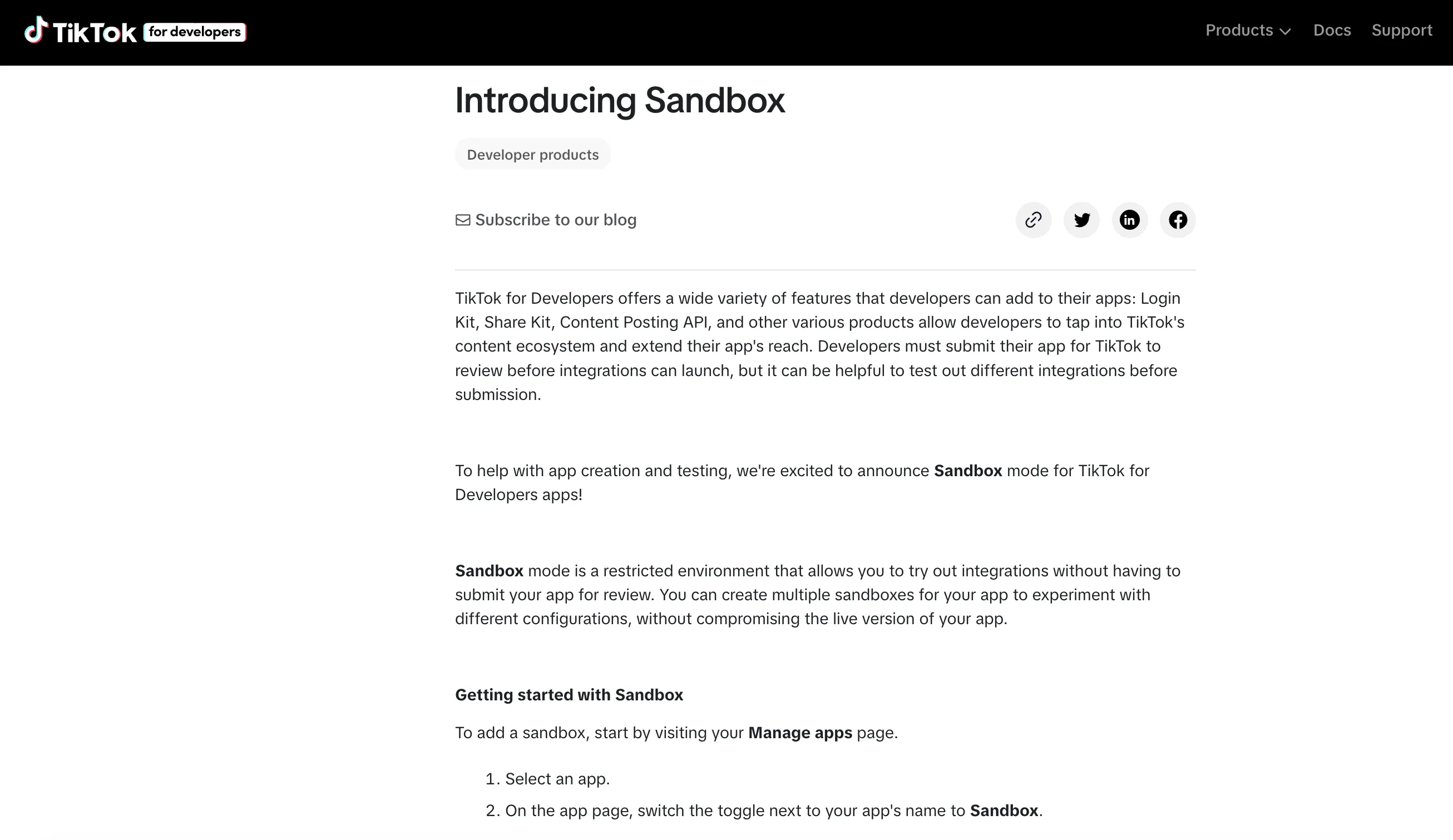
Sandbox mode. When your app is new and unaudited, you can spin up to five sandboxes per app, each shareable with up to ten TikTok accounts. Anything you post from inside a sandbox client is forced to private visibility, regardless of what the OAuth scope said or what the end user selected. That is the audit gate working as designed: you can fully build and test, you cannot ship public content to non-tester accounts until your app clears review.
App audit. To move out of sandbox and publish public content on behalf of arbitrary users, you submit your app for TikTok’s review. TikTok publishes App Review Guidelines that spell out the requirements: a real website rather than a landing or login page, a privacy policy and terms of service, and up to five demo videos of 50 MB each showing the integration end to end, recorded in a sandbox if the app has never been approved. What it still does not publish is a target turnaround, so plan against builder reports rather than a documented SLA. The same guidelines rule out two kinds of app entirely: anything “for private or personal use,” and anything “still in development or testing.” Common rejection reasons are incomplete app data, unreachable demo coverage of a requested scope, and not responding to TikTok’s follow-up correspondence.
The demo-video catch-22
This is the part that stalls people, and it is worth stating plainly because almost no guide does.
TikTok asks for a demo video showing a complete working integration. But an unaudited client cannot post publicly. So the recording you need in order to pass review has to be made with an API that is still restricted, which is exactly what builders keep running into. A developer hit this on the n8n community forum on July 21, 2026 and asked the question directly:
How can I record the required demo video if the API does not work yet?
The way out is that sandbox mode is your recording studio. You are allowed to build and demonstrate the full flow before audit, the posts are just locked to SELF_ONLY visibility. Record the complete OAuth handshake, the upload, and the resulting post inside a sandbox client with a tester account, and show every scope you are requesting actually performing a real action. The restricted visibility does not disqualify the recording. Trying to film a “real” public post before approval is the thing that cannot work.
Budget for two submissions rather than one. In the same n8n discussion, an earlier thread on automated TikTok posting ends with the community recommending a third-party publishing service as the intermediary precisely because the audit is the slow part, not the code.
Token refresh. Access tokens last 86,400 seconds (24 hours). Refresh tokens last 31,536,000 seconds (365 days) and can be refreshed at any time during that window using grant_type=refresh_token against /v2/oauth/token/, with no user re-consent required, per the OAuth user access token management doc. One detail to build in: a refresh can hand back a different refresh token, and TikTok’s docs say you must store and use the newly returned one. Revocation runs through /v2/oauth/revoke/. The math is friendlier than Meta’s 60-day long-lived tokens, but you still need a refresh job in your infrastructure.
None of these is a dollar cost. All three are calendar costs. And for a tool that only posts to your own account, the audit is not on the table at all: TikTok will not approve an app “for private or personal use,” so a personal build stays in sandbox, with every post private.
The 6 Per Minute Cap: TikTok’s Posting Rate Limit
TikTok caps the Content Posting API at 6 requests per minute per user access token, per the Direct Post reference. That is per user, not per app, so the ceiling scales with the number of connected accounts rather than throttling your whole application. It is generous for a creator posting to their own account.
It is tight for a tool acting on behalf of many users from a shared infrastructure. The rate limit is enforced at the user-token layer, so spreading load across N user tokens scales the cap linearly. The trap is the daily ceiling that sits on top. TikTok’s content sharing guidelines put the per-creator limit at “typically around 15 posts per day,” shared across every Direct Post app posting to that account, and it surfaces as spam_risk_too_many_posts. An unaudited client can let only 5 users post in any 24-hour window, and every client, audited or not, also gets a 24-hour active-creator cap based on the usage estimates in its audit application. Build for failure on a hard 429 or spam_risk response and back off.
The read-side APIs use separate ceilings, summarized below. Quotas reset at 12:00 AM UTC.
| API | Rate limit |
|---|---|
| Content Posting (per user token) | 6 requests per minute |
| Display API (per endpoint) | 600 requests per minute, sliding window |
| Research API (default) | 1,000 requests per day, 100,000 records per day |
| Research API (followers/following) | 20,000 requests per day, 2,000,000 records per day |
What trips builders up is not the call ceiling. It is the audit gate. Until your app is audited, every post you publish in production stays private. That is not a quota you can buy your way out of. TikTok is not alone here either: Pinterest also keeps an unapproved app’s posts private, and YouTube’s own pages now disagree on whether it still does.
Three TikTok Signals Mistaken for an API Penalty
No. TikTok has not published guidance treating API posts differently from native posts, and posting method is absent from TikTok’s official “How TikTok recommends videos #ForYou” ranking-signal list. Buffer’s public position is the same: “no evidence that social platforms purposely limit the reach of scheduling tools.”
That said, three real signals get mistaken for an API penalty, and two of them are worth engineering around:
- Post-publish session signals. The algorithm weighs the first 30 to 60 minutes of engagement heavily, and scheduled posts often fire while you are asleep. This is why Sprout Social’s TikTok scheduler hands off to a mobile notification instead of publishing silently.
- Watermark and duplicate detection. TikTok’s Originality Policy, enforced more strictly since September 15, 2025, demotes visible third-party watermarks and near-duplicate uploads. Recycling from a content library trips this quietly.
- Spam-risk thresholds. The API returns
spam_risk_too_many_postsandspam_risk_user_banned_from_postingwhen frequency or duplicate checks fire. This is the one that bites automated posting hardest, and it is a real argument for spacing an agent’s output rather than dumping a queue.
The reach gap creators report is usually a session-signal gap, not an API tax. I cover the cross-platform version of this question, and what every platform’s ranking documentation actually says, in does posting with an API hurt your reach.
Four Mistakes That Bite First-Time TikTok Builders
Four things bite people the first time they ship on the TikTok API. Ranked by how often they come up in builder forums, #1 and #4 sit at the top.
- Posting from a sandbox client and wondering why nobody can see the video. Sandbox mode forces every uploaded video to private visibility, regardless of what the OAuth scope said. The fix is to pass app audit. There is no settings toggle.
- Missing the URL ownership verification for PULL_FROM_URL. If you ask TikTok to fetch media from your own server, the URL prefix or domain needs to be verified inside the developer portal under “Manage URL properties.” Skip this step and the create-container call can succeed at the request layer while the async media status flips to a failed state later. Poll the container endpoint or you will never see the failure.
- Treating the access token as long-lived. TikTok access tokens expire in 24 hours. Refresh tokens last 365 days, refreshable any time inside the window. Build the refresh job before launch, not after the first 25-hour outage.
- Underestimating the audit. Most teams plan for one submission. Plan for two, and record the demo inside a sandbox rather than waiting for public posting to work.
What TikTok Audit Approval Took in Practice
Three personas show what the TikTok API actually costs in calendar time and dollars.
The Indie SaaS Publisher
You are a solo founder posting 5 to 10 times a day to your own TikTok account, running everything inside a sandbox on your own developer app.
- TikTok API monthly cost: no published API fee in TikTok docs
- App audit: not available to you. TikTok’s guidelines rule out apps “for private or personal use,” so a tool that only posts to your own account stays in sandbox, with every post private
- Token refresh: automated job before the 24-hour mark, ~30 minutes to wire
- Total: no published API fee, ~2 hours of setup, and no public posts from your own build
The Agency Posting for 30 Clients
You are running a content agency that posts on behalf of 30 different TikTok accounts. (For the wider stack question, see social media tools for agencies.)
- TikTok API monthly cost: no published API fee in TikTok docs
- App audit: no published turnaround, for
video.publishanduser.info.basic, plus demo-video production and OAuth UX cleanup. Plan for two submissions, and know that TikTok’s guidelines list “a utility tool to help upload contents to the account(s) you or your team manages” as not acceptable, so an internal agency tool risks rejection outright - URL ownership verification for the media-host server and a refresh job across 30 user tokens: ongoing engineering
- Per-user 6 requests per minute cap across 30 accounts: fine, since the cap is per user, but the active-creator cap TikTok sets from your audit estimates, and roughly 15 posts per creator per day, are the ceilings to plan around
- Total: no published API fee, an audit TikTok may refuse outright for an internal-only tool, recurring auth maintenance
The Brand Monitor or Researcher
You are reading public TikTok data at scale, not posting. The official Research API is closed to commercial users, so this is the one case where a third-party wrapper is the answer rather than a workaround. Budget $0 as an eligible academic, or roughly $29 to $1,400/month commercially depending on volume. Prices are in the wrapper table above.
If You Are Wiring TikTok Into an AI Agent
This is where the audit gate stops being a paperwork nuisance and starts being the whole project.
An agent that drafts TikTok captions is easy. Getting that agent to actually publish is a different problem, and the blocker is not the model or the prompt. If you build your own client, that app has to clear TikTok’s audit before anything it posts is visible to another human. You can wire Claude Code, OpenClaw, or Hermes to a TikTok integration in an afternoon and still be weeks away from a public post, because the constraint is a review queue rather than code. That gap surprises people who are used to shipping as fast as they can prompt. The table earlier in this post lays out which parts of that paperwork a hosted API removes and which it does not.
One thing to decide before you connect any agent to a live account: whether it posts on its own. An agent with publishing rights and no review step will eventually post something you would not have approved, and TikTok’s spam_risk thresholds punish exactly the bursty, repetitive behavior an unattended loop produces. Start with the isDraft flag set, review the queue for a week or two, and loosen from there.
Already on Meta’s APIs? TikTok Is a Different Beast
If you are coming from Instagram’s Graph API, the Facebook API, or the Threads API, the TikTok flow looks similar on the surface and works differently underneath. Both ecosystems are free at the endpoint level. Both gate production access behind review. The differences worth knowing:
- TikTok’s review is called an “audit” and is scope-specific, not permission-by-permission. Meta reviews each permission separately.
- TikTok forces private visibility inside sandbox, regardless of scope. Meta’s analog is keeping the app in development mode and capping users to invited testers.
- TikTok refresh tokens last 365 days and refresh without user re-consent. Meta long-lived tokens last 60 days.
- TikTok’s Content Posting API audit does not require the business-verification document upload Meta requires for Advanced Access. A demo video is the primary artifact instead.
The mental model carries over. The plumbing does not.
The Honest Pitch: Skip the Audit and Use Blotato
The comparison below is not neutral. I built Blotato, and the pitch is biased on purpose.
If you are building a public-facing product that posts to TikTok (and not reading at research volume), going direct to TikTok’s API is a real option. TikTok does not publish a paid tier or per-call fee for it. The question is whether your time is free too.
You still write the OAuth flow, host the public media URL server, verify the URL prefix, submit for app audit, produce the demo video, and build the 24-hour access token refresh path. And you do it again for every other social media API your product needs on top of TikTok.
One API. Every social platform.
Blotato’s unified API turns the multi-platform posting job into a single HTTP request:
All seven required TikTok fields, with a working payload, are on the TikTok posting API page.
curl -X POST https://backend.blotato.com/v2/posts \
  -H "blotato-api-key: YOUR_API_KEY" \
  -H "Content-Type: application/json" \
  -d '{
    "post": {
      "accountId": "YOUR_TIKTOK_ACCOUNT_ID",
      "target": {
        "targetType": "tiktok",
        "privacyLevel": "PUBLIC_TO_EVERYONE",
        "disabledComments": false,
        "disabledDuet": false,
        "disabledStitch": false,
        "isBrandedContent": false,
        "isYourBrand": false,
        "isAiGenerated": false
      },
      "content": {
        "text": "Posted to TikTok via the Blotato API.",
        "mediaUrls": ["https://your-cdn.example.com/video.mp4"],
        "platform": "tiktok"
      }
    }
  }'
That is the minimal TikTok payload, with all seven required target fields filled in. For TikTok-specific behavior, the Blotato API takes a required privacyLevel of SELF_ONLY, PUBLIC_TO_EVERYONE, MUTUAL_FOLLOW_FRIENDS, or FOLLOWER_OF_CREATOR, plus disabledComments, disabledDuet, and disabledStitch toggles. Three separate disclosure booleans map to TikTok’s own compliance labels: isBrandedContent for a paid partnership, isYourBrand for your own promotion, and isAiGenerated for AI-made content. There is also an isDraft flag, which is the switch you want while you are still deciding whether to let an agent post unattended. The full schema lives in the Blotato API reference.
The same envelope works for the other eight platforms in the API enum, but each platform’s target fields differ (Facebook needs pageId, Pinterest needs boardId, Threads has replyControl). Full schema in the Blotato API docs.
From Claude Code, Without the curl
If your agent is the thing doing the posting, you do not write the request at all. Point an MCP client at the hosted server once:
claude mcp add blotato --transport http https://mcp.blotato.com/mcpThen the instruction is just English:
Post this video to my TikTok, keep comments on, and mark it as AI generated.
Claude picks the tool, fills the typed fields, and posts. That matters more than convenience: a typed tool schema is what stops an agent from inventing a privacyLevel value TikTok will reject, which is the exact failure mode a prose-based skill file cannot prevent. The same connection works from Claude Desktop, Cowork, Cursor, and any other MCP client, and the wider MCP server comparison covers the alternatives.
The API is included on every paid plan, with no per-post charges layered on top.
Blotato plans:
- Starter ($29/month): 1,250 AI credits, 20 connected accounts
- Creator ($97/month): 5,000 AI credits, 40 connected accounts
- Agency ($499/month): 28,000 AI credits
One thing to know before you click, because it trips up developers specifically: the 7-day trial covers everything except the API. Generating an API key immediately ends the trial and starts the paid Starter subscription. If you came here to wire TikTok into code or an agent, plan on subscribing rather than trialing. If you want to test the dashboard first, the trial is genuinely free for seven days and cancels anytime.
My Honest Read on Building for TikTok
I’m biased, obviously. I built Blotato because going direct to each social API stops penciling out the moment a product touches more than two networks. TikTok is the most opinionated audit of the bunch, and even TikTok still costs you the OAuth flow, the URL-prefix verification, the sandbox-to-production audit, the demo video, and a refresh job that runs forever.
If you only need to post to one TikTok account, building it yourself will not get you there: TikTok will not audit a personal-use app, and an unaudited one can only post privately. Schedule inside TikTok itself, or go through a hosted tool. If you are building a product that touches more than two networks, wrap it. The hours you save on plumbing pay for the subscription in a week.
If TikTok is your starting point, the next platforms most teams add are short-form-video adjacent. See the YouTube API pricing guide for the quota math on YouTube Shorts uploads, and the X (Twitter) API pricing guide for the per-call cost of cross-posting.
TikTok API FAQs
Is the TikTok API free in 2026?
Every official TikTok API (Content Posting, Display, Research, and Marketing) is free at the dollar level. TikTok publishes no paid tier and no per-call fee in the developer portal. The real cost is calendar time: sandbox-to-production audit, the demo video, the URL-prefix verification, and a 24-hour access token refresh job.
How do I get access to the TikTok Content Posting API?
Create a developer app at developers.tiktok.com, request the video.publish and video.upload scopes, verify your URL ownership for PULL_FROM_URL transfers, build inside a sandbox (each app supports up to five), and submit for audit when you are ready for production. TikTok’s App Review Guidelines list the requirements but give no target turnaround for the audit, so treat it as an unschedulable dependency rather than a fixed step in your launch plan.
How do I record TikTok’s required demo video if my app is not approved yet?
Record it inside a sandbox client. Unaudited apps can run the entire OAuth and upload flow, the resulting posts are just forced to SELF_ONLY visibility, and that restricted visibility does not disqualify the recording. Show every scope you are requesting performing a real action against a real tester account. Waiting for public posting to work before filming is the deadlock builders keep hitting, and there is no way through it in that order.
What are the TikTok API rate limits?
The Content Posting API caps at 6 requests per minute per user access token, with a per-creator ceiling of typically around 15 posts per day shared across every app, and a limit of 5 posting users per 24 hours for unaudited clients. The Display API allows 600 requests per minute per endpoint in a sliding window. The Research API allows 1,000 requests per day and 100,000 records per day by default, with Followers/Following separately allowed 20,000 requests per day.
Why are my TikTok API posts private even though I requested public visibility?
Because your app is in sandbox mode. Any content posted by a non-audited client is forced to private regardless of the OAuth scope or the user’s selection in the consent screen. The fix is to pass app audit. There is no settings toggle that overrides this.
Can Claude post to TikTok?
Not on its own. Claude has no TikTok integration built in, so it needs a tool that holds the connection. Point an MCP client at a hosted publishing server (claude mcp add blotato --transport http https://mcp.blotato.com/mcp), connect your TikTok account once, and Claude can publish videos and photo posts from a plain-English instruction. The same approach works from Claude Desktop, Cowork, Cursor, and other MCP clients.
Do I need my own TikTok developer app to use an MCP server?
No, as long as you are publishing through the provider’s already-audited client. You skip the developer app, the app audit, the demo video, the OAuth build, and the URL ownership verification. The exception is if you need posts attributed to your own TikTok client, which is common for products that resell publishing. In that case you still own the audit no matter which tool sits in front of it.
Can I use the TikTok Research API if I’m not an academic?
Not as a commercial user. The Research API is limited to academic institutions in the US, EEA, UK, Canada, and Switzerland, EU non-profit and independent research organizations, and Brazilian academic or non-profit researchers studying youth safety. Commercial users, creators, and advertisers are explicitly ineligible. The commercial equivalent is a third-party wrapper like TikAPI, TikHub, or EnsembleData.