Buffer Pricing 2026: Free Plan Limits + Real Cost at 5-25 Channels
Buffer's free plan in 2026: 3 channels, 10 queued posts, and the lifetime 8-connection cap nobody mentions. Plus what paid tiers really cost at 5-25 channels.
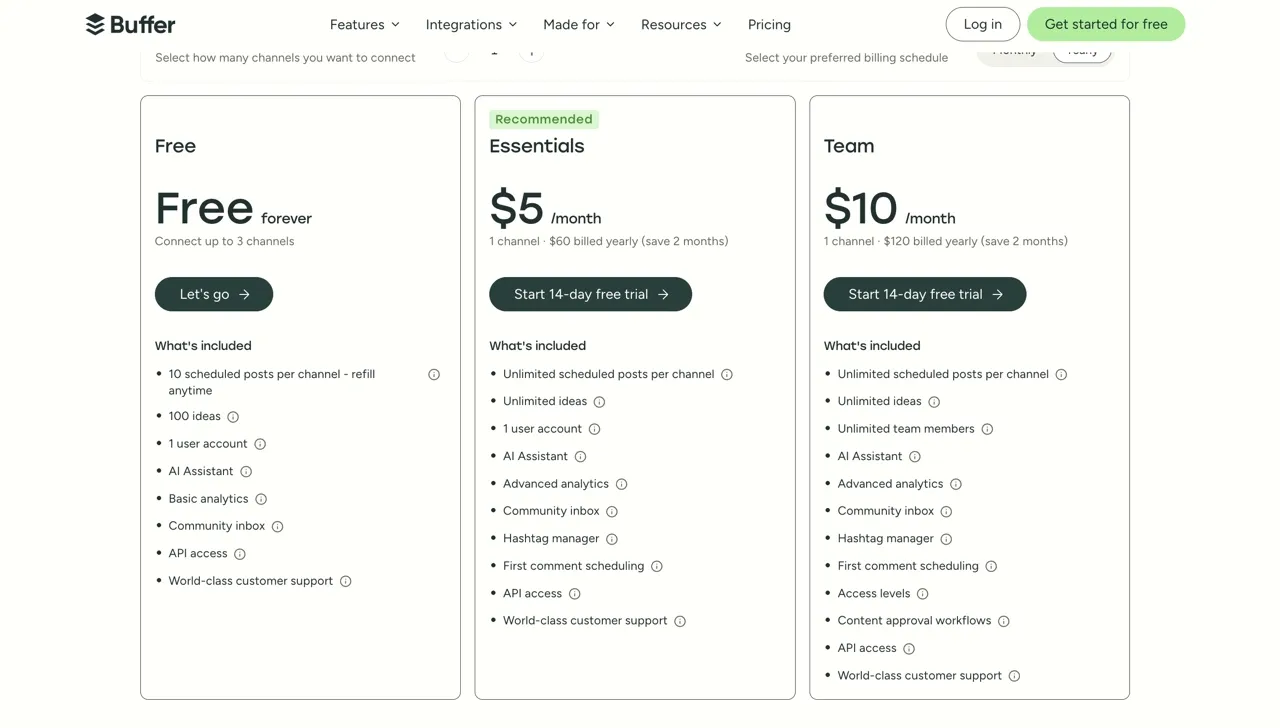
Buffer pricing looks simple on the marketing page and gets complicated the moment you add a second channel. The sticker prices on Buffer’s pricing page are $5 a month for Essentials and $10 a month for Team, but those numbers are per channel, not flat. The bill scales linearly with how many social accounts you connect, and most people don’t run the math before they upgrade.
I’ve tested just about every major scheduler in the last two years, and the pricing question is the one that comes up most. This post breaks down what each Buffer plan actually costs at 1, 5, 10, 25, and 50 channels, what the AI Assistant does (and doesn’t do), what’s missing from every plan, and where the per-channel model genuinely makes sense.
One thing changed in 2026 that the pricing page still buries: Buffer now ships a full developer API with a hosted MCP server, and your plan sets the request ceiling your AI agent runs into. If you are wiring Buffer into Claude or n8n rather than posting by hand, skip to the API section below, because the per-channel math is not the number that will constrain you.
The short version: Buffer is a polished scheduler with a clean queue and one of the few real free plans in the category. The pricing question is just whether per-channel scaling fits how you actually post.
Buffer Pricing at a Glance
Free plan: 3 channels, 10 scheduled posts per channel, no time limit.
Essentials: $5 per channel per month (annual), $6 per channel (monthly). Unlimited scheduled posts.
Team: $10 per channel per month (annual), $12 per channel (monthly). Adds team collaboration features.
Free trial: 14 days on any paid plan, no card required.
Volume discount: Past 10 channels, the per-channel rate drops. Buffer now publishes the bands in its machine-readable rate card: Essentials is $6 per channel for 1 to 10, $4 for 11 to 25, $3 for 26 to 50, and $1 from 51 up (more on this below).
How Buffer’s Per-Channel Pricing Actually Works
A “channel” in Buffer is one connected social account. Your X profile is a channel. So is your Instagram business account. A LinkedIn company page and a personal LinkedIn each count separately. Eight connected accounts means an eight-channel bill.
Both paid plans bill per channel for the first 10, then reduce the per-channel rate above that. Buffer publishes the bands for monthly billing only, so every rate in this table is a monthly-billing figure:
| Channel count (monthly billing) | Essentials per channel | Team per channel |
|---|---|---|
| Channels 1-10 | $6/mo | $12/mo |
| Channels 11-25 | $4/mo | $4/mo |
| Channels 26-50 | $3/mo | $3/mo |
| Channels 51+ | $1/mo | $2/mo |
On annual billing the first band drops to $5 per channel for Essentials and $10 for Team. Buffer does not publish annual rates for the bands above 10, only annual totals, so an annual bill past 10 channels cannot be reconstructed from this table.
Buffer states the rule plainly: channels 1 to 10 are priced at the standard rate, and any channels above 10 cost less per channel. The bands above come from Buffer’s own machine-readable rate card, which publishes them even though the rendered pricing page does not. Third-party roundups quote numbers for these bands that contradict each other, so take them from Buffer’s file rather than from a comparison post.
Two things about the bands catch people out. They are marginal, so the cheaper rate applies only to the channels inside it and your existing channels do not reprice. And in the 11-to-50 range Essentials and Team charge the identical per-channel rate, which means the Team upgrade there buys unlimited seats at no extra per-channel cost.
Monthly billing is roughly 20% higher across the board.
The 50% nonprofit discount on Buffer’s nonprofit page applies to every plan if you qualify, which is worth knowing if it applies to you.
Is Buffer Free? What the Free Plan Includes and What It Locks
Yes, Buffer has a real forever-free plan: 3 channels, 10 queued posts per channel, and a lifetime cap of 8 unique channel connections that almost nobody mentions. There’s no trial clock on it and no card required.
The free plan is unusually generous for the category. You get 3 connected channels, 10 scheduled posts per channel (so 30 queued posts total), AI Assistant access for drafts and rewrites, and storage for 100 saved content ideas. Basic analytics and the community inbox are included too.
Limits worth knowing:
- The 3-channel cap is a hard limit. Once you connect a fourth, you’re prompted to upgrade.
- The 10-posts-per-channel cap is a rolling queue. Once a post goes out, the slot frees up, so you’re not capped at 10 posts ever, just 10 in queue at once.
- Lifetime unique connections are limited to 8. You can swap channels in and out, but only 8 different accounts can ever touch the free plan on one Buffer account.
For a solo creator posting to Instagram, LinkedIn, and X on a casual schedule, the free plan is genuinely usable for a long time. The reason most people upgrade isn’t the post cap, it’s the channel cap.
You’ll know you’ve outgrown free when one of these hits:
- You need a fourth channel connected at the same time, or you’ve burned through the 8 lifetime connections swapping accounts.
- You want first-comment scheduling on Instagram, Facebook, or LinkedIn, which only starts at Essentials.
- You’re wiring Buffer into an AI agent and the free tier’s 3,000 API requests per 30 days isn’t enough (details in the API section below).
Buffer Essentials Plan
Essentials is the plan most paying Buffer customers land on. At $5 per channel per month on annual billing, you get unlimited scheduled posts, advanced analytics, the hashtag manager, first-comment scheduling for Instagram, Facebook, and LinkedIn, campaigns and tagging, and unlimited ideas storage. The community inbox carries over from the free plan.
The AI Assistant is included with no extra fee. It handles content rewrites, tone shifts, and brainstorming, but doesn’t generate images, video, or carousels.
The cost ladder lives in the “Real Cost” master table below. Worth flagging here: the volume discount past 10 channels softens the curve, so adding channels costs less than the headline rate implies. On monthly billing, channels 11 through 25 bill at $4 each, so the step from 10 channels to 25 runs $60 to $120 rather than the $150 a flat $6 rate would suggest. On annual billing Buffer publishes the totals directly: $50 a month at 10 channels, $100 at 25.
Buffer Team Plan
Team is the same product as Essentials with collaboration features added. At $10 per channel per month annual, you get unlimited team members (which is the standout feature on this plan), approval workflows, custom user permissions, branded reports for clients, and shared notes inside the calendar.
The pricing math on Team gets interesting fast because Team doubles the base rate on your first 10 channels, and the volume discount starts at channel 11 on both paid plans.
- 1 channel: $10/mo
- 5 channels: $50/mo
- 10 channels: $100/mo
- Above 10 channels: reduced per-channel rate, $4 from channel 11, $3 from channel 26, and $2 from channel 51
If you’re a single-person operation, you’re paying twice as much for a feature (unlimited team members) you won’t use. If you’re an agency adding a few client accounts at a time, the per-channel rate does flatten above 10 channels, so Team becomes more reasonable as you scale. At 25 channels Team is $150 a month on annual billing against Essentials at $100, and the master table below runs the full ladder.
The Real Cost at 1, 5, 10, 25, and 50 Channels
This is the table most people don’t see before they upgrade. The monthly column, for both Essentials and Team, is Buffer’s own published annual-billing figure for each channel count, taken from the example table in its rate card. The yearly column is that figure times twelve, which is my arithmetic rather than a number Buffer prints. Buffer publishes its volume bands in monthly dollars only, so annual totals past 10 channels cannot be reconstructed from the bands and have to be read off those published examples instead.
| Channels | Essentials/mo | Essentials/year | Team/mo | Team/year |
|---|---|---|---|---|
| 1 | $5 | $60 | $10 | $120 |
| 5 | $25 | $300 | $50 | $600 |
| 10 | $50 | $600 | $100 | $1,200 |
| 25 | $100 | $1,200 | $150 | $1,800 |
| 50 | $163 | $1,956 | $213 | $2,556 |
For context: most creators post to between 5 and 8 channels. That puts you at roughly $25 to $40 a month on Essentials annual, or $50 to $80 on Team.
The number that surprises people is what happens once you cross 10 channels. The first 10 cost the full rate, and everything past that costs less per channel, so the bill grows fast up to 10 and then noticeably slower. Buffer’s own published figures show the shape: on Essentials annual, 10 channels is $50 a month, 25 is $100, and 50 is $163. Doubling from 25 to 50 channels adds only 63% to the bill.
What Buffer’s AI Assistant Actually Does
The AI Assistant is included on every plan, free included. It generates copy from a topic prompt, rewrites your draft in a different tone, and suggests post ideas based on what you’ve already written. It’s a writing assistant, not a content creation engine.
What it does well:
- Rewriting a long-form blog snippet into a tight LinkedIn post.
- Adjusting tone from casual to professional or vice versa.
- Generating 5 to 10 hook variations for the same idea.
Where it stops:
- Images. Buffer integrates with Canva and Unsplash for visuals, but the AI itself is text-only.
- Video. No faceless video, no voiceover, no clip generation.
- Carousel slides for Instagram or LinkedIn.
If you mostly need help phrasing posts faster, the AI Assistant is enough. If you want the tool to produce the actual content (images, video, carousels), Buffer’s pricing covers scheduling and copy help, and you’ll layer in other tools for the rest. My roundup of AI content repurposing tools covers what those usually look like.
What’s Not Included in Any Buffer Plan
Buffer focuses on a specific job (clean publishing plus light engagement) and doesn’t try to be a content creation suite. A couple of things are worth flagging:
- Bulk CSV uploads beyond 100 posts per import. Bulk upload exists, but each CSV is capped at 100 posts, and “unlimited” scheduling has a 5,000-posts-per-channel fair-use cap on what can sit in queue at one time.
- White-label client portals. Branded reports on Team include logo and cover page, but Buffer doesn’t ship a fully white-labeled client dashboard.
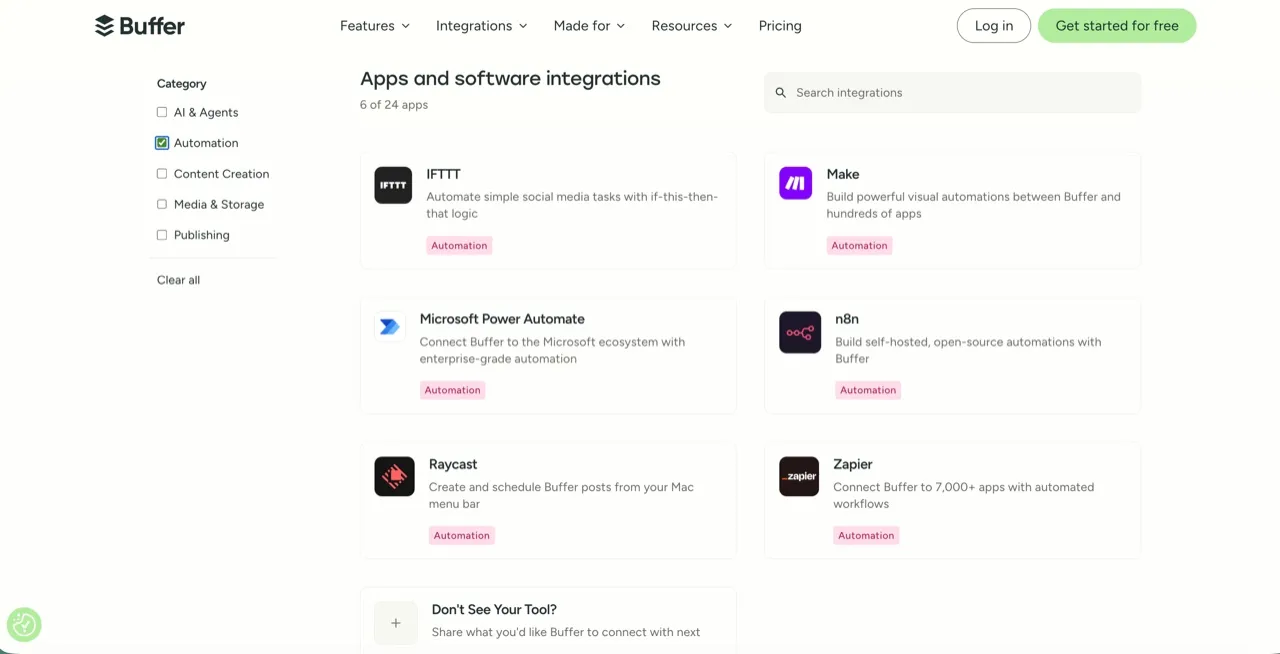
None of these are dealbreakers if Buffer is solving the scheduling part of your workflow. Worth knowing that as of 2026 Buffer does have first-party n8n, Make, Zapier, and Claude integrations, so automation is no longer a gap.
What Buffer’s Pricing Means If You Use the API or an AI Agent
This is the part of Buffer’s pricing that changed most in 2026, and it barely shows up on the pricing page.
Buffer now ships a real developer platform. The Buffer API is GraphQL, and there are first-party setup guides for Claude and Claude Code, ChatGPT, Cursor, Perplexity, Raycast, n8n, and Zapier. There is a hosted MCP server at mcp.buffer.com/mcp, and the Claude connection uses OAuth, so there is no API key to paste.
API access itself is included on every plan, free tier included, which is genuinely rare. The catch is that your plan sets your rate limits, and that is where the per-channel bill quietly becomes an API bill.
| Limit | Free | Essentials | Team |
|---|---|---|---|
| API keys | 1 | 3 | 5 |
| App clients | 1 | 3 | 5 |
| Requests per 15 min | 100 | 100 | 100 |
| Requests per 24 hr | 250 | 250 | 500 |
| Requests per 30 days | 3,000 | 7,500 | 15,000 |
Read the 30-day row rather than the 15-minute one, which is the same trap that shows up across every platform’s posting caps. The 15-minute ceiling is identical across all three plans, so paying more does not buy you burst capacity. What paying buys is monthly volume: 3,000 requests on free, 7,500 on Essentials, 15,000 on Team.
For an agent, that ceiling arrives faster than it looks. A single “write and schedule a week of posts” instruction is rarely one request. The agent lists your channels, creates each post, often reads back a confirmation, and may fetch metrics afterward. At five to ten requests per published post, 7,500 a month is roughly 750 to 1,500 posts, and every exploratory query your agent makes while figuring out what to do counts against the same budget.
The structural thing to notice: Buffer’s bill scales on channels, but its API scales on requests, and the two are billed on completely different axes. Adding an eleventh channel costs you a reduced per-channel rate and buys you zero additional API headroom. If your workflow is agent-driven, you can end up paying for channel count while being constrained by a request ceiling you cannot buy your way out of without moving to Team. Buffer’s own public API roadmap is worth a look before you commit, since image asset uploads and comment endpoints are still listed as exploratory rather than shipped.
Worth separating from the cost question: what the API actually exposes. Buffer’s GraphQL reference publishes 19 queries and 19 mutations, covering accounts, channels, posts, content items, ideas, templates, tags, and post metrics. None of them reads or writes a comment, a mention, or a DM, though Buffer’s September 2026 changelog added an experimental comment engagement type, so check the API changelog before you build. Buffer does run a community inbox, but it lives in the app, and the only comment your agent can write is the firstComment field it attaches when publishing to Facebook, Instagram, or LinkedIn.
So access is not what limits you here, since the API key is free and the scope is the same on every plan: your agent can publish a post and read how it performed, and it stops there. Replies get handled in Buffer’s app or on the platform itself, which means a human step or another tool in the loop, and that is the part worth pricing before you build. Blotato covers publishing and replies through one key, with real limits of its own: comments and DMs work on Instagram and Facebook only, and analytics returns nothing for LinkedIn. I wrote up how that comments and DM endpoint actually behaves when we shipped it.
That is a different pricing question from “what does a scheduler cost,” and it is the one worth asking if an agent is doing the posting. Our social media API pricing breakdown covers how the unified-API tools price the same job, our AI agent pricing research prices Buffer against 24 other tools on one 9-platform agent job, and Blotato vs Buffer runs the head-to-head.
When Buffer Pricing Makes Sense (and When It Doesn’t)
Buffer’s per-channel model is a fair deal when:
- 1 to 5 channels is your reality, and a clean scheduler is what you need.
- Text rewrites from AI cover your needs, not image or video generation.
- Nonprofit pricing applies to your organization.
- Solo operator or small business managing your own accounts.
It starts to bite when:
- Account counts past 10 push you to want a flat rate.
- An AI agent does the posting at volume, and the API’s monthly request ceiling starts to bind.
- An agency setup needs a fully white-labeled client dashboard, not just branded reports.
- One predictable monthly bill matters more than per-channel granularity, especially when onboarding new clients regularly. The social media automation tools post covers flat-rate options here.
This isn’t a Buffer problem. It’s a category-fit problem. Buffer is built around a “schedule what you already make” workflow, and the pricing reflects that. Flat-rate tools price the plan instead of the channel, which is why the math flips once you run many accounts.
Buffer Pricing vs Common Alternatives
For context, here’s how Buffer’s entry tier compares on price at typical channel counts. The billing basis differs by tool, so each row says which one it is.
| Tool | Cheapest paid tier | What you get at the entry tier |
|---|---|---|
| Buffer Essentials | $5/channel/mo annual | 1 channel base, unlimited posts, AI text assistant |
| Metricool Starter | from $20/mo annual ($25 monthly), 5 brands; $36/mo for 10 | Analytics, competitor tracking, light AI text |
| Later Starter | $18.75/mo annual ($25 monthly) | Visual calendar, Link in Bio, basic AI |
| SocialPilot Essentials | $30/mo monthly ($25.50 annual), 7 accounts | Scheduling, basic analytics (white-label reports from the $100 Premium tier) |
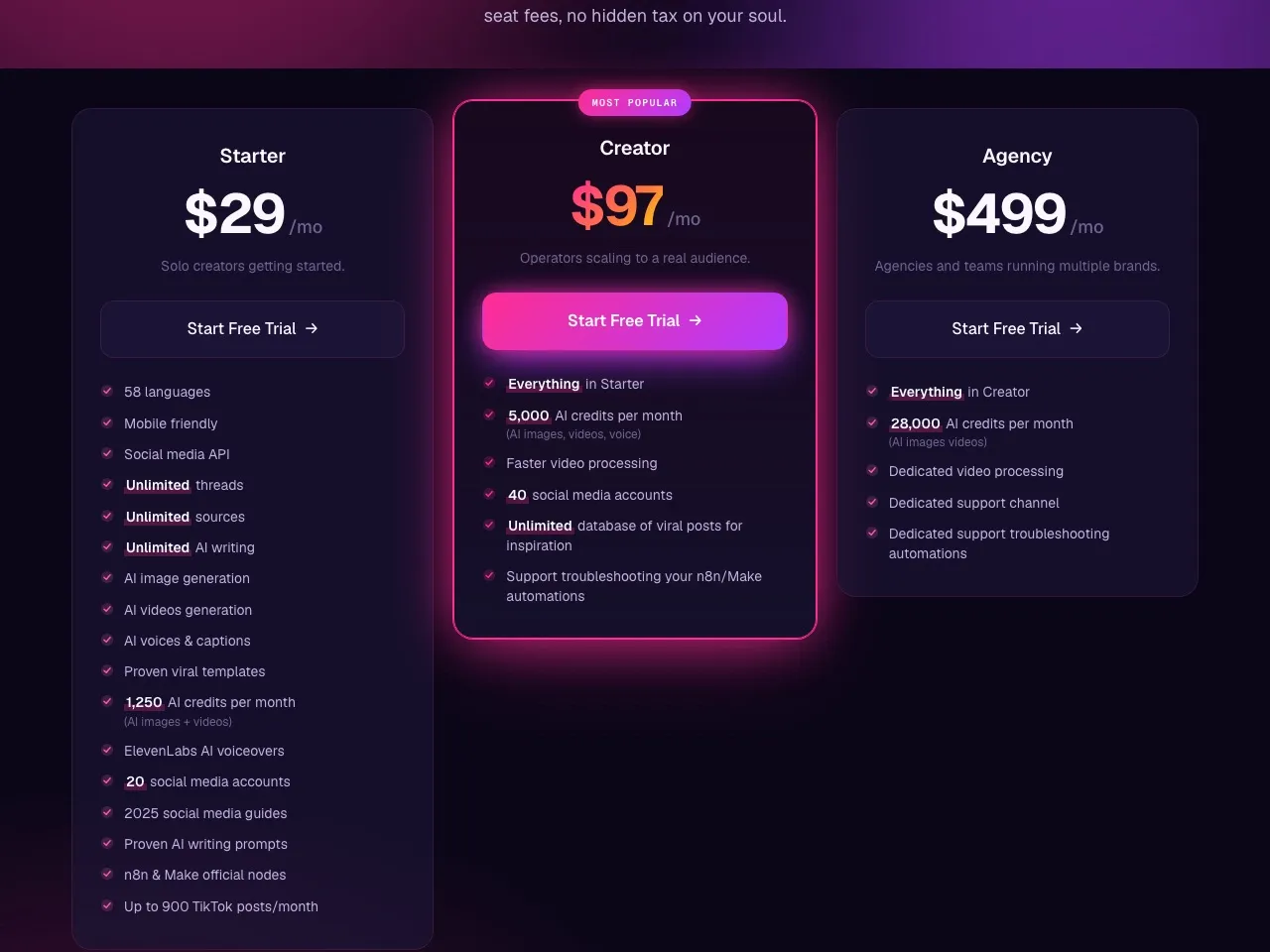
| Blotato Starter | $29/mo flat | 20 accounts, social media API + hosted MCP, n8n & Make official nodes, Instagram and Facebook comments, DMs and DM automation, 1,250 AI credits for images and video |
At 1-3 channels, Buffer’s per-channel model is the cheapest option on this list. At 10+ channels, the flat-rate tools start to win on raw price, and the gap widens further if you want DMs handled on the same bill, since Buffer’s pricing page lists comments in its community inbox, not DMs. If you want the full head-to-head, see the Blotato vs Buffer comparison. For more options, see my roundup of the best Buffer alternatives in 2026.
Full disclosure on that Blotato row: Blotato is my company, and its posting caps are our own rather than the platforms’, so Instagram is 50 posts a day.
Sabrina’s Take on Buffer Pricing in 2026
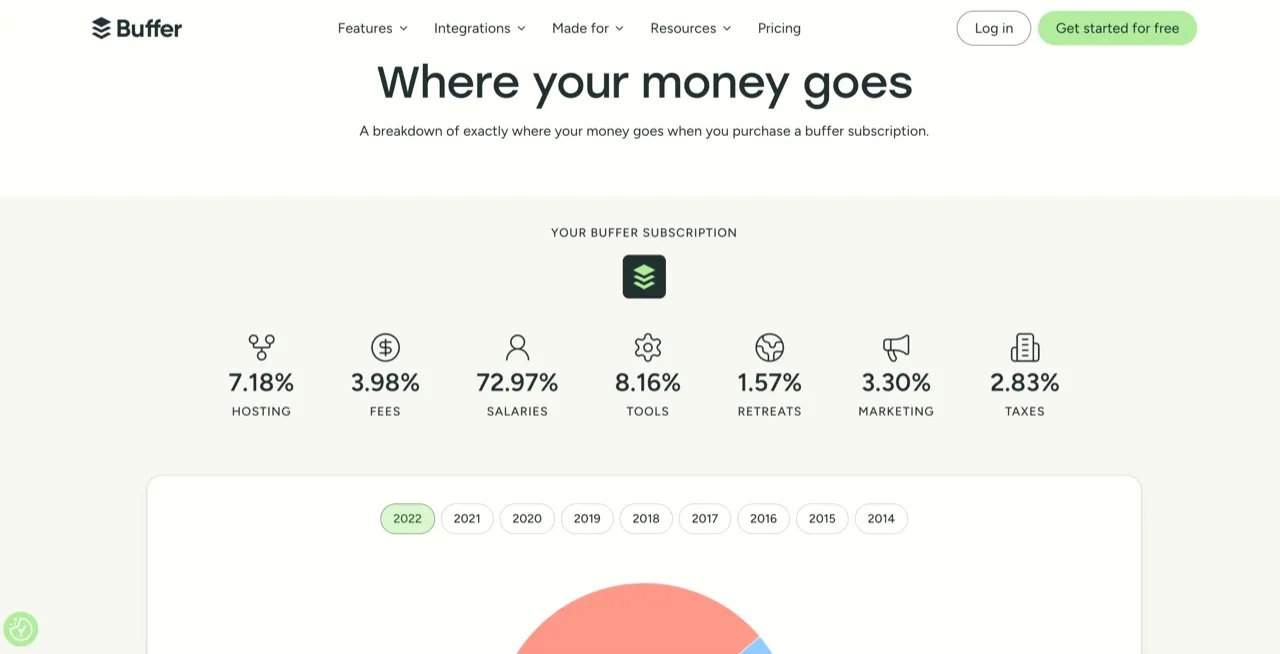
Buffer’s pricing is honest in a way I appreciate. There’s no hidden seat fee on Essentials, no surprise rate hike, no forced annual contract. The free plan has been roughly the same for years, and the Buffer transparent pricing dashboard breaks down where every dollar of expense goes, which is rare for a SaaS company.
What’s worth thinking about before you upgrade: per-channel pricing rewards focus and punishes breadth. If your strategy is to post deeply to a few platforms, Buffer is one of the best-value tools on the market. If your strategy is to repurpose one piece of content across many platforms, the bill scales faster than it would on a flat-rate tool.
The other thing I’d flag is the AI side. Buffer’s AI Assistant is fine for rewrites and is included on every plan, including free, but it’s a text-only assistant. If you’re considering Buffer in 2026 to handle “AI content creation,” I’d reset expectations: it’s a scheduler that helps you write, not a tool that makes posts for you.
If you’re still figuring out where Buffer fits, the simplest path is to start on the free plan and only upgrade once you hit the 3-channel cap. If you’re already past that point and the per-channel math feels heavy, look at flat-rate tools first. Blotato is one option if an agent will do your posting, as long as you can live with one login per account and DMs on Instagram and Facebook only. Metricool, SocialPilot, and Later are fair fits if you need team seats, analytics depth, or a visual planner instead.
One caveat if you came to this post for the API rather than the scheduler: Blotato’s 7-day trial covers everything except the API and MCP, and generating an API key ends the trial and starts the paid Starter plan. So if an agent is the reason you are shopping, plan on starting the subscription rather than trialing it. That is the same shape of detail as Buffer’s rate limits, and it is the kind of thing worth knowing before you build against either one.
Buffer Pricing FAQs
Does Buffer’s price include API access?
Yes. API access is included on every Buffer plan, including the free tier, with no separate developer fee. What your plan changes is the rate limit: 3,000 requests per 30 days on free, 7,500 on Essentials, and 15,000 on Team, plus 1, 3, and 5 API keys respectively. The 15-minute ceiling is 100 requests on all three plans, so upgrading buys monthly volume rather than burst capacity.
What can the Buffer API actually do?
It publishes and it reports. An agent can create, edit, reschedule, and delete posts, save ideas, list your connected channels, and pull performance metrics on what already went out. What it cannot do is engage: there are no operations for reading or replying to comments, mentions, or direct messages, so anything past publishing needs Buffer’s app or another tool.
Can Claude post to social media through Buffer?
Yes. Buffer runs a hosted MCP server at mcp.buffer.com/mcp and publishes setup guides for Claude, Claude Code, ChatGPT, Cursor, Perplexity, and Raycast. The Claude connection uses OAuth, so there is no API key to paste. The constraint is not the connection, it is the request budget: your Buffer plan’s 30-day rate limit applies to everything your agent does, including the exploratory calls it makes while working out what to publish.
Is Buffer free?
Yes, Buffer has a real forever-free plan with 3 channels and 10 scheduled posts per channel. The AI Assistant, 100 saved ideas, basic analytics, and the community inbox are all included on free. You won’t get unlimited posts, advanced analytics, or team collaboration features, but it’s enough for a solo creator posting to a few platforms.
What does Buffer cost per month?
Essentials is $5 per channel per month on annual billing ($6 on monthly). Team is $10 per channel per month annual ($12 monthly). Do not simply multiply by your channel count, because the rate is graduated: on monthly billing it drops to $4 per channel from channel 11, $3 from channel 26, and $1 on Essentials from channel 51. Buffer’s own published annual totals are $50 a month at 10 channels, $100 at 25, and $163 at 50.
Why is Buffer pricing per channel?
Buffer rolled out the per-channel model in 2021, replacing the earlier tiered Small/Medium/Large Business plans. Their reasoning: every connected channel consumes publishing API calls, storage, and analytics processing on their side, so the billing follows usage. The model scales linearly for the first 10 channels and then drops to volume rates above that.
What’s the difference between Essentials and Team?
Essentials covers everything one person needs: scheduling, AI Assistant, advanced analytics, hashtag manager, campaigns. Team adds collaboration (unlimited members, approval workflows, custom permissions, branded client reports). If you don’t work with collaborators, Essentials is the better value.
Does Buffer have a free trial?
Yes, every paid plan has a 14-day free trial with no credit card required. The trial gives you full Team-plan features so you can test workflow features before deciding which tier you need.
Is Buffer cheaper than Hootsuite?
Yes, by a wide margin. Hootsuite publishes its pricing on its plans page: Standard is $99 per user per month, Professional $199, and Advanced $399 per user per month on annual billing, with Enterprise on custom pricing. Buffer’s Essentials at $5 per channel covers most use cases for a fraction of that cost. The tradeoff is Buffer doesn’t have Hootsuite’s enterprise depth on listening, reporting, or governance. If Buffer’s per-channel model still feels heavy, my Hootsuite alternatives roundup covers cheaper options on both sides.