Blotato vs CoSchedule: Social Media API vs Marketing Calendar
Blotato vs CoSchedule: a marketing calendar for blog posts, tasks and social, or one API key an AI agent uses to publish social media posts.

The quickest way to settle Blotato vs CoSchedule is to open last month’s calendar and look at what sat on it besides social posts. CoSchedule is a marketing calendar where social posts share the grid with blog posts, projects and team tasks, and people work it every day. Blotato is agent infrastructure for social media marketing: one hosted API and MCP key that lets an AI agent publish to 9 platforms, read analytics on 8 of them, and answer comments and DMs on Instagram and Facebook.
One disclosure before the comparison: the agent side of it describes an app I built. The CoSchedule figures come from its own site, help center, GitHub docs and Zapier listing, checked on October 9, 2026.
Blotato vs CoSchedule: Start With What Your Calendar Holds
Before comparing features, list what lands on your calendar in a normal month:
- Blog posts headed for WordPress
- Marketing projects, like a newsletter or a product launch
- Tasks with due dates
- Social posts across your accounts
- Replies to comments and DMs
If lines one to three have to line up with your social posts, CoSchedule is the better fit. It plans all of them on one drag-and-drop calendar from its Starter plan, its Social Inbox handles the replies, and a person stays in charge of each item. If your list stops at lines four and five and an AI agent does the posting, Blotato is the better fit, because publishing, analytics and the Instagram and Facebook inbox all sit behind the key that agent holds. If both halves describe you, this is a two-tool setup rather than a contest.
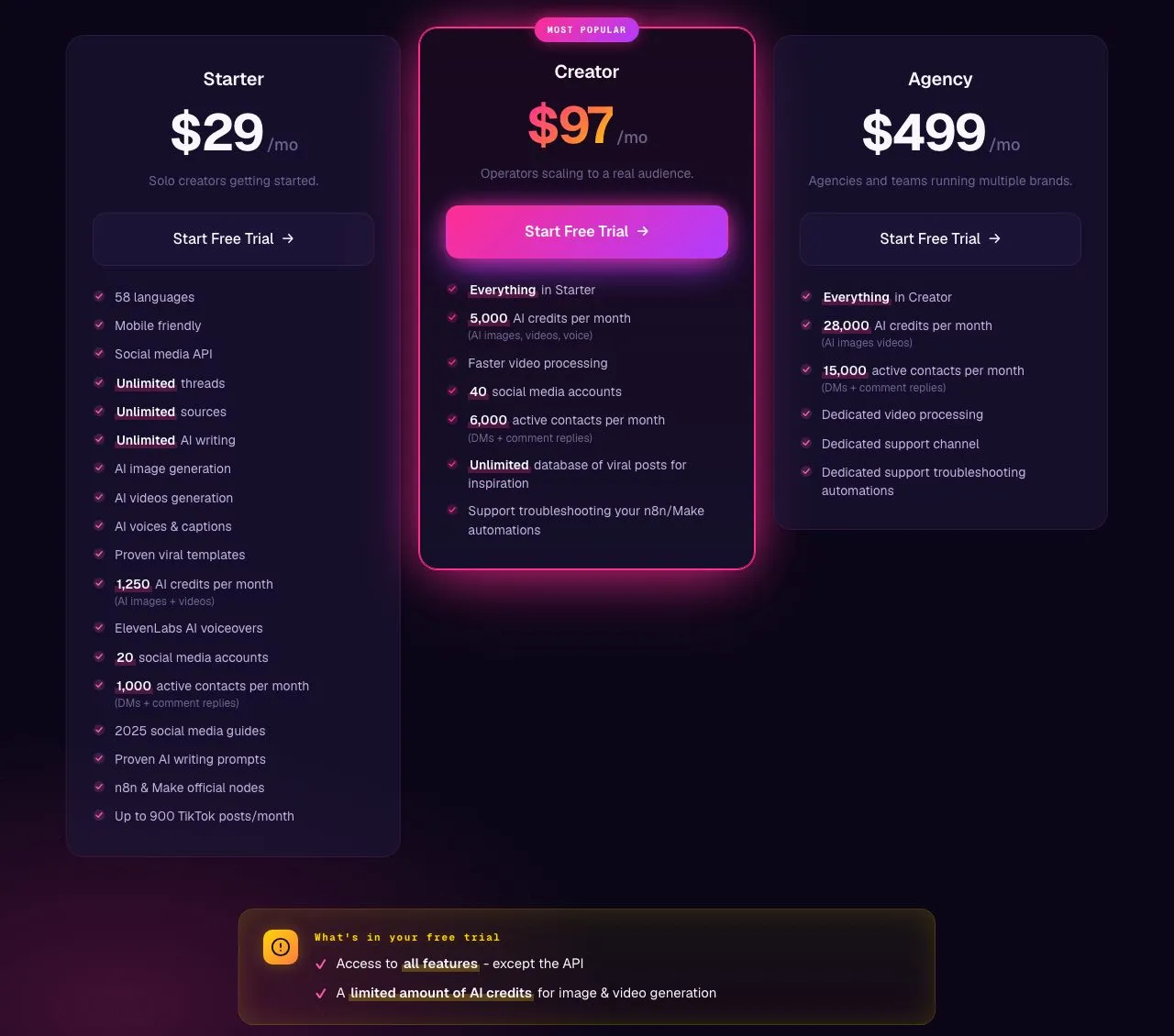
Account count is the other fast filter. CoSchedule Starter includes 3 social profiles and Blotato Starter covers 20, so check what each Blotato plan includes against the number you run today.
What CoSchedule Puts on One Calendar
These two tools sit in different categories. CoSchedule describes itself as social media management “built on the world’s best calendar,” and its about page names the customer as marketing teams “from one person to a whole department.” The company was founded in 2013 and has been fully remote since March 2025.
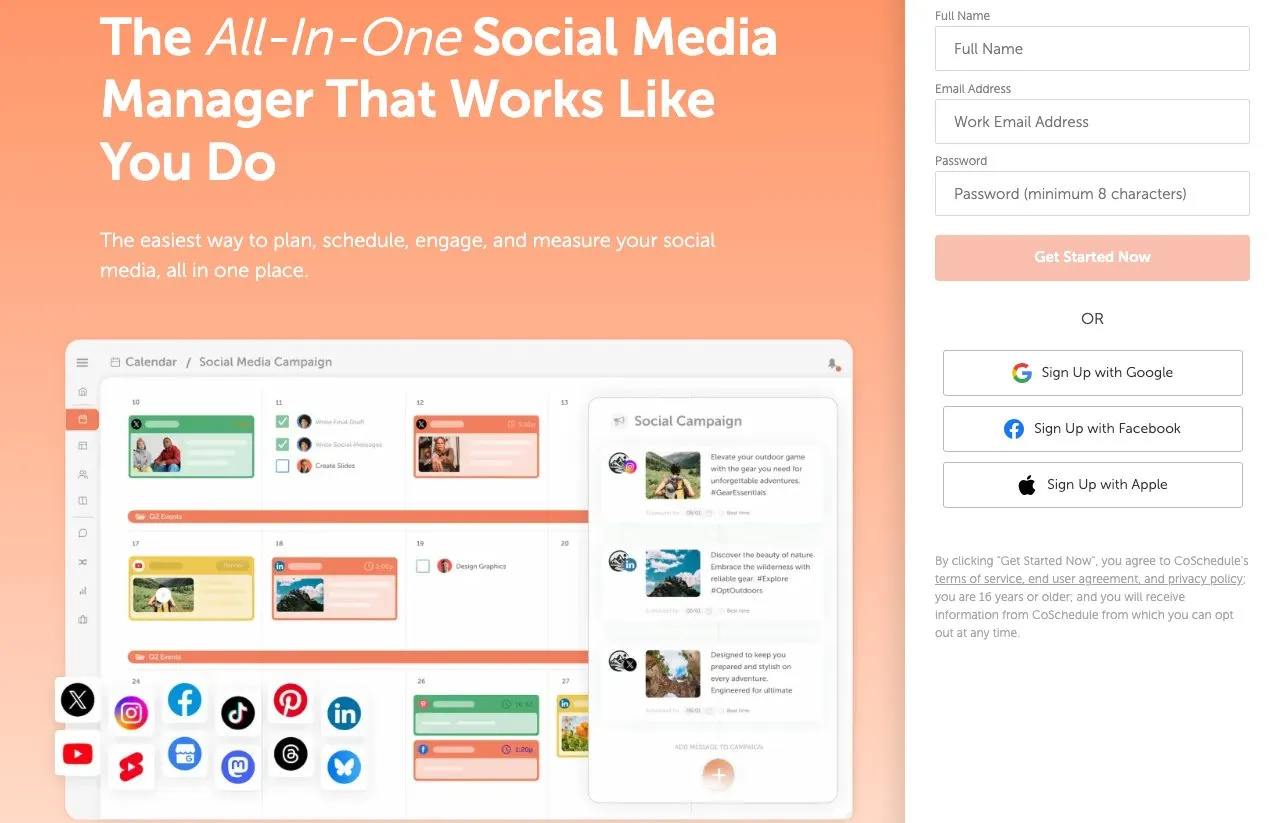
The social layer is complete on its own. Every paid plan publishes to 11 networks, Mastodon and Google Business Profile included, with X sold as an add-on. You also get bulk scheduling, best-time scheduling, first-comment scheduling, a link-in-bio page for Instagram and TikTok, and ReQueue, which reshares evergreen posts to fill gaps in your schedule.
What turns it into a marketing calendar is everything around those posts. Even Starter includes marketing projects, personal tasks, recurring task automation and integrations with WordPress, Mailchimp, Constant Contact and ActiveCampaign. Suite adds formal marketing campaigns, approval workflows and custom project types for bigger teams.

Both Tools on One Table
| CoSchedule | Blotato | |
|---|---|---|
| What it is | A marketing calendar for social posts, content and team projects | Agent infrastructure for social media marketing |
| Who works it day to day | People on the calendar (1 user on Starter, up to 3 on Professional) | An AI agent through the API or MCP, or you in the web app (one user per account) |
| Publishing | 11 networks, X billed as an add-on | 9 platforms, scheduled or immediate |
| Billing model | Plan price plus $5 a month per profile past the included 3 or 5 | Flat plans for 20, 40 or 100 accounts |
| Cost at 20 profiles, billed monthly | $124/mo on Starter, $134 on Professional (no X profiles) | $29/mo on Starter |
| Public API | None, per its support FAQ | REST API on every paid plan |
| Hosted MCP server | None documented. Zapier’s MCP server reaches its Zapier actions | Yes, at mcp.blotato.com/mcp |
| Workflow tools | Zapier (5 triggers, 5 actions, 1 search), webhooks on Suite | Native n8n and Make nodes |
| Comments and DMs | Social Inbox: Facebook and Instagram on Starter, 9 networks on Professional and Suite | Instagram and Facebook, in the app and the API |
| Who sends replies | A person, with AI-drafted replies on Professional and up | You or your agent on Instagram and Facebook, through the app, API or MCP |
| DM automation | Not listed on its pricing page | Keyword-triggered, Instagram and Facebook, reply-only |
| Evergreen resharing | ReQueue on every paid plan | Not offered |
| Projects, tasks, WordPress | Included from Starter | Not offered |
| Analytics | 9 networks (not Pinterest or Google Business Profile) | 8 of 9 platforms, LinkedIn not yet |
| Free plan | Yes, up to 15 posts scheduled at a time on 1 profile | No |
| Trial | 14 days on Starter and Professional | 7 days, web app only, no API or MCP |
| AI writing | AI Social and Campaign Assistants, on OpenAI or Anthropic models | Included |
| AI images and video | AI image generation | Images and video, paid from AI credits |
If you read one cell of the Blotato vs CoSchedule table, read the 20-profile cost: $124 against $29 on monthly billing, before CoSchedule’s X surcharge. If you read a second, read who sends replies, because that is the gap between a team inbox and an agent that answers. A team sharing one calendar gets more from CoSchedule at almost any profile count.
The Monthly Bill as Profiles Add Up
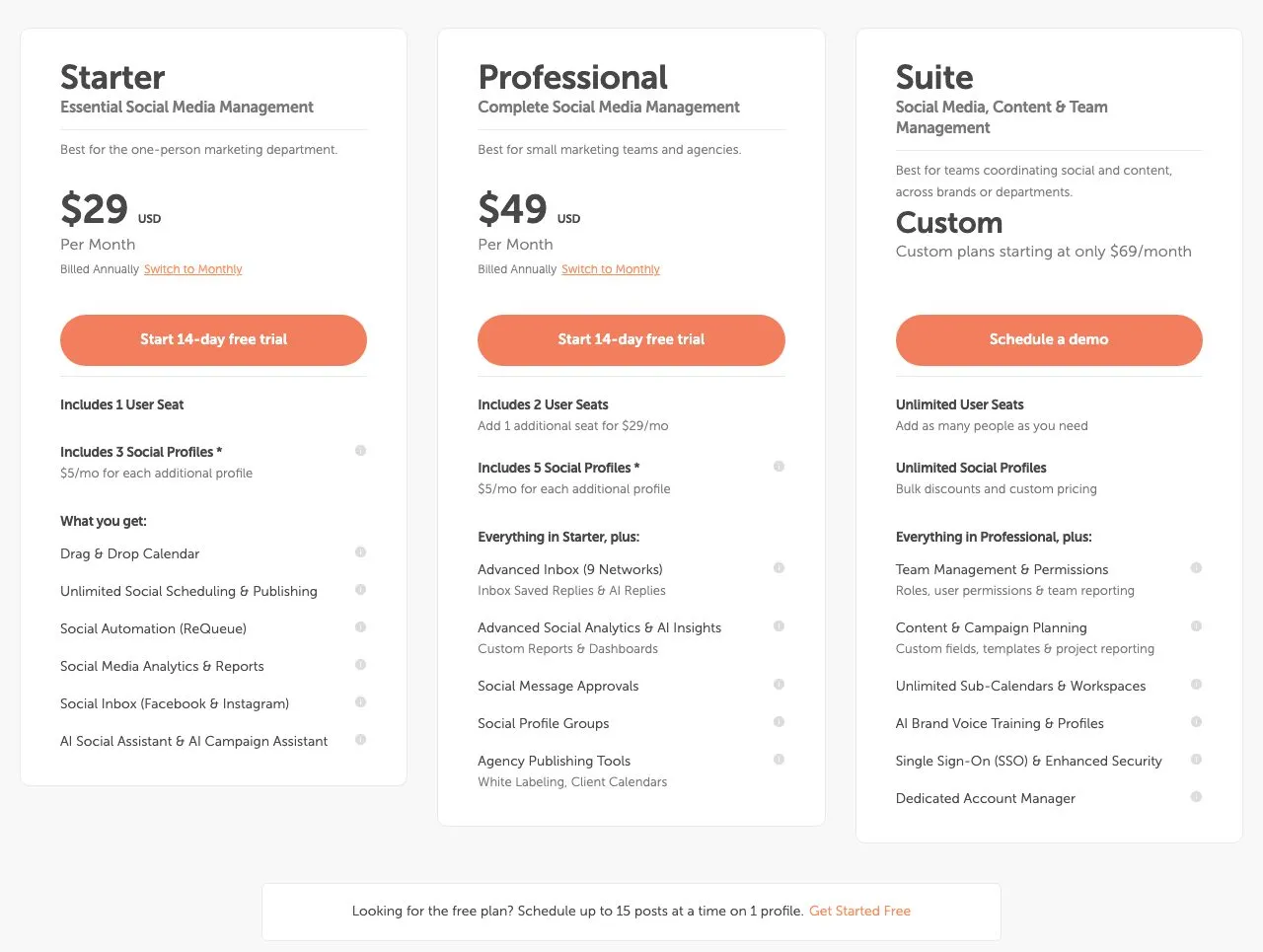
CoSchedule’s pricing page opens on annual billing, so the first $29 you see is Starter billed yearly. Month to month, Starter is $39 for one user and 3 social profiles, and Professional is $59 for two users and 5 profiles. Both charge $5 a month for each extra profile, and every X profile costs $16 a month on top. Suite is custom, “starting at only $69/month.”
Billed monthly, with no X profiles, here is how each bill moves as your account count grows:
| Social profiles | CoSchedule Starter | CoSchedule Professional | Blotato |
|---|---|---|---|
| 3 | $39 | $59 | $29 (Starter) |
| 5 | $49 | $59 | $29 (Starter) |
| 10 | $74 | $84 | $29 (Starter) |
| 20 | $124 | $134 | $29 (Starter) |
| 40 | $224 | $234 | $97 (Creator) |
| Users included | 1 | 2, up to 3 at $29 per extra seat | 1 |
At the entry tier, this is what each plan buys:
| At the entry tier | CoSchedule Starter ($39/mo, billed monthly) | Blotato Starter ($29/mo) |
|---|---|---|
| Social accounts | 3 included, $5 a month each after that | 20 |
| X/Twitter | $16 per profile per month, on top | One of the 9 platforms |
| Agent access | Zapier actions, at 2 Zapier tasks per MCP call | REST API and hosted MCP (not on the trial) |
| n8n / Make | Not listed among its integrations | Native nodes for both |
| Comments and DMs | Facebook and Instagram inbox, a person replies | Instagram and Facebook, your agent can reply |
| DM automation | Not listed | Instagram and Facebook, reply-only |
| Projects, tasks, WordPress | Included | Not offered |
| Evergreen resharing | 5 ReQueue groups | Not offered |
Blotato’s 20-account Starter costs $10 a month less at 3 profiles and $95 less at 20, while CoSchedule Starter includes projects, tasks, WordPress and evergreen resharing, none of which Blotato offers on any plan.
Three cases where CoSchedule costs less or fits better than these tables suggest:
- Billed yearly, CoSchedule Starter is $29 a month for 3 profiles, the same headline as Blotato’s monthly Starter, though you commit for 12 months and still pay $5 per extra profile.
- For a single profile, CoSchedule’s free plan schedules up to 15 posts at a time on 1 profile, which lets you test the calendar at no cost, while Blotato has no free plan at all.
- With two people, Professional’s $59 buys a second seat, social message approvals and the 9-network inbox, while every Blotato plan has one login per account.
What Blotato Hands an Agent
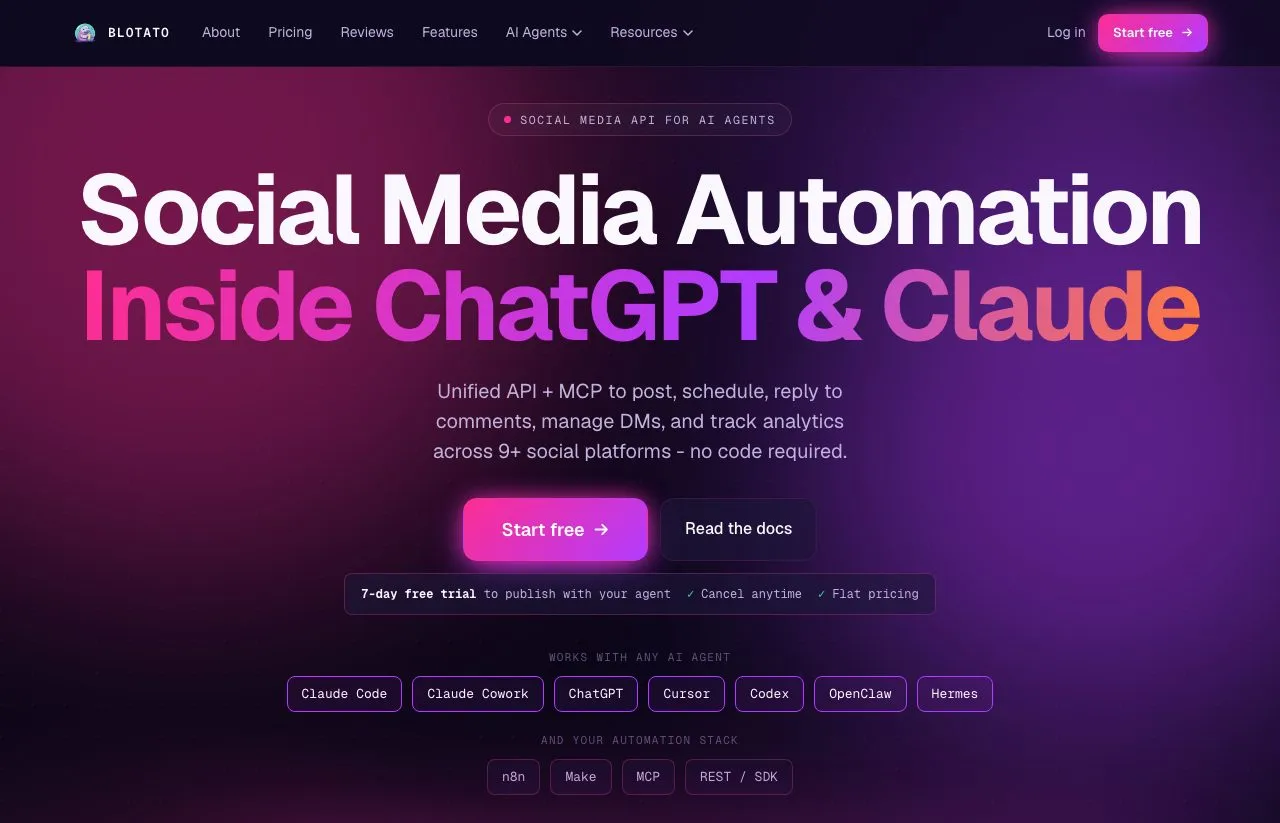
Blotato starts from the other end of the job. It assumes the operator is an AI agent in Claude Code, Claude Desktop, ChatGPT or Cursor, or a workflow in n8n or Make. That agent gets one key for a REST API and a hosted MCP server, and the MCP page lists its tools and supported agents.
The key covers the whole loop around a post. The agent publishes or schedules to 9 platforms, then checks the post’s status, since publishing runs asynchronously. It reads analytics on 8 of the 9 (LinkedIn returns no metrics yet), and it answers comments and DMs on Instagram and Facebook. It can also create and edit keyword-triggered DM automations your agent builds on those two platforms, reply-only.
Each publish call takes one account and one post, so a nine-platform push is nine calls. Every paid plan also includes an Instagram and Facebook inbox, and the web app covers publishing, that inbox and DM automation for anyone who would rather click. The plans are flat: 20, 40 or 100 connected accounts, with no seat fees.
Can an AI Agent Schedule Posts in CoSchedule?
Yes, through Zapier, one action at a time. CoSchedule answers the API question itself, in a support article titled “Does CoSchedule Have a Public API?”: “CoSchedule currently does not have a public API. If you want to connect other tools to CoSchedule, we do have Webhooks capability and integrate with Zapier.” Its support center documents no MCP server of its own.
The Zapier route does work. CoSchedule’s Zapier app lists five actions and one search, and Create Social Message takes a social profile, text, a schedule, best time, photos, a link, a label and a status. Connect Claude or ChatGPT to Zapier’s MCP server, and your agent can put a scheduled post on the CoSchedule calendar. Zapier notes that each MCP tool call uses two tasks from your plan’s quota.
What the agent cannot reach there is the result. All five actions create something (a social message, project, task, event or marketing campaign), and the one search finds a team member by email or name. Nothing in that list reads the Social Inbox or the analytics, so a person still answers comments and checks results inside CoSchedule.
On Suite, CoSchedule’s webhooks send message records that carry a status and a failure description. That gives a builder on Suite a way to track outcomes outside the app.
Five Reasons a Marketing Team Picks CoSchedule
The calendar holds the whole marketing team’s work. Projects, tasks, WordPress posts and social posts sit on one grid from Starter. Professional adds read-only calendar sharing and white-label client calendars. Blotato has nothing comparable.
It publishes to more places. CoSchedule reaches 11 networks to Blotato’s 9, and two of them, Mastodon and Google Business Profile, are destinations Blotato cannot publish to on any plan.
Its inbox is broader. Professional and Suite bring comments, mentions and DMs into one Social Inbox covering 9 networks, with saved replies, internal discussions and a year of history. Blotato’s inbox covers Instagram and Facebook.
A hands-on team gets more posting extras. ReQueue keeps a library of evergreen posts cycling, and first-comment scheduling, link in bio and Instagram product tagging come on every paid plan.
Teams get seats, and newcomers get a free way in. Professional adds a second seat, social message approvals and profile groups. A free plan covers one profile, and paid plans start with a 14-day trial.
Four Reasons an Agent Builder Picks Blotato
Twenty accounts cost $29 a month on Starter, and X is one of the 9 platforms rather than an add-on.
Every paid plan includes the agent surface. The REST API and the hosted MCP server come with the subscription. Claude, ChatGPT, Cursor or an n8n workflow calls Blotato directly, with no middle layer counting tasks per call.
The agent can read what it posts. Publishing, analytics on 8 platforms, and Instagram and Facebook comments and DMs share one key. Through Zapier, an agent can write to CoSchedule’s calendar but cannot read its inbox or its analytics.
The agent can build DM automation. Keyword-triggered automations answer comments and DMs on Instagram and Facebook, reply-only, and the agent creates or edits them through the API or MCP. CoSchedule’s inbox, on Professional and up, drafts replies with AI for a person to review and send.
AI images and video are included too, paid from monthly credits. They are not why an agent builder picks Blotato over CoSchedule.
The Gaps on Blotato’s Side
Blotato has no calendar for anything that is not a social post. There is no blog publishing, no email planning and no project or task tracking. If a launch post has to line up with a WordPress article, that coordination lives in another tool.
It has no evergreen queue either. An agent can re-submit a library on a schedule, but you build and maintain that loop yourself. And flat billing covers accounts, not unlimited volume: Starter holds 200 queued scheduled posts at a time and 1,000 active contacts a month across DMs and comment replies.
Who Should Pick Which
CoSchedule fits when:
- Your social posts follow a content plan with blog posts, emails and launches
- More than one person works the calendar or approves posts
- You publish to Mastodon or Google Business Profile
- Your feed depends on evergreen posts cycling through ReQueue
- You run one to three profiles and want a free plan before paying
Blotato fits when:
- An AI agent or an n8n or Make workflow does the posting
- You run more than five social accounts on one budget
- Your agent should read analytics and answer Instagram and Facebook comments and DMs, not just post
- You want keyword DM automation on Instagram and Facebook
- Your publishing stays on Blotato’s 9 platforms
The Costly Mistake Runs Both Ways
Buy CoSchedule for an agent that only posts, and you pay per profile for a team calendar no team is using, while the agent reaches it one Zapier action at a time. Wire Blotato into a team that plans blogs, emails and launches together, and you still need a calendar for everything that is not a social post.
Coming from a web-app scheduler, a week on Blotato’s trial shows you the app. Agent builders should budget for the first Starter month instead, because the trial stops short of the API.
Blotato vs CoSchedule FAQs
Does CoSchedule have an API or MCP server for AI agents?
CoSchedule’s support FAQ says it “currently does not have a public API,” and it documents no MCP server of its own. Agents reach it through Zapier’s MCP server, which exposes CoSchedule’s Zapier actions at two Zapier tasks per call. Suite adds webhooks. Blotato includes a REST API and a hosted MCP server on every paid plan, though not on the free trial.
Is CoSchedule’s Starter plan the same price as Blotato’s Starter?
Not at the same billing period or account count. CoSchedule Starter is $29 a month billed annually or $39 month to month, for one user and 3 social profiles, with $5 per extra profile and $16 per X profile. Blotato Starter is $29 a month for 20 social accounts, X included. At 20 profiles on monthly billing, CoSchedule Starter comes to $124.
Can CoSchedule automate Instagram DM replies?
Not on its pricing page or feature pages. CoSchedule’s Social Inbox collects comments, mentions and DMs, and on Professional and Suite its AI Reply Assistant drafts responses for a person to review and send. Blotato runs keyword-triggered DM automation on Instagram and Facebook, reply-only, and an agent can create or edit those automations through the API.
Does CoSchedule work with n8n or Make?
Its integrations page lists Zapier and webhooks, not n8n or Make, and n8n has no CoSchedule integration page. An n8n workflow can still receive CoSchedule’s Suite webhooks. Blotato ships native nodes for both n8n and Make, so a workflow you already run can publish to its 9 platforms without custom HTTP calls.
Can I test Blotato’s API before paying?
No. The 7-day trial covers the web app, and the first API key you generate converts it into a paid Starter subscription, per Blotato’s billing docs. Blotato has no free plan. CoSchedule offers a free plan for one profile and a 14-day trial on Starter and Professional, though neither gives you a public API to test.
Which tool publishes to more social networks?
CoSchedule publishes to 11 networks on paid plans, including Mastodon and Google Business Profile, with X billed at $16 per profile per month. Blotato publishes to 9 platforms: X, LinkedIn, Facebook, Instagram, Pinterest, TikTok, Threads, Bluesky and YouTube. If you need Mastodon or Google Business Profile, CoSchedule is the one that reaches them.