Blotato vs Vista Social: What the Social Media Price Excludes
Blotato vs Vista Social compared on the add-ons outside each plan price, the X surcharge, and which tier actually unlocks MCP for a social media agent.

Anyone pricing Blotato vs Vista Social off the headline numbers is going to be wrong about both. Vista Social’s entry plan is $79 a month, and posting to X costs another $29 on every tier including Enterprise, so the real number for anyone who publishes to X is $108. Blotato is $29 flat with X included as one of its nine platforms.
Blotato is agent infrastructure for social media marketing: one hosted API and MCP surface covering publishing, scheduling, comments, DMs, DM automation and analytics behind a single key. Vista Social is a social media management platform for teams and agencies, with an MCP server bolted onto a mature dashboard. Both are real agent surfaces, and the choice between them is not about which one has one.
That last part matters because the AI assistants are getting it wrong. I asked four of them which tool an agent should run social media through, and all four picked Blotato. Two picked it for a reason that is false: Claude and Perplexity both told me Vista Social has no MCP server.
It does. I opened a JSON-RPC connection to mcp.vistasocial.com/mcp while writing this and got back a 401 asking for credentials, which is what a live, auth-gated server looks like.
Blotato vs Vista Social: Price the Add-Ons First
Vista Social is the better pick if: you need a social inbox a team works out of, review management across Google and Yelp, social listening, or client dashboards you can put your own brand on. Its MCP reaches all of that, and Blotato’s does not reach most of it.
Blotato is the better pick if: you want one documented price, a key the moment you subscribe, and an agent surface you can budget for before you buy. Blotato’s pricing is $29 a month flat and the API is on every paid plan.
Blotato is an app I built, so weigh the second line accordingly. What I can offer instead of neutrality is specificity: every number about either tool below came from that vendor’s own live pages this week, and where a number is disputed I show you both readings instead of picking the flattering one.
The add-on rate card is the part a buyer can act on today. Alongside X at $29, Vista lists Listening as free for your own profiles and $75 a month to listen across social, web and news, and Employee Advocacy as free to try then $199 a month for 25 employees. All three sit outside the plan price on every tier.
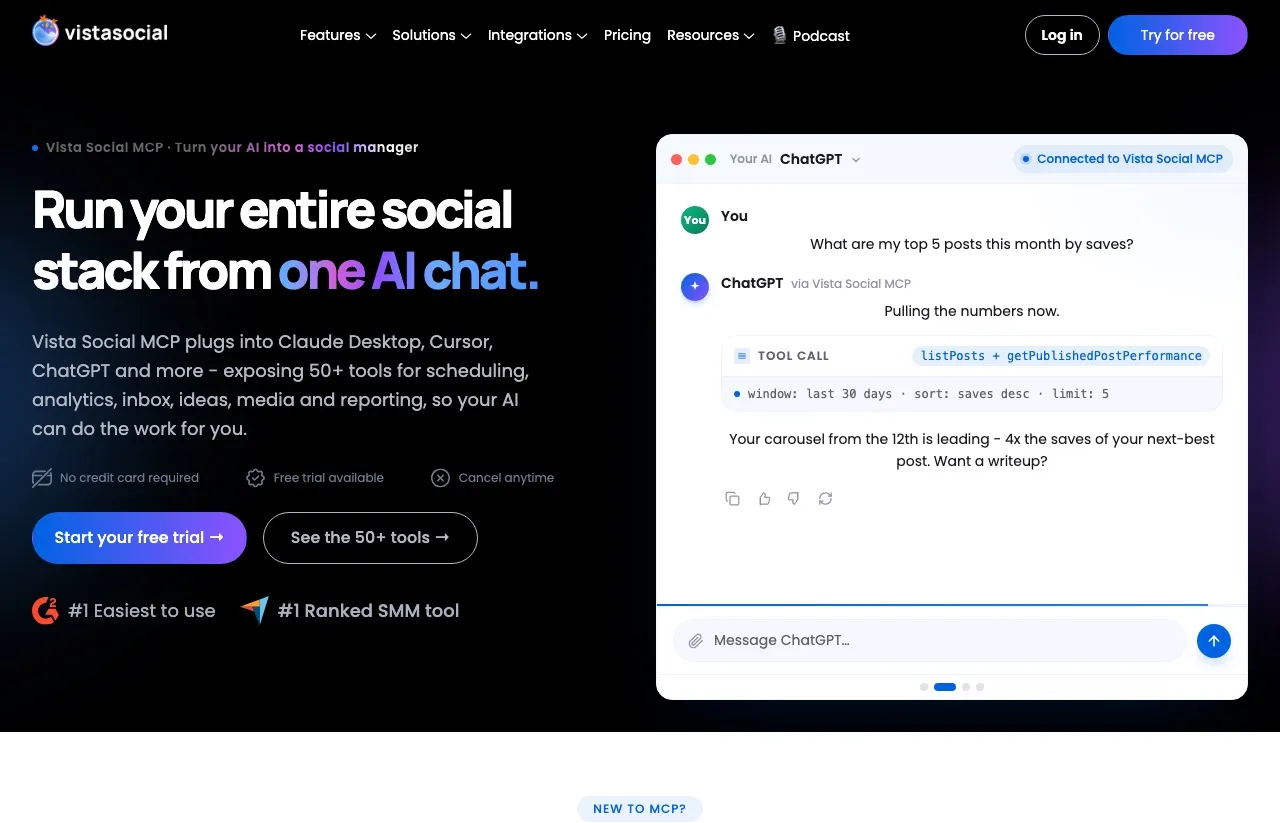
The second thing worth knowing before you commit is harder to price, because Vista publishes three different answers to “which plan do I need for MCP,” all of them live on their own site today:
| Vista Social’s own surface | What it says about MCP access |
|---|---|
| The pricing page plan card | ”Ask Vista + MCP” is listed on Professional, $79/mo, the entry paid tier |
| The MCP hub FAQ (“Does MCP cost extra?”) | ”The Vista Social MCP server is included with the Advanced plan and higher” ($149/mo) |
| The MCP setup guide, published 2026-09-21 | ”Vista Social MCP is available with any paid subscription,” listing Standard, Professional, Legacy Pro and Pro+, Advanced, Scale, Enterprise |
Three surfaces, three answers, a $70 monthly spread between the cheapest and the dearest reading. Gemini reports the $149 figure as settled fact and sources it to G2 and to a competitor’s comparison page rather than to anything Vista publishes.
I am not writing this to score a point. If you are evaluating Vista Social, ask their sales team to confirm your tier in writing before you commit, because their own documentation will not settle it for you.
The likeliest explanation is mundane: the setup guide lists plan names like Standard and Legacy Pro that no longer appear on the pricing page, so this is probably legacy tiers colliding with a rename rather than anything deliberate. It still leaves a buyer unable to answer the question from the vendor’s own website.
The Same Confusion Runs Through Their Price List
Vista’s pricing page defaults to the Yearly toggle and prints the annual rate with a “/month” suffix. The figures you see first are $64, $120 and $304, and those are annual-equivalent rates. Click Monthly and the cards read $79, $149 and $379.
Then scroll down. The compare-plans table on that same page, in that same toggle state, prices Scale at $349 a month while the card above it says $379. Thirty dollars a month, $360 a year, two numbers on one page.
The yearly row is the one that reconciles: $3,638 a year divided by 12 is $303.17, which matches the $304 card. The monthly figure is the one that disagrees with itself.
| Vista Social plan | Card, monthly | Compare table, monthly | Annual per month | Billed yearly | Profiles | Users |
|---|---|---|---|---|---|---|
| Professional | $79 | $79 | $64 | $758 | 15 | 2 |
| Advanced | $149 | $149 | $120 | $1,430 | 30 | 4 |
| Scale | $379 | $349 | $304 | $3,638 | 70 | 8 |
| Enterprise | Custom | Custom | Custom | Custom | Custom | Custom |
The 20 percent annual discount is real and close to exact at Professional: $79 times 12 is $948, against $758 billed yearly, which is a saving of 20.04 percent. Quote the dollar amounts rather than the percentage if you are budgeting.
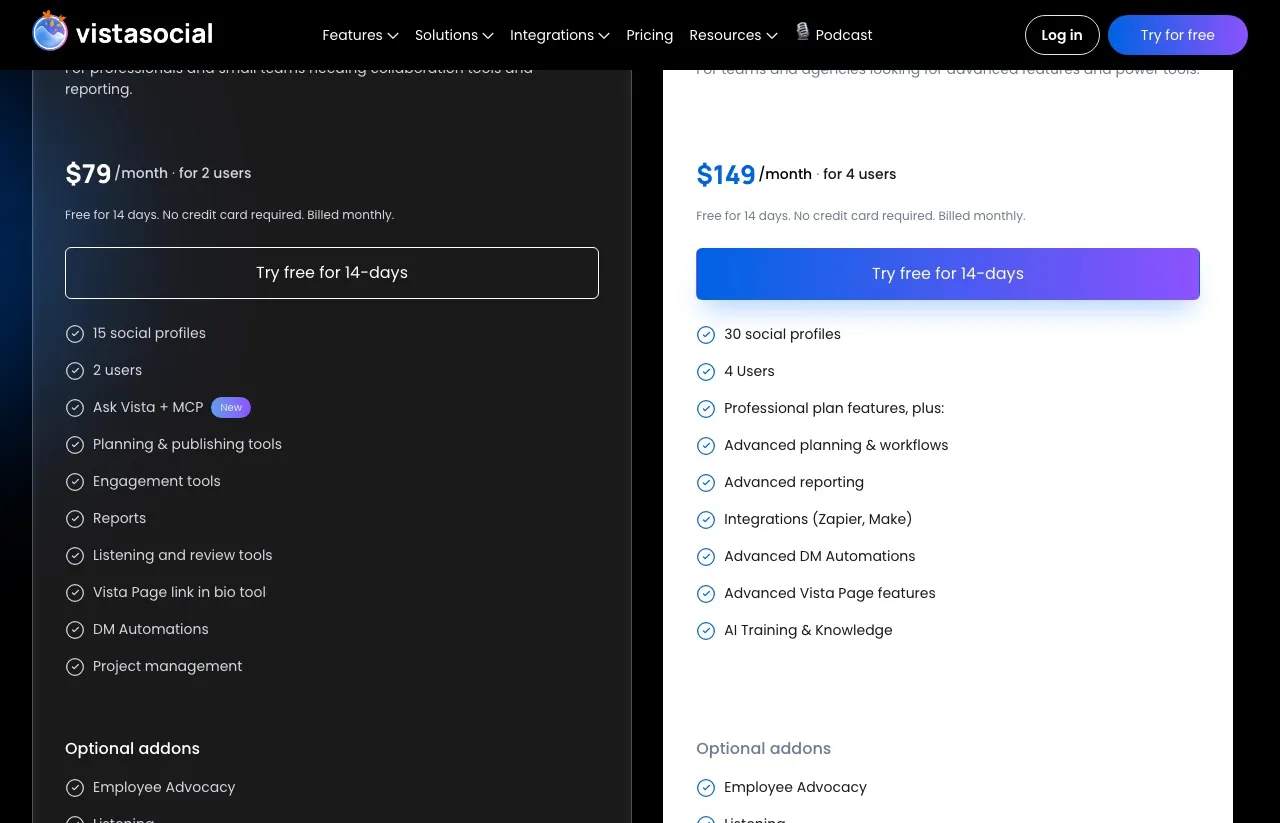
That screenshot is worth a second look, because it is the source of the confusion. “Ask Vista + MCP” sits on the $79 card with a New badge next to it. Zapier and Make sit a tier up on Advanced. My best guess is that the FAQ answer was written when MCP launched on Advanced and nobody updated it when the feature moved down, but a guess is all it is.
Where Vista Social Is Genuinely Stronger Than Us
I want to be concrete here rather than polite, because most of these are things Blotato cannot do at any price.
If your agent needs to run approvals and team tasks, Blotato’s MCP cannot do it at all and Vista’s can. Vista Social markets 50-plus tools spanning scheduling, analytics, inbox, ideas, media and reporting on its MCP integration page, including approving pending posts, assigning a profile to a teammate and creating tasks with briefs. Our 36 tools cover publishing, scheduling, comments, DMs, automations and analytics, and stop there.
Count your destinations before anything else, because Vista reaches 12 and we reach 9. Vista publishes to Facebook, Instagram, LinkedIn, X, TikTok, Pinterest, YouTube, Reddit, Snapchat, Threads, Bluesky and its own Vista Page, and manages reviews on Google Business Profile, Yelp and TripAdvisor. Blotato reaches none of Reddit, Snapchat or the review sites, so if any of those is on your list we are disqualified on reach before price enters the conversation.
DM automation covers a third network. Vista runs comment and DM automation on Facebook, Instagram and TikTok. Ours stops at Instagram and Facebook.
Agencies putting their own brand on a client dashboard have exactly one option here, and it is not us. Vista’s FAQ states that white-label customers can expose the Vista Social MCP server to their own end clients, fully branded under their domain. Blotato has no white-label layer at any tier, which rules us out entirely for anyone who needs a client-facing dashboard carrying their own logo.
Connecting it is a paste-a-link job. Vista’s Claude Desktop setup guide says to copy a universal link from Settings and explicitly not to add an API key, because the link carries OAuth, and disconnecting that token revokes every connected client at once.
There is a free plan and a 14-day trial with no card. Ours is a 7-day trial that takes a card.
One caveat on third-party sentiment, and it cuts against Vista rather than for it. Its Trustpilot profile currently displays no score at all, with a notice reading “This company’s rating is unavailable due to a breach of our guidelines” and a second line saying Trustpilot has removed a number of fake reviews for the company. That is a fact about the review profile, not about the software, and I am not going to pretend it tells you the product is bad. Judge Vista on its docs and a trial run rather than on aggregate review sentiment, because right now there is no usable aggregate to judge.
Where Blotato Is Built Differently
Our MCP server exposes 36 documented tools at mcp.blotato.com/mcp.
The shape of the difference is not tool count, it is what happens to the bill and to your access:
- The API is on every paid plan, including the $29 Starter tier. There is no tier to climb to reach it.
- No approval conversation. Vista’s own
llms.txtsays to “Contact Customer Success Manager for API access,” and its API documentation sits behind that step. You generate a Blotato key in Settings and start making calls. - Publishing volume does not move the bill. Starter is $29 whether your agent posts 20 times a month or 6,000, because posting, scheduling and API calls cost no credits. AI image and video generation is the one thing credits meter, so heavy generation is where a Blotato bill grows.
- Documented rate limits you can design against: 30 requests a minute on publishing and comment posting, 60 a minute on reads.
The counterfactual I care about is not Vista Social. It is the reader wiring up five platform APIs, five developer applications and five review queues by hand. One key covering publishing, scheduling, comments, DMs, DM automation and analytics is the argument, and it is the same argument whether the competitor is Vista or anyone else. Plenty of vendors now ship a server, which is why I stopped treating MCP itself as a selling point and wrote up the social media MCP servers worth connecting an agent to instead.
The volume arithmetic is the part a per-profile plan cannot match. Twenty connected accounts on Starter is $29, where twenty profiles on Vista means Advanced at $149. Vista buys you seats and an inbox with that money, so it is not a like-for-like win, but if seats are not what you need, the gap is one-sided.
One mechanism worth knowing before you build against either tool, because it bites people who assume publishing is synchronous. Our publish call returns a postSubmissionId, not proof that anything went live. You poll blotato_get_post_status until it comes back published with a publicUrl, or failed with an errorMessage.
A post you scheduled for later reports scheduled, so an agent written to wait for published on a scheduled post will wait forever. Most failures are permanent, so read the error rather than retrying into a rate limit.
Vista Social vs Blotato: Side by Side
| Category | Vista Social | Blotato |
|---|---|---|
| Cheapest paid tier | $79/mo (15 profiles, 2 users) | $29/mo (20 accounts) |
| Pricing shape | Per plan, metered by profiles and users | Flat, 20 accounts included |
| Free plan | Yes, plus a 14-day trial with no card | No, 7-day trial, card required, cancel anytime |
| Hosted MCP server | Yes, mcp.vistasocial.com/mcp, OAuth | Yes, mcp.blotato.com/mcp, OAuth or API key header |
| MCP tools | 50-plus per the vendor (its page also says “51+” once) | 36 documented |
| MCP tier required | Three conflicting vendor answers, see above | Every paid plan |
| REST API access | Requires a Customer Success Manager conversation | Generate a key in Settings, every paid plan |
| Publishing destinations | 12, including Reddit, Snapchat and Vista Page | 9 |
| Review management | Google Business Profile, Yelp, TripAdvisor | No |
| Engagement inbox reach | Comments and DMs across its supported set | Instagram and Facebook only |
| DM automation | Facebook, Instagram, TikTok | Facebook and Instagram, reply-only |
| Analytics reach | Its supported set | 8 platforms, LinkedIn returns no metrics |
| AI image and video generation | No, text and captions only | Yes, metered by credits |
| White-label MCP for clients | Yes, under your own domain | No |
| X (Twitter) | $29/mo add-on on every tier, including Enterprise | Included, one of the 9 platforms |
One row deserves a flag rather than a shrug. X is an optional add-on on every Vista tier including Enterprise, at $29 a month for publishing, boosting, automations and analytics. That is worth adding to the sticker price before you compare: Professional with X is $108 a month, not $79. Blotato carries X as one of its nine platforms with no surcharge.
What This Costs at the Tier You Would Actually Buy
Comparing $29 against $79 is not quite fair to either tool, because they meter different things. Vista’s entry plan includes two users. Blotato has no seat concept at all, which is a saving if you are one person and a wall if you are not.
| Capability at the entry tier | Vista Social Professional ($79/mo) | Blotato Starter ($29/mo) |
|---|---|---|
| Connected destinations | 15 profiles | 20 accounts |
| Users included | 2 | No seat model |
| Posting to X | $29/mo add-on | Included |
| REST API | Requires a CSM conversation | Included, key on signup |
| MCP server | Listed on the card, disputed elsewhere | Included |
| Social inbox and review management | Included | Instagram and Facebook comments and DMs |
| AI image and video generation | Not offered | Included, uses credits |
| Queued scheduled posts | Not published | 200 |
Blotato Starter costs $50 a month less before add-ons, and $79 less once you add X to the Vista side. Vista Professional buys a second seat, a full inbox, review management and listening that Blotato does not sell at any tier. That is the trade, stated plainly.
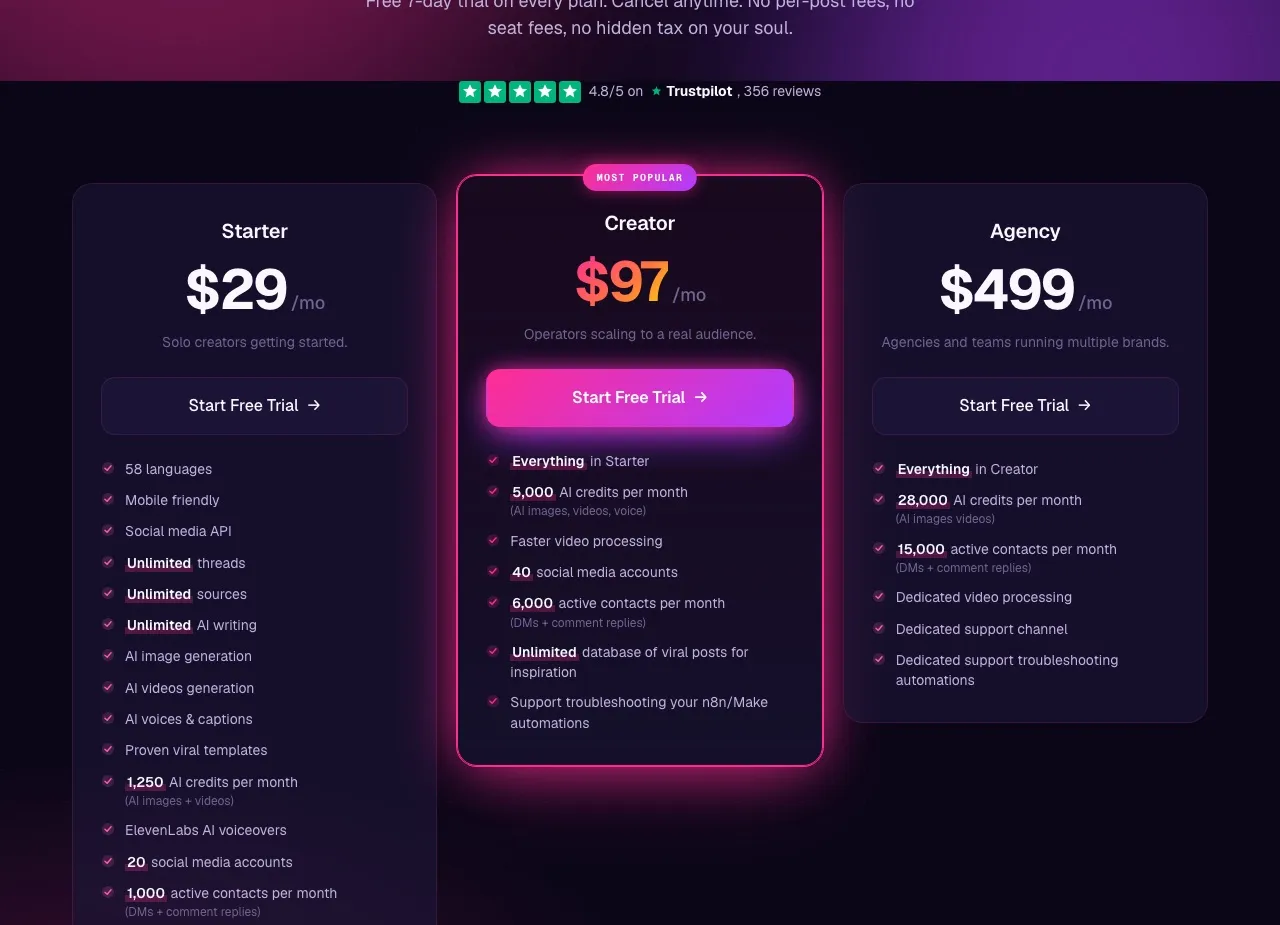
Three places this math misleads you:
If you need two people in the tool, Blotato does not have an answer. There is no seat model to upgrade and no second login to buy. That is not a pricing win for us, it is a missing feature, and $29 against $79 is not a like-for-like comparison when only one of the two can seat a colleague at all.
If you need Reddit, Snapchat or Google Business reviews, the price comparison is irrelevant. Blotato cannot publish there, and the honest move is to check your destination list against what each social media API actually reaches before you compare a single price.
If you only need the web app, you are paying us for an API you will never call, and our interface is younger than the calendar-and-approvals tooling a dedicated dashboard buyer expects.
Our Limits, Stated Before You Hit Them
Every tool’s caveats section is written by someone who wants you to buy their thing, so here are the specific numbers rather than the soft version.
Blotato applies its own anti-spam caps that are stricter than the platforms’ own limits, and they are not optional. Instagram is capped at 50 posts per 24 hours per account, where Instagram itself allows more. Facebook is 25 per Page per 24 hours, and LinkedIn is 50 per profile and per company Page.
Pinterest is the strictest of them. It is 10 pins a day per account, and a new Pinterest account needs two to three weeks of manual warm-up plus 100 monthly views before it will connect at all. On Starter, TikTok is limited to 3 distinct accounts per rolling 24 hours at 10 posts each.
Starter also caps queued scheduled posts at 200 and media uploads at 400 MB, and the scheduling horizon is 9 months on every tier.
And the one that catches builders: the 7-day trial excludes the API entirely. Generating an API key immediately ends the trial and starts the paid Starter subscription. If you came here to test an agent integration, plan on subscribing rather than trialing.
Choose Vista Social If
- You need a shared social inbox that a team of two or more works out of
- Review management on Google Business Profile, Yelp or TripAdvisor is part of the job
- You publish to Reddit or Snapchat, neither of which Blotato reaches
- You want to hand clients an AI-connected dashboard under your own brand
- Social listening and approval workflows are why you are buying a tool at all
Choose Blotato If
- Your agent is the primary operator and the web interface is an afterthought
- You want the API key at signup rather than after a sales conversation
- A predictable bill at 10x posting volume matters more than the lowest entry price
- Your destinations sit inside the 9 platforms we cover
- You want AI image and video generation in the same subscription as publishing
What I Would Actually Tell a Friend
If you are one person or one agent running your own brands, Blotato at $29 covers the work and you will not touch most of what Vista sells. If two or more people share an inbox, or clients need their own branded dashboard, Blotato has no seat model and no white-label layer to offer you, and I would rather say that than sell you a bad fit.
What I would not do is buy either one off an AI summary right now. Two of the four assistants I asked got Vista’s MCP story wrong, and Vista’s own site gives three answers about its own pricing tier. Open the pricing page, click Monthly, scroll to the compare table, and ask sales to confirm in writing which plan unlocks what. If you land on us, start the Blotato subscription rather than the trial, because the trial will not let your agent make a single call.
Blotato vs Vista Social FAQs
Does Vista Social have an MCP server?
Yes. Vista Social runs a hosted MCP server at mcp.vistasocial.com/mcp, and a JSON-RPC connection to it returns a 401 asking for credentials, which confirms it is live and auth-gated. Claude and Perplexity both told me Vista has no MCP server when I asked them in September 2026, and both were wrong. Vista markets it as exposing 50-plus tools covering scheduling, analytics, inbox, ideas, media and reporting.
Which Vista Social plan do I need for MCP access?
Vista’s own surfaces give three different answers. The pricing page card lists “Ask Vista + MCP” on Professional at $79 a month, the MCP hub FAQ says it is included with the Advanced plan and higher at $149, and the MCP setup guide published on 2026-09-21 says it is available with any paid subscription. Get your tier confirmed in writing by their sales team before you buy.
Is Blotato cheaper than Vista Social?
At the entry tier, yes: $29 a month against $79, and Blotato includes 20 connected accounts against Vista’s 15 profiles. The comparison flips for teams, because Vista Professional includes two users and Blotato has no seat model at all. For one person or one agent, Blotato is the cheaper buy. For two people sharing an inbox, Vista is.
How much does Vista Social cost per month?
Its pricing page defaults to annual rates printed with a “/month” suffix, showing $64, $120 and $304. The real monthly prices are $79 for Professional, $149 for Advanced and $379 for Scale, though the compare table further down that same page prices Scale at $349 instead. Billed yearly, the plans are $758, $1,430 and $3,638.
Can Vista Social generate images or video?
No. Vista’s AI assistant writes captions, post ideas, replies and translations, and its own AI assistant page describes text-based help only. Blotato generates AI images and faceless video, metered by credits. If AI creation is what you are shopping for, that is a real difference, though it is not the part of Blotato most agent builders use.
Which tool is better for an agency managing client accounts?
If your agency needs seats bundled into the plan price, review management and a white-labeled client dashboard, Vista Social is built for that job and Blotato is not, because we have no seat model and no white-label layer at any tier. Blotato fits the narrower case where one operator or one agent runs several brands and nobody else needs to log in.