Blotato Is Now an Official ChatGPT Plugin for Social Media
Blotato is now in ChatGPT's Plugins directory. Install it to schedule social media posts, answer comments and run DM automations from chat.
Tell ChatGPT to move your Friday posts to Monday, and they move.
Blotato is now an official plugin in the ChatGPT Plugins directory, published by Blotato Inc. after OpenAI’s review. From one conversation, ChatGPT can schedule and publish your posts across nine platforms, answer Instagram and Facebook comments and DMs, read your post analytics, and build DM automations.
You could already connect Blotato to ChatGPT, but only by adding a custom MCP server by hand, and OpenAI fences that route in. Full custom MCP support covers Business, Enterprise and Edu workspaces on the web. On Business only an admin or owner can add the server, and Pro accounts get read and fetch, which cannot publish.
Then come eight steps: open Plugins, choose Add custom MCP server, type in the server URL, pick OAuth, click through a risk warning, create the plugin yourself, connect it, approve access. Now you install it from the directory and sign in.
Full disclosure, Blotato is my company. The plugin signs in to a Blotato account, and MCP access starts on a paid plan, from $29 a month. The 7-day trial covers the web app but not the API or MCP, so plan on starting the subscription if the plugin is why you are here. During the trial, ChatGPT’s calls to Blotato can fail with a subscription error.
What You Can Ask It
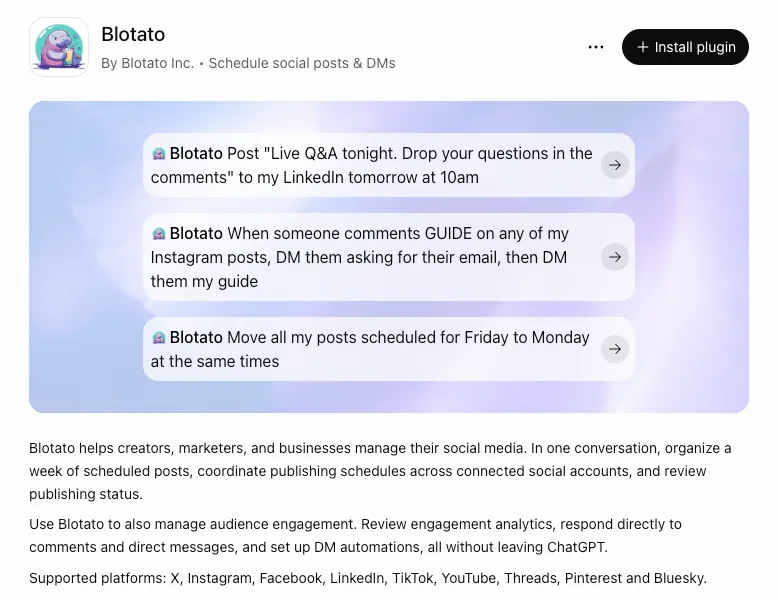
The listing ships with three example prompts. Each one maps to real tools on Blotato’s MCP server, so here are the tools behind them.
- “Post ‘Live Q&A tonight. Drop your questions in the comments’ to my LinkedIn tomorrow at 10am.” ChatGPT calls
blotato_create_postwith a scheduled time. The same tool publishes immediately when you leave the time out. - “When someone comments GUIDE on any of my Instagram posts, DM them asking for their email, then DM them my guide.” That is a DM automation with an email gate, created through
blotato_create_automation. A new automation starts as a draft, so ask ChatGPT to turn it on. The gate waits up to 72 hours for a reply and keeps the first email address it finds. The automation runs in your Blotato account, so the chat does not need to stay open. - “Move all my posts scheduled for Friday to Monday at the same times.”
blotato_list_schedulesfinds the Friday posts andblotato_update_schedulemoves each one.
Past the examples, the same conversation can pull performance with blotato_get_post_analytics, reply to a comment with blotato_post_comment, and answer a DM with blotato_send_message. You can manage the DM automations it builds in the web app too, since both sides read the same account.
What Sits Behind the Install Button
The listing points at mcp.blotato.com/mcp. That is the same hosted server Claude and Cursor connect to, so your connected accounts, scheduled posts and automations are all already there when ChatGPT signs in. At launch, Blotato’s MCP tools reference lists 35 tools on that server.
Getting into the directory is not self-serve. OpenAI’s plugin submission guide has a developer verify their identity and their server’s domain, pass automated checks, and clear a review before anything is published.
Updates work differently. Per that guide, OpenAI scans a listed plugin’s server daily. Eligible changes to existing tools go live once they pass automated checks, with no new package version or separate publish step, while a brand-new tool stays unavailable until it is approved.
“If you already draft your posts in ChatGPT, copying them into a scheduler is the step you can drop. The post goes from the chat straight onto the schedule.” - Sabrina Ramonov, founder of Blotato
Once it is installed, ChatGPT reaches for the plugin on its own when a request fits. You can also call it by name with an @ mention.
Who Can Install It
OpenAI makes the Plugins directory available across ChatGPT plans, but says installing or using a given plugin depends on your plan, workspace, role, region and the plugin’s capabilities. It publishes no per-plan rule for write actions in directory plugins, so publishing through the plugin on Plus or Pro is not confirmed yet. On a company workspace, an admin may need to allow it before it appears. Depending on your app permission settings, ChatGPT may also ask you to approve a post or a DM before it runs.
If you already added Blotato as a custom MCP server, it keeps working, and the setup steps for every client are still documented.
Still Early, and Honest About It
This just shipped. Three things to know before you lean on it.
- A publish returns a receipt, not proof. Ask ChatGPT to check the post’s status before you assume it went live. A scheduled post reports as scheduled until its time comes.
- The engagement side is Instagram and Facebook only. Comments, DMs and DM automations cover those two. Publishing covers all nine platforms, and analytics covers eight, because LinkedIn returns no metrics yet.
- Comment automations reply in public by default. Right after the first DM, Blotato posts a short public reply under the triggering comment. Tell ChatGPT to switch that off if you would rather not add a reply to the thread.
Where to Find It
Open Plugins in the ChatGPT sidebar and search for Blotato, or go straight to the Blotato listing. Click Install plugin, then authorize your Blotato account when ChatGPT prompts you.
Then send a first request: List my connected Blotato accounts. If your accounts come back, you are wired up and can start scheduling. If the list is empty, connect a social account in Blotato first.