How to Post to Social Media From ChatGPT (What Actually Works)
Post to social media from ChatGPT with a custom MCP connector: the real setup, the plan requirement, and the auth path that actually works.
To post to social media from ChatGPT you add a custom MCP connector, because ChatGPT ships with no built-in path to your accounts. It drafts beautifully and publishes nothing. Every route that actually puts text on LinkedIn or a photo on Instagram runs through a server you point it at.
Which leaves one question worth settling before you click anything: how you authenticate that server.
That sounds like a small thing. It is the difference between a connector that works on the first try and a 401 you cannot explain.
Every Way to Post to Social Media From ChatGPT, Compared
ChatGPT never touches a social platform directly. Something you connect does the publishing for it. Here are the routes worth evaluating and what each one costs.
| Path | Platforms | Setup | Where it breaks |
|---|---|---|---|
| Plain ChatGPT, no connector | None | Nothing to set up | It drafts. It cannot publish. There is no setting that changes this |
| Custom MCP connector | Whatever the server covers | Add one server URL, authenticate once | Requires a paid ChatGPT plan, and web only |
| Custom GPT Action you build | Whatever you wire | An OpenAPI schema plus auth for whatever it calls | Point it at one aggregation API and it is manageable. Point it at the platforms directly and you own a developer app and a separate set of posting rules for each |
| Zapier or Make in the middle | Whatever the connector covers | A zap or scenario per action | Zapier dropped its X integration back in 2023, so X still needs another route |
The middle row is the one worth your time, and it is the one this post walks through. Hosted multi-platform posting starts around the same price across the category, so the sticker should not decide this for you. Blotato’s Starter is $29 a month for one user and up to 20 connected accounts. Postiz Standard is $29 for 5 channels, it does not meter posts, and its Team tier at $39 adds colleagues, which Blotato does not offer at any price. Postiz is also open source if you would rather run it yourself and absorb the hosting instead of the subscription. Compare on connected accounts and on whether you need other people in the tool, not on the headline number.
I build one of those servers, so weigh my framing accordingly. If you already know you want that path, connect your accounts first and the config below takes about two minutes.
Free 7-day trial · Cancel anytime
One correction before you click that, because it will save you a support ticket. The trial covers the app but not the API, and generating an API key ends the trial and starts the paid Starter subscription immediately. So the trial is the way to evaluate Blotato itself, and the connector is a paid-from-day-one feature. Budget for the subscription rather than planning to test the connector inside the free week.
The Plan Requirement Nobody Mentions Until You Hit It
Custom MCP servers are not on every ChatGPT account.
You add one on the web, not in the mobile app. That part is firm: OpenAI’s help centre says custom MCP servers cannot be connected on mobile.
Which paid tiers get it is less settled than most guides admit, and OpenAI has moved this more than once. OpenAI’s help centre currently lists full MCP, the kind that can take write actions like publishing, on Business, Enterprise, and Edu, and limits Pro to read and fetch. On a Business workspace, only an admin or owner can add the server. ChatGPT Dots, OpenAI’s always-on agent, draws on the same Plugins menu, so the same tier rule applies to any custom plugin a dot can use. A free account has no path either way. Check whether your own Plugins page offers Add custom MCP server before you plan around a tier, and if it does not, Codex is a different OpenAI product that takes the same endpoint with a plain API key header and no tier requirement.
One catch before you go hunting through settings. OpenAI changed the setup. If a walkthrough tells you to turn on Developer mode first, or to look under Connectors, it predates the current Plugins flow. OpenAI’s help centre now says you do not need to turn on Developer mode first. You add the server straight from Plugins.
Instagram carries a requirement that has nothing to do with ChatGPT and catches people anyway. Publishing to Instagram through any API means the Instagram Graph API, which requires a professional account. A personal account cannot be published to programmatically, by us or by anyone else. Convert it before you start wiring anything, or the connector will work perfectly and Instagram will still refuse.
Two Auth Paths, and the One ChatGPT Uses
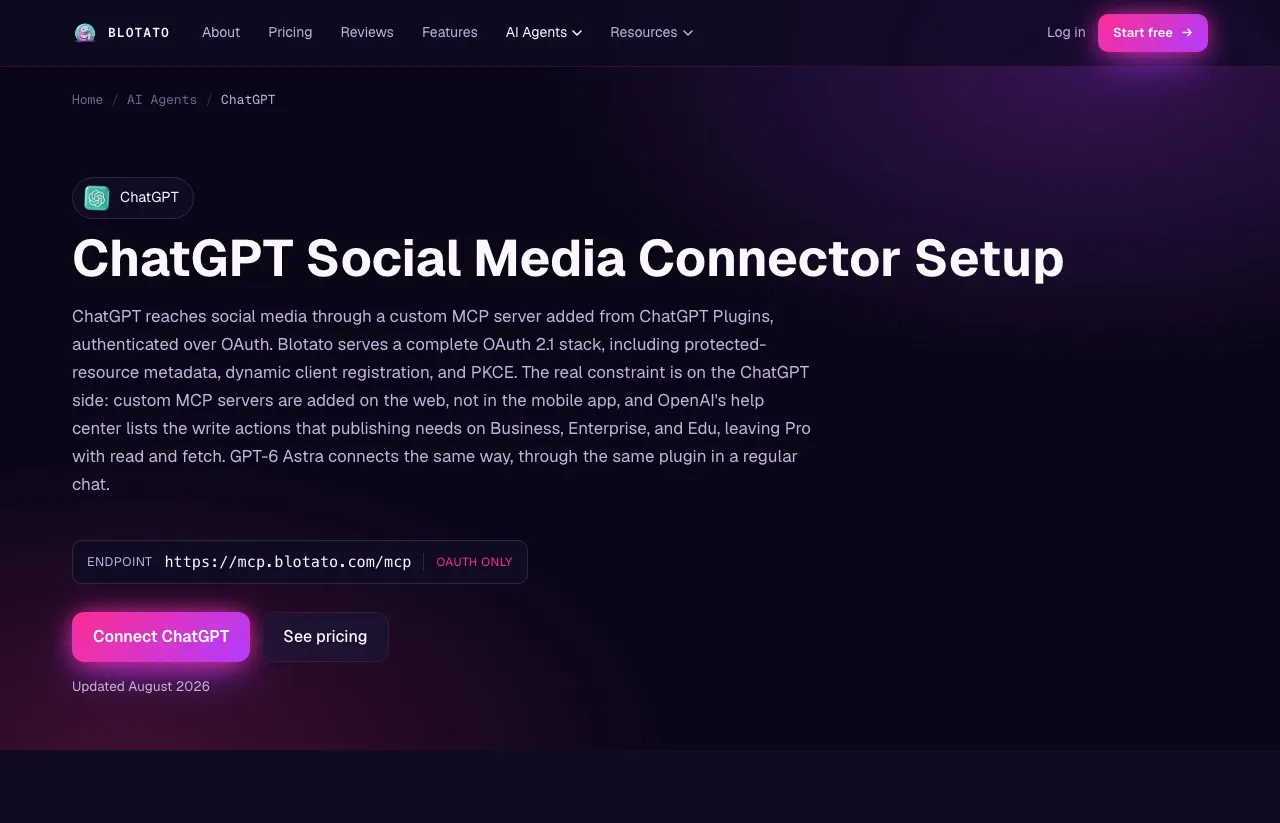
Blotato’s server takes more than one kind of credential, and older setup guides, an earlier version of our own included, pointed ChatGPT at the wrong one.
Both of our ChatGPT instructions now agree on OAuth. The ChatGPT connector page marks the endpoint OAuth only for ChatGPT, and the MCP setup guide tells you to choose OAuth authentication. The header config in that guide is for clients such as Cursor and Codex, where you leave the bearer field blank and set a header key of blotato-api-key.
Mix the two up and you get a 401 with nothing on screen explaining why.
The server itself is not the constraint. Sending no credentials at all returns a 401 whose body names every method it accepts:
{"error":"invalid_token","error_description":"Missing API key or OAuth2.1 token. Pass blotato-api-key header or Authorization: Bearer <key> or use OAuth2.1 authentication flow"}A blotato-api-key header returns a normal MCP handshake from that same endpoint, and mcp.blotato.com/.well-known/oauth-protected-resource resolves with a real authorization server behind it. Three working methods, server side.
So use OAuth with ChatGPT, the path both of our guides document for it, and treat the header config as the path for clients that take headers, which is what Cursor and Codex do.
If you hit an “auth unsupported” error, that is the signal you are on the wrong path for your client rather than a broken connector, and the fix is a different config rather than a support ticket.
Adding the Connector
Connect your social accounts in Blotato first. You authorize each platform once inside Blotato, which is real setup work, just done in one place rather than a developer app per platform. This is also the step people skip, and skipping it produces a connector that authenticates perfectly and then reports zero accounts, which reads exactly like a broken connection when it is really an empty workspace.
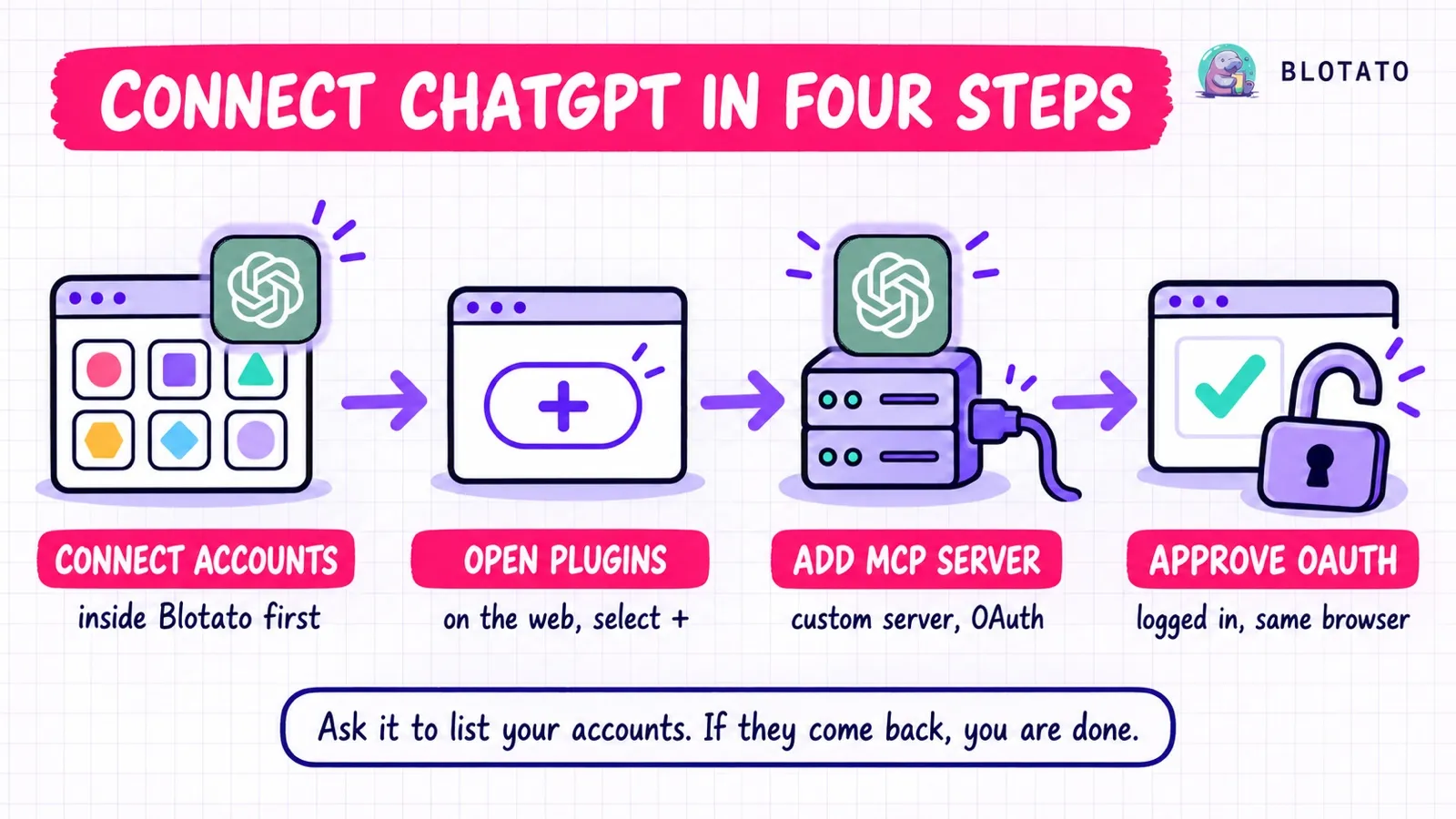
That is the whole shape of it. Here are the individual clicks, in ChatGPT on the web:
- Open Plugins, select the plus button, then Add custom MCP server. You do not need to turn on Developer mode first.
- Name it Blotato and set the URL to
https://mcp.blotato.com/mcp. - Choose OAuth for authentication, review the risk warning, and check I understand and want to continue.
- Select Create as a plugin.
- Complete the OAuth approval in the browser, while logged into Blotato in that same browser, then review the tools it discovers. The login is the part people miss, because the approval needs a live Blotato session to approve against.
- Install the plugin, then start a new chat, type
@, and select Blotato.
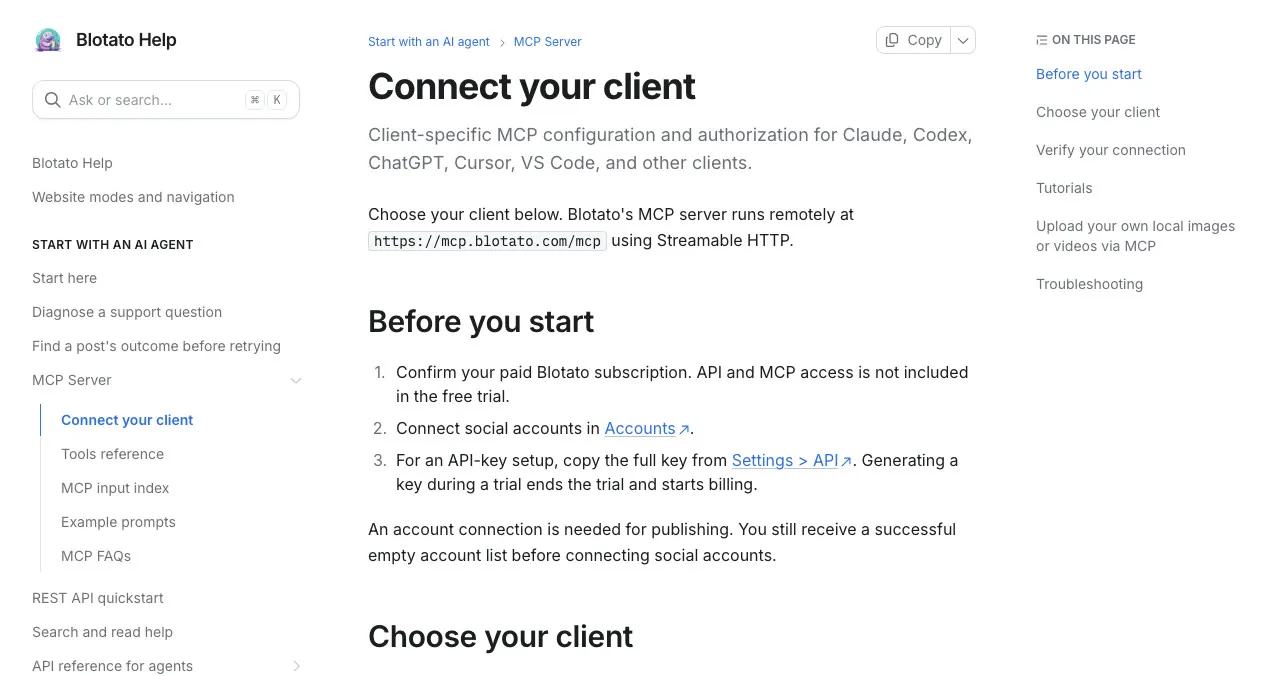
If you are instead setting this up in a client that takes headers, such as Cursor or Codex, leave the bearer field blank, set a header key of blotato-api-key, and paste your key in as the value. Copy the whole key: if it ends in one or more = characters those are part of it, and dropping them produces a 401 that looks identical to a wrong key.
Confirming it worked
Ask ChatGPT what accounts you have connected. It calls blotato_list_accounts and returns your platforms, which confirms the connection and the authentication in one move. If your accounts come back, you are done.
If nothing comes back, these three failures look identical from the chat window and have different fixes:
- The connector authenticates but returns an empty account list. Nothing is broken. You added the server but never connected any social accounts inside Blotato, so the workspace it is reading is genuinely empty. Connect your accounts in Blotato settings, then ask again.
- Every call returns a 401. Either the key is truncated, or you are using an auth path your client does not support. With ChatGPT, use OAuth rather than a header config copied from a Cursor or Codex walkthrough.
- There is no option to add a custom MCP server at all. Your plan or workspace does not allow it, you are in the mobile app rather than on the web, or you are on a Business workspace without an admin or owner role.
Start It in Read-Only
For the first week, do not give the connector permission to publish.
Ask it to list your accounts, pull analytics, and draft posts you copy out by hand. You will learn how the model phrases things and where it guesses wrong while the cost of a mistake is still zero.
This matters more from a chat window than from a script. A script posts what you told it to post. An assistant decides how to phrase the thing you asked for, and it makes small calls you never specified: which hashtags, whether to add an emoji, how to split a long thought across a thread. Those choices are fine once you have seen a week of them and bad the first time you see one in production. Turn publishing on after that.
What Runs Through One Connector, and What Does Not
Once connected, ChatGPT reaches nine platforms through Blotato: Instagram, TikTok, LinkedIn, Facebook, X, Threads, Bluesky, Pinterest, and YouTube.
The engagement surface is narrower, and the edges are worth knowing before a prompt quietly returns nothing.
| Capability | Coverage |
|---|---|
| Publishing and scheduling | All 9 platforms |
| Analytics | 8 platforms. LinkedIn publishes normally but returns no metrics yet |
| Comments, read and reply | Instagram and Facebook |
| DMs and conversations | Instagram and Facebook |
| DM automation, keyword triggered | Instagram and Facebook, reply-only |
Posting limits are worth setting expectations on too, because several are ours rather than the platforms’. Blotato caps Instagram at 50 posts per 24 hours and Pinterest at 10 to 50 pins a day depending on the account’s monthly views, and those are our anti-spam guards sitting below what the platforms themselves allow. There are further caps on TikTok, YouTube, LinkedIn and Facebook, some of them tier-dependent, all listed in the account limits doc. An agent on a loop will find them long before a human would.
What you can actually ask it to do
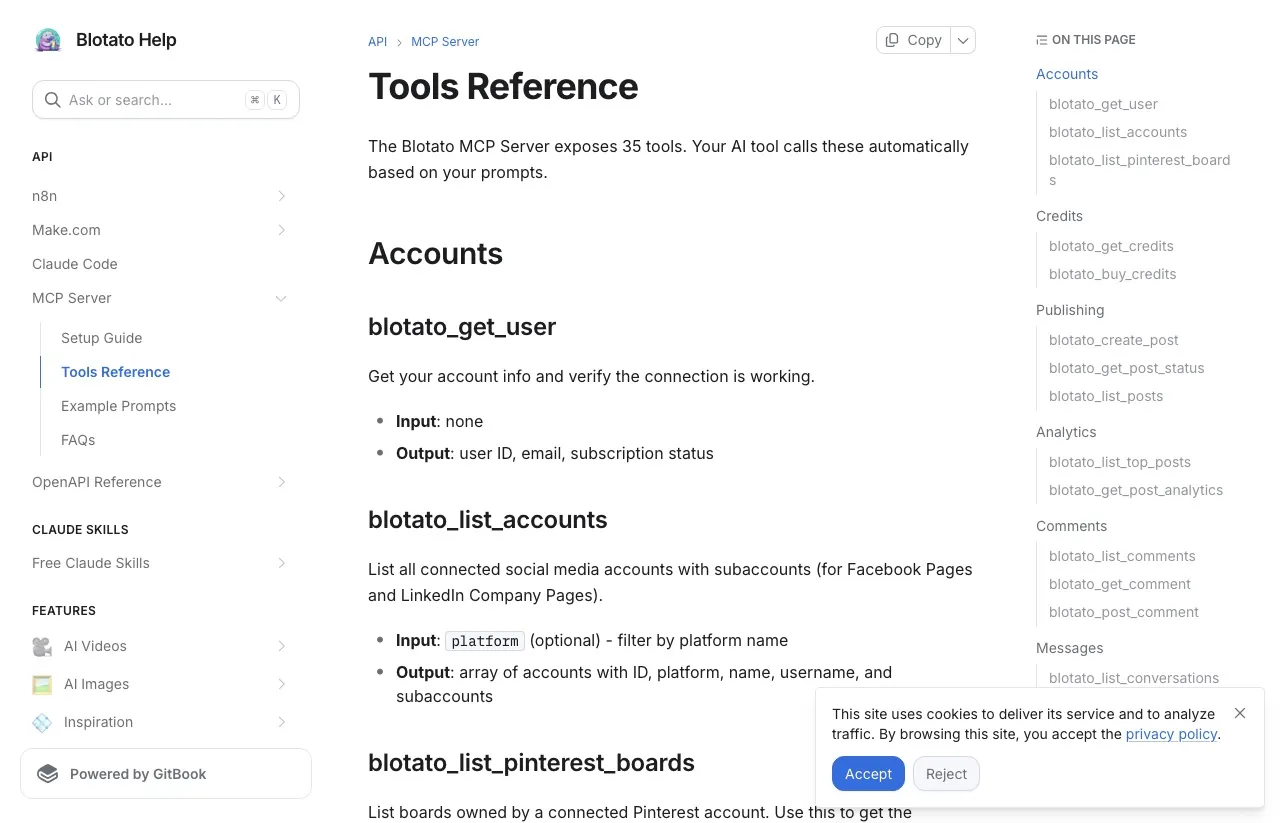
One connector gives ChatGPT 35 named tools, covering publishing, scheduling, comments, the inbox, keyword automations, analytics, and media generation. You never type a tool name, so read the table below as a map of what to ask for rather than syntax to memorize.
Our tools reference documents all 35, including blotato_update_automation_trigger, and the table below maps every one of them.
| What you ask for | Tools behind it |
|---|---|
| Publish, and confirm it landed | blotato_create_post, blotato_get_post_status, blotato_list_posts |
| See which accounts you can post to | blotato_list_accounts, blotato_get_user, blotato_list_pinterest_boards |
| Review and adjust what is queued | blotato_list_schedules, blotato_get_schedule, blotato_update_schedule, blotato_delete_schedule |
| Read what performed | blotato_list_top_posts, blotato_get_post_analytics |
| Work the comments (Instagram and Facebook) | blotato_list_comments, blotato_get_comment, blotato_post_comment |
| Handle the inbox (Instagram and Facebook) | blotato_list_conversations, blotato_get_conversation, blotato_list_messages, blotato_get_message, blotato_send_message |
| Run keyword auto-replies (Instagram and Facebook) | blotato_create_automation, blotato_list_automations, blotato_update_automation, blotato_update_automation_trigger, blotato_delete_automation, blotato_list_automation_runs, blotato_list_automation_logs, blotato_get_automation_analytics |
| Pull an article or video in as source material | blotato_create_source, blotato_get_source_status |
| Generate an image or video from a template | blotato_list_design_templates, blotato_create_design, blotato_get_design_status |
| Get an upload URL for a local file | blotato_create_presigned_upload_url |
| Check the credit balance | blotato_get_credits |
Two things to read off that table before you write a prompt against it. The three rows labelled Instagram and Facebook are where our engagement surface genuinely ends, so comments, the inbox, and keyword automations do not reach the other seven platforms. And a few rows stop earlier than their label suggests: scheduling something new goes through blotato_create_post with a time on it rather than a calendar tool, source extraction pulls the raw material while publishing stays a separate call, the upload tool hands back a URL your client then uploads to, and buying credits returns a Stripe checkout link for a human to complete rather than charging the card.
So “reply to anyone who commented on my last Instagram post” is a request that already works, and nothing in the interface tells you so. The full reference with arguments is in the MCP tools doc, and I broke down what keyword-triggered replies can and cannot do in the DM automation write-up.
The Honest Pitch: One Connector, Nine Platforms
The argument for routing ChatGPT through Blotato is not that we have an MCP server. That is table stakes now. Outstand, Postiz, Zernio, Buffer and Post Bridge all run one.
The argument is what sits behind the one connection. Publishing, scheduling, comments, DMs, and analytics arrive through a single server and a single key. Several competitors aggregate platforms too, and against those the honest comparison is the one above: connected accounts, engagement coverage, and whether you need teammates. Our Postqued comparison is a clean example, since both plans cost $29 for 20 accounts and the choice centers on team approvals versus Instagram and Facebook DMs.
The case for aggregation over building it yourself is the one that is not close, because going direct means a Meta app review for Instagram, a separate LinkedIn approval, X’s paid API tier, and a different bill and renewal date for each.
Worth knowing how crowded this has become, because it changes how you should read any recommendation, including mine. Ask two different assistants which tool to use for this and they return almost entirely different lists, mostly of names that did not exist a year ago, and often not the incumbents you would expect. That is a field that has not settled. Check the endpoint and the tier requirement yourself rather than taking any name on trust, this post included.
One API. Every social platform Blotato supports.
curl -X POST https://backend.blotato.com/v2/posts \
  -H "blotato-api-key: YOUR_API_KEY" \
  -H "Content-Type: application/json" \
  -d '{
    "post": {
      "accountId": "YOUR_ACCOUNT_ID",
      "target": { "targetType": "linkedin" },
      "content": { "text": "Posted from ChatGPT.", "mediaUrls": [], "platform": "linkedin" }
    }
  }'
That accountId is not something you invent. It comes from GET /users/me/accounts, and for a LinkedIn Company Page or a Facebook Page you also need a pageId from GET /users/me/accounts/:accountId/subaccounts. Through the connector you never touch either one, because the agent calls the tool that lists accounts and passes the right ID itself. The full endpoint reference is at help.blotato.com/api/start.
The MCP server at https://mcp.blotato.com/mcp exposes the full tool set listed above, which is the part that matters for an assistant rather than a script. ChatGPT picks the tool, fills the arguments, and reports what came back.
One thing to be straight about, because it rarely appears on a pricing page: Blotato is one user per account. There are no teammate logins, no roles, no audit trail. If you need three people posting with separate credentials, we are not the right fit yet, and I would rather say that here than let you find it after you subscribe.
Sabrina’s Take
I am biased, obviously. But I built Blotato because I got tired of maintaining a separate OAuth app for every platform I wanted to post to, and an assistant makes that worse rather than better, because it wants to touch all of them in one sentence.
If you are in ChatGPT every day anyway, the connector removes the copy-and-paste step between drafting and publishing, and the setup is genuinely a couple of minutes once you know which auth path your account supports. What I would not do is give it publish permission on day one. Let it draft for a week first.
And if what you actually need is a team, roles, and an approval queue, wait for us or look elsewhere. I would rather tell you that now than after you have wired everything up.
Posting to Social Media From ChatGPT FAQs
Can ChatGPT post to social media by itself?
No. ChatGPT drafts content but has no access to your social accounts out of the box. Publishing requires a custom MCP connector, a custom GPT Action you build, or an automation layer like Zapier or Make sitting in between.
How do I post to Instagram from ChatGPT?
On a Business, Enterprise, or Edu plan, add Blotato to ChatGPT as a custom MCP server, connect your Instagram professional account in Blotato, then ask ChatGPT to post your caption with a public image or video link. On Business, an admin or owner adds the server, and on Enterprise or Edu an admin can grant you permission to add it. From Plugins on the web, select the plus button, choose Add custom MCP server, enter https://mcp.blotato.com/mcp, pick OAuth, accept the risk warning, select Create as a plugin, and complete the Blotato sign-in. On Pro, OpenAI limits custom MCP servers to read and fetch, so ChatGPT can list your accounts but not post.
What ChatGPT plan do I need to add a custom MCP connector?
You need a paid plan and ChatGPT on the web, since custom MCP servers cannot be added from the mobile app. OpenAI’s help centre lists full MCP, which publishing needs, on Business, Enterprise, and Edu, and gives Pro read and fetch only. On a Business workspace, only an admin or owner can add the server. Tiers have shifted before, so check whether your own Plugins page offers Add custom MCP server.
Why does my ChatGPT connector authenticate but return no accounts?
You connected the server but have not connected any social accounts inside Blotato yet. The connector is working and the workspace is empty. Connect your accounts, then ask ChatGPT to list them again.
Can ChatGPT reply to Instagram comments and DMs through Blotato?
Yes, for Instagram and Facebook. Comments, conversations, and keyword-triggered DM automation are live on those two platforms only, and DM automation is reply-only. The other seven still publish and schedule normally, and all of them except LinkedIn also return analytics.
Can ChatGPT post to LinkedIn and Instagram in the same prompt?
Yes. Ask for both and the agent calls the posting tool once per platform, which is the practical advantage of one connector over per-platform integrations. LinkedIn Company Pages need a page ID, which the agent retrieves itself.
Why does my ChatGPT MCP connector return a 401 on every call?
The most common cause is an auth mismatch rather than a bad key. With ChatGPT, use OAuth rather than a custom API-key header config copied from a Cursor or Codex guide. If you are on a header client such as Cursor or Codex, check that you copied the whole key, including any trailing = characters. With ChatGPT, check that you completed the browser approval while logged into Blotato in that same browser.
Does ChatGPT’s custom MCP setup support an API key header or only OAuth?
Use OAuth with ChatGPT, which is the path both Blotato’s connector page and its setup guide document. The Blotato server itself does accept a blotato-api-key header and a Bearer token, but those paths are for clients that send custom headers, such as Cursor and Codex.
Is the 7-day trial enough to test the connector?
No. Generating an API key ends the trial immediately and starts paid Starter, so the API cannot be trialed. Budget for the subscription from day one.