Blotato Is Now in Claude's Connector Directory for Social Media
Blotato's Claude connector is now in the connector directory. Add it to schedule social media posts and run Instagram and Facebook DM automations.

Search for Blotato inside Claude, add it, and your next scheduled post is one message away.
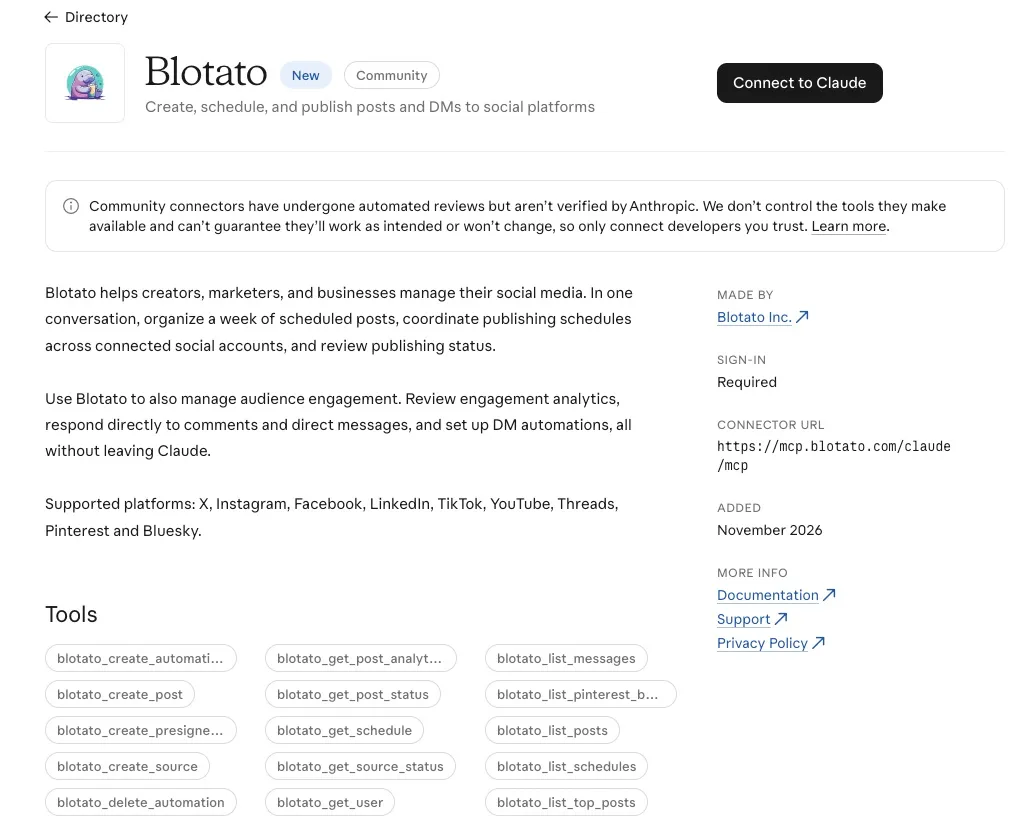
Blotato is now listed in Claude’s connector directory, as a Community connector made by Blotato Inc. You find it inside Claude, add it, sign in to your Blotato account, and start scheduling social media posts from the chat.
Until now, connecting Claude meant adding Blotato as a custom connector by hand: open Connectors, paste https://mcp.blotato.com/mcp, approve access. That route still works. But it only reached people who already had the URL, and on Claude’s Free plan it used up the one custom connector the plan allows.
Full disclosure, Blotato is my company. The connector signs in to a Blotato account, and connector access needs a paid plan, from $29 a month. The 7-day trial covers the web app but not API or MCP access, so Claude’s calls return a subscription error until the plan starts.
What Can Claude Do With Blotato?
Schedule posts, move them, answer comments and build DM automations. Here is what a few everyday requests turn into.
- “Schedule this LinkedIn post for Tuesday at 9am Eastern and put the other two in my next open slots.” Claude calls
blotato_create_post, once with a time and twice with your next free slot. With neither a time nor a slot, the post goes live right away. - “What goes out next week? Move Thursday’s post to Friday.”
blotato_list_schedulesreads the queue andblotato_update_schedulemoves that one post. - “Reply to the new comments on yesterday’s Instagram post.”
blotato_list_commentspulls them in andblotato_post_commentreplies to each top-level comment. - “When someone comments GUIDE on my posts, DM them the link.”
blotato_create_automationbuilds the comment-to-DM flow. It starts as a draft by default, so ask Claude to switch it on, and it keeps running in Blotato after the chat closes.
What Changes Now That Blotato Is in Claude’s Directory?
Three things: how you find Blotato, which plans can add it, and where it follows you. Anthropic says a directory label “affects how the connector is displayed and discovered in the directory, not how the connector itself functions.”
- You can find it without a URL. In Claude, open Customize (being renamed Plugins), then Connectors, then Browse connectors, and search for Blotato.
- Every Claude plan can add it. Directory connectors are open to all users, so a Free account no longer spends its custom connector slot on Blotato.
- It follows your Claude account. Add it once and it is there on the web, in the Desktop app and in Cowork. The Claude mobile apps can browse the directory too, though installing from a phone is still in beta.
On a Claude Team or Enterprise plan, an owner enables connectors for the organization first, and members can request one. Each person then signs in to their own Blotato account.
Already added Blotato by URL? Nothing to redo. Anthropic says directory and custom connectors use the same technology, and your custom connector reaches the same Blotato account.
Is Blotato Verified by Anthropic?
No. Blotato carries Anthropic’s Community label. Anthropic screens a Community connector for policy compliance before listing it but has not reviewed it in depth. Verified is a closer review that includes a functional test of each tool, and Anthropic decides on its own which listings to escalate. There is no application for it.
The label describes how far Anthropic’s review went. I lined up the label each social media connector carries if you want to compare.
“You already plan the week with Claude. Now the schedule lives in the same conversation as the plan.” - Sabrina Ramonov, founder of Blotato
Still Early, and Honest About It
This just shipped. Three things to know before you lean on it.
- The listing names 32 of Blotato’s tools. Blotato’s full tool list documents 35, and the three the listing leaves out are the visual template tools. If those do not show up in Claude, the custom connector at
https://mcp.blotato.com/mcpcarries all 35. - The engagement side is Instagram and Facebook only. Comments, DMs and DM automations cover those two. Publishing covers all nine platforms, and analytics covers eight, because LinkedIn returns no metrics yet.
- A publish returns a receipt, not proof. Ask Claude to check the post with
blotato_get_post_status. A scheduled post reportsscheduleduntil its time comes, so do not wait forpublishedbefore then.
How to Add Blotato to Claude
Three steps, and no server URL to copy.
Step 1: Open the Blotato listing
Open Blotato’s directory page, or search for Blotato under Browse connectors in the Claude app.
Step 2: Connect and sign in
Click Connect to Claude, then sign in to the Blotato account you want Claude to post from.
Step 3: Check the connection
Send a first request: List my connected Blotato accounts. If your accounts come back, you can start scheduling. An empty list means Claude is connected but no social accounts are, so connect one in Blotato first.
Using Claude Code or ChatGPT?
Claude Code still connects with one setup prompt, which is on the Blotato for Claude page along with the Cowork upload fix. And since Blotato is also an official ChatGPT plugin, the same account now works from both chats.