Blotato vs Planoly: Can Your Agent Answer Social Media DMs Too?
Blotato vs Planoly: both plug into Claude over MCP, but only one lets your social media agent work Instagram and Facebook comments and DMs.
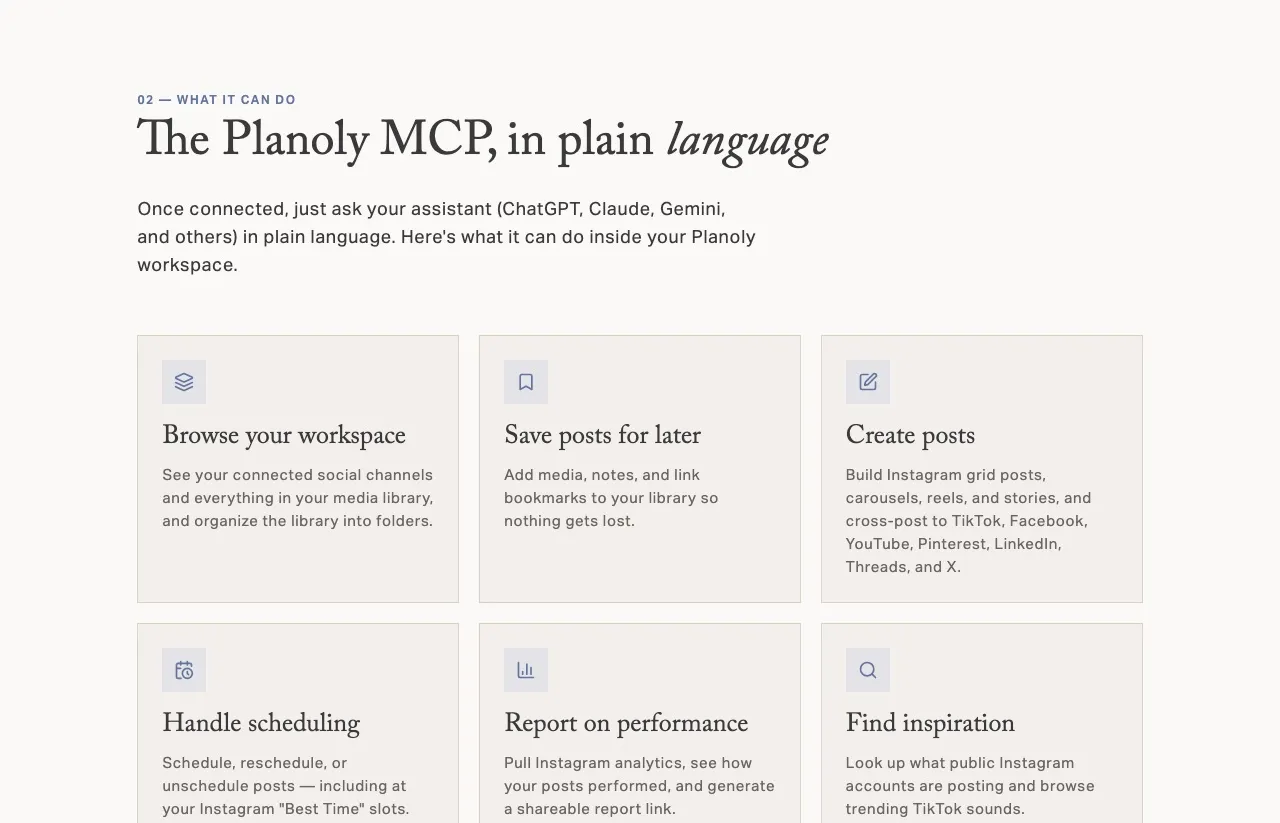
Blotato vs Planoly is no longer a planner against an API. Planoly runs a hosted MCP server, it is listed in Claude’s connector directory, and one of Planoly’s own example prompts has Claude drafting and scheduling a week of posts in one message.
So the real question is narrower. Planoly is a visual planner whose MCP server drafts and schedules posts, and Blotato is agent infrastructure for social media marketing whose MCP server also reaches Instagram and Facebook comments, DMs and DM automation. What changes the answer is whether the agent also has to read comments, answer DMs, or build the automations that reply for you.
Blotato is an app I built, so read my take on it with that in mind. What I can promise is that every Planoly claim below links to the page it came from, and nearly all of those pages are Planoly’s own.
Blotato vs Planoly: Three Questions Decide It
Question one: does your agent stop at the calendar? If Claude only needs to draft and schedule, Planoly covers it, even on its free plan, and a paid plan adds Instagram analytics through the same connector.
Question two: does your agent need to work the inbox? Planoly’s 22 documented MCP tools include no comment, DM or automation tool. Blotato’s MCP server reads and replies to comments, reads and sends DMs, and builds DM automations, all on Instagram and Facebook only.
Question three: who is doing the replying? If you build Instagram automations yourself in an app, Planoly’s builder does more than ours on Instagram, with story-reply triggers and public replies. If an agent answers your Instagram and Facebook comments and DMs, Blotato’s server is the one of these two that exposes them, starting at $29 a month on Starter.
What Planoly’s MCP Server Can Reach
Planoly is a social media planner built around a visual Instagram grid. It holds a 4.7 rating on the US App Store, and it bundles Creator Store for selling products from your link in bio.
The MCP server is the newer half. Its own tool list names 22 tools, and here is how they split between reading and writing:
| Group | Tools | Read or write |
|---|---|---|
| Workspaces and channels | list_workspaces, list_channels | 2 read |
| Media library | list_media_library + 4 that create, update or delete items and folders | 1 read, 4 write |
| Bringing in media | create_asset_from_url, request_asset_upload, confirm_asset_upload | 3 write |
| Posts and scheduling | create_post, update_post, set_post_group_schedule, delete_post_group, list_post_groups | 4 write, 1 read |
| Tagging and inspiration | Instagram location and product search, a public Instagram account lookup, TikTok trending sounds | 4 read |
| Analytics | get_instagram_analytics, list_post_performance, create_post_report_share_link | 2 read, 1 write |
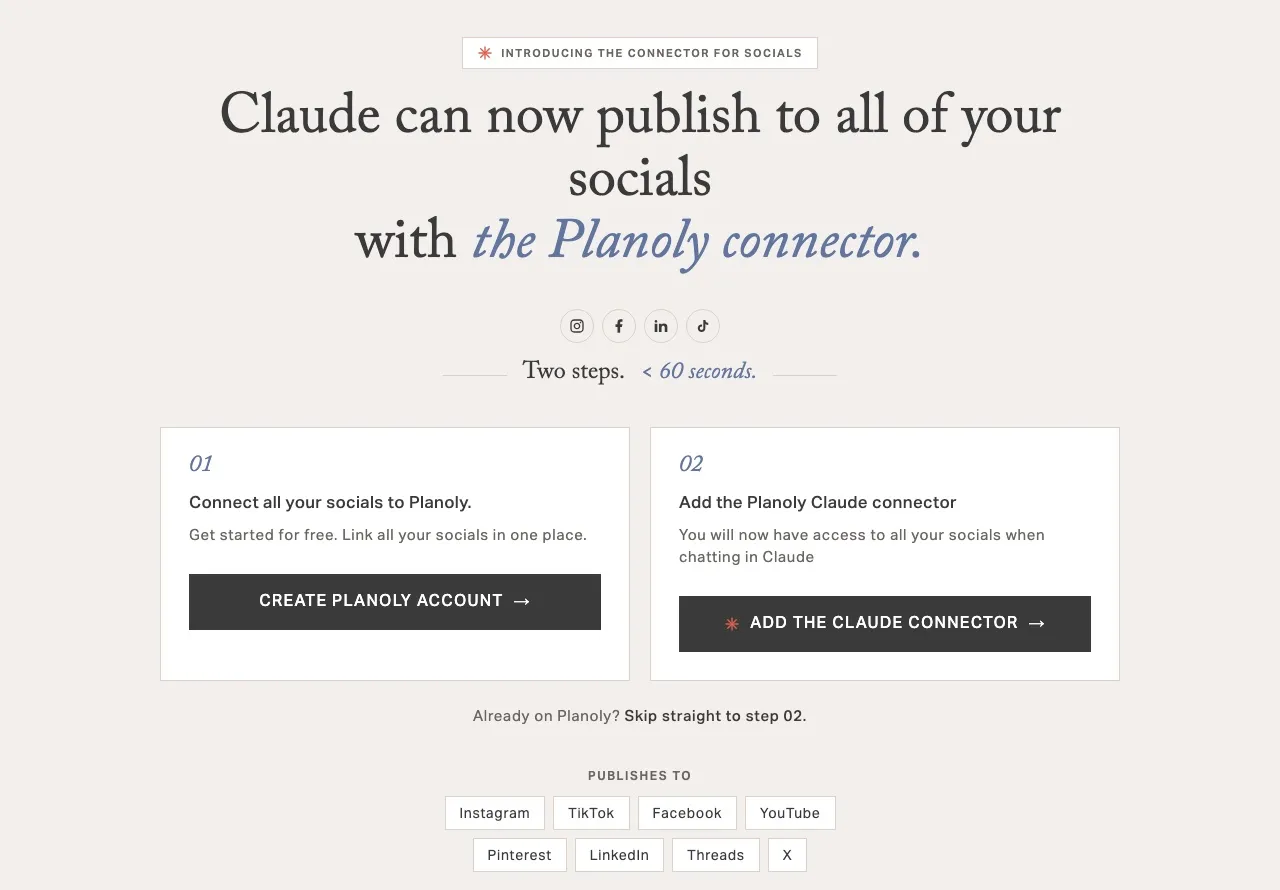
That is 10 reads and 12 writes. The writes create and schedule posts, manage media, and make a shareable report link, and every analytics read is Instagram. Planoly’s setup guide says the same: the assistant can “pull Instagram analytics,” and publishing reaches Instagram, Facebook, TikTok, YouTube, Pinterest, LinkedIn and Threads, with X “as reminders only.”
Two Planoly pages describe the connection’s reach differently. The /ai page says the assistant “acts only inside the workspace you connected.” The setup guide says the OAuth token “reaches every workspace you are a member of,” and each request names the workspace it acts on. If you run several workspaces, assume the token can reach all of them until Planoly’s pages agree.
The Instagram Inbox Planoly Built for People
On Instagram automations built by hand, Planoly is ahead of us, and I want to be specific about how. Every paid plan includes an Instagram inbox for comments and DMs, and a comment-to-DM builder that answers both post comments and story replies.
The builder does things ours does not. On a post it can leave a public reply under the comment, rotating through three public replies. The DM itself can be text, a photo or video, a card with buttons, or a gallery of up to 10 cards. And when two automations match one comment, Planoly sends one reply and warns you about the clash.
Both live in the Planoly app, not in its MCP server. The inbox covers Instagram only, an automation on one post needs that post to publish through Planoly (an Every post automation also covers posts published elsewhere), and both carry a “rolling out” note, so some accounts do not have them yet. None of the 22 MCP tools reaches either one, which means Claude can schedule the post but cannot read the comments it earns.
The Same Inbox, Reached Through One Key
Blotato is built for the other case, where the agent does the replying. The inbox sits behind the agent’s key rather than inside an app: the same key that publishes to 9 platforms also reads comments, sends DMs and runs DM automation on Instagram and Facebook, over REST or the hosted MCP server.
As of October 9, Blotato’s MCP server lists 35 tools. Eight of them work the inbox: blotato_list_comments, blotato_get_comment, blotato_post_comment, blotato_list_conversations, blotato_get_conversation, blotato_list_messages, blotato_get_message and blotato_send_message. Eight more build, edit and report on keyword automations, from blotato_create_automation to blotato_get_automation_analytics.
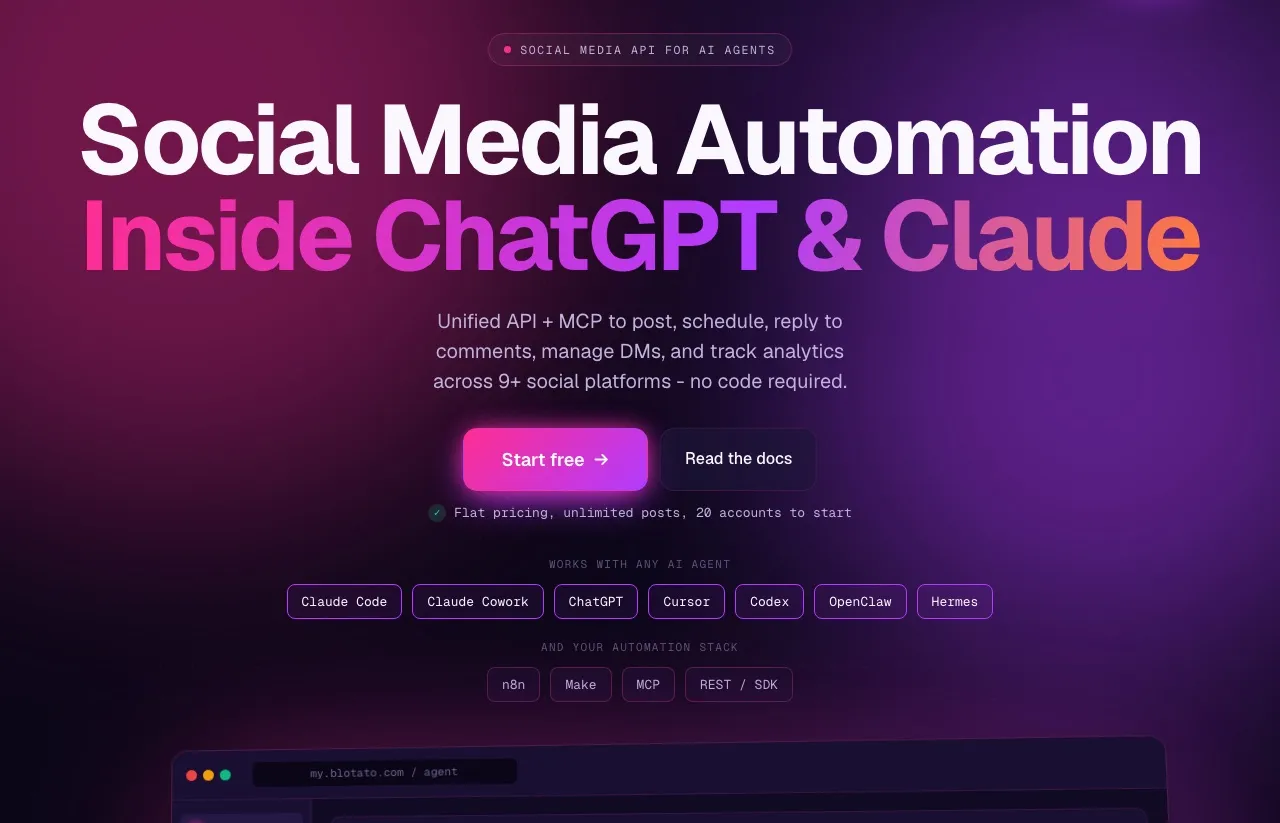
In practice, that is one Claude session that publishes a reel, attaches a keyword automation to it, and later checks that automation’s runs. Replies follow the platforms’ messaging windows, so a private reply goes out once per comment within 7 days, and a regular DM inside the 24-hour window. The engagement side is Instagram and Facebook only, so an agent cannot reply on TikTok, LinkedIn or YouTube through Blotato either. The same key also runs from n8n and Make, where Blotato has native nodes, and Planoly lists no planner API or n8n integration that I could find.
Connecting Each One to Claude
In Claude Code the two set up almost identically: one claude mcp add --transport http command, then a sign-in in the browser. Planoly signs in with OAuth only, and its guide covers Claude, ChatGPT in Developer Mode, Claude Code and the Gemini CLI. Blotato takes OAuth or an API key in a request header, and its setup guide walks through Claude.ai, Claude Desktop and Cowork, Claude Code, Codex, ChatGPT, Cursor and VS Code, plus a generic config for other clients.
The header option matters for one kind of agent. An OAuth connection needs a person at a browser to approve it the first time, so a job that runs on a server with nobody watching is easier to wire up with a key.
The two also handle a bad post differently. Planoly checks each post against the network’s media rules before it schedules, and its own demo shows the agent skipping two drafts whose aspect ratio was out of range. Blotato’s publish call is asynchronous: blotato_create_post returns a submission ID, and the agent polls blotato_get_post_status until it reads published, scheduled or failed, with an error message on a failure.
For approvals, Planoly marks every tool that creates, changes or deletes something as destructive, which tells your client to ask first. With either connector, Claude lets you set each tool to need your approval before it runs, which is the setting I would use on any tool that publishes.
Planoly vs Blotato: Capability by Capability
| Capability | Planoly | Blotato |
|---|---|---|
| What it is | A visual social media planner with an MCP connector | Agent infrastructure for social media marketing, one key over API and MCP |
| Publishing | 7 networks auto-post, X is reminder-only | 9 platforms, scheduled or immediate |
| What the bill counts | Social sets (one of each of 8 channels) plus users | Connected accounts, flat per plan |
| Hosted MCP server | Yes, 22 tools, OAuth only | Yes, 35 tools, OAuth or an API key |
| Claude connector directory | Listed as a Community connector | Added as a custom connector |
| REST API | None documented for the planner | Yes, on paid plans |
| n8n / Make.com | No n8n integration page, and no public planner API to call | Native nodes for both |
| Comments through the agent | No MCP tool | Instagram and Facebook |
| DMs through the agent | No MCP tool | Instagram and Facebook |
| DM automation | In the app, Instagram posts and stories, with public replies | Through the agent or app, Instagram and Facebook, reply-only, no public comment replies |
| Analytics | App: 5 networks incl. LinkedIn Pages (beta). MCP: Instagram only | 8 of 9 platforms (LinkedIn not yet) |
| Free option and trial | Free plan at 10 posts a month per workspace, 14-day trial on paid plans | No free plan, 7-day trial on the web app only, no API or MCP |
| Users | 1, 2 or 6 by plan, plus add-ons | One user per account |
| Grid planner and link-in-bio store | Yes (Creator Store) | No |
| AI writing and media | AI Caption Writer and Idea Generator | AI writing, plus images and video on AI credits |
The table splits into two halves. Above the analytics row, the question is what an agent can touch, and on Instagram and Facebook the answer leans our way. Below it, the rows are about what a person gets in the app, which is where Planoly’s free plan, extra seats and grid planner show up.
Where Planoly Is the Better Buy
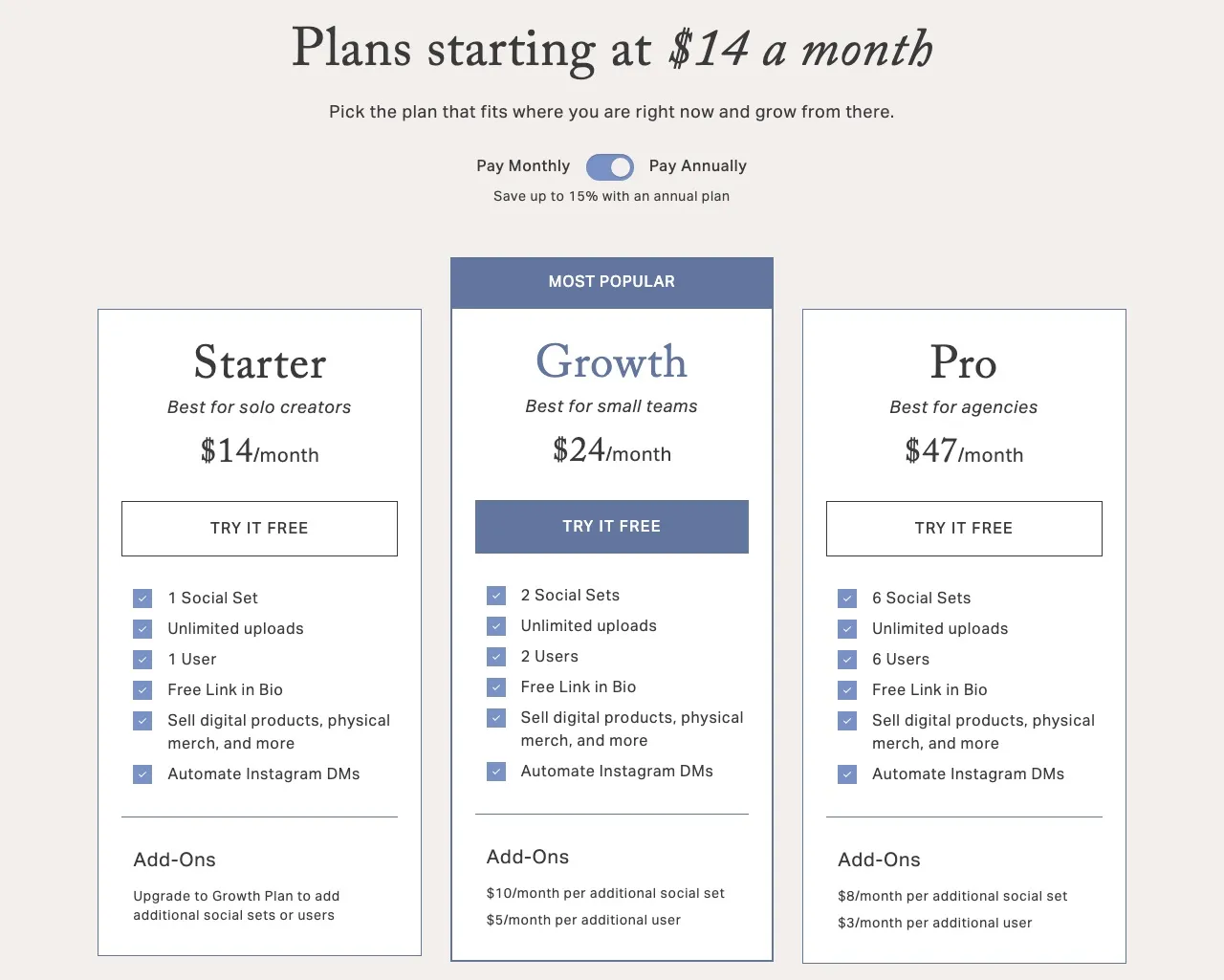
It costs less for one person running one brand. Planoly’s Starter is $16 a month, or $14 billed yearly, for one social set, which is one account on each of 8 channels. Blotato Starter is $29 a month, so for one person running one brand, Planoly costs a little over half as much, as long as X reminders are fine.
Its MCP works on the free plan. Planoly’s setup guide says “Drafting and scheduling posts do not need a paid plan.” The free plan caps you at 10 posts a month per workspace, but that is enough to test the connector, while our trial excludes the API entirely.
It is in Claude’s directory. Planoly has a Community listing in Claude’s connector directory, which Anthropic describes as automatically reviewed but not verified by Anthropic, and connecting from there is a click. Blotato is added as a custom connector by pasting its URL.
Its Instagram automations do more for a person in the app. Story-reply triggers, public comment replies and card or gallery DMs are all in Planoly’s builder, on accounts the rollout has reached. For a creator answering their own Instagram, that is a better toolkit than ours.
It reports on LinkedIn Pages. Planoly’s in-app analytics cover Instagram, Facebook, Pinterest, TikTok and LinkedIn Pages, with Facebook and LinkedIn in beta. Blotato returns no LinkedIn metrics yet, so if LinkedIn Page numbers matter to you, Planoly’s app has them and our API does not.
It handles a small team and the grid. Growth includes two users and Pro includes six, while Blotato is one login per account. And if the visual grid and a storefront in your bio are what you open the app for, Planoly is built around exactly that.
Limits on Our Side of the Connector
These are ours, and they matter more to an agent builder than to someone in the web app.
Our MCP analytics filter is narrower than our API. Blotato collects analytics on 8 platforms, but the MCP’s blotato_list_top_posts filter accepts only X, Instagram, Facebook, Threads and Bluesky. Through MCP you cannot ask for TikTok, YouTube or Pinterest alone, and the REST endpoint is the way to filter by them.
Duplicate automations are on you. If two live Blotato automations match the same incoming DM, both send, so the person gets two messages. On a comment only one reply gets through and the other run fails, and our docs recommend one live automation per keyword per account. Planoly lets only one automation answer and warns you about the clash, so with us your agent has to keep keywords unique.
Our automation DMs are plain. A Blotato automation sends text with up to 3 link buttons, plus optional email and follow gates. Planoly’s builder can send a photo, a video, a card or a gallery of cards, so if the DM itself is the sales page, Planoly’s format is richer.
What Each Path Costs Your Agent
The pricing models count different things. Planoly counts brands and people, Blotato counts connected accounts. I covered how a social set gets expensive as you add channels in the Later comparison, so here I only price the agent’s reach. All figures are monthly billing.
| What your agent needs at the entry tier | Planoly Starter ($16/mo) | Blotato Starter ($29/mo) |
|---|---|---|
| Draft and schedule posts from Claude | Yes, also on the free plan | Yes, not on the trial |
| Accounts | One of each of 8 channels | 20 across 9 platforms |
| Analytics through the agent | 8 platforms (filter limits above) | |
| Read and reply to comments | Not in the MCP | Instagram and Facebook |
| Read and send DMs | Not in the MCP | Instagram and Facebook |
| Build and edit DM automations | In the app only, Instagram | Instagram and Facebook, reply-only |
| REST API, n8n and Make | Not documented | Included |
Planoly’s Starter costs $13 a month less, and none of its tiers puts comments, DMs or automations within an agent’s reach. Blotato’s $29 buys that reach on Instagram and Facebook, which is the whole price-to-value argument in one table.
The math tips toward Planoly in three setups:
- If your agent only schedules and you answer comments yourself, Planoly’s $16 plan, or its free plan at 10 posts a month, does the job for less.
- If you run many brands that each post on all 8 channels, Planoly’s Pro plan covers six full sets for $55 (with X as reminders), while Blotato’s 20-account Starter fills up at about two and a half such brands.
- If two or more people need their own logins, Planoly’s Growth includes two users for $28, and Blotato has no second login on the same account.
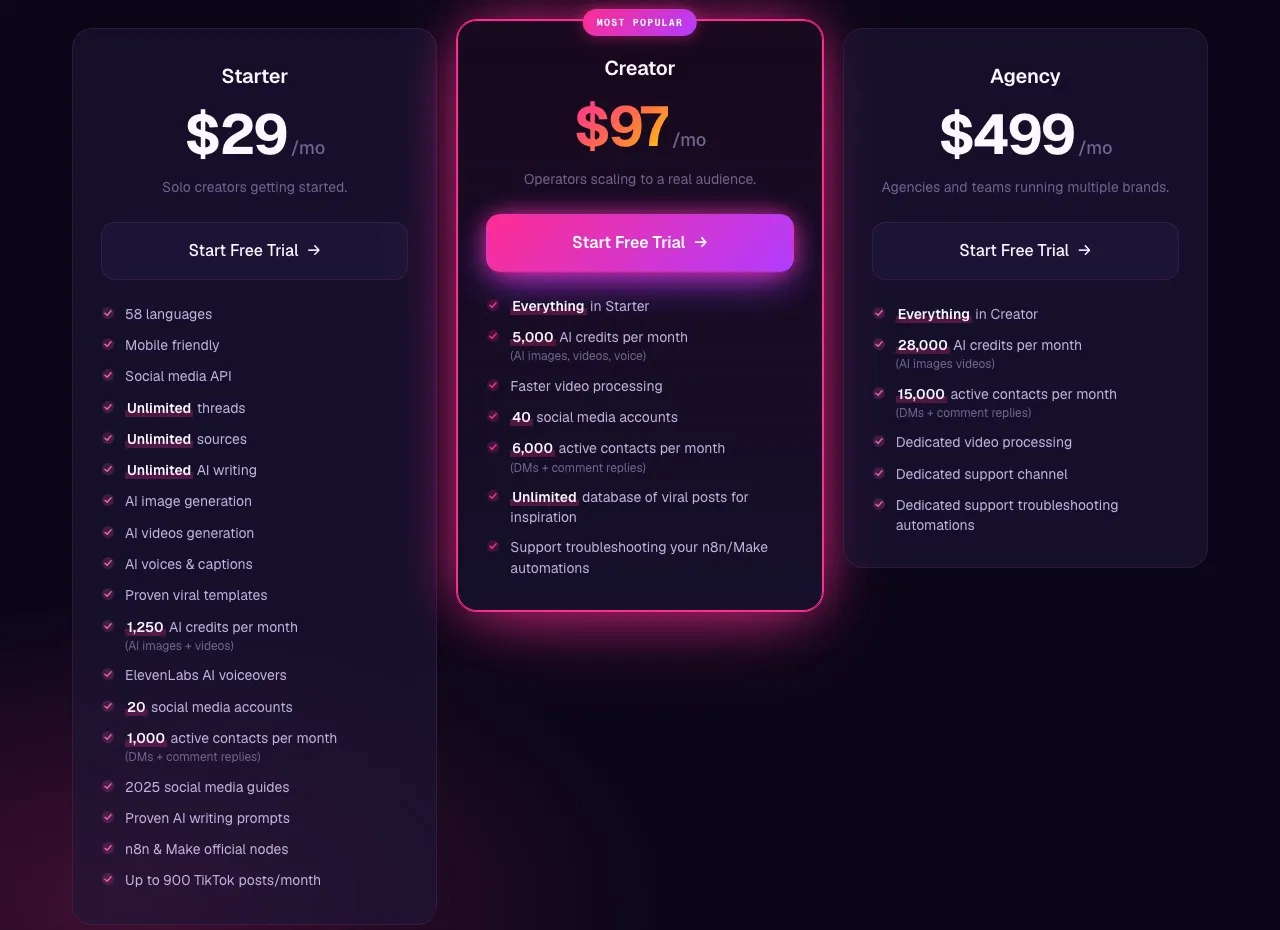
Full plan details are on Blotato’s pricing page. Creator is $97 for 40 accounts and Agency is $499 for 100.
Matching the Tool to Your Setup
A creator who plans the grid and answers DMs by hand. Planoly. Its inbox, story-reply automations and Creator Store fit this setup, and Claude can still draft and schedule for you through its connector.
A solo builder whose Claude agent runs posting and the inbox. Blotato. The agent publishes to 9 platforms and answers Instagram and Facebook comments and DMs through the same key, as long as your engagement lives on those two networks.
A small team on Instagram with a shared calendar. Planoly’s Growth plan, with two logins and in-app automations, is the better fit, unless an agent has to build the automations, and on Instagram and Facebook that takes Blotato’s server.
A creator who wants out of Planoly entirely. If none of these setups fits, the alternatives sorted by why you are leaving Planoly covers grid-first planners and multi-brand tools too.
Start With Who Answers the Comments
One question usually decides it: what should Claude do once the comments start coming in? If you will handle them yourself, Planoly’s connector covers the agent’s part, and its app is built for the replying you do by hand. If the agent should reply to comments, answer DMs and adjust the automation that fired, that is the job Blotato’s server covers, on Instagram and Facebook only.
Planoly’s free plan is a cheap way to try its connector. For Blotato, the 7-day trial doesn’t include API access, so if the API or MCP server is why you are here, plan on starting Starter.
Blotato vs Planoly FAQs
Does Planoly have an MCP server?
Yes. Planoly runs a hosted MCP server that connects to Claude, ChatGPT, Gemini CLI and Claude Code over OAuth. Its tool list names 22 tools for workspaces, media, posts, scheduling, tagging and Instagram analytics. Drafting and scheduling work on the free plan, and analytics and the media library need a paid plan.
Can Planoly’s MCP answer Instagram DMs or run DM automation?
Not through the MCP server, which lists no comment, DM or automation tool. Planoly’s app has an Instagram inbox and comment-to-DM automations for posts and stories on paid plans, both still rolling out. Blotato’s MCP server reads and sends Instagram and Facebook DMs, and it builds automations that answer comments with a private reply, never a public one.
Is Blotato cheaper than Planoly?
No, for one brand. Planoly Starter is $16 a month for one account on each of 8 channels, against $29 for Blotato Starter. Blotato’s 20 accounts go further when you run several brands on a few channels each, and it is the one of the two whose agent can reach Instagram and Facebook comments and DMs.
Can I use Planoly with n8n or Make.com?
I found no Planoly integration page on n8n and no public API for Planoly’s planner, so a Make or n8n workflow has nothing documented to call. Its only documented API key is for Creator Store’s Zapier connection. Blotato has native nodes on both n8n and Make, and the same key works over REST and MCP.
Can I try either MCP server for free?
Planoly, yes: its free plan allows drafting and scheduling through the MCP, capped at 10 posts a month, and drafts count toward that cap. Its paid plans also come with a 14-day free trial. Blotato’s 7-day trial covers the web app but not the API or MCP server, and generating an API key ends the trial and starts the paid Starter plan.
Which networks can each tool publish to?
Blotato publishes to 9 platforms, including Bluesky. Planoly auto-posts to 7 networks and handles X as a reminder you post yourself. Both cover Instagram, Facebook, TikTok, YouTube, Pinterest, LinkedIn and Threads.