How to Use Flux 3 Max for Social Media Video Automation
Flux 3 Max makes 5 to 20 second videos with sound on fal. Copy the one-prompt story trick, see per-clip pricing and automate social media posting.
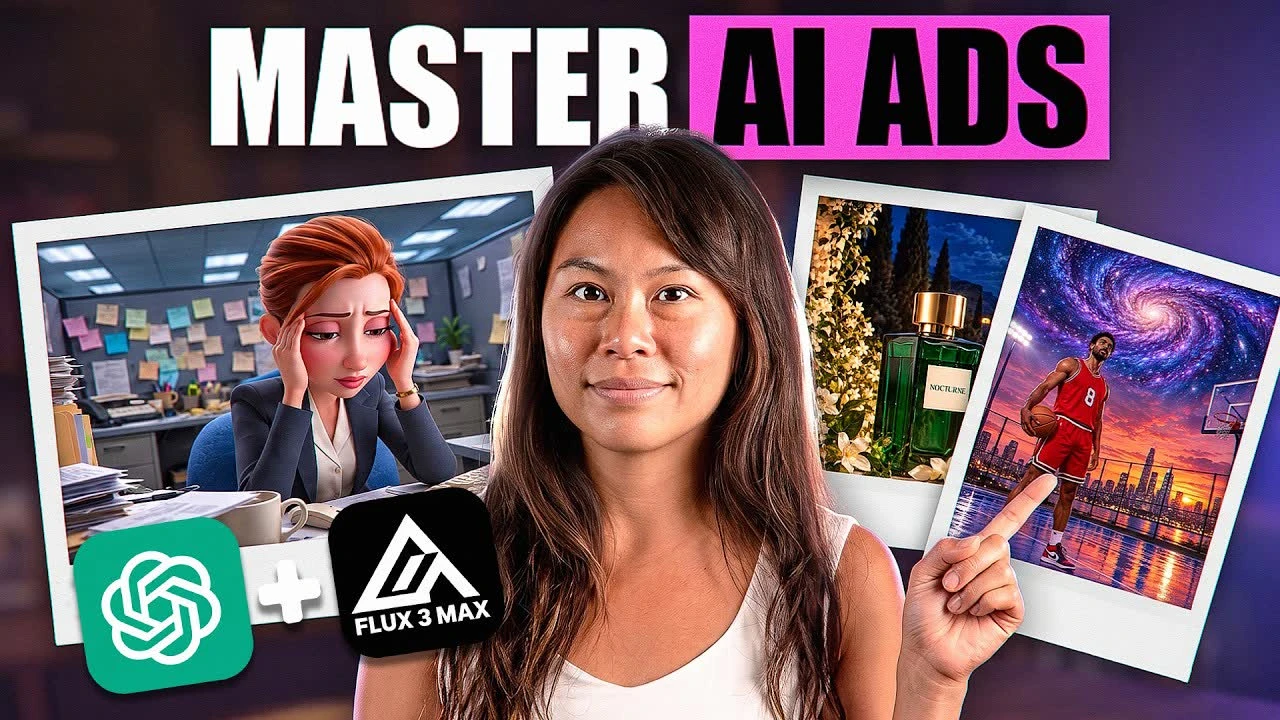
Flux 3 Max is fal’s new video model, and it makes 5 to 20 second clips with sound from a text prompt or a starting image. fal post-trained it with Black Forest Labs and launched it on October 19, 2026. I used it to turn one prompt into a 20-second animated story and one product photo into a perfume ad. I did not film anything.
If you build with agents, the model is an API endpoint, and Step 4 shows where Blotato picks up the file. If you work in a browser, the generation steps run in fal’s playground. Either way, you get the prompt that kept my character consistent and the setting that decides whether a clip comes out vertical. You also get what each clip costs during fal’s launch discount, which runs until November 7, and after it.
Flux 3 Max Tutorial (Video Guide)
The written guide adds the full story prompt to copy and per-clip prices from my cost slide.
Why AI Video Stories Fall Apart Between Clips
My first plan was the obvious one. An office scene in one clip, the roller coaster escape in a second. I had Gemini write the prompts, Pixar style, with a character, an action, a setting and sound in each.
It did not hold. I ran the first prompt twice and got a different character with a different vibe each time, in a similar bedroom. Then the roller coaster prompt changed her completely again. That prompt even asked for “the same stylized young woman with auburn hair.”
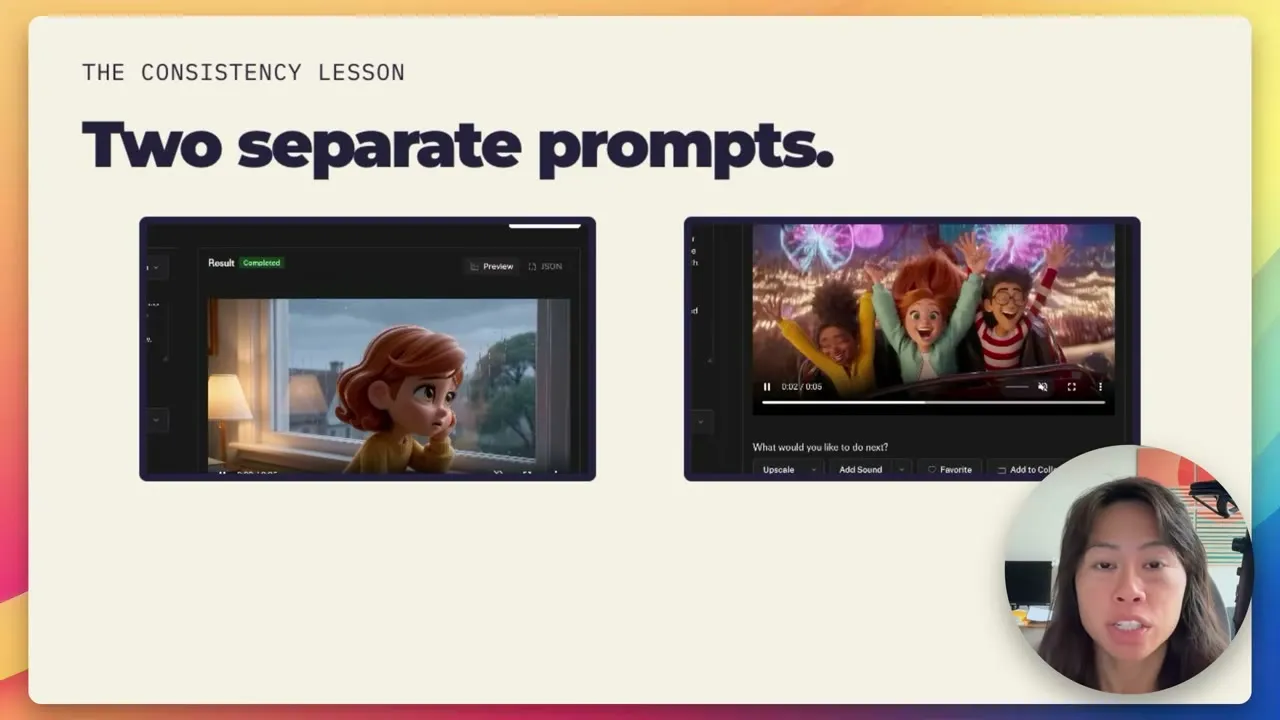
Repeating her description in the next prompt did not keep her the same across my separate runs. What worked in my test was to stop asking for separate clips at all.
The Four Tools Behind These Clips
- fal runs the model and is the only piece billed per clip. Its playground offers Text to Video, Image to Video and Keyframes to Video for Flux 3 Max.
- Gemini wrote the story prompts.
- Codex running GPT-6 Astra rewrote the perfume ad prompt after I gave it fal’s prompt guidance.
- Blotato is where I show the scheduling step: add a video, pick accounts, then publish or schedule.
I founded Blotato, so it is the one tool on this list I have a stake in.
fal hands you a finished MP4, and posting it to several platforms is a separate job. If you want that part on a schedule, start a 7-day free Blotato trial and connect your accounts. Then add your first clip in the post editor, as in Step 4.
What a Flux 3 Max Clip Costs at List and Launch Prices
fal bills the model per second of video, at promotional rates that are 75% off until November 7. During the discount, a clip costs under a dollar at 10 seconds in either resolution, or at 20 seconds in 720p. After November 7, the cheapest clip, 5 seconds at 720p, costs $0.85.
| Clip | Launch price (to Nov 7) | List price (after Nov 7) |
|---|---|---|
| Per second, 720p / 1080p | $0.0425 / $0.0725 | $0.17 / $0.29 |
| 10 seconds at 720p | $0.43 | $1.70 |
| 10 seconds at 1080p | $0.73 | $2.90 |
| 20 seconds at 720p | $0.85 | $3.40 |
| 20 seconds at 1080p | $1.45 | $5.80 |
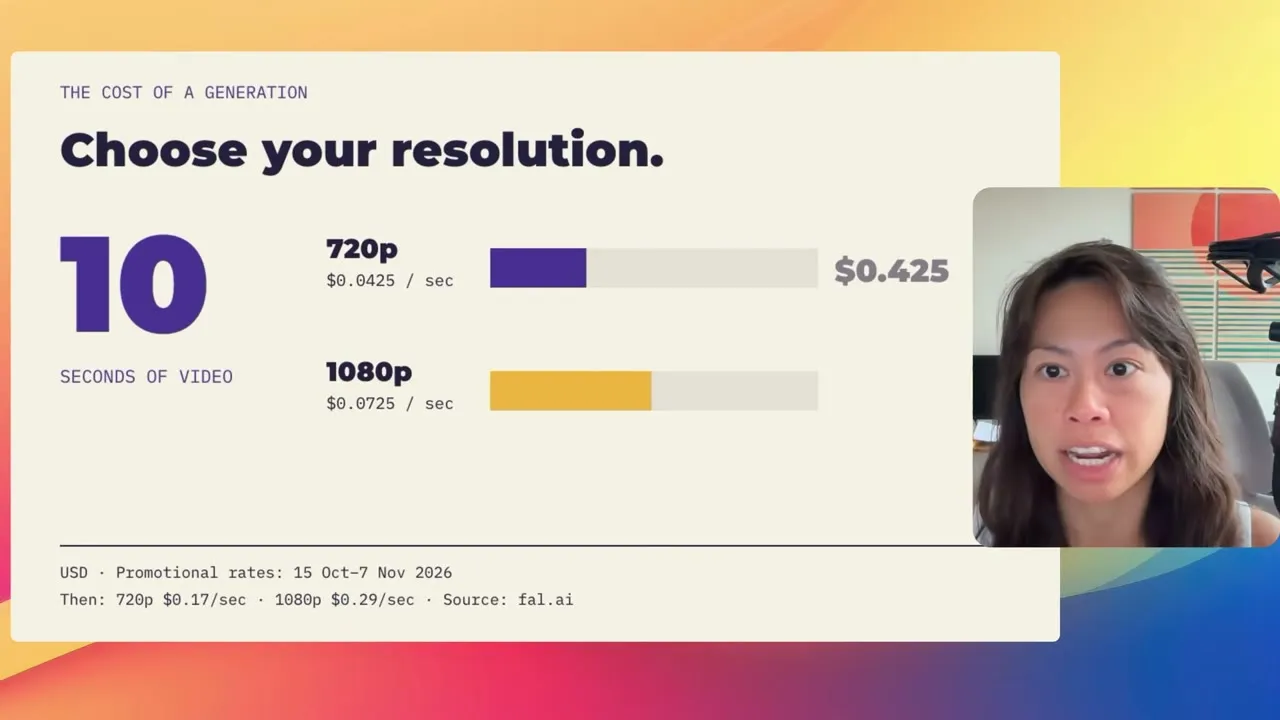
Budget for the clips you throw away, too. The video shows four generations for the story: three short runs, then the 20-second one I kept. Two of them were 5 seconds at 1080p, so assume the third matched. Those throwaways come to about $1.09 at launch prices and $4.35 at list, and the whole story to about $2.54 and $10.15.
fal’s model page also describes 1080p as “optional 1080p upscaling” on top of a 720p default. It costs about 71% more per second.
In my Higgsfield pricing breakdown, calling a model API directly cost more per Seedance clip than a fully spent subscription bundle. What pay-per-generation buys is no generation charge in the months you make nothing.
How to Use Flux 3 Max (Step-by-Step)
Four steps, from a blank playground to a scheduled post.
Step 1: Open Flux 3 Max in fal’s playground
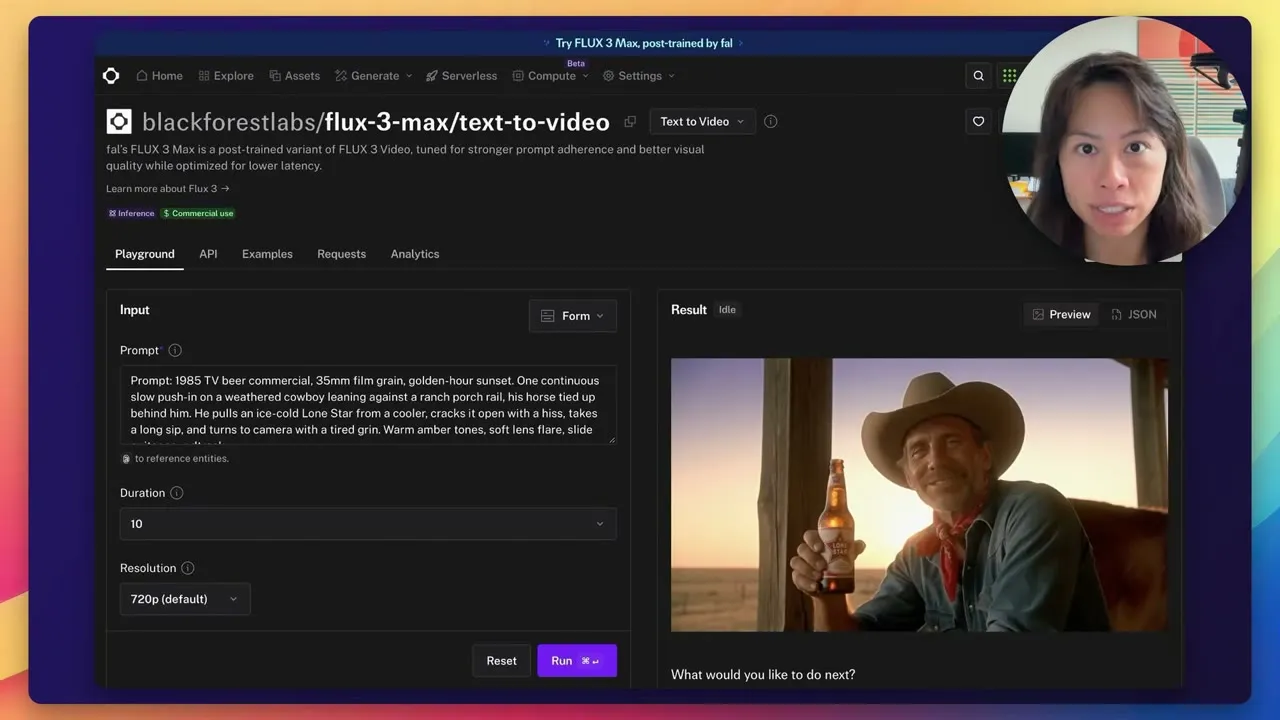
Go to the Flux 3 Max text-to-video page on fal and stay on the Playground tab. The cowboy on the right is fal’s default sample, not your result. Replace that prompt with your own.
Duration runs from 5 to 20 seconds. Resolution is 720p by default, with 1080p as the option.
Aspect ratio sits under Additional Settings (click More). Auto gives you 16:9 from a text prompt, so pick 9:16 there for Reels, TikTok or Shorts.
Step 2: Write the whole story as one prompt
Back in Gemini, I asked for one continuous sequence. Start at the desk, show the transformation, then arrive on the roller coaster. The transition becomes part of the action, instead of two clips you hope will match. This is the prompt I ran, word for word:
A beautiful, 3D Pixar-style animated 9:16 vertical video of an elegant 30-year-old woman with a mature, expressive face, sharp jawline, large warm hazel eyes, and structured auburn hair tied back in a neat bun. The scene begins as a locked-off, intimate shot of her sitting at a cluttered office desk under harsh, cool fluorescent lights, looking deeply exhausted as she rubs her temples and lets out a heavy sigh. Then, at the 5-second mark, the camera initiates a slow, continuous tracking push-in shot straight past her desk. As the camera moves closer, the messy office backgrounds dynamically dissolve and blur away, seamlessly morphing into a spectacular, sun-drenched amusement park at twilight. By the 12-second mark, the camera smoothly pulls back to reveal the exact same woman now sitting securely on a massive, rolling carnival coaster car. She bursts into a radiant, joyful smile, her auburn hair flowing wildly in the wind as the coaster drops into a steep, neon-lit track surrounded by flashing fairground lights and exploding distant fireworks. Rich clay animation textures, Disney aesthetic, masterful lighting transitions from clinical blue to vibrant, warm festival gold. [Audio: Clinical office silence punctuated by a sharp mouse click and a deep human sigh, fading smoothly into a sudden rush of roaring wind, the heavy metallic click-clack rumble of roller coaster tracks, crowd cheering, and a burst of triumphant carnival pop music with celebratory laughter]
It describes the woman once, in detail, then times each beat, and the audio goes in brackets at the end. I set the duration to 20 seconds so the scene had room to move and kept 1080p.
Before you hit Run, set the aspect ratio to 9:16 for a vertical post. My run came out as a horizontal 1920 x 1088 clip, even though the prompt asks for 9:16.
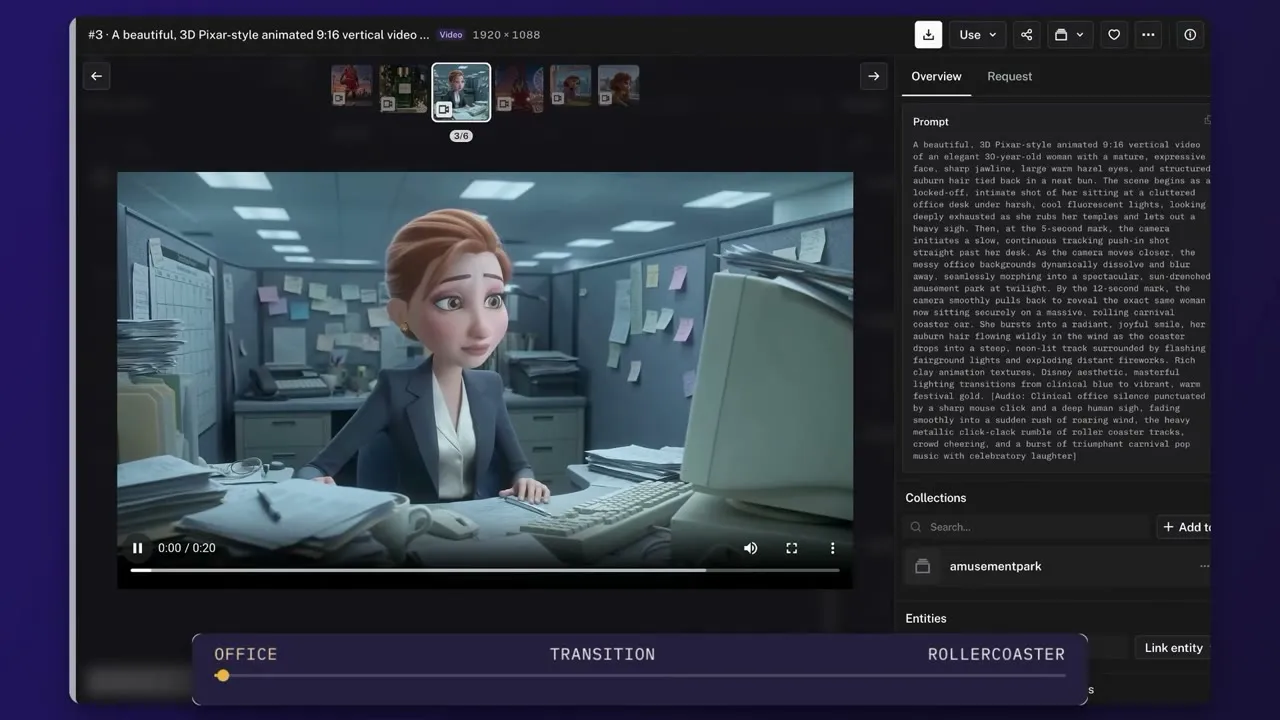
Compared with the separate runs, the woman at the desk is the same woman on the coaster. You watch her while the whole scene changes around her.
Step 3: Turn a product photo into an ad
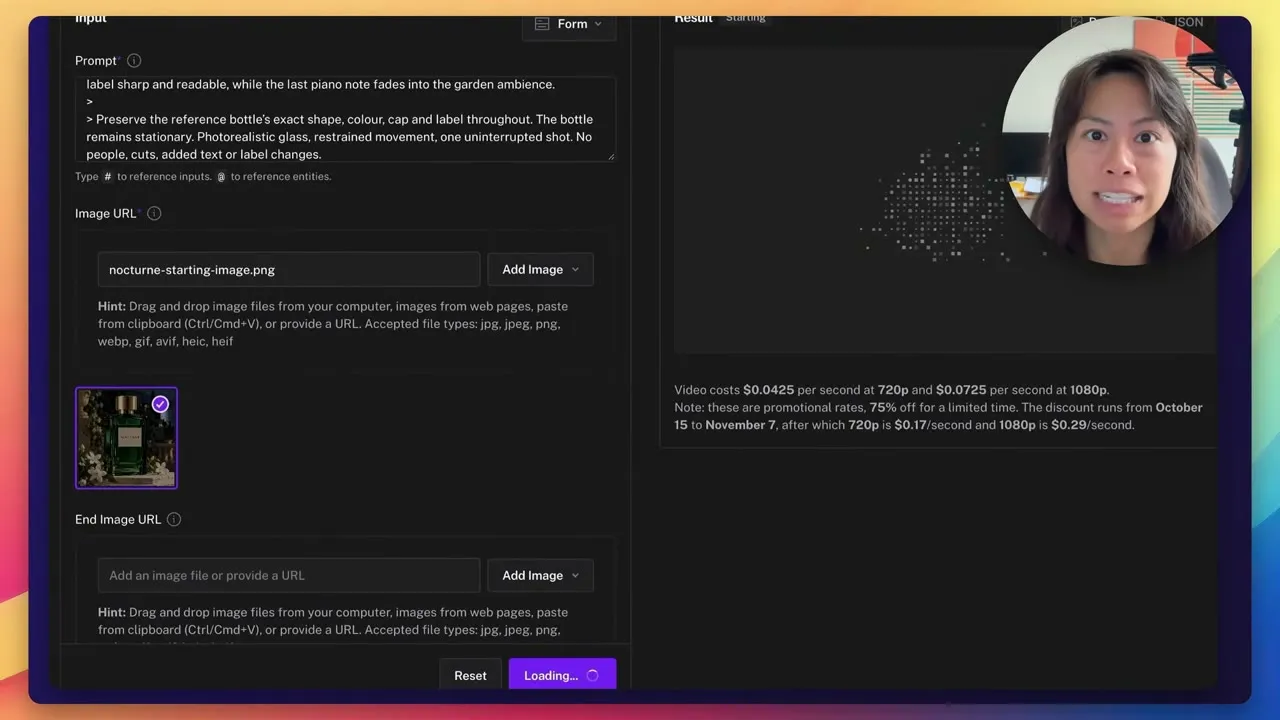
For the ad I started from one perfume image, a green bottle with a NOCTURNE label that was already well lit.
I used Codex running GPT-6 Astra and gave it fal’s guidance from the model page. A useful prompt, fal says, “establishes a clear sequence of visible actions,” with camera, lighting, atmosphere and sound written in. The result keeps the bottle still while the camera moves around it, with petals and mist for movement and light catching the glass. It also asks for music, garden ambience and a soft voice with one line: “Nocturne. Leave a little mystery.”
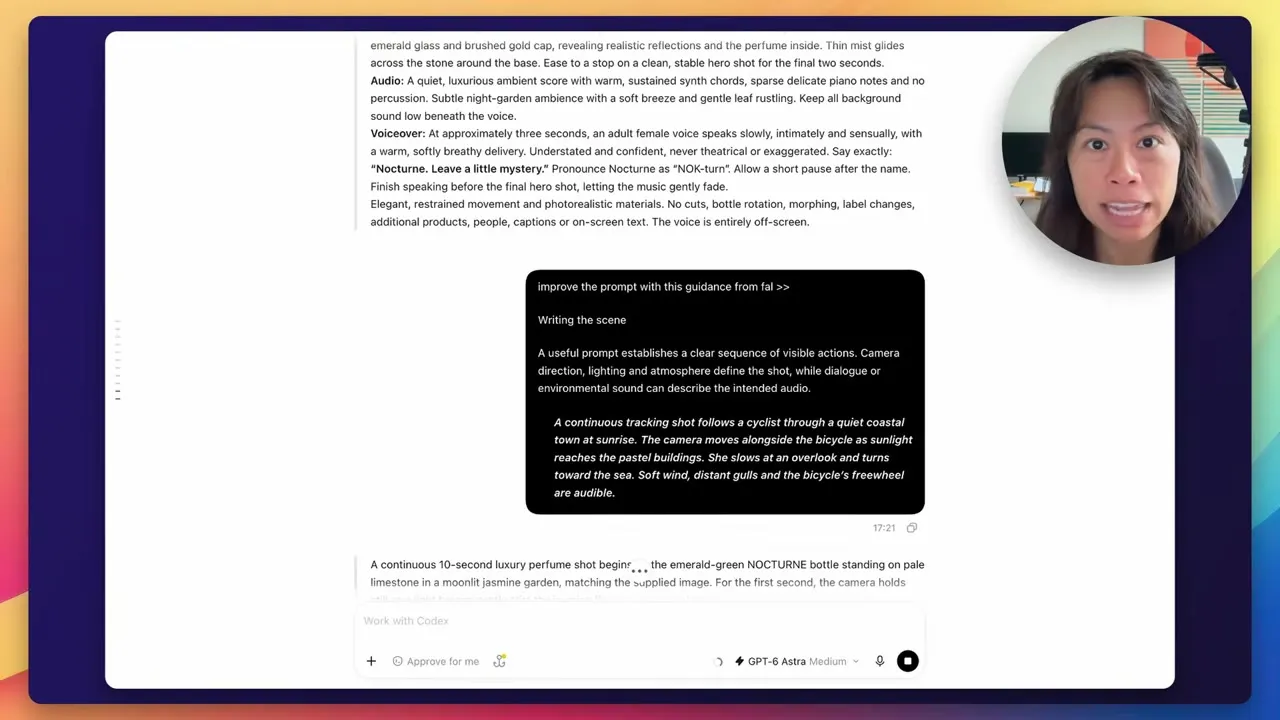
Then switch fal to Image to Video, paste the prompt and upload the photo as the starting frame. I ran it at 10 seconds. The sound is what finishes the ad.
Step 4: Schedule the clips in Blotato
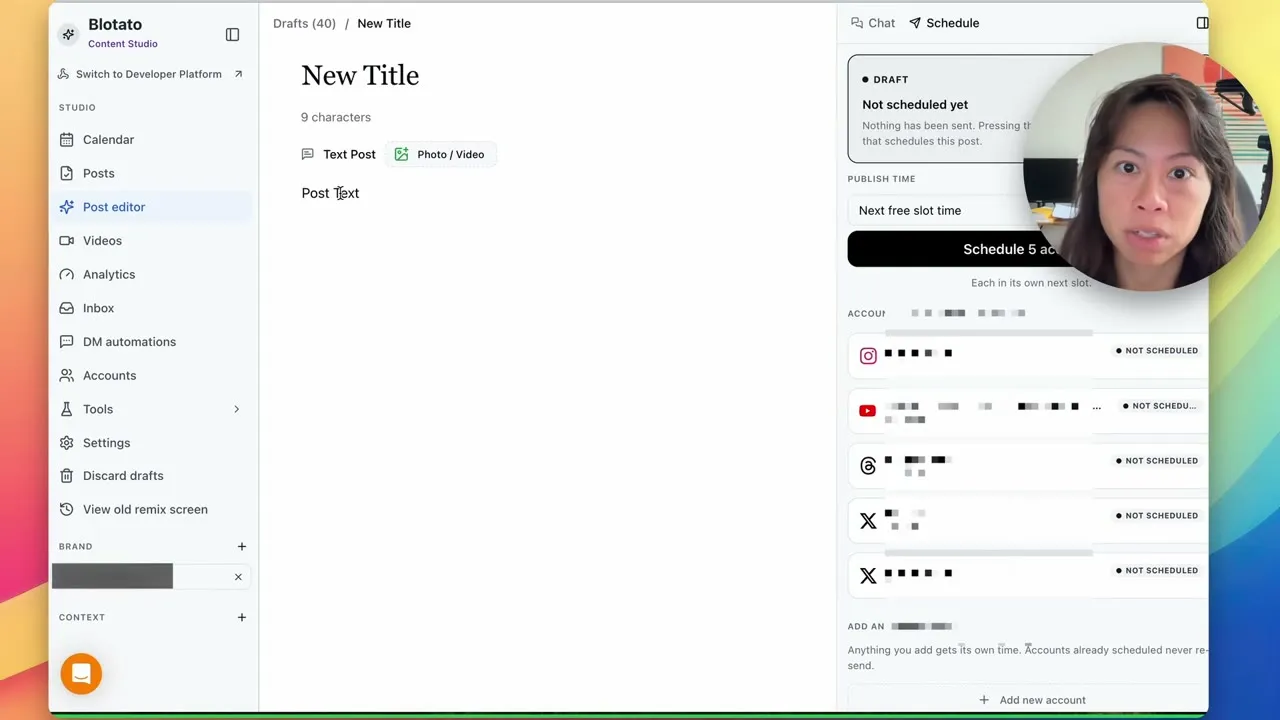
Open a new post in Blotato’s post editor and add the video file. Write your caption and pick the accounts. You can publish right away or schedule it.
Once you set up weekly posting slots, “Next free slot time” puts the post into each account’s next open slot. If no matching slot is open, scheduling fails instead of posting right away.
I show these steps with a different clip in the video. You can line your finished clips up across Instagram, TikTok and YouTube.
An agent can skip the download entirely. fal returns each clip as a hosted video URL. Blotato’s publish request takes that URL directly in mediaUrls, with no upload step.
Pro Tips for Flux 3 Max
Writing 9:16 in the prompt does not set the frame. fal’s docs say auto mode frames a text prompt at 16:9 and follows the starting image in image-to-video. That matches both of my runs. The story came out horizontal, and the perfume ad, built from a portrait 941 x 1672 photo, came out vertical. If you start from an image, crop it to the shape you want before you upload it, or set aspect_ratio in the API.
Write the don’ts into a product prompt. For an ad, the label is the brand. My perfume prompt says to “preserve the reference bottle’s exact shape, colour, cap and label throughout.” It also rules out people, cuts, added text and label changes. A clip that rewrites your label is a clip you cannot post.
Where Flux 3 Max Falls Short
Twenty seconds is the ceiling for one generation. A longer story needs more than one generation, and separate generations are where my character drifted.
Blotato’s own limits apply to these clips too. Blotato asks for at least four weeks of warm-up on a TikTok account before you connect it. Starter allows 3 distinct TikTok posting destinations per rolling 24 hours. Creator and Agency have no destination cap.
From fal to Blotato With an Agent
If you build with Claude or another agent, the same flow runs without a browser or a download.
Call the model’s fal endpoint, blackforestlabs/flux-3-max/text-to-video, with the same duration, resolution, aspect ratio and audio settings. Image-to-video has its own endpoint. It takes image_url for the starting frame and an optional end_image_url. Pass the hosted video URL fal returns straight into Blotato’s publish request, as in Step 4.
Blotato handles supported platform conversions for videos up to 120 seconds, which covers every clip length the model makes. Publishing is asynchronous. Poll the post status until it reports published, scheduled or failed, and handle failures. A submission ID alone confirms nothing.
Marc, who runs the Automate with Marc channel, built a similar flow with Claude, fal over MCP and four approval gates. He used Kling instead of Flux 3 Max, and his build is in the Claude video generation guide. The Blotato trial covers the web app only, and creating an API key ends the trial and starts your paid plan.
Is Flux 3 Max Worth It at List Price?
At list price, a 10-second 720p clip costs $1.70 and a 20-second 1080p clip costs $5.80, before any runs you throw away. It is worth testing if your scene fits in 20 seconds. One prompt per scene, written as a shot list, kept my character consistent and generated the sound too. If you want the finished clips scheduled across your accounts from one editor, a Blotato plan handles that step.
Flux 3 Max FAQs
Where can I access Flux 3 Max?
In fal’s playground or through fal’s API, where fal launched it on October 19, 2026. It also shows up inside other apps, including Krea. fal Research post-trained it in collaboration with Black Forest Labs. It runs on top of BFL’s FLUX 3 foundation model.
Is Flux 3 Max free?
Not on fal, which bills it per second of output video with no minimums and no subscription. Text-to-video and image-to-video cost the same. The cheapest run there, 5 seconds at 720p, is about $0.21 at launch rates until November 7, 2026, and $0.85 at list. Apps that offer it, like Krea, set their own plans.
Can I turn off the audio in Flux 3 Max?
Yes. Flux 3 Max generates audio by default, and the generate_audio setting turns it off. In my perfume ad, the music, garden ambience and voiceover all came from the prompt.
How fast is Flux 3 Max?
fal’s text-to-video model page says that in benchmarks it generates a 10-second video in approximately 11 seconds. My 5-second, 1080p clip took 10.90 seconds on fal’s request timer. Actual turnaround varies, and Overchat’s hands-on test measured 19 to 27 seconds for 10-second 720p clips.
Does Flux 3 Max rewrite my prompt?
It can. The reasoning level setting is high by default, and at high the model expands your prompt before it generates. Higher reasoning can also increase generation time, so try low when you want faster runs.