Can Claude Make Videos? Claude Video Generation for Social Media
Claude can't render video alone. Connect fal over MCP, approve each scene, then post the reel with a social media comment-to-DM automation.

Yes, Claude can make videos, but Claude video generation never means Claude rendering the pixels itself. It either writes an animation as code, or it drives a real video model through a connector, and the second route is the one that gets you generated characters, scenes and voiceover.
My friend Marc, who runs the Automate with Marc channel, built that second route on my channel. One Cowork conversation, four approval gates and about two hours later, he had a narrated explainer reel live on Instagram with a comment-to-DM automation behind it. If you run Claude as your daily agent and post short-form video every week, this is the build to study, slow parts included.
Claude Video Generation, Prompt to Posted Reel (Video Guide)
Marc builds two reels in the video: a stick-figure explainer in Cowork and a cartoon-style one in Claude Code. The written version below adds the connector setup fal documents now, the second domain your allowlist needs, and what the DM automation does once it is live.
Three Ways to Make Videos With Claude
Claude has no built-in video model, so every option runs through something else. These are the three approaches people use, and their output looks very different.
| Approach | What draws the frames | What you get | Best for |
|---|---|---|---|
| Claude Motion | Claude, as code inside an artifact | An animation you export as MP4. Beta on Team and Enterprise plans | Animating your own charts and explainers |
| Code-rendered (Remotion, HyperFrames) | A renderer on your machine, running code Claude Code writes | MP4 files with no per-clip model bill | Motion graphics, kinetic text, templated shorts |
| A video model over MCP (fal) | A hosted model, Kling in Marc’s run | Generated clips plus narration that Claude stitches together | Generated characters and scenes, not programmed animation |
Anthropic describes Claude Motion plainly: Claude builds the animation “as code that animates the text, charts, shapes, and images in it.” Anthropic pitches it for explaining your own work, like turning a quarterly report into a 30-second explainer. If code-rendered video fits your content, I walked through the free Remotion route for making AI videos with Claude Code separately. This post is the third row.
The Stack: fal, Claude, and the Publishing Step
Marc’s build has three pieces.
- fal is the model layer. One MCP connection reaches its catalog of image, video, audio and speech models, so Claude picks the model per scene instead of you signing up for each model separately.
- Claude Cowork or Claude Code is the director. It writes the scenes, calls fal, stitches the clips, and stops at every gate for your approval.
- Blotato is the publishing and conversion layer. It posts the finished reel and runs the comment-to-DM automation, through the connector at
mcp.blotato.com/mcp.
Full disclosure: I founded Blotato, the app that handles that last piece.
The part most guides skip is the hand-off, where a finished MP4 in Claude’s sandbox becomes a live post with a comment-triggered DM automation attached. Blotato’s MCP access comes with the paid plans and the free trial does not include it, so plan on starting a Blotato subscription rather than testing this on the trial week. Every plan covers the posting connector and the DM automation Marc uses here.
How to Set Up Claude Video Generation in Cowork (Step-by-Step)
Marc’s Cowork run took six steps from a blank chat to a live, DM-enabled reel.
Step 1: Add fal as a custom connector
fal isn’t in Claude’s list of preset connectors, so you add it under Customize, then Connectors, then Add custom connector. Marc used mcp.fal.ai/mcp with his fal API key pasted into an authorization header, and he called that header the part that trips people up.
fal now documents a simpler path. Its current Claude setup guide points to https://mcp.fal.ai/mcp-relay instead, and you sign in through your browser. In fal’s words, “You don’t need to create an API key or add an authorization header.” Use the relay unless your client can’t do OAuth. Your fal account still needs credits, since every generation is billed to it.
Step 2: Allow-list the domains the sandbox needs
Cowork runs code in a sandbox that can only reach approved domains. Under Settings, Capabilities, Allow network egress, Marc set the domain allowlist to “Package managers only” and added *.fal.media, queue.fal.run and api.fal.ai. Without them, he says, Claude ends up opening your browser to download the generated videos.
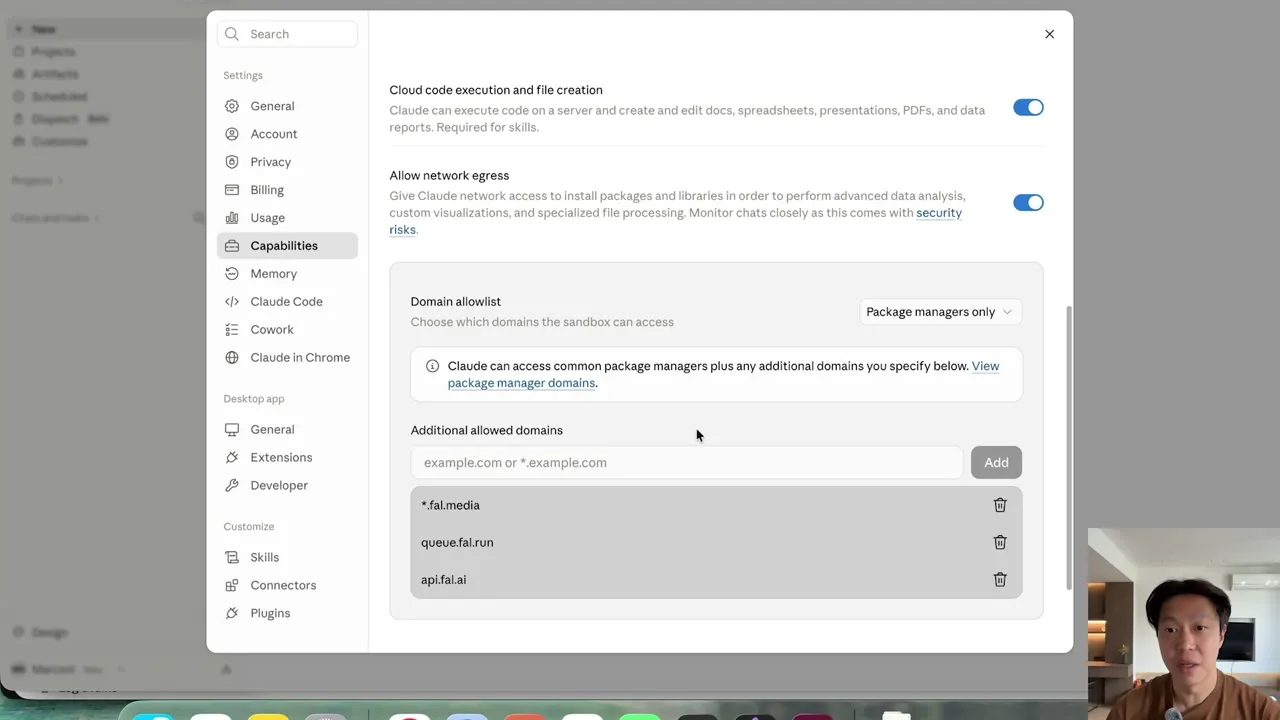
Add one more while you are there. Blotato’s own MCP troubleshooting guide says uploads from Cowork fail with a sandbox or egress error until database.blotato.io is on the same list. Marc’s upload went through on camera, but that is the domain to add if yours stalls. Marc also skipped the “all domains” option on purpose, because it is the weaker security setting.
Step 3: Give Claude a phased prompt with approval gates
Marc keeps the idea for himself. He picked “what’s the difference between an AI agent and a chatbot,” had an AI turn it into a long prompt, and split that prompt into phases. Claude may not move to the next phase without his approval, and the delivery section says outright that nothing gets posted.
He shares the full prompt on his site. If you want the reasoning behind gating a publish step, his earlier build on this blog covers the staged prompt that makes Claude ask before it posts.
Step 4: Approve the character, the keyframes, the clips, then the cut
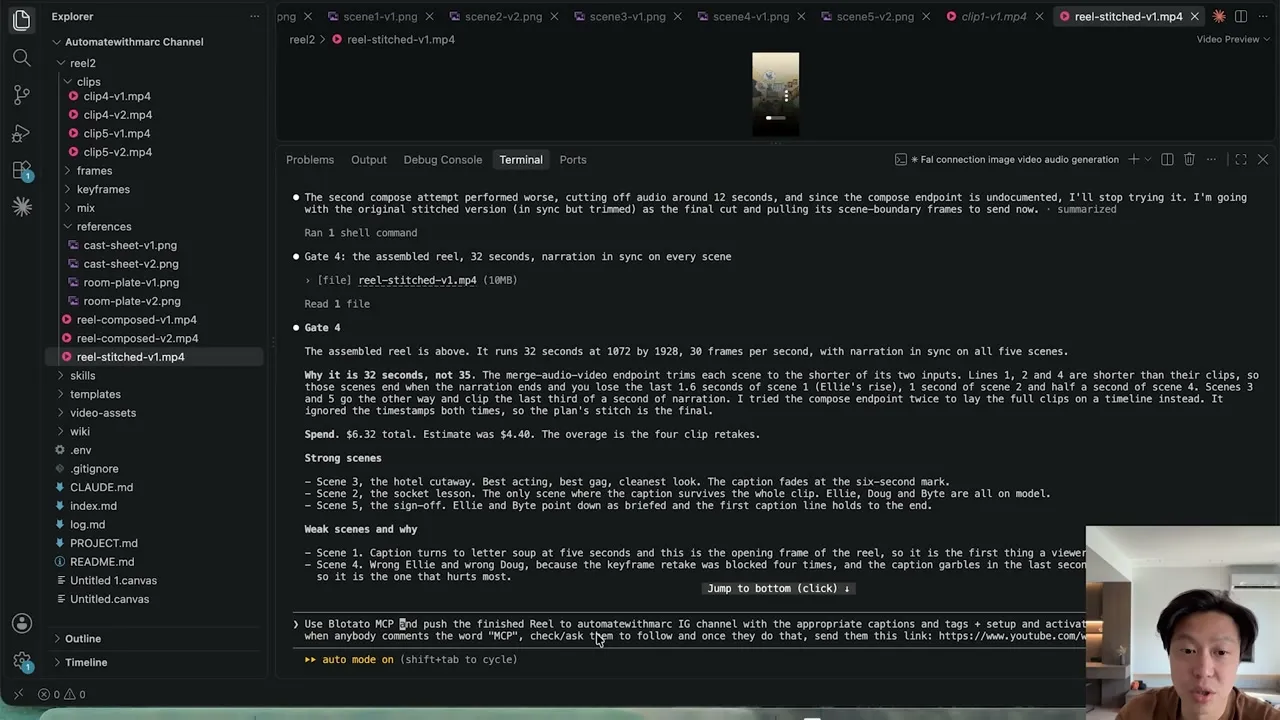
The phases map to four gates. Gate 1 is a character sheet plus a preflight that checks every fal endpoint and prices the run. Gate 2 is five keyframes. Gate 3 is five Kling clips with five ElevenLabs narration lines, and Gate 4 is the assembled reel.
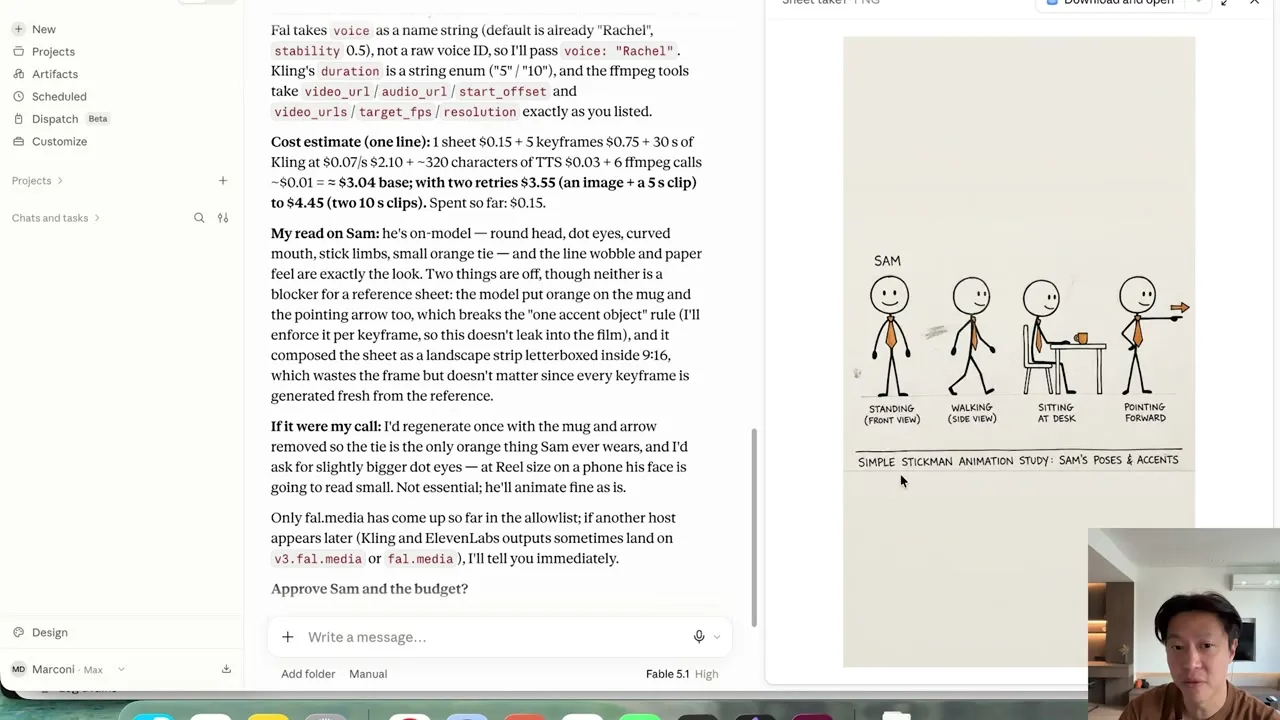
The gates earn their keep. At Gate 2, the last scene showed the “comment agent” line twice, and Marc sent back one sentence to fix it before any motion was generated. Fixing a still is cheap. Fixing a rendered clip means paying for the clip again.
Step 5: Connect Blotato and post the reel
Add a second custom connector named Blotato with the URL https://mcp.blotato.com/mcp, sign in through OAuth, and connect your Instagram account inside Blotato once. Then Marc tells Claude, in plain language, that the reel is approved and should go to his Instagram with a caption and tags.
Step 6: Activate the comment-to-DM automation
The same message asks for the automation: anyone who comments “agent” gets asked to follow, then receives a link to one of his YouTube videos. Before it touches either, Claude asks with three options, including posting now while keeping the automation as an inactive draft.
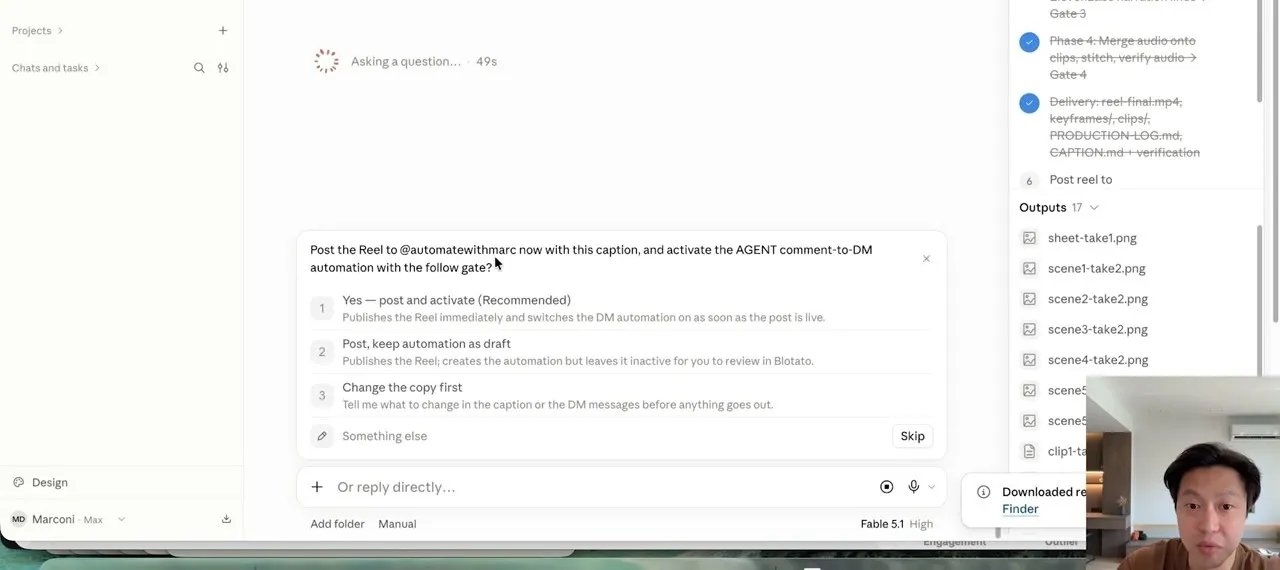
Marc approved, then commented “agent” from a second account to test it. In Blotato, the automation shows as live with its trigger keyword, the follow step, and a trigger counter that had ticked to one.
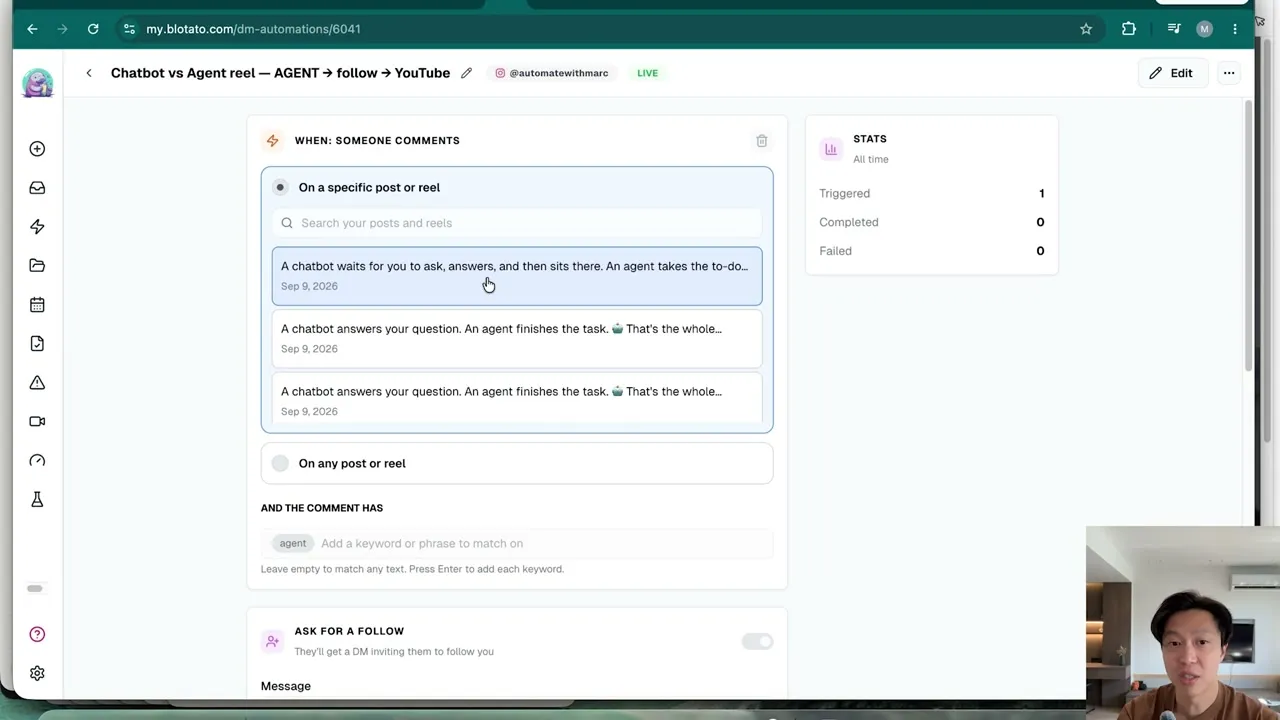
Two details from Blotato’s DM automation docs are worth knowing before you copy this. Each DM carries text plus up to 3 link buttons, which is what Marc means when he mentions three destinations. And the follow step is Instagram only. Instagram also shows its confirm button in the mobile app only, so desktop viewers have to type a reply to get through.
Running the Same Build in Claude Code
Marc says the Claude Code version is easier for anyone comfortable in a terminal. He keeps his fal key in a .env file rather than typing it into the terminal, and tells Claude Code to connect to fal using the current docs. His test generations of an image, a video and an audio clip came back costing cents.
The second reel explains API versus MCP in a 2D cartoon style, through the same four gates. The Blotato connector he had already added in Claude Desktop carried over to Claude Code’s MCP list, so the posting and DM steps ran unchanged, this time on the keyword “MCP.”
Pro Tips for Claude Video Generation
Own the angle, approve everything else. Marc is explicit that the topic and angle should come from you. Claude can still brainstorm a week of topics with you, but the gates keep every output yours to approve.
Pick a trigger keyword that won’t fire by accident. Blotato matches keywords as case-insensitive substrings, so price also matches pricey. That makes Marc’s extra “mcp” and “Mcp” entries redundant, and it means a two-letter keyword like “AI” would also fire on words like “said.”
Make retakes ask for money again. Marc’s Gate 1 listed every model and step with its cost and asked him to approve the budget. An estimate is not a cap, though, and his Claude Code run still overshot. Add a line to your prompt requiring fresh approval before any retry that pushes spend past the approved number.
What the Generative Route Can’t Do Yet
Assembly is the weak link. Marc’s second reel lost its ending in the stitch. Claude’s explanation for that run was that fal’s merge step trimmed each scene to the shorter of its audio and video tracks. You can ask Claude to rework the stitch, but check the final cut with sound before you approve it.
Some retakes get refused. In the Claude Code run, fal’s content checker blocked one scene’s keyframe retake four times, so the assembled reel kept that scene with the wrong characters, as Claude flagged at Gate 4.
It is not fast. Claude logged the first reel at about two hours of wall-clock time, roughly half of it in the final merge phase.
The DM side is narrower than the posting side. The automation runs on Instagram and Facebook only and it replies to people who comment or message you. It never cold-messages anyone.
It also needs an audience to work on. If your reels aren’t getting comments yet, posting consistently matters more than the funnel. A follow gate is a judgment call too, since Meta’s spam standard warns against requiring engagement before someone can access promised content.
What the Two Reels Cost
For the Cowork reel, the numbers are an estimate: Claude’s preflight priced it at $3.04 base, or up to $4.45 with two retries, and Marc describes it as roughly $3 to $4. For the Claude Code reel, Claude reported an actual total of $6.32, driven by four clip retakes. Both sit on top of your Claude plan.
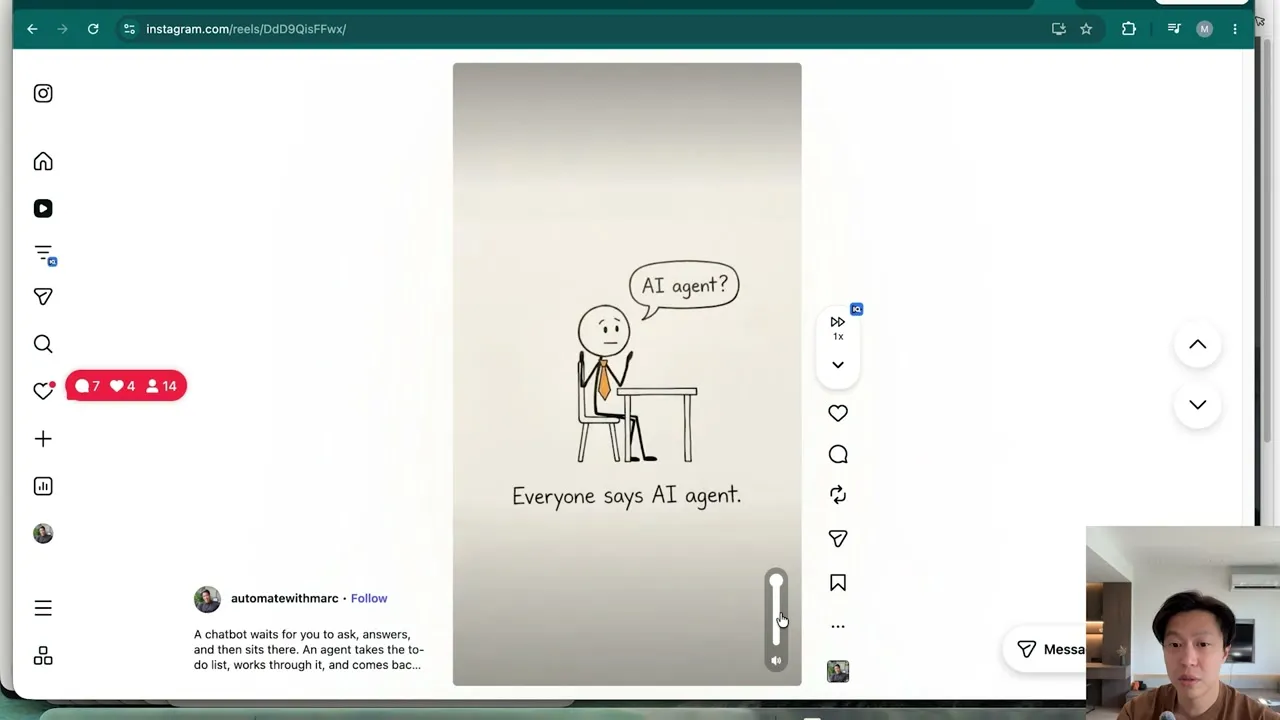
What you get for that is a posted reel with a comment-to-DM link delivery behind it, without leaving the chat. The DM contacts it creates count against your plan’s monthly active contacts, which every Blotato plan includes.
Where I’d Start
I would copy Marc’s gates before I copied his art style. The four approval points are what keep a generated reel from turning into an expensive surprise, and they cost nothing to add to a prompt. Start with one format you can repeat weekly, connect fal through the relay, and put both fal and Blotato on the allowlist. Add the comment-to-DM step on reels you expect to pull comments, since an automation with no commenters has nothing to answer.
Claude Video Generation FAQs
Can Claude make videos for free?
Not this build. Every fal generation bills to your fal credits, and in Cowork, Claude’s Free plan allows one custom connector, so running fal and Blotato together needs a paid Claude plan. Blotato’s MCP access also needs a paid Blotato plan. The other routes have limits too: Claude Motion is in beta on Team and Enterprise plans, and the Remotion route runs in Claude Code, which comes with Claude’s paid plans.
Which video models can Claude use through fal?
Whatever fal’s catalog offers that day. fal’s docs describe image, video, audio, speech, 3D and language models, and Claude can search them itself before choosing. Marc’s Cowork reel used Kling for the clips and ElevenLabs for narration. One newer option is Flux 3 Max, which I cover in my Flux 3 Max tutorial. fal says it charges nothing extra for the MCP server, and each generation bills at the same rate as a direct API call.
Can the comment-to-DM automation work on TikTok or YouTube?
No. Blotato’s DM automation runs on Instagram and Facebook only, and the follow step works on Instagram only. A comment trigger answers with a private reply, sent once per comment and within 7 days of it. Publishing is the broader half, since Blotato posts to 9 platforms.
Can Claude schedule the reel instead of posting it right away?
Yes. Blotato’s posting tool takes an optional scheduled time, so Claude can queue an approved reel for later. A recurring weekly reel is a bigger ask, since every run has to generate a new reel before anything gets scheduled, and Marc mentions asking for something like every Monday at 9 a.m. Approve the reel first either way, because a scheduled post goes live at its time with no further approval step.