How Wayne St Ledger Automates a Social Media Week With Claude
Wayne St Ledger's social media automation turned 25 pieces into 89 scheduled posts in one filmed Claude run. Here is the workflow and his dashboard.

Wayne St Ledger batches his social media week through Claude. The week’s reels, carousels and text posts collect in a folder. Claude fills in the captions each platform still needs, and Blotato drops every post into the next open slot on his calendar. In the run he filmed in May, 25 pieces became 89 scheduled posts.
Wayne is a one-person marketing consultant who runs this from a Claude Code project connected to Blotato. By the end of September his dashboard showed 2,012 published posts at a 97.1% publishing success rate.
I founded Blotato, and the Blotato link in Wayne’s video descriptions carries his affiliate code, so he can earn a commission when a viewer signs up. His results below come from his own videos and dashboard, and the plan limits come from Blotato’s help docs.
How Wayne St Ledger Runs Social Media Automation From Claude
This is Wayne’s May video, where he films the Claude run end to end. The write-up below also pulls from his August review, where Claude sets up a comment-to-DM funnel, and his September dashboard tour, where he walks through his Blotato analytics and the second Instagram account he is starting.
Who Is Wayne St Ledger
Wayne is a digital marketing and AI consultant in New Ross, County Wexford. His site says he helps “business owners in Wexford and across Ireland” save hours with AI tools and build marketing systems. He teaches the same systems on his YouTube channel, inside his AI Marketing Hub community on Skool, and through his consultancy at stledgermarketing.com. He also posts on X as @stledgerdigital.
His channel listed 244 subscribers on November 2, and he films and runs this workflow himself. In August he said three clients’ accounts run through the same Starter plan as his own. He has made ten videos about Blotato since May.
One Claude Run, 25 Pieces, 89 Posts
Wayne’s May video has a chapter called “Claude as the brain, Blotato as the system,” and that is the whole split. Claude does the writing and the sorting. Blotato holds the calendar and sends the posts. If your week already lands in a folder, the loop below is easy to test: start Blotato Starter, set your slots, and point Claude at the queue. One catch for Claude users is that the 7-day trial covers everything except the API and MCP server, so plan on starting the subscription when you connect Claude.
Step 1: Set the posting slots once
Wayne’s weekly posting schedule has two slots on Sunday and four on each weekday. The slots are configured for his accounts on Facebook, Instagram, LinkedIn, Pinterest, Threads, TikTok, X and YouTube, and each piece of content still goes only to the accounts chosen for it. “Set your posting slots once,” he says.
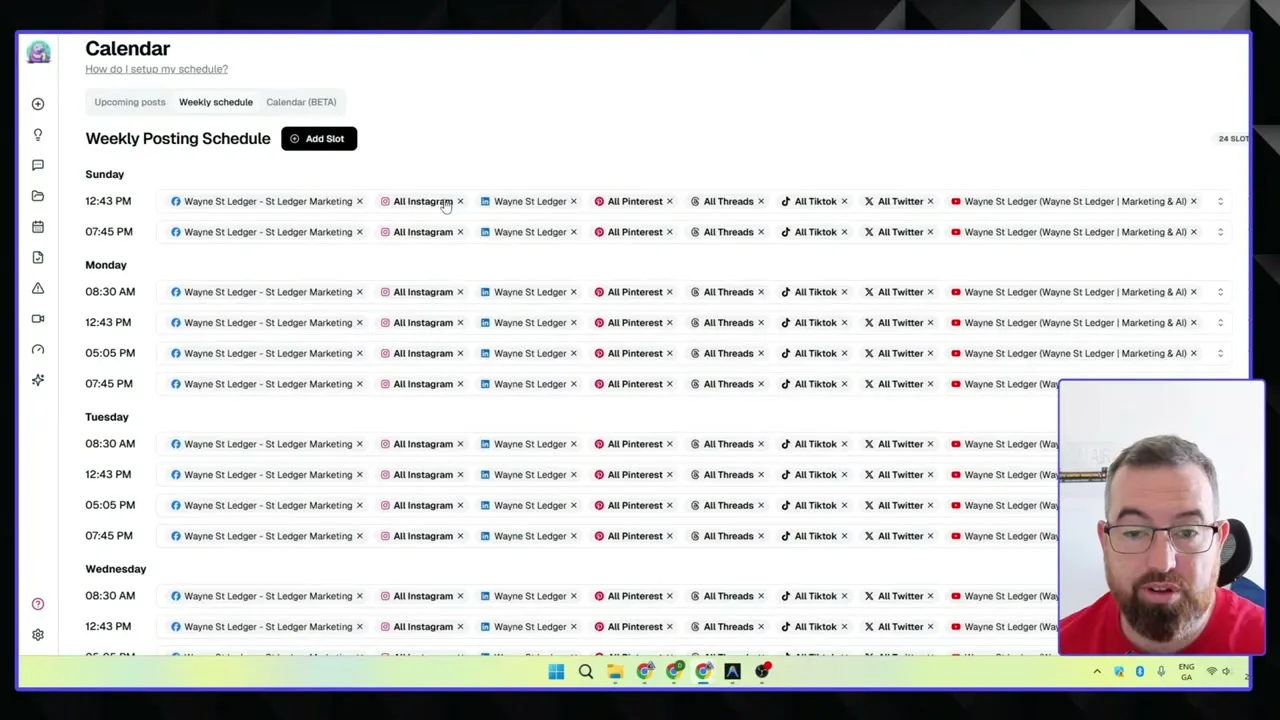
If you run an agent, this is the part to copy. A post sent with useNextFreeSlot: true lands in the next open slot for that platform and account, and Blotato skips any slot that already holds a post (schedule slots docs). Claude never has to pick a time.
Step 2: Let the folder fill up during the week
Content piles up in one folder as Wayne makes it: reels, carousels, images, infographics and text posts cut from his videos and streams. In the May run the folder held 25 pieces.
Step 3: Have Claude finish the captions and queue everything
Claude writes the platform captions each piece is missing. In May that meant LinkedIn, Facebook and X captions for seven reels that only had TikTok, Instagram and YouTube copy. Then it schedules the whole folder into Blotato. Its wrap-up says the 25 pieces became 89 posts, “all queued via next-free-slot in the mixed running order so no two of the same content type land back-to-back.”
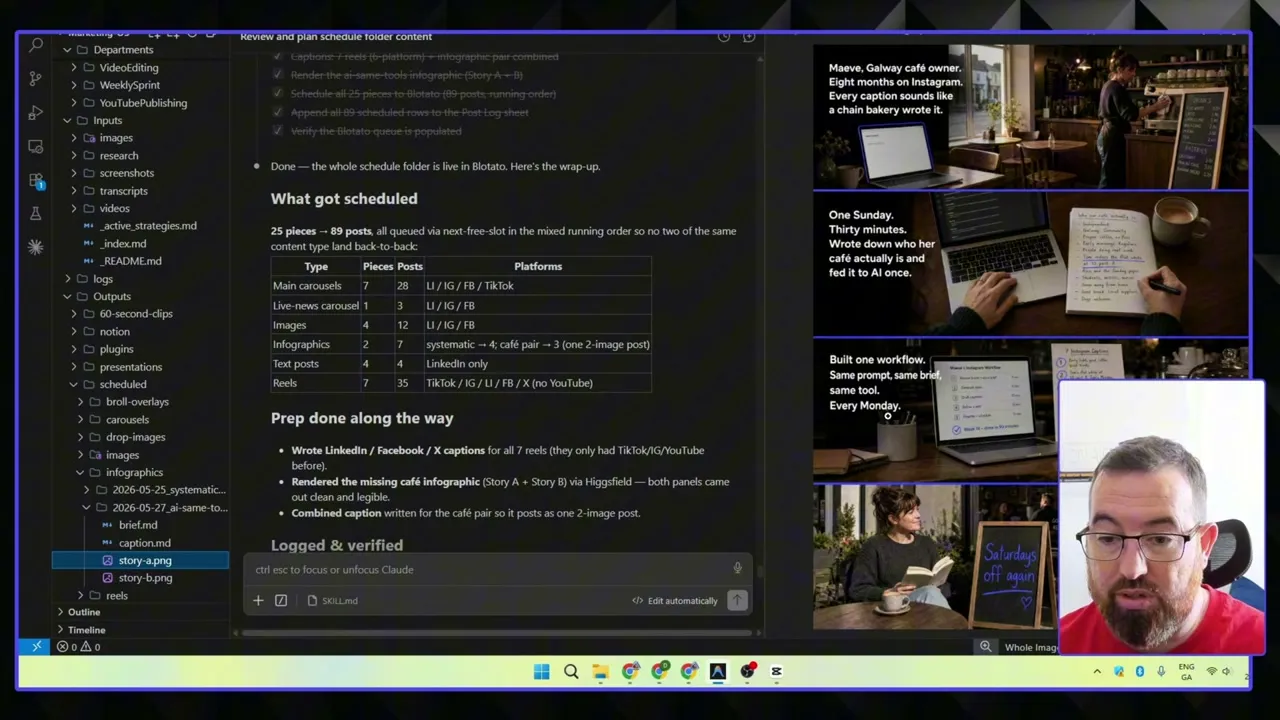
That batch went to five platforms: LinkedIn, Instagram, Facebook, TikTok and X. Wayne recorded the video while the run went, and he put it at about 15 minutes.
Step 4: Log every post and review the log
Claude appends all 89 scheduled posts to his Google Sheets post log. Every two or three weeks Wayne runs the log through a review: “what worked, what didn’t, what to remove, what to keep.” After the run he had “on average four posts coming out per day on all platforms,” in his words, and he planned another run early the next week to fill the slots still open.
The Comment That Sends the Guide
Scheduling keeps Wayne consistent. His second workflow connects keyword comments to a guide page with an email form, and in August he built it with the same Claude setup.
He gave Claude a research file on Instagram for small businesses and one instruction: turn it into a lead magnet, publish it, and “create the automation.” He says the guide page and the comment-to-DM automation took about four minutes, with the automation set up on his Instagram account and his Facebook Page.
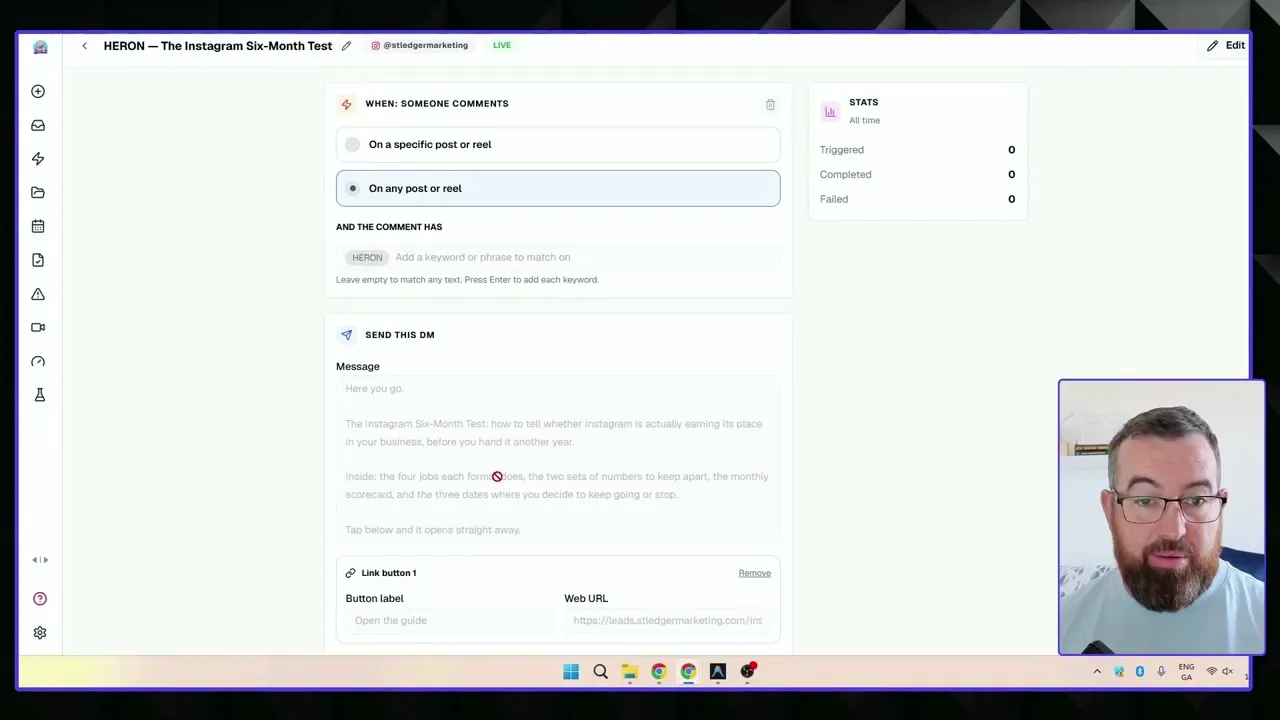
Claude then generated an image through his Higgsfield connection and wrote a caption that names the keyword, and Wayne had it post to Instagram and Facebook only. The video shows the setup, not sign-up results. Blotato DM automations covers the triggers and gates if you want the full feature. Calvin Hia pushed the same idea to 46 automations built from a template folder, and Wayne’s version is one research file, one guide and one keyword.
Blotato’s automations only answer people who comment or message first, and they run their steps in a fixed order inside Meta’s messaging windows. “ManyChat does have a few more features to reengage an audience,” Wayne says, “but I think for this purpose for many people, this is ideal.” In August he said these posts get maybe 10 comments each. Starter includes 1,000 active contacts a month.
What Wayne’s Blotato Dashboard Shows
Blotato’s analytics page has a Time saved card next to the publishing numbers. Wayne filmed both views for his September 30 video.
| Metric | Last 30 days | All time |
|---|---|---|
| Posts published | 304 | 2,012 |
| Failed posts | 6 | 60 |
| Publishing success rate | 98.1% | 97.1% |
| API requests | 413 | 2,367 |
| Estimated hours saved | 76 | 503 |
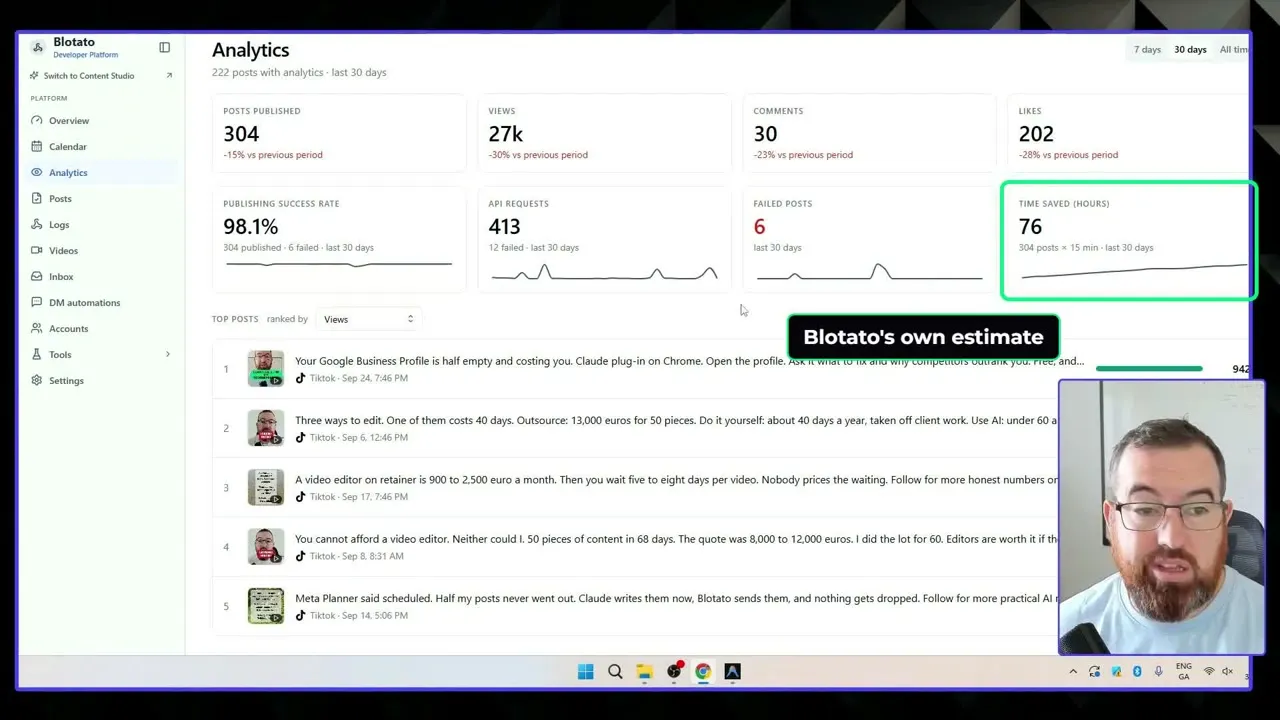
The card multiplies posts by 15 minutes each, so the hours are an estimate of hand-scheduling time. Wayne prices those hours at $21 an hour, which his slide credits to Indeed’s average pay for a social media specialist, and gets “$1,600 of work” for the month on a $29 plan. The post count and the failure rate are counted, not estimated.
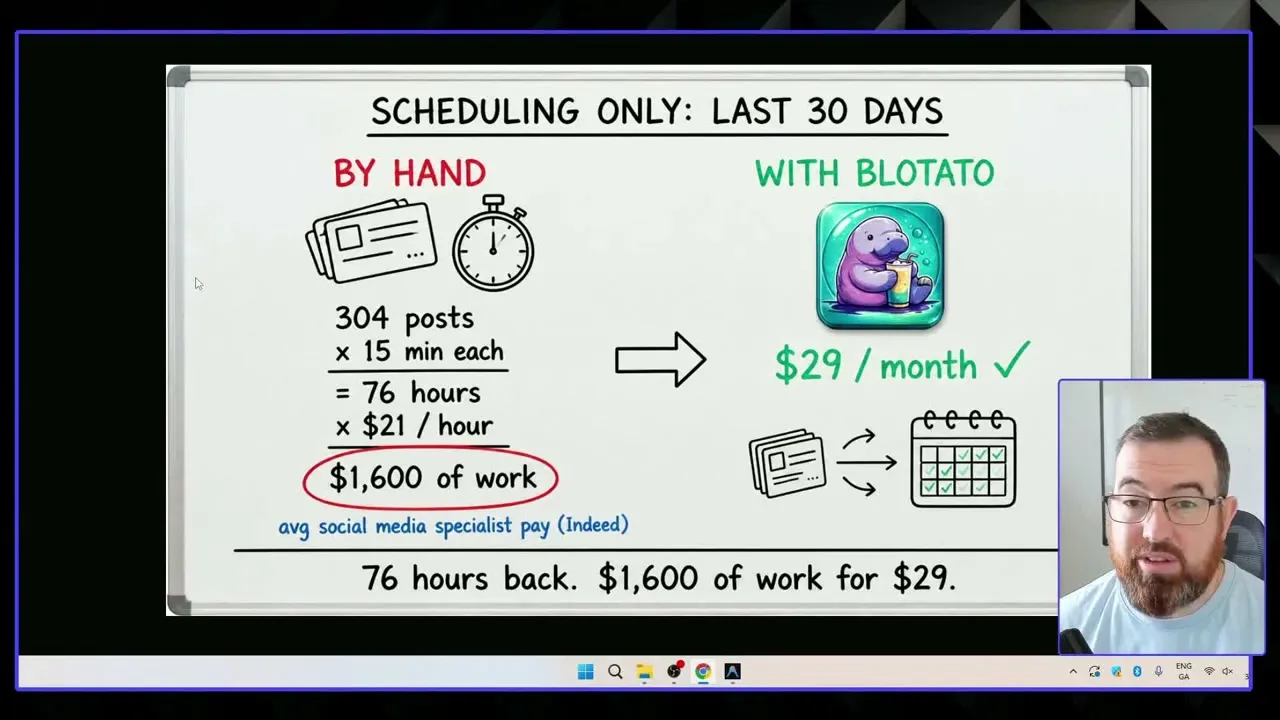
Wayne thinks most of that month’s six failures came from an account he had not reconnected. What he is testing now is a second Instagram account about AI video editing, with the plan that every niche account points back to his community. He is still posting to it by hand to warm it up, and he has copied his comment keyword automation over, though it was not switched on yet when he filmed. There are no results from that account yet.
Where the Setup Runs Out
- The Starter queue holds 200 scheduled posts. In August Wayne said that only lets him queue about “the next two weeks of content,” and that he would need the $97 Creator plan, which holds 1,000.
- DM automation covers Instagram and Facebook only. His accounts on every other platform do not get comment-to-DM automations.
Why This Fits a One-Person Marketing Business
Wayne is one person with a steady stream of content and a handful of accounts to keep fed. His own line is that the business that shows up on every channel every week “beats the ones that post in bursts and goes quiet.” His answer is a cadence he sets once and lets Claude fill, instead of posting in bursts when he has spare time. If you already work in Claude and your content already collects somewhere, his setup is a short step from where you are.
Sabrina’s Final Take
What I would copy from Wayne is the order he works in: slots first, a folder that fills during the week, one Claude run that writes and queues, and a log he reviews every few weeks. His screenshots show the failed posts next to the published ones. The comment funnel is a sensible second step once posts are going out every day. If you want to run the same loop, the posting slots and comment-to-DM automations he uses come with every Blotato plan.