How to Automate Instagram Reels With AI (24/7 Posting System)
How to automate Instagram Reels with AI in 2026. The 24/7 posting system I built with n8n, HeyGen, and Blotato, step by step.
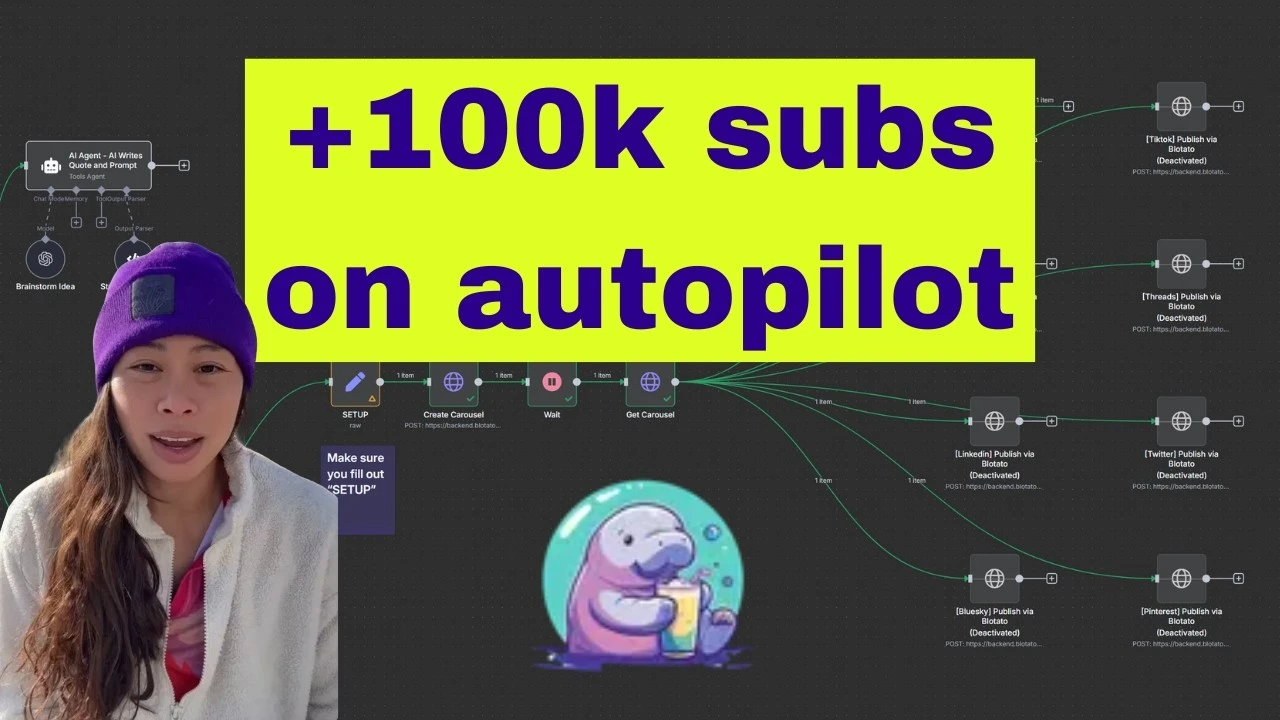
Automating Instagram Reels is the dream, but most tutorials stop at scheduling. They don’t address the hard part: where does the content come from? I built a system that clones viral Reels from creators I admire, rewrites them in my voice using AI, generates an avatar video, and autopublishes to nine social platforms. The whole thing runs 24/7 with one approval step.
This isn’t a demo. I ran this exact workflow live in the video below, cloning an Alex Hormozi Reel and posting my AI avatar version to Instagram in under 10 minutes. The template is free, and I’ll walk you through every step.
How to Automate Instagram Reels (Video Guide)
If you’d rather watch the full walkthrough, this is the video version. The written guide below covers the same build with extra detail on the setup steps and common troubleshooting issues.
Why Clone Viral Reels Instead of Creating From Scratch
Most Reels automation posts assume you already have content to schedule. They skip the creation step entirely. But that’s the bottleneck for solo creators and small agencies: coming up with fresh ideas, scripting them, and producing video daily.
Cloning viral Reels solves this. You identify content that’s already proven to resonate, then adapt it to your niche. The AI rewrites the script in your voice, generates an avatar video, and publishes it automatically. You’re not stealing content. You’re studying what works and creating your own version, which is exactly what successful creators have always done.
The human-in-the-loop approval step is what makes this safe. You review the AI-generated script before any video is created. Nothing posts without your approval.
My Tool Stack for Automating Instagram Reels
Here’s what the workflow uses:
- n8n for workflow automation (self-hosted or cloud)
- Airtable for the content queue and approval interface
- Apify to scrape the original Reel transcript
- OpenAI/ChatGPT to rewrite the script in your voice
- HeyGen to generate AI avatar videos
- Blotato to upload and publish to Instagram (plus 8 other platforms)
I’m involved with Blotato as a creator and tester, so take this with whatever grain of salt feels right. The multi-platform publishing is what ties the whole system together, and that’s the piece most DIY automations skip.
If you want to test the whole stack on your own account, start a free 7-day Blotato trial, connect Instagram, and run your first AI-generated Reel end to end. The trial covers the dashboard, but the API access the n8n flow needs is a paid-plan feature: generating an API key in Settings ends the free trial and activates your paid Starter plan.
AI Avatar Automation vs Traditional Scheduling
| Approach | Content Source | Video Creation | Publishing | Human Review |
|---|---|---|---|---|
| Traditional scheduling | You create everything | Manual filming/editing | Scheduled posts | Before scheduling |
| AI avatar automation | Clone viral Reels | HeyGen generates video | Autopublish via API | Before video creation |
| This workflow | Viral Reel URL | AI rewrites + HeyGen | Blotato to 9 platforms | Airtable approval gate |
The key difference: traditional scheduling automates the when, but you still do all the creative work. This workflow automates the what by sourcing proven content and generating video automatically. The approval step keeps you in control of quality.
If you’ve already built the Instagram Stories automation or the carousel automation, this is the same pattern with Reels swapped in.
How to Automate Instagram Reels (Step-by-Step)
One sentence framing: The workflow has three phases, each triggered by the previous step completing.
Step 1: Set Up Your Airtable Database
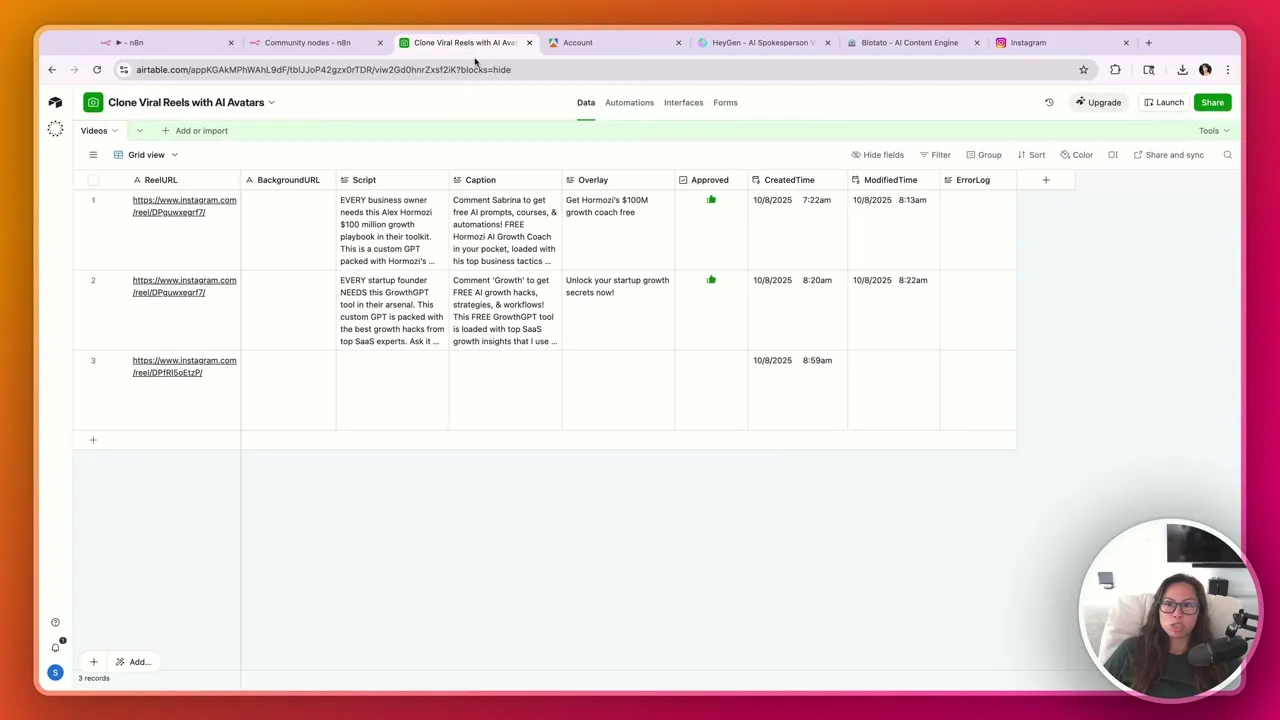
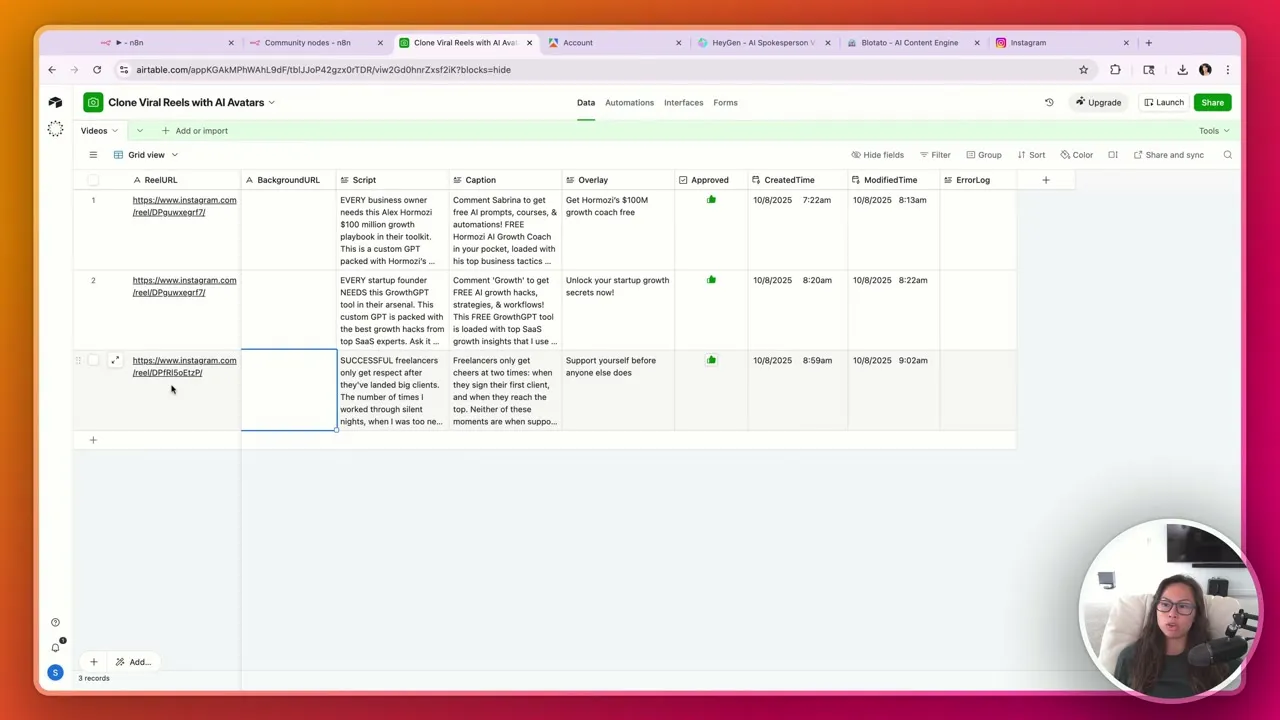
Clone my Airtable template (linked in the video description). The database has columns for ReelURL, BackgroundURL, Script, Caption, Overlay, Approved, CreatedTime, ModifiedTime, and ErrorLog.
You can submit Reels via a form or paste URLs directly into the table. The form is useful if you want to expose the workflow to a team without giving them access to the full database.
Step 2: Import the n8n Workflow Template
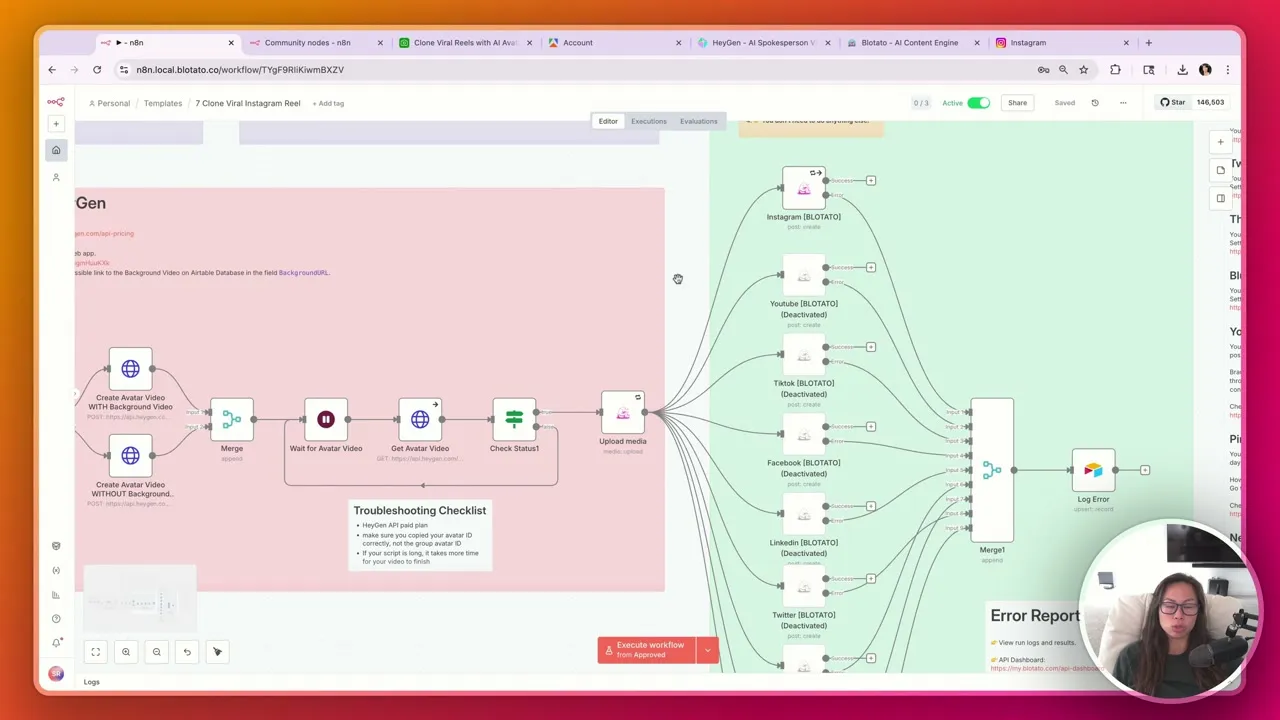
Download the free template from the video description. In n8n, import the JSON file and you’ll see the full workflow with three color-coded sections: Phase 1 (green) handles scraping and script generation, Phase 2 (pink) creates the avatar video, and Phase 3 (purple) publishes everywhere.
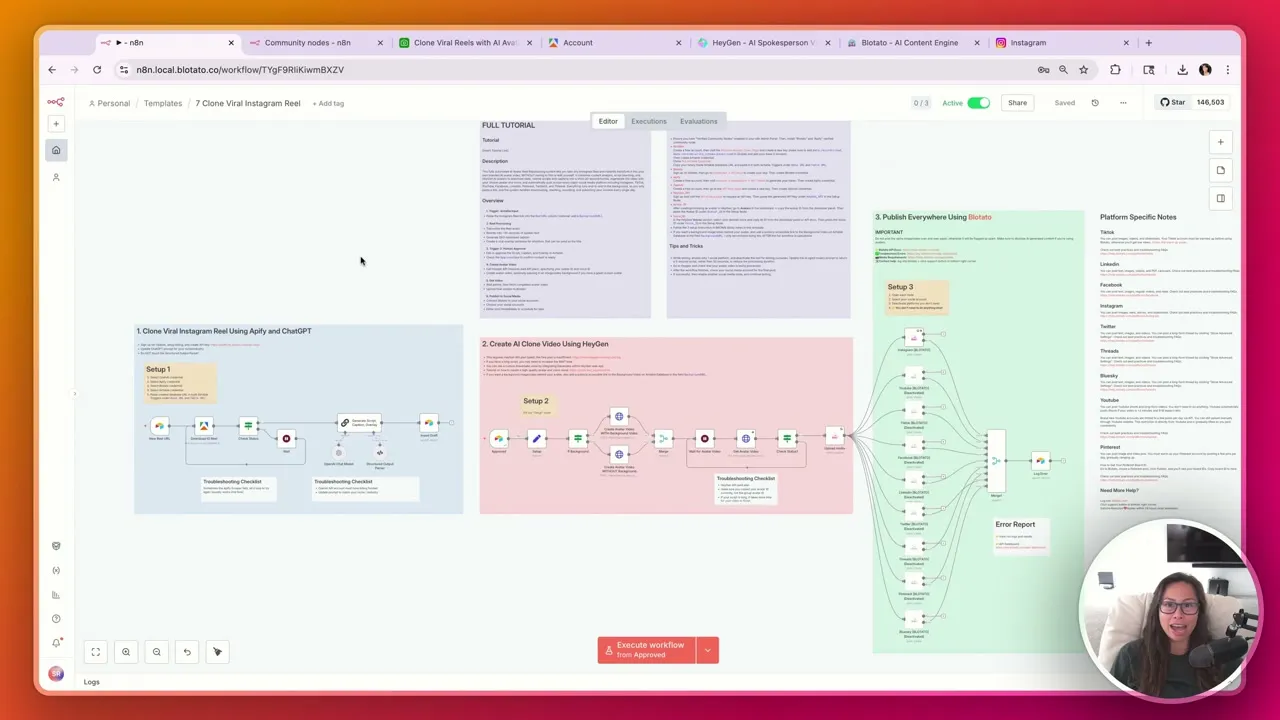
Connect your credentials for Airtable, Apify, OpenAI, HeyGen, and Blotato. Each service has a setup node with instructions. The sticky notes in the workflow tell you exactly what to paste where.
Step 3: Configure Your API Credentials
You’ll need API keys from five services:
- Airtable: Personal access token with data.records read/write and schema.bases read scopes
- Apify: Account with billing enabled for Instagram scraping
- OpenAI: API key with GPT-4 access
- HeyGen: Creator plan ($99/mo minimum for API access) plus your Avatar ID and Voice ID
- Blotato: API key from Settings > API in your dashboard
The HeyGen setup is the most involved. Go to Avatars in your HeyGen dashboard, choose the avatar you want to use, and copy the Avatar ID. Do the same for Voices to get your Voice ID. Paste both into the n8n setup node.
Step 4: Drop a Viral Reel URL and Trigger the Workflow
Find a Reel you want to clone. Copy the URL and paste it into your Airtable database (or submit via the form). This triggers Phase 1 automatically.
The workflow uses Apify to download the Reel and extract the transcript. ChatGPT then rewrites the script, caption, and overlay text tailored to your niche. All three appear in your Airtable row within a few minutes.
Step 5: Review and Approve the AI-Generated Content
This is the human-in-the-loop step. Read the generated script. Make edits if anything sounds off. The AI usually gets it 80% right, but your voice has nuances a model can’t fully capture.
When you’re happy with the content, click the Approved checkbox. This triggers Phase 2: the HeyGen avatar video generation.
Step 6: Wait for HeyGen to Generate Your Avatar Video
Phase 2 sends your approved script to HeyGen’s API. The avatar video takes a few minutes to render, longer for scripts over 30 seconds. You can watch the progress in your HeyGen dashboard.
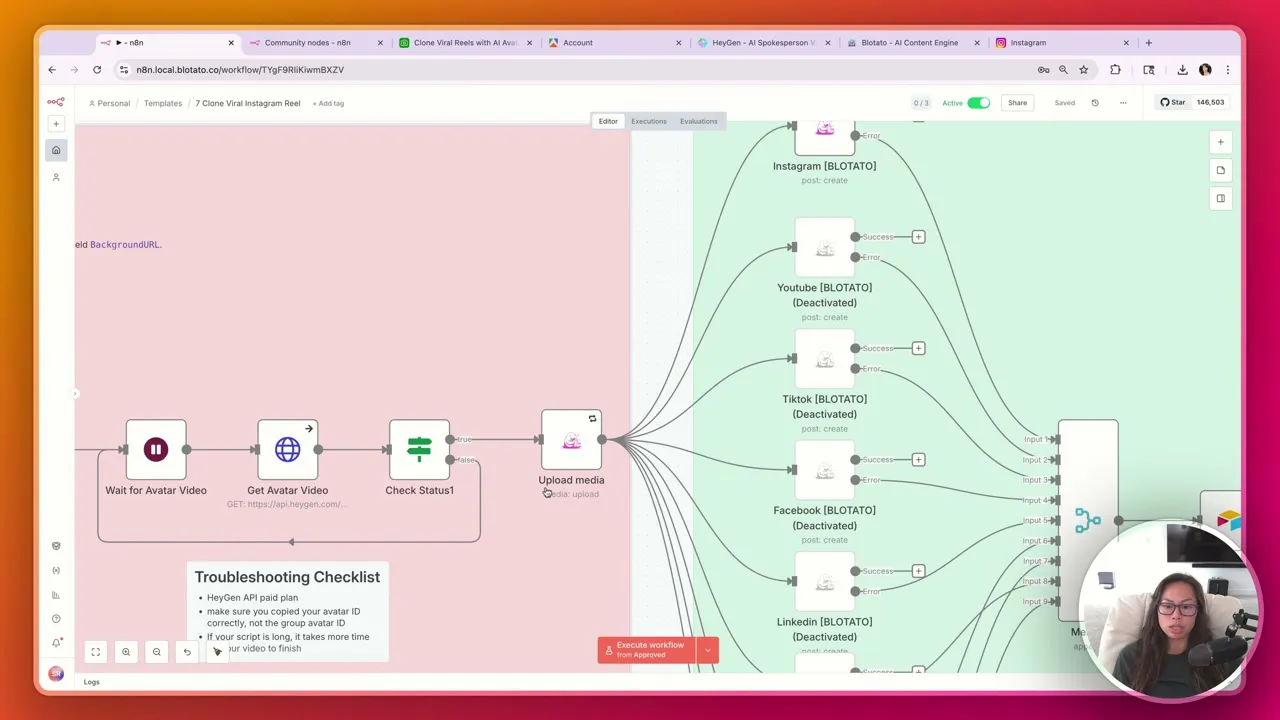
Once complete, the workflow downloads the video and uploads it to Blotato’s media library automatically.
Step 7: Autopublish to Instagram (and 8 Other Platforms)
Phase 3 publishes the video everywhere. In the template, I’ve enabled Instagram and deactivated the other platforms for testing. Once Instagram works, activate YouTube Shorts, TikTok, LinkedIn, Twitter, Threads, Facebook, Bluesky, and Pinterest.
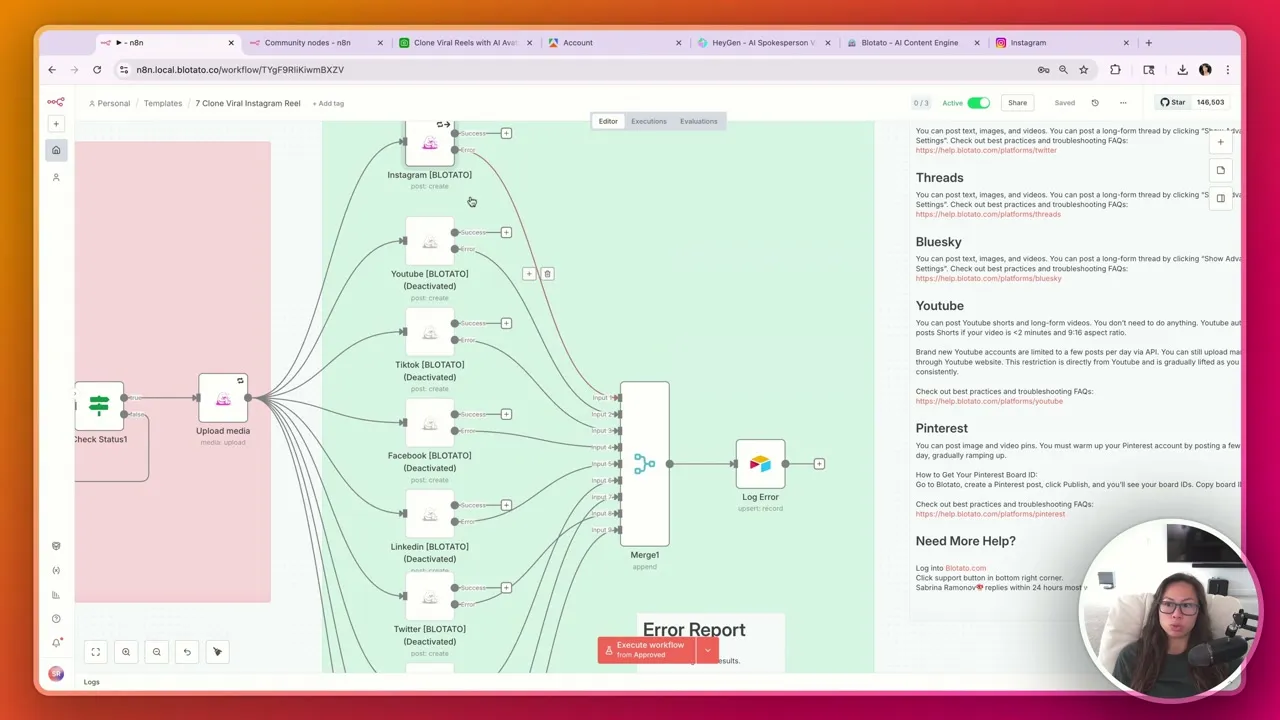
The workflow logs any errors back to your Airtable database. If HeyGen times out or a platform rejects the post, you’ll see exactly what happened in the ErrorLog column.
Pro Tips for Automating Reels
Test with one platform first. While testing, enable only Instagram and deactivate the rest. Update the AI prompt to generate a 5-second script instead of 30 seconds, which reduces HeyGen processing time.
Watch HeyGen during the workflow. Have your HeyGen dashboard open so you can see the video being created in real time. This helps you catch issues early before the publish step.
Customize the ChatGPT prompt for your niche. The default prompt is generic. Spend time refining it to match your industry, tone, and specific use case. This is where most of your ongoing optimization happens.
What This Workflow Can’t Do (Yet)
The workflow clones the script, not the visual style. Your HeyGen avatar looks like you, not the original creator. If the source Reel relies heavily on visual gags, text overlays, or b-roll, those won’t transfer.
HeyGen avatar quality depends on your plan. The Creator plan ($99/mo) gives you API access, but the separate API pricing adds $99/mo more. That’s $200/mo minimum just for HeyGen, which means this workflow isn’t for beginners still figuring out their content strategy.
Multi-platform publishing happens simultaneously. If you want to stagger posts (Instagram first, TikTok an hour later), you’d need to build separate scheduled triggers in n8n.
Results You Can Expect
Once the workflow is running, you can clone 3-5 viral Reels per day with maybe 10 minutes of actual work (reviewing and approving scripts). Each approved Reel publishes to all your connected platforms automatically.
The Blotato Starter plan ($29/mo) includes 20 social accounts and the API access this workflow needs. If you’re posting to Instagram, TikTok, YouTube Shorts, and a few others, you’re covered on any Blotato plan.
Sabrina’s Final Take
This workflow is for intermediate or advanced creators who already know what content resonates with their audience. The HeyGen costs ($200/mo) make it impractical for beginners. But if you’re running an agency or scaling a personal brand across multiple platforms, the time savings compound fast. Clone what works, add your voice, and let the automation handle the rest.
Automate Instagram Reels FAQs
Is cloning viral Reels legal?
You’re not downloading and reposting someone else’s video. The workflow extracts the transcript and generates an entirely new video with your AI avatar. This is content inspiration and adaptation, not theft. That said, avoid copying word-for-word scripts from creators who might object.
Do I need coding skills to set this up?
No coding required. The n8n template is drag-and-drop. You’ll paste API keys and configure credentials, but that’s closer to filling out forms than writing code. The sticky notes in the workflow explain each step.
Why is HeyGen so expensive for this workflow?
HeyGen charges separately for their web app and API access. The Creator plan ($99/mo) lets you create avatars, but API access for automation costs another $99/mo minimum. It’s a real cost barrier, and there’s no way around it if you want AI avatar video generation.
Can I use this for TikTok instead of Instagram?
Yes. Blotato publishes to TikTok, YouTube Shorts, and seven other platforms. Just enable the TikTok node in the workflow and connect your account. The same video publishes everywhere.
How many Reels can I automate per day?
The bottleneck is HeyGen video generation time and your API rate limits. Realistically, 5-10 Reels per day is sustainable. More than that and you’ll hit queuing delays or API throttling.