SocialPilot Pricing 2026: Two Live Rate Cards, One Canonical
SocialPilot pricing runs $30 to $200 a month on its canonical page. A second live page sells the same tier names for less, with fewer accounts.

SocialPilot pricing has a problem most pricing posts will not tell you about: the company is running two live pricing pages at the same time, and they do not agree. One sells Essentials at $30 a month for 7 social accounts. The other sells Essentials at $20 a month for 5. Same tier name, same page layout, same buttons, different deal.
Both were live on 15 September 2026, both return HTTP 200. As of 28 September, only one is open to search engines: /plans carries a canonical tag pointing at itself, while /pricing carries no canonical tag and a noindex, nofollow robots tag, which asks search engines to leave it out of the index. So SocialPilot is steering crawlers and AI assistants to the $30 card while the $20 card stays reachable to anyone who lands on it.
This post breaks down what each tier actually costs, what the add-on math does to your bill as you grow, and how to tell before you pay which of the two cards you are being sold. If you are wiring SocialPilot into an agent rather than clicking around a dashboard, there is a second split worth knowing about too: the MCP server is on every paid plan, and the REST API is not.
Credit where it is due first. SocialPilot bundles team members into the plan instead of charging per seat, and at the top tier it stops counting people entirely. Where Hootsuite, Sprout Social and Agorapulse all bill per user, that is a different choice, and it is a large part of why the tool keeps showing up on agency shortlists.
SocialPilot Pricing in 2026, Tier by Tier
These are the numbers from /plans, the page SocialPilot lets search engines index. Annual billing saves 15% on every tier, which I verified by dividing rather than trusting the badge.
| Tier | Monthly | Annual (per month) | Social accounts | Users |
|---|---|---|---|---|
| Essentials | $30 | $25.50 | 7 | 1 |
| Standard | $50 | $42.50 | 15 | 3 |
| Premium | $100 | $85 | 25 | 6 |
| Ultimate | $200 | $170 | 50 | Unlimited |
| Enterprise | Contact sales | Contact sales | Custom | Unlimited |
Four things that decide most bills:
- There is no free plan. Both plan cards advertise a 14-day trial with no credit card required, though the rate card is vaguer about which plans qualify.
- Extra social accounts are $4 a month each, available on every tier including Essentials.
- Extra users are $5 a month each, and that line only appears on Standard and Premium. Essentials has no user add-on at all, and Ultimate does not need one.
- The REST API is Enterprise-only. Every self-serve tier is a dashboard product with an MCP server attached.
The Two Pages Problem, and How to Tell Which One You Got
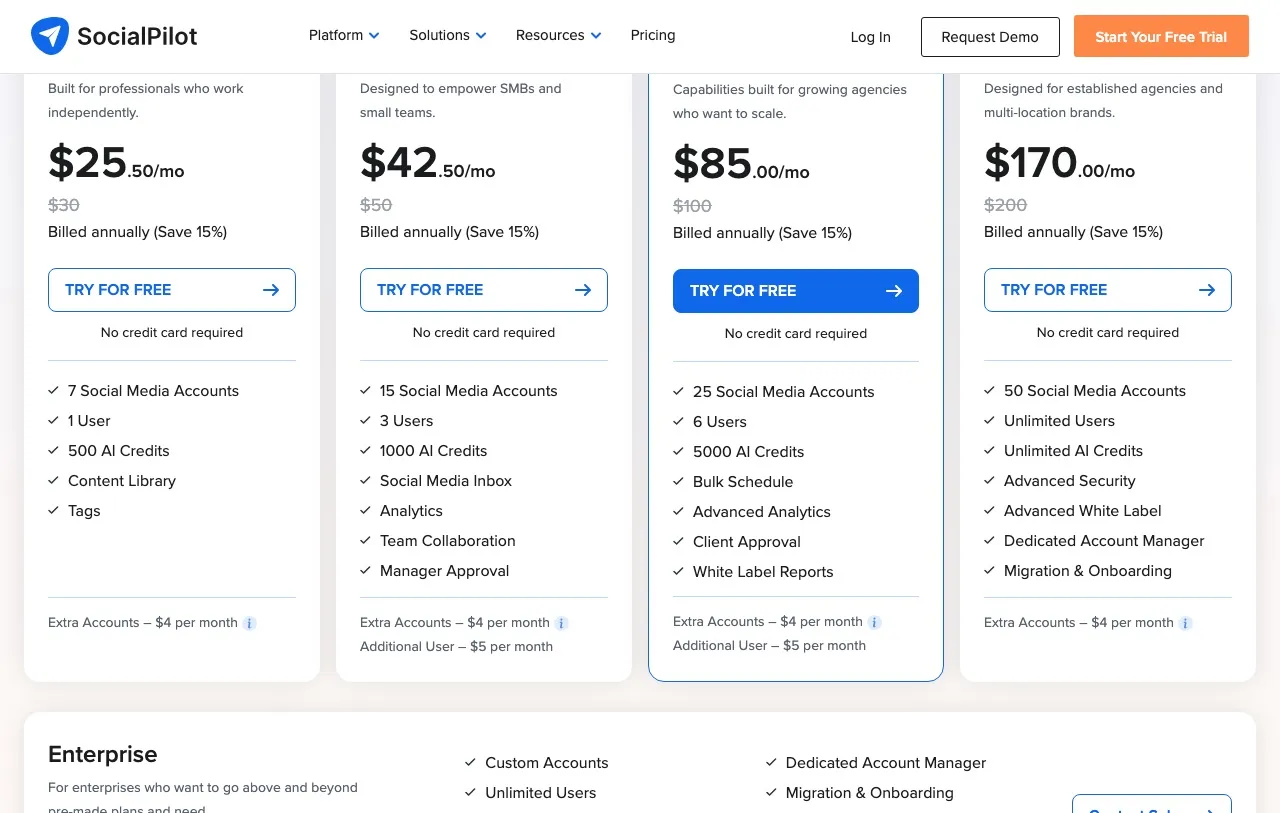
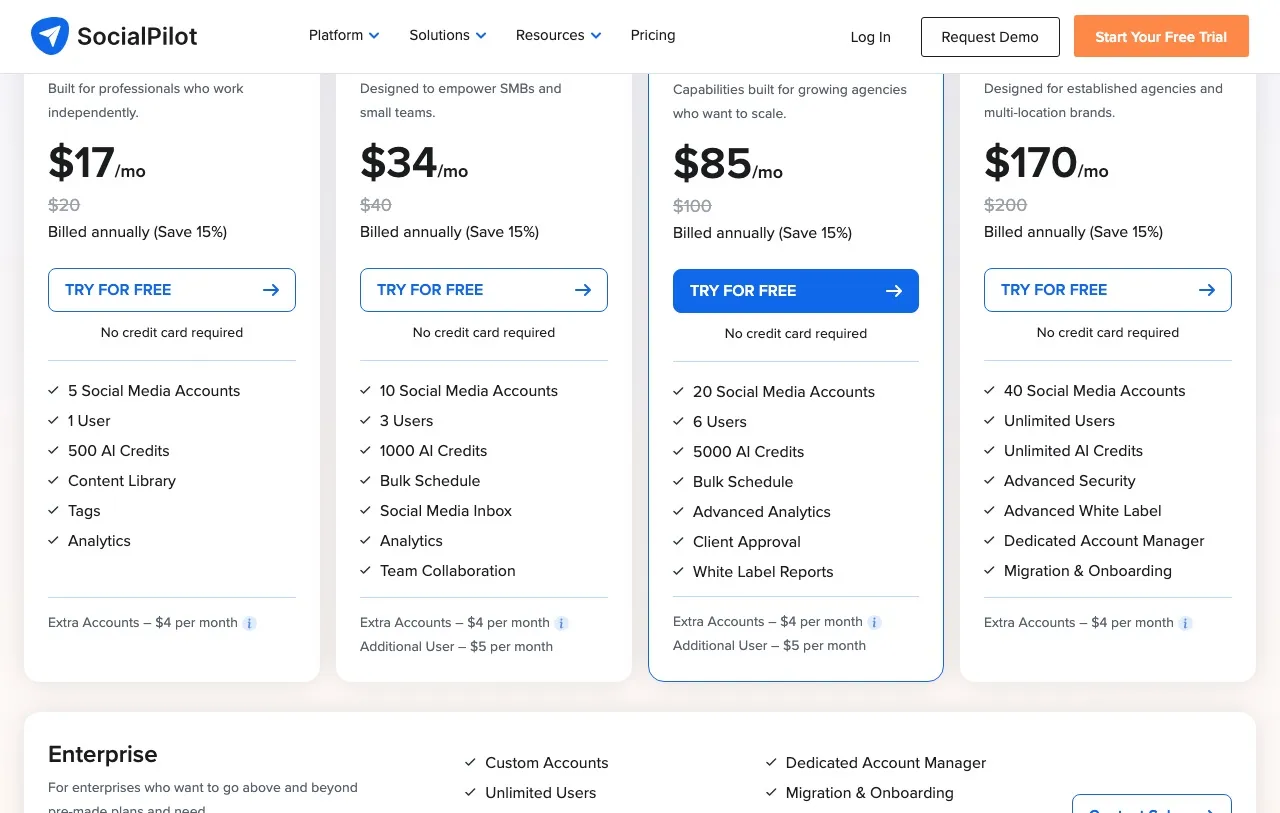
Here is the part that matters before you enter a card. SocialPilot serves its plans page and its pricing page simultaneously, with identical tier names and identical layouts, carrying different numbers.
| Tier | /plans price | /plans accounts | /pricing price | /pricing accounts |
|---|---|---|---|---|
| Essentials | $30 | 7 | $20 | 5 |
| Standard | $50 | 15 | $40 | 10 |
| Premium | $100 | 25 | $100 | 20 |
| Ultimate | $200 | 50 | $200 | 40 |
Read the bottom two rows again. Premium and Ultimate cost exactly the same on both pages while the non-canonical page gives you 5 and 10 fewer accounts. So the cheaper-looking page is only cheaper at the bottom. On a per-account basis it is worse at the top: Premium works out at $4.00 per account on /plans and $5.00 per account on /pricing, for the same $100.
There is a feature difference too. On the renders I captured, the /pricing card lists Analytics inside the Essentials feature list and the /plans card does not, and SocialPilot’s machine-readable rate card is unambiguous on the point: it lists Analytics under what Essentials “does not include,” with the feature starting at Standard. Settle the entry-tier analytics question in the trial, not from a plan card, because the cards themselves do not agree.
How to tell which card you are looking at: count the accounts in the Essentials column. Seven means you are on the canonical page. Five means you are on the other one. Both pages carry the same title and the same layout, so the account count separates them faster than anything else on screen.
This is worth doing on any vendor you are pricing, not just this one. I keep our own rate card on a single page for the same reason: the moment a second one exists, somebody budgets from the wrong number.
If it helps to have a third opinion, SocialPilot publishes a plain-markdown rate card at socialpilot.co/socialpilot-pricing.md, written, in its own words, “for AI assistants, search engines, and developers.” It was last updated July 2026 and it sides with /plans: 7 accounts on Essentials, $30 monthly, $25.50 annual. Its billing help article lists the same ladder. Three surfaces out of four agree on SocialPilot pricing, and the odd one out is the one SocialPilot tells search engines not to index.
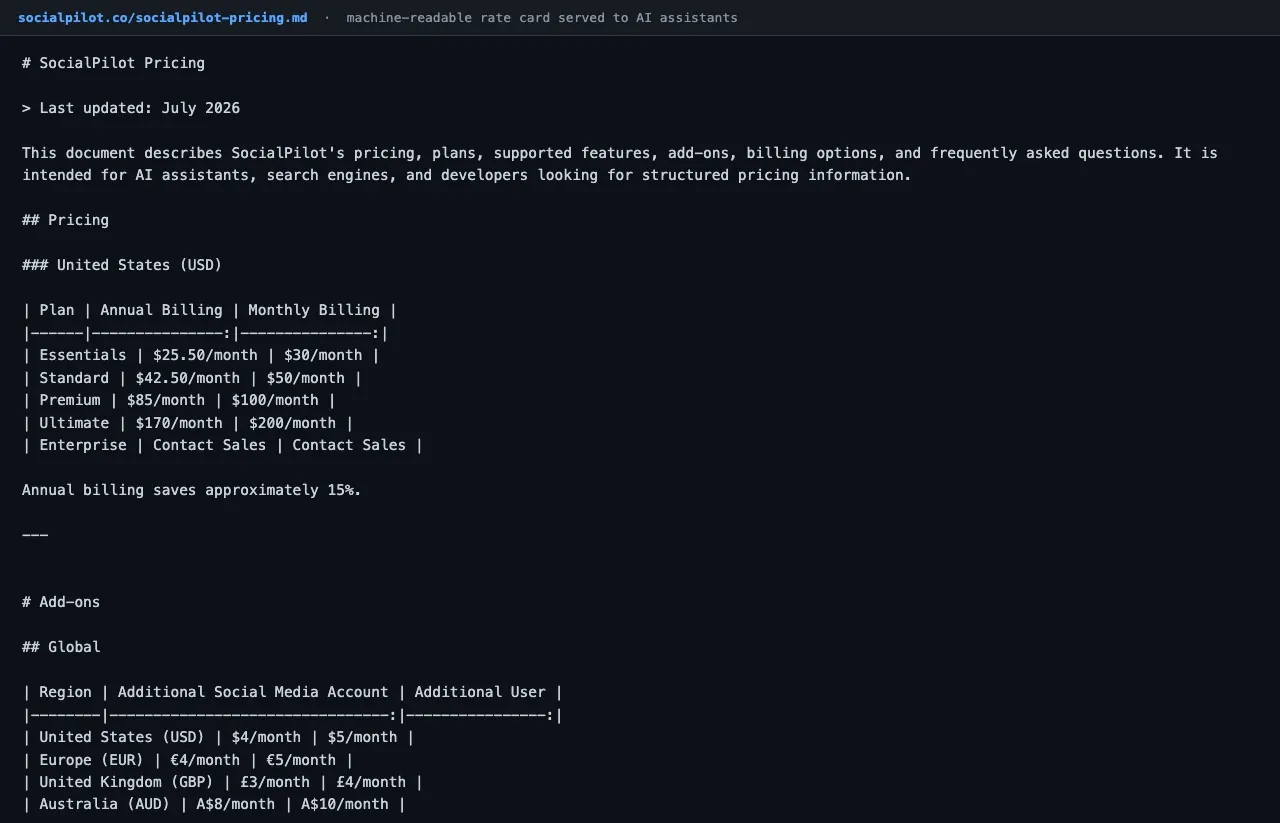
That file is also the cleanest answer to the add-on question, because it separates the two rates the plan cards show side by side: $4 buys a social account and $5 buys a user.
What This Costs You at 5, 10, 15, 25, and 50 Accounts
This is the table I would have wanted. Annual billing, cheapest route to each account count, add-ons included where they beat the next tier up.
| Accounts | Cheapest route | Per month | Per year | Per account |
|---|---|---|---|---|
| 5 | Essentials | $25.50 | $306 | $5.10 |
| 7 | Essentials | $25.50 | $306 | $3.64 |
| 10 | Essentials + 3 extra | $37.50 | $450 | $3.75 |
| 15 | Standard | $42.50 | $510 | $2.83 |
| 25 | Standard + 10 extra | $82.50 | $990 | $3.30 |
| 50 | Ultimate | $170 | $2,040 | $3.40 |
Two things fall out of this that the plan cards do not tell you.
Staying put and buying add-ons often beats upgrading. At 10 accounts, Essentials plus three $4 add-ons costs $37.50 against Standard’s $42.50. At 25, Standard plus ten add-ons costs $82.50 against Premium’s $85. The add-on route wins right up until it does not, and nothing on the pricing page flags the crossover.
The best value on the whole ladder is Standard at exactly 15 accounts. That works out to $2.83 per account, the low point of every row in the table. Run 25 accounts and you are at $3.30 each, and 50 on Ultimate costs $3.40. Every add-on account costs the same flat $4 wherever you sit, so what moves is the average: filling a tier to its cap is what drives your per-account number down, and sitting just past a cap is what drives it back up.
Where the Bundled Seat Model Pays Off
Most tools in this category charge per user, and that is the comparison SocialPilot is built to win. Standard includes 3 users at $42.50 and Premium includes 6 at $85, which works out to $14.17 per user either way. That figure is the whole plan divided by its seats rather than a seat charge, since the accounts and features come with it, so treat it as a ceiling when comparing against a tool that genuinely bills per head. Ultimate includes unlimited users at $170.
The crossover is worth knowing if you are growing a team. Premium plus $5 user add-ons matches Ultimate exactly at 23 users, where both cost $170, and Ultimate wins from the 24th onward when Premium reaches $175. So “upgrade to Ultimate for the unlimited seats” is usually wrong advice unless you are also close to needing more than 25 accounts. Buy Ultimate for the accounts, and treat unlimited users as the thing that comes along with it.
There is also a second seat axis nobody mentions. SocialPilot’s rate card lists Client Seats separately from team members: zero on Essentials and Standard, unlimited from Premium up. If you are an agency planning to give clients login access for approvals, that is the line that decides your tier, not the user count. It is also why Premium came out as the cheapest client-approval setup when I priced a four-client agency against Kontentino’s per-user billing.
What the AI Credits Actually Buy
Every tier ships AI credits: 500 on Essentials, 1,000 on Standard, 5,000 on Premium, unlimited on Ultimate. The AI Assistant writes and rewrites post copy, generates captions and hashtags, and adapts one post for different platforms.
Where it stops is image and video. SocialPilot’s AI is a text product. There is no AI image generation and no AI video generation in the plan, so if your workflow needs visuals you are still paying for Canva or something like it alongside the subscription. The Canva integration is included on every tier, which tells you how the product expects you to solve that.
For a text-only workflow the credit allowances are generous, and unlimited at Ultimate is a real answer rather than a high cap.
SocialPilot for Agents, MCP Servers, and the API Wall
If you found this post because you want an agent doing the posting, the pricing splits differently than it does for a human clicking around.
SocialPilot ships a first-party MCP server on every paid plan. The endpoint at mcp.socialpilot.co/mcp is live and auth-gated: a JSON-RPC initialize request sent without credentials on 15 September 2026 came back HTTP 401, which is a server refusing an unauthenticated caller, not a dead URL. Its rate card lists creating posts, saving drafts, scheduling, retrieving schedules and reading connected accounts as supported workflows. So a $30 plan does get you an agent surface, which is worth weighing against the API wall below it.
The REST API is a different story. It sits on Enterprise, behind a sales conversation with no published price. SSO is in the same place. That is a real ceiling. MCP is a good fit when a human-supervised assistant is doing the work, say Claude Desktop or Claude Code driving your posting while you watch, and a poor one when you want a server-side job posting on a schedule with no client attached. SocialPilot’s rate card does not name supported clients, saying only that any MCP-capable application can connect after authentication, so confirm your own client works during the trial.
Worth being precise about what that means for cost. You cannot price an API workflow on SocialPilot at all from public information, because the tier that carries it does not publish a number. Our pricing study of agent access across social media tools hit the same wall, so it prices SocialPilot through the MCP on Essentials and leaves the HTTP API out.
What the Rate Card Leaves Undefined
Two places where SocialPilot’s own surfaces go quiet instead of contradicting each other, which is a different thing and worth reporting as silence.
- Trial terms. The pricing cards say “14-Day Trial, no credit card required.” The machine-readable rate card is softer: a free trial “for eligible plans,” and on the card question it says to “refer to the signup page for the latest free trial requirements.” It does not say which plans are eligible.
- Posting limits. Neither surface publishes a posts-per-day or posts-per-hour ceiling. That looks absent rather than hidden, so confirm it in the trial if throughput matters to you.
Neither of these is a gotcha. They are places where I would check at signup instead of quoting a number at you.
Who Should Buy SocialPilot, and Who Should Not
It fits well if:
- You run a small agency with client approvals and white-label reports in the workflow, which start at Premium.
- Your team is growing faster than your account count, since seats are bundled and the per-user math beats most of this category.
- You want client login seats, which unlock at Premium and are free from there.
- You are at 7 or 15 accounts exactly, where the tiers are priced most efficiently.
It gets expensive or awkward if:
- You need a REST API, which means an Enterprise conversation with no published price.
- You want AI image or video generation, which is not in the product at any tier.
- You are one person running a lot of accounts, where you are paying for a seat structure you will never use.
- You sit just past a tier boundary, where add-ons quietly accumulate.
This is a category-fit question, not a quality one. SocialPilot prices the way an agency tool should price, and if you are not an agency you are paying for the parts of it that make it one.
How SocialPilot Compares on Entry Price
| Tool | Cheapest paid tier | What you get at entry |
|---|---|---|
| SocialPilot Essentials | $30/mo ($25.50 annual) | 7 accounts, 1 user, 500 AI credits, MCP server, no API |
| Buffer Essentials | $6/mo per channel | 1 channel, scheduling and basic analytics, $30 at 5 channels |
| Sendible Core | $35/mo ($30 annual) | 1 workspace of 6 profiles, unlimited users, white-label reports |
| Agorapulse Standard | $99/mo per user ($79 annual) | 10 shared profiles, full inbox, billed per seat |
| Blotato Starter | $29/mo flat | 20 accounts, 1 user, AI text, image and video, REST API, MCP, n8n and Make nodes |
The last row needs a conflict-of-interest note: I am the founder of Blotato, so check that line against your own shortlist before you believe it.
This table splits on what you are buying, not on who is cheaper, and on the axis this post is about we are the weaker product. Blotato is one login per account and there is no seat product at any tier, so if three people need to be in the tool next month, SocialPilot at $42.50 for 15 accounts and 3 users does something we cannot do at any price. Our client-approval story is thinner too, where SocialPilot gives away unlimited client seats from Premium up. Both of those are real gaps rather than positioning, and if a team or a client login is involved they decide this on their own.

I put the full head-to-head in Blotato vs SocialPilot, including where the solo-operator math lands. If you are shopping the wider category, the Sendible alternatives roundup covers the agency end and Buffer pricing covers the per-channel model this one is built to beat.
My Read on Paying for SocialPilot in 2026
If you take one thing from this breakdown of SocialPilot pricing, make it this: open /plans rather than /pricing, and count the accounts in the Essentials column before you trust any number on the screen. Seven means you are on the page SocialPilot lets search engines index. That one check is the difference between budgeting from the card SocialPilot wants crawlers to find and budgeting from the one it keeps out of the index.
Then decide on seats before you decide on tier, because that is the axis this product is priced around. If you are adding people faster than accounts, the bundled seats are what you are paying for and the $14.17 per user on Standard is the ceiling to compare against whatever your current tool charges per head. If accounts are the thing multiplying and you are the only person logging in, run the add-on math in the table above, because staying on a lower tier with $4 accounts beats upgrading more often than the plan cards suggest.
The thing I would want to know before committing is the API wall. MCP on every paid plan is a good call and more than much of this category offers. But if your plan is to have something server-side posting on a schedule, you are heading for an Enterprise quote, and you should find out what that costs before you build around it. Take the 14-day trial and push on that specifically. The scheduling works fine and does not need testing.
Two Rate Cards and Four Tiers: SocialPilot Cost FAQs
How much does SocialPilot cost per month?
On the canonical plans page, SocialPilot costs $30 a month for Essentials, $50 for Standard, $100 for Premium and $200 for Ultimate, billed monthly. Annual billing takes 15% off each: $25.50, $42.50, $85 and $170. Enterprise is quote-only. A second live page sells the lower two tiers for $20 and $40 with fewer accounts.
Why do two SocialPilot pages show different prices?
Both socialpilot.co/plans and socialpilot.co/pricing are live, but only /plans is indexable: it carries a canonical tag pointing at itself, while /pricing carries a noindex, nofollow robots tag. So the plans card is the one SocialPilot points crawlers at. The pricing page sells Essentials at $20 for 5 accounts against $30 for 7. Count the accounts in the Essentials column to tell them apart.
Is there a free version of SocialPilot?
No. SocialPilot has no free tier and no forever-free plan. It offers a 14-day free trial, and both plan cards state no credit card is required to start it. Its machine-readable rate card is vaguer, describing a trial for “eligible plans” and pointing to the signup page for current requirements, so confirm the terms at signup.
Is SocialPilot cheaper than Buffer?
It depends entirely on your channel count, and the answer flips twice. Buffer bills per channel on tiered bands and publishes the totals: $18 at 3 channels, $30 at 5, $60 at 10, $120 at 25 and $195 at 50, billed monthly. Buffer is cheaper below 5, ties SocialPilot at exactly 5, then loses until roughly 50. At 25 accounts SocialPilot’s cheapest route on monthly billing is $90, Standard at $50 plus ten $4 add-ons, against Buffer’s $120. On annual billing that same route is $82.50.
What do extra accounts and extra users cost on SocialPilot?
Extra social accounts are $4 a month each on every tier. Extra users are $5 a month each, offered only on Standard and Premium. Essentials is single-user with no seat add-on, and Ultimate already includes unlimited users, so neither carries the line.
Is SocialPilot better than Hootsuite on price?
On price the gap is wide, because the billing units differ. Hootsuite charges $99 per user per month on annual billing for Standard, covering 10 social accounts, and every extra seat costs the full rate. SocialPilot Standard is $42.50 annually for 15 accounts and 3 users. If your team is more than one person, SocialPilot is the cheaper model by a large margin.
Does SocialPilot have an API?
SocialPilot restricts REST API access to Enterprise plans at custom pricing, with no published rate. It does ship a first-party MCP server on every paid plan at mcp.socialpilot.co/mcp, which handles creating, scheduling and retrieving posts from a connected AI assistant. So agent access starts at $30 and programmatic API access does not have a public price.