AI edits your videos. You just approve.
Free skills that turn Claude Code, ChatGPT Codex, Grok Bot, or Hermes into your professional AI agent video editor. Raw clip in, finished Reel out.
Setup github.com/blotato/contentskillsOther ways to install
From a terminal: git clone https://github.com/blotato/contentskills.git && cd contentskills && claude "Set me up"
Your agent clones the repo, installs what is missing and downloads the free voice and video tools (about 2 GB, roughly 15 minutes).
Official repo: github.com/blotato/contentskills · Agents: contentskills.md
- 10,000+looks from 1 take
- 20+themes
- $0voice, captions, effects
- 1sentence to install
Finished reels, edited by Claude
Every one of these started as a raw clip or a one-line topic. No timeline editor, no After Effects.
Messy footage in. Finished video out.
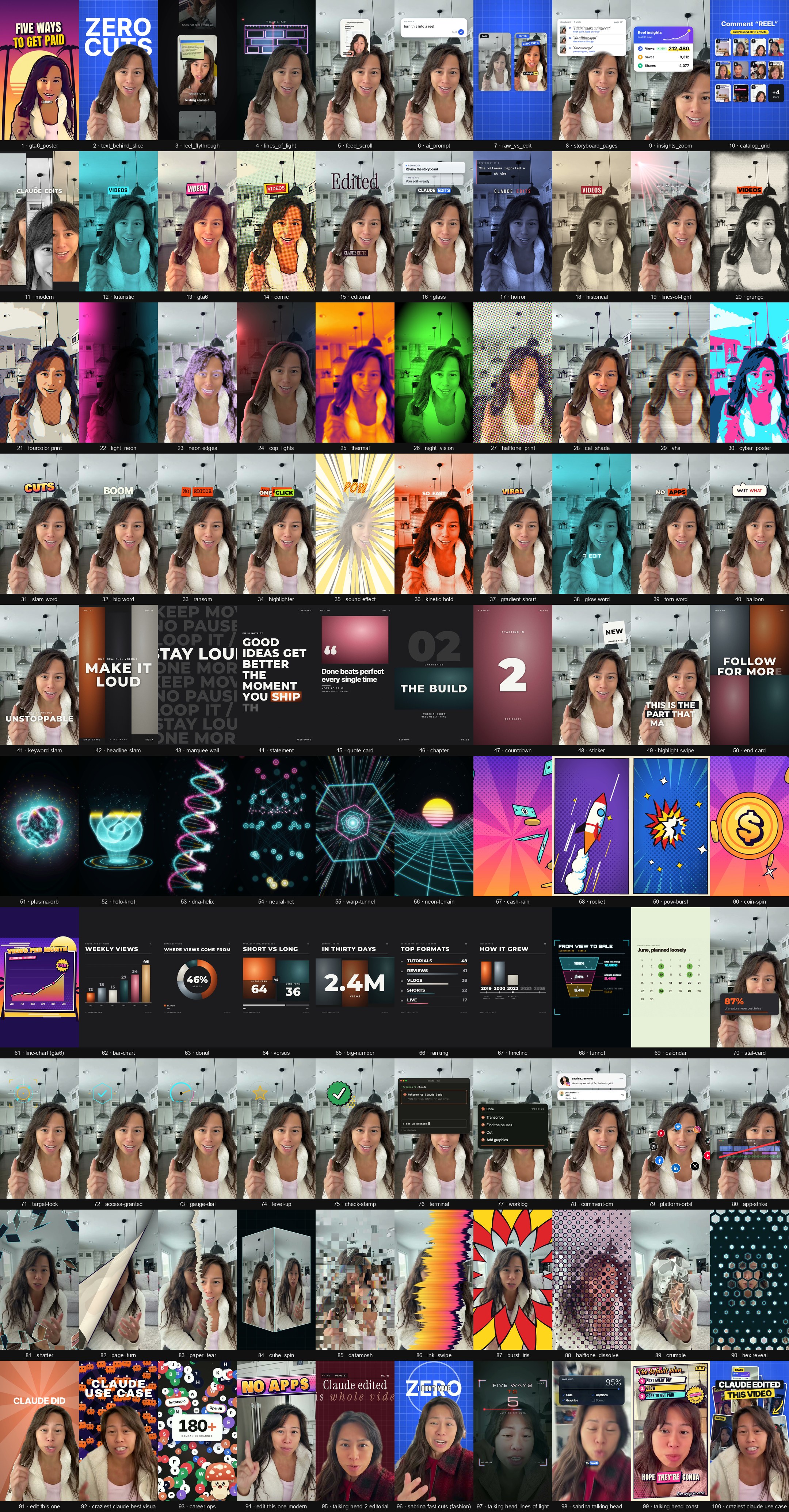
The same white-fleece kitchen frame through 90 pieces of the library, plus 10 frames from finished reels. One category per row. Ask for any of them by name.
 Open full size ↗
- Effects gta6_poster, text_behind_slice, reel_flythrough, feed_scroll
- Themes modern, futuristic, gta6, comic, editorial, horror, grunge
- Light and filters cop_lights, thermal, night_vision, vhs, cel_shade
- Captions slam-word, highlighter, kinetic-bold, glow-word, balloon
- Text headline-slam, marquee-wall, quote-card, countdown, end-card
- 3D plasma-orb, dna-helix, warp-tunnel, neon-terrain, coin-spin
- Charts bar-chart, donut, big-number, ranking, funnel, calendar
- Motion graphics and app UI terminal, worklog, comment-dm, platform-orbit
- Transitions shatter, page_turn, paper_tear, cube_spin, ink_swipe
- Finished reels ten frames from videos made with the pipeline
How a video gets made
Four steps. Claude does the work, you approve and give notes in plain English.
- 1
Ask
Point Claude at a clip or a topic. Add a reel you like and it copies the look: grade, fonts, captions, pace.
- 2
Approve the storyboard
A phone-size preview, one panel per scene. Nothing renders until you press Make my video, so changes are fast.
- 3
Fix
Pause anywhere on the review page, type what is wrong ("captions smaller"), get a new version. Old versions are kept.
- 4
Finish
Every video is checked first: no text on your face, nothing under the app buttons, steady loudness, no frozen frames.
Things to ask Claude
- Edit ~/Downloads/take1.mov in this style: <reel link>
- Make a 30-second video about 5 ways creators make money
- Make a video from ~/Downloads/take1.mov in the gta6 theme
- Put text_behind_slice on the hook
- Add a bar chart of the numbers I say at 0:20
- Glitch on every cut
- This card covers my face
- Hate the blue, never use it again
What is in the repo
Themes
20+ whole looks, including modern, editorial, minimal, glass, gta6, comic, futuristic, grunge, fashion, lifestyle, historical, horror and lines-of-light.
Library
Effects, captions, text, 3D, charts, app screens, transitions, sounds and music. Browse it all playing live on the dashboard.
Pipeline
Cut, find your face, plan, render, check. Local voice and transcription, so the default path costs nothing.
Your style
Your colours, fonts and captions. It learns from your notes and remembers them for every next video.
ContentSkills questions
01 Is ContentSkills free?
02 What do I need to install it?
03 Do I need to know how to edit video or write code?
04 Can I make videos without filming myself?
05 Does it post my videos?
Then post it everywhere with Blotato
ContentSkills makes the video. Blotato publishes and schedules it to Instagram, TikTok, YouTube and 8 more platforms from the same Claude chat.
Setup github.com/blotato/contentskills