Schedule Social Media Posts and Answer DMs From ChatGPT
- Official plugin in ChatGPT’s Plugins directory, published by Blotato Inc.
- Schedule to 9 platforms, plus Instagram and Facebook comments, DMs, and DM automations
- Same account, queue, and automations your Claude, Cursor, or API workflows already use
Blotato is an official ChatGPT plugin for social media. Install it, sign in, and schedule the post ChatGPT just drafted without copying it into another tab. OpenAI says installing or using a plugin depends on your plan, workspace, role, and region, and publishing through the plugin on Plus or Pro is not confirmed yet.
The plugin signs in to a Blotato account, and MCP access starts on a paid plan from $29/mo. The 7-day trial covers the web app but not MCP, so ChatGPT’s calls can fail with a subscription error until the plan starts. Updated November 2026.
How to connect ChatGPT to social media with the Blotato plugin
With your social accounts connected in Blotato and a paid Blotato plan active, it takes two steps: install the plugin, then talk to it. The plugin can only reach accounts that are already in Blotato.
Install the Blotato plugin
Open Plugins in the ChatGPT sidebar, search for Blotato, and select Install plugin. When ChatGPT asks, sign in to Blotato and approve access. On a company workspace, an admin may need to allow it first.
Prefer a custom MCP server? Add https://mcp.blotato.com/mcp on ChatGPT web with OAuth, where your plan allows custom servers. Either way, there is no API key to paste.
Then ask ChatGPT in plain English
Once it is installed, ChatGPT reaches for the plugin on its own when a request fits, or you can call it with an @ mention.
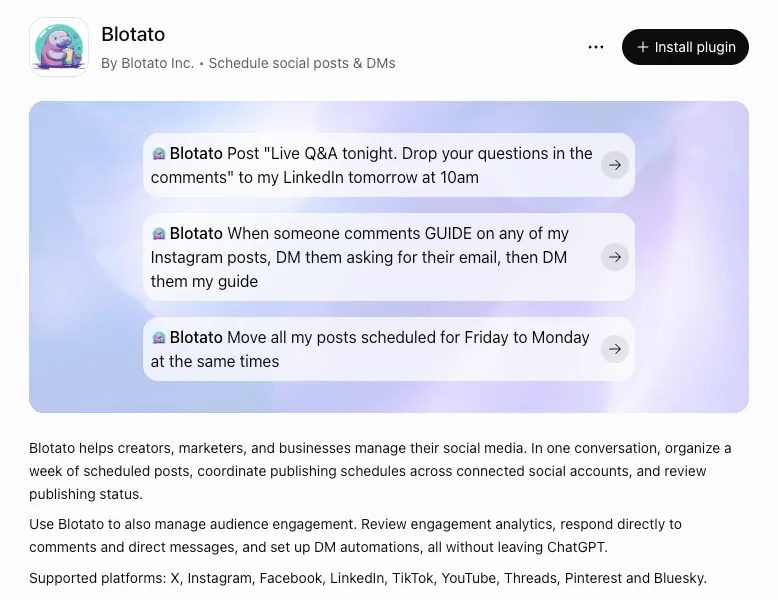
Post “Live Q&A tonight. Drop your questions in the comments” to my LinkedIn tomorrow at 10am
 ChatGPT, through Blotato
blotato_list_accountsFinds your connected LinkedIn account.blotato_create_postSchedules the post for 10am tomorrow.
The post sits in your Blotato queue for 10am, and Blotato publishes it whether or not the chat is still open.
- List my connected Blotato accounts
- Move Friday’s posts to Monday, same times
- Reply to comments on my last Instagram post
If your accounts come back, the connection works. If the list is empty, connect a social account in Blotato and ask again.
Full setup, step by step
- 1
Connect your social accounts in Blotato. MCP access needs a paid Blotato plan, and the 7-day trial does not include it.
- 2
In ChatGPT on the web, desktop, or mobile, open Plugins in the sidebar and search for Blotato. The listing is published by Blotato Inc.
- 3
Select Install plugin. When ChatGPT asks you to connect Blotato, during install or on first use, sign in and approve access.
- 4
Start a new chat and ask ChatGPT to list your connected Blotato accounts.
If the plugin is not available to you and your plan allows custom MCP servers, add Blotato by hand on ChatGPT web instead: Plugins, the plus button, Add custom MCP server, name Blotato, URL https://mcp.blotato.com/mcp, OAuth, accept the risk warning, then Create as a plugin, connect it, and approve access. On a Business workspace, only an admin or owner can do this.
Which social media platforms can ChatGPT post to?
Any of the 9 platforms you connect in Blotato. Connect the accounts once, then name the platform in your request.
- X
- TikTok
- YouTube
- Threads
- Bluesky
Publishing and scheduling cover all 9. Comments, DMs, and DM automations cover Instagram and Facebook only. If you need Mastodon, Telegram, Discord, or Reddit, Blotato does not post there.
Plugin or custom MCP server: which route fits?
Both routes reach the same hosted server and the same Blotato account. The directory plugin is the shorter path. The custom server is the fallback for workspaces where the plugin is unavailable, and custom-server write actions depend on your ChatGPT plan.
| Detail | Blotato plugin (Plugins directory) | Custom MCP server (by hand) |
|---|---|---|
| Setup | Plugins, search Blotato, Install plugin, sign in. | Plugins, the plus button, Add custom MCP server, URL https://mcp.blotato.com/mcp, OAuth, accept the risk warning, Create, then connect it and approve access. |
| Where | ChatGPT on the web, desktop, and mobile. | ChatGPT on the web only. |
| Who can use it | The directory is available across ChatGPT plans. OpenAI says installing or using a plugin depends on your plan, workspace, role, and region. | OpenAI lists write actions on Business, Enterprise, and Edu. On Business, only an admin or owner can add the server. |
| Publishing on Plus or Pro | Not confirmed yet. OpenAI publishes no per-plan rule for write actions in directory plugins. | Pro gets read and fetch, which cannot publish. |
| Sign-in | Your Blotato account, OAuth only. No API key to paste. | Your Blotato account, OAuth only. No API key to paste. |
| Best for | Start here if Blotato shows up when you search Plugins. | A workspace where the plugin is disabled or missing, on a plan that allows custom servers. |
What ChatGPT can do with Blotato
One Blotato connection covers publishing, the queue, comments, DMs, and analytics through real platform APIs, with no browser bots to babysit. ChatGPT works from the same accounts and automations your other agents use.
Publish now or schedule
blotato_create_post publishes to any of 9 platforms. Give it a time and the post is scheduled. Leave the time out and it submits the post right away.
Publish a video as a Reel
Give ChatGPT a video and ask for a Reel, and the same call sets the media type to reel. Video on Facebook goes out as a reel too, since regular feed video is no longer supported there.
Rearrange the queue
blotato_list_schedules finds what is queued and blotato_update_schedule moves it to a new day or time.
Reply to comments
blotato_list_comments reads the comments on a post and blotato_post_comment replies. Comment access covers Instagram and Facebook only.
Answer DMs and automate replies
blotato_send_message answers a DM, and blotato_create_automation builds keyword-triggered replies that keep running after the chat closes. Instagram and Facebook Pages only, and automations respond to someone who comments or messages first.
Check how posts did
blotato_get_post_analytics pulls a post’s performance into the chat. Through MCP, metrics cover X, Instagram, Facebook, Threads, and Bluesky, and LinkedIn reports none yet.
What to ask ChatGPT once Blotato is installed
These three come straight from the plugin listing. Each names the Blotato tools that run, so you can check what ChatGPT actually did.
Post “Live Q&A tonight. Drop your questions in the comments” to my LinkedIn tomorrow at 10am.
blotato_create_post with a scheduled time. The same tool publishes immediately when you leave the time out.
When someone comments GUIDE on any of my Instagram posts, DM them asking for their email, then DM them my guide.
blotato_create_automation builds a DM automation with an email gate: it waits up to 72 hours for a reply and sends the guide once it gets an email address. A new automation starts as a draft by default, so ask ChatGPT to turn it on. By default it also posts a short public reply under the comment, which you can ask ChatGPT to switch off.
Move all my posts scheduled for Friday to Monday at the same times.
blotato_list_schedules finds the Friday posts and blotato_update_schedule moves each one.
How do I know it worked?
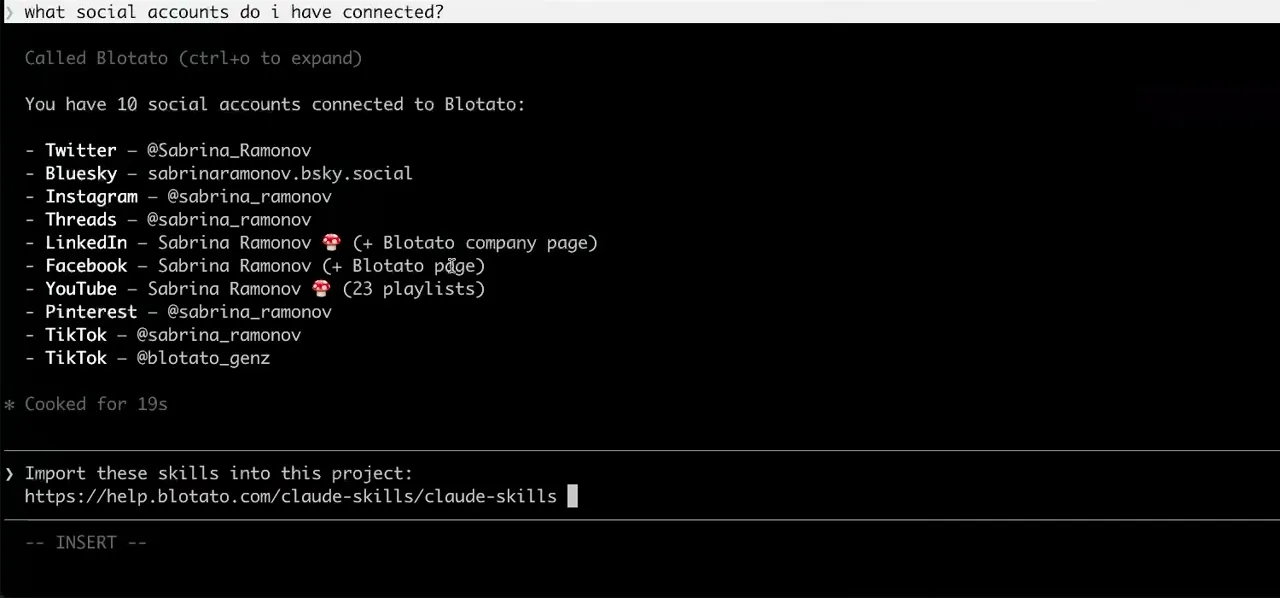
Ask ChatGPT to list your connected accounts. It calls blotato_list_accounts and returns your platforms, which confirms the install and the sign-in in one step. It does not test publishing. A publish request can return before the post is live, so ask ChatGPT to check the post’s status with blotato_get_post_status.
What breaks, and how to fix it
A common dead end is an older walkthrough that adds a custom MCP server by hand. Search Plugins for Blotato first. If it shows Disabled by admin or is missing on a company workspace, ask your admin to allow it, or use the custom route where your plan allows it: add the server on the web, skip any Developer mode step, and choose OAuth rather than an API key header.
A subscription error during the trial.
The 7-day trial covers the web app but not MCP, which the plugin uses. Activating a paid Blotato plan turns MCP on.
A post that “went out” but is not live.
Publishing is asynchronous. Ask ChatGPT to check the post’s status, and remember a scheduled post reports as scheduled until its time comes.
A public reply you did not expect.
Right after the first DM, a comment automation posts a short public reply under the triggering comment by default. Tell ChatGPT to switch that off if you would rather not add one.
Is ChatGPT the same as Codex or ChatGPT Dots?
No. All three come from OpenAI. ChatGPT and Codex share one plugin directory, and a dot can use the supported plugins installed on your ChatGPT account. What changes is who drives the work.
| Detail | ChatGPT | OpenAI Codex | ChatGPT Dots |
|---|---|---|---|
| What it is | OpenAI’s chat assistant on the web, desktop, and mobile. | OpenAI’s coding agent in the desktop app, CLI, and IDE. | OpenAI’s always-on agent, with its own cloud computer. |
| How Blotato connects | The Blotato plugin from the Plugins directory, or a custom MCP server on the web. | The same plugin from the desktop app or /plugins in the CLI (the IDE extension does not support plugins), or the server by hand with an API key header. | The supported plugins installed on your ChatGPT account. OpenAI does not list which ones, so setup ends with the dot checking its own tools. |
| How you use it | Ask in plain English and approve actions when ChatGPT asks. | Give it a task and it chains the steps. | Hand it ongoing work that runs on its own computer. |
| Best for | Planning, drafting, and scheduling by conversation. | Repeatable, multi-step jobs. | Always-on work, once your dot confirms it can see Blotato. |
 OpenAI Codex
 ChatGPT Dots
Using Codex instead? See Blotato for Codex. Setting up a dot? See Blotato for ChatGPT Dots. Vendor documentation: ChatGPT custom MCP setup. The sign-in follows the MCP authorization spec, which Blotato supports, including dynamic client registration and PKCE.
Other AI agents that post through Blotato
Same account, same queue, one setup per agent. The AI agents for social media hub covers what they all share, including every tool an agent can call.
- Claude.ai OAuth
- Claude Cowork OAuth
- Claude Code OAuth or header
- ChatGPT Dots OAuth
- OpenAI Codex OAuth or header
- Google Antigravity API key header
- Cursor API key header
- Grok Bot API key header
- Meta Muse API key header
- Cline API key header
- GitHub Copilot OAuth or header
- Replit Agent API key header
- Windsurf API key header
- Perplexity Computer OAuth or API key
- OpenClaw OAuth or header
- Hermes Agent OAuth or header
- OpenCode OAuth or header
- Gemini CLI API key header
- NanoClaw Via an stdio bridge








Related guides: Blotato is now an official ChatGPT plugin · How to post to social media from ChatGPT · ChatGPT Dots vs Grok Bot vs Meta Muse for social media
ChatGPT social media FAQs
01 Can ChatGPT post to social media?
02 How do I connect ChatGPT to social media?
03 How do I set up ChatGPT for social media?
04 Is Blotato an official ChatGPT plugin?
05 What is the best ChatGPT plugin for social media?
06 Do I need a paid ChatGPT plan to post to social media from ChatGPT?
07 Does ChatGPT need my social media passwords?
08 Does ChatGPT need to be running for a scheduled post to go out?
09 What can I ask ChatGPT to do once it is connected?
10 What goes wrong when connecting ChatGPT?
11 What is the best way to manage social media with ChatGPT?
12 Is ChatGPT the same as Codex?
13 How much does it cost to connect ChatGPT?
Let ChatGPT publish
instead of just drafting
Install the plugin, sign in to Blotato, and schedule the next post from the same chat you wrote it in.
MCP access starts on a paid Blotato plan from $29/mo, cancel anytime.

 Blotato
Your AI Agent still can't post to social media.
Point Claude, ChatGPT, n8n, or your own agent at Blotato's MCP and that's fixed: 9 platforms behind one key, flat $29/mo.
Connect your agentFlat pricing. Cancel anytime.