Blotato vs HubSpot: Which is Better for Social Media Management?
Blotato vs HubSpot for social media: HubSpot gates social publishing behind an $800/mo tier. Here is who that math actually works for.

Blotato vs HubSpot is a strange comparison to write, because these two products are not really competing for the same job. HubSpot does not sell a social media tool. It sells a CRM that includes one, and it puts that one behind Marketing Hub Professional at $800 a month.
So the useful question is not which tool is better. It is whether you need social publishing wired into a sales pipeline, because that is what the $800 actually buys. For a 12-person revenue team, the answer is often yes. For a creator publishing five times a day, it is almost never yes.
I build social media software, so I have an obvious bias here. What I can do is show you HubSpot’s own documentation and pricing page, and be specific about where it beats what I built.
Blotato vs HubSpot: At a Glance
HubSpot is the better pick if: Your company already runs sales and marketing on HubSpot’s CRM, you have a Marketing Hub Professional seat or budget, and the reason you post is to generate and attribute leads that a sales team will work.
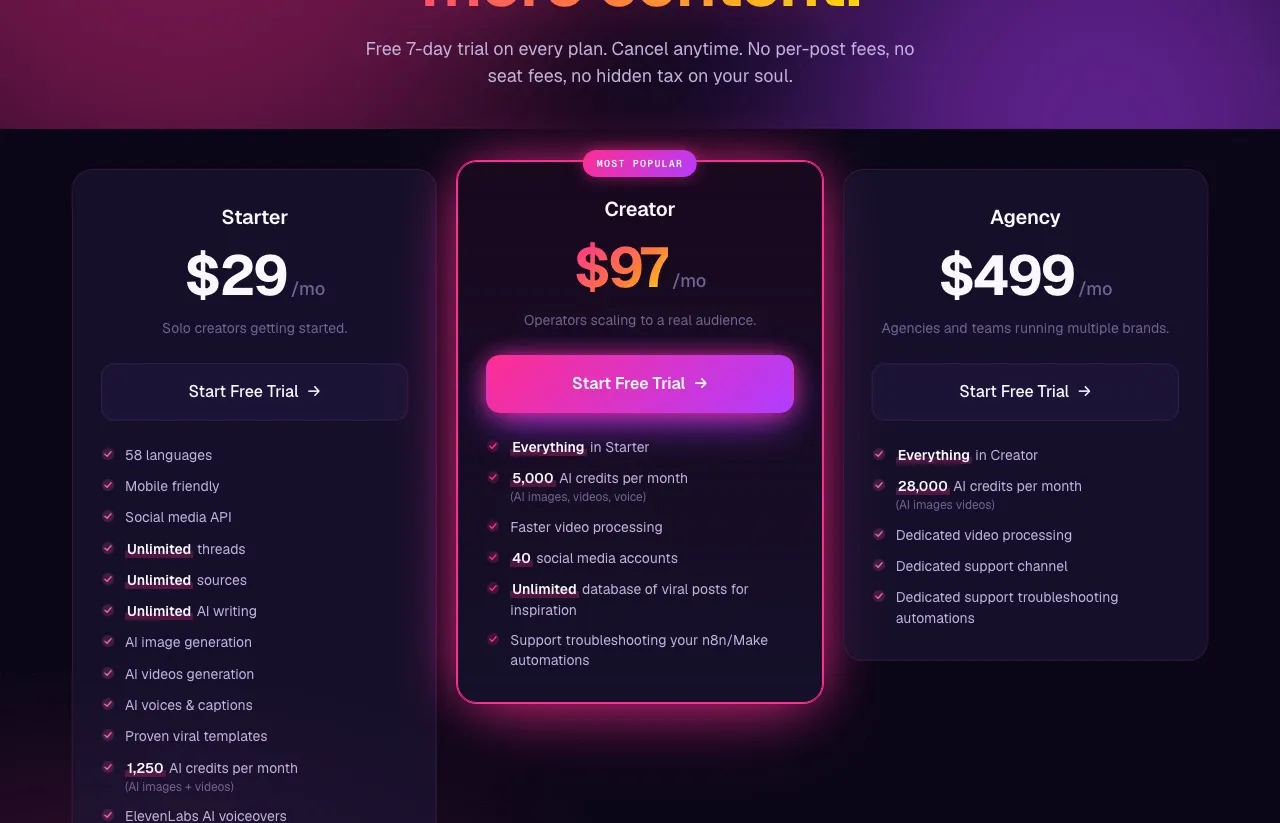
Blotato is the better pick if: You are a creator, solopreneur, or small agency whose job is to publish a lot of content across many accounts, and you want AI to help make it. You can see the whole cost on our plans and limits page before you talk to anyone.
One thing worth knowing up front if you plan to automate: HubSpot’s only social publishing endpoint is a deprecated legacy API with no versioned successor, and its MCP server covers CRM objects rather than social posting. If your plan is to publish through Claude or a workflow tool, that decides it before price does.
No. One Orbits the Contact Record.
No, and pretending otherwise would waste your time.
HubSpot is a customer platform. Its center of gravity is the contact record. Every tool it ships, including social, is built to feed and enrich that record so a sales team can act on it. Social posting is one feature inside Marketing Hub, sitting next to email, landing pages, workflows, and attribution reporting.
Blotato is a content engine that publishes. Its center of gravity is the post itself. It writes, generates images and video, and pushes to 9 platforms.
So the honest framing for Blotato vs HubSpot is not “which social tool is better.” It is “do you need social publishing attached to a CRM, and are you prepared to buy the CRM to get it?” If yes, HubSpot’s social module is a reasonable thing to use. If no, you are buying an entire customer platform to get at one feature inside it. HubSpot is also the CRM in the AI marketing stack I run, where it handles lead nurture rather than posting.
This is a different question than the one I worked through in Blotato vs Hootsuite, where both tools were at least built for the same job.
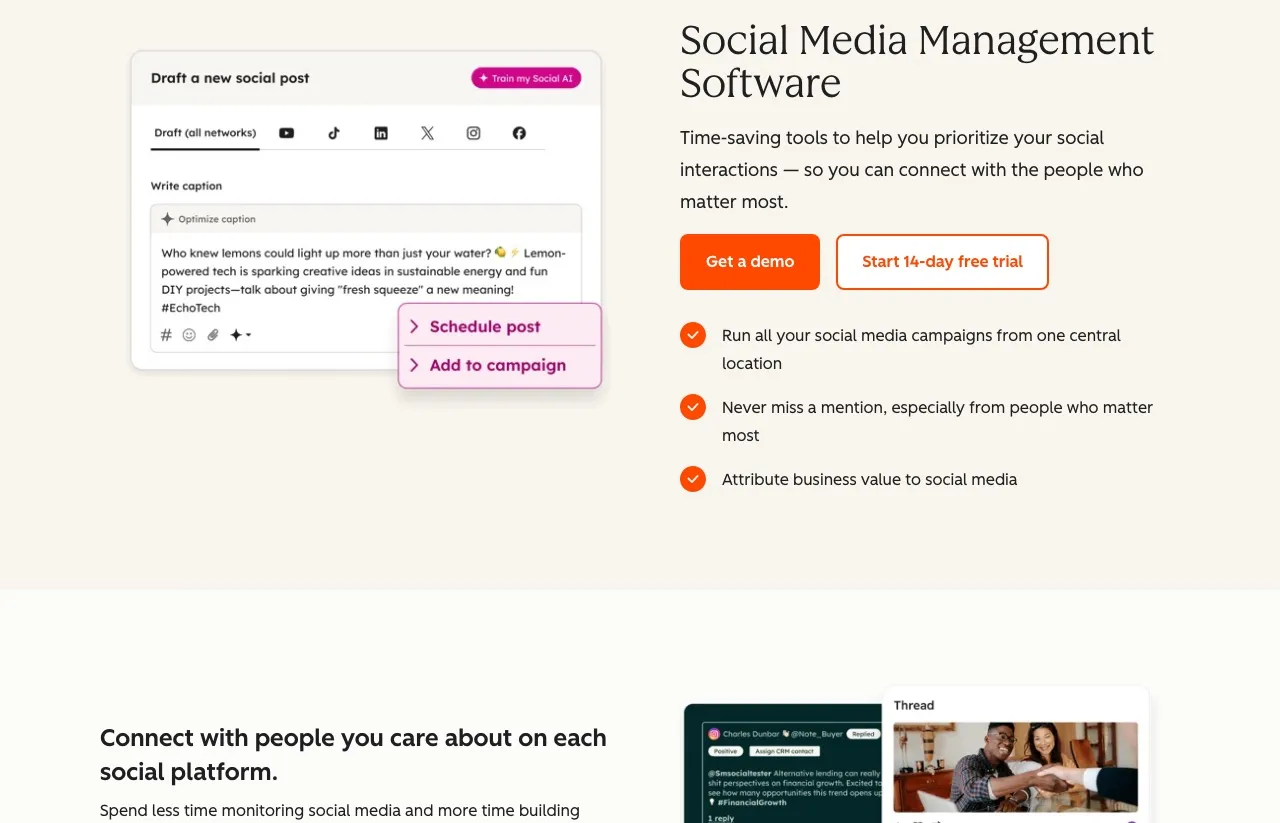
Marketing Teams Already Paying for the CRM
HubSpot is built for companies where marketing exists to hand qualified leads to sales. It has been at this since 2006 and the CRM is genuinely excellent at what it does.
The social tool is aimed squarely at that buyer. It is not trying to win creators. It is trying to make sure the marketing team’s social activity shows up in the same reporting layer as everything else, so a director can answer “what did social contribute to pipeline” without exporting anything.
Worth knowing before you evaluate: social publishing is not available on HubSpot’s Free or Starter tiers at all. HubSpot’s own knowledge base article on connecting social accounts lists the requirement as Marketing Hub Professional or Enterprise.
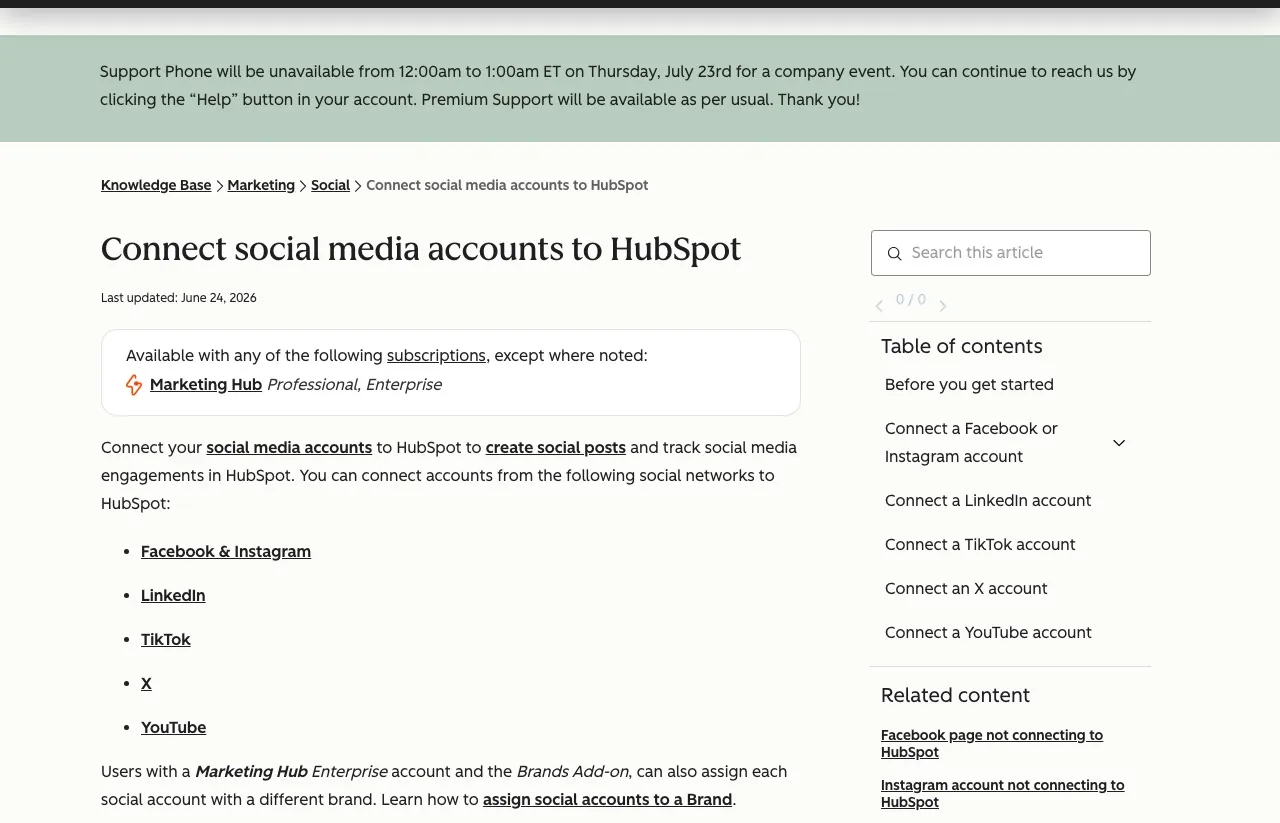
That same page lists which networks you can connect: Facebook and Instagram, LinkedIn, TikTok, X, and YouTube. HubSpot lists these as five entries, with Facebook and Instagram sharing one. Threads, Bluesky, and Pinterest are not on it.
I could not verify HubSpot’s current G2 rating for this post. G2 returned a Cloudflare block when I tried to pull it, and I would rather tell you that than quote a number I did not see today.
Everyone Who Doesn’t Need Revenue Attribution
Blotato is an app I built, so weigh my read accordingly.
I made it because I was posting across a lot of accounts and the tools available either scheduled content I had already made, or cost more per channel than the content was worth. I wanted one place to write the post, make the image or the video, and send it everywhere.
It is built for creators, solopreneurs, small business owners, and small agencies running 5 or more accounts. The people who get the most out of it are the ones publishing constantly and using the AI to carry the making, not just the scheduling.
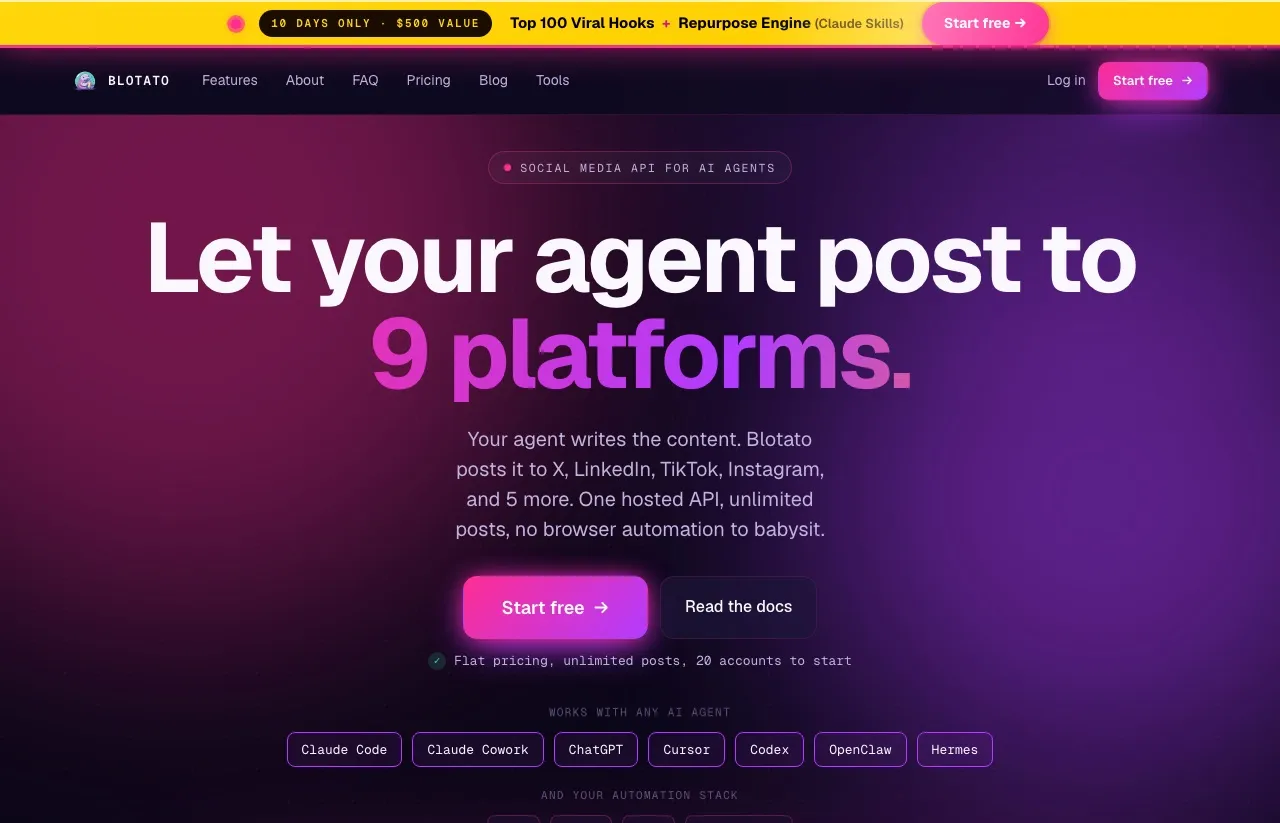
HubSpot vs Blotato: Side by Side
| Category | HubSpot | Blotato |
|---|---|---|
| Pricing model | Per tier, seat-based, CRM suite | Flat rate |
| Lowest tier with social publishing | Marketing Hub Professional, $800/mo annual | $29/mo (Starter) |
| Free plan | Yes, but no social publishing | No (7-day trial, cancel anytime) |
| One-time onboarding fee | $3,000 required on Professional | None |
| Seats included | 3 Core Seats on Professional | Not seat-based |
| Connected social accounts | Up to 50 on Professional | 20 on Starter, 40 on Creator |
| Platforms | Facebook, Instagram, LinkedIn, TikTok, X, YouTube | 9 |
| AI caption writing | Yes (Breeze) | Yes, unlimited text generation |
| AI image generation | Requires separate Content Hub subscription | Included (uses AI credits) |
| AI video generation | Clip extraction from existing video | Faceless video with ElevenLabs voiceovers |
| Social publishing API | Legacy endpoint only, deprecated, no versioned successor | Yes (full REST API on paid plans) |
| MCP / Claude integration | MCP server exists, CRM only, no social | Yes, hosted at mcp.blotato.com/mcp |
| Social monitoring and inbox | Yes, with competitor streams | No monitoring; inbox on Instagram and Facebook |
| CRM and revenue attribution | Yes, native | No |
Two rows carry most of the weight. HubSpot connects more accounts at its tier, and it attributes social to revenue, which Blotato flatly cannot do. Blotato covers more platforms, generates media rather than just captions, and can be driven programmatically.
Attribution That Closes the Loop to Revenue
1. Attribution that actually closes the loop. This is the real one. Because social posts live on the same platform as the contact records, you can trace a post to a visit to a lead to a closed deal. Standalone schedulers cannot do this without stitching together integrations, and the stitching usually leaks. If your CFO asks what social contributed to revenue, HubSpot answers it natively.
2. Monitoring and social listening. HubSpot gives you keyword monitoring streams that surface interactions and trigger alerts, plus competitor streams that let you monitor up to three competitors at a time. Blotato has no monitoring or social listening, and its engagement inbox covers Instagram and Facebook only. If replying and listening are half your job, that gap matters.
3. Higher account ceiling. Up to 50 connected accounts on Professional and up to 300 on Enterprise, with a 10,000 post monthly allowance and scheduling up to 3 years out, per HubSpot’s Product and Services Catalog. Blotato’s ceiling is 100 accounts on Agency, so between 100 and 300 accounts HubSpot Enterprise is the only one of the two with headroom left.
4. It is one system. Email, landing pages, forms, workflows, reporting, and social under one login, with one support contract and one security review. For a company that has already made the HubSpot decision, adding a separate social tool means another vendor, another invoice, and another SOC 2 questionnaire. Staying inside the suite has real organizational value that a feature table does not capture.
5. Enterprise governance. Brand assignment for social accounts on Enterprise, seat-level permissions, and the compliance posture a regulated company needs. This is not a creator concern, but it is decisive for the buyer HubSpot is actually courting.
Content Generation Without a Second Hub Subscription
1. It makes the content, not only the calendar. HubSpot’s Breeze writes captions. But AI image generation requires a separate Content Hub subscription on top of Marketing Hub, and its AI video feature clips video you already have rather than generating new video. Blotato generates captions, images, and faceless video with ElevenLabs voiceovers inside your existing plan. Text generation is unlimited. Images and video draw on your monthly AI credits, 1,250 on Starter. If you are starting from a blank page rather than a content library, that is a different kind of tool.
2. Wider platform coverage. Blotato publishes to 9 platforms. HubSpot connects Facebook, Instagram, LinkedIn, TikTok, X, and YouTube, and does not support Threads, Bluesky, or Pinterest. For a creator chasing distribution on newer platforms, three missing surfaces is a real constraint.
3. It can be driven by code and by Claude. This is the sharpest difference for anyone automating their publishing, and it deserves a precise answer rather than a slogan.
HubSpot does have a social publishing endpoint, POST /broadcast/v1/broadcasts. But it sits in the deprecated APIs section. HubSpot’s own wording is that these endpoints “are functional and stable, but won’t be updated beyond their current version,” and that it will support them “for the foreseeable future.” So it works today and it is not disappearing tomorrow. It is also frozen, with no versioned replacement announced.
HubSpot also ships an MCP server. Its documented coverage is CRM objects and engagements: contacts, companies, deals, tickets, calls, emails, meetings. Social publishing is not in it, so you cannot hand social posting to Claude through HubSpot.
Blotato ships a full REST API on paid plans, native nodes for n8n and Make, and a hosted MCP server at mcp.blotato.com/mcp that Claude posts through directly. If you are building on top of your publishing tool, one of these is a maintained surface and the other is frozen.
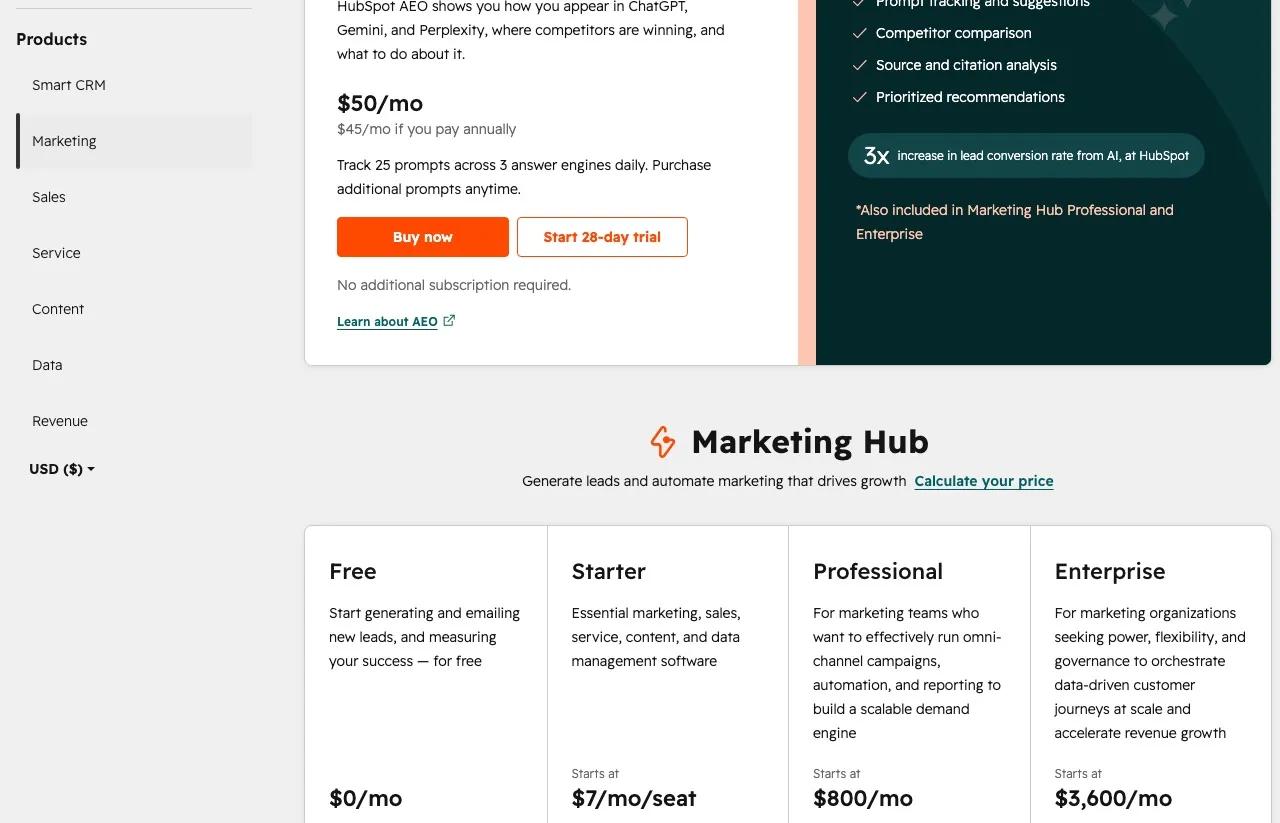
4. The price of entry, if publishing is all you need. Blotato Starter is $29 a month with 20 accounts and 1,250 AI credits. HubSpot’s Marketing Hub pricing puts Professional at $800 a month annually, or $890 monthly, and requires a one-time $3,000 onboarding fee. First-year cost to reach the social tool starts around $12,600.
That is not an apples-to-apples price gap, and I do not want to pretend it is. HubSpot’s $800 buys a CRM, email, landing pages, workflows, and attribution. The point is narrower: if publishing is the job you are hiring for, HubSpot makes you buy the other nine tools to get the one.
Social Publishing Starts at the $800 Professional Tier
| Plan | HubSpot | Blotato |
|---|---|---|
| Free | $0/mo, no social publishing | Not offered |
| Entry paid | Starter $7/mo per seat, no social publishing | Starter $29/mo, 20 accounts |
| Social-capable tier | Professional $800/mo annual ($890 monthly) | Starter $29/mo |
| Mid tier | Enterprise $3,600/mo | Creator $97/mo, 40 accounts |
| Onboarding fee | $3,000 on Professional, $7,000 on Enterprise | None |
| Trial | 14-day free trial, but social needs a Professional subscription | 7 days, cancel anytime |
Now the entry-tier comparison, which is where the mismatch is clearest.
| Capability at the cheapest social-capable tier | HubSpot Professional ($800/mo) | Blotato Starter ($29/mo) |
|---|---|---|
| Social accounts | Up to 50 | 20 |
| Platforms | 6 | 9 |
| AI caption writing | Yes | Unlimited text |
| AI image generation | No, needs Content Hub | Included (draws on credits) |
| AI video generation | Clip extraction only | Faceless video included |
| Social publishing API | No | Yes |
| MCP for social | No | Yes |
| Social monitoring and inbox | Yes | No monitoring; inbox on Instagram and Facebook |
| Revenue attribution | Yes | No |
| Required onboarding fee | $3,000 | None |
Read that table as a scope comparison, not a value verdict. At the tier where each can first publish, Blotato costs $771 a month less and adds media generation and a maintained API. HubSpot’s column is thinner on publishing because most of what you are paying for is not in this table at all: the CRM, the email tool, the workflows, and the attribution that only exists because those things share a database. If you need only the publishing half, you are buying a lot of column you will not open.
Four honest caveats, because that table is not the whole picture:
If you already pay for Marketing Hub Professional, social publishing costs you nothing extra. Adding Blotato is new spend for capability you partly have, and the case for it rests on the AI generation and the API, not on price.
If you connect more than 40 accounts, Blotato’s Creator plan runs out and HubSpot Professional does not. Above 40 accounts the comparison genuinely changes.
If replying, monitoring mentions, and tracking competitors are core to your role, Blotato will frustrate you. Its inbox stops at Instagram and Facebook, and it does no monitoring at all. That is a real gap in what I built.
If you need to prove social’s revenue contribution to a board or a client with closed-deal data, HubSpot does that and Blotato does not. No amount of publishing speed substitutes for attribution when that is the question being asked.
Keep HubSpot When Social Reports Into Pipeline
- Your CRM is already HubSpot and marketing reports into a revenue number
- You need social posts attributed to contacts, deals, and closed revenue
- Monitoring, mentions, and competitor tracking are part of the daily job
- You manage more than 50 social accounts across brands
- You have a marketing team with seats, budget, and an onboarding line item
Not in HubSpot Already? Don’t Buy a CRM for Scheduling.
- You are a creator, solopreneur, or small agency publishing constantly
- You want AI to generate the images and video, not just the captions
- You publish to Threads, Bluesky, or Pinterest
- You want Claude or an n8n workflow to publish on your behalf through a maintained API
- You want the whole cost visible on a pricing page with no sales call
Inside HubSpot, Stay. Outside It, Don’t Move In.
If you are already inside HubSpot, use HubSpot’s social tool. It is competent, it is included, and the attribution genuinely cannot be replicated by a standalone scheduler. Switching to save $29 would be a bad trade.
If you are not already inside HubSpot, this is not a close call. Nobody buys an $800 per month CRM to schedule Instagram posts. The comparison mostly exists because HubSpot turns up in every marketing software search. If the part of HubSpot you wanted was a shared marketing calendar rather than the CRM, a calendar-first tool like CoSchedule is the closer comparison.
My honest advice: if you need social attached to a sales pipeline, budget for Marketing Hub Professional and the onboarding fee. If you need to publish a lot of content well, start with our Starter tier. One note for anyone planning to automate through the API or MCP, since that is where a lot of our best users live: the 7-day trial covers all features except the API, and generating an API key ends the trial and starts the paid subscription. Plan on starting the subscription rather than trialing it.
Blotato vs HubSpot FAQs
Does HubSpot have a free social media scheduler?
No. HubSpot’s Free and Starter tiers do not include social publishing at all. HubSpot’s knowledge base lists social tools as requiring Marketing Hub Professional or Enterprise, which starts at $800 per month billed annually plus a one-time $3,000 onboarding fee.
Which platforms does HubSpot support for social publishing?
HubSpot connects Facebook and Instagram, LinkedIn, TikTok, X, and YouTube. Threads, Bluesky, and Pinterest are not supported. Blotato publishes to 9 platforms.
Does HubSpot have a social media API?
Yes, but only a legacy one. POST /broadcast/v1/broadcasts is documented under HubSpot’s deprecated APIs, described as functional and stable but frozen at its current version with no versioned successor. HubSpot’s MCP server covers CRM objects and engagements, not social publishing. Blotato ships a full REST API on paid plans plus a hosted MCP server.
Can HubSpot generate AI images and video for social posts?
Partly. Breeze writes captions inside Marketing Hub. AI image generation requires a separate Content Hub subscription, and the AI video feature creates clips from video you already have rather than generating new video. Blotato includes image and faceless video generation in its plans.
Is Blotato cheaper than HubSpot?
At the tier where each can publish socially, yes, by a wide margin: $29 per month against $800 per month annually plus $3,000 onboarding. But they are not equivalent purchases. HubSpot’s price buys a full CRM with revenue attribution, and the social tool is one feature inside it.
Which is better for agencies?
It depends on account count and reporting needs. Agencies under 40 accounts that report on reach and engagement do well on Blotato’s flat pricing. Agencies past 50 accounts, or ones that must prove revenue impact with closed-deal data, are better served by HubSpot despite the cost.
Can a marketing team run posts through approval in Blotato before they publish?
No. Blotato has no approval workflow, no multi-step review and no per-person roles or permissions, because it runs one login per subscription rather than a seat model. Whoever holds the login can publish, so a team that needs a draft reviewed and signed off before it goes live has to run that step somewhere else. HubSpot Professional is built for exactly that buyer, with review baked into the same platform the post is scheduled from, and that is a structural difference rather than a feature we have not shipped yet.