Manychat vs Chatfuel: Which DM Automation Platform Is Better?
Manychat vs Chatfuel compared on what each one actually meters, what happens the moment you hit the ceiling, and which social media bill grows with you.

Manychat vs Chatfuel is a question with a real answer, and for most people it is Manychat: seven channels against five, the exact DM you wrote with no AI model in the loop, and a bill you can forecast. Chatfuel wins a narrower case, which I will define precisely rather than hedge.
But the comparison almost everyone runs is the wrong one. Reading both pricing pages side by side, the flow builders and template counts stopped mattering to me quickly, because the two tools do not charge you for the same resource in the first place.
Manychat charges you for people. Chatfuel charges you for AI processing. That sounds like a footnote until you hit the ceiling on either one, because the two products then do opposite things: Manychat keeps working and bills you more, and Chatfuel stops replying unless you have told it to refill from your card.
Worth saying up front: Blotato is an app I built and it does DM automation too, so take my read with whatever grain of salt feels right. It is not what this comparison is deciding, but it does solve a problem neither of these two touches, so it gets a section near the end.
Manychat vs Chatfuel: The Verdict Up Front
Chatfuel is the better pick if: WhatsApp is where your customers actually are, you want AI answering in your voice without wiring anything up, or you run a large audience on a compact setup, where its $20 plan with unlimited contacts undercuts a per-head meter from a few hundred contacts to about 25,000 a month.
Manychat is the better pick if: you want a bill you can forecast, you need Telegram, SMS or email alongside your DMs, or you would rather absorb a small overage charge than have automations go quiet mid-campaign.
Two Meters, Not One Price War
Most comparisons put the two sticker prices side by side and declare a winner. That comparison is not meaningful here, because the two numbers are not measuring the same thing.
Manychat prices on Active Contacts. Its pricing FAQ defines one as “a real person you interact with during a monthly billing period,” and then removes the ambiguity itself: “It doesn’t matter how many messages you exchange. One person = one Active Contact for the month.” A contact counts as active when messages move through Manychat by any route, including automations, AI, Broadcasts, or someone simply writing to your inbox.
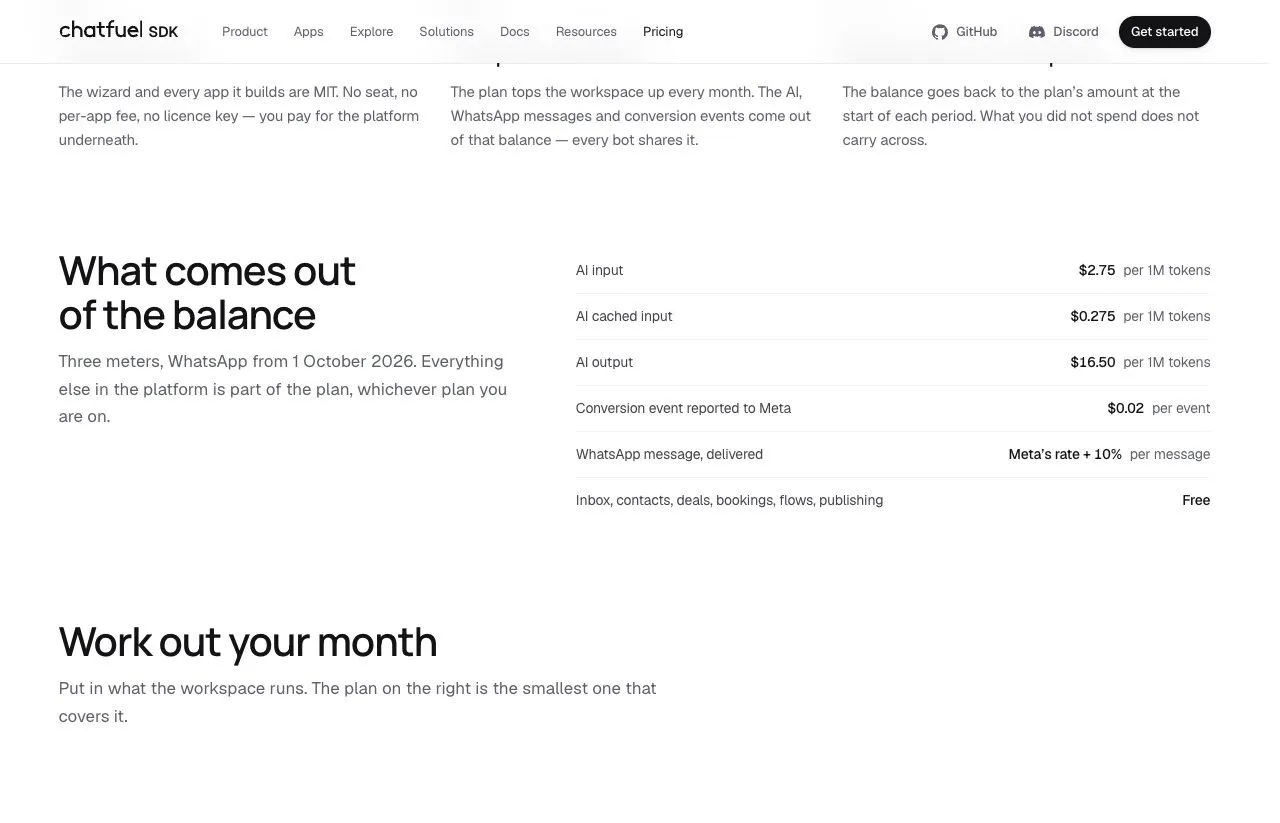
Chatfuel prices on AI processing. Its plans include unlimited contacts, and each paid plan carries a wallet, a dollar balance that AI replies, WhatsApp fees and conversion events draw down. Its plans guide puts it in one line: “Your subscription price never changes with your traffic. The wallet is what moves.”
So one tool counts humans and the other counts computation. A busy month means something different to each.
What Manychat Counts, and What It Costs When You Pass It
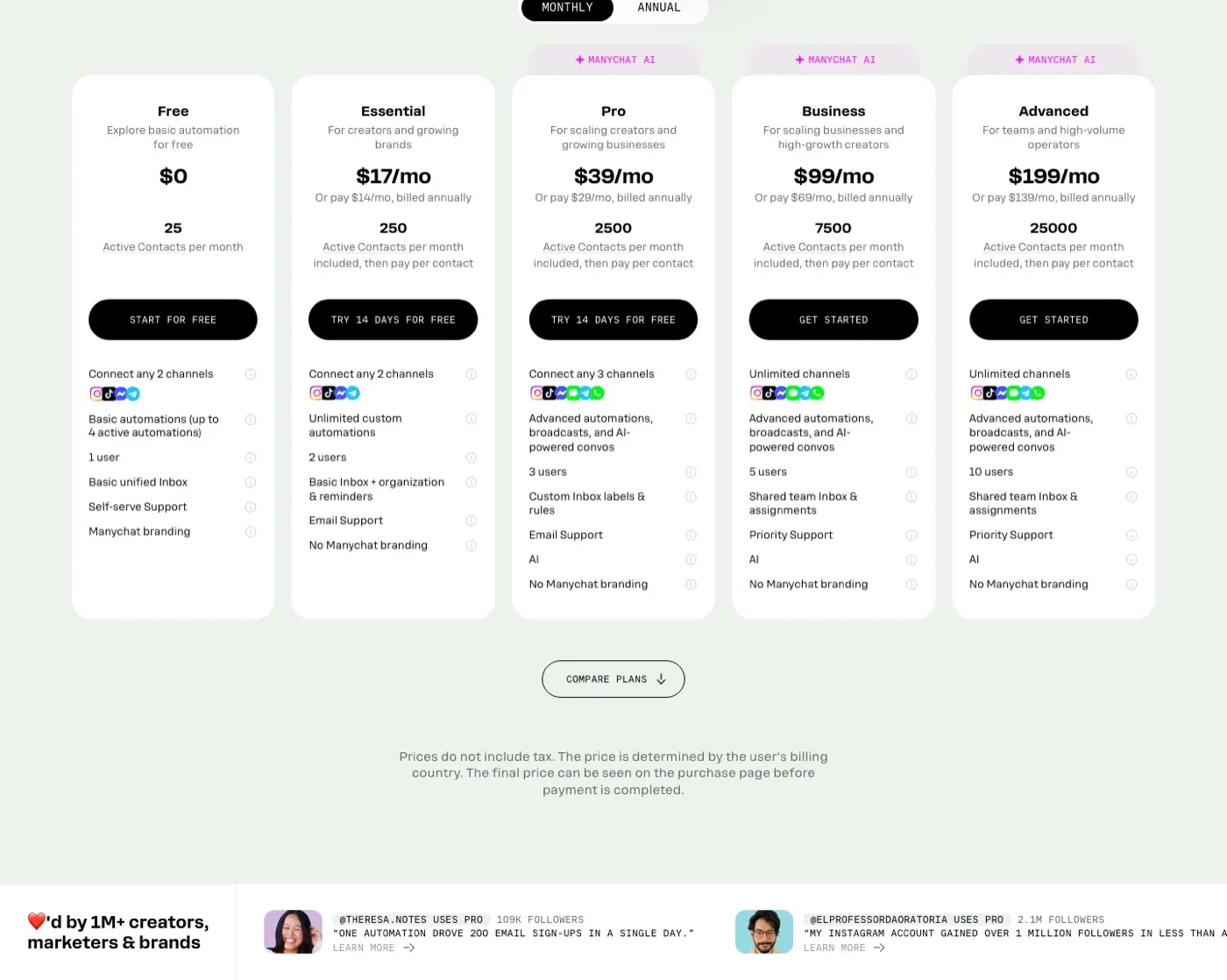
Manychat runs five tiers. On month-to-month billing they are Free at $0, Essential at $17, Pro at $39, Business at $99, and Advanced at $199. Annual billing brings those to $14, $29, $69 and $139 a month.
The included pools are 25, 250, 2,500, 7,500 and 25,000 Active Contacts. Past your pool you pay per additional contact, and the rate falls steeply as you climb. On monthly billing that is $0.10 on Essential, $0.05 on Pro, $0.025 on Business, and $0.004 on Advanced. Annual billing discounts those to $0.082, $0.038, $0.018 and $0.0028.
That spread is the actual pricing story. Ten thousand contacts over your allowance costs $1,000 on Essential and $40 on Advanced, both at monthly rates. At the same 10,000 total contacts, the whole bill is $992 on Essential and $199 on Advanced, a gap that depends only on which tier the meter runs against, which is why the sticker price is close to uninformative on its own. I ran that meter out tier by tier, including the three contact counts where the cheaper Manychat plan flips.
What Manychat does at the ceiling is the part worth knowing before you pick: “your automations don’t suddenly shut off, we’ll just charge a small overage fee for each additional Active Contact.” Manychat also forgives accrued overage if you upgrade within the same billing cycle. You will not go dark in the middle of a launch. You will get a bigger bill.
What Chatfuel Counts, and Why Nobody Can Quote You a Number
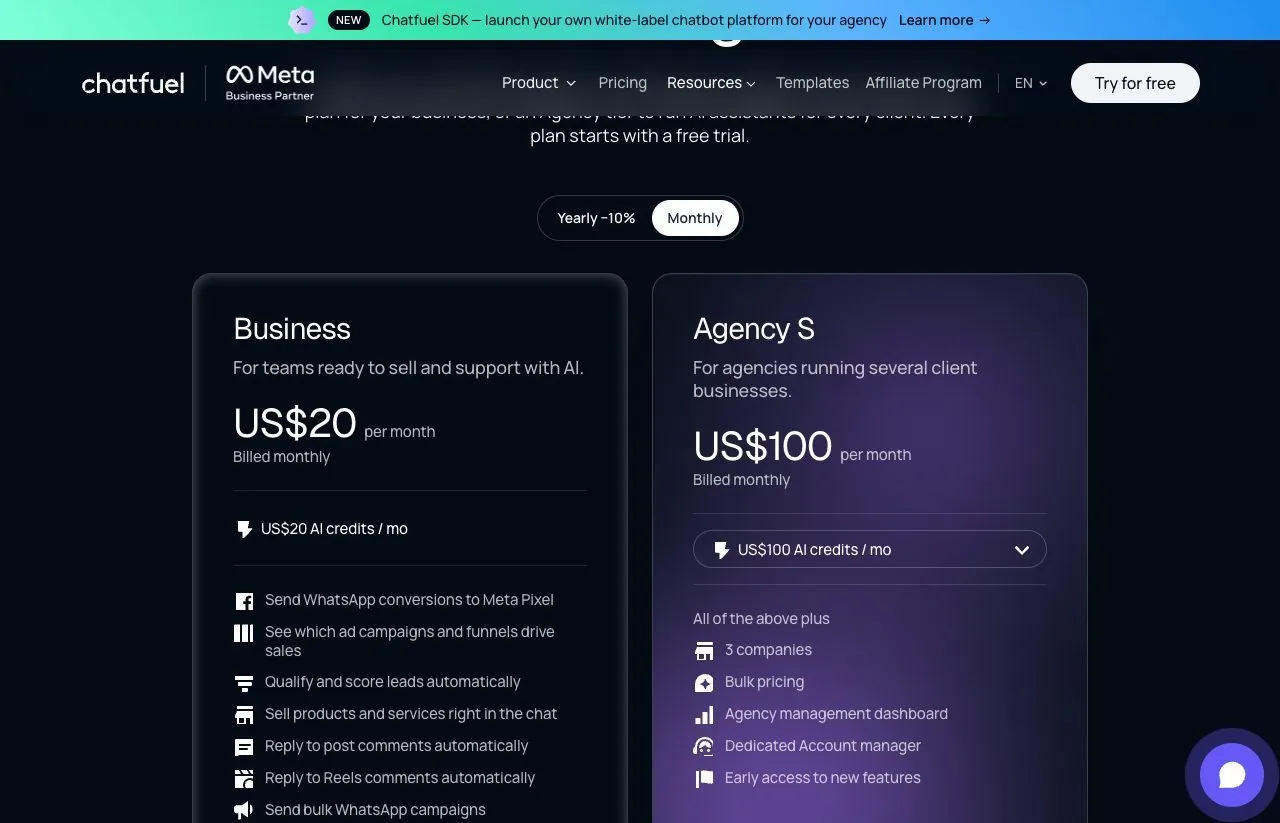
Chatfuel sells a Business plan at $20 a month, or $18 billed yearly, and agency plans from $100. Each fee comes back as AI credit, $20 on Business and $100 on Agency S, and the Chatfuel pricing breakdown walks the full ladder and the usage math.
The token rates are published, at $2.75 per million input tokens and $16.50 per million output tokens. What nobody can quote you is the cost of a reply, and once you read how the AI consumes the wallet it is hard to see how a single number could be quoted honestly.
Chatfuel says AI usage depends on your knowledge base, your additional instructions, and the conversation history for each reply, together forming the context window the model reads every time it answers. Its own illustration is the clearest: “A knowledge base with 50,000 characters takes more to read than one with 5,000.” The consequence follows directly: two businesses on the same plan can spend very different amounts, depending on how much their AI reads, not on how many clients write in.
The old exemption for static automations is narrower than it looks. Chatfuel’s limits page still says “keyword replies, button flows, broadcasts, and any non-AI automation are unlimited regardless of volume,” but the dashboard has no Flows button by design and sets new comment replies and DMs up as Fuely AI automations, and the help center documents a fixed-text option only for the public comment reply. Static flows, which the SDK rate card lists as free, are built through the Public API, and the help center ties the drag-and-drop flow builder to Legacy accounts. So a keyword trigger set up in the dashboard draws a small amount of AI credit per DM, well under a cent on a short setup.
The Failure Modes Are Opposites
Here is the sentence I would want someone to tell me before I picked one.
When Manychat hits its ceiling, the bot keeps running and the invoice grows. When Chatfuel’s wallet hits zero, the invoice stays flat and the bot stops. Chatfuel does not soften this: “your automations stop replying and messages stop going out.”
You get three ways out, and they are all worth knowing in advance. You can top up the wallet by hand. You can switch on auto-top-up, which refills it from your card before it empties, and then Chatfuel behaves like Manychat: it keeps answering and the bill grows. Or you can move to a larger plan, which Chatfuel says gives more credit for the money than topping up.
One escape hatch has closed. Chatfuel’s older limits page still offers to connect your own OpenAI key, but its current help center says “There is no option to plug in your own OpenAI API key.” Plan on the wallet.
There is a crossover point worth knowing before you argue about sticker prices. Manychat Essential covers 250 contacts for $17, and at $0.10 for each one after that it reaches Chatfuel Business’s $20 at 280 contacts. Past that, on a compact setup, Chatfuel stays cheaper to roughly 25,000 contacts a month, even after its AI-written DMs run past the $20 of credit.
Pick your failure mode deliberately. If a silent bot during a product launch is the expensive outcome for you, Manychat’s overage is cheap insurance. If a surprise invoice is the thing you cannot have, Chatfuel’s hard stop, with auto-top-up off, is a feature.
Manychat vs Chatfuel: Side by Side
| Category | Manychat | Chatfuel |
|---|---|---|
| What it meters | Active Contacts (people) | AI usage, WhatsApp fees and conversion events, drawn from a dollar wallet |
| At the ceiling | Keeps running, bills per contact | Stops at zero unless auto-top-up refills it |
| Free tier | Yes, 25 Active Contacts/mo | Not on the pricing page, 7-day trial with $15 of credit |
| Cheapest paid tier | $17/mo (Essential, 250 contacts) | $20/mo (Business), $18 billed yearly |
| Paid tiers | 4 | 6 (Business plus five agency tiers) |
| Channels | Instagram, Messenger, TikTok, Telegram, WhatsApp, SMS, email | Instagram, Facebook, WhatsApp, TikTok, website chat |
| Channels by tier | Gated: 2 on Free and Essential, 3 on Pro, all on Business and up | All five on every paid plan |
| AI replies | Pro and above | Every paid plan, billed from the wallet |
| Bring your own OpenAI key | No | No, per the current help center |
| Static automations metered | Yes, contacts still count | Dashboard automations draw credit, API-built flows are free |
| Public API | Yes, beta, no publishing endpoints | Yes, GraphQL, can build flows and AI automations |
| Publishes posts to a feed | No | Instagram only, one account per bot, immediately, through the API |
The two rows I would read twice are the metering row and the row below it. Everything else on this table is a preference. Those two decide what happens on your worst month.
What the Ranking Pages Get Wrong About Both Prices
I checked the pages currently ranking for this comparison against both vendors’ live pricing, and the gap is wide enough to be worth flagging.
The SetSmart comparison ranking at the top of this query says Chatfuel starts at $39 a month for 150 contacts, and prices it up a four-tier ladder to $279. Kayako’s roundup lists Chatfuel Pro from $14.99. Neither matches what the page sells today: a $20 Business plan, agency plans from $100, and no contact limits at all.
Kayako’s figure is the annual-toggle trap. Both vendors’ pricing pages load on annual billing and print that rate with a per-month suffix, so a source reading the first number it sees records the discounted figure as the monthly price. Manychat does the same thing, showing $14 for Essential above a sub-line reading “$168 billed annually (18% off).” SetSmart’s numbers are a different problem: its whole contact-tier ladder describes a Chatfuel that no longer exists.
I mention it because it changes how you should read any comparison of these two, including this one. Open both pricing pages, click Monthly, and check my numbers against what you see.
Where Chatfuel Is the Stronger Buy
WhatsApp is a first-class channel on every paid plan. Chatfuel is an Official Meta Partner and a WhatsApp Business Solution Provider, and every paid plan includes WhatsApp alongside its other four channels. Manychat puts WhatsApp on Pro at $39 a month, and because Pro connects only three channels total, adding WhatsApp there means giving up one of the others.
There is little tier math for a single business. You are on the $20 Business plan, and the variable is how much your AI reads, not how many people write in. For anyone who would rather not forecast their own contact growth, that is worth something on its own.
Audience size genuinely does not cost more. Unlimited contacts and unlimited messages are the vendor’s words, and the ceiling sits on AI processing instead. For a large, chatty audience served by a compact set of answers, that is the cheaper shape by a distance.
Its AI is the product rather than an add-on. Fuely AI answers, qualifies leads and books appointments on every plan, which is a different proposition from bolting a model onto a flow builder.
Agencies get one wallet. Agency plans put every client bot on one balance, and from Agency M upward the plan adds 11% to 22% in bonus credit.
Where Manychat Is the Stronger Buy
Seven channels against five. Instagram, Facebook Messenger, TikTok, Telegram, WhatsApp, SMS and email, versus Instagram, Facebook, WhatsApp, TikTok and a website widget. Telegram, SMS and email have no equivalent on Chatfuel.
A real free tier for building. Twenty-five Active Contacts is small, but it has no time limit, so a small funnel can sit on it indefinitely. Chatfuel’s pricing page shows no free plan, only a 7-day trial.
You can forecast the bill. Two numbers you already know, contacts and tier, give you the answer, where Chatfuel’s bill depends on how much text its AI reads per reply, which you can only estimate before you start.
Cheaper to start, on a meter you can model. Essential is $17 against Chatfuel’s $20. At the other end, Advanced covers 25,000 contacts for $199 with overage at $0.004 per head.
It does not go quiet. If you are running paid traffic into a funnel, an automation that keeps answering through an overage is worth more than the overage costs you.
The Third Option Neither of Them Covers
Manychat cannot publish a post to a feed, and Chatfuel publishes only to Instagram, one account per bot, immediately, through its API. So for most people the content that earns the DM comes from a separate tool on a separate subscription.
That is the gap Blotato fills, and it is the honest reason to consider it as an alternative to both: DM automation and publishing to 9 platforms run behind one key, at $29 a month for Starter. Against Manychat that replaces two subscriptions with one. Against Chatfuel it adds scheduled publishing across 9 platforms, though Chatfuel’s $20 entry plan costs less than our $29 Starter. That only wins if you need both jobs done. If your scheduler is already sorted, the verdict above stands.
It would be unfair to spend this long on ceilings and skip our own. Blotato meters active contacts too, 1,000 on Starter, and the behavior at the cap is a third mode: the send fails with error code 20101 and the run is marked failed. Not an overage charge, not a paused bot, but an individual message that does not go out, with the count resetting next month.
Where the argument stops: our engagement surface is Instagram and Facebook only, a hard boundary rather than something on a roadmap. Manychat’s seven channels and Chatfuel’s WhatsApp, TikTok and AI replies are real advantages we do not match. Comments are also retained for 45 days, so reporting past that window means storing the data yourself.
If you want the fuller picture on how these three overlap, the Manychat alternatives roundup covers nine tools on what each one bills for, and there is a dedicated Blotato and Manychat comparison if that is the specific pair you are weighing.
Pick Chatfuel When
- WhatsApp matters and you do not want it competing for one of three channel slots
- Your support answers are compact and your knowledge base stays small
- You want AI replies working on day one without configuration
- You would rather have a hard stop than an unexpected invoice, with auto-top-up left off
- You run several client businesses and want one wallet behind all of them
Pick Manychat When
- You need Telegram, SMS or email alongside Instagram
- You need to model the bill before committing to it
- You want keyword flows that run with no AI model in the loop
- An automation going quiet during a campaign is your expensive outcome
- You are past about 25,000 contacts a month, where Advanced’s $0.004 per head starts to undercut AI-written replies
So Which One Is Better?
Manychat, for most people. It sends the exact DM you wrote with no AI model in the loop, reaches more channels, and its worst case is arithmetic you can do today. Chatfuel is the better platform when WhatsApp is central, or when your answers fit a compact knowledge base and your audience runs from a few hundred to roughly 25,000 contacts a month, where its $20 plan undercuts a per-head meter.
The one case where I would not pick either is when you are about to buy a DM tool and a scheduler in the same month, since that is two bills for what Blotato does on one. That is a different question from the one in the title, and on the title’s question the answer is Manychat.
Before paying either, estimate your Chatfuel AI usage against its published token rates. If your automations are mostly short keyword replies, each one costs well under a cent and the unlimited contacts are a genuine bargain. If you are loading a product catalog and expecting the AI to reason over long conversations, you are the account that drains the wallet, and the cost per reply is something you can only estimate until you run it. That unknown is the real asymmetry between them.
Manychat vs Chatfuel FAQs
Is Chatfuel cheaper than Manychat?
Past a few hundred contacts, on a compact setup. Manychat Essential is $17 for 250 Active Contacts, and at $0.10 per extra contact it reaches Chatfuel Business’s $20 at 280. From there to roughly 25,000 contacts a month, Chatfuel stays cheaper as long as each AI-written DM reads a short setup, while a large knowledge base can flip it.
What is a Manychat Active Contact?
A person you interacted with through Manychat during the billing month. Its own wording is that the number of messages does not matter, so one person counts once. Contacts count whether they came through an automation, AI, a Broadcast, or simply wrote to your connected inbox, which is why the total runs higher than people expect.
What happens when Chatfuel’s wallet runs out?
Processing stops: your automations stop replying and messages stop going out until the wallet is funded again, while contacts, history and live chat stay. You can top up, switch on auto-top-up so Chatfuel refills from your card before it empties, or move to a larger plan, which Chatfuel says gives more credit for the money. Its current help center says you cannot plug in your own OpenAI key.
Does Chatfuel limit how many contacts I can have?
No. Chatfuel’s plans include unlimited contacts and unlimited teammates. What it meters is AI usage, WhatsApp fees and conversion events, drawn from a dollar wallet, and flows built through the Public API run outside the AI meter. Contact count is simply not the billing unit.
Can Manychat or Chatfuel publish posts to my feed?
Manychat cannot. Chatfuel’s API can publish to the Instagram account connected to each bot, immediately, with no scheduling, so a content calendar is something you build yourself. Both are DM automation platforms first, so for most people the post that triggers the DM comes from somewhere else. Manychat has a public REST API, still labeled beta, covering pages, subscribers and sending, with no publishing, broadcast, analytics or flow-management endpoints.
Do static keyword automations count against Chatfuel’s limit?
On the current platform, mostly yes, and this is the detail that decides whether Chatfuel is cheap or risky for you. The dashboard sets keyword replies up as Fuely AI automations by default, so each keyword DM draws a small amount of credit, while static flows built through the Public API are free. A short keyword DM costs well under a cent, while an AI assistant reasoning over a large knowledge base drains the wallet far faster.