Manychat API and MCP: What a Social Media Agent Can Build
Manychat API endpoints and MCP options mapped for social media DM builders: what an agent can read, tag and send, and the one job no wrapper can do.
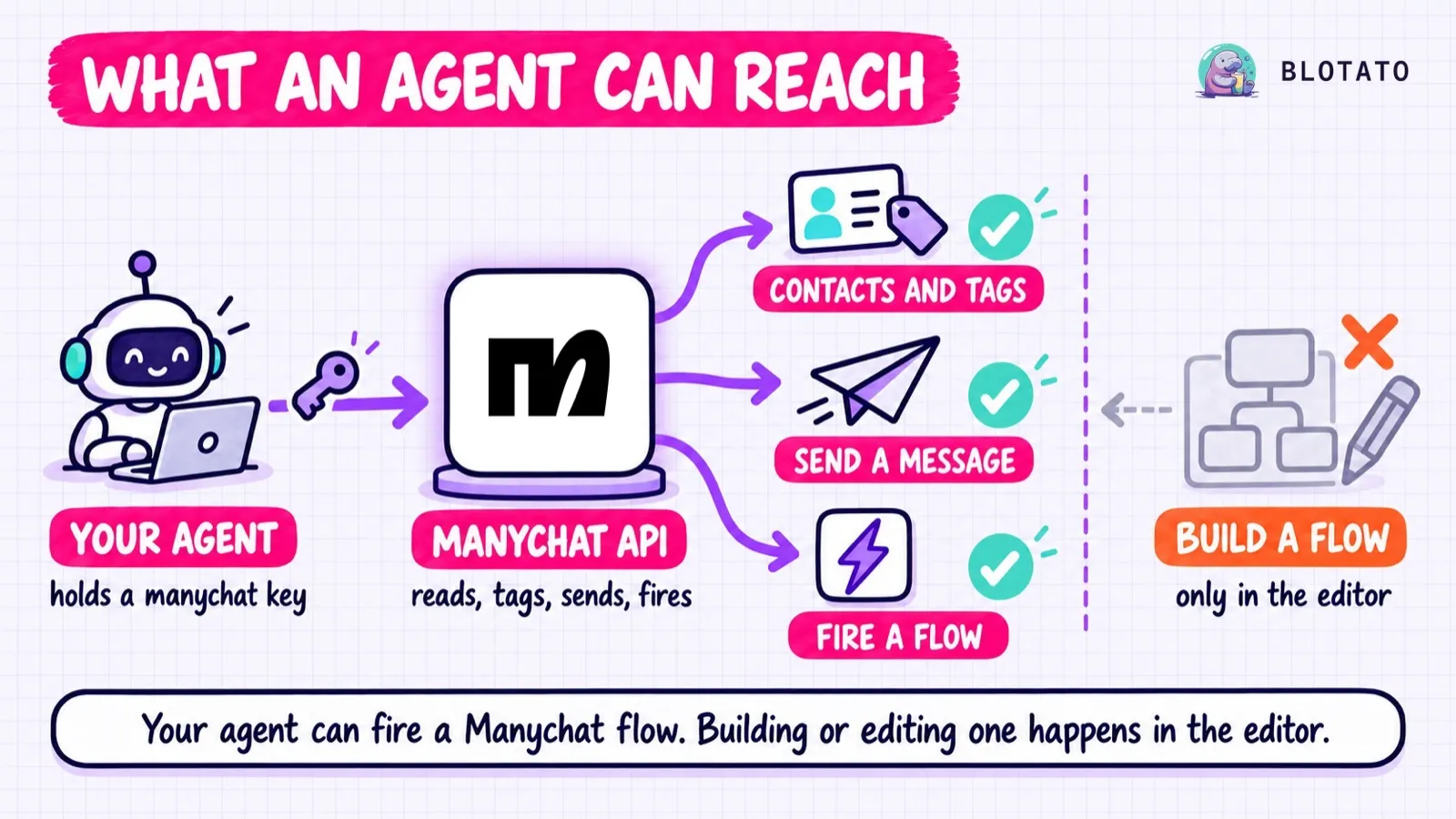
The Manychat API lets an agent read your contacts, tag them, fill their fields, send them messages and fire an automation you already built. It does not let an agent build that automation. Nothing in the public API creates, edits or deletes a flow or a keyword trigger, and that one gap decides whether Manychat fits an agent-driven build.
I run Blotato, which competes with Manychat on DM automation, so weigh what follows with that in mind. For this post I counted Manychat’s specification endpoint by endpoint, pulled both of its rate-limit tables, and read the source code of seven community MCP servers on GitHub. What follows is what an AI agent can actually do with Manychat today.
Manychat API at a Glance (2026)
On the pricing model Manychat introduced on March 2, 2026, it sells five plans, and API access starts on the third one: the Free and Essential plan pages list no API access, while Pro, at $39 a month, is the first plan whose plan page lists API access, though Manychat’s plan-chooser article names API access only under Advanced.
| Access tier | Monthly cost | Best for | Key friction |
|---|---|---|---|
| Free | $0 | Testing a funnel by hand | No API listed, 25 active contacts |
| Essential | $17 ($14 annual) | Creators building flows in the canvas | No API listed, 250 active contacts |
| Pro | $39 ($29 annual) | Scripting contacts, tags and sends | API labeled beta, 2,500 active contacts |
| Business | $99 ($69 annual) | High-volume teams | Everything on Pro, 7,500 active contacts |
| Advanced | $199 ($139 annual) | Enterprise-scale messaging | Same API, 25,000 active contacts |
Pro is where code starts, and the plans above it raise contact limits and seats. Manychat publishes one API reference and documents no plan-specific endpoints, so the endpoints below are the whole surface on any plan from Pro up. Accounts created before March 2 move to these plans country by country, so an older account may still show its original tier.
If your agent needs to write DM automations rather than fire them, Blotato’s plans include an API that does, on every paid tier.
Free 7-day trial · Cancel anytime
Our trial excludes the API. Generating a key ends the trial and starts the Starter subscription, so plan on paying from day one if code is the point.
What Changed in 2026
Two things moved this year, and neither was a change to the Manychat API itself.
Builders started asking for it. In March, a Manychat user posted a feature request headed “ManyChat API for the AI Agent Era” that opens by saying Manychat has “one of the best visual automation builders on the market” and then lays out the gap: “We are forced back into the UI for every critical operation.”
The community built around it. A Manychat MCP package has sat on PyPI since April 2025, but all seven community servers I read on GitHub were created in 2026, and the directories and integration platforms that list or host Manychat MCP servers now fill most of the first page of Google for that search.
The 34 Manychat Page API Endpoints, Grouped by What They Do
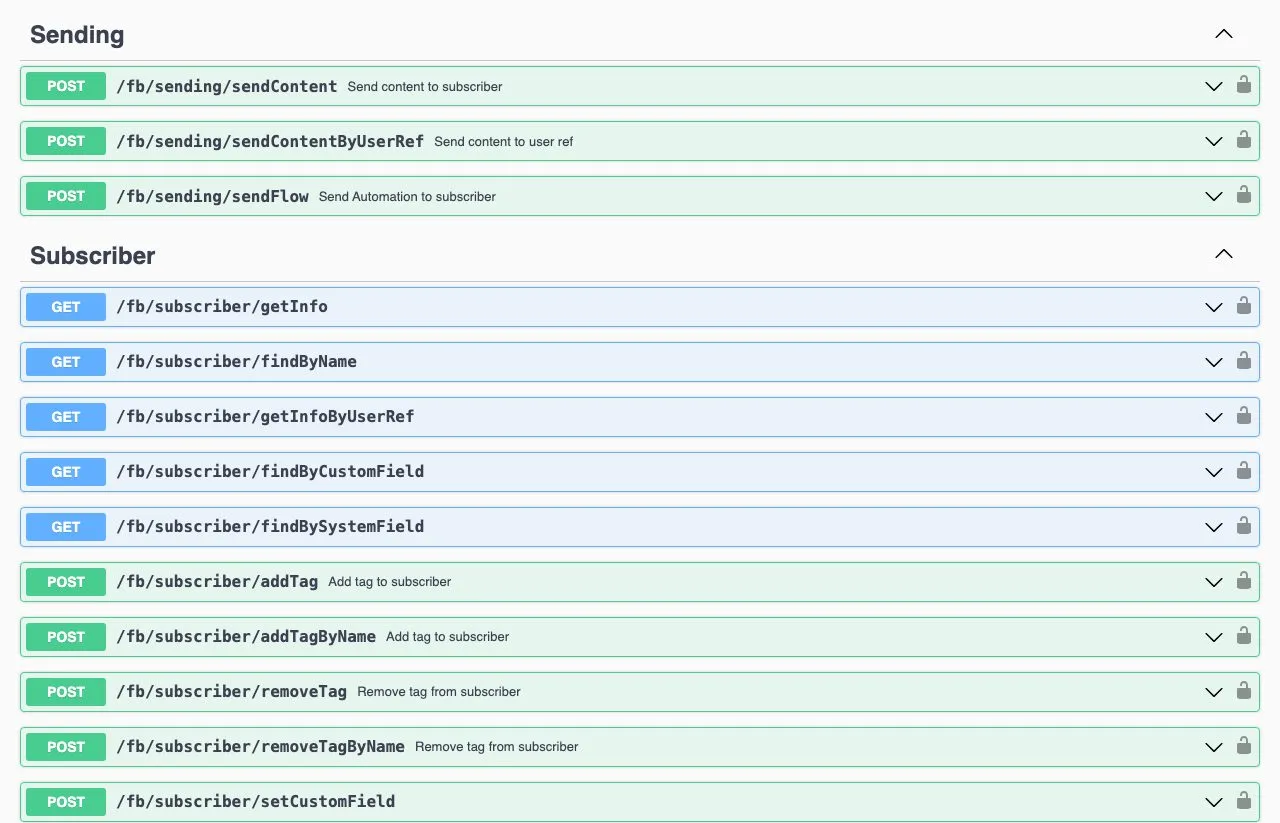
Manychat’s Page API publishes 34 endpoints, all under /fb/: 16 page-level, 3 for sending and 15 for subscribers. I counted them in the live Swagger reference on September 23, 2026, in both the rendered page and its underlying spec file. Every Page API call carries a key you generate in Manychat under Settings, then API, sent as a Bearer token.
| Group | Endpoints | What an agent can do with them |
|---|---|---|
| Page reads | 8 | Read page info, tags, custom fields, bot fields, growth tools, one-time notification topics, and the list of flows |
| Page writes | 8 | Create and remove tags, create custom fields and bot fields, set bot field values |
| Sending | 3 | Send content to a subscriber, send content by user ref, fire a flow at a subscriber |
| Subscriber reads | 5 | Look up a contact by ID, user ref, name, custom field, or email or phone |
| Subscriber actions | 10 | Create and update contacts, add and remove tags, set custom fields, verify a signed request |
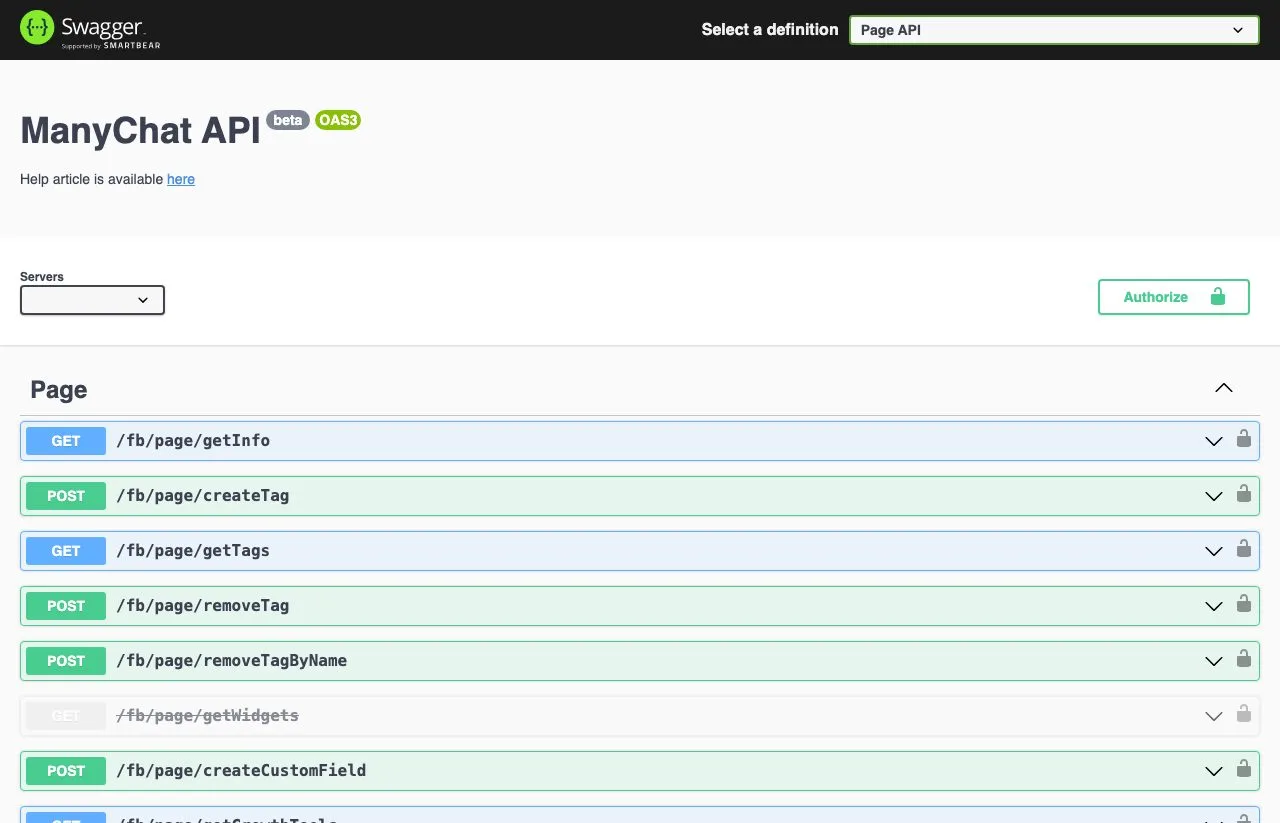
One endpoint, getWidgets, is marked deprecated and tells you to use getGrowthTools instead, so 33 of the 34 are current. And the definition dropdown hides a second API, the Profile API, with one more endpoint: generateSingleUseLink, which makes a one-time install link for a template you already built. Manychat’s help center notes that it needs a different key from the Page API.
The Two Flow Endpoints, and the Write Surface That Is Missing
Only two of the 34 endpoints mention flows, and both assume the flow already exists. GET /fb/page/getFlows lists your automations. POST /fb/sending/sendFlow fires one at a single subscriber, taking just a subscriber_id and a flow_ns.
What is missing is a whole write surface. There is no create, update or delete for a flow, no endpoint for keyword triggers at all, and no call that returns what a flow contains. The spec’s own Flow object has three fields: an ID called ns, a name and a folder_id. So getFlows tells you what your automations are called and where they sit, but not what they say or what triggers them. Some DM tools do expose that layer, and I ranked the ones where an agent can create and edit keyword triggers separately.
Manychat API Rate Limits: Two Pages, Two Numbers
Manychat publishes its API rate limits in two places, and they disagree on two endpoints. The Swagger reference writes a limit into each endpoint’s description. The help center’s token and limits article prints a table.
| Endpoint | Swagger reference | Help center table |
|---|---|---|
sendFlow | 20 per second, and 100 per subscriber per hour | 25 per second |
sendContent | 25 per second | 25 per second |
findBySystemField | 50 per second | 100 per second |
getFlows | 10 per second | 10 per second |
| Page writes (tags, fields) | 10 per second | 10 per second |
| Other page reads (tags, fields, info) | 100 per second | 100 per second |
I would build against the lower number in each case. Two caps on sendFlow shape an agent build: 20 per second governs how fast you can fan out to a list, and 100 per subscriber per hour governs how often you can fire flows at one person. The help article also warns that when you hit the limits, “Manychat may stop processing requests for 24 hours.” A retry loop that keeps hammering past the limit is how you find that out.
Where an Agent Does Fit Inside Manychat
There is a second way to wire an agent into Manychat, and it runs in the opposite direction. Manychat’s Dev Tools, which Manychat documents as a paid-plan feature, let a flow call out to your own server while it runs.
An External Request block sends data to your server, can change it or fetch more, and maps the response back into the contact’s fields. A Dynamic Block fetches JSON from your server and turns it into the next message. Put an agent behind that endpoint and it can decide what each contact hears next. Manychat’s own Claude integration works the same way, with an Action block that sends a prompt to Claude and saves the reply to a custom field.
The agent answers inside a flow a person built, and Manychat’s own docs warn that a Dynamic Block which calls back into the Public API leaves the automation’s context, so node buttons in that reply fail.
Does Manychat Have an MCP Server?
I found no first-party MCP server for Manychat, in its help center or at its obvious hostname. On September 23, 2026, mcp.manychat.com/mcp redirected to manychat.com/mcp, which rendered a “404 Nothing Found” page in a browser.
The community has filled the gap with wrappers, and I read the source of seven of them on GitHub, from fabienbutz, ronstar83, ideasdinamicas, WIZNEOAI, AleemHaider, vdloureiro and paulovyn1. Every one reaches flows through the same two calls, getFlows and sendFlow, and nothing else, though fabienbutz’s also wraps the Profile API’s template link. The integration platforms land in the same place: Pipedream’s Manychat MCP exposes four actions and Activepieces exposes seven, and none of those eleven touches a flow.
Manychat does build flows with AI, inside its own editor. Its AI Flow Builder assistant turns a short chat about your business into an automation, built from one of its templates or from your own description, on Instagram, Messenger, WhatsApp and Telegram. It lives in the web app, and nothing your agent can call reaches it.
The only outside agent tool I found that builds Manychat flows skips the API entirely. It is a Claude skill that drives Manychat’s visual builder in a logged-in Chrome tab, typing into the canvas the way a person would. It can work, but you are handing an agent your logged-in browser session, and every change to the editor’s layout is a chance for it to break.
Three Agent Jobs, Tested Against the Manychat API
The Agent That Fires Existing Flows
A launch sends 500 new subscribers into a welcome flow you already built.
- 500
sendFlowcalls ÷ 20 per second = at least 25 seconds of calls - 500 subscribers × 1 call each = 500 calls, one per person, well under the 100-per-hour cap
- Result: supported, as long as each subscriber is still inside the channel’s messaging window. This is the job the API was designed for.
The Agent That Repoints 20 Automations
Your offer changes, and 20 keyword automations need a new link.
- 20 automations × 0 update endpoints = 0 API calls that can change one
- 20 automations × 1 manual edit in the canvas = 20 edits by hand
- Result: not supported. One
getFlowscall lists every flow by name, but it cannot show which ones hold the old link, so a person opens each one.
The Agent That Moves 46 Automations to Another Tool
You want your comment-to-DM flows running somewhere else.
- 1
getFlowscall returns 46 names, 46 IDs and 46 folder IDs - 46 flows × 0 fields holding message text or triggers = no message or trigger to export
- Result: not supported. Every automation is rebuilt from scratch at the destination, the switching cost I described in the Manychat alternatives roundup.
The number comes from Calvin Hia’s account. He had 46 comment-to-DM automations in Blotato at the start of his walkthrough, all set up by his agents from a template folder, which only works on a tool with a write API.
The Honest Pitch: Skip the Canvas and Use Blotato
I’d be a bad founder if I didn’t tell you the trade-off first. Manychat covers seven channels (Instagram, TikTok, Facebook Messenger, WhatsApp, Telegram, SMS and email), and Blotato’s DM automation covers two, Instagram and Facebook, reply-only, with no cold outreach. If your funnel lives on WhatsApp or SMS, our automations cannot reach it today.
One API for the Post and the DM
What Blotato adds is the write path. A DM automation is an object your agent creates with POST /v2/dm-automations, sending an accountId, a name, a platform, a target, a buttons array (empty for text only), a dmMessage and up to two triggers (the full request body is in the DM automation API guide). It edits the automation with PATCH /v2/dm-automations/:id, pauses one trigger at a time, and archives with DELETE. Blotato’s automation guide lists eight endpoints for the whole lifecycle, runs and logs included, and its REST reference adds a ninth that reads one automation by ID.
Repointing 20 automations is 20 PATCH calls, which fits inside a minute under Blotato’s cap of 30 automation writes a minute per route, and rewriting 300 takes at least ten minutes.
Starter is $29 a month flat with 1,000 active contacts, Creator is $97, and Agency is $499.
The same key publishes the post that triggers the DM, on any of 9 platforms. Publishing one Instagram post is one request:
curl -X POST https://backend.blotato.com/v2/posts \
  -H "blotato-api-key: YOUR_API_KEY" \
  -H "Content-Type: application/json" \
  -d '{
    "post": {
      "accountId": "YOUR_INSTAGRAM_ACCOUNT_ID",
      "content": {
        "text": "Comment GUIDE and I will send you the checklist.",
        "mediaUrls": ["https://example.com/reel.mp4"],
        "platform": "instagram"
      },
      "target": { "targetType": "instagram" }
    }
  }'
Connect the Instagram or Facebook account in Blotato first, because until you do, GET /v2/users/me/accounts returns no Instagram or Facebook account to use. The accountId comes from that call. The POST returns a postSubmissionId rather than a live post, so poll it until it reads published or failed. The REST quickstart walks through both, and the DM automation reference covers triggers, gates and webhooks.
Agents can skip hand-writing REST calls. Point Claude Code, Claude Desktop, Cowork or any other client that supports remote MCP servers at the hosted server, https://mcp.blotato.com/mcp, and the agent creates, edits and pauses automations as tool calls. Clients authenticate through OAuth in the browser, or with a blotato-api-key header where a client cannot run OAuth. The server exposes 36 named tools across publishing, the inbox, DM automations, analytics, media and scheduling:
| Job | Tools |
|---|---|
| DM automations (8) | blotato_create_automation, blotato_list_automations, blotato_update_automation, blotato_update_automation_trigger, blotato_delete_automation, blotato_list_automation_runs, blotato_list_automation_logs, blotato_get_automation_analytics |
| Publishing and analytics (5) | blotato_create_post, blotato_get_post_status, blotato_list_posts, blotato_list_top_posts, blotato_get_post_analytics |
| Comments and DMs (8) | blotato_list_comments, blotato_get_comment, blotato_post_comment, blotato_list_conversations, blotato_get_conversation, blotato_list_messages, blotato_get_message, blotato_send_message |
| Accounts, boards and credits (5) | blotato_get_user, blotato_list_accounts, blotato_list_pinterest_boards, blotato_get_credits, blotato_buy_credits |
| Scheduling (4) | blotato_list_schedules, blotato_get_schedule, blotato_update_schedule, blotato_delete_schedule |
| Media and visuals (6) | blotato_create_presigned_upload_url, blotato_create_source, blotato_get_source_status, blotato_list_visual_templates, blotato_create_visual, blotato_get_visual_status |
Blotato is not the only DM tool with an agent surface: BooSend and Inrō both run hosted MCP servers that answered a live probe on September 23, so compare on what else the same key covers, which in Blotato’s case includes publishing the post that triggers the DM.
If that is the build you are planning, start with Blotato here, and plan on the Starter subscription rather than the trial if the API is why you came.
Sabrina’s Take
I’m biased, obviously. But I built Blotato because nobody should have to piece together a different API for every social media job, and DM automation is one of those jobs.
Manychat is a great product, and I used it for a long time. If a person on your team edits flows in a canvas and your agent only fires them, the Manychat API does that job well. If you are not sure which camp you are in, count how often your offers change, because every change is a round of edits somebody has to make.
Manychat API FAQs
Does Manychat have an API?
Yes. Manychat has a public REST API, labeled beta, and the Pro plan page, at $39 a month, is the first to list it. The Page API has 34 endpoints covering page settings, tags, custom fields, subscribers and sending, and a separate one-endpoint Profile API generates template install links.
Can the Manychat API create or edit flows?
No. getFlows returns each flow’s name, ID and folder, and sendFlow fires a flow at one subscriber. The API has no call that writes a flow or sets a keyword trigger, so building and editing automations stays in Manychat’s visual editor.
Does Manychat have an MCP server?
Not one that Manychat documents. mcp.manychat.com redirects to the Manychat homepage, and mcp.manychat.com/mcp lands on a page that shows a 404. Community MCP servers on GitHub, plus Pipedream and Activepieces, wrap the public API, so they inherit its limits: none of them can build a flow.
Which Manychat plan includes API access?
Pro is the first plan whose plan page lists API access, at $39 a month or $29 a month billed annually. The Free and Essential plan pages list none, and Business includes everything on Pro. Manychat’s plan-chooser article names API access only under Advanced, so confirm it on your own account before you build.
What are the Manychat API rate limits?
The published limits run from 10 to 100 requests per second, and Swagger publishes no limit for one current endpoint, getInfoByUserRef. sendFlow is capped at 20 per second and 100 per subscriber per hour in the Swagger reference, while the help center lists it at 25 per second. Manychat warns it may stop processing requests for 24 hours after you hit the limits, so build against the lower figure.