Chatfuel Pricing 2026: Plans, Credits and Social Media DM Costs
Chatfuel pricing runs on a prepaid AI credit wallet. The 2026 plans, the token rates, and what a busy social media DM month really costs.
The $20 you pay for Chatfuel’s Business plan comes back to you as $20 of AI credit, and that is the first thing to understand about Chatfuel pricing. The subscription is mostly a prepaid balance. What you actually spend each month depends on how much the AI reads and writes, and on how many WhatsApp messages Meta bills you for.
Chatfuel replaced its plans between early September and October 1, and several pages and AI answers still quote older ones. This post covers the current plans, the credit meter underneath them, a cost comparison for anyone switching from Manychat and, for anyone driving Chatfuel from an agent, its API and SDK.
Every paid plan gets WhatsApp, Instagram, Facebook, TikTok and a website chat widget, plus unlimited contacts and teammates. Set up the default way, as an AI automation, even a keyword comment-to-DM reply is written by its AI and draws credit, though on a short setup that is well under a cent. If what you also need is posting, Blotato’s plans start at $29 a month and put publishing and Instagram and Facebook DM automation behind one key.
Chatfuel Pricing Today: Business, Agency Tiers and a Wallet
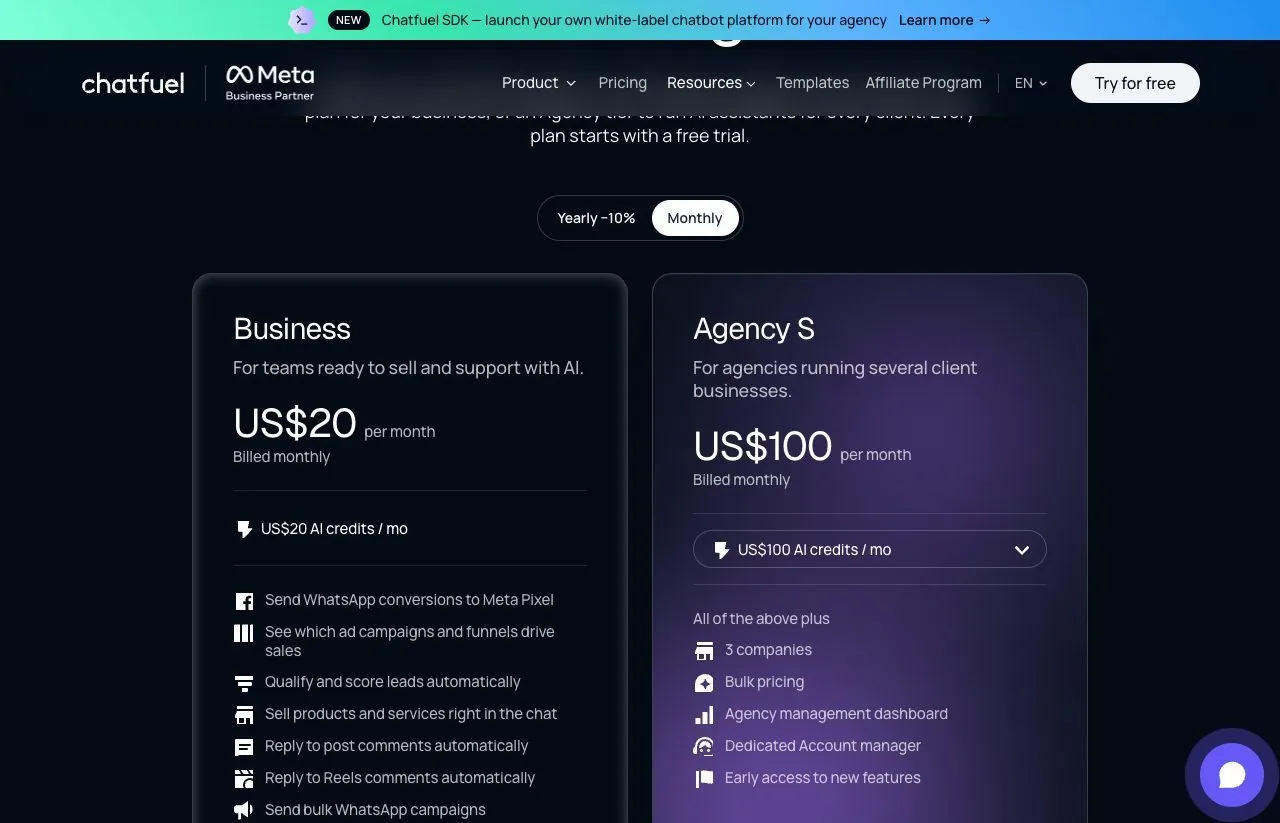
- Business: $20 a month billed monthly, or $18 a month billed yearly ($216 a year). One bot and $20 of AI credit a month.
- Agency S: $100 a month, or $90 a month billed yearly ($1,080 a year). Three companies on one wallet and $100 of credit a month.
- Agency M, L, XL and XXL: $225, $440, $850 and $2,050 a month, carrying $250, $500, $1,000 and $2,500 of credit, with unlimited bots.
- Usage on top: AI at $2.75 per million input tokens and $16.50 per million output tokens, $0.02 per conversion event sent to Meta, and delivered WhatsApp messages at Meta’s rate plus 10%.
- Trial: 7 days with $15 of credit, though Chatfuel’s own pages disagree on whether a card is needed.
- What moves your bill: included credit does not roll over, and at a zero balance your automations stop replying.
Chatfuel’s pricing page opens on the Yearly toggle, so the $18 and $90 you see first are yearly rates printed per month. Click Monthly and they become $20 and $100, each marked “Billed monthly.” The bigger agency tiers sit behind a dropdown on the Agency S card, so I took those prices from Chatfuel’s SDK pricing page, which prints all six plans in one table.
Why Search Shows Five Different Chatfuel Prices
Four AI assistants and Google’s AI Overview gave five different entry prices in our October 6 checks: $18, $20, $39, $49 and $69.
Most of those numbers trace back to a current or archived Chatfuel price, though several answers cited third-party reviews rather than Chatfuel itself. Chatfuel’s own pages disagree too:
| Chatfuel page | Entry price it shows | Status on October 6 |
|---|---|---|
| chatfuel.com/pricing | $18 a month billed yearly, $20 monthly | Current |
| sdk.chatfuel.com/pricing | $20 a month, plus the usage rate card | Current |
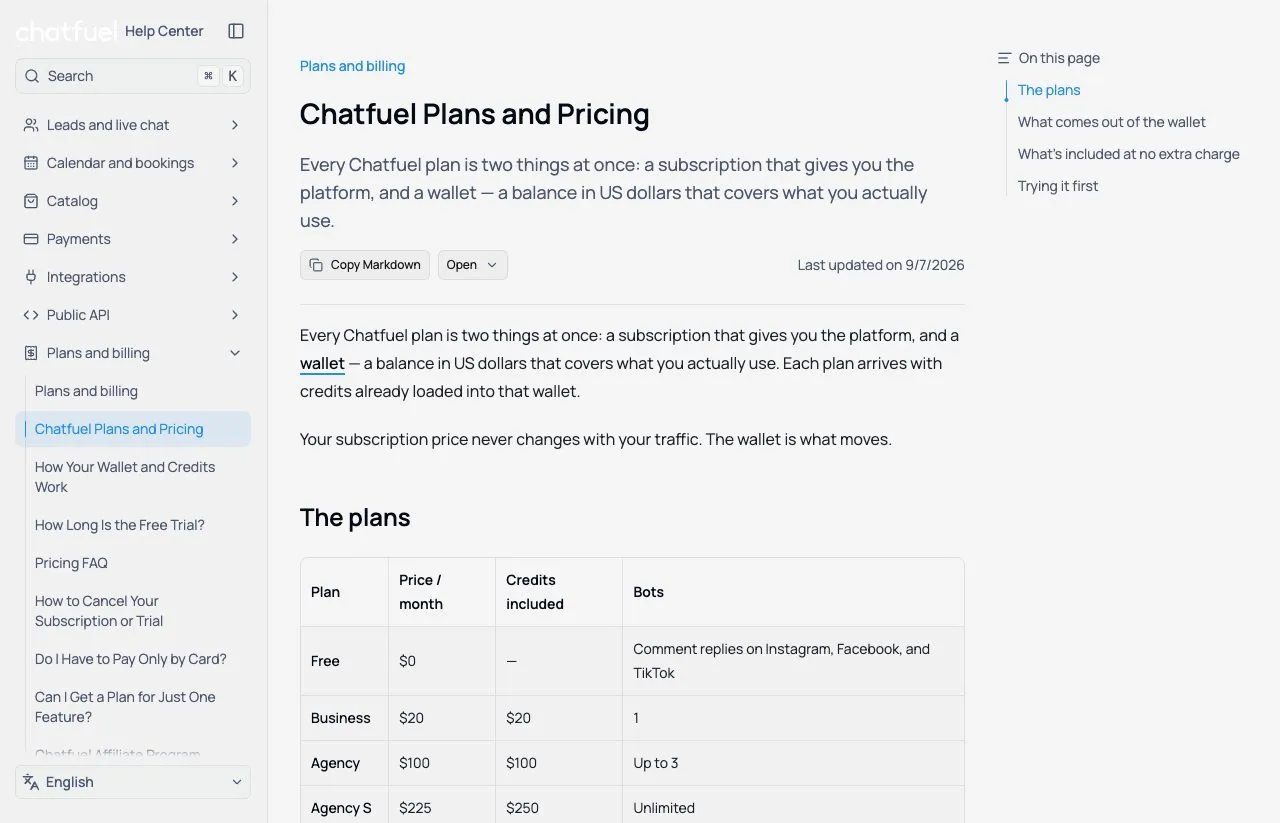
| Help center plans article | Free at $0, then Business at $20 | Current, agency tiers named one step off |
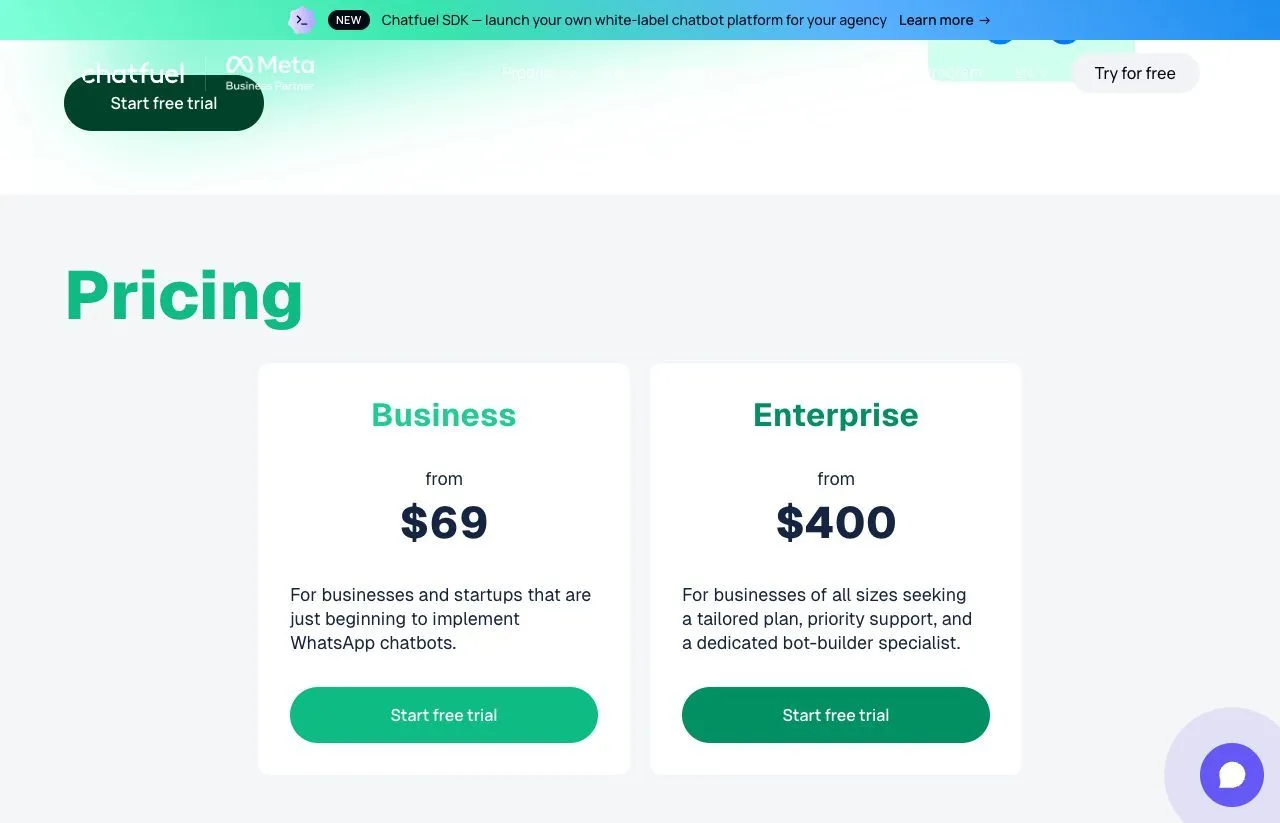
| chatfuel.com/whatsapp | ”from $69” | An older card, still live |
| help.chatfuel.com/plans | A $39 contact-tier ladder, as ChatGPT quotes it | Returns a 404 |
| The pricing page on September 3 | Chatfuel Light free, AI PRO $49 a month yearly | Archived |
The help center table lists an “Agency” plan at $100 for up to three bots and calls the $225 tier Agency S, while the pricing page calls those Agency S and Agency M. If support quotes “Agency S,” ask which list they mean.
The $69 figure is still live on Chatfuel’s WhatsApp landing page, which sells “Business from $69” and “Enterprise from $400” and matches neither current list.
The Credit Wallet Under Every Chatfuel Plan
Every paid Chatfuel plan carries a wallet, a single balance in US dollars. Chatfuel’s plans and pricing guide puts it plainly: “Your subscription price never changes with your traffic. The wallet is what moves.”
Three things draw the wallet down, per the help center:
- AI replies: every message the AI agent reads and answers, priced per million tokens
- WhatsApp templates: the messages you send after the 24-hour window has closed
- WhatsApp messages Meta charges for: from October 1, Meta bills service replies too
The SDK rate card adds $0.02 for each conversion event your bot reports to Meta. Inbox, contacts, bookings, flows and publishing cost nothing extra.
Two rules set the wallet apart from a contact meter. Included plan credit does not carry over. And at zero, processing stops: “your automations stop replying and messages stop going out.” Contacts, history and live chat stay, so you can answer by hand until you top up.
Auto-top-up is the guard: Chatfuel charges your card an amount you set before the wallet empties. Turn it on if uninterrupted replies matter more to you than a hard spending stop, because a traffic spike can drain the wallet when replies use AI.
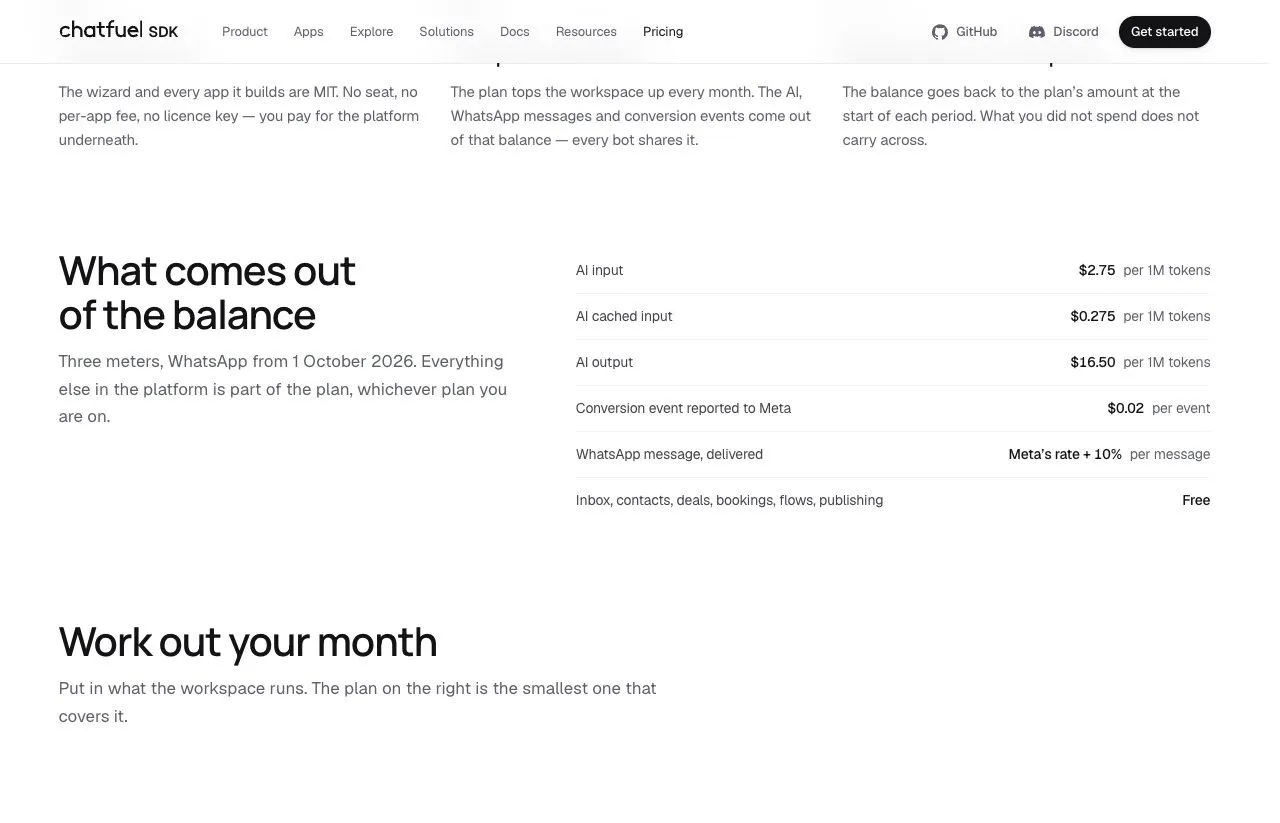
WhatsApp is the one meter Chatfuel describes in two places. The SDK pricing page lists a delivered WhatsApp message at “Meta’s rate + 10%.” Chatfuel’s August explainer on Meta’s October change answers “Is Chatfuel raising its prices?” with “No. Meta sets these rates,” and does not mention a markup. If WhatsApp volume drives your month, budget at the SDK page’s rate and confirm with Chatfuel.
The Business Plan, for One Bot
Business is for one company running one bot, with $20 of credit a month. Yearly billing takes the fee to $18 while the card still shows $20 of credit a month, so the credit slightly outruns the fee.
With a short FAQ, $20 of credit can cover a busy month. With a long product catalog reread on every answer, it can be gone in a week.
The Agency Ladder, S Through XXL
Agency S costs $100 a month for three companies on one shared wallet, plus an agency dashboard, bulk pricing and a dedicated account manager.
| Plan | Monthly price | Credit included | Bots | Extra credit over the price |
|---|---|---|---|---|
| Business | $20 | $20 | 1 | $0 |
| Agency S | $100 | $100 | 3 | $0 |
| Agency M | $225 | $250 | Unlimited | $25 (11%) |
| Agency L | $440 | $500 | Unlimited | $60 (14%) |
| Agency XL | $850 | $1,000 | Unlimited | $150 (18%) |
| Agency XXL | $2,050 | $2,500 | Unlimited | $450 (22%) |
On monthly billing, Business and Agency S hand back exactly what you pay, and from M upward the bonus climbs from about 11% to 22%. In the help center’s words, “a larger plan gives you more credits for the money than topping up does.”
The bonus only pays once you spend it. On monthly billing, Agency M beats topping up a smaller plan only past $225 of wallet charges a month, and Agency S saves a single bot nothing. Yearly billing shifts both lines: yearly Agency S beats yearly Business plus top-ups past $92 of usage, and Agency M drops to $202.50 a month.
Modeled AI Bills From 500 to 25,000 Replies
Chatfuel publishes no cost per AI reply, because each answer reads your knowledge base, your instructions and the conversation so far. So I ran its published token rates through two illustrative setups.
- Compact bot: a 5,000-character knowledge base (about 1,250 tokens at roughly four characters per token), 750 tokens of instructions and history, and a 150-token reply
- Large bot: a 50,000-character knowledge base (about 12,500 tokens), 1,500 tokens of instructions and history, and the same 150-token reply
- The caching spread: the low figure bills the whole knowledge base at the cached-input rate of $0.275 per million tokens, and the high figure caches nothing. Chatfuel does not say how much of each read is cached, and a real bot can land outside both.
That puts one AI reply at about 0.5 to 0.8 cents on the compact bot, and 1 to 4.1 cents on the large one.
| AI replies a month | Compact bot, modeled AI-only bill | Large bot, modeled AI-only bill |
|---|---|---|
| 500 | $20 | $20 to $20.49 |
| 2,000 | $20 | $20.08 to $81.95 |
| 5,000 | $24.41 to $39.88 | $50.19 to $204.88 |
| 10,000 | $48.81 to $79.75 | $100.38 to $384.75 |
| 25,000 | $122.03 to $199.38 | $225.94 to $874.38 |
Each figure is the cheapest monthly-billed plan for one bot plus top-ups, with Agency M or XL taking over where their bonus credit wins. WhatsApp fees and conversion events are extra.
Reply count alone will not predict this bill, because the text the AI reads per reply moves it just as hard. At the uncached end, $20 of credit covers about 2,500 replies on the compact bot and about 490 on the large one, roughly five to one on the same plan.
The SDK pricing page has a calculator for your own month.
The Free Trial, and the Free Plan Only the Docs Mention
There is no free plan on the pricing page. Every plan “starts with a free trial,” and the page adds “no credit card required.” The help center describes the same 7 days and $15 of credit differently: you enter a card to activate the trial, and the plan is billed when it ends unless you cancel.
The help center’s plans table does list a Free plan at $0, limited to comment replies on Instagram, Facebook and TikTok. The pricing page does not show it, so confirm with Chatfuel before planning around it.
Is Chatfuel’s Pricing Right for Your DMs?
It fits when:
- WhatsApp is where your customers are, and you want Meta’s charges on one bill
- You want an AI that answers open questions, books calls and qualifies leads, not a fixed reply
- You run several client businesses and want one wallet behind all of them. Chatfuel’s homepage now pitches the product to agencies as “a new revenue line”
- Your team is large, since teammates and contacts are unlimited on every paid plan
It starts to bite when:
- Your knowledge base is long and every reply rereads it
- Traffic spikes while auto-top-up is off
- You also need scheduled publishing across several social networks
None of that makes the pricing unfair. Chatfuel is priced for AI conversations and says so, and the question is whether that is what you are buying. If it is not, the Manychat alternatives roundup compares Chatfuel with eight other DM tools on what each one bills for.
Chatfuel vs Manychat Cost at 1,000 to 25,000 Contacts
If you run Manychat today, the comparison that matters is a keyword funnel at your contact count, set up in each tool’s dashboard. The two tie at about 280 contacts a month:
| Contacts a month, one DM each | Manychat, cheapest monthly plan | Chatfuel Business, modeled AI-only bill |
|---|---|---|
| 1,000 | $39 (Pro) | $20 |
| 5,000 | $99 (Business) | $24.41 to $39.88 |
| 10,000 | $161.50 (Business) | $48.81 to $79.75 |
| 25,000 | $199 (Advanced) | $122.03 to $199.38 |
Each Chatfuel figure assumes one AI-written DM per contact on the compact setup, with WhatsApp fees and conversion events extra. At 25,000 contacts the two meet only at the uncached end, and a large knowledge base costs more.
Fuely AI, the Public API and the SDK
Chatfuel’s AI, Fuely AI, answers customers in DMs and comments, qualifies leads, books appointments and sends follow-ups from your knowledge base. The dashboard has no Flows button by design and sets new comment replies and DMs up as Fuely AI automations, and the help center documents a fixed-text option only for the public comment reply. Static flows, which the SDK rate card lists as free, are built through the Public API, and the help center ties the drag-and-drop flow builder to Legacy accounts. So for a dashboard user, a keyword DM draws AI credit.
For builders, Chatfuel has two surfaces. The first is a Public API, a GraphQL endpoint at panel.chatfuel.com/graphql with docs last updated October 6. It manages contacts, sends messages on every channel, and builds flows and AI automations through mutations such as fuelyAutomationCreate, at 25 operations per second per account, server-to-server only.
The second is the Chatfuel SDK, a free MIT-licensed wizard (npx @chatfuel/wizard) that scaffolds your own app on Chatfuel’s infrastructure and installs “agent skills for Claude Code and Codex.” The wizard prints a promo code worth $100 of credit at checkout. Neither the help center nor the SDK docs describe an MCP server for the product, and probes of the likely addresses found none.
Manychat’s API can read and trigger flows but cannot write one, and Chatfuel’s can. Publishing is narrower. The SDK Publishing module covers “Instagram only, and one account,” the one connected to each bot, posts immediately, and a schedule means running your own queue in your own database.
Three Gaps in Every Chatfuel Plan
- Channels beyond the five. Chatfuel says it cannot connect Telegram, Viber or Line, and that there is no workaround.
- A general follow trigger. Chatfuel says Instagram exposes no standard new-follower event, and its DM to Follow feature is a limited alpha.
- Your own OpenAI key. The current help center says “There is no option to plug in your own OpenAI API key,” though an older limits page still offers it.
Four DM Tools, Four Different Meters
A limit of my own first, since I founded Blotato and it shows up in this comparison. Its DM automation runs on Instagram and Facebook only and sends a fixed message you wrote, in response to a comment or an incoming DM. It does not write AI replies, send cold outreach, or reach WhatsApp or TikTok.
| Tool | Cheapest paid plan, monthly | What the entry plan meters |
|---|---|---|
| Chatfuel Business | $20 | $20 of wallet credit for AI replies, WhatsApp fees and conversion events, 1 bot, 5 channels |
| Manychat Essential | $17 | 250 Active Contacts a month, with each extra contact billed |
| LinkDM Pro | $19 | 25,000 DMs a month across up to 3 Instagram accounts |
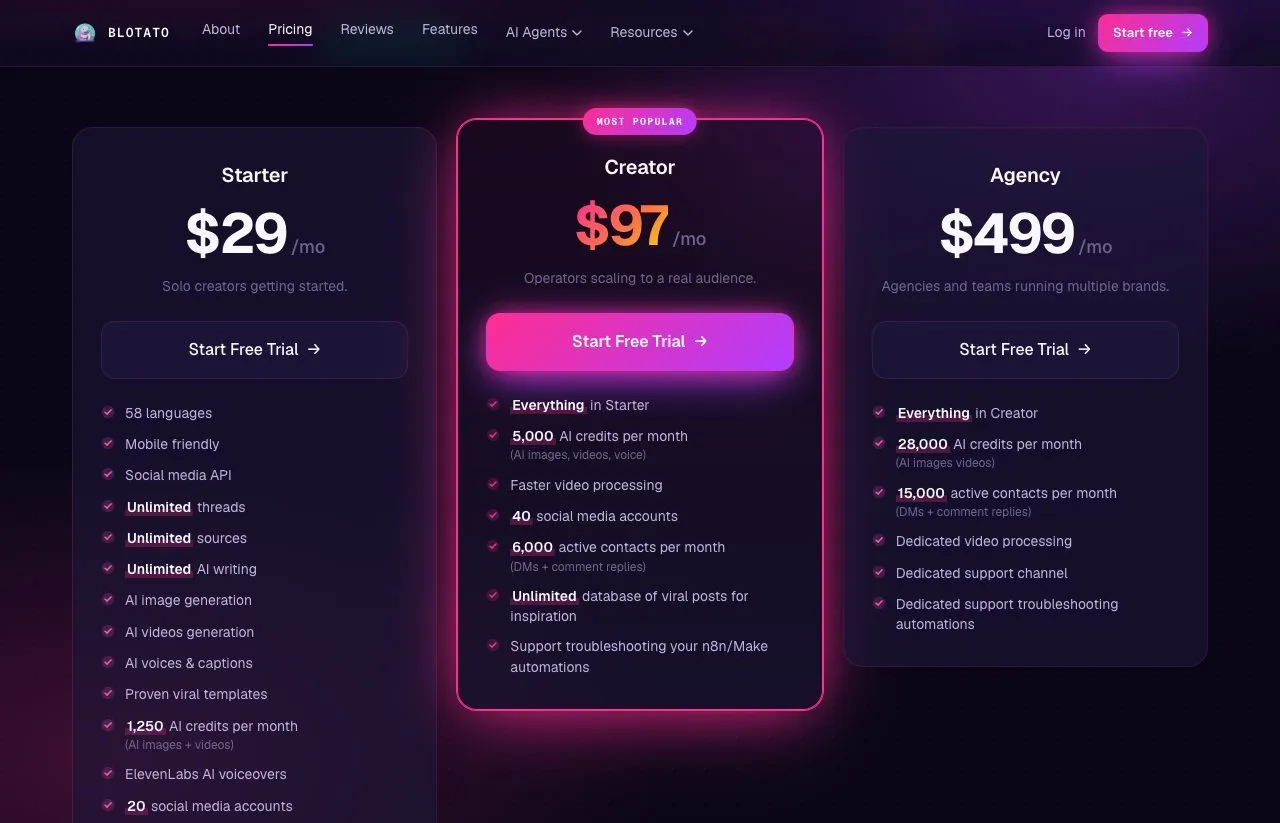
| Blotato Starter | $29 | 1,000 active contacts for DMs and private comment replies, plus publishing to 9 platforms from 20 accounts |
Among these entry plans, Chatfuel is the one whose DM bill moves with AI usage at published token rates. Manychat counts people, as the full Manychat pricing breakdown shows, and LinkDM counts messages.
Blotato’s difference is scope rather than depth. The key that runs its Instagram and Facebook automations also publishes and schedules to 9 platforms, and an agent can drive all of it through the hosted MCP server at mcp.blotato.com/mcp. The trial excludes the API, so plan on Starter if an agent is how you want to test it.
My Read on Chatfuel’s Wallet Model
Measure your knowledge base before you pick a plan. Turn on auto-top-up if a silent bot would cost you more than a bigger invoice, and read the itemised billing page after your first busy week.
For WhatsApp and AI conversations, Business is the entry plan, and on monthly billing Agency M only pays off past about $225 of usage. For a keyword, a link and a lead, Chatfuel’s compact-bot math is cheap at most volumes. Blotato Starter costs $29 for fixed-message DM automation on Instagram and Facebook up to 1,000 active contacts a month, with publishing to 9 platforms behind the same key.
Chatfuel Pricing FAQs
Is Chatfuel free, and does it have a free trial?
There is no free plan on the pricing page, only a free trial, which the help center says lasts 7 days with full access and $15 of credit. The pricing page says no credit card is required, while the help center says you enter one to activate it and are charged when the trial ends unless you cancel. The help center also lists a $0 plan limited to comment replies.
How much does Chatfuel cost per month?
Business is $20 a month billed monthly or $18 billed yearly, and Agency S is $100 or $90. The larger agency tiers run from $225 to $2,050 a month. Each plan includes wallet credit, and usage past it, such as AI replies and WhatsApp fees, needs a manual top-up or auto-top-up, since processing stops at zero.
Why does Chatfuel charge for credits instead of contacts?
Because its main cost is AI. Each reply reads your knowledge base, instructions and conversation history, priced per million tokens, so Chatfuel bills that usage from a prepaid wallet. Contacts and teammates are unlimited on every paid plan. The trade is a cheap quiet month and a less predictable busy one.
What is the difference between Chatfuel Business and Agency?
Business covers one bot with $20 of monthly credit. Agency S covers three companies on one shared wallet with $100 of credit, an agency dashboard and an account manager. Agency M and above remove the bot limit and add bonus credit worth about 11% to 22% of the price. Chatfuel’s help center names these tiers one step differently from its pricing page.
What is Chatfuel AI?
Chatfuel AI, called Fuely AI, is the agent that answers customers on WhatsApp, Instagram, Facebook, TikTok and your website from your knowledge base and instructions. It qualifies leads, books appointments and sends follow-ups, and Chatfuel says it runs on OpenAI’s GPT-5.2. Every reply it writes, including keyword DMs set up as automations, draws on your plan’s credit at published token rates.
Is Chatfuel cheaper than Manychat?
For a keyword funnel on a compact setup, usually yes, above about 280 contacts a month. Manychat Essential is $17 and Chatfuel Business is $20, and they tie at about 280. Up to roughly 25,000 contacts Chatfuel costs less in our model, while a large knowledge base or WhatsApp fees can flip it, because every AI-written DM reads your setup. Manychat vs Chatfuel compares the two side by side.