Postiz vs Upload-Post: What Can Your Social Media Agent Do?
Postiz vs Upload-Post, counted tool by tool: one social media MCP server makes images and video, the other replies to comments, retries and measures.
Postiz vs Upload-Post usually gets framed as a dashboard against a headless API. That is the answer Google’s AI summary gave when I checked, and the first page it leaned on was Postiz’s own comparison page. It is also the least useful way to choose between them if an AI agent is doing the work.
Both tools publish. Both run a hosted MCP endpoint, and both were reachable and rejected my unauthenticated requests with a 401. Both put their API on every tier they sell.
So I skipped the positioning and opened the toolboxes. I read Postiz’s tool reference and the code that registers its tools, and I ran Upload-Post’s published MCP package to list what it actually exposes. They overlap at publishing, then specialize on opposite sides of it.
Postiz vs Upload-Post: Pick by the Jobs Your Agent Runs
Postiz is the better pick if: your agent starts from a topic and needs the image, the video or a set of clips before it can post, on a plan and connector that include generation. Its server generates media. Upload-Post’s does not.
Upload-Post is the better pick if: your agent has to read comments, reply to them, retry a failed upload or pull the numbers over MCP. Its server does all four. Postiz’s MCP server does none of them.
Blotato is an app I built, so read what follows with that in mind. It competes with both of these, and it gets one labelled section near the end, where I also say where it falls short of each. If you want the flat-rate plans in view while you read, they are on Blotato’s pricing page.
Every Tool Each Server Hands Your Agent
A tool count on a marketing page tells you very little, and on these two vendors it is not even stable.
Postiz’s MCP documentation says the server “provides 13 tools.” Its open-source tool registry registers 19 tool classes, and the extras are helpers for media uploads, video status and chat widgets, at least one of which agents are told not to call. Upload-Post’s llms-full.txt says its server exposes 40 tools, its MCP page says 50, its GitHub README lists 58, and its local package, @upload-post/mcp version 0.11.4, listed 57 when I ran it: 33 marked read-only and 24 not.
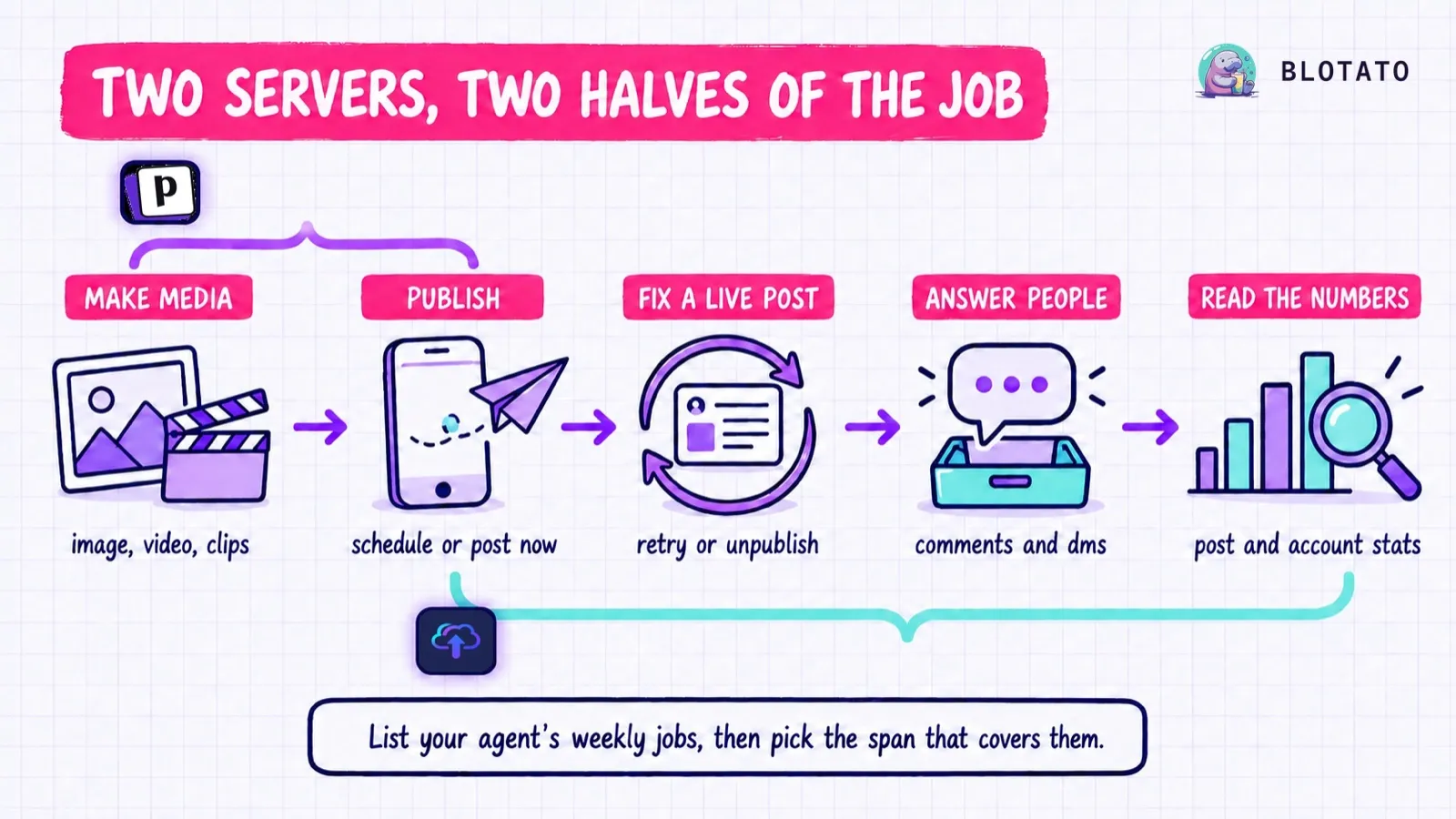
The counts matter less than what the tools do. Here are the jobs that decide this comparison, and which server has a tool for each. “None” means I found no such tool in the MCP tool reference or source registry when I checked.
| Job your agent runs | Postiz MCP tools | Upload-Post MCP tools |
|---|---|---|
| Generate an image | generateImageTool | None |
| Generate a video | generateVideoTool, plus options and status helpers | None |
| Cut a long video into clips | clippingTool, clippingStatusTool | None |
| Process media you supply | None, it uploads media from a URL as is | submit_ffmpeg_job for trim, transcode, watermark |
| Publish or schedule | schedulePostTool | upload_video, upload_photos, upload_text, upload_document |
| Edit a post not yet live | postSettingsTool (platform settings only, not content or date) | edit_scheduled, cancel_scheduled |
| Retry a failed post | None | retry_post |
| Delete a live post | None | unpublish_post (not Instagram, TikTok or Threads) |
| Read and reply to comments | None | 8 platforms |
| Send a DM | None | Instagram only |
| Read analytics | None (analytics live in the app, API and CLI) | Post, account and audience tools |
| Onboard a customer’s accounts | None | create_user, generate_jwt |
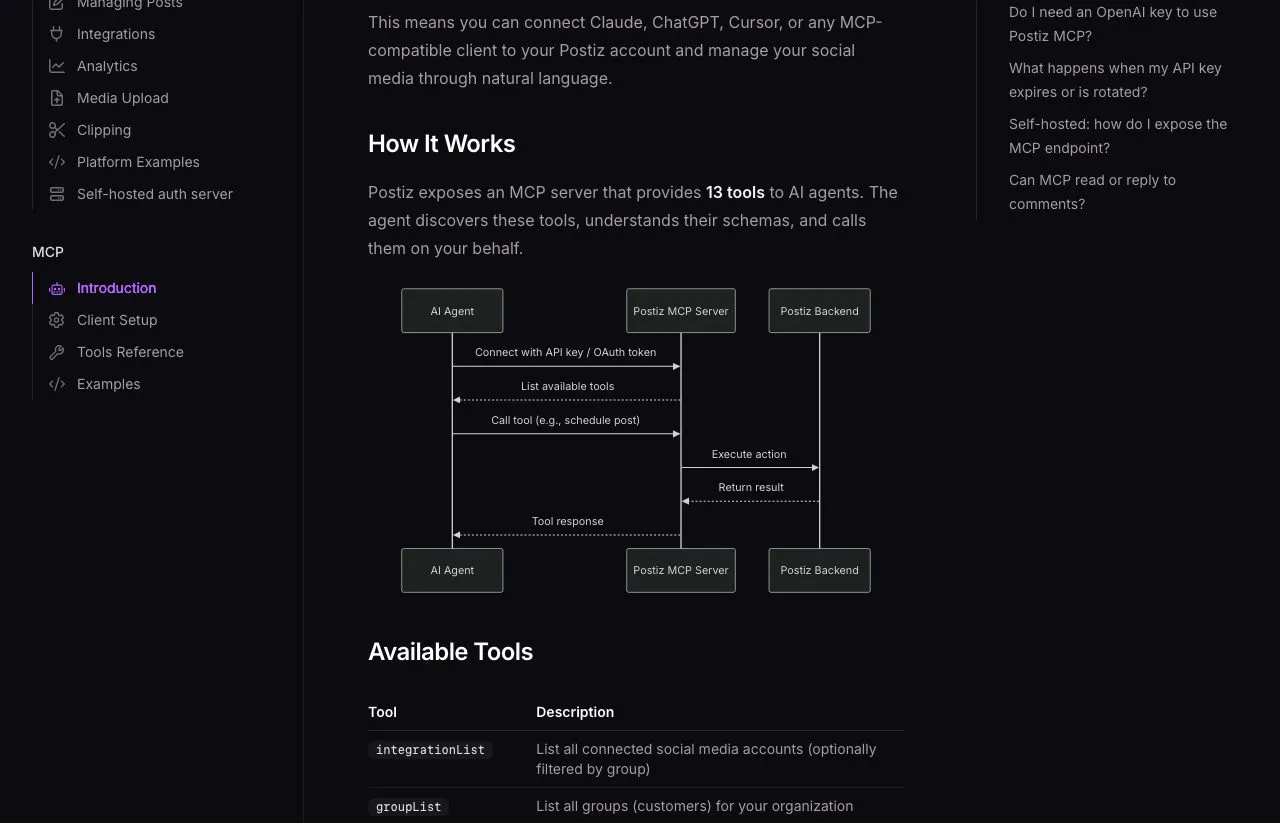
Postiz: The Server That Makes the Media
Postiz calls itself an agentic social media scheduler, and it is open source under AGPL-3.0 with more than 36,000 GitHub stars. You can run it on your own server or pay for the cloud, and I focus on the cloud here because this comparison is about hosted MCP connections.

What an agent gets here that it cannot get from Upload-Post is generation. It can ask Postiz for an image, a video from one of its two generators, or a batch of short captioned clips cut from a long YouTube video. The clipping tool creates a draft post for each clip on each channel you pass it, and schedules nothing until you say so.
Reach is the other strength. Postiz says it supports 34 platforms overall, and its public API reference documents 32. Most of the unusual ones also appear on Upload-Post’s list, but Farcaster, Twitch, Kick, Tumblr, Medium and VK do not. A Postiz channel is, in its own words, “one connected social account,” so connecting two X profiles uses two channels.
Where the server stops is stated in Postiz’s own FAQ: “There is no getComments or replyToComment exposed via MCP. Comment replies must be triggered through the Postiz UI.”
Its marketing page says an agent connected to Postiz can “read analytics,” but neither the tool reference nor the registry in its source code contains an analytics tool. The Postiz app shows analytics for 10 of its 34 platforms. Its MCP server does not reach them, though an agent can through the public API’s GET /analytics/{integration} endpoint or the CLI’s postiz analytics:platform command.
Two details worth knowing before you automate against it. Postiz states its rate limit in three places: 90 create-post requests an hour in its limits doc, “90 requests per hour (100 for the cloud)” in its API introduction, and a general 30 an hour in the OpenAPI spec on its connect docs. Until those agree, I would design against 30. And a TikTok post sent in inbox mode “is reported as successfully published by the Postiz API” even though it only reaches the creator’s TikTok inbox, so an agent that trusts the status alone will report a post that is not on the profile yet.
Upload-Post: The Server That Talks Back
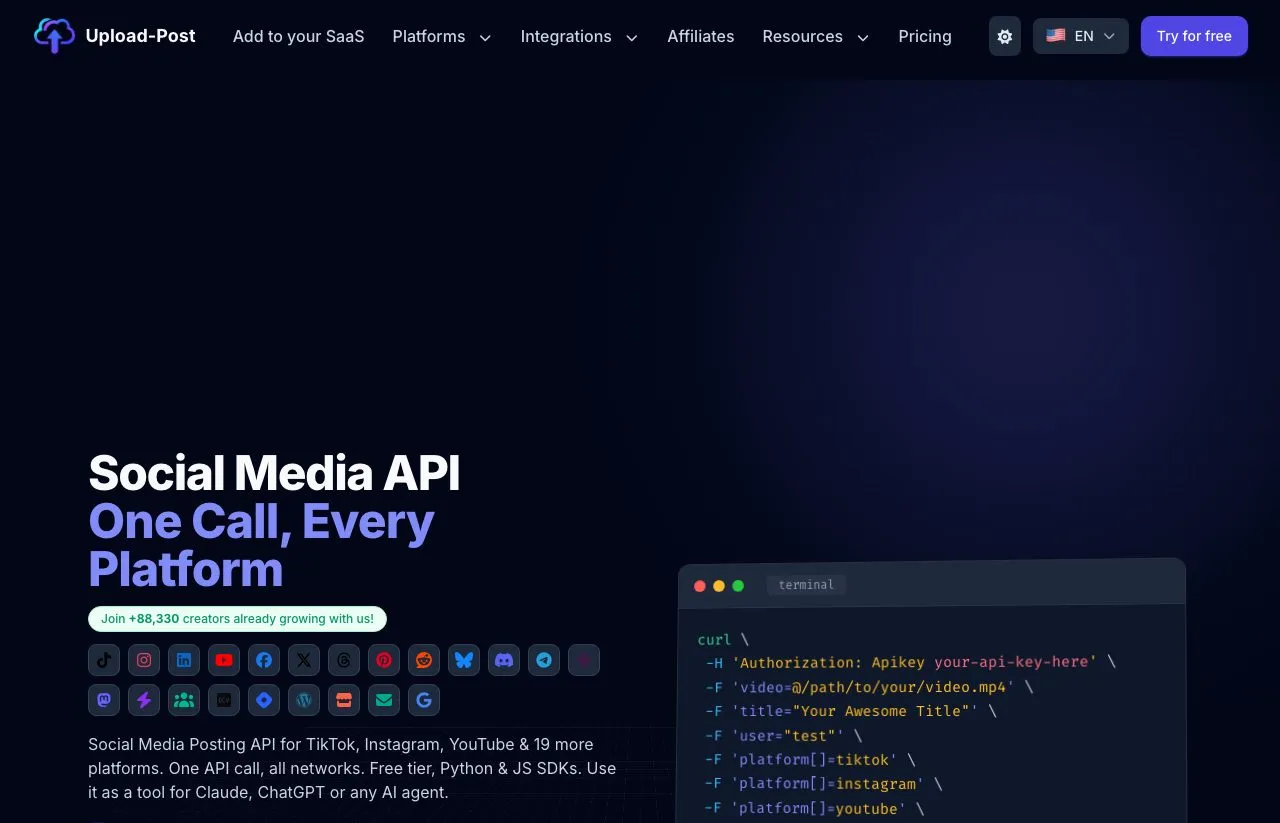
Upload-Post sells itself as a social media posting API, and the publishing side is exactly that: one call, up to 22 destinations, with the media adapted per platform. Reddit is on the list but currently answers every upload with a 503 reddit_unavailable error, which leaves 21 listed destinations.
The part its positioning undersells is everything after publishing. Its comments tools read and reply on Instagram, Facebook, YouTube, LinkedIn company pages, TikTok, X, Threads and Bluesky. Reply is not the same operation everywhere: X comments come through mentions, and Instagram only takes replies, not new top-level comments. It also sends Instagram DMs, replies to Google Business reviews, and exposes post, account and audience analytics.
It also handles the failures an unattended agent runs into. retry_post reruns a failed upload, and cancel_scheduled and edit_scheduled cover the queue. unpublish_post deletes a live post on Facebook, YouTube, X or LinkedIn from the MCP tool, with more platforms through the REST endpoint, though never Instagram, TikTok or Threads.
There is one automation to read closely before you rely on it. Upload-Post’s AutoDM monitors send a private reply to each new commenter, but they are Instagram only, watch one post URL each, check for comments every 15 minutes at the fastest, and stop on their own after 15 days. You can create 2 new monitors per profile per day.
What it does not do is make anything. Its AI Shorts feature writes titles, descriptions and hashtags for short videos you already have, and its FFmpeg tool reformats media you supply. I found no image or video generator in its MCP tools, its docs or its plan descriptions.
What Each Vendor Says About the Other
Both vendors publish a page about the other, and Google’s AI answer for Postiz vs Upload-Post leans on Postiz’s. Neither page is careful. I checked each claim against the other vendor’s own documentation.
| Claim | Where it appears | What the other vendor’s docs show |
|---|---|---|
| Upload-Post “publishes to eleven platforms” | Postiz’s Upload-Post alternatives page | Upload-Post lists 22 destinations, with Reddit currently unavailable |
| Upload-Post’s API is “a REST endpoint rather than an MCP server or CLI” | Postiz’s Upload-Post alternatives page | Upload-Post runs a hosted MCP server and an MIT-licensed local one |
| Upload-Post has no “analytics dashboard” | Postiz’s Upload-Post alternatives page | Whatever the dashboard, Upload-Post documents analytics through its API for 9 to 11 platforms, depending on the page |
| Upload-Post Basic is “$16” per month | Postiz’s comparison page | $16 is the annual rate. Monthly is $24 |
| Upload-Post’s “$18/month plan includes 5 profiles” | Upload-Post’s Postiz alternative page | Upload-Post’s own pricing card shows $24 monthly or $16 yearly for 5 profiles |
| Postiz Standard includes “400 posts per month” | Upload-Post’s Postiz alternative page | Postiz’s pricing page and plans doc now say unlimited posts on every tier |
I cannot infer intent, and every one of these claims conflicts with the other vendor’s current documentation. The practical lesson is to price and scope each tool from its own docs, never from the rival’s comparison page.
Two Rate Cards at Monthly Prices
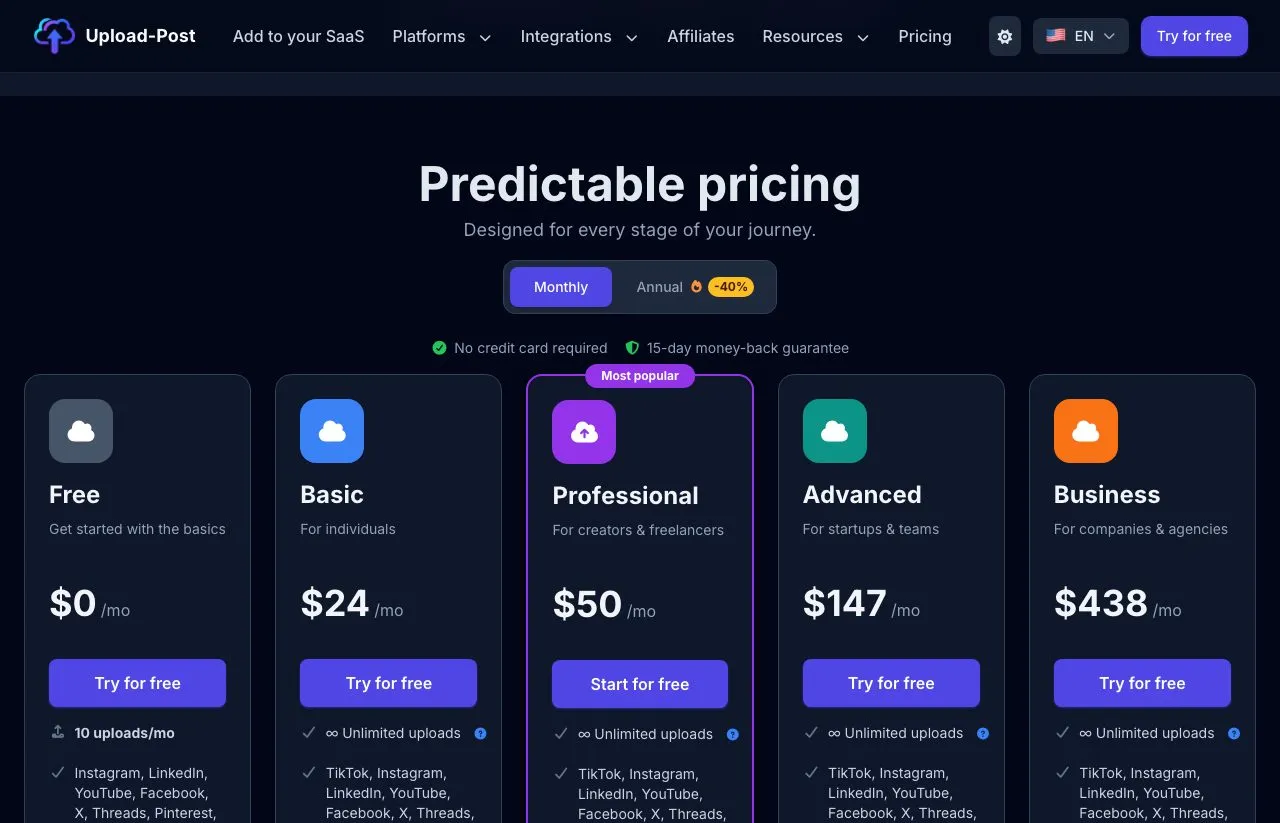
Postiz’s pricing page opens on monthly. Upload-Post’s opens on annual and prints the annual rate with a “/mo” suffix, which is how the $16 figure keeps turning up.
| Postiz cloud | Upload-Post | |
|---|---|---|
| Free plan | None, 7-day trial with a payment method | Yes: 2 profiles, 10 uploads a month, no TikTok |
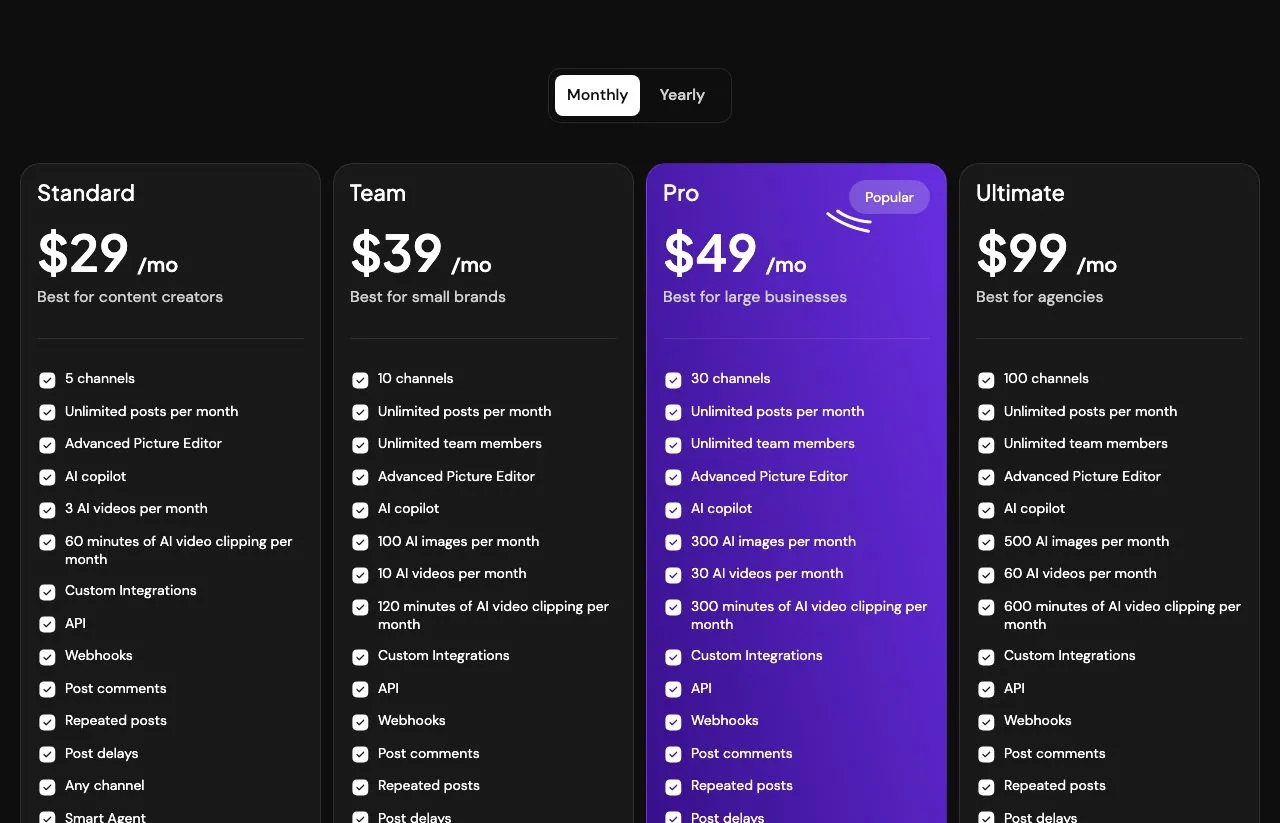
| Entry | Standard, $29: 5 channels, solo | Basic, $24: 5 profiles, owner only |
| Second tier | Team, $39: 10 channels, unlimited members | Professional, $50: 25 profiles, 2 seats |
| Third tier | Pro, $49: 30 channels | Advanced, $147: 75 profiles, 5 seats |
| Top tier | Ultimate, $99: 100 channels | Business, $438: 225 profiles, 10 seats |
| Billed yearly | $278, $374, $470, $950 | $192, $400, $1,411, $4,205 |
| What one unit is | One connected account | One person or client, one account per platform |
| API and MCP | Every tier | Every tier, including Free |
Those units are not comparable. One brand on five platforms is five Postiz channels and one Upload-Post profile, so matching tiers by name tells you nothing. I worked through why a profile and a connected account price so differently with a table of real workloads, and each vendor’s own ladder is priced in full in Upload-Post’s tier-by-tier costs and Postiz’s cloud-versus-self-hosting math.
Three limits the price table does not capture:
- Upload-Post’s media tool runs on a meter.
submit_ffmpeg_jobdraws on FFmpeg minutes, 30 on Free and 300 on Basic, so an agent that reformats every video will find that limit before any upload cap. - Postiz’s generation runs on a meter too, and its pages disagree about images. Standard includes 3 AI videos and 60 clipping minutes a month. Its plans doc gives Standard 20 image credits and then marks the image generator “No” for that tier, and its pricing FAQ says Standard has “no AI image generation.” The plans doc defers to the pricing page, so plan on no AI image generation at $29.
- Both entry plans are single-seat. Postiz calls Standard “a solo plan,” and Upload-Post Basic is “Owner only.” A second person with a login moves you up a tier on either tool.
Choose Postiz When the Agent Starts From Nothing
- Your agent turns a topic into a post and needs the image or video made for it
- You want long videos cut into captioned clips without a separate clipping tool
- You publish to Farcaster, Twitch, Kick, Tumblr or Medium alongside the usual networks
- You want the source code, or the option to run the whole stack yourself
- Comment replies happen by a person in the app, not through the agent’s MCP connection
Choose Upload-Post When the Agent Has to Answer People
- Your agent reads and replies to comments across several networks
- It needs to retry failed uploads or pull a live post without a human
- Analytics feed back into what the agent posts next
- Your media already exists and only needs reformatting and delivery
- You want to prove the pipeline on a free plan before paying, and TikTok can wait
Count the Jobs, Not the Tools
If I were settling Postiz vs Upload-Post for a real build, I would not start on either pricing page or either vendor’s comparison page. I would write down the jobs my agent runs in a normal week and check each one against the job table above.
Of these two, I would shortlist Postiz when generation is on the list and your plan and connector expose it. I would favor Upload-Post when the list keeps going past publish, into comments, retries and numbers, on networks it supports. A list that needs both runs into the edge of each server.
Blotato as the Alternative to Both
Blotato covers publishing and answering people from one key, on a narrower set of networks than either tool here, so run the same job test on us.
Blotato’s hosted MCP server exposes 36 documented tools behind one key. They cover publishing and scheduling to 9 platforms, comments and DMs, post analytics with LinkedIn not collected yet, and visuals built from templates. So on Instagram and Facebook, one agent session can publish a post, read the replies to it and check how it did without a second vendor.
DM automation is where we differ most, and only on Instagram and Facebook, which is also where it stops. Upload-Post’s AutoDM is the closest match, and it watches one Instagram post per monitor, only for comments, for 15 days. Postiz’s MCP server has no comparable tool.
A Blotato DM automation fires on a comment or on an incoming message, on Instagram and on Facebook Pages, and it can target one post by its Blotato post ID or every post and reel on the account. There are 8 MCP tools for building and editing those automations, so the agent that published the post can wire up the replies in the same session.
Now the same test I ran on them. Our comments and DMs cover Instagram and Facebook only, so Upload-Post reaches comments on more networks than we do. We have no tool to retry a failed post or delete one that already went live, which Upload-Post has.
We also publish to 9 platforms, against vendor-listed totals of 34 for Postiz and 22 for Upload-Post. Starter is $29 a month flat for 20 connected accounts, and the 7-day trial excludes the API, so an agent build here starts on the paid Starter plan rather than a trial.

Postiz vs Upload-Post FAQs
Can an AI agent reply to comments through Postiz or Upload-Post?
Through Upload-Post, yes: its MCP tools list and reply to comments on Instagram, Facebook, YouTube, LinkedIn company pages, TikTok, X, Threads and Bluesky. Through Postiz’s MCP server, no. Its MCP documentation states there is no getComments or replyToComment tool and that comment replies must be triggered in the Postiz app. Scheduling a follow-up comment on your own post is a different feature.
Do Postiz and Upload-Post work with n8n?
Yes. n8n lists both as verified nodes built by the vendors, the Postiz node and the Upload-Post node, so the common steps need no raw HTTP request. Postiz’s node creates posts, uploads files and generates video. Upload-Post’s node uploads media and reads and replies to Instagram comments, a narrower comment reach than its MCP server’s eight networks.
Does Postiz’s MCP server generate images and video?
Yes, on plans that include it. Postiz documents tools that generate images, generate videos and cut long YouTube videos into captioned clips, and the agent can attach the results to a scheduled post. The $29 Standard plan includes video and clipping, while its pricing FAQ says it has no AI image generation. The Claude connector directory version of Postiz also leaves the media tools out, so connect it as a custom connector if your agent needs them.
Is Upload-Post cheaper than Postiz?
At the entry tier, Upload-Post Basic is $24 a month against $29 for Postiz Standard, and Upload-Post has a free plan while Postiz has only a trial. The two bill different units, though. A Postiz channel is one account, while an Upload-Post profile holds one account on every platform, so which is cheaper depends on how many brands and platforms you run.
Can I self-host Upload-Post the way I can self-host Postiz?
Only part of it. Upload-Post’s MCP server is open source under MIT and can run on your own machine, but it still calls Upload-Post’s hosted API, which is the part you pay for. Postiz is open source end to end under AGPL-3.0, so the whole product, including its API and MCP server, can run on your own infrastructure.