Facebook Comment to DM Automation From Your Social Media Agent
Facebook comment to DM automation on a Page: what Business Suite does free, the Page-only rules, and how a social media agent sets it up.

Facebook comment to DM automation lets your agent answer people who comment a keyword on your Page with a private Messenger message, usually carrying the link they asked for. Through Blotato’s MCP server, the agent can build that automation, edit it and tell you why a run failed. Meta Business Suite already does the basic version for free, though, and a Facebook Page breaks a few rules you may have learned on Instagram.
What the agent can do here: create the automation, aim it at one post it published through Blotato or at every post on the Page, and ask for an email before the link. What it cannot do: message someone who never commented or wrote to you first, or hold the link behind a follow on Facebook. If your posts get a few comments a week, skip all of this and reply by hand.
Facebook Comment to DM Automation at a Glance (2026)
Four common routes turn a Facebook comment into a Messenger DM.
| Route | Who builds it | What it watches | Where it breaks on a Page |
|---|---|---|---|
| Meta Business Suite “Comment to message” | You, in the desktop Inbox | Comments with your keywords on your posts | Keyword automations are desktop only, and turning on Meta Business Agent pauses them |
| Meta’s Private Replies API, direct | A developer | Any post or comment ID your webhook receives | You run the webhook server, the Page token and the deduplication yourself |
| Manychat Facebook Comments trigger | You, in its flow builder | Any post, or a chosen one, including scheduled and ad posts | Its API can fire a flow you built, but cannot create or edit one |
| Blotato DM automation | Your agent, over MCP or REST | One post published through Blotato, or a keyword on every post | No follow gate on Facebook, and it covers Instagram and Facebook only |
If you run one keyword on one Page and are happy to set it up by hand on desktop, Business Suite covers it. An agent earns its keep in Facebook comment automation when the keyword changes every week, when the same offer runs on several Pages, or when you want the post and its automation created in the same conversation. Other DM tools run their own MCP servers too, so read the table as the common routes, not every route.
Free 7-day trial · Cancel anytime
The trial covers the web app. Your agent’s route runs on the API and MCP, which the trial does not include, and generating an API key ends the trial and starts the $29 Starter plan.
What Business Suite Already Does for Free
Meta ships this inside Business Suite’s Inbox automations, which you can create for a Facebook Page, an Instagram account or a WhatsApp Business account. The template list includes “Comment to message”, which Meta describes as sending “a message reply to comments on your posts that contain specific keywords or phrases.”
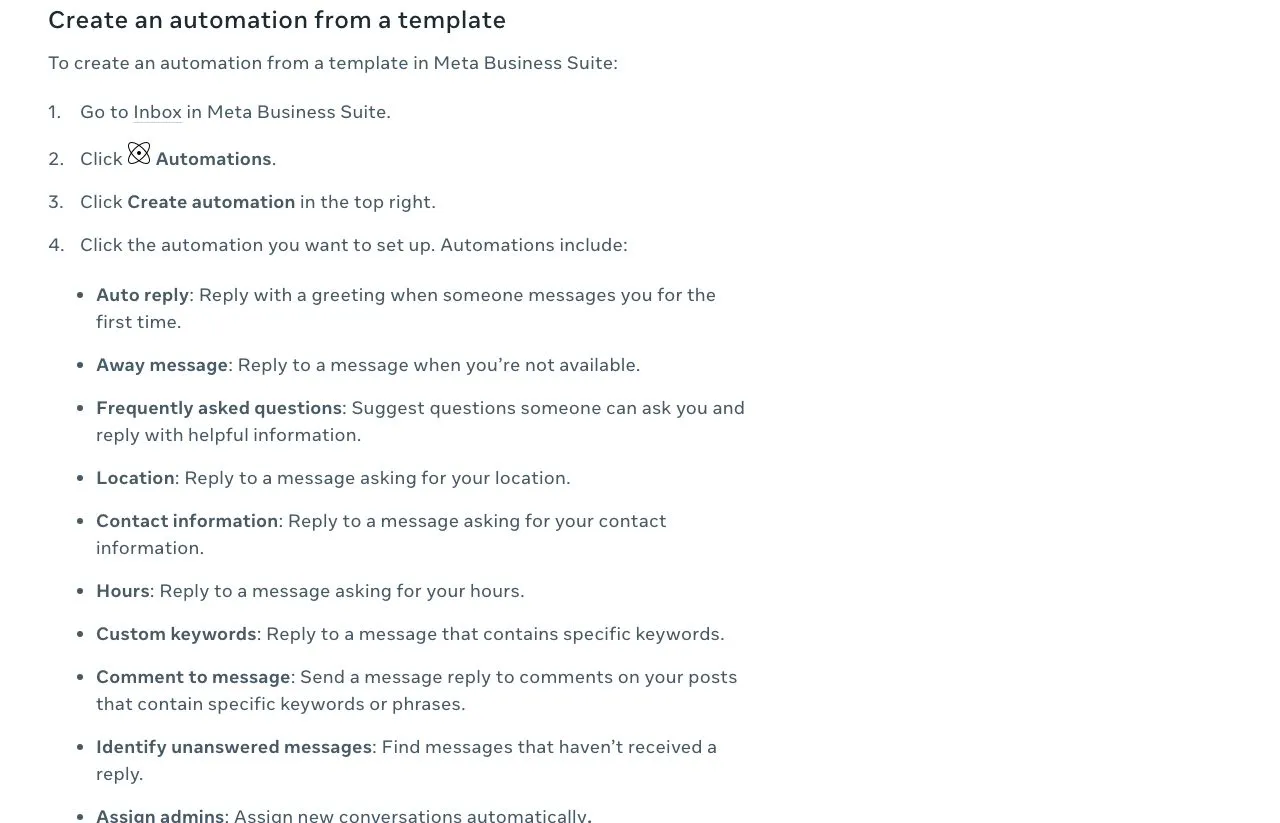
Two lines on that help page matter before you build on it. Keyword automations “are only available in Meta Business Suite on desktop.” And if you turn on Meta Business Agent, “any existing automations (such as away messages or instant replies) will be paused.”
What Changes on a Facebook Page
Comment-to-DM runs on Meta’s Private Replies on both platforms, but a Facebook Page changes six things your agent has to handle.
1. It runs on Pages, never a personal profile or a Group. Blotato connects through your personal Facebook login, because Meta uses that login to grant access to the Pages you admin. Disconnect the login and every Page authorized through it goes with it. Remove a single Page and, per Blotato’s Facebook limitations page, its automations stay marked Live but stop receiving comments and messages until you add the Page back.
2. The automation needs a pageId. Over MCP, blotato_list_accounts returns your Facebook account with its Pages listed as subaccounts. Over REST, the same IDs come from GET /v2/users/me/accounts/:accountId/subaccounts. Each connected Page counts as one account on your plan, and the personal login does not count.
3. There is no follow gate. Blotato’s follow gate checks Instagram follower status, and a Facebook automation rejects it with HTTP 422 and error code 20303. An email gate works instead, and on automations published after September 14, 2026, a contact who already gave an email to a gate on the same Page skips it.
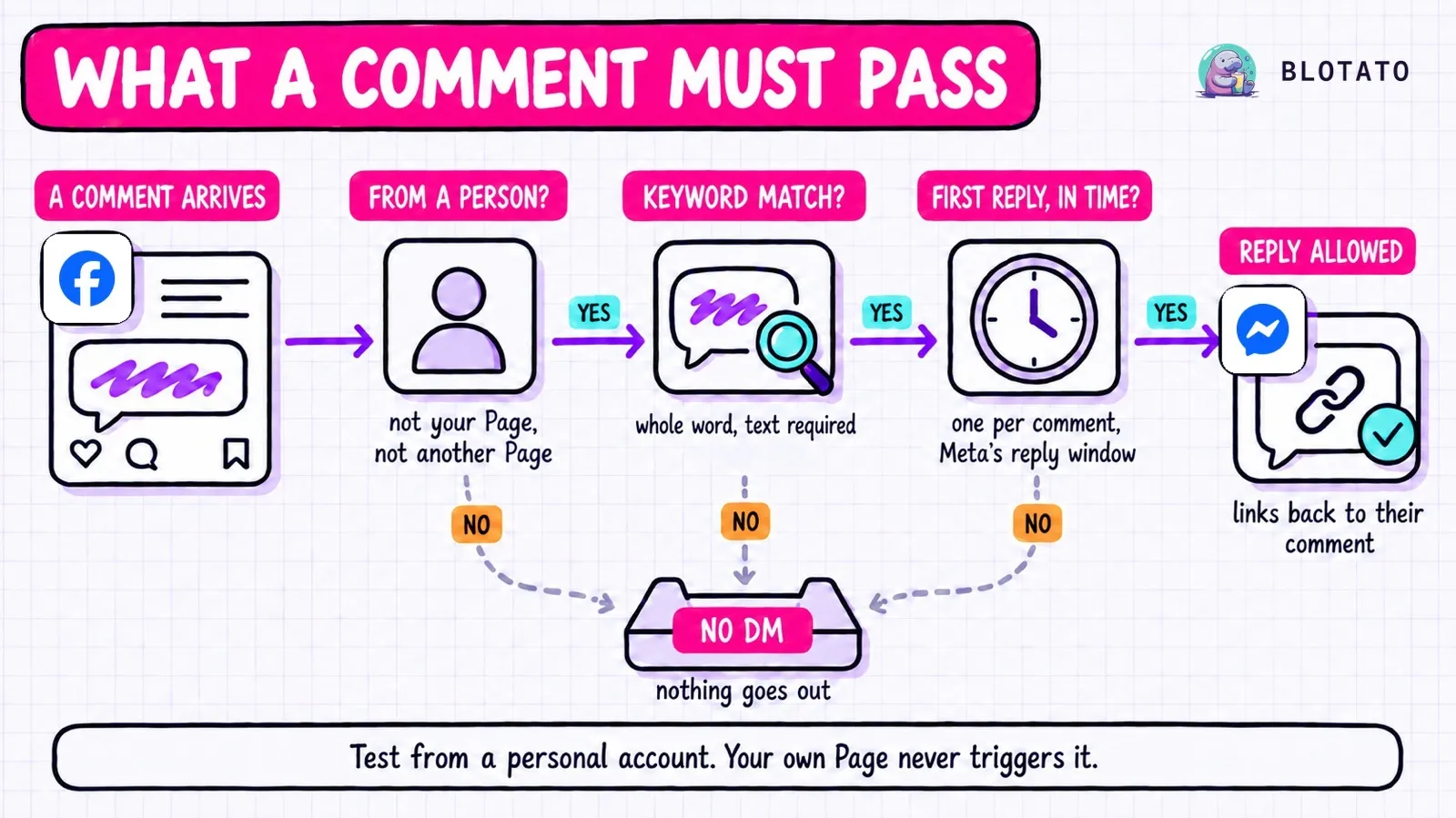
4. The Page cannot test it. Comments posted by the account the automation runs on never start a run. Meta also lists, under its Private Replies limitations, that a business “cannot send private reply message to another facebook page,” so a comment posted as a second Page goes unanswered too. Test from a personal account.
5. The DM points back at the comment. Meta’s Private Replies documentation says the message “will contain a link to the post or comment that the person published.” Each comment can get one private reply at most, sent within 7 days of the comment, and the conversation only continues inside the 24-hour window if the person answers.
6. Contacts count per Page. Every new person an automation reaches counts toward your plan’s monthly active contacts: 1,000 on Starter, 6,000 on Creator and 15,000 on Agency. A person is counted once per connected account, so someone who comments on two of your Pages counts twice toward that one plan total. Past the limit, a send to someone new fails with error code 20101.
Meta’s API reaches further than Blotato’s automations do: Private Replies also covers posts visitors publish on your Page and comments in your business’s Facebook Group. Blotato’s Facebook docs do not mention ad comments either, so test one before you count on it.
From Your Agent, Start to Finish
Eight MCP tools cover a Facebook automation from the moment you create it to the run that tells you why a DM failed, and this is the order I would hand an agent setting up Facebook comment to DM automation.
Connect the Page first. In Blotato, connect Facebook, pick each Page individually and approve the comment and message permissions. A Page connected before comments and messaging launched needs reconnecting, or the automation never fires.
Publish the post through Blotato if you want per-post targeting. The trigger takes a Blotato post ID, so the agent publishes with blotato_create_post, polls blotato_get_post_status until it reads published, then reads the post ID from blotato_list_posts. My Facebook setup for Claude covers the publishing side. For a post you made in the Facebook app, leave the post ID out and the automation watches that keyword across every post on the Page.
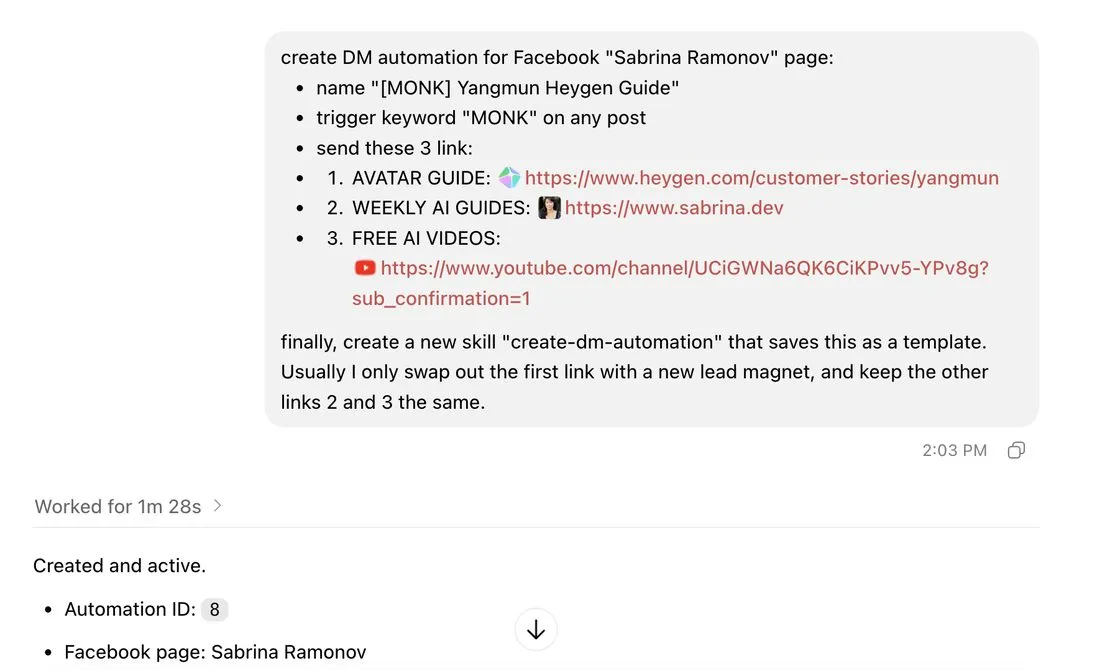
Then ask for the automation in one message. A prompt like this is enough:
Publish this video to my Facebook Page “Acme Studio” with the caption below. Once it is live, create a DM automation on that post: keyword GUIDE, ask for their email first, then send “Here’s the guide you asked for” with a button labeled “Get the guide” linking to my checklist. Send each captured email to my webhook. Turn it on.
Behind that prompt, the agent calls blotato_create_automation with platform: "facebook", the pageId, a comment-received trigger holding the keyword and post ID, a message of up to 640 characters, up to three link buttons, an emailGate and a webhook. Keywords match anywhere in the text, ignore case and tolerate a line break inside a multi-word keyword.
Read the runs. blotato_list_automation_runs returns each run with its status and, for a failure, an error code and message. blotato_list_automation_logs shows each step a run took, and blotato_get_automation_analytics returns triggered, completed and failed totals plus failures from the last 7 days.
Change the keyword without rebuilding. blotato_update_automation swaps the message, buttons, gates or triggers on a live automation, and the change publishes immediately. blotato_update_automation_trigger turns a single trigger off or on, and blotato_delete_automation archives the whole thing. Trigger IDs change whenever you edit an automation’s content or triggers, so the agent should re-read them with blotato_list_automations before toggling one.
The email itself never shows up in the conversation endpoints. Blotato sends it as email in the webhook’s JSON body (on every method except GET), and the run logs record that body too. A webhook timeout is logged and the run still completes with no retry, an error response is logged without stopping the run, and either way you should confirm your endpoint actually stored the address.
Who Owns the Messenger Thread
Several apps can connect to one Page’s Messenger, and Meta’s conversation routing decides which one may speak. The key line: “Only default application can send a message when the thread is in idle state,” and even then the conversation has to be “within the messaging window.” A thread goes idle when the person has not messaged you in the last 24 hours, or when the app holding it releases control.
Business Suite’s own Inbox can be that default app, and so can any other connected tool. With no default app set, every connected app receives the webhooks and can answer the same message.
On Instagram, Blotato’s troubleshooting guide says the comment’s private reply still arrives when another app controls the conversation, and Meta rejects the later messages. It names Manychat as a common source of that conflict.
When an email gate runs on a Page, its message uses the comment’s one private reply, and the later messages go out as standard DMs, the kind routing governs. Meta’s routing page does not say whether private replies are exempt from the idle-thread rule, and Manychat’s community moderator sent a user straight to conversation routing when their Facebook comment replies stopped. So settle routing before you go live. These four steps are adapted from Blotato’s Instagram routing guide, keeping the Page’s Messenger settings:
- Open Facebook Page Setup for the Page and go to Messenger conversation routing.
- Remove the default routing app, or select Blotato.
- Back in Page Setup, open Advanced Messaging and turn off Take control of conversations for every other app.
- Back in Blotato, republish the automation.
If you manage the Page through Business Manager, the same switch sits under Conversation Routing in the business settings. Keep one live automation per keyword on each Page, because two automations matching the same comment compete for its one private reply.
The Honest Pitch: Skip the Webhook Server and Use Blotato
Blotato is my company, and its DM automation covers two platforms, Instagram and Facebook, replying only to people who wrote first. Manychat covers more channels, and its trigger picker lists ad posts.
What you skip is the plumbing: a Page access token from someone who can perform the MESSAGING task, the pages_messaging permission, a webhook server that hears every comment, and your own record of which comments already got their one reply.
One API. Every social platform. The key that runs this automation also publishes to 9 platforms, reads Instagram and Facebook comments and DMs, and pulls analytics. Creating the Facebook automation from the prompt above is one request:
curl -X POST https://backend.blotato.com/v2/dm-automations \
  -H "blotato-api-key: YOUR_API_KEY" \
  -H "Content-Type: application/json" \
  -d '{
    "accountId": "YOUR_FACEBOOK_ACCOUNT_ID",
    "platform": "facebook",
    "target": { "targetType": "facebook", "pageId": "YOUR_PAGE_ID" },
    "name": "GUIDE keyword on the launch video",
    "triggers": [
      { "type": "comment-received", "keywords": ["guide"], "postId": "YOUR_BLOTATO_POST_ID" }
    ],
    "dmMessage": "Here is the guide you asked for.",
    "buttons": [ { "type": "url", "title": "Get the guide", "url": "https://example.com/guide" } ],
    "emailGate": { "message": "Reply with your email and I will send it over." },
    "webhook": { "method": "POST", "url": "https://example.com/hooks/leads" },
    "isActive": true
  }'
accountId comes from GET /v2/users/me/accounts, pageId from the subaccounts call above, and the post ID from GET /v2/published-posts, which lists the posts Blotato published. The full field list is in Blotato’s DM automation reference, and the DM automation API guide compares this model with building on Meta yourself.
Blotato also runs an MCP server at https://mcp.blotato.com/mcp. Add it to Claude Code, Claude Desktop or any MCP-compatible agent, sign in with OAuth or a blotato-api-key header, and ask the agent to list your accounts.
Starter is $29 a month, Creator is $97 and Agency is $499. Pick a plan
Where I’d Start on a Facebook Page
I’m biased, obviously. I built Blotato, and the setup I would copy on a new Page is small: one keyword, an email gate and a webhook into your list. When a test DM does not arrive, read the runs first. If there is no run at all, check the usual suspects from this page: a comment from your own Page, a keyword miss, a post the automation does not watch, or a Page that needs reconnecting.
Facebook Comment to DM Automation FAQs
Can my AI agent DM people who comment on my Facebook posts?
Yes, if the comments land on a Facebook Page and the agent connects to a tool with a write API for automations, such as Blotato’s MCP server. The agent creates a Facebook automation with the Page’s pageId and a comment keyword, and Blotato sends a private reply to each matching comment. The API and MCP start with a paid plan.
Can Manychat automatically reply to Facebook comments?
Yes, through flows you build in its editor, and Manychat’s API can fire a flow but cannot create or edit one, so an outside agent cannot set it up through the API. Its Facebook Comments trigger watches any post or a chosen one, including scheduled and promotable posts, and sends a private Messenger reply. The Manychat API breakdown covers what an agent can and cannot reach there.
Can I auto-DM people who comment on my Facebook Page for free?
Yes, if you set it up by hand in Meta Business Suite on desktop: its “Comment to message” automation replies to comments containing your keywords. Turning on Meta Business Agent pauses it along with your other Inbox automations, so check that setting if it stops.
How long do I have to send a private reply on Facebook?
Seven days from when the comment was posted, and one message per comment. A comment that already got a private reply, from Blotato or any other tool, rejects a second one.
Does comment-to-DM work on a personal Facebook profile or in a Group?
Not through Blotato. Its automations run on Facebook Pages only, never on a personal profile or a Group.
Why did my Facebook automation not send the DM?
Start with the comment. A photo or sticker with no text never starts a run. Then check that the targeted post belongs to the automation’s own Page, and read the run’s error, such as 20101 for the monthly contact limit. A run that failed after the message went out, for example when the webhook address could not be reached, still delivered the DM, so do not resend it.