Upload-Post Pricing 2026: Agent Costs Per Social Media Profile
Upload-Post pricing in 2026: when a social media profile add-on beats upgrading, the daily X post cap, and why annual plans save 20 to 33%, not 40%.
Upload-Post pricing runs from a free plan to four paid tiers at $24, $50, $147 and $438 a month on monthly billing. Every tier is sold by its profile count. For an agent that posts on your behalf, the bill usually moves for a different reason: a second seat, a busy X account, or a profile count that lands between two tiers.
This post prices each of those. It covers what each tier limits besides profiles, when an add-on pack is cheaper than the next tier, the daily caps an unattended agent runs into behind “unlimited uploads,” and what the annual toggle really saves.
Credit where it is due: the rate card is public, the free plan needs no card, and one API call reaches 22 destinations.
Upload-Post Pricing: The Short Version
- Free: $0, 2 profiles, 10 uploads a month, no card, and no TikTok.
- Basic: $24/month, or $192 billed yearly (shown as $16/month). 5 profiles, 1 seat.
- Professional: $50/month, or $400 billed yearly (shown as $33/month). 25 profiles, 2 seats, whitelabel.
- Advanced: $147/month, or $1,411 billed yearly (shown as $118/month). 75 profiles, 5 seats.
- Business: $438/month, or $4,205 billed yearly (shown as $350/month). 225 profiles, 10 seats, extra profiles at $1 each.
- The quirk worth knowing first: profile add-on packs don’t stack, so you pick one pack per plan, and the jump from 125 to 126 profiles costs $176 a month.
What One Profile Buys on Upload-Post
A profile is Upload-Post’s billing unit, and it is generous. The vendor’s own definition is that a profile “lets you connect one account per platform,” so 5 profiles means 5 TikTok accounts, 5 Instagram accounts and 5 YouTube accounts. One brand with one account on each of nine networks uses one profile, not nine.
That is the opposite of per-account billing. On Blotato’s Starter plan, the same brand on nine platforms uses 9 of its 20 connected accounts. The profile unit gets cheaper relative to per-account billing as each brand adds platforms, and I work through where that crossover sits in Zernio vs Upload-Post.
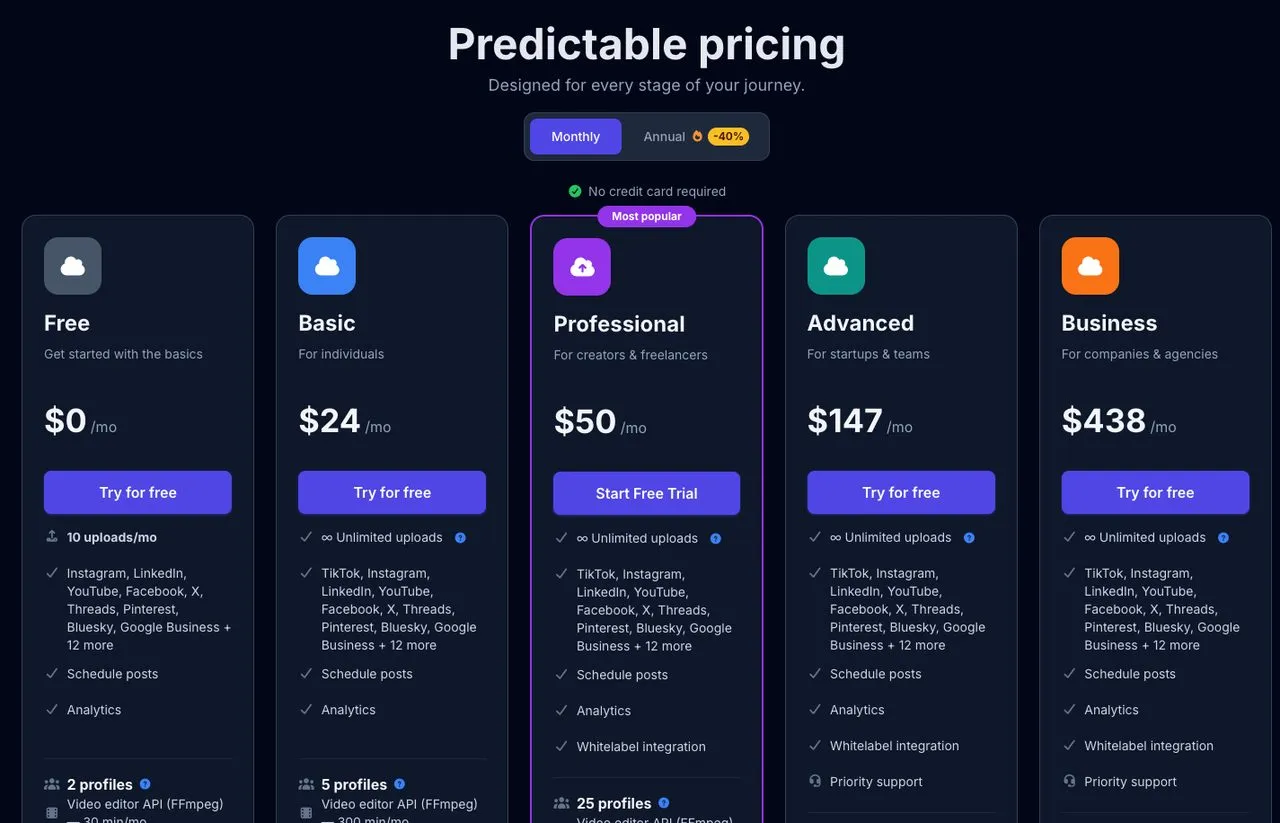
Upload-Post’s pricing cards with the Monthly toggle clicked. The page opens on Annual by default.
Profiles are one of several limits each tier sets. The pricing section on its homepage lists all of them:
| Tier | Profiles | Seats | FFmpeg minutes/mo | AI Shorts analyses/mo | X posts per profile per day |
|---|---|---|---|---|---|
| Free | 2 | 1 | 30 | 10 | 10 |
| Basic | 5 | 1 | 300 | 100 | 10 |
| Professional | 25 | 2 | 1,000 | 300 | 20 |
| Advanced | 75 | 5 | 3,000 | 600 | 30 |
| Business | 225 | 10 | 10,000 | 1,000 | 30 |
The seat counts come from the pricing cards and the machine-readable rate card, and the X column comes from the fair-use docs covered further down. Neither appears in the headline price, and both can force an upgrade before your profile count does.
The Upload-Post Free Plan
The free plan is a real plan, not a trial with a clock on it. Upload-Post leads its homepage with it, next to a single curl call that posts everywhere.
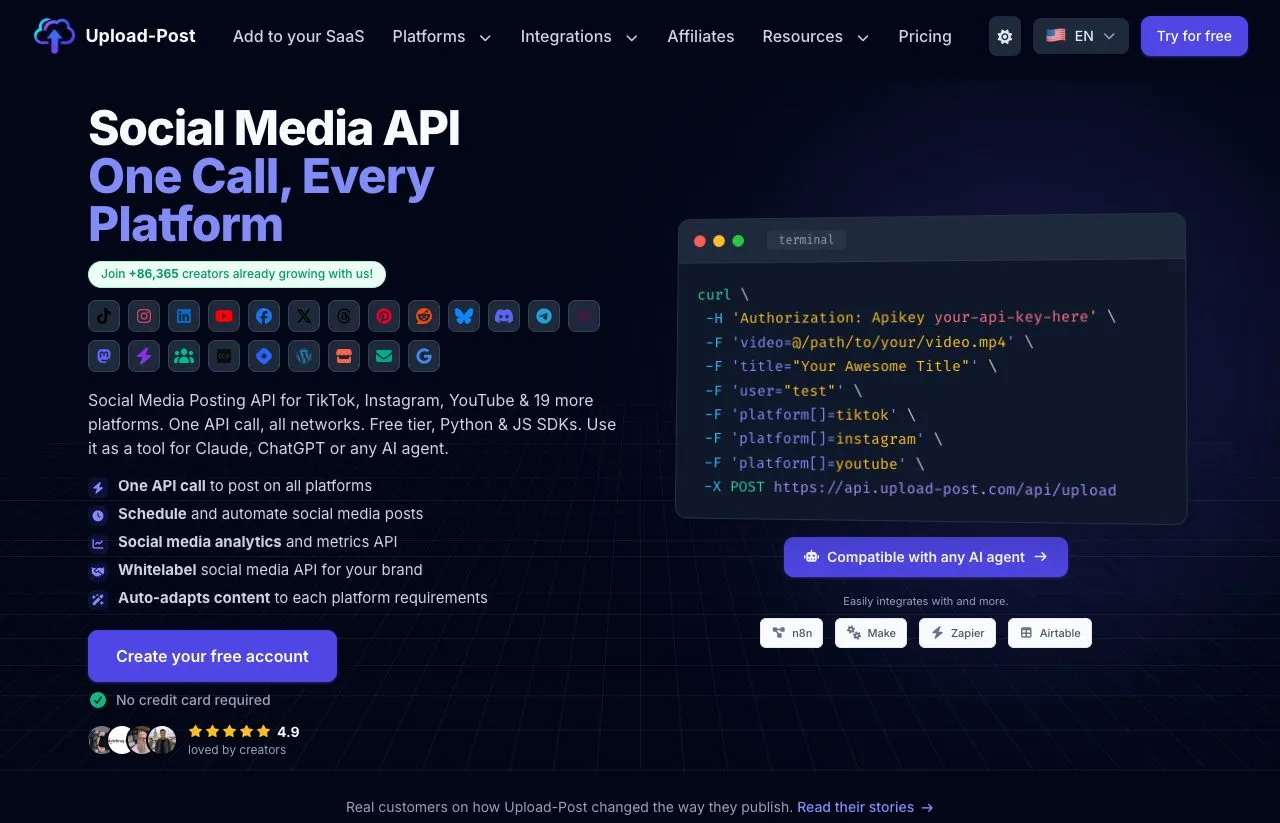
Upload-Post’s homepage leads with the free account and a one-call API example.
On the free plan you get:
- 10 uploads a month, with no credit card
- 2 profiles
- Every platform except TikTok on the pricing card, though the pricing FAQ lists only nine
- Scheduling, analytics and API access
- 30 FFmpeg minutes and 10 AI Shorts analyses a month
What pushes people off it is TikTok, which only the paid plans include, and the 10-upload ceiling. An agent that posts daily burns through ten uploads in under two weeks.
Upload-Post Basic Plan
Basic is $24 a month and covers 5 profiles for one person. The seat is “Owner only,” so a second teammate with their own login means Professional.
Basic adds TikTok and unlimited uploads within the daily caps. Its packs are +5 profiles for $15 a month and +10 for $25, and the cost table below shows when either is worth buying.
Upload-Post Professional Plan
Professional is $50 a month for 25 profiles, and it is the tier the pricing page labels most popular. It adds a second seat and whitelabel integration.
The quiet change is the X cap. Free and Basic allow 10 X posts per profile per day. Professional doubles that to 20. An agent that posts to X more than ten times a day on one account needs Professional, even with only one profile in use.
Its packs are +15 profiles for $35 and +25 profiles for $55.
Upload-Post Advanced Plan
Advanced is $147 a month for 75 profiles and 5 seats, plus priority support. It raises the X cap to 30 posts per profile per day.
Its packs are +25 profiles for $65 and +50 profiles for $115. The +50 pack takes Advanced to 125 profiles, which is where the pricing ladder has its biggest step.
Upload-Post Business Plan
Business is $438 a month for 225 profiles and 10 seats. It is the only tier that sells profiles one at a time: past 225, each extra profile is $1 a month.
The X cap stays at 30, the same as Advanced. What Business buys over Advanced is headroom, seats and larger video and AI quotas, not a higher X posting ceiling.
Add-On or Upgrade: The Cost at 5 to 250 Profiles
The pricing card says it plainly: “choose one, they don’t stack.” So every profile count has exactly one cheapest configuration, and I computed it at each step:
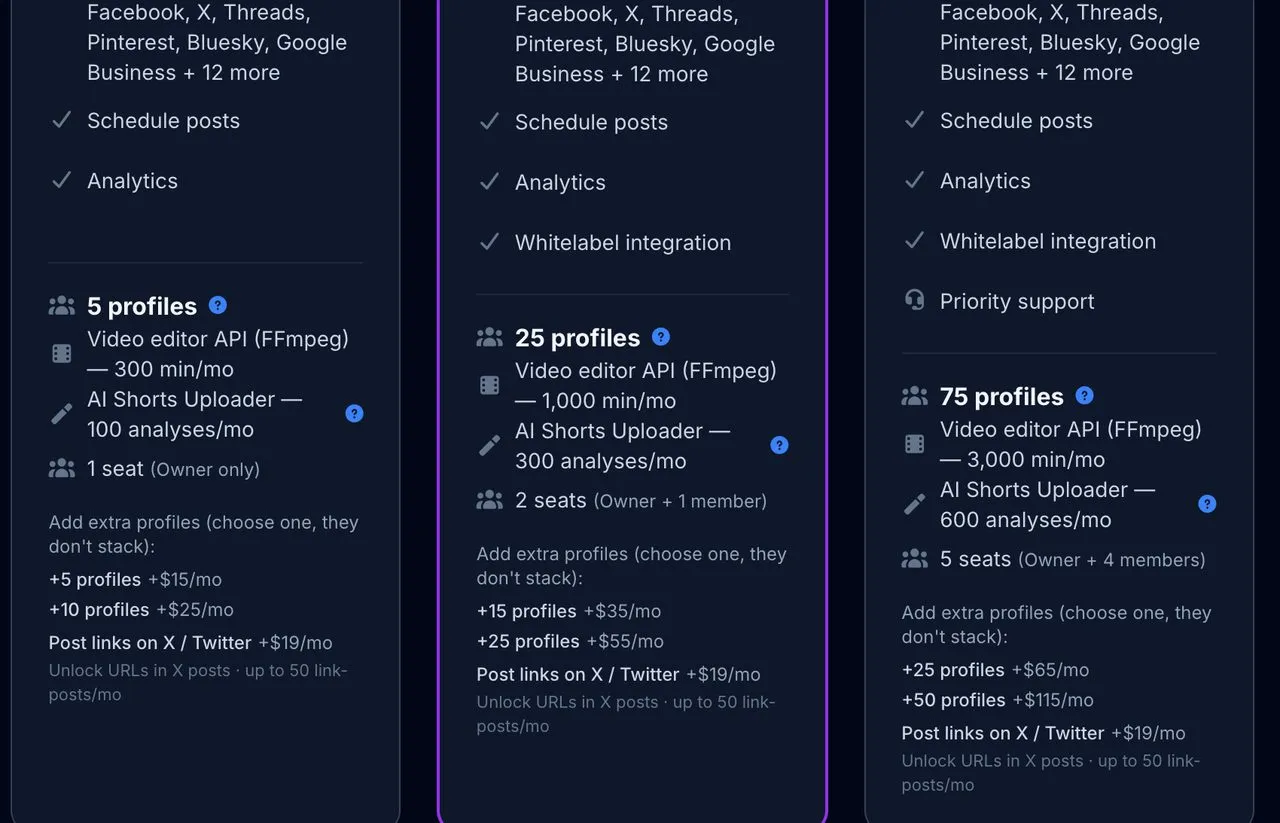
The add-on block on each paid card, with the no-stacking rule above the pack prices.
| Profiles | Cheapest setup | Monthly billing | Annual billing (per year) | Per profile, monthly |
|---|---|---|---|---|
| 5 | Basic | $24 | $192 | $4.80 |
| 10 | Basic + 5 pack | $39 | $312 | $3.90 |
| 15 | Basic + 10 pack | $49 | $392 | $3.27 |
| 25 | Professional | $50 | $400 | $2.00 |
| 50 | Professional + 25 pack | $105 | $840 | $2.10 |
| 75 | Advanced | $147 | $1,411 | $1.96 |
| 100 | Advanced + 25 pack | $212 | $2,061 | $2.12 |
| 125 | Advanced + 50 pack | $262 | $2,561 | $2.10 |
| 126 to 225 | Business | $438 | $4,205 | $1.95 at 225 |
| 250 | Business + 25 extras | $463 | $4,205 + $1/mo per extra | $1.85 |
Three rows change what you should buy.
At 15 profiles, skip the Basic pack. Basic with the +10 pack is $49 a month. Professional is $50, and it adds 10 more profiles, a second seat, whitelabel, 700 more FFmpeg minutes and double the X cap. One dollar is the whole difference.
At 10 profiles, the pack wins. Basic with +5 is $39 against $50 for Professional, which saves $11 a month if one seat and 10 X posts a day are enough.
At 126 profiles, the bill jumps $176. Advanced tops out at 125 profiles for $262 a month. Profile 126 needs Business at $438, because Advanced has no pack larger than +50. Once you cross it, Business covers you at the same $438 all the way to 225, then adds profiles at $1 each.
At each tier’s full capacity, a profile costs about $2 from 25 profiles up. Below 25 you pay a premium for being small, $4.80 a profile on Basic. Inside the 126 to 224 gap you pay for empty headroom, peaking at $3.48 a profile at 126.
The Annual Discount Is Smaller Than the Toggle Says
The Annual button on the pricing page carries a “-40%” badge, and the pricing FAQ says annual plans “cost up to 40% less.” The vendor’s own figures don’t reach 40 on any tier.
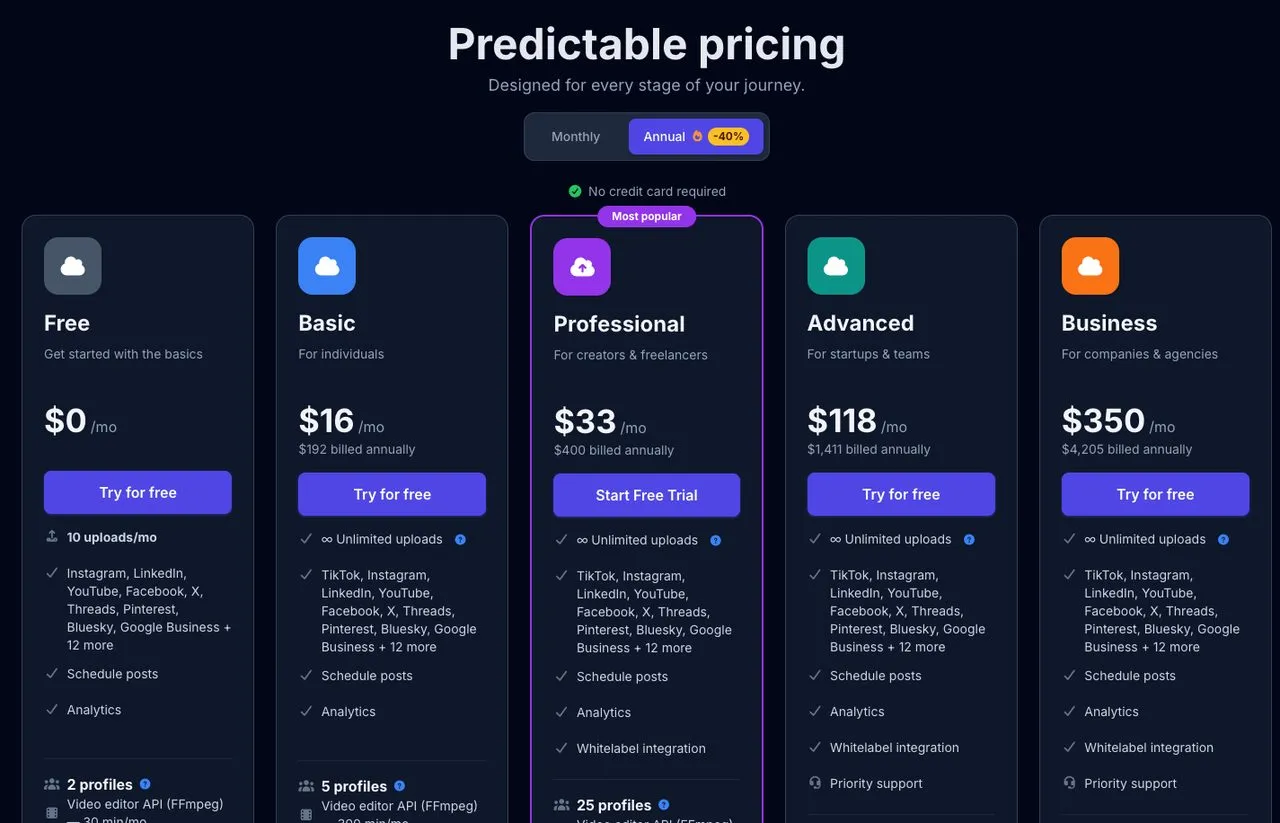
The Annual view with its “-40%” badge. Compare each yearly total with twelve months at the monthly price to get the real saving.
| Tier | 12 months billed monthly | Billed yearly | Real saving |
|---|---|---|---|
| Basic | $288 | $192 | 33.3% |
| Professional | $600 | $400 | 33.3% |
| Advanced | $1,764 | $1,411 | 20.0% |
| Business | $5,256 | $4,205 | 20.0% |
The add-on packs follow a split of their own. Basic and Professional packs save 33.3% on annual billing, while Advanced packs save 16.7%: the +50 pack is $1,150 a year against $1,380 paid monthly.
So the discount shrinks exactly where the bill gets large. The two largest tiers save half of what the badge implies. Annual billing is still worth taking once your profile count is stable, but budget with 20% on Advanced and Business, not 40%.
The pricing comparison page is where the “up to 40% less” wording lives, alongside the correct yearly totals that disprove it.
What “Unlimited Uploads” Means for an Agent
Every paid plan advertises unlimited uploads, and Upload-Post sets no monthly quota of its own. The limit that applies is a daily cap per connected account, enforced on a rolling 24-hour window and documented on its limit of uploads page:
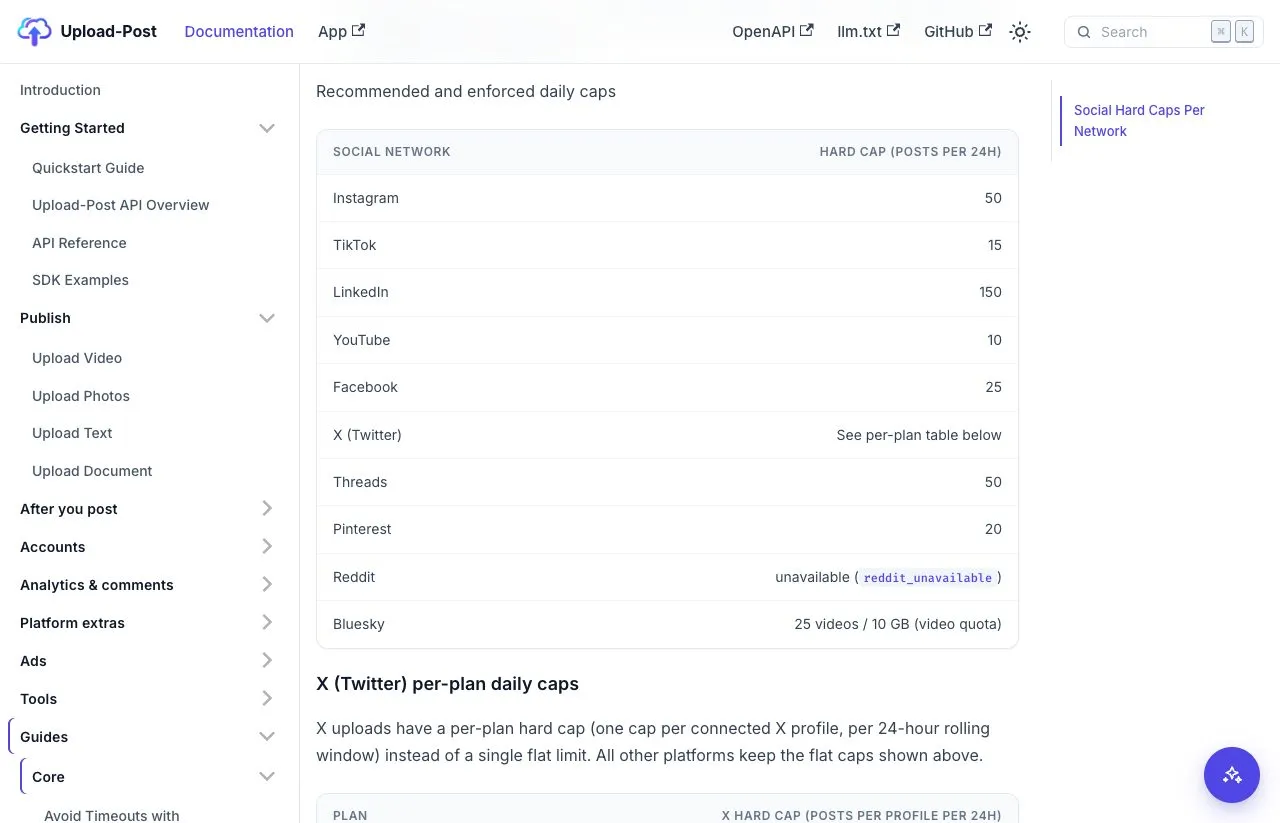
The daily caps table in Upload-Post’s docs. The caps apply per connected account, not per Upload-Post user.
- Instagram 50, TikTok 15, LinkedIn 150, YouTube 10, Facebook 25, Threads 50, Pinterest 20
- Bluesky 25 videos or 10 GB of video
- Reddit returns
reddit_unavailable - X depends on your plan: 10 on Free and Basic, 20 on Professional, 30 on Advanced and Business
Two details matter for anything running unattended. Caps are re-checked when a scheduled post fires, so a queue built on Monday can still fail on Thursday with a 429. And the verifier rejects duplicate or near-duplicate content on the same account within 48 hours, which catches agents that repost the same caption within two days.
What Upload-Post’s AI Actually Does
Upload-Post’s AI is one feature, the AI Shorts Uploader. It watches a short-form video you already made and writes a title, description and hashtags for each platform. It also runs through the API, and a second call rewrites captions you already have into another language.
What it does well:
- Per-platform metadata for short video, without a separate AI subscription
- A monthly quota on every plan, including 10 analyses on Free
- API access, so an agent can call it in the same pipeline that uploads the video
Where it stops:
- It doesn’t write a post from a topic or plan a calendar
- It generates no images, carousels or video
- The quota is per month, so a heavy video week can run it dry: 100 analyses on Basic is about three a day
If your agent writes its own copy, none of this matters. If you were expecting a content generator, Upload-Post is a delivery layer with a metadata helper, which matches how it describes itself: a social media posting API.
What No Upload-Post Plan Includes
A few gaps hold across every tier:
- AI image and video generation. No plan lists an image generator, and Upload-Post’s own AI page sends the video itself to separate generators such as Sora or Veo.
- Links in X posts. Upload-Post strips URLs from X posts by default, because X bills a post with a URL at $0.20 against $0.015 for plain text, and sells link posting back for $19 a month, capped at 50 link-posts.
- Reddit comments. The comments API returns an unavailable error for Reddit. Instagram, Facebook, YouTube, LinkedIn pages, TikTok and Bluesky work, X reads comments through mentions, and Threads support is partial.
- DM automation beyond Instagram. Its AutoDM monitors are Instagram only, triggered by comments, and each one watches a single post URL.
- A paid-plan trial with published terms. The Professional card shows a “Start Free Trial” button, but the docs don’t state a trial length for paid plans. The free plan is the documented way to test.
When Upload-Post Pricing Fits, and When It Pinches
It fits when:
- Each brand you run posts to many platforms, so one profile covers what would be several accounts elsewhere
- You need platforms outside the usual majors, such as Mastodon, Nostr or Dev.to
- You want to prove a pipeline on the free plan before paying anything
- You are one person on Basic, posting to X ten times a day or less per account
It pinches when:
- A second person needs a login, which starts at Professional
- An agent posts to X more than ten times a day on one account
- Your profile count lands just past 125, where one more profile adds $176 a month
- Your X posts carry links, which adds $19 a month and caps link posts at 50
Every one of these prices is public. The headline tier just predicts the bill poorly once an agent posts at volume. If a limit pinches in a way no tier fixes, the Upload-Post alternatives worth a look cover the rest of the field.
Upload-Post Pricing Next to Four Alternatives
Blotato is the one tool in this table I have a stake in, since I built it, and it gives ground to Upload-Post on daily caps. It allows 50 LinkedIn posts per profile per day where Upload-Post allows 150, 10 Pinterest pins where Upload-Post allows 20, and its Starter plan caps TikTok at 3 accounts with 10 posts each per day.
| Tool | Cheapest paid tier | What the entry tier bills for |
|---|---|---|
| Upload-Post Basic | $24/mo ($16 billed yearly) | 5 profiles, each holding one account per platform, 1 seat |
| Zernio | First 2 accounts free, then $6 each for accounts 3 to 10 | Per connected account, graduated, $48 a month at 10 accounts |
| Postiz Standard | $29/mo ($278 billed yearly) | 5 channels, API on every tier |
| Ayrshare Premium | $149/mo | One social profile, its own brand across its networks |
| Blotato Starter | $29/mo | 20 connected accounts on 9 platforms, API and hosted MCP |
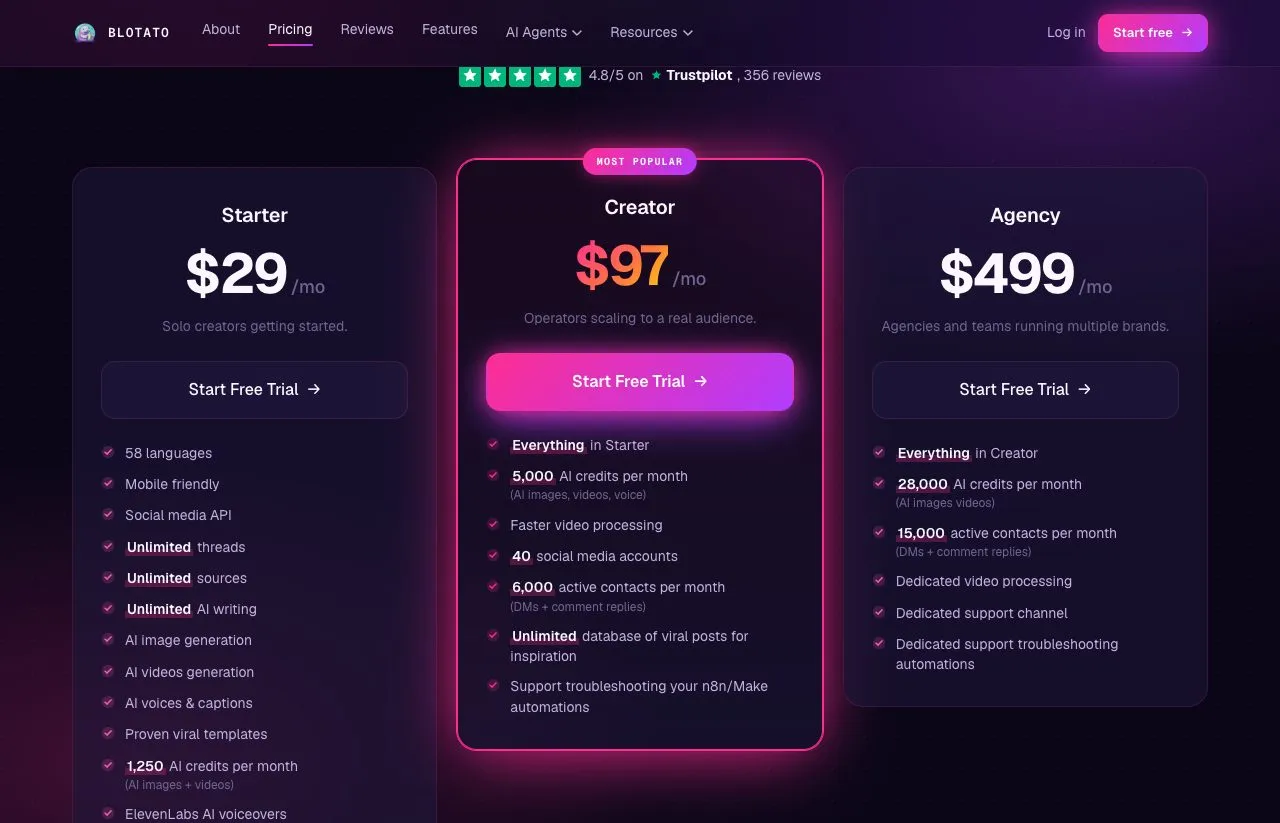
Blotato’s pricing page, with Starter, Creator and Agency.
At one brand on seven or more platforms, Upload-Post Basic is the cheapest row in this table, and its lead grows as brands multiply. Zernio is cheaper for a handful of accounts, because its first two cost nothing, and at six platforms the two tie at $24. Against Upload-Post, Blotato’s edge is narrow and specific: DM automation on Facebook as well as Instagram, started by an incoming DM as well as a comment, from the same key that posts. Blotato’s comments and DMs stop at Instagram and Facebook, so that edge covers only those two networks.
My Read: Count Seats and X Posts Before Profiles
Upload-Post publishes a full machine-readable rate card and prices its paid tiers in the open. The profile unit is kind to anyone running a few brands across many platforms.
The mistake I would avoid is choosing a tier by profile count alone. Count the people who need a login, the busiest X account’s daily posts, the video minutes your agent processes, then profiles. Whichever forces the highest tier is your real plan. After that, check whether your profile count sits near 15 or near 125, because those are the two places where the cheapest move is not the obvious one.
If you are still proving a pipeline, the free plan is the right first step. If your agent needs DM automation on Facebook as well as Instagram, or automations that fire when someone messages you first, compare the plans on Blotato’s pricing page. Plan on the Starter subscription rather than the trial there, since the trial excludes the API.
Upload-Post Pricing FAQs
Is Upload-Post free?
Yes, the free plan costs nothing and needs no credit card. It includes 2 profiles, 10 uploads a month, scheduling, analytics and API access. TikTok is the notable exclusion, and it needs a paid plan starting at $24 a month. The pricing card and the pricing FAQ disagree on the rest of the free platform list, so check the card for your platforms.
How much does Upload-Post cost per month?
Basic is $24, Professional $50, Advanced $147 and Business $438 on monthly billing. Billed yearly they cost $192, $400, $1,411 and $4,205, which the pricing page shows as $16, $33, $118 and $350 a month. Profile add-on packs cost $15 to $115 a month extra, and Business adds single profiles at $1 each.
Why does Upload-Post charge per profile?
A profile holds one account on each platform, so Upload-Post bills for a set of connections that usually maps to one brand, rather than for each connection. One brand on nine networks is one profile. That makes it cheap for multi-platform brands and less of a bargain for many accounts on a single platform.
What is the difference between Upload-Post Basic and Professional?
Professional costs $26 more a month and adds 20 profiles, a second seat, whitelabel, 700 more FFmpeg minutes, 200 more AI Shorts analyses, and a daily X cap of 20 posts per profile instead of 10. If you need 15 profiles, Professional is only $1 more than Basic with its largest pack.
Does Upload-Post have a free trial?
Its free plan is the documented way to test, and it never expires. The Professional card shows a “Start Free Trial” button, but Upload-Post’s docs don’t publish a trial length for paid plans, so confirm the terms at checkout before you count on one.
Is Upload-Post cheaper than Ayrshare?
At the entry tier, yes, by a wide margin: $24 a month for Basic against $149 for Ayrshare Premium. Both bill by a brand-level unit, a profile at Upload-Post and a social profile at Ayrshare. Ayrshare’s plan for posting on behalf of many users, Launch, starts at $299.