The Social Media API Errors That Were Never the API
Social media API errors, counted from 90 days of failed posts: most never reached a platform API. Every error string, how often it hit, and its fix.
Ask any assistant which social media API errors hit an automated posting agent most often and you get the same ranking: auth first, rate limits second, malformed payloads third, media somewhere below. I ran that question through ChatGPT and Claude with live web search on this week. Both produced that ranking. Both also admitted, unprompted, that they were guessing. Claude put it plainly: there is no publicly available research breaking down failure rates by error message, and if you need that data you will have to instrument your own system.
So here is one system’s data.
Ryan Doser runs his agency’s publishing through Blotato and let me pull his failure log. Over the last 90 days his account produced 13 failed posts across 8 distinct error strings. That is a small sample and I am going to keep saying so. But it is real, it is countable, and it inverts the consensus ranking in a way that is worth your attention: nine of those 13 failures never reached a platform API at all. They died on media, inside our infrastructure, before a single request went to Instagram or TikTok or LinkedIn.
Rate limits, the error every guide ranks second, hit zero times.
What Social Media API Errors Actually Looked Like Across 90 Days
This is the whole log. Every failed post in the window, grouped by the verbatim errorMessage the API returned.
| Count | errorMessage | Failure class |
|---|---|---|
| 5 | Failed to read media metadata. Is the file accessible and a valid media file? | Media, before the platform call |
| 2 | Could not upload media to storage | Media, before the platform call |
| 1 | Failed to fetch media URL: 403 Forbidden | Media, before the platform call |
| 1 | Failed to fetch media URL: read ECONNRESET | Media, before the platform call |
| 1 | Could not upload media to LinkedIn | Media, rejected by the platform |
| 1 | Error uploading video to Tiktok: Please review our URL ownership verification rules | Media, rejected by the platform |
| 1 | LinkedIn account has expired | Token expiry |
| 1 | Internal error: TypeError: fetch failed | Blotato-side |
Nine of 13 in the first four rows, all media, all of them dying before anything was sent to a platform. Two more reached a platform and were rejected, and both of those were about media too. So 11 of 13 were media in some form. One was a token, one was ours, and none was a rate limit.
You can pull the same table for your own account in one call. GET /posts takes a status filter, so status=failed with a 90-day since returns every recorded failure with its errorMessage attached. It is cursor-paginated, and the endpoint allows 60 requests a minute. That single call is most of the instrumentation Claude told you to go build.
If your agent is publishing media and you have never read that list, read it before you write another retry handler. I would rather you check your own failure log against your plan than take my word for the shape of it. Worth knowing before you start: the 7-day trial excludes the API entirely, and generating a key ends the trial and starts paid Starter, so an API reader should plan on the subscription rather than trying to test this inside a trial.
The Error That Hit Five Times Was a 200 That Was Not the File
Five of the 13 were the same post fanned out to five platforms on 2026-08-04. Same media URL, five destinations, five identical failures:
Failed to read media metadata. Is the file accessible and a valid media file?The media URL was a Google Drive link in the uc?export=download form. Here is why that is worth a section rather than a bullet, and it is the most useful thing in this post.
We cannot replay what that URL returned on the day, so treat what follows as the mechanism rather than as a forensic finding. What we can show is that the same link, pointing at the same file, still behaves this way today:
curl -sL -o /dev/null -w "%{http_code} %{content_type} %{size_download}\n" \
  "https://drive.google.com/uc?export=download&id=FILE_ID"
# 200 text/html; charset=utf-8 2431
HTTP 200. A completely healthy-looking response. And 2,431 bytes of HTML, because Drive answered with a confirmation interstitial instead of the file. The same file, requested through the form our docs specify, behaves entirely differently:
curl -sL -o /dev/null -w "%{http_code} %{content_type} %{size_download}\n" \
  "https://drive.usercontent.google.com/download?id=FILE_ID&export=download&confirm=t"
# 200 video/mp4 115754363
Same file. 115 MB of video/mp4. Nothing about the file needs to change for it to work. One URL form serves a web page to a machine that asked for a video, and does it with a status code that says everything is fine.
This is the likeliest reason media outranked auth in this log while ranking fourth in every guide. An auth failure announces itself. A media URL that returns 200 with the wrong content type passes a status-code check, which is the check most people write. If your agent validates media by checking for a 2xx, it will hand us an HTML page and we will fail on it, and the error you read will be about metadata rather than about the link.
The fix: never validate a media URL on status code alone. Check content_type and size_download too. And for files you control, skip host quirks entirely. POST /media/uploads with a filename returns a presignedUrl and a publicUrl, you PUT the binary to the first and publish with the second, and no third-party host sits in the path. Our error reference lists the same three causes in order of likelihood, with file-not-publicly-accessible first and CDN bot protection second, which is the one that surprises people: a file behind Cloudflare or GoDaddy can return a clean 200 to curl from your laptop and still get throttled or garbled on a server-to-server fetch.
Two More Ways a Media URL Dies
Two singles in the log are the same failure wearing different clothes, and both came from expiring links rather than bad files.
Failed to fetch media URL: 403 Forbidden
Failed to fetch media URL: read ECONNRESET
Both were the same Opus Clip signed URL, on two posts submitted to X and TikTok seconds apart on 2026-08-12. Signed CDN URLs carry an expiry in the query string, and the likeliest reading is that the agent held that URL long enough for it to lapse between generating the video and publishing. Both failures are ours fetching that URL, not a platform fetching it: one attempt came back 403, the other had its connection reset mid-read. Neither error mentions expiry anywhere.
Then twice, on separate days:
Could not upload media to storageOur reference gives the same underlying cause here as for a Supabase upload failure: we fetched what was at your URL and could not read it as media, almost always because the file is not reachable rather than because it is broken. One of Ryan’s two was another Drive link. The other pointed at a .mov file, and that is worth knowing as a rule rather than as a diagnosis of this row: Blotato requires H.264 MP4 for video published through the API, and .mov is not supported even when the file is comfortably under the size cap.
The fix for both: treat any signed or expiring URL as unusable for scheduled publishing. Resolve it to durable storage at the moment you create the media, not at the moment you publish. A post scheduled for Tuesday holding a Friday-signed URL is a failure with a date on it.
The Two That Really Were the Platform
Only two of 13 got far enough to be rejected by a platform, and both were still about media.
Error uploading video to Tiktok: Please review our URL ownership verification rulesThis one is not a bug and no retry will clear it. TikTok’s PULL_FROM_URL flow requires the developer to have verified ownership of the domain or URL prefix the media sits on. Their media transfer guide is explicit: once a domain is verified, all paths under it count as owned, and unverified URLs return url_ownership_unverified. Ryan’s media was on a host nobody had verified with TikTok. The fix is to move the file to a host that is verified, or to upload through POST /media/uploads first so the file is served from storage that already satisfies the rule.
Could not upload media to LinkedInGeneric on purpose. Our reference documents this as one message emitted on every platform, meaning the platform rejected the media and the specific reason is in the individual post record rather than the summary string. Retrying identical media will not help. Read the per-post error in the API dashboard, then match it to format and size specs. When the same message appears across several platforms at once, check each one separately, because the underlying cause genuinely can differ per platform.
The One Auth Failure, and Why It Was Inevitable
LinkedIn account has expiredOne row out of 13. The consensus ranking’s number one cause, and on this account it fired once in three months.
It was also the most predictable failure in the log. LinkedIn’s own OAuth documentation states that all access tokens are issued with a 60-day lifespan, and that programmatic refresh tokens are available only to a limited set of partners. So for most integrations there is no silent renewal happening. A human has to reconnect the account, roughly six times a year, forever.
That makes token expiry a calendar problem rather than an error-handling problem. Your retry logic cannot fix it. What can: watch for the expiry class specifically and alert a person, because no amount of retrying reconnects an account. Our reference lists the sibling strings to watch for alongside it: invalid_grant for Instagram and Meta, Account requires reconnect, Your Instagram account has expired and its Facebook wording under error code 5002, and a separate invalid_grant for an expired MCP OAuth connection, which is a different thing from a social account expiring and is fixed by re-adding the connector in Claude rather than by reconnecting a platform. Match on the class, not on any one of those strings.
The One That Was Ours
Internal error: TypeError: fetch failedA TikTok post on 2026-09-01. This is a Blotato-side failure, it is not in our published error reference, and there is nothing in that string a reader can act on.
I would rather say that than round it into a category it does not belong to. Two of the eight distinct strings in this log are missing from our 127-row error reference as I write this: that one, and LinkedIn account has expired, where the reference documents the Instagram and Facebook wording of the same failure but not LinkedIn’s. That is a gap in our docs, and naming it is more useful to you than pretending the catalog is complete, because it tells you something about how to build: your agent will meet error strings that appear in no vendor’s reference, and it should record the raw string rather than trying to classify it.
What the Sequence Actually Looks Like
Put the log next to the publish sequence and the pattern stops being surprising.
A publish is not one call. You hand us a media URL, we fetch it, we read its metadata, we store it, and only then do we hand it to the platform, which accepts or rejects it. Three of those four steps finish before the platform is involved at all. Nine of Ryan’s 13 failures happened inside those three steps.
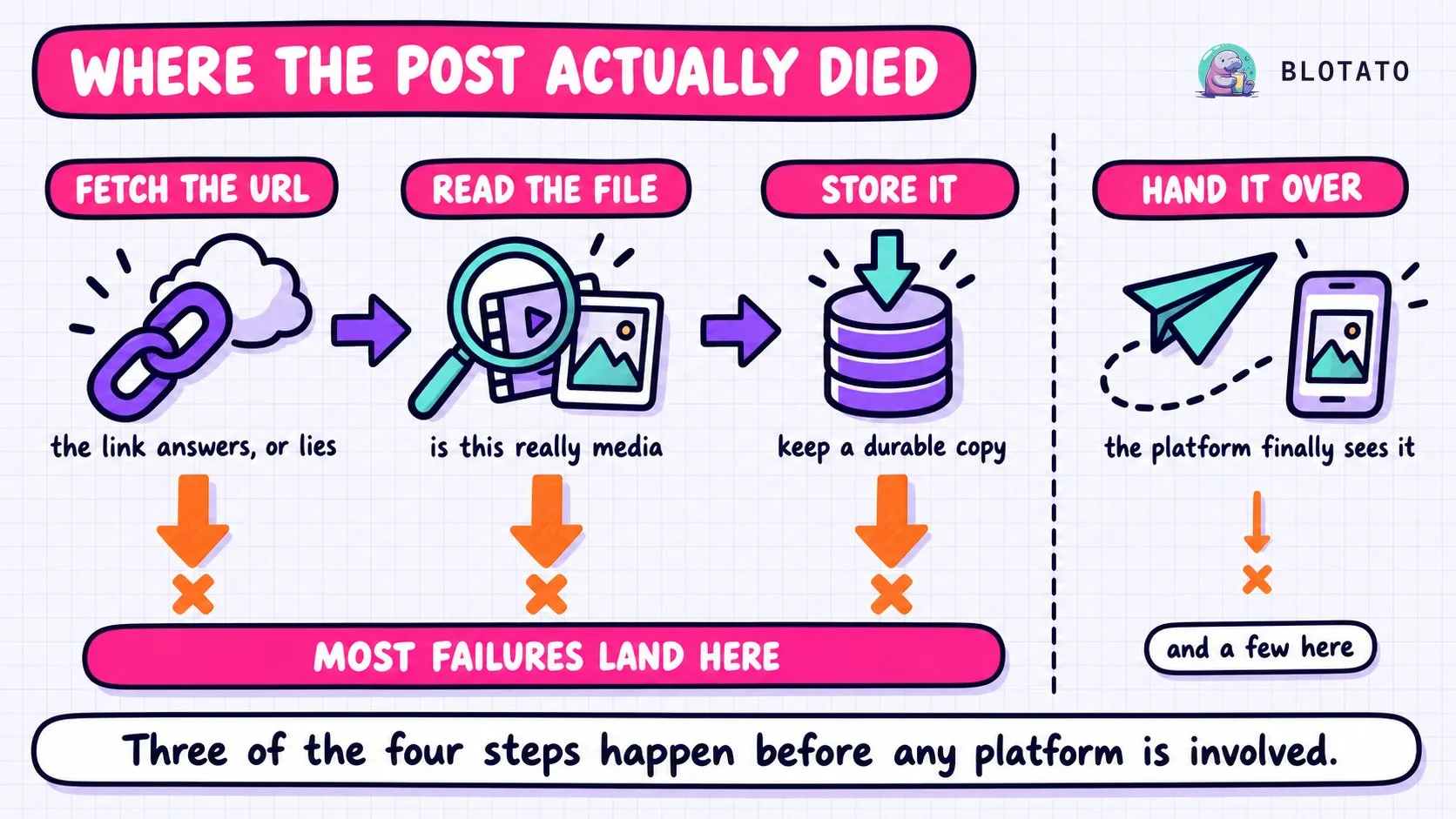
The consensus ranking is weighted toward what happens at and after that handoff. Most of these failures never got there.
There is a second-order effect worth naming. Because our API returns a postSubmissionId rather than a result, all of this is asynchronous: the create call succeeds, and the failure surfaces later against the record. If your agent treats the submission ID as proof, every error in this post is invisible to it. You will find them the way Ryan does, by listing failed posts after the fact. The status enum has four values, in-progress, scheduled, published and failed, and getting that loop wrong is its own category of problem. I wrote up the full state machine and the polling trap in AI agent social media guardrails, so I will not repeat it here.
What This Sample Cannot Tell You
This is one account, 13 failures, 90 days. It is not a platform-wide count and I have not represented it as one. Ryan publishes short video to a handful of platforms on a regular cadence, which means his media mix is heavier than a text-first account’s and his failure profile is skewed toward media by construction. An agent posting plain text with links would produce a different table, and probably a shorter one.
The sample also cannot see the failures that never became rows, and I mean that literally. Our own reference documents a mode where a scheduled post disappears at publish time on YouTube, Facebook or Instagram without publishing, failing, or leaving a Failed Posts record at all, because the media fetch dies before the publish job reaches the platform. Every count on this page is drawn from failed posts, so any of those are invisible to it. A log built this way has a floor, not a total.
Rate limits appeared zero times here, and I do not read that as evidence that caps do not bite. It more likely means his volume sits under them. Blotato applies its own anti-spam caps that are stricter than the platforms’ own, LinkedIn at 50 posts per 24 hours per profile and per Page, Facebook at 25 per Page, Pinterest at 10 pins a day, and if you are running near those numbers your table will have rows this one does not. The caps by platform are worth reading against your own volume rather than assuming, and the posting limits tool gives you the same numbers per platform without the prose.
What it does tell you is directional and worth acting on: on an agent that publishes media, the media path is where the failures are, and it is the part of the stack both assistants ranked fourth. If you are going to harden one thing this week, harden that. Fetch your own failed posts, group them by string, and check whether your table looks like this one. If it does, your retry logic is defending the wrong door.
One GET /posts call is what produced the table on this page, across five platforms, without normalizing five error vocabularies first. The API quickstart has the publish path end to end if you want to run the same query against your own account.
Social Media API Error FAQs
Why did my Instagram post fail through the API?
If it carried media, check the media path before the token. On the log above, the most common failure by a wide margin was media that never became media: a URL the fetch could not read as a file. Fetch the failed post’s errorMessage rather than inferring from the platform, since Instagram-specific strings like Cannot read properties of undefined (reading 'mediaUrl') frequently trace back to an expired token that is throwing a media-shaped error downstream. Fix the token first when you see invalid_grant in the same window.
Failed to read media metadata. Is the file accessible and a valid media file?
Beyond the reachability causes covered above, two are worth knowing because they change what you do. Check the file against your plan’s upload cap, which is 400MB on Starter and 1GB on Creator and Agency, since an oversized file surfaces here rather than as a size error. And if the identical call on the same small file passes sometimes and fails other times, our reference points away from the URL and calls it an intermittent metadata-reader flake, where the fix is a two-attempt retry with a three-second delay, or moving to presigned upload, which runs a different code path.
Does an API error mean the post partially published?
No. A failed state means that post is not live, whether it died on media before we called the platform or the platform rejected it. Each destination is its own post with its own status, so a multi-platform publish can leave some live and some failed. The risk runs the other way: because publishing is asynchronous, a create call that returned a postSubmissionId and then timed out on your side may well have published. Retrying that blind is how you get duplicates. Send your own idempotency key and check the status of the original submission before you retry anything.
Can a post fail without appearing in my failed posts list?
Yes, and this is the blind spot in every table on this page. There is a documented mode where a scheduled post vanishes at publish time on YouTube, Facebook or Instagram: it does not publish, does not fail, and leaves no Failed Posts record, because the media download dies before the publish job reaches the platform and no failure record ever gets written. Rescheduling the same post does not help, since the stored file reference is the broken part. Re-upload the media fresh instead. Any count built from failed posts, including mine, undercounts by however many of these happened.
Do I have to poll for every result?
No. POST /posts accepts a webhook object with a url, so you can be notified instead of polling GET /posts/{postSubmissionId} on a timer. Polling is still the right call when you need a result inline before the next step, and the webhook is better for a scheduled post you would otherwise have to wake up and check hours later. Either way there are four status values and only two of them are terminal, so a post that comes back scheduled has not published yet and is not done.