Social Media API Rate Limits: What Breaks at Scale in 2026
Social media API rate limits from primary docs: daily posting caps per platform, the one that publishes none, and the YouTube number everyone gets wrong.

Social media API rate limits are the most confidently wrong subject in this category. Not because the numbers are hard to find, but because almost nobody reads them off the platform’s own page. They get copied from one blog to the next, and a figure that was true two years ago outlives the documentation that retired it.
I can show you this rather than assert it. The number every guide repeats about YouTube uploads is dead, and it is still sitting on Google’s own page in a way that keeps it alive.
So every number below is quoted from the platform’s own developer documentation, with the endpoint named and the page linked. Where a platform contradicts itself, I show both statements instead of picking the one I like. Where a platform publishes nothing, I say that too, because that is the finding that actually changes how you build.
Social Media API Rate Limits at a Glance (2026)
These are the write-side limits, the ones that bind when your agent is publishing rather than reading.
| Platform | Posting limit | Window | What it counts |
|---|---|---|---|
| 100 published posts (50 in the carousel section) | Rolling 24 hours | Posts, carousels count as one | |
| 4,800 × engaged users | Rolling 24 hours | Business Use Case calls, scales with audience | |
| Threads | 250 posts, 1,000 replies | 24 hours | Posts and replies, counted separately |
| X | 10,000 posts per app, 100 per user | 24 hours per app, 15 min per user | Calls to POST /2/tweets |
| YouTube | 100 videos.insert calls | Per day | Uploads, in a dedicated bucket |
| TikTok | 6 requests per minute | Per minute, per token | Direct Post requests |
| Bluesky | 35,000 points, about 11,666 records | Per day | Weighted by operation type |
| 300 per day on Trial, 100 per minute on Standard | Day or minute by tier | All org_write operations | |
| Not published | Resets midnight UTC | Application and member calls |
If you are still choosing which platforms to build against, the guide to every social media API covers access and cost per platform. This post is only about what stops you once you are already connected.
These are the request-level quotas. The caps you meet as a user, the ones a scheduling tool enforces on your account before the API ever refuses a call, are a different set of numbers: the social media posting limits tool lays those out per platform.
The shape worth noticing is that no two rows count the same thing. Instagram counts posts, Facebook counts calls against a formula that moves with your audience, Bluesky counts weighted points, YouTube runs uploads in a separate bucket from everything else, and LinkedIn refuses to tell you. A single throttle set to “N requests per minute” satisfies none of them.
If you would rather not maintain nine different limiters, start a free week of Blotato and let one endpoint handle the accounting. Worth knowing before you click, since it is the whole reason most of you are here: the trial does not include API access, so budget for the Starter plan if you are testing programmatically.
Free 7-day trial · Cancel anytime
The YouTube Number That Refuses to Die
Here is the one that made me want to write this.
For years the arithmetic went: the YouTube Data API gives you 10,000 quota units a day, a video upload costs 1,600 units, so you get about six uploads a day. That number is everywhere. It is also no longer what Google’s documentation says.
The quota cost reference now states, in the prose directly above the table, that “the search.list and videos.insert methods have their own quota buckets. Each of these methods has a default daily limit of 100 per day. The quota cost is 1 per call.” The table row agrees: insert costs 1 quota, capped at 100 per day. The getting started guide says the same thing, describing a default allocation of “100 search.list calls, 100 videos.insert calls, and 10,000 units per day combined for all other endpoints.”
So the default ceiling is 100 uploads a day, not six, and uploads no longer consume the 10,000-unit pool your other calls draw from. It is a default rather than a hard cap, and the quota extension form is still the path above it.
The reason the old figure survives is more interesting than the correction. The 1,600 number is still on that page, but only inside Google’s auto-generated Page Summary block at the top, which reads that methods like videos.insert “have the highest cost of 1600 points.” Every authored element on the page says 1 unit. The stale figure lives on in the machine-written summary.
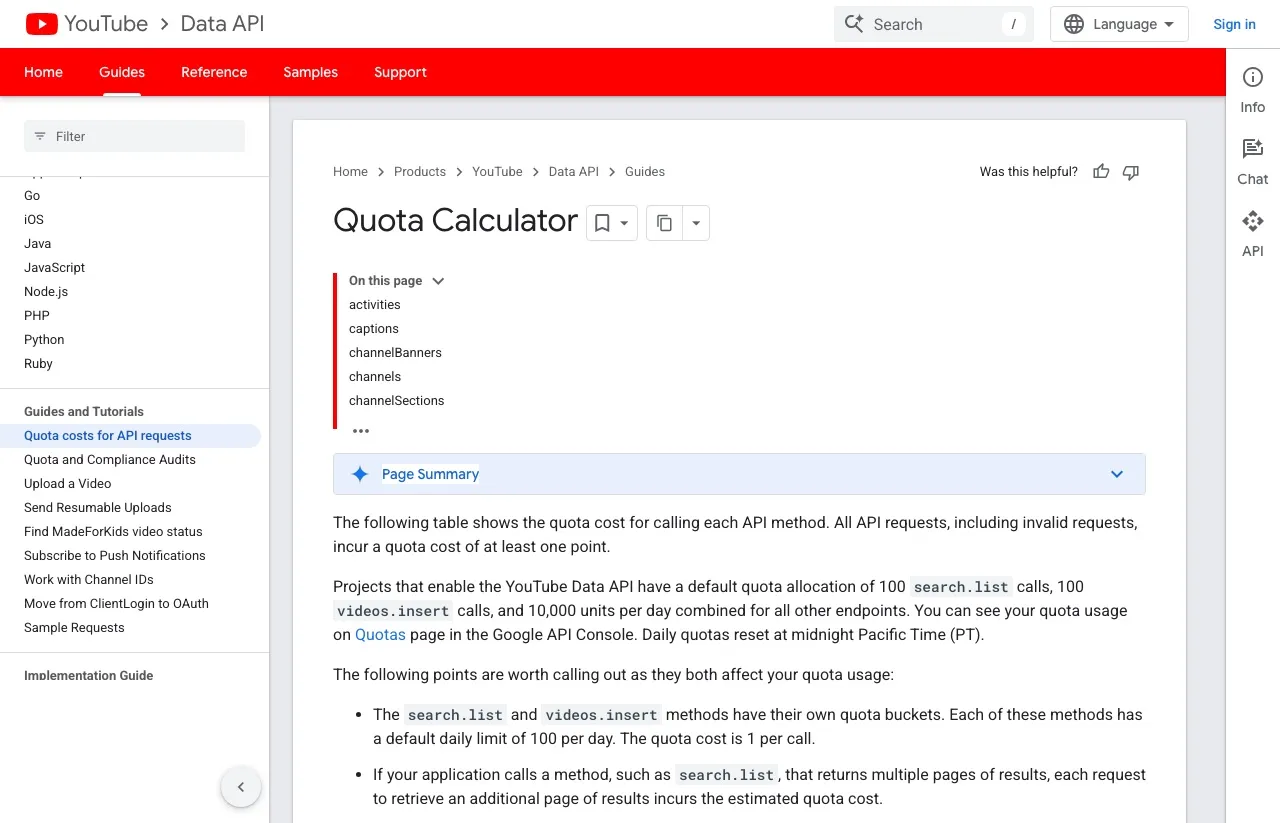
That matters because a summary block is exactly what a scraper lifts and what a language model is most likely to quote. The wrong number is not surviving in spite of the documentation. It is surviving inside it, in the part nobody wrote.
Check the table row and the prose, not the summary. And re-check it before you build against it, because this is a number that has already changed once.
The Platform That Publishes Nothing
LinkedIn is the one that breaks capacity planning, and it does so deliberately.
From LinkedIn’s rate limiting documentation: “Your application’s daily rate limit varies based on which API endpoint you are using. Standard rate limits are not published in documentation.”
That is the whole policy. There is no table to consult and no number to design against. To learn your own ceiling you call the endpoint once, then open the Developer Portal and read it off the Analytics tab. The docs are explicit that the page “will only show usage and rate limits for endpoints you have made at least 1 request to today,” so an endpoint you have never called shows nothing at all.
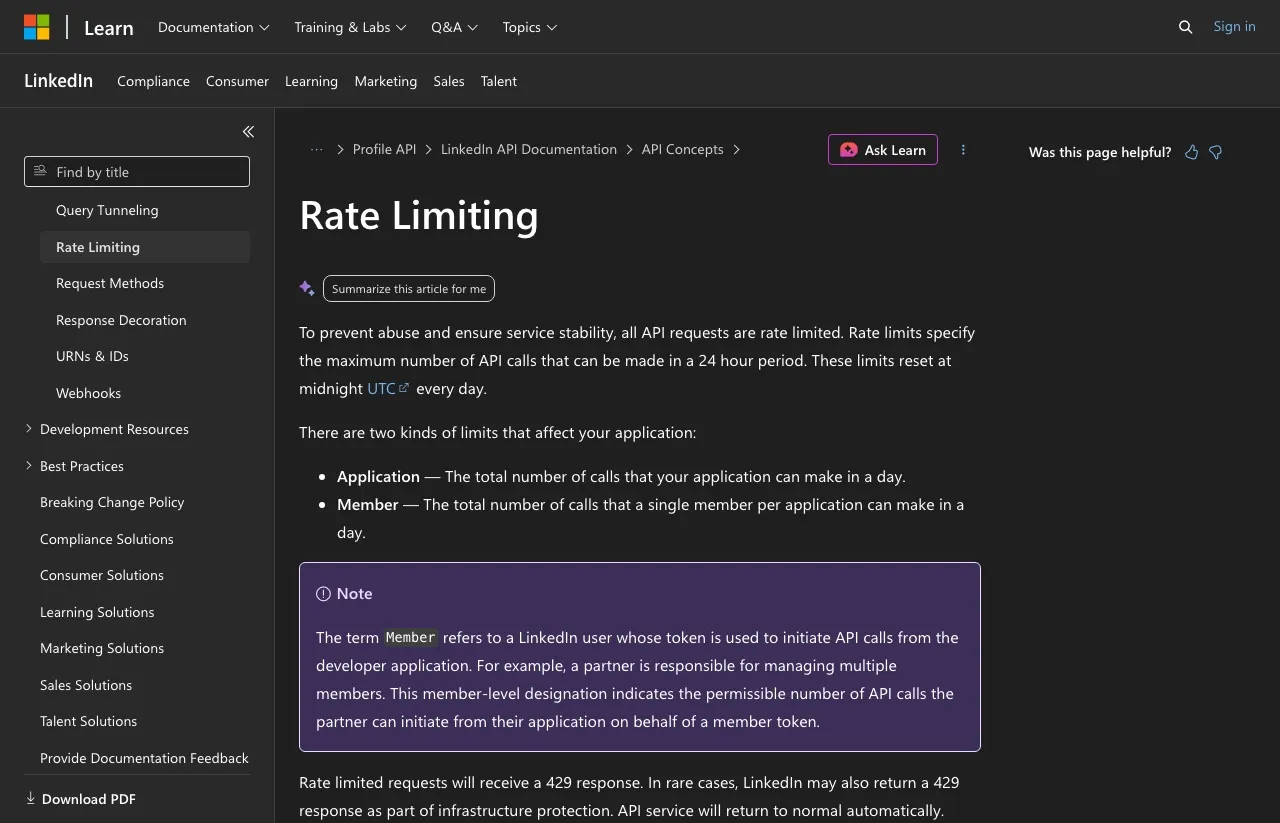
Sit with the operational consequence. You cannot capacity-plan a LinkedIn integration from documentation, and you cannot discover your limit without first spending some of it. The limits are per-application and per-member, they reset at midnight UTC, and you get an email when you cross 75 percent of quota, delayed by one to two hours and only for application-level breaches. A member-level breach pages nobody.
For an unattended agent this is the difference between a limit and a surprise. Log the 429s, because they are your only real telemetry.
Instagram Argues With Itself on One Page
Meta’s content publishing guide states that “Instagram accounts are limited to 100 API-published posts within a 24-hour moving period,” and adds that “carousels count as a single post.”
Further down the same page, in the section on creating a carousel container, it states that accounts “are limited to 50 published posts within a 24-hour period.”
Both sentences are live on one page today. They cannot both describe the same thing, and the carousel note makes the disagreement stranger, since the general rule already tells you a carousel counts once.
I am not going to adjudicate it, because Meta gives you something better than a guess. The guide names a GET /<IG_ID>/content_publishing_limit endpoint that reports the account’s current usage against its actual quota. Query it and you get the number that applies to that account right now.
The general rule for anything Meta: when the docs disagree, ask the API. A published figure describes a policy, and an endpoint describes your account. The approval friction that gets you to that endpoint in the first place is a longer story, and I walk through it in the Instagram API pricing breakdown.
Nine Platforms, Four Ways of Counting
The limits are not just different sizes. They are different kinds of measurement, which is why one generic limiter cannot cover them.
Counted in posts. Instagram allows 100 published posts in a rolling 24 hours. Threads publishes a quota_total of 250 for posts and 1,000 for replies over an 86,400 second window, visible in the response examples in Meta’s Threads troubleshooting docs rather than stated in prose. These are the intuitive ones.
Counted in calls, against a formula. Facebook’s rate limiting page defines the Business Use Case ceiling as “Calls within 24 hours = 4800 * Number of Engaged Users,” with platform-level limits at “200 * Number of Users” per hour. Your ceiling moves with your audience, so a new Page is throttled hardest exactly when you are testing.
Counted in weighted points. Bluesky’s rate limits page sets the write ceiling at “5,000 points per hour and 35,000 points per day,” where a CREATE costs 3 points, an UPDATE 2, and a DELETE 1. The docs work it out for you: “an account may create at most 1,666 records per hour and 11,666 records per day.” What the 429 actually looks like when you cross that line is a separate question.
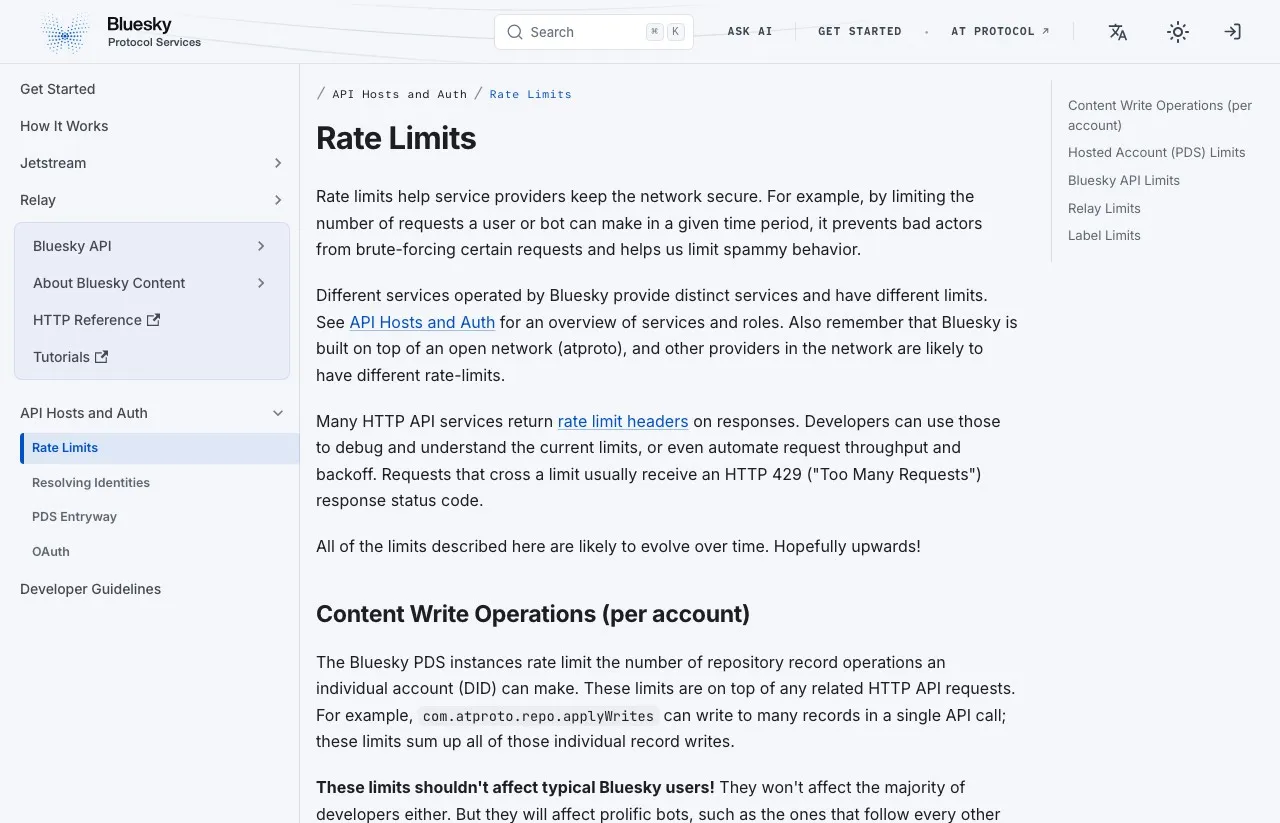
Note that the daily figure is not 24 times the hourly one. Twenty-four hours at the hourly ceiling would be 120,000 points, and the day caps you at 35,000. Run near your hourly limit and the day binds first, after seven hours of sustained peak rather than a full day. If you plan against the hourly number alone you will hit a wall you did not know existed.
Counted in money. X moved to pay-per-use, which is why every post that still shows you a Free, Basic and Pro tier table is out of date. The X API introduction now reads: “The X API uses pay-per-usage pricing. No subscriptions, pay only for what you use.”
One correction I want to make to my own side of the argument here, since I have seen it overstated. Pay-per-use replaced the subscription tiers, not the rate limits. X still documents both, and its rate limits reference puts POST /2/tweets at 10,000 per 24 hours per app and 100 per 15 minutes per user. You now have a bill and a ceiling. I cover the per-call math in X (Twitter) API Pricing.
TikTok belongs to the per-minute family. Its Direct Post documentation limits each user access token to 6 requests per minute. A daily cap exists too, but TikTok never prints the number, and you meet it as a spam_risk_too_many_posts error saying the daily post cap for that user has been reached. Pinterest’s rate limits reference puts pin creation under org_write at 300 per day on Trial access and 100 per minute per user on Standard, and warns that “all rate limits are subject to change without notice.”
What This Costs You in Practice
Three builds, with the arithmetic shown so you can substitute your own numbers.
The solo builder posting daily to five platforms
One post a day to X, Instagram, LinkedIn, Bluesky and Threads.
- 1 post × 5 platforms × 30 days = 150 calls a month
- Instagram: 1 of 100 daily posts, 1 percent of cap
- Bluesky: 3 points of 35,000 daily, under 0.01 percent
- X: 1 of 10,000 daily app calls
Verdict: no published limit comes close to binding. Build the simplest thing that works and stop reading here. Your risk is auth expiry, not throughput, with the caveat that LinkedIn’s ceiling is unknowable in advance even at this volume.
The agency running 40 client accounts
Three posts a day per client across four platforms, all from one application.
- 3 posts × 40 clients = 120 posts a day per platform
- Instagram: 120 against a 100-per-account cap, but the cap is per account, so 3 per account is fine
- X: 120 calls a day against 10,000 per app, comfortable
- Facebook: 4,800 × engaged users, so a client Page with 50 engaged users allows 240,000 calls, and a brand-new Page with 2 allows 9,600
- LinkedIn: unknowable in advance, must be read from the portal per endpoint
Verdict: the platform ceilings are fine, and the two that hurt are the new client Page and LinkedIn’s silence. Onboarding is the risky window, not steady state.
The autonomous agent reacting to events
An agent that posts on a trigger, unattended, with no human watching the queue.
- Burst of 40 posts in one minute to Bluesky: 120 points, well under the hourly 5,000
- Same burst to TikTok: 40 requests against a 6-per-minute token limit, which fails 34 times
- Sustained 1,666 records an hour on Bluesky hits the 35,000 daily ceiling in about 7 hours
Verdict: the per-minute limits break agents first, and the daily ones catch the survivors. An agent generates its whole day’s output in a burst, which is precisely the shape every per-minute limiter is built to reject. Clear that hurdle by running continuously and the daily ceilings arrive next, seven hours in on Bluesky. Queue the writes and spread them, or the retry storm becomes your outage.
The Limits Nobody Puts in a Table
A few things that are not rate limits but fail in the same place.
Publishing is asynchronous on most platforms, so an accepted request is a receipt and not a delivered post. If your agent treats HTTP 200 as published, it will report a clean week that never went out.
TikTok’s content posting docs state that “all content posted by unaudited clients will be restricted to private viewing mode.” A publish call that asks for private visibility simply succeeds, so your integration works, returns success, and reaches an audience of one until you pass audit.
And retries deserve more suspicion than they usually get. Most write failures are permanent, so retrying into a rate limit converts one failed post into a throttled account. Read the error before you re-send it. When we counted 90 days of our own failed posts, not one of them was a rate limit, and nine of thirteen died on media before any platform call.
Each of these needs a control on your side rather than a number to design against, and I work through the ones an agent needs before you leave it running separately.
The Honest Pitch: One Set of Limits Instead of Nine
I would be a bad founder if I did not tell you the trade-off here, so let me be precise about what a wrapper does and does not solve.
It does not raise a single ceiling above, and in several places we are stricter than the platform. Blotato caps Instagram at 50 posts per 24 hours where Instagram’s own documented limit is 100, LinkedIn at 50 per profile and per company Page, Facebook at 25 per Page, and Pinterest at 10 pins a day per account. Those are anti-spam limits, and I would rather you read them here than discover them in an error message. They are all published in the help docs.
So the trade is not a higher ceiling. It is how many accounting systems you maintain. Instead of writing a points-weighted limiter for Bluesky, an engagement-scaled one for Facebook, a per-minute one for TikTok and a portal-scraping guess for LinkedIn, you write against one API whose limits are all on one page.
Ours are in the API reference, and I will quote them here rather than make you go looking: POST /posts is 30 requests per minute, GET /posts/:id is 60, POST /media is 30 and POST /media/uploads is 120. Listing your accounts is marked “No limit.” A 429 tells you when to retry. That is the whole surface.
One API. Every social platform.
curl -X POST https://backend.blotato.com/v2/posts \
  -H "blotato-api-key: YOUR_API_KEY" \
  -H "Content-Type: application/json" \
  -d '{
    "post": {
      "accountId": "YOUR_ACCOUNT_ID",
      "target": { "targetType": "bluesky" },
      "content": { "text": "Posted via the Blotato API.", "mediaUrls": [], "platform": "bluesky" }
    }
  }'
Get accountId from GET /users/me/accounts, once, at setup. And note that the call above returns a postSubmissionId rather than a published post, so poll GET /posts/{postSubmissionId} until it reaches published or failed. We are asynchronous too, and I would rather say so here than let you find out at scale.
For agent builds, the MCP server at https://mcp.blotato.com/mcp puts the same surface in front of Claude Code, Claude Desktop, Cowork or any MCP client, and the agent lists accounts itself rather than making you pass IDs around. The counterfactual is not one competitor. It is five vendors, five approval processes and five rate-limit models to keep current.
One caveat for this audience specifically: the trial excludes the API, and generating a key ends the trial and starts the Starter subscription. If you came here to test API throughput, plan on starting the subscription rather than trialing it.
Sabrina’s Take
I am biased, obviously. But the reason I built Blotato is sitting in the table at the top of this post: nine platforms, four incompatible ways of counting, and one of them publishes nothing at all. That is not a hard engineering problem, it is a tedious one that never stops, because every number in that table changes without telling you.
If you are posting a few times a day to a handful of accounts, do not hire a wrapper for it. Go direct, and enjoy never thinking about any of this. The math changes when you are running unattended, at volume, across platforms that count differently, and someone has to notice the day Google quietly re-buckets uploads.
Read the docs on the day you ship. Including mine.
Social Media API Rate Limit FAQs
What is the daily posting limit for the Instagram API?
Instagram’s content publishing guide states 100 API-published posts in a rolling 24-hour period, with carousels counting as a single post. The same page separately states 50 in its carousel-container section, so the two figures disagree. Query GET /<IG_ID>/content_publishing_limit to see the quota that actually applies to your account.
How many videos can I upload per day with the YouTube Data API?
The current documentation gives videos.insert its own quota bucket with a default limit of 100 calls per day, at a cost of 1 unit per call. The widely repeated figure of six uploads a day came from an older 1,600-unit cost against the shared 10,000-unit pool, which the authored parts of Google’s page no longer state.
How do I find my LinkedIn API rate limit?
Make one test call to the endpoint you care about, then open your app in the Developer Portal and read the Analytics tab, which is where LinkedIn exposes the number. Do this per endpoint during development, before the limit matters, and record what you find. Set your alerting on 429 responses rather than on a threshold, since the built-in email alert fires only at the application level and lags by one to two hours.
How should an AI agent pace its posts to avoid rate limits?
Queue the writes and release them on a timer instead of publishing them the moment they are generated. A burst of 40 posts clears every daily cap in this post and still fails 34 times against TikTok’s 6-requests-per-minute limit. One post every ten seconds satisfies every per-minute ceiling here, and for scheduled content you can hand the timing to the platform by setting a future publish time.
When is a unified social media API worth it for rate limits?
It is worth it when you are posting to four or more platforms, or running unattended, because the cost you avoid is maintaining four separate limiters and tracking when each one changes. It is not worth it for the ceilings themselves, since no tool can raise a platform’s limit and most wrappers, Blotato included, add stricter anti-spam caps of their own. Some go further and cap your monthly post count outright, which is the split I work through in Blotato vs SocialClaw. If you publish to one or two platforms and watch the queue yourself, go direct.