
Claude Cowork Social Media Setup
Claude Cowork connects to social media the same way Claude Desktop does: Customize, then Connectors, then Add custom connector pointing at mcp.blotato.com/mcp, approved over OAuth. The step people miss on Cowork specifically is network egress, which is blocked by default and quietly breaks uploading your own images and video.
https://mcp.blotato.com/mcp OAuth Updated August 2026
How to connect Claude Cowork to social media
- Connect your social accounts in Blotato first.
- In Cowork, open Customize, then Connectors, then the plus button, then Add custom connector.
- Set the URL to https://mcp.blotato.com/mcp, press Connect, and approve access in your default browser.
- If you plan to upload local media, open Settings, then Capabilities, then Allow network egress, and add database.blotato.io under additional allowed domains. Then fully quit and restart Cowork.
https://mcp.blotato.com/mcp

# Settings > Capabilities > Allow network egress
# Additional allowed domains:
database.blotato.io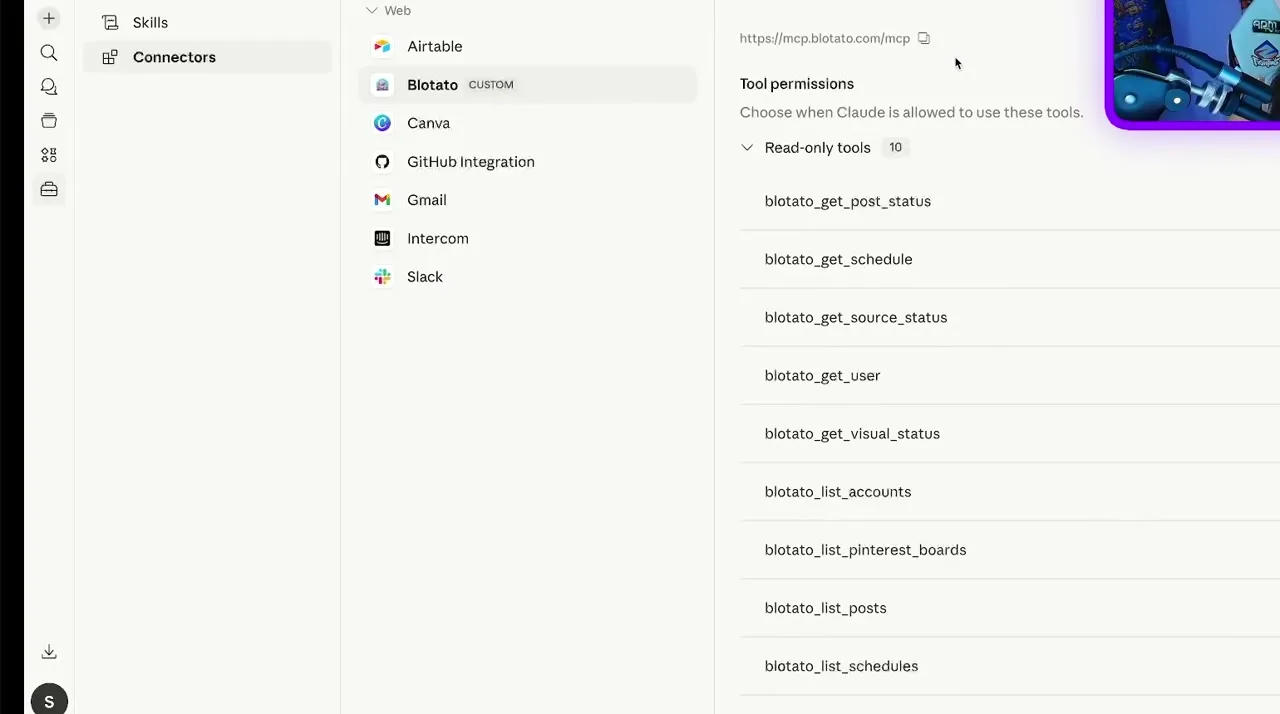
How do I know it worked?
Ask Claude Cowork to list your connected accounts. It calls
blotato_list_accounts and returns your platforms, which confirms both the connection and
the authentication in one step. If you see your accounts, setup is done.
What social media accounts do I have connected?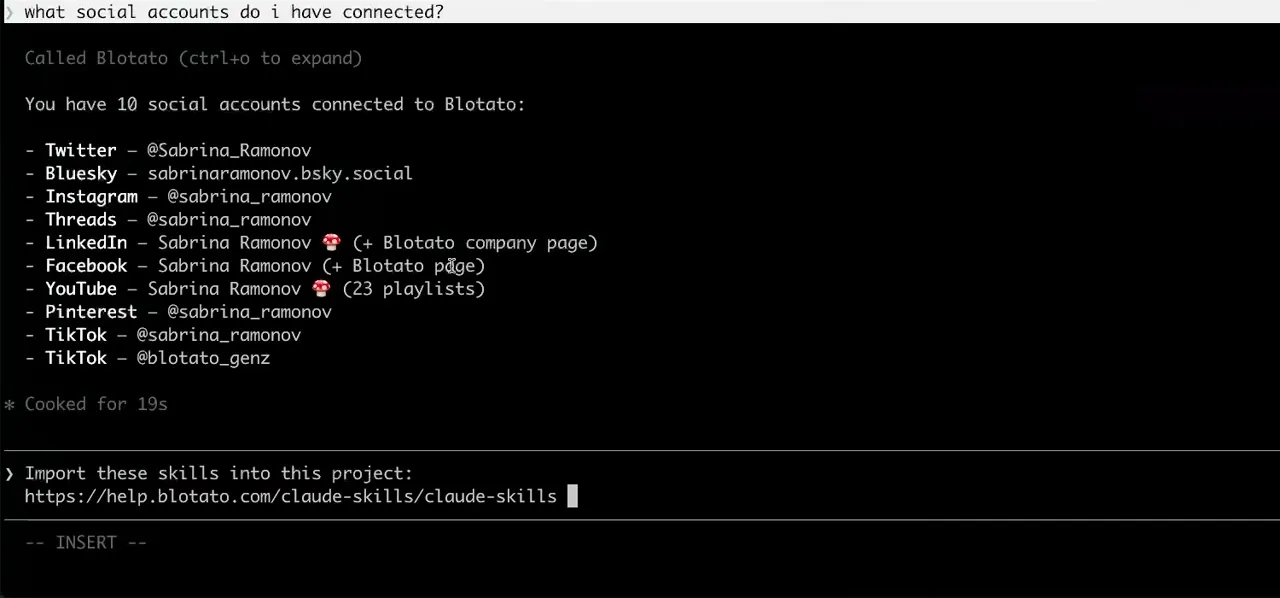
Worth knowing before you rely on it: when an agent ranks your best posts through MCP, metrics cover X, Instagram, Facebook, Threads, and Bluesky. TikTok, YouTube, and Pinterest analytics are available in the Blotato web app and REST API, and LinkedIn publishes normally but reports no metrics yet.
What to ask Claude Cowork once it is connected
- Post the video in this folder to TikTok and Instagram, and write the caption yourself.
- Cowork reads the file, calls blotato_create_presigned_upload_url to upload it, drafts the caption, then publishes with blotato_create_post. This is the request that fails without the egress allowlist above, because the upload never reaches the storage host.
- Anything in my Instagram DMs I need to answer?
- blotato_list_conversations and blotato_list_messages read the inbox, and blotato_send_message replies once you approve the wording. Instagram and Facebook only: no other platform exposes DMs here.
- Turn this week's notes into five posts and space them out.
- Cowork works from the files it already has open, then makes five blotato_create_post calls with scheduledTime set, or useNextFreeSlot to drop them into the slots you have configured.
- Did the welcome automation actually reply to anyone this week?
- blotato_list_automation_runs lists the runs, one per comment or message that matched, and blotato_list_automation_logs shows what happened inside a run. A reply that could not be sent reaches status failed on its run rather than disappearing, which is how you catch a comment that already received a private reply from Blotato or another tool and cannot take a second one.
What breaks, and how to fix it
Two failures are specific to Cowork. The first is an upload that fails with a message about network egress settings, which is the default egress block rather than anything to do with your key, and is fixed by allowlisting database.blotato.io and restarting. The second is a connector stuck showing Connected while every call fails on credentials, which is a cached stale session: reconnecting reuses the same session, so remove the connector fully and add it fresh.
What is different about Claude Cowork
Cowork runs with outbound network access switched off by default, which no other agent on this list does. That single setting is why a Cowork setup can pass every connection check and still fail the moment you ask it to post a local video, because the presigned upload never reaches the storage host.
Vendor documentation: Claude Cowork MCP setup. The handshake it uses is the MCP authorization spec, which Blotato implements in full, including dynamic client registration and PKCE.
Already connected and want the workflow?
This page covers the connection. Our guide to automating social media with Claude Cowork covers the full workflow, the tool stack, and what the setup cannot do yet.
Claude Cowork social media FAQs
01 Can Claude Cowork post to social media?
02 How do I connect Claude Cowork to social media?
03 How do I set up Claude Cowork for social media?
04 What is the best way to manage social media with Claude Cowork?
05 What goes wrong when connecting Claude Cowork?
06 Does Claude Cowork need to be running for a scheduled post to go out?
07 What can I ask Claude Cowork to do once it is connected?
08 How much does it cost to connect Claude Cowork?
Connecting a different agent?
Same endpoint, same accounts, one setup per client. The AI agents for social media hub covers what all of them share, including every tool your agent can call.












 Blotato
 Your AI Agent still can't post to social media.
Point Claude, ChatGPT, n8n, or your own agent at Blotato's MCP and that's fixed: 9 platforms behind one key, flat $29/mo.
Connect your agentFlat pricing. Cancel anytime.