
How to Schedule Social Media Posts From Claude Desktop With MCP
You can schedule social media posts from Claude Desktop or Claude.ai without writing code by adding Blotato as a custom connector. Open Customize, then Connectors, add mcp.blotato.com/mcp, and approve the OAuth prompt. From then on you ask in plain language, and Claude schedules the post to any of nine platforms and reads your queue back in the same chat. The Blotato connector lives on your Claude account, so one setup covers Claude.ai, the Desktop app and Cowork.
https://mcp.blotato.com/mcp OAuth Updated October 2026
How to connect Claude.ai to social media
- On a paid Blotato plan, connect your social accounts once, so the agent never touches a platform credential. API and MCP access is not part of the 7-day trial.
- In Claude Desktop or Claude.ai, open Customize, then Connectors, then the plus button, then Add custom connector.
- Name it Blotato and set the URL to https://mcp.blotato.com/mcp.
- Press Connect, sign into the Blotato account you want Claude to post from in the browser window that opens, and approve access.
https://mcp.blotato.com/mcp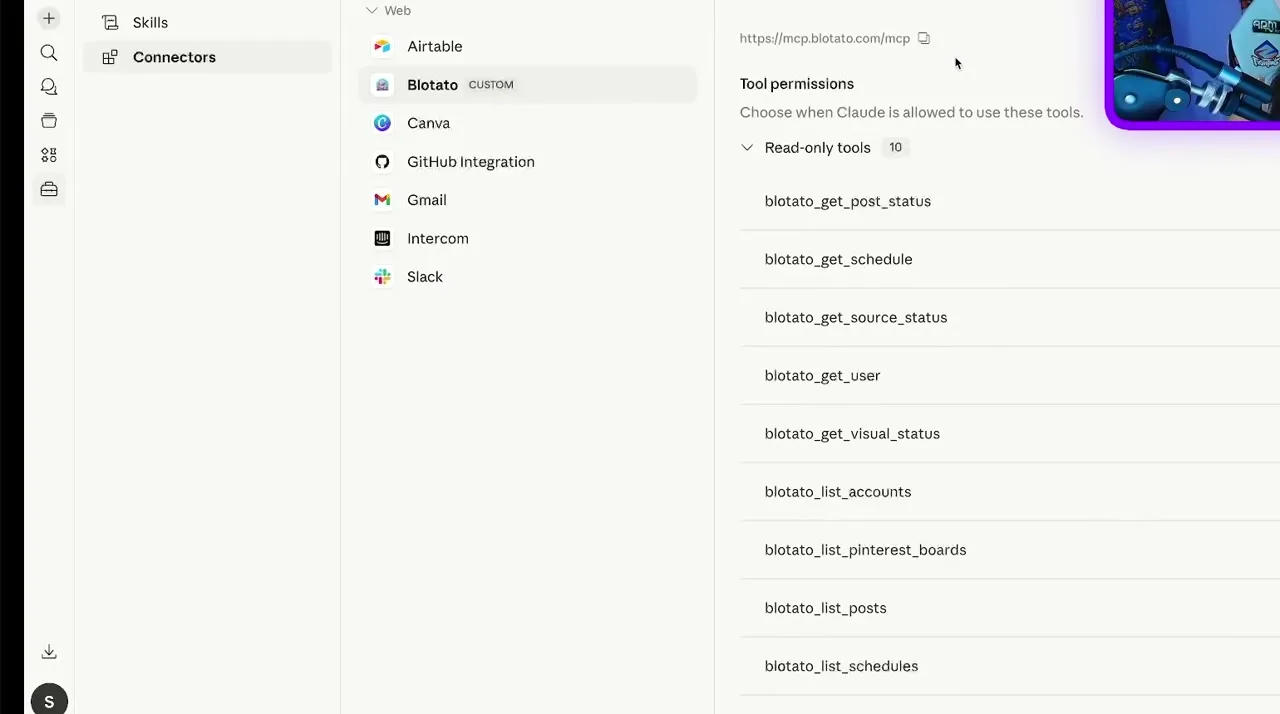
How do I know it worked?
Ask Claude.ai to list your connected accounts. It calls
blotato_list_accounts and returns your platforms, which confirms both the connection and
the authentication in one step. If you see your accounts, setup is done.
What social media accounts do I have connected?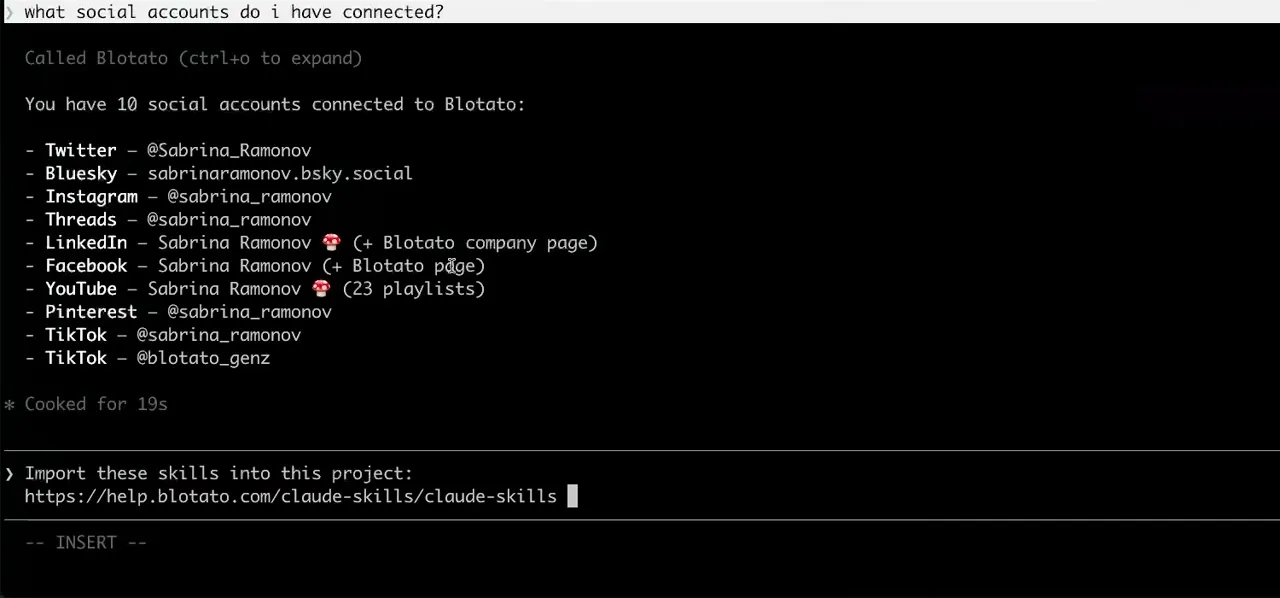
Worth knowing before you rely on it: when an agent ranks your best posts through MCP, metrics cover X, Instagram, Facebook, Threads, and Bluesky. TikTok, YouTube, and Pinterest analytics are available in the Blotato web app and REST API, and LinkedIn publishes normally but reports no metrics yet.
Scheduling from Claude Desktop: what to ask once connected
- Draft three LinkedIn posts from the notes I just pasted, and show me before anything goes out.
- Claude writes the drafts in the chat and sends nothing to Blotato yet. Over MCP, blotato_create_post either publishes or schedules, so this conversation is your review step: nothing reaches Blotato until Claude makes that call.
- Schedule the second one for Tuesday at 9am Eastern, and put the other two in my next open slots.
- Claude calls blotato_list_accounts to find the LinkedIn account, then blotato_create_post with a scheduledTime for Tuesday and useNextFreeSlot for the other two, which takes the next free times in the posting schedule you set up in Blotato. The posts wait in Blotato's queue, so quitting Claude Desktop does not stop them.
- What is going out next week? Push Thursday's post to Friday, same time.
- blotato_list_schedules returns Blotato's queue sorted by scheduled time, and blotato_update_schedule with only a new scheduledTime moves that one post and leaves its content as it was.
- Someone in my Instagram DMs is asking whether we ship to Canada. Pull up that thread and answer it.
- blotato_list_conversations finds the thread, blotato_get_conversation and blotato_list_messages read that exchange rather than the whole inbox, and blotato_send_message sends your reply. Meta closes the reply window 24 hours after their last message, so an old thread can be readable and no longer answerable.
What breaks, and how to fix it
On Claude, the confusing failure is a connector that shows Connected while its tool calls fail, and the error code tells you which problem you have. A 403 means the Blotato subscription is not active, because API access requires a paid plan. If you are on the 7-day trial, generating an API key under Settings then API ends it and starts the paid Starter plan, even though Claude itself never uses that key. A 401 is a credential or session problem instead, so remove the Blotato connector and add it again. On a Claude Team or Enterprise plan there is one more trap: only Owners and Primary Owners can add custom connectors, plus a custom role with Manage access to Libraries on Enterprise, and members can only connect the ones already added.
What is different about Claude.ai
Claude's Free plan allows one custom connector in total, so if that slot already holds another tool, remove it or move to a paid Claude plan before adding Blotato. Claude also turns each connector on or off per conversation, from the + button at the lower left under Connectors, so a chat with Blotato switched off will not see its tools.
Vendor documentation: Claude.ai MCP setup. The handshake it uses is the MCP authorization spec, which Blotato implements in full, including dynamic client registration and PKCE.
Already connected and want the workflow?
This page covers the connection. Our guide to posting to social media with Claude on every platform covers the prompts and the per-platform workflow once the connector is live.
Claude.ai social media FAQs
01 Can Claude.ai post to social media?
02 How do I connect Claude.ai to social media?
03 How do I set up Claude.ai for social media?
04 What is the best way to manage social media with Claude.ai?
05 What goes wrong when connecting Claude.ai?
06 Does Claude.ai need to be running for a scheduled post to go out?
07 What can I ask Claude.ai to do once it is connected?
08 How much does it cost to connect Claude.ai?
09 How do I schedule social media posts from Claude Desktop without code?
10 Does adding the connector in Claude.ai also set up Claude Desktop?
Connecting a different agent?
Same endpoint, same accounts, one setup per client. The AI agents for social media hub covers what all of them share, including every tool your agent can call.












 Blotato
 Your AI Agent still can't post to social media.
Point Claude, ChatGPT, n8n, or your own agent at Blotato's MCP and that's fixed: 9 platforms behind one key, flat $29/mo.
Connect your agentFlat pricing. Cancel anytime.