
OpenAI Codex Social Media MCP Setup
OpenAI Codex connects to a social media MCP server through a form rather than a JSON block. Choose the streamable HTTP server type, set the URL to https://mcp.blotato.com/mcp, leave the bearer token field blank, and add blotato-api-key as a header with your key as the value. Codex can also take the same entry in config.toml.
https://mcp.blotato.com/mcp API key header Updated August 2026
How to connect OpenAI Codex to social media
- Connect your social accounts in Blotato, then copy your API key from Settings then API.
- In Codex, add an MCP server and choose the streamable HTTP server type.
- Set the URL to https://mcp.blotato.com/mcp.
- Leave the bearer token environment variable blank. This field is not how Blotato authenticates.
- Under Headers, set the key to blotato-api-key and paste your full API key as the value, then save.
# Form: choose "streamable HTTP"
URL:                    https://mcp.blotato.com/mcp
Bearer token env var:   (leave blank)
Header key:             blotato-api-key
Header value:           YOUR_API_KEY
Codex asks for a form rather than JSON: choose the streamable HTTP server type, set the URL, leave the bearer token blank, and add blotato-api-key as a header.
How do I know it worked?
Ask OpenAI Codex to list your connected accounts. It calls
blotato_list_accounts and returns your platforms, which confirms both the connection and
the authentication in one step. If you see your accounts, setup is done.
What social media accounts do I have connected?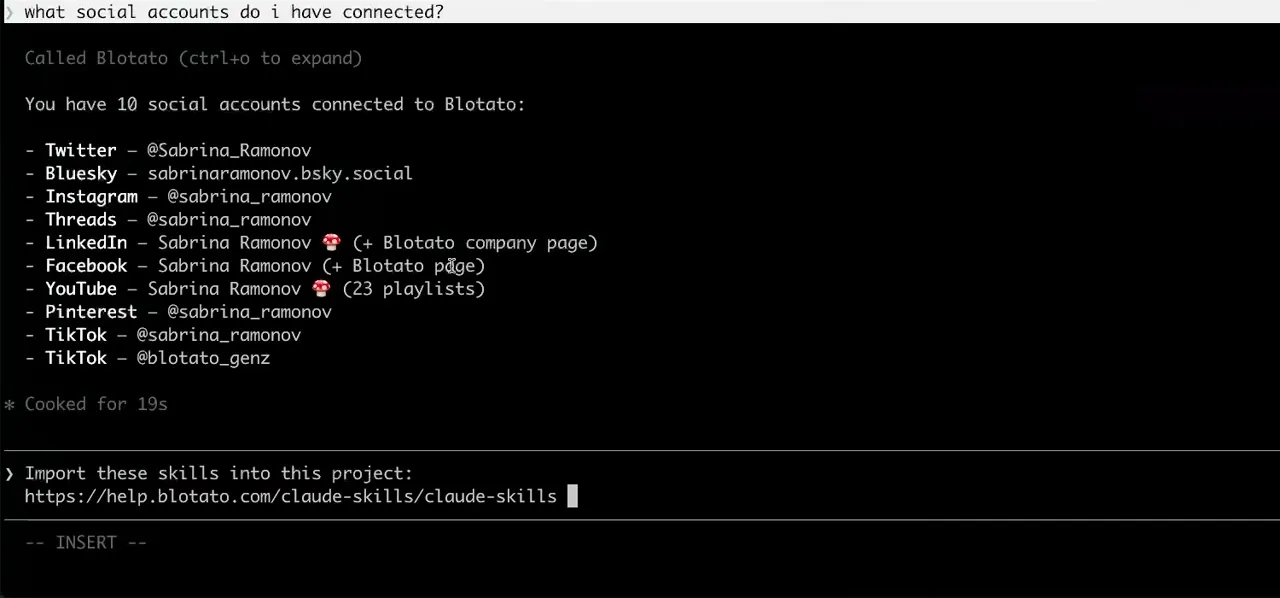
Worth knowing before you rely on it: when an agent ranks your best posts through MCP, metrics cover X, Instagram, Facebook, Threads, and Bluesky. TikTok, YouTube, and Pinterest analytics are available in the Blotato web app and REST API, and LinkedIn publishes normally but reports no metrics yet.
What to ask OpenAI Codex once it is connected
- Ship the release notes to X and LinkedIn when the build passes.
- Codex puts blotato_create_post at the end of the task it is already running. The publishing step lives in the same agent session as the work that produced it, rather than in a separate tool you switch to afterwards.
- Did that actually publish?
- blotato_create_post returns a postSubmissionId rather than a finished post, because publishing is async. blotato_get_post_status resolves it to published, scheduled, or failed with an error message, which is the check worth building into any script.
- Pull my recent posts so I can see what we already covered.
- blotato_list_posts returns them, which is the cheapest way to stop an agent rewriting a topic it published last week.
What breaks, and how to fix it
The Codex-specific mistake is filling in the bearer token field because it is the obvious one. Blotato does not authenticate that way, and a key in that slot returns an auth error while the header sits empty. The other is dropping a trailing equals sign when copying the key, since the equals is part of the key and losing it produces a 401 invalid API key.
What is different about OpenAI Codex
Codex is the only client here that asks for a form instead of JSON, which is why the config everyone pastes between Cursor and Antigravity does not transfer. It is also frequently confused with ChatGPT: they are different OpenAI products with different connection models, and Codex is not bound by the ChatGPT plan rules for custom MCP servers.
Vendor documentation: OpenAI Codex MCP setup. For how a client discovers and calls tools once connected, see the MCP client concepts reference.
OpenAI Codex social media FAQs
01 Can OpenAI Codex post to social media?
02 How do I connect OpenAI Codex to social media?
03 How do I set up OpenAI Codex for social media?
04 What is the best way to manage social media with OpenAI Codex?
05 What goes wrong when connecting OpenAI Codex?
06 Does OpenAI Codex need to be running for a scheduled post to go out?
07 What can I ask OpenAI Codex to do once it is connected?
08 How much does it cost to connect OpenAI Codex?
Connecting a different agent?
Same endpoint, same accounts, one setup per client. The AI agents for social media hub covers what all of them share, including every tool your agent can call.












 Blotato
 Your AI Agent still can't post to social media.
Point Claude, ChatGPT, n8n, or your own agent at Blotato's MCP and that's fixed: 9 platforms behind one key, flat $29/mo.
Connect your agentFlat pricing. Cancel anytime.