How to Build a Social Media Content Calendar With Claude
Automate a 30-day social media content calendar with three Claude skills: one plans the month, one builds the posts, one schedules them.
A free template gives you a social media content calendar with 30 empty rows. Filling them is still your job: the post ideas, the captions, the visuals and the scheduling, five platforms at a time. I built a million-dollar business off social media, so I know the posting is worth it. Keeping up with it is the hard part.
My friend Jake Dawson built a version where Claude does the filling in. To build a social media content calendar with Claude, connect Blotato as a Claude connector, then create three Claude skills: a strategist that plans 30 days, a post creator that builds each post from the plan, and a scheduler that books every post on Blotato’s calendar. A skill is a saved set of instructions Claude follows the same way each time, and you build an approval step into each handoff. This guide is for solo creators and small business owners who already post on a few platforms and keep falling behind.
Social Media Content Calendar With Claude (Video Guide)
Jake made this walkthrough with me for my channel. The written guide adds what changed since he recorded it, plus two scheduling settings that trip people up.
A Template Stores the Plan. It Doesn’t Post It.
Jake opens with a cafe owner. It’s just you, the coffee and the plants, and every day you’re supposed to post on TikTok, Instagram, X, LinkedIn and Facebook. In his words, “It’s a full-time job stacked right on top of the job that you already have.”
A template doesn’t change that. Every row still needs someone to write the post, make the visual and hit schedule, and that’s the work that falls apart by week two.
If you post on one platform and you’re still finding your rhythm, you don’t need this. Post by hand and get consistent first. This setup pays off once you’re on several platforms and the posting, not the ideas, is what keeps slipping.
The Stack Behind This Calendar
Two products do the work:
- Claude. Skills work on every Claude plan, including Free, as long as code execution is turned on in settings. Jake’s plain definition: “a Claude skill is just a saved set of steps. So, you write it once and Claude runs it the same way every time.” Details are in Anthropic’s guide to Claude skills. If you build in Claude Desktop, Cowork or Claude Code instead, the connector works there too with its own setup steps, and Claude Code runs skills as well.
- Blotato, connected to Claude through its hosted MCP connector. It holds your social accounts and the calendar that actually publishes, across 9 platforms.
I’m the founder of Blotato, so factor that into anything I say about it.
Blotato’s free trial covers the web app, but not the API or the MCP connection this whole build runs on, and generating an API key ends the trial on the spot. If you want to run Jake’s three skills, plan on starting a Blotato Starter subscription rather than trialing it. Starter is $29 a month with 20 connected accounts and 1,250 AI credits.
Template vs Scheduler vs Claude Skills: Who Does the Work?
| Spreadsheet template | Scheduler calendar view | Claude skills + Blotato | |
|---|---|---|---|
| Who writes the plan | You | You | The strategist skill, from your answers, your accounts and its market research |
| Who writes each post | You | You, sometimes with an AI caption helper | The post creator skill, following each row’s instructions |
| Who books the time | You, platform by platform | You, by drag and drop | The scheduler skill, at the planned time or your next free slot |
| What happens next month | Copy the grid and refill it | Refill the queue by hand | Rerun the strategist with new angles |
| Where you step in | Every step | Every step | Approving the plan, reading captions, checking live posts |
Every option ends in a calendar. What changes is who does the work in each row.
How to Build Your Social Media Content Calendar (Step-by-Step)
The build takes seven steps, and you check the work at every handoff.
Step 1: Connect Your Social Accounts (Warm Up New Ones First)
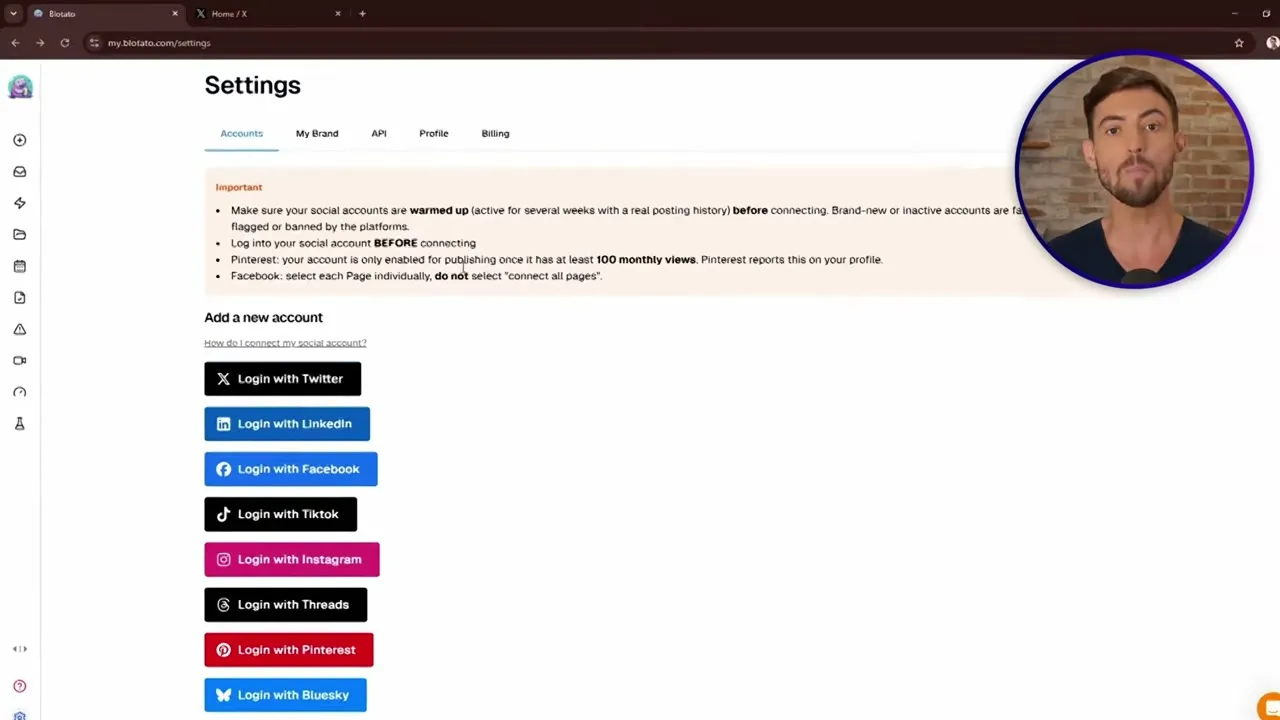
In Blotato, open Accounts and connect each profile you want on the calendar. Jake’s trick: log into that exact profile in a second tab of the same browser first, so the login button links the right handle. Approve the consent window and the account is connected.
Don’t connect a brand-new account straight away. Jake’s rule of thumb is to use it by hand for at least two weeks on most platforms, and longer on TikTok. His reasoning: brand-new profiles that suddenly start autoposting are the ones that get flagged as bots. Blotato’s own Accounts page gives the same warning.
Step 2: Connect Blotato to Claude
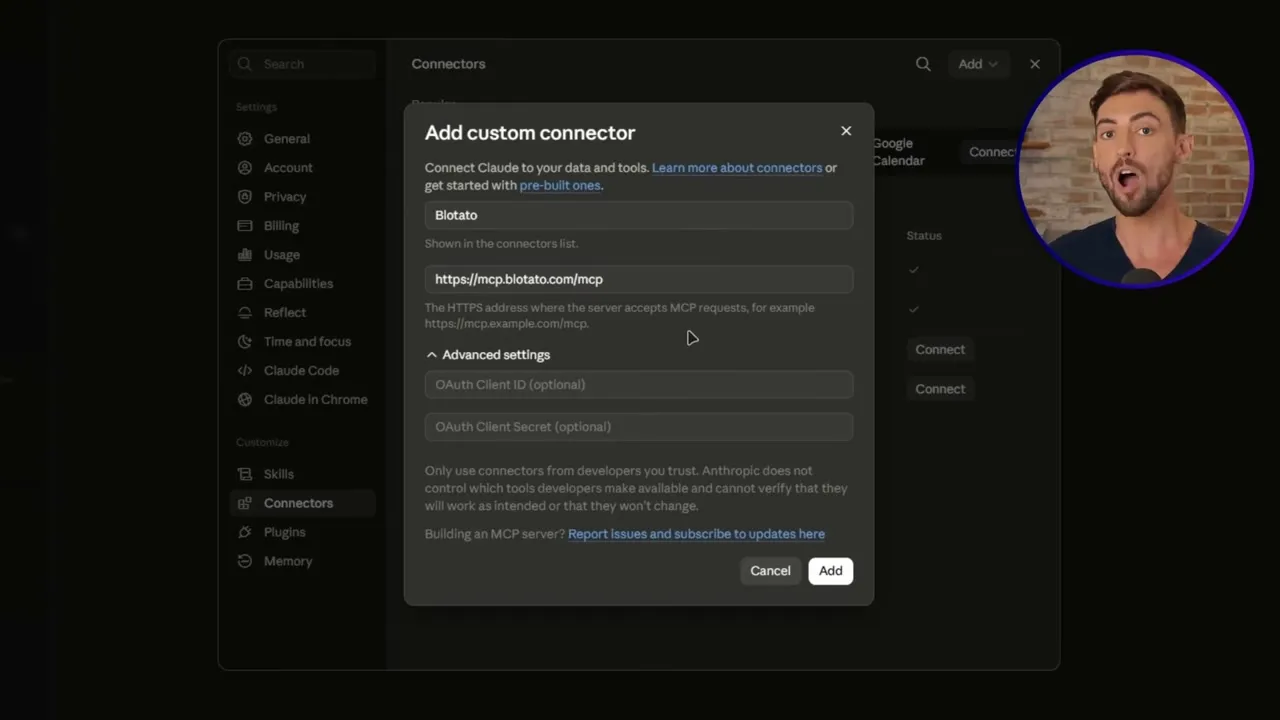
Jake adds Blotato as a custom connector. In Claude, open Customize, then Connectors, choose Add custom connector, name it Blotato, and paste https://mcp.blotato.com/mcp. Stay logged into Blotato in the same browser, then approve access when Claude asks. Since he recorded this, Blotato also joined Claude’s connector directory, so you can search for it and click Connect instead.
To check it worked, open a fresh chat and ask Claude to list your connected Blotato accounts. Jake got back his four: a Facebook Page, Instagram, TikTok and X.
Step 3: Build Skill One, the Content Strategist
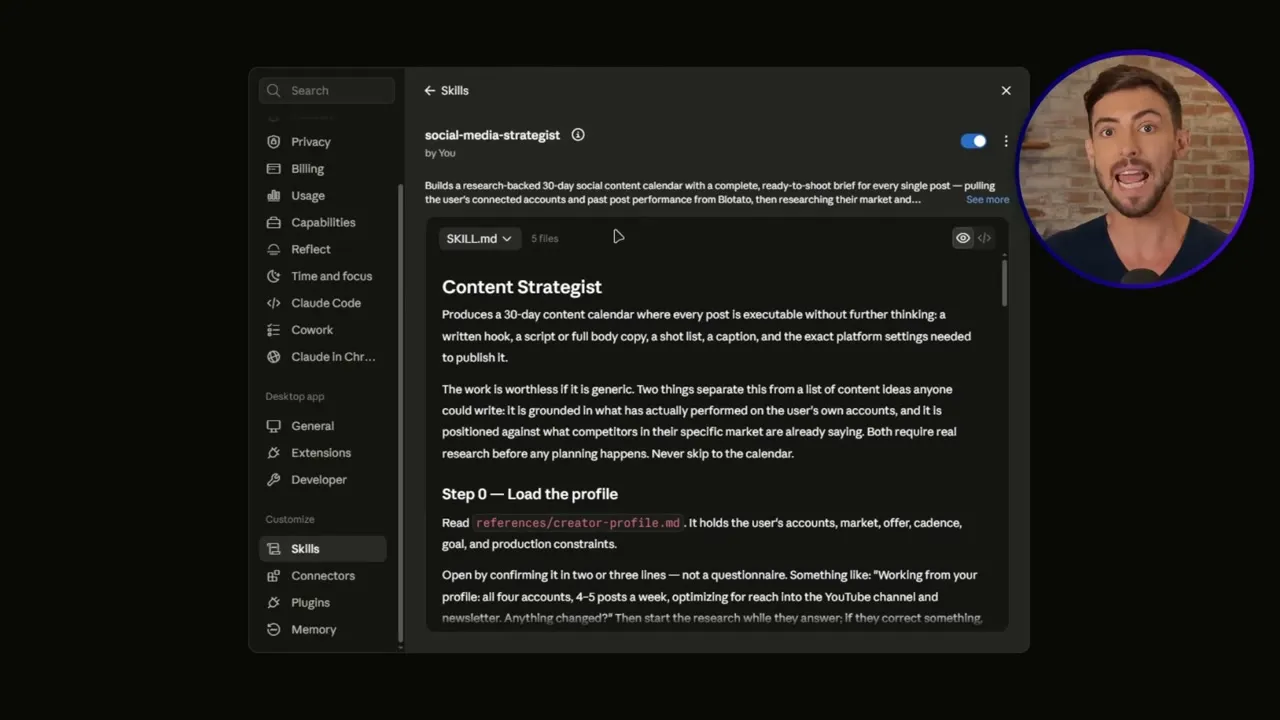
Start a new chat, type a forward slash, and pick the skill creator. Then give it one prompt. Jake’s was: “build me a content strategist that plugs into Blotato, looks at my past posts, checks the market and my competitors and lays out 30 days of content with instructions for every post across all of my connected networks.”
The skill creator asks a few questions before it builds: which accounts the plan is for, how many posts a week you can actually keep up with (give your real number, not your ideal one), and what market you sell to. Answer them, wait a few minutes, then save the skill so it lives in your Claude account.
Step 4: Run the Strategist and Get Your 30-Day Calendar
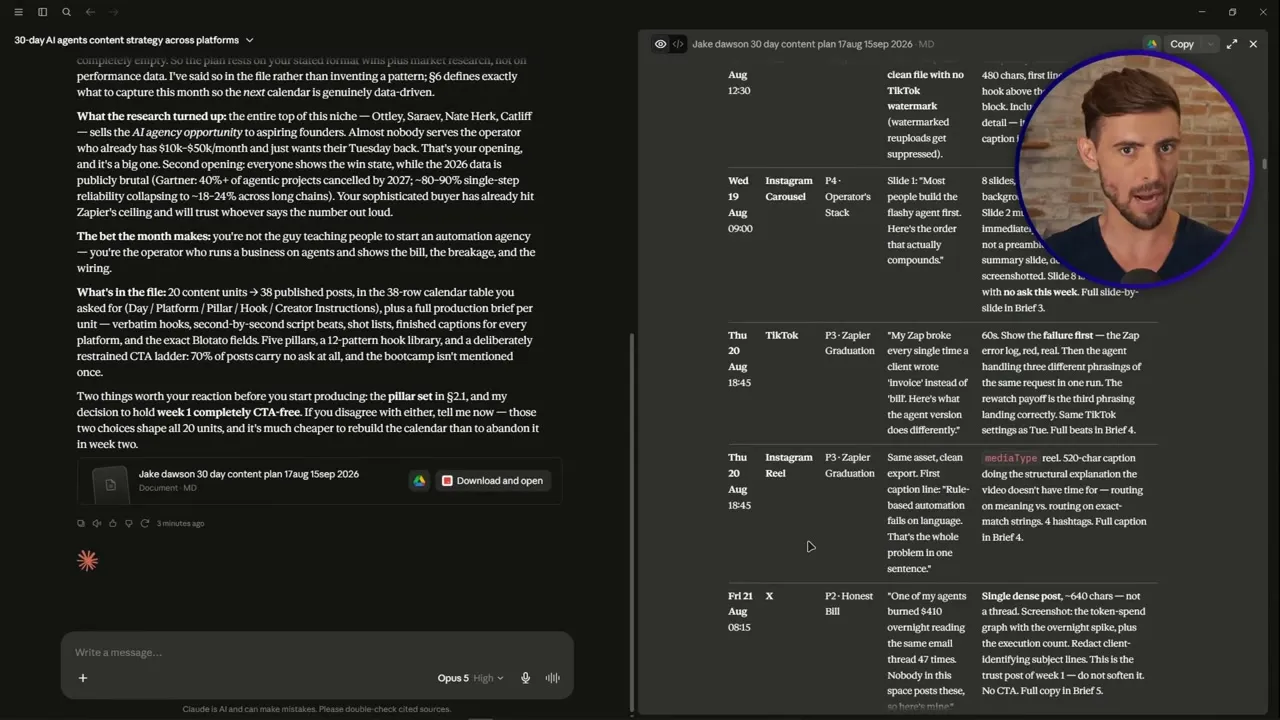
Open a new chat, type a forward slash, pick the strategist and hit enter. It asks permission to use the details from your social accounts, asks a few questions about the month, and comes back with a social media content plan: content pillars, a different angle for each platform, how often to post and the tone.
Jake’s plan mapped 20 content units to 38 posts in a 38-row table, then stopped to ask for his reaction on two choices before anything got produced. Keep that pause. The plan is a draft until you say yes. His came back as a document you can download, so save the approved version, because the post creator works from it.
All of this is Claude thinking and writing, so it spends no Blotato credits. Jake’s advice is to keep the skill and rerun it next month with new angles or goals.
Step 5: Build Skill Two, the Post Creator
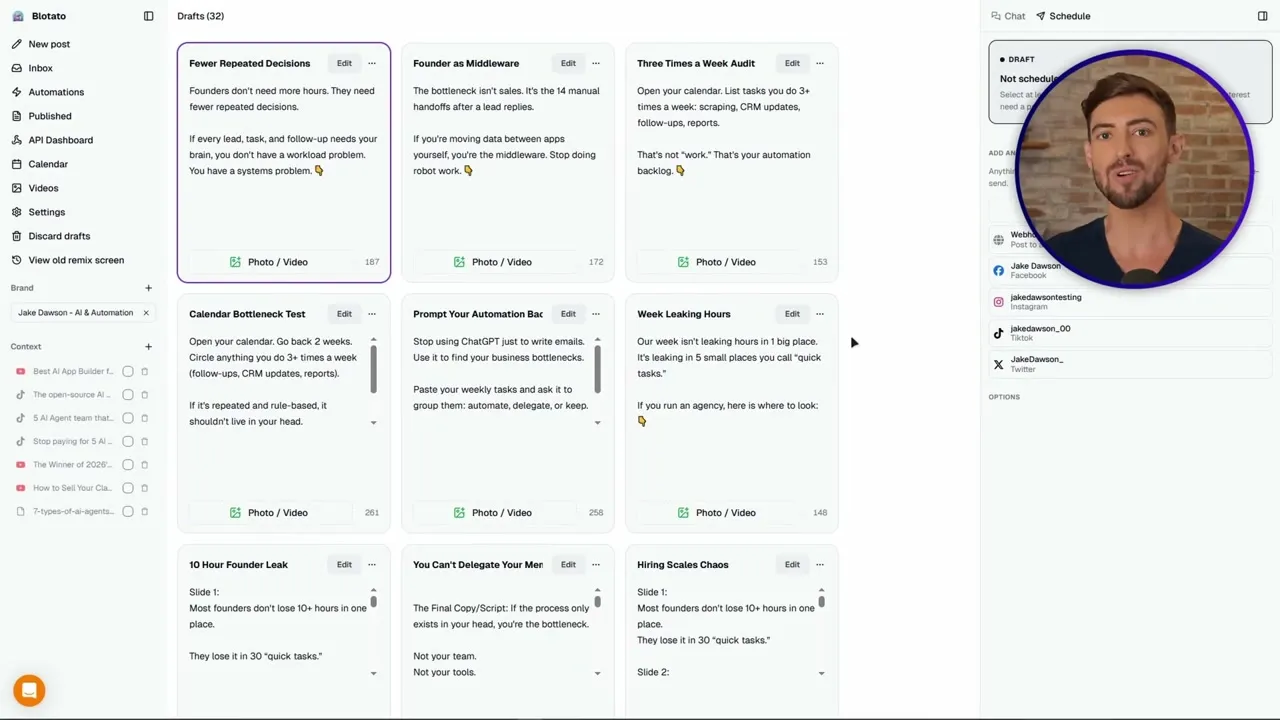
Back to the skill creator, with this prompt: “Take the content calendar we built with the social content strategist and actually make the post for it. Follow the instructions attached to each post and build every one exactly the way the plan lays it out.” Answer its build questions and save it.
Before building it, Jake shows the one-off version: point Blotato at a source (a YouTube video, TikTok, article, podcast or PDF) and ask Claude for posts. His one blog post became captions, images, a carousel and a short faceless video. The skill repeats that for every row. Only AI images and video spend Blotato credits, so Jake’s advice is to start on Starter and move up when you actually run out.
Step 6: Build Skill Three, the Scheduler
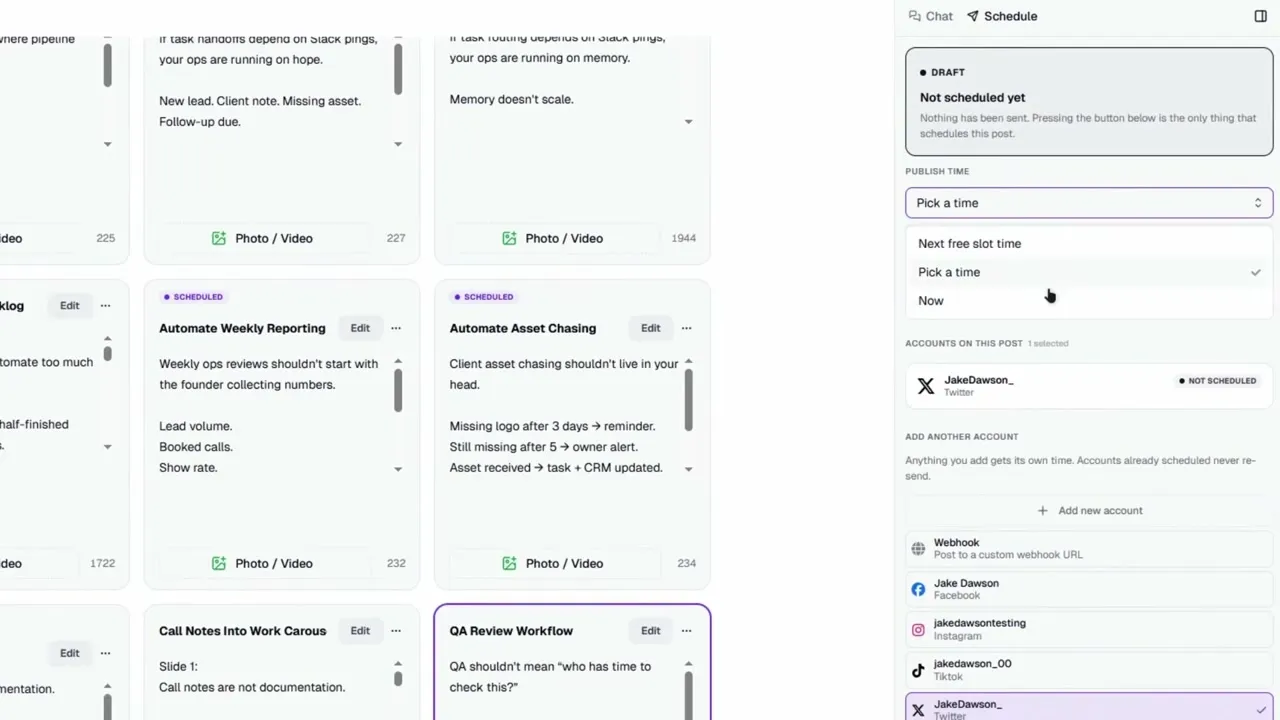
One more trip to the skill creator. Jake asks for a skill that takes every post the creator made and schedules it in Blotato, each one at the time the plan set for it. Before you save yours, tell it to show you the full schedule and wait for your yes, and to give every post exactly one publish time (more on why in the tips below).
Each post gets one of three publish options: now, the exact time the calendar picked, or the next free slot, where Blotato finds the next opening for you. It handles more than feed posts, including Instagram and Facebook Stories and threads on X, Threads and Bluesky.
Step 7: Check the Calendar, Then Check the Platform
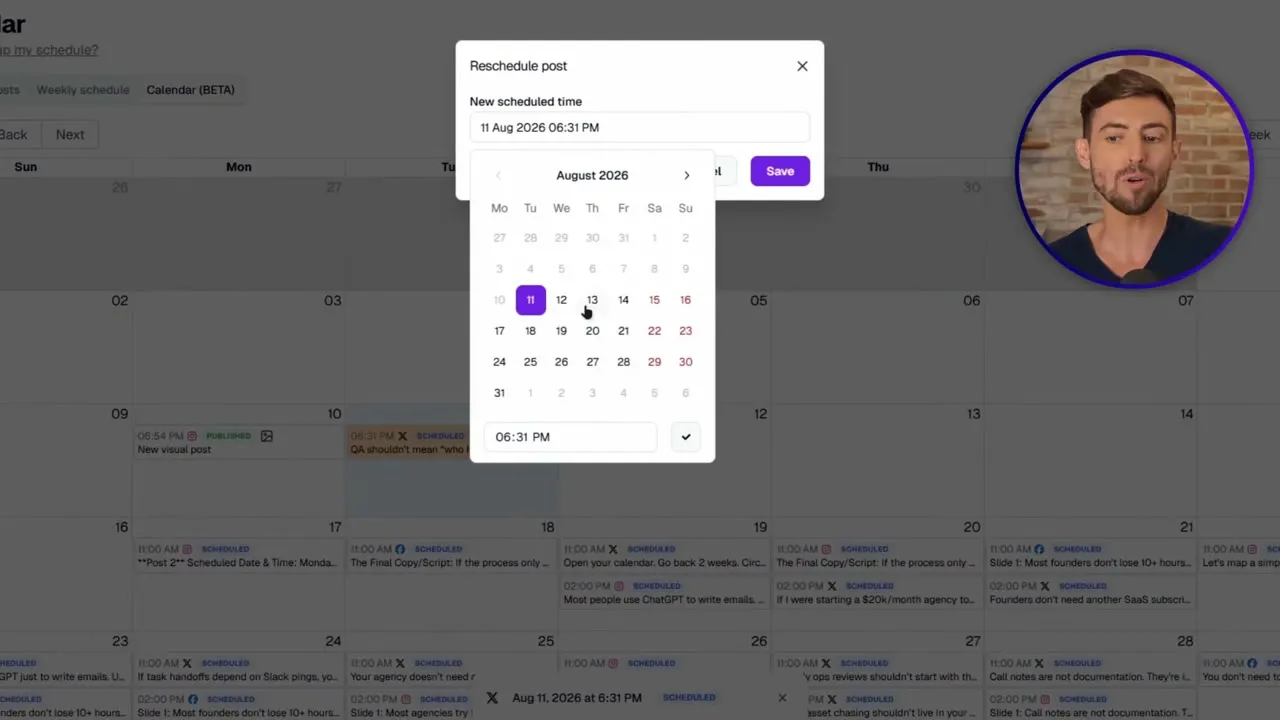
Run the scheduler and the posts land on Blotato’s calendar across every connected platform. If something needs to move, move it there instead of editing posts one by one.
Then do what Jake does before he lets it run loose: when a post goes out, open the platform and confirm it’s really live, because live and “sitting pretty in Blotato’s calendar” aren’t always the same thing. Claude can also check each post’s status in Blotato: in progress, scheduled, published (with the public link when available) or failed (with the error message). On your first run, read every caption and schedule one week, not the whole month.
Pro Tips for an AI Content Calendar
Every post needs a time, or it goes out now. Blotato publishes a post immediately when it carries neither a scheduled time nor a next-free-slot request. Write that rule into the scheduler skill: every post gets its planned time or the next free slot. Never neither, and never both, because Blotato’s docs say not to combine them.
Save posting slots before you lean on “next free slot.” That option picks an opening from the slots you saved for that platform and account. With no slots saved, it returns an error instead of guessing. Here’s how to set up your posting slots in the web app.
What This Calendar Can’t Do (Yet)
There is no approval step after scheduling. Once a post is on the calendar, it publishes at its time. Blotato has no approval queue, so your review happens in the chat before the scheduler runs, and on the calendar, where you can move or delete a post.
Starter covers a month like this, up to a point. Its queue holds 200 scheduled posts at once, enough for Jake’s 38 or one post a day on five platforms for 30 days. Past that, Creator holds 1,000, or have the scheduler book one week at a time.
The strategist can’t read LinkedIn numbers. Blotato’s analytics covers 8 of its 9 platforms, and LinkedIn returns no metrics yet. So the strategist has no LinkedIn performance data to learn from, and your LinkedIn rows rest on research and whatever you tell it.
What Jake’s First Run Produced
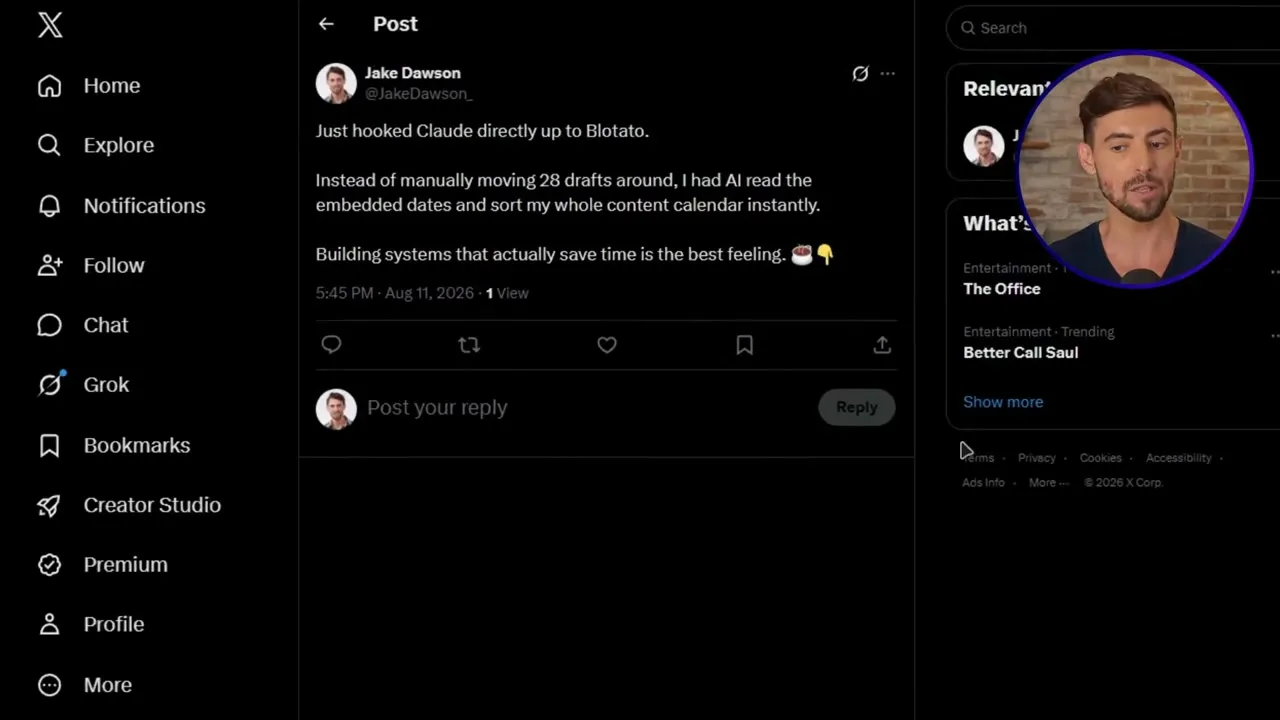
From that one strategy pass, the creator skill turned the plan into “a full set of posts,” and the scheduler sent them “straight onto the content calendar.” He then pushed a real post for his business from the chat and watched it go live. In an earlier post on X, from the day he hooked Claude up to Blotato, he wrote: “Instead of manually moving 28 drafts around, I had AI read the embedded dates and sort my whole content calendar instantly.”
His own take, based on his testing, is that the setup pays for itself fast, because “You’re not hiring a writer, a designer, a scheduler, and then praying that they all actually talk to each other.” Every paid Blotato plan runs this same build. The plans differ in accounts, credits and how many posts you can queue.
Is a Self-Scheduling Calendar Worth Building?
If you post on several platforms and the posting, not the ideas, is what keeps slipping, yes. Build the strategist first and run it once before you touch the other two, since a weak plan stays weak however well it’s scheduled. Then say yes at every handoff the way Jake does, and check the platform, not just the calendar.
Social Media Content Calendar FAQs
Can Claude plan and schedule a month of social media posts?
Yes, with a connector. Claude can plan the month on its own, but it can’t publish without a tool behind it. With Blotato connected, it can post now, schedule an exact time or book your next free slot on 9 platforms, and scheduled posts go out on time even after you close the chat.
What should a social media content calendar include?
At minimum, a date, a platform and a format for every post. Jake’s strategist goes further: each row carries a written hook, a script or the full body copy, a shot list, a caption and the platform settings needed to publish it. That detail is what lets a second skill build the posts with far fewer questions.
How far ahead can I schedule my content calendar?
Blotato schedules up to 9 months ahead on every plan, so you could book a whole quarter in one run. The real ceiling is your plan’s queue of scheduled posts, covered above.
Can someone who doesn’t code set up an AI content calendar?
Yes. Jake builds all three skills by typing plain-English prompts into Claude’s skill creator and answering its questions, and the connector is a URL you paste or a directory listing you click.