Leaving Zernio: Export Social Media Posts by API Then Disconnect
Leaving Zernio means disconnecting accounts, which cancels the scheduled social media posts aimed only at them. Export the queue via the API first.
Leaving Zernio comes down to one rule: copy first, disconnect last. Disconnecting an account stops Zernio publishing to it at once. An hour later, Zernio cancels the scheduled posts aimed only at that account. I founded Blotato, and this guide covers moving your own accounts to it, on the 9 platforms it publishes to.
Delete nothing on Zernio’s side as you go, either. A deleted Zernio post takes any uploaded media no other post uses with it.
The full order: save what a disconnect deletes, pair each account with a Blotato one, stop new posts reaching Zernio, export the queue and rebuild it in Blotato. Only then disconnect, one account at a time.
What Blotato Won’t Take Over From Zernio
Customer account onboarding doesn’t transfer. Zernio gives each of a product’s customers a profile, and its GET /v1/connect/{platform} call returns a sign-in link to hand them. A Blotato subscription has one user login, and social accounts connect only on that user’s Accounts page. If your customers connect their own accounts, the multi-tenant pick in our Zernio alternatives roundup fits that job.
Several channels stay behind too. Blotato has no ads product and no phone numbers, SMS, WhatsApp or iMessage, and it doesn’t publish to Telegram, Discord, Slack or Google Business. It publishes to Instagram, Facebook, X, LinkedIn, Threads, Bluesky, TikTok, YouTube and Pinterest.
Replies are narrower. Blotato’s comments, DMs and DM automation cover Instagram and Facebook only, so replies on X, LinkedIn, YouTube, Threads or Bluesky have no home in Blotato.
Blotato also sets its own anti-spam caps on several platforms, per its posting limits. Instagram, for one, takes 50 posts per account and Facebook 25 per Page in any 24 hours. A busy Zernio queue may need spreading out to fit them.
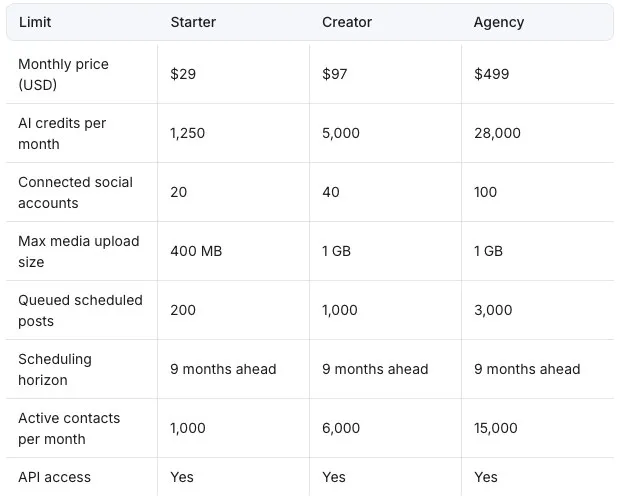
Blotato’s bill is a flat plan price for up to 20, 40 or 100 accounts. Publishing, scheduling and API calls spend no credits, so posting more doesn’t raise it. The Blotato vs Zernio comparison prices both at your account count. API and MCP access start with a paid plan, from $29 a month on Starter, and Blotato’s 7-day trial covers neither.
What Disconnecting Does to a Zernio Queue
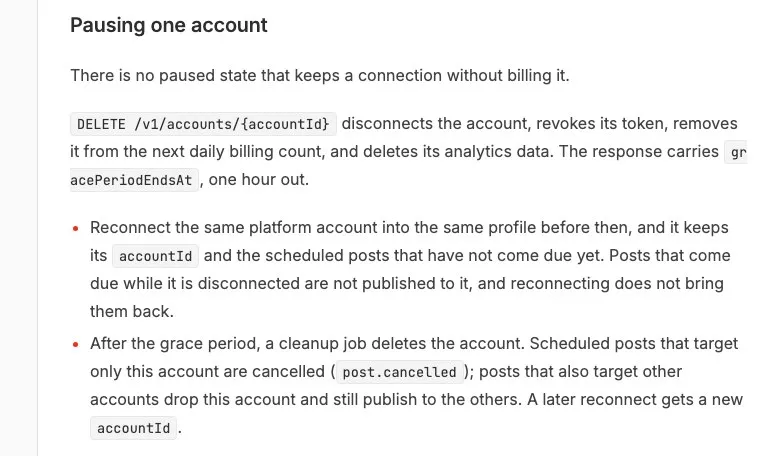
Zernio bills each connected account by the day. Its pricing page says you can “disconnect any social account at any time and you stop being charged for it.” Its multi-tenant docs add: “There is no paused state that keeps a connection without billing it.”
Here’s what each way out does to the queue:
| What you do | Scheduled posts | Media and data | Can you undo it? |
|---|---|---|---|
Disconnect an account with DELETE /v1/accounts/{id} | Publishing to it stops at once. After an hour, posts that target it alone are cancelled, and posts for several accounts drop it | Its analytics are deleted | Partly, within the hour: reconnecting the same account into the same profile keeps its ID and the posts not yet due |
| Delete a post | That post stops, though an entry already sending may still go out | Uploaded media no other post uses is deleted | No |
| Stop paying | The team is paused, at once or after a 24-hour grace if you’ve paid at least $50, and due posts fail | Accounts stay connected | Paying restores access, but failed posts aren’t retried |
| Delete your Zernio account in Settings | Zernio’s docs don’t say | Its privacy policy gives 30 days to delete or anonymize your data | No |
Two Zernio features can change the queue after you’ve looked at it. A scheduled public YouTube video goes up early as a private video carrying YouTube’s own release time, per Zernio’s YouTube docs. Zernio’s API schema times that upload two ways, up to 15 minutes early in one field and immediately in another.
Recycling, Zernio’s repost feature, clones a post after it publishes, so future copies may not exist yet when you export the queue. Leave it running until the cutover, so the copies due before then still go out from Zernio.
How to Migrate From Zernio Without a Double Post
Before the cutover, a post is Zernio’s job, and from the cutover on it’s Blotato’s. Pick a time that leaves room to rebuild and check every post before the first one comes due.
With a handful of posts and no code, a written list can stand in for the export files, and Content Studio for the create calls. Steps 1 to 3, Step 4’s YouTube list and Step 6 still apply, and Step 1’s analytics export needs Zernio’s API either way.
Step 1: Record what Zernio will delete
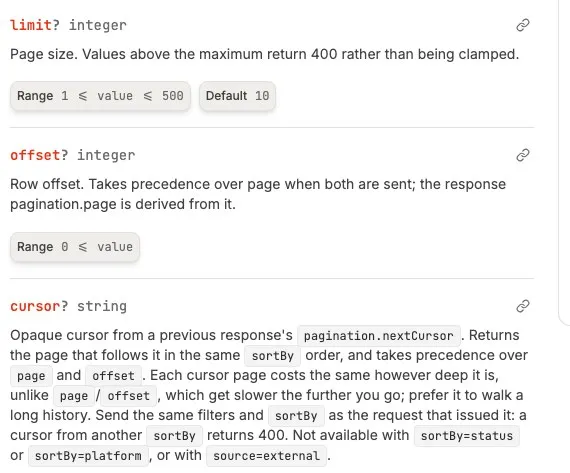
Disconnecting deletes an account’s analytics, so save them first. Zernio’s GET /v1/analytics returns post stats for a date range of up to 366 days, starting 90 days back unless you set fromDate. It pages at 50 posts by default and 100 at most, so page through every range you care about. Blotato doesn’t import analytics, so that file is your record.
Capture recycling next. For every post with recycling on, save the whole post, including its recycling settings and its state: nextRecycleAt, recycleCount and contentVariationIndex. nextRecycleAt is when Zernio would create the next copy, and the interval sets the dates of the rest. Note which of those posts also target accounts staying on Zernio, because Step 6 switches recycling off and those accounts will need their copies another way.
Step 2: Pair every Zernio destination with a Blotato one
Sign each account in to Blotato separately, since no connection carries over from Zernio. Instagram has to be a professional Business or Creator account.
Pair destinations as well as accounts. With no pageId, a Zernio Facebook entry posts to the default Page. With no organizationUrn, a LinkedIn entry posts to the default organization or the personal profile. With no boardId, a Pinterest entry uses the first available board.
Blotato requires a Facebook pageId and a Pinterest boardId, and it sends a LinkedIn post with no pageId to the personal profile. Resolve each of those defaults in Zernio before you rebuild, and connect LinkedIn Pages as their Super Admin or Content Admin.
If your app drops posts into Zernio’s queue, recreate its weekly slots in Blotato’s calendar. Zernio’s slots keep their local time through daylight saving changes. Blotato stores slots in UTC, so a slot can shift an hour of local time when the clocks change.
Step 3: Stop new posts from reaching Zernio
Porting only matters if your own code calls Zernio. If it does, rewrite each call against the field map further down while your app keeps publishing through Zernio. Names from Zernio’s days as Late still turn up, such as LATE_API_KEY in its CLI and the X-Late-Signature webhook header.
Test each kind of post your app sends, such as a Page post, a thread and a TikTok, with a time two days out. Look each test up with blotato_list_schedules, cancel it with blotato_delete_schedule, and look again to confirm it’s gone.
To freeze Zernio, point your app at Blotato for the moving accounts, timing every new post at or after the cutover. Switch off anything else that adds posts for those accounts: another agent, a CSV bulk upload, or a flow in n8n, Make or Zapier. If your app acts on Zernio’s webhooks, plan for Step 6. A disconnect sends account.disconnected at once, and the cleanup an hour later sends post.cancelled for each post it cancels.
Step 4: Export everything that can still publish
This script writes the accounts and every post that can still publish into a fresh folder. It stops on any failed call. It needs curl, jq and a read-only key. POST /v1/api-keys mints one when you set "permission": "read", which limits the key to GET requests.
#!/usr/bin/env bash
set -euo pipefail
: "${ZERNIO_API_KEY:?export ZERNIO_API_KEY first}"
get() { curl -fsS -H "Authorization: Bearer $ZERNIO_API_KEY" "https://zernio.com/api/v1$1"; }

dir="zernio-export-$(date -u +%Y%m%dT%H%M%SZ)"
mkdir "$dir"
cd "$dir"

get "/accounts?includeOverLimit=true" > accounts.json
jq -e '.accounts | type == "array"' accounts.json > /dev/null

for status in scheduled publishing partial; do
  cursor=""; page=1
  while :; do
    out="$status-$page.json"
    get "/posts?status=$status&limit=500&sortBy=scheduled-asc${cursor:+&cursor=$cursor}" > "$out"
    jq -e '.posts | type == "array"' "$out" > /dev/null
    cursor=$(jq -r '.pagination.nextCursor // empty | @uri' "$out")
    [ -z "$cursor" ] && break
    page=$((page + 1))
  done
done
From the publishing and partial files, only entries still marked pending get copied. Entries in any other state go on a list for you to decide. Posts that failed outright aren’t in these files, so pull status=failed the same way if you want them. Put drafts into a file of their own for rebuilding by hand.
Then download every media file the queue points to, covers and thumbnails included, and note which entry and field each belongs to. The accounts file gives each account’s username for pairing.
YouTube needs its own list, made now that nothing new reaches Zernio. A video Zernio already uploaded can read as published there, so it may be missing from the export. Open YouTube Studio and list every private video with a scheduled release, with its video ID and release time.
Mark each one kept or replaced. A kept video stays on YouTube, which releases it on time, and it gets no Blotato copy. Zernio’s docs and schema disagree on whether a YouTube first comment goes up at release or right after upload. Check each kept video once its account is disconnected, and add and pin the comment if it’s missing.
A replaced one gets rebuilt in Blotato from your original video file, since YouTube Studio’s own download gives only 720p or 360p. That file has to fit Blotato’s upload limit, 400 MB on Starter and 1 GB on Creator or Agency. Its YouTube release comes down only after that copy reads scheduled.
If a listed video also turns up in the export, its list line decides what happens to it. The export entry gets no Blotato post of its own.
Step 5: Give each platform entry its own Blotato post
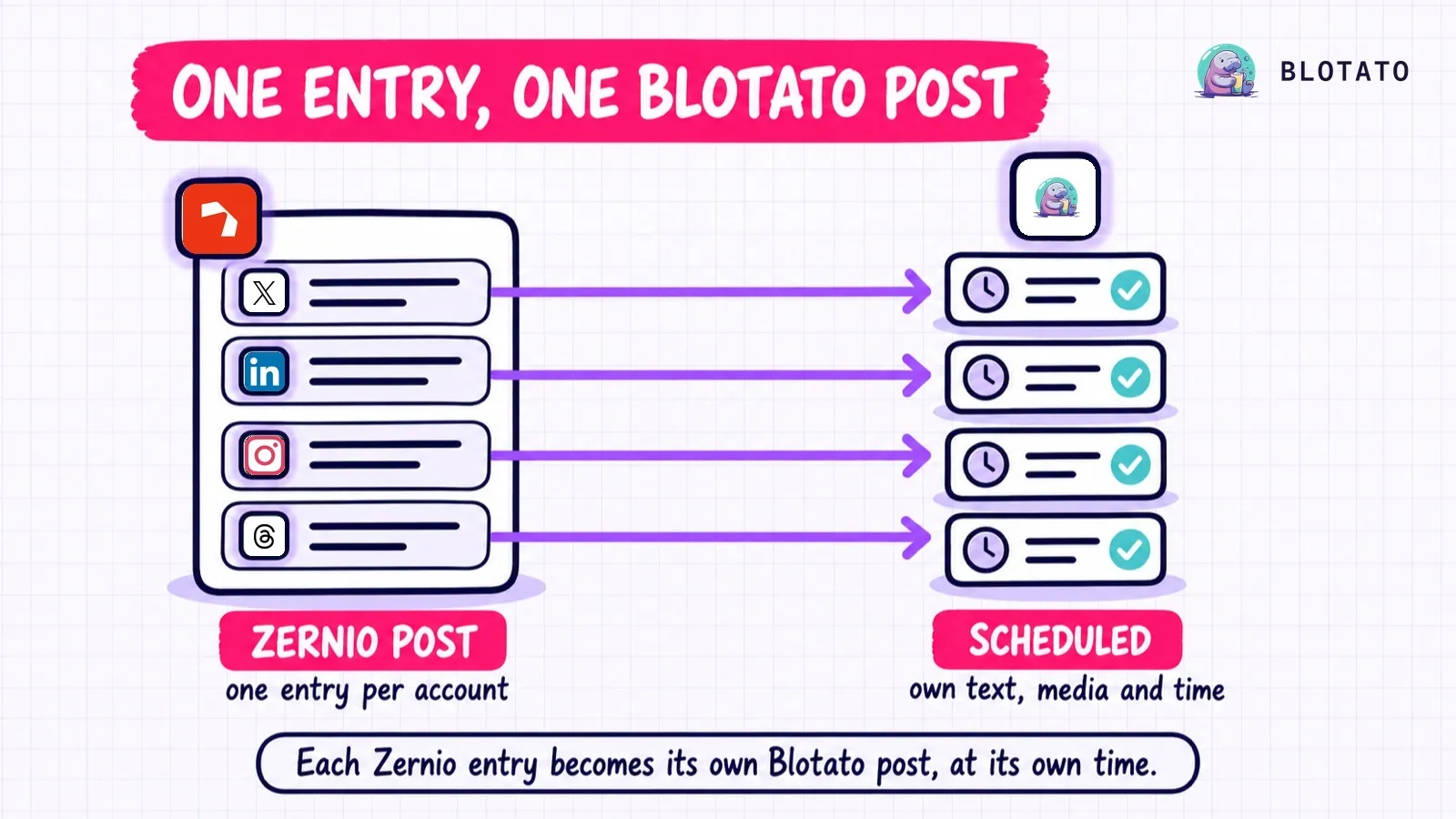
A Zernio post holds a platforms array with one entry per account. Each entry can carry its own text, media, time and settings. Blotato’s create call takes one account and one platform, so each entry becomes its own post.
A thread maps part by part, since Zernio never publishes a thread’s top-level content. Each threadItems part brings its own content and mediaItems. The first becomes the post’s text and media, and the rest become additionalPosts.
Outside threads, an entry’s customContent wins over the post’s content, and its customMedia over mediaItems. An entry’s own scheduledFor wins over the post’s too, so a single post can straddle the cutover.
Send that time as scheduledTime, including for posts that came from Zernio’s queue, so each keeps the slot it already holds. Over MCP, blotato_create_post takes the same settings as flat fields, pageId and privacyLevel included.
For media, blotato_create_presigned_upload_url returns an upload URL and a public URL for each file. PUT the file with its Content-Type, and once that succeeds, put the public URL in mediaUrls. An Instagram cover goes in coverImageUrl and a YouTube thumbnail in thumbnailUrl, and any other cover image has no Blotato field.
Check remaining capacity before you create anything. Starter’s scheduled queue holds 200 posts, Creator’s 1,000 and Agency’s 3,000, counting what’s already scheduled, none more than 9 months out. 24-hour caps apply on top on the platforms that have them, so count entries when you choose a Blotato plan.
Blotato’s create endpoint takes 30 requests a minute, so plan on 20 minutes or more for every 600 entries. Poll each postSubmissionId until it reads scheduled before you count that entry as done.
Step 6: Cut over account by account
Check your saved queue against Blotato entry by entry before you disconnect anything.
Then, right before each disconnect, list that account’s Zernio posts again and look through YouTube Studio. Anything new that isn’t a recycled copy already on your dated list delays that account. Every entry due at or after the cutover needs a Blotato post that reads scheduled, or a drop you approved. Each Blotato post also needs the right account, time, text, media and settings.
An account that isn’t ready, or runs out of time, gets a later cutover. It keeps publishing from Zernio, so delete its Blotato copies of every post Zernio will now publish before each copy’s time arrives. Confirm each deletion with blotato_list_schedules.
Disconnect a ready account in the gap between its last Zernio post and its first Blotato one. For each YouTube release marked replaced, confirm its Blotato copy reads scheduled, then delete the release in YouTube Studio before its time. Look through Studio once more after the disconnect for anything you missed.
At the cutover, switch recycling off on every recorded post that targets a moved account, through Zernio’s update call. If one also targets accounts staying on Zernio, those accounts need their future copies another way. Dated Zernio posts can cover the occurrences Zernio hasn’t already cloned. Copies due more than 9 months out don’t fit in Blotato’s queue yet, so keep a dated list and add them as the window reaches them.
Anything Zernio still runs for you, from ads to WhatsApp to accounts you’re keeping there, stays connected. When the move is done, revoke the keys you created only for it, the read-only one included, with DELETE /v1/api-keys/{keyId}. Keep any key that still serves accounts staying on Zernio.
Zernio Fields and Their Blotato Names
Step 3 ports your code against this map. Every Zernio setting and every default Zernio fills in either maps, gets dropped with your OK, or blocks its entry until you decide. Every field Blotato requires needs a value.
| Zernio | Blotato | Note |
|---|---|---|
A platforms[] entry | One create call | The entry’s customContent, customMedia and scheduledFor win over the post’s |
platforms[].accountId | accountId from GET /users/me/accounts | Pair by platform, username and Page |
platforms[].platform | content.platform and target.targetType | Same names on all 9 shared platforms |
scheduledFor | Top-level scheduledTime | Leaving it off, or putting it inside post, makes Blotato publish on the spot |
queuedFromProfile | useNextFreeSlot: true on new posts | Never sent with scheduledTime. Existing entries keep their time |
threadItems on X, Threads or Bluesky | content.text and content.mediaUrls, then content.additionalPosts[] | Each part keeps its own media, though a Threads post in Blotato takes one image or video. threadItems[0] is the first post |
firstComment | target.firstComment | Instagram and Facebook posts and reels only |
Facebook pageId | target.pageId | Required in Blotato. Resolve Zernio’s default Page first |
Instagram or Facebook contentType | target.mediaType | A story stays a story, with empty text on Instagram. Other Facebook videos go out as reel |
Instagram instagramThumbnail (or its alias reelCover) | target.coverImageUrl | Re-host the image first |
LinkedIn organizationUrn | target.pageId | Swap the URN for the Page ID from Blotato’s subaccounts call. Without one, Blotato posts to the personal profile |
Pinterest boardId | target.boardId | Required in Blotato. Zernio falls back to the first board |
YouTube visibility, notifySubscribers, madeForKids, playlistId | target.privacyStatus, target.shouldNotifySubscribers, target.isMadeForKids, target.playlistIds | target.title is required too. categoryId has no Blotato field |
TikTok allowComment, allowDuet, allowStitch | target.disabledComments, target.disabledDuet, target.disabledStitch | Invert each value, and decide any that are missing |
TikTok commercialContentType, isBrandOrganicPost, brandPartnerPromote, videoMadeWithAi | target.isYourBrand, target.isBrandedContent, target.isAiGenerated | brand_organic sets isYourBrand and brand_content sets isBrandedContent, unless an override flag says otherwise. privacyLevel is required |
TikTok draft | target.isDraft | The only draft flag Blotato’s API takes. Other Zernio drafts, Facebook’s included, get rebuilt in Content Studio |
X or LinkedIn poll | None | Blocks the entry |
Idempotency-Key header | None | Search blotato_list_schedules before any retry |
post.published and post.failed webhooks | GET /posts/{postSubmissionId} | A future post is done at scheduled |
recycling | None | Each copy becomes a dated post from Step 1’s record |
Authorization: Bearer key | blotato-api-key header | Requests go to https://backend.blotato.com/v2 |
Handing the Copy to an Agent
An agent can do Step 5 from your export folder through Blotato’s MCP server at mcp.blotato.com/mcp, on any paid Blotato plan. Zernio’s server at mcp.zernio.com/mcp is optional for lookups, signed in with OAuth or your API key as a Bearer token. The prompt keeps it read-only.
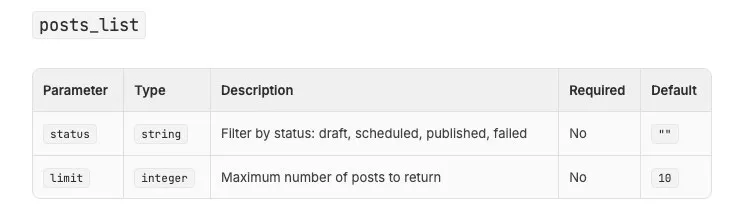
Zernio’s MCP tool reference keeps about 50 tools visible and the rest behind search_tools. Its visible list tool can’t page through a full queue, so the prompt works from Step 4’s files.
Copy my Zernio queue into Blotato.
Cutover: [CUTOVER, UTC]. Moving: [ACCOUNTS]. Everything else stays.
Export folder: [zernio-export-...], from a single export run.

NEVER
- Write to Zernio in any way: no create, update, delete, disconnect.
- Create a Blotato post without a top-level scheduledTime at or after
  the cutover, or with useNextFreeSlot.
- Resend a row whose outcome is unknown. Bring it to me.

DEADLINE
- Once [CUTOVER] is under 30 minutes away, create nothing more. List
  every Blotato post already created whose Zernio original will still
  publish, so I can delete them.

INPUTS
- scheduled-*, publishing-*, partial-*.json (pending entries only),
  accounts.json, my recycling record, my YouTube release list.
- zernio-blotato-log.csv, if it exists. Recheck every logged row in
  blotato_list_schedules first, verified ones included. A deleted
  copy gets logged as cancelled.

MANIFEST (bring it to me before any create)
- Row ID = Zernio post ID + platform + account + scheduled time, so
  each recycled copy gets its own row. Match exported copies to their
  source through recycledFromPostId so no copy appears twice. Copies
  past 9 months go in the report as deferred, not into Blotato.
- Threads map part by part: each threadItems part's content and
  mediaItems. Otherwise text is customContent, else content. Empty
  text for Instagram stories. Media, covers and thumbnails,
  each with its Blotato field.
- Destination: Blotato account plus pageId or boardId.
- Every Zernio setting, Zernio default and Blotato-required field:
  mapped, dropped with my OK, or blocking. Blocking rows never get
  created.
- One line per YouTube release on my list. Match each release to its
  export entry by video ID (platformPostId) where the entry has one,
  else by account and release time. Bring me any match that isn't
  unique. A matched entry follows the list line and gets no other
  row. Kept: no Blotato row.
  Replaced: a row built from my original video file, and tell me once
  it reads scheduled so I can delete the YouTube release.
- Totals against free queue space, connected accounts, the 9-month
  limit and Blotato's 24-hour posting caps. Any file over my plan's
  upload limit blocks its row.

RUN (once I approve)
- Re-host media through blotato_create_presigned_upload_url, PUT with
  the right Content-Type, check the response, log old -> new URL.
- Log the row and its full payload as "sending", create it, then log
  the postSubmissionId straight away.
- Pilot with the earliest row only, then wait for my OK. After that,
  no more than one create every two seconds.

STATUS MEANINGS (blotato_get_post_status)
- scheduled: find it in blotato_list_schedules, compare every field
  with the row's payload, then log it as verified with its schedule ID.
- failed: log errorMessage and move on.
- published while the row's time is still ahead: stop the run and
  tell me.
- still in progress after five minutes, checked once a minute: unknown.
  Every unknown gets settled or cancelled before its scheduled time.
  An empty schedules list doesn't prove it won't post. Bring me its
  ID and payload.
- no postSubmissionId came back: compare every blotato_list_schedules
  page against the row's full payload. A single exact twin gets logged
  as verified. Zero or several twins: unknown.

FINISH
- A report listing every row as verified, dropped, blocked, failed,
  unknown, cancelled or deferred. For any account with failed, unknown or blocked rows,
  list its Blotato posts, because that account's cutover has to move.
Zernio to Blotato FAQs
How do I get my scheduled posts out of Zernio?
Through GET /v1/posts, since Zernio documents no endpoint that exports posts and its posts CSV feature is a bulk upload. Each platform entry carries its own status and can carry its own time, and Zernio’s docs don’t say which post status a part-sent post shows. Pull scheduled, publishing and partial, then copy any entry still marked pending.
Why does my agent only see 10 Zernio posts?
Zernio’s always-visible posts_list tool returns 10 posts by default and has no page parameter. search_tools can find the full list-posts tool, but a saved export is steadier, because the queue keeps changing while an agent reads it live. Give the agent your Step 4 folder and let the prompt keep its Zernio connection read-only.
Can I keep some accounts on Zernio and move the rest?
Yes, if you disconnect only the accounts you move to Blotato. Say a launch post was set for X and Telegram and you moved X. Once X is disconnected, Zernio drops the X entry and still sends the Telegram one.
Will Zernio still publish a YouTube video after I disconnect?
Zernio’s docs don’t cover it. They do say YouTube, not Zernio, holds the release time of a scheduled public video Zernio has already uploaded. YouTube releases it unless you delete it there, even one you’ve rebuilt in Blotato. Check any you keep for their first comment.
How do I stop paying for Zernio?
Copy and verify your queue first, since a disconnect cancels posts aimed only at that account an hour later. Then disconnect, and each account drops out of the next daily billing count. Release phone numbers, cancel iMessage senders and deactivate RCS agents, since those bill monthly.
X API calls, active ads past 500 and outbound messages past 10,000 a month meter separately, even within Zernio’s two free accounts. How Zernio’s per-account rate adds up has the full ladder.