How to Build a Faceless Video Factory With AI (Viral Videos)
How to build a faceless video factory with AI: turn one topic into 4 platform-native videos, track cost per platform, and auto-publish with Blotato.
Most people picture a faceless video factory as one app that spits out generic clips. The system Till Oberhammer built is the opposite of that.
Till is an AI consultant in Europe who built a fully custom faceless video system called Optimus Flow. It takes one topic, turns it into four platform-native videos, and runs a nightly loop that learns what works and rewrites its own prompts. He built it with no engineering background, and Blotato handles the rendering and publishing so the rest of the system can focus on content and learning.
I sat down with him to walk through the whole thing, and it’s the most complete creator setup I’ve seen for solo operators and small agencies. Most guides on this topic stop at “pick a niche and use a TTS tool.” This one goes deeper: the architecture, the cost tracking per platform, and the self-improving part that almost nobody builds.
Inside a Faceless Video Factory (Video Guide)
If you’d rather watch, this is the full interview with Till walking through Optimus Flow live. The written guide below covers the same build with extra detail on the stack, the cost math, and the nightly learning loop.
Why Most Faceless Video Systems Stay Generic
Till’s background is not social media or marketing. He came to this as an automation person who wanted a presence online as a solopreneur. That gap is exactly why his system is good.
He noticed the same thing I hear from creators every week. If you do not have feedback loops, you are guessing what works. And if you post the same video to YouTube, TikTok, Instagram, and Facebook, it flops, because each platform has a different audience and different expectations.
So he set two rules from the start. The output should not look generic, and the system should improve itself instead of relying on him to guess. He took one topic, transformed it into four platform-native videos, and wired a metrics-driven loop around it.
The Stack Behind the Faceless Video Factory
Here is the toolset Till used. It is leaner than most people expect.
- Claude Code built the entire application. Till is not a developer and has no engineering background, so the whole platform was coded conversationally.
- Gemini handles the creative writing parts, which Till found stronger there than other models.
- KIE AI generates the images, chosen because the per-image cost is very low and he was tracking spend obsessively.
- Blotato sits at the core for rendering, publishing, and even some of the animations.
Till’s stack is custom, so the picks are his. If you are assembling your own and want the off-the-shelf options at each stage, here are the best AI tools for faceless content grouped by the manual step they remove.
That last one is why this was fun for me to see. I’m involved with Blotato as a creator and tester, so take this with whatever grain of salt feels right. Till picked it for a practical reason: one platform that connects many accounts across many social networks at a low price point. He compared it to Buffer while doing his own research and found Buffer at around 80 dollars a month for 20 social accounts.
If you want to test the publishing layer Till leans on, the cleanest way is to start a free 7-day Blotato trial, connect your accounts, and push one AI-generated video to four platforms. The publish-and-render step is the part of any faceless build that breaks most often when people wire it up themselves, and it’s the exact piece Optimus Flow hands to Blotato so the rest of the system can stay focused on content and analytics.
Off-the-Shelf Generator vs Custom Factory
The honest question is whether you even need a custom build. Here is how Till’s approach compares to a typical all-in-one faceless generator.
| What you care about | All-in-one generator | Custom factory (Optimus Flow) |
|---|---|---|
| Output style | One locked look | Brand-specific worlds, colors, cameo |
| Platforms per topic | Usually one format | Four platform-native videos from one topic |
| Cost visibility | Bundled, opaque | Cost per video, per view, per platform |
| Learning | Manual A/B testing | Nightly self-improving loop |
| Agency use | Single account | Multi-client with shared or separate keys |
If you only run one channel and you are fine with a single style, an all-in-one tool is faster to start. The custom factory earns its keep once you care about per-platform performance or you run content for clients. If you have already built a single-platform version like a faceless YouTube Shorts workflow, this is the same idea scaled to four platforms with a learning layer bolted on.
Inside the Faceless Video Factory (Step-by-Step)
Here is the end-to-end journey Till walks through, from a blank brand to published videos with analytics.
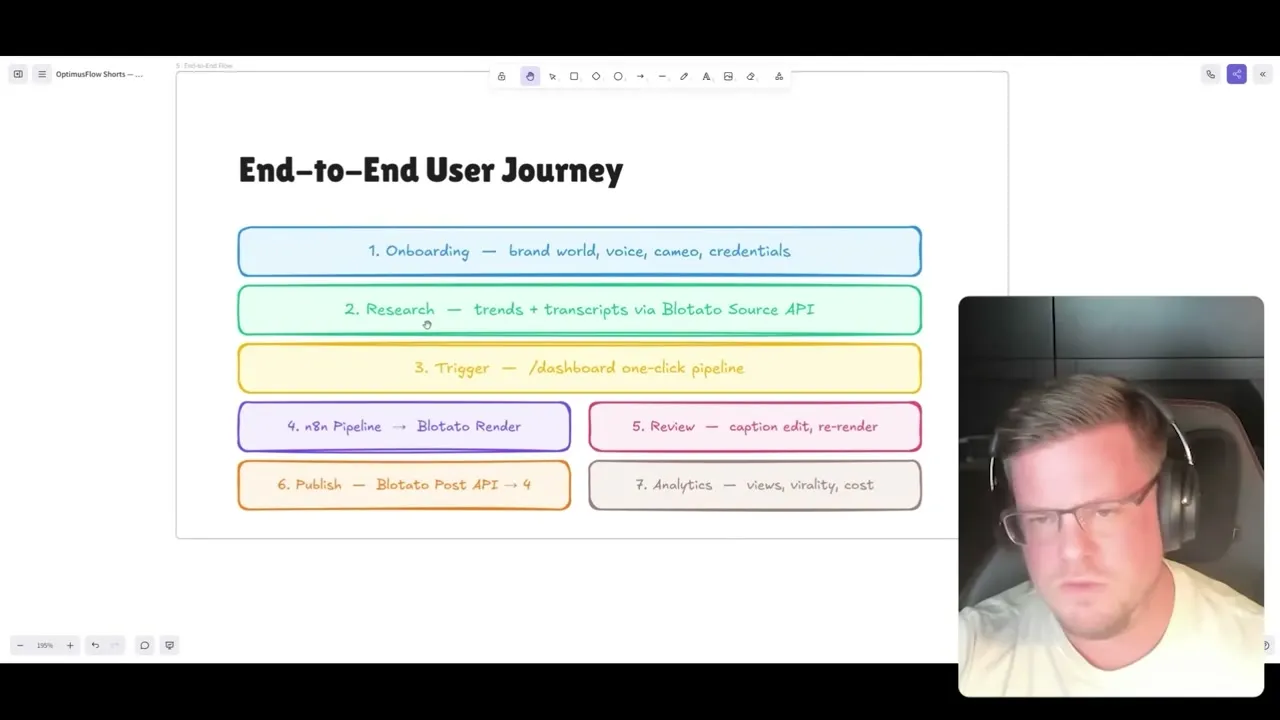
Step 1: Build the Brand World
First-time users run a quick wizard. You choose your niche, the platforms you want to publish on, and your language. Then you drop in samples so the system understands how your posts sound.
For deeper setups, some clients have full brand booklets. They throw the whole brand kit in, and the system pulls everything out and adjusts the visual style, the voice, and the complexity automatically.
Step 2: Set Voice, Cameo, and Guardrails
You pick a voice for the narration. Till noted English voices are excellent out of the box, while German pronunciation is harder to get right.
Then there is the cameo, which is an on-screen character. Till just used himself in the opening scenes. He mentioned a creator who uses a little animated monkey in every video, so the audience recognizes her instantly. Guardrails come last: brand safety rules, competitor mentions, disclaimers, and any restrictions a regulated niche needs.
Step 3: Trigger the Pipeline From the Dashboard
From the dashboard, you paste a YouTube URL or research input and run the pipeline. You can also paste raw text or a PDF when scraping fails to pull a transcript.
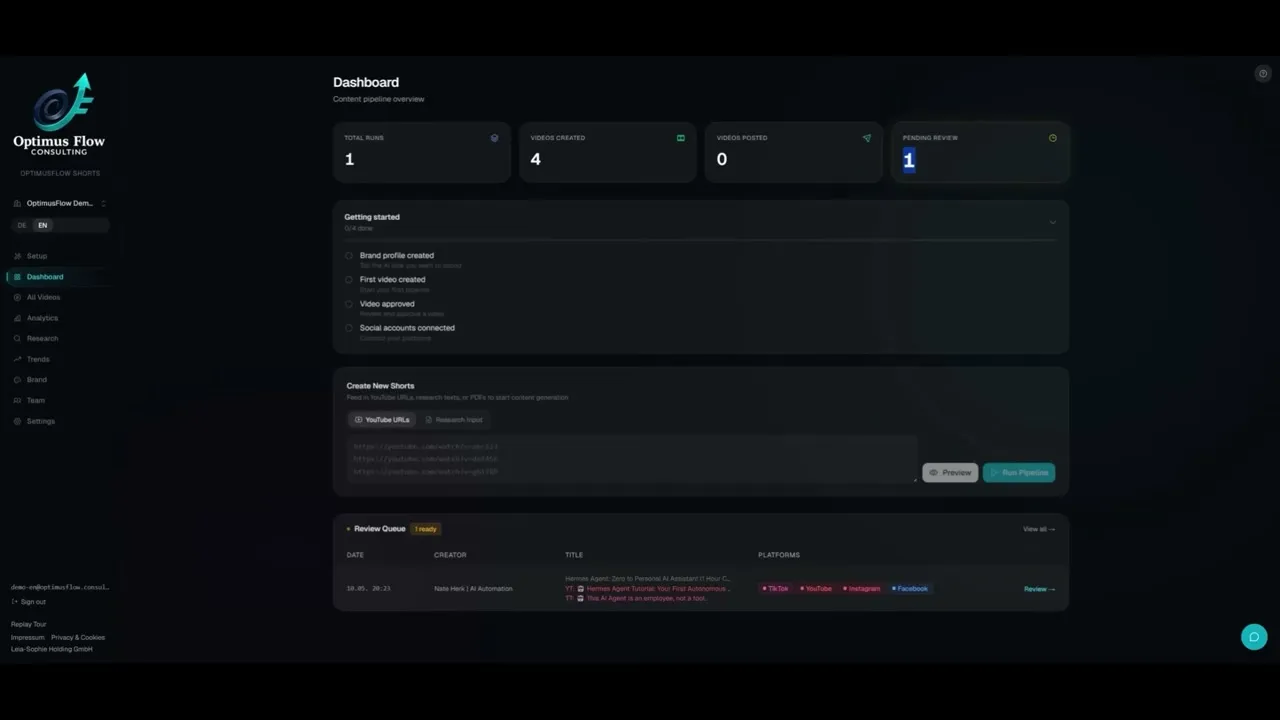
Step 4: Let the Pipeline Run
In the background, the n8n workflow takes over. It scrapes the transcript through Blotato, decides the format (explainer, short, or deep dive), generates the images through KIE AI, and sends them to Blotato to render one video after another.
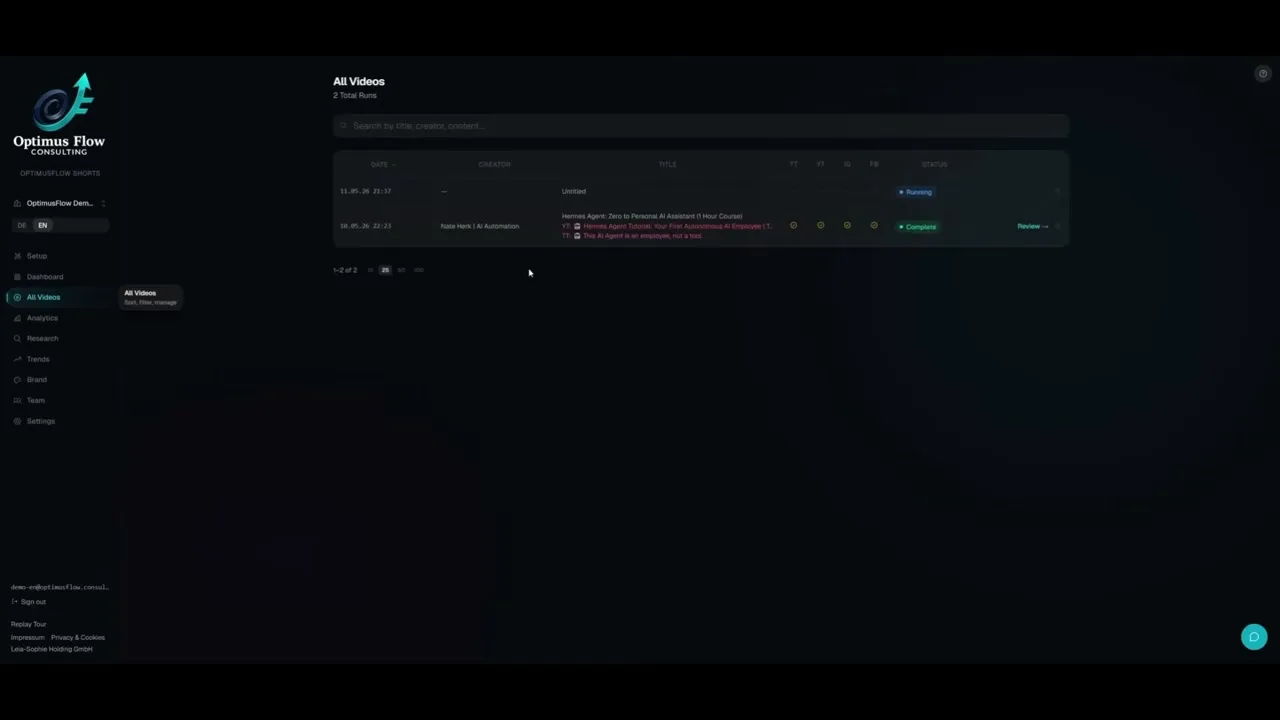
Step 5: Review and Publish
When a run finishes, you open the review screen. Every scene is laid out with its caption, the platform-specific text, and tags. You can edit a caption or re-render an individual scene if a generated image is off.
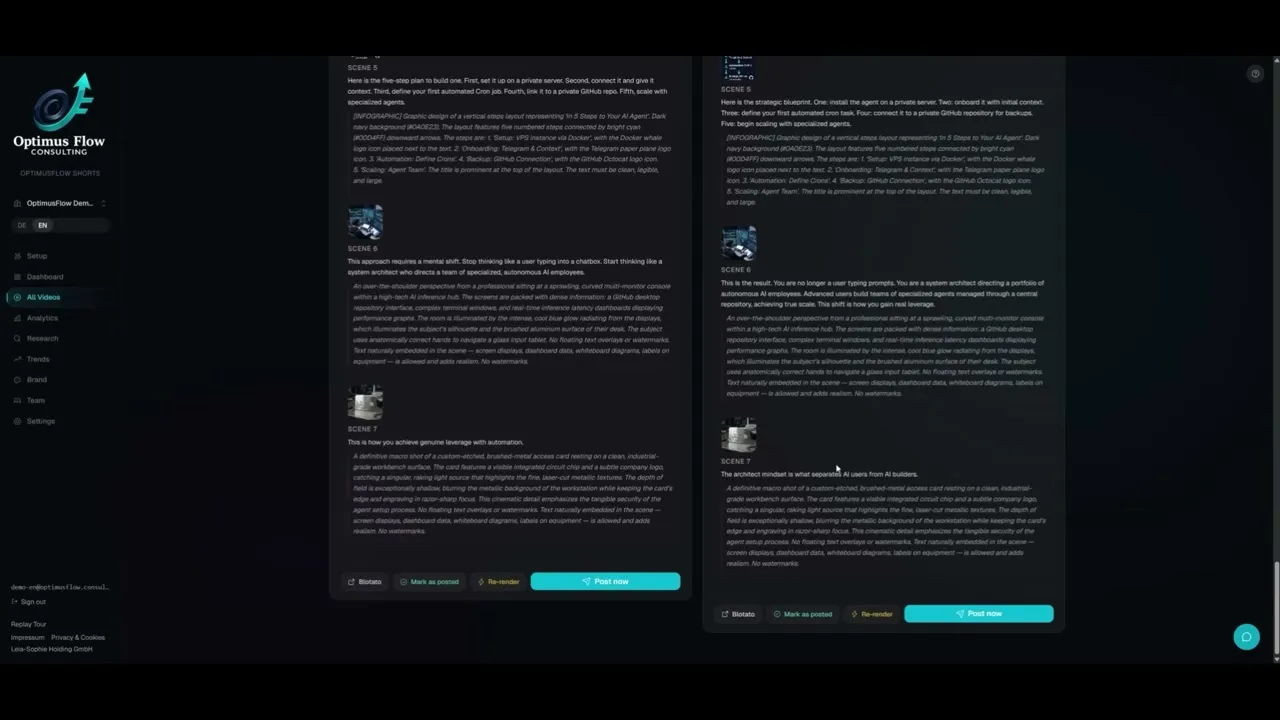
Publishing goes back out through Blotato. After posting, Till can even push the generated caption and tags straight into the YouTube description.
The Self-Improving Loop
This is the part that sets the build apart. Most faceless systems never close the loop.
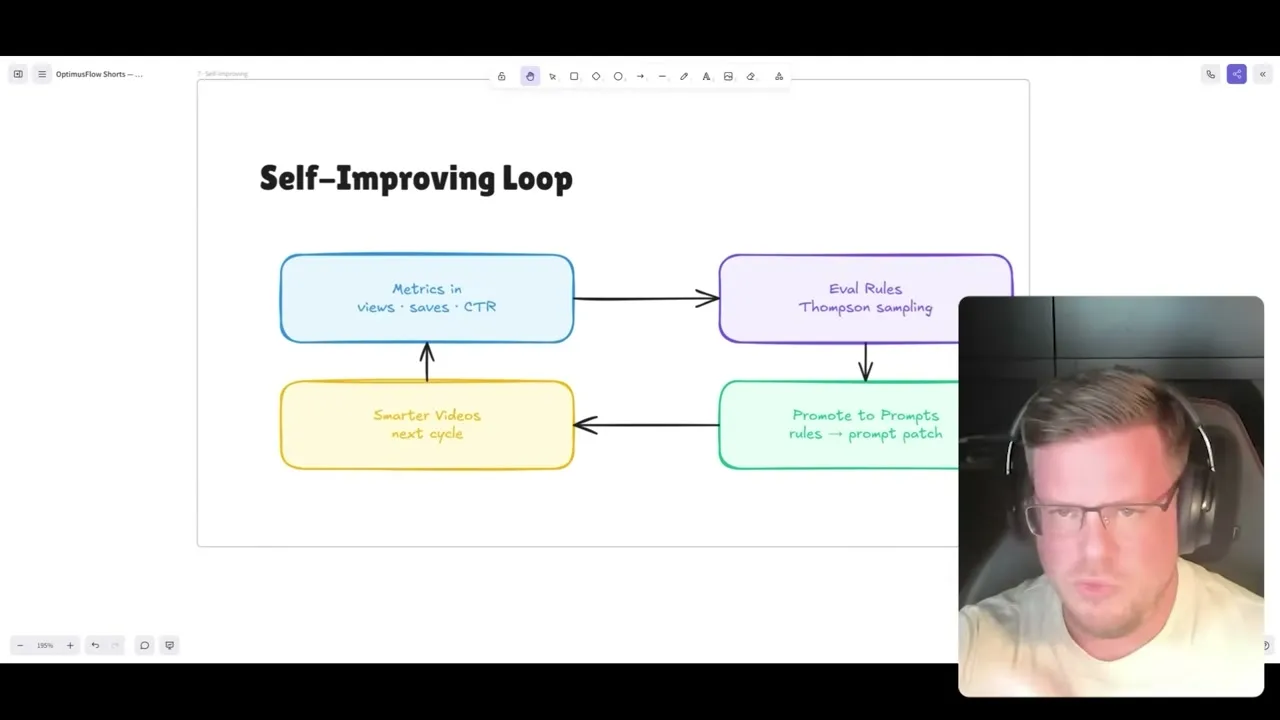
Every night, the system checks all published videos. It looks at views, saves, and click-through rate, then runs Thompson sampling in the background to understand what is working. It identifies candidate changes, promotes them into the prompts, and produces better videos over time. It also keeps some randomness so a single lucky topic does not skew the whole model.
The analytics make this concrete. Till tracks cost per video, per view, and per platform, plus a reality score broken down by platform so a strong TikTok number does not unfairly bury Instagram.
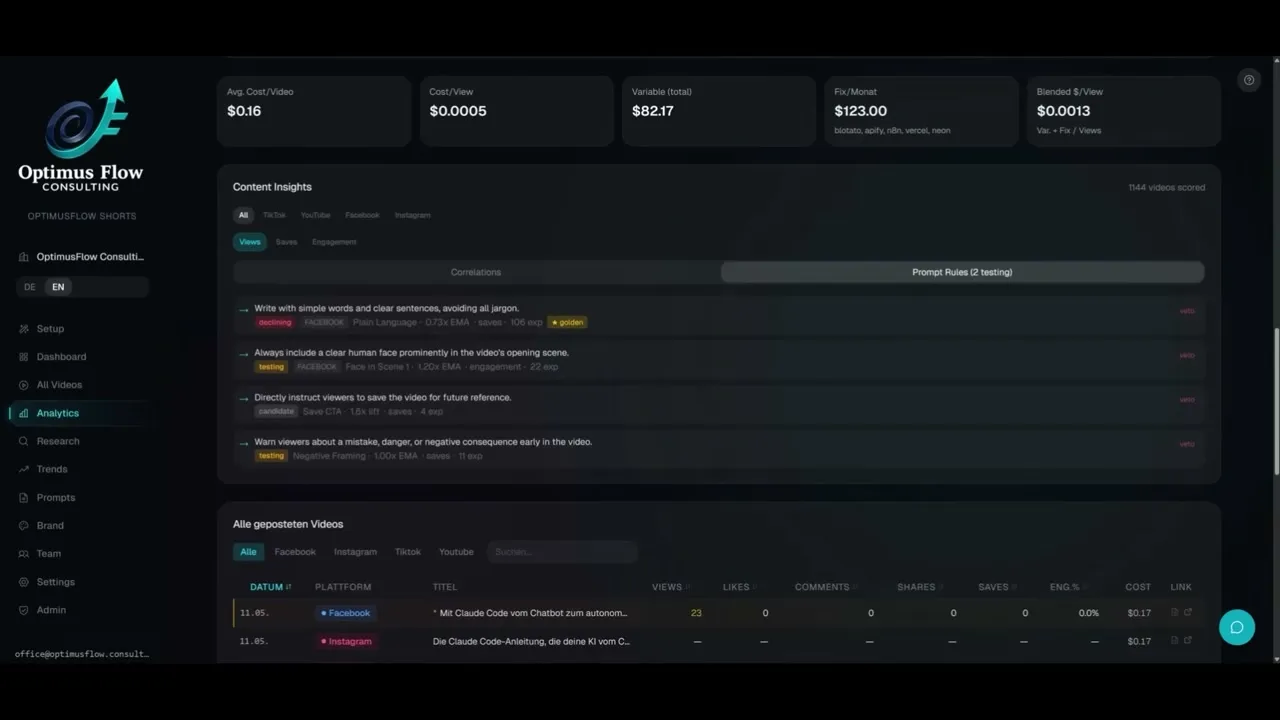
The insights get specific. Plain language hurt performance on one platform but a question in the hook lifted YouTube. Keyword overlays and a loop bridge, where the end of the video flows back into the beginning, both tested as strong positive signals.
Pro Tips From the Build
Match complexity to your audience, not to a default. Till found plain language wins on Facebook, but a technical niche performs better when the system stops simplifying. He had early videos nobody understood until he tuned this.
Track cost per platform, not just overall. Because TikTok often outperforms everything, a blended number hides which platform is actually losing money. Per-platform cost per view tells you where to spend.
Use carousels when video cost is too high. You do not have to generate AI video for every post. Till noted you can run carousels with no AI images or video to keep spend down, or blend a few AI clips with your own assets.
What This Workflow Can’t Do (Yet)
This is a custom build, so the honest limits matter. Running all four platforms as fully individualized videos got too expensive for a simple experiment, so for himself Till makes one video with the scenes and swaps only the voiceover and the post text per platform. Full per-platform individualization is something he reserves for paying clients.
Voice attribution is also imperfect. Till wanted to know if the chosen voice affects watch time, but the loop cannot cleanly isolate that without running the same video with two voices. And non-English pronunciation, German in his case, still needs manual checking because the standard voices are not always accurate.
Results You Can Expect
The payoff Till cares about is presence. He told me that if you Google his name now, a lot of his YouTube videos come up, not from going viral, but from steady volume across indexed platforms. He has also run real client work on it, including explanatory videos for foundations that summarize medical papers so patients can understand them in seconds. The system has scored over a thousand videos and reports cost per video around 16 cents, which is the kind of number you only see when every image and render is tracked.
Sabrina’s Final Take
I love this build because it answers the question I get most: how do I actually know what to make better? Till’s nightly loop does that automatically, and he wired it together with no engineering background using Claude Code, Gemini, KIE AI, and Blotato. You do not need to clone Optimus Flow to benefit, you need the same instinct: one topic, platform-native outputs, and a feedback loop you trust. If you want the publishing and rendering layer that makes the rest of it possible, every Blotato plan is built for exactly this kind of multi-account, multi-platform workflow.
Faceless Video Factory FAQs
What is a faceless video factory?
It’s a system that turns one topic into multiple platform-ready videos without you appearing on camera for every clip. Till’s version adds research, brand customization, rendering, publishing, and a nightly analytics loop, all wired together rather than handled by one app.
Do you need to be a developer to build one?
No. Till has no engineering background and built the entire Optimus Flow platform with Claude Code, coding it conversationally. The harder skill is taste and tuning the prompts, not writing code by hand.
How much does it cost to run per video?
In Till’s setup, cost per video runs around 16 cents, with image generation through KIE AI kept deliberately cheap. He tracks cost per video, per view, and per platform so the spend stays visible instead of bundled into an opaque subscription.
Can you use this for an agency with multiple clients?
Yes. The build supports separate clients underneath one system, with the option to share API keys across them or give each client an individual setup. Analytics and cost tracking are also broken down per client.
Why publish through Blotato instead of each platform’s API directly?
Wiring up each platform’s posting API yourself is the part that breaks most often, especially the approval hoops on TikTok. Blotato connects many accounts across many networks at one low price, which is why Optimus Flow hands the render and publish step to it.