How to Sell on Instagram: Social Media DMs That Get Customers
How to sell on Instagram with social media automation: posts that start conversations, DMs that send the right link, and how to get more customers.
Learning how to sell on Instagram, once your posts get views, comes down to one habit most business accounts skip: ending each post with a reason to message you, then replying in the DM with the exact link that person needs. My reel that brought in the most revenue had around 200,000 views. My biggest reel, at over 4 million, mostly brought followers.
If you own a salon, a product brand or a consulting practice, or you run Instagram for clients who do, this is how to get more customers on Instagram, from a stranger watching your Reel to a booking or an order.
Key takeaways
- On my 4-million-view reel, 80% of viewers did not follow me. Your best posts are often seen mostly by strangers, so the call to action has to work for someone who just met you.
- A keyword comment that triggers a DM puts the right link in front of a person without asking them to visit your profile.
- Match what the DM sends to how you sell: a booking link, a product page, a guide, or a local perk.
- DM automation needs posts that already get views. Get the views first.
- Judge it on comments, completed DMs and paying customers.
How to Sell on Instagram and Get More Customers With DMs
The conversation path has four handoffs, and a business can lose people at each one:
- Seen. The post reaches people who don’t follow you yet.
- Started. Something in the post gives them a reason to comment or message you before they scroll on.
- Answered. A DM gives them the standard answer to the question they asked (price, how to book, shipping) with one link.
- Closed. They book or buy, through the DM’s link or after a quick reply from you or your team.
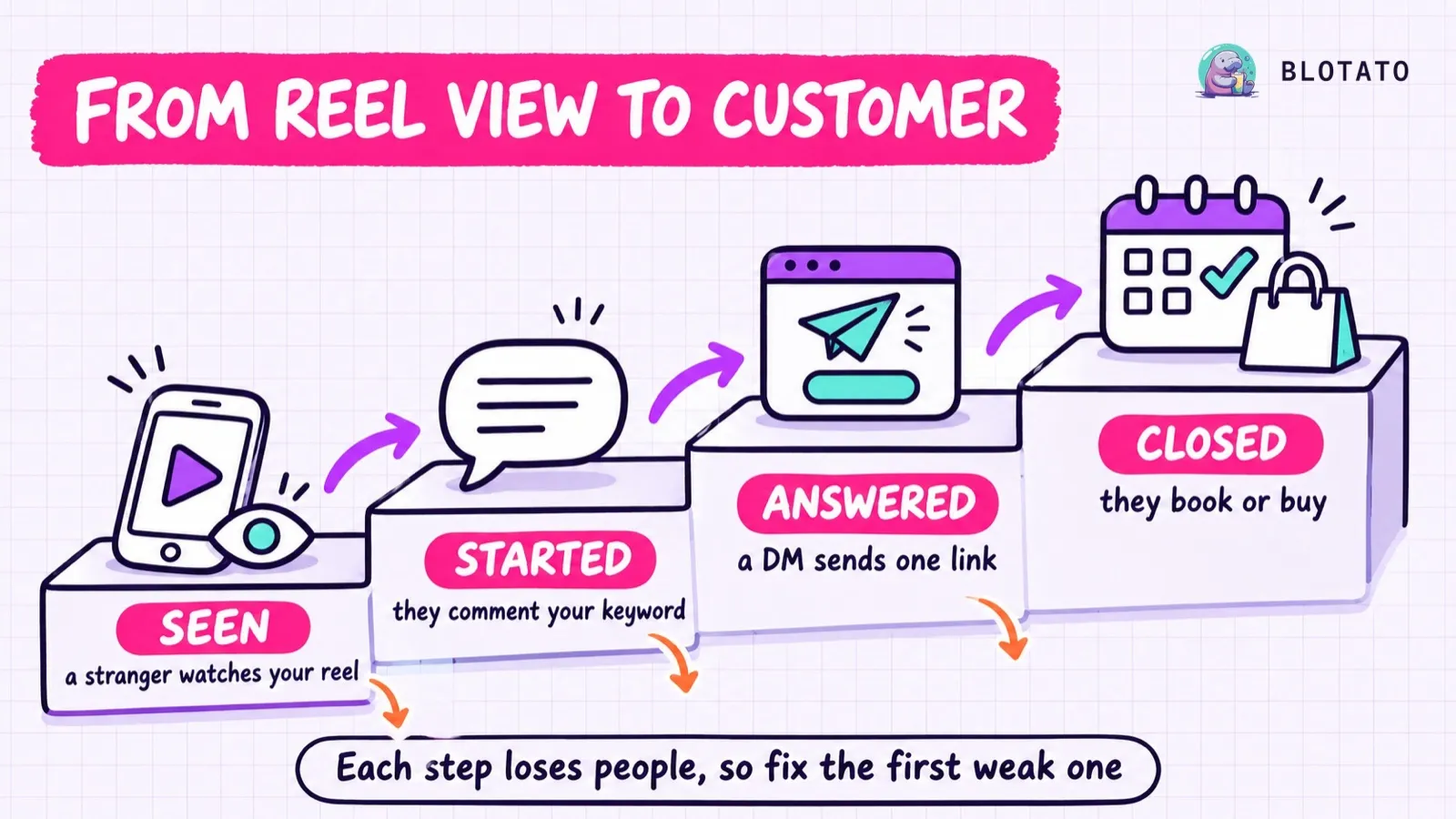
Each step loses people, so fix the first weak one before you touch the next. The numbers table further down shows how to find it.
Product tags and a bio link can skip the middle two steps. For services and bookings, those two steps are where viewers turn into leads.
Step three is the one I automate. When someone comments a keyword, Blotato sends the DM with the link and posts a short public reply under the comment, whether I am awake or not. Full disclosure: I built Blotato and still run it, so I am biased toward the tool that handles this step.
If your posts already get views and you can’t keep up with the DMs, you can start a 7-day Blotato trial and set up your first keyword reply in the web app. A card is required, you can cancel anytime, and the trial includes every web app feature except the API and MCP.
Why Don’t Views Turn Into Customers?
Most viewers have no relationship with you yet, and a follow button asks them for one. On my reel that passed 4 million views, 80% of the viewers were not followers. It asked people to comment a keyword, and over 100,000 did, which grew my Instagram by 100,000 followers. It did not bring direct revenue.
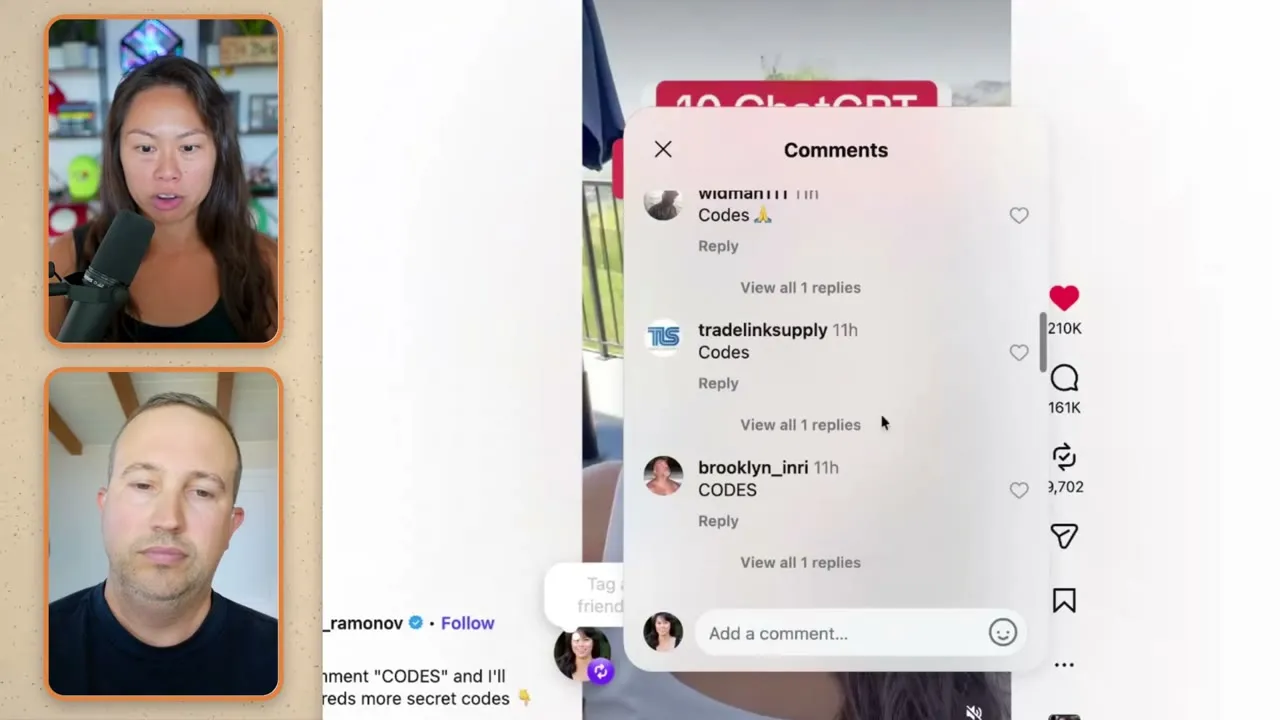
A different reel, at around 200,000 views, added $10,000 in monthly recurring revenue, and it keeps earning because people keep finding it and commenting. Both used the same mechanic. They did different jobs, and the smaller one was the one that paid. I broke down that comment-to-DM funnel step by step in a separate post.
The useful question for any post: what does a stranger who likes it do in the next ten seconds? If there is no answer, the post can still grow your audience, and it won’t add customers.
Shop, DM or Link in Bio: How Should You Sell on Instagram?
If you are working out how to sell on Instagram, there are three ways to do it. Most accounts run one as the main path and keep the others as backups.
| Path | How a customer buys | Best for | What to know first |
|---|---|---|---|
| Instagram Shop and product tags | Taps a tagged product, then usually checks out on your website | Physical products you already sell online | Needs a store on your own domain and an eligible account. Meta says checkout on Instagram itself works only in the United States |
| Comment-to-DM | Comments a keyword, gets a DM with an answer and one link | Services, bookings, quotes, offers with a common question | Only works on posts that get views. One private reply per comment, sent within 7 days |
| Link in bio | Visits your profile, taps the link, finds the right page | A single offer, or a backup for everything else | Two extra taps, and one link has to serve every offer |
A product brand with a catalog can lean on product tags and use DMs for questions. A cleaner or a coach has nothing to tag, which is why the DM path does most of the work for service businesses.
What Should Your DM Send?
Pick the one thing the person needs to take the next step, and send only that. Here is how I would match it to the business:
| Business | Keyword to ask for | What the DM sends | What a paying customer looks like |
|---|---|---|---|
| Local service (salon, cleaner, contractor) | SLOT | Your booking link and which service to choose | A completed, paid appointment |
| Product brand | CART | The product page and the answer to the most common question, like sizing | An order |
| Coach, consultant or agency | GUIDE | A free guide that asks for an email first | A signed client, usually after a call |
| Restaurant or local shop | PERKS | This week’s perk, the address and the hours | A redeemed perk |
Bookings, emails and calls are leads. Count them, and then count which ones paid.
Keep the DM to two or three short lines, start with the answer to what they commented about, and put the link on a button. Blotato allows up to three link buttons per message, and one usually does the job.
How to Set Up Comment-to-DM for a Business
Step 1: Pick one offer and one post
Connect your Instagram professional account to Blotato first. Then start with your highest-view post from the last month and the offer people ask about most. Before you send anyone to your profile, make the bio say who you help, what you sell and how to book, with the bio link pointing at that same offer.
Step 2: Choose a keyword that won’t misfire
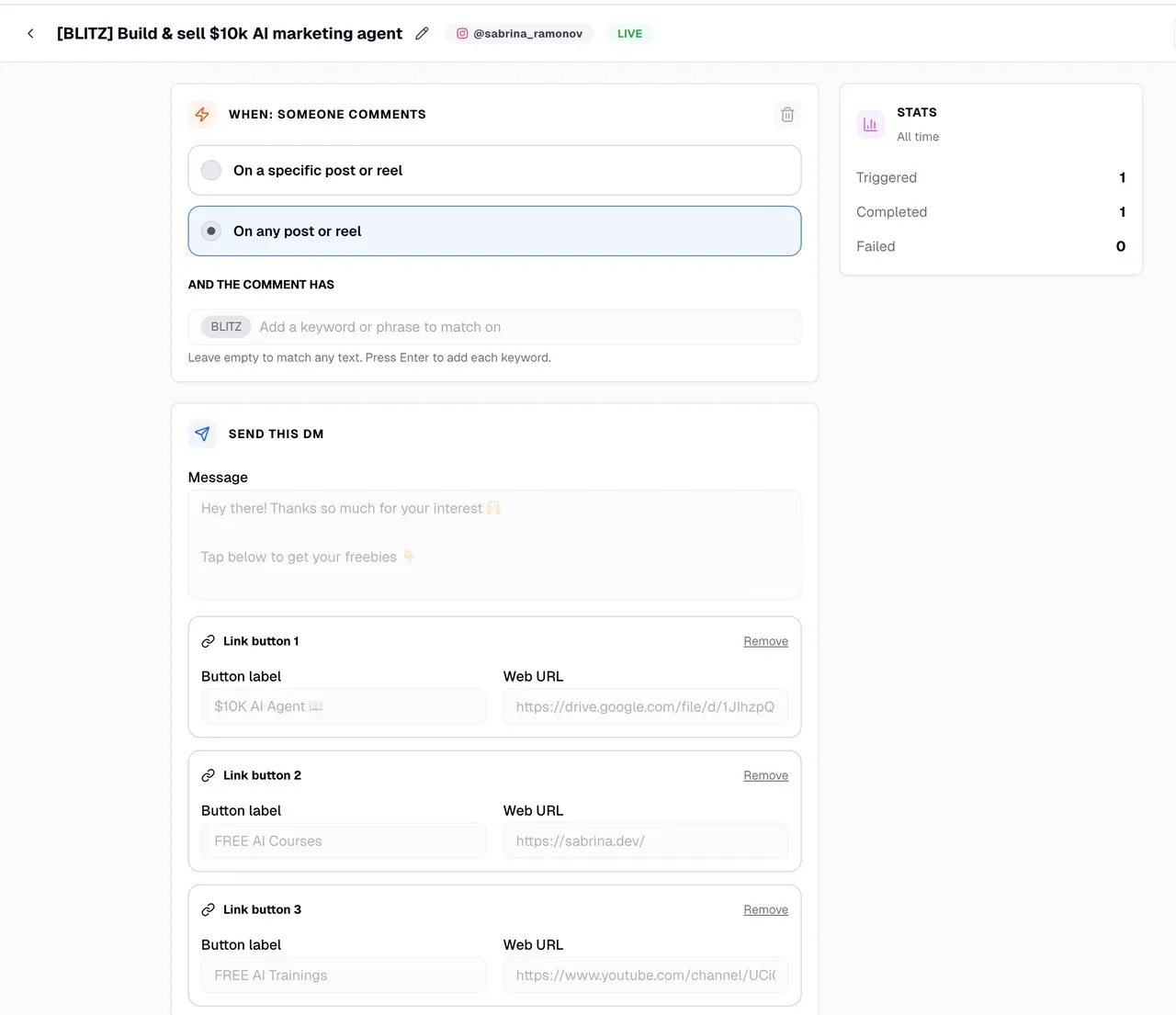
Blotato matches keywords as a case-insensitive substring, so “price” also fires on “pricey.” Short common words cause trouble: “book” fires on “Facebook,” and “deal” fires on “ideal.” Pick a word nobody types by accident, like SLOT or GUIDE, and say it on screen and in the caption. On a Story, ask people to DM you the keyword instead, and add a message trigger to the automation: it answers any DM that contains the keyword.
Step 3: Write the DM and the public reply
The DM holds the answer and the button. Blotato posts one of three default public replies under the comment unless you write three to six of your own. Yours should say where the message went.
Instagram delivers a private reply to the person’s main inbox if they follow you, and to their message requests if they don’t (Meta’s private replies documentation). A reply like “Sent! Check your message requests” heads off the “I never got it” comments.
Step 4: Decide whether to ask for an email
An email step is the simplest form of Instagram lead generation. With it, the first DM asks for their address. When they reply with it, Blotato saves it, sends the DM with your link, and can pass the email to your email tool or CRM through a webhook. Every extra step loses some people, so save it for offers worth an email.
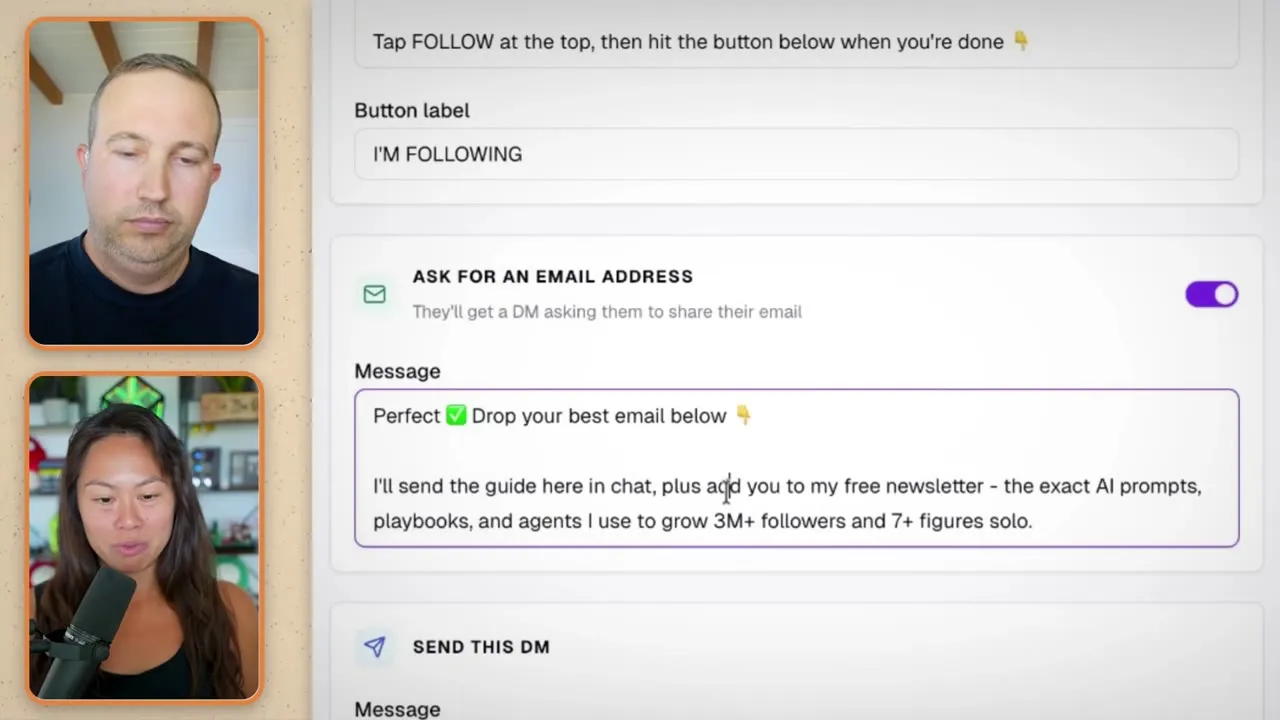
Step 5: Switch it on
New automations start as drafts. Turn yours on before you test, or nothing will fire.
Step 6: Test it as a stranger
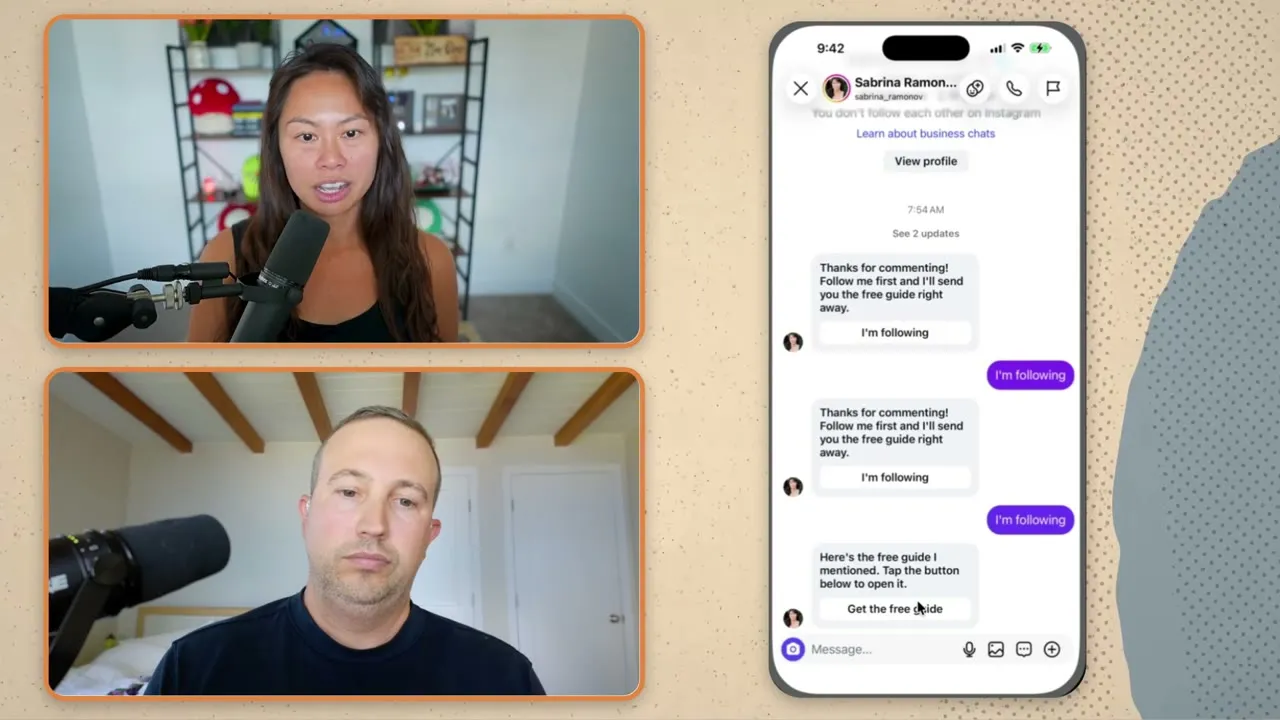
Comment your keyword from a second account that doesn’t follow you, check the requests folder, tap the button, and finish the booking or purchase yourself. I started doing this after readers messaged me about a confusing Substack app prompt that followed my own newsletter signup.
If you run Claude or another AI agent, it can create these automations through Blotato’s MCP server, one per offer. Calvin Hia, a Blotato customer, had his agent build 46 and reports more than 3,000 email leads in 30 days (his full setup). His video’s Blotato link carries his referral code. The API and MCP need a paid plan, not the trial.
Which Numbers Tell You It’s Working?
Check these once a week for each post that carries a keyword:
| Number | Where to find it | What it tells you |
|---|---|---|
| Share of views from non-followers | Your post insights (professional accounts) | Whether the post reaches new people |
| Keyword comments | The post’s comments | Whether the call to action is clear |
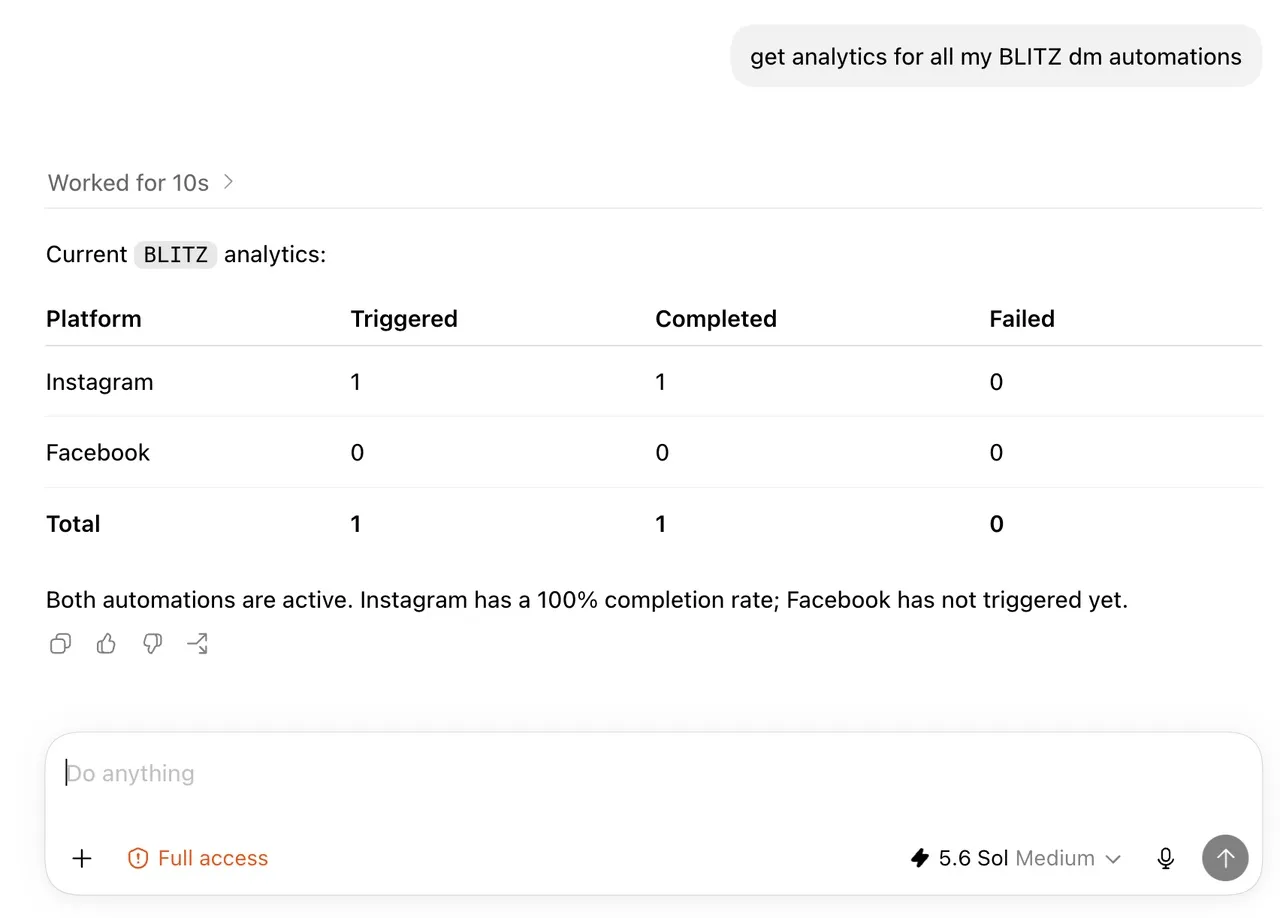
| Completed runs | Your automation’s analytics | Whether DMs actually went out |
| Button taps or emails | Your link tracking, webhook or email tool | Whether the DM offer pulls people forward |
| Paying customers | Your booking tool, store or a “how did you hear about us?” question | Whether it makes money |
Compare each number with the one above it. Fix the first step where the drop looks worse than it should, since every number below it depends on it.
Mistakes That Cost Instagram Customers
- Sending everyone to the link in bio. It asks a stranger to leave the post, open your profile and find the right page.
- Promising something and gating it hard. Meta’s spam rules list “Requiring or claiming that users are required to engage with content (e.g., liking, sharing) before they are able to view or interact with promised content” (Meta’s spam policy). Meta does not say how it applies that clause to comment-to-DM flows, so I keep the ask modest: deliver exactly what the post promised, and skip the follow gate on small freebies.
- Automating before the posts get views. A flow on a post with 300 views reaches a handful of people. Unless each inquiry is worth a lot to you, spend the next month on posting.
- Opening the DM with your story. They commented “SLOT” because they want to book. The first line should be the booking link’s reason to exist.
- Leaving replies unread. When someone answers your DM with “do you have this in blue?”, that is a buyer. A person on your side has to reply.
If You Run Instagram for Clients
Comment-to-DM is a service you can sell on top of posting, and it reports a number every client cares about: leads, then customers. Here is what Blotato covers for an agency today and what it doesn’t:
- One login per account. Blotato supports one user per account, shared by passing the login code, with no separate teammate logins or roles.
- No approval step. Blotato has no client sign-off flow, so a scheduled post goes out without one.
- No branded client reports. Blotato’s docs don’t describe any, so results come from automation analytics and your own tracking.
- DM automation on Instagram and Facebook only. It replies to people who contact you first. There is no cold outreach.
That makes it a fit for lean agencies that handle client approvals outside Blotato, in a shared doc or a weekly call, and want posting and DM automation for every client from one account. Agencies whose clients expect to log in and approve inside the tool will feel those gaps, so check which tool adds client post approvals, and on which plan first.
The price is flat inside stated limits. The Agency plan is $499 a month for up to 100 connected accounts, 3,000 queued scheduled posts and 15,000 active contacts a month, where each person you DM or reply to counts once a month per account.
Where Comment-to-DM Falls Short
It turns attention into conversations, and it can’t create the attention. If your posts don’t get views, post more often and test hooks before you add automation. I use Instagram trial reels, which show a reel to non-followers first, to test openers before they reach my audience.
Blotato’s DM automation works on Instagram and Facebook, not TikTok or LinkedIn, and a strong DM can’t rescue an offer nobody wants.
The Order I’d Do This In
If you sell products online, set up product tags first and add a keyword on your best post for the question everyone asks.
If you sell a service, skip the shop and put one keyword on your best post this week. Test it from a second account, then watch completed runs and bookings for seven days. Once a single flow pays for itself, test a second keyword on a new post. Every paid Blotato plan includes DM automation.
How to Get More Customers on Instagram FAQs
How do I get leads through Instagram without ads?
Post content that reaches non-followers, end each post or Story with a keyword to comment or DM, and answer it with a DM holding one link, such as a booking page or a guide that asks for an email. Organic reach decides how many people see the offer, so test hooks with trial reels before you scale.
Do I need a business account for Instagram DM automation?
You need an Instagram professional account. Meta’s private replies, the feature comment-to-DM tools use to message commenters, work on professional accounts’ posts, Reels, Stories and Lives.
Can I accept payments directly on Instagram?
Meta’s native checkout on Facebook and Instagram works only in the United States. Everywhere else, a tagged product or a DM link sends the buyer to your own website, booking tool or payment page to pay.
Can you sell on Instagram without a website?
Yes, through DMs. Outside Meta’s US checkout, product tags send buyers to a store on your own domain. The DM path doesn’t need one: the keyword DM can link to a booking page, a payment page from your payment provider or an order form. For a service business with no site, that is how to sell on Instagram.
Why didn’t someone get my automated DM?
Ask them to check their message requests first, since that is where it lands for non-followers. If it isn’t there, open the automation’s analytics: no triggered run means the automation was still a draft or the comment missed your keyword, and a failed run means it fired and broke. Comments from your own account never start a run.