Are Instagram Comment Bots Allowed? Meta's Social Media Rules
Some Instagram comment bots run into Meta's spam rules. Others answer comments on your posts with social media automation. Here is how to tell.

An Instagram comment bot is software that writes Instagram comments or replies for you, and the name covers two very different jobs. One auto-comments from your account on strangers’ posts to farm attention. The other answers people who commented on your own posts, usually with a private message holding the link they asked for.
Search the term and the top 10 results mostly sell the first kind, and this post will not help you find one. The short answer: bots that comment on strangers’ posts at volume collide with Meta’s spam policy, while replies to your own commenters run on an API Meta built for exactly that. Meta’s other rules still apply, so treat it as a path, not a guarantee.
Blotato is an app I built. I founded the company, so take my read with whatever grain of salt feels right. It runs the second kind on Instagram and Facebook, and plans start at $29 a month.
What an Instagram Comment Bot Does on Your Own Posts
Someone comments a keyword like GUIDE under your reel, and the bot sends them a private message with the link. Meta built an endpoint for exactly this, called Private Replies, and the official-API tools in this category run on it.
It Sends One Private Reply per Comment
This limit is Meta’s, so every tool inherits it. Meta’s docs say “Only one message can be sent to the Instagram user who commented,” within 7 days of the comment. The conversation continues only if they write back.
A follower gets the reply in their Inbox and a non-follower in their Requests folder, with a link back to the post they commented on. Write the first line for the stranger, because that is who reads it cold. Instagram Live is the exception, where the reply has to go out during the broadcast, one of the Meta rules that break comment-to-DM builds.
It Can Also Answer in Public
Some tools post a public reply under the comment too, so people scrolling see the offer is real. Manychat does, and it rotates several reply variations, in its words, “to keep interactions natural.” Blotato’s automation sends the private reply only.
The 30-Second Test for Any Comment Bot
Answer four questions before you connect a tool. One left-column answer is enough to walk away.
| Question | Spam comment bot | Comment-to-DM automation |
|---|---|---|
| Where does it act? | On strangers’ posts, found by hashtag, location or follower lists | On your own posts, answering people who commented |
| How does it log in? | Your password, a session cookie or a browser extension | Meta’s own login screen, no password handed over |
| Who acts first? | The bot | The person who commented |
| What does it send? | Public comments, often the same few lines | One private reply per comment, plus an optional public reply |
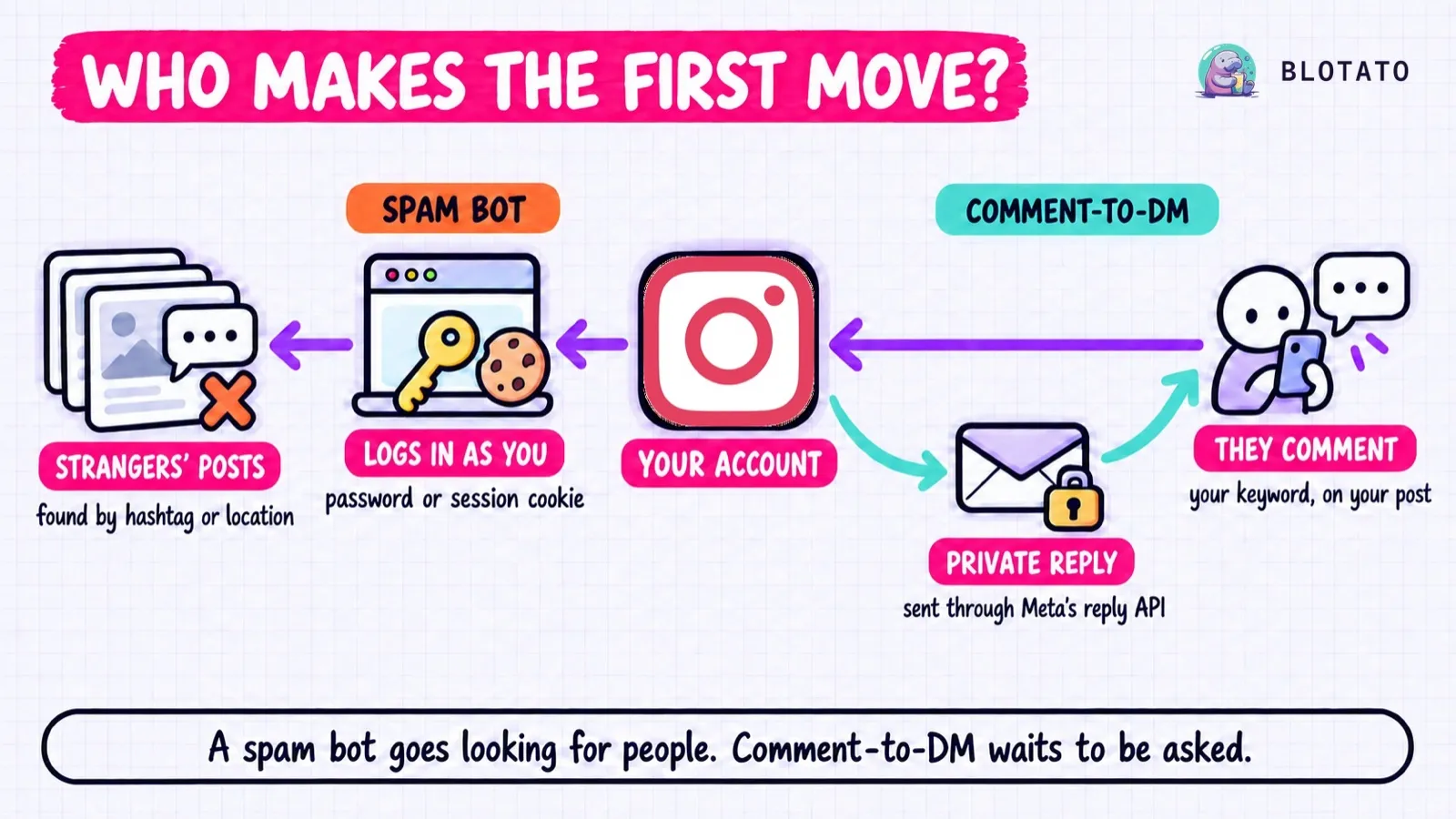
The login row is the fastest tell. An official connection never needs your Instagram password, so a tool asking for it is not using one. And every official reply starts with someone else’s comment, so a tool promising cold outreach at scale is not doing it through Meta’s reply endpoints.
What Meta’s Rules Say About Comment Bots
Most guides on this say “against the terms” without quoting a line of them. Here is what Meta actually wrote, for Instagram. If your agent also publishes elsewhere, each platform draws its automation line differently.
Instagram’s Terms of Use bar collecting information “in an automated way without our express permission, regardless of whether such automated access or collection is undertaken while logged-in to an Instagram account.”
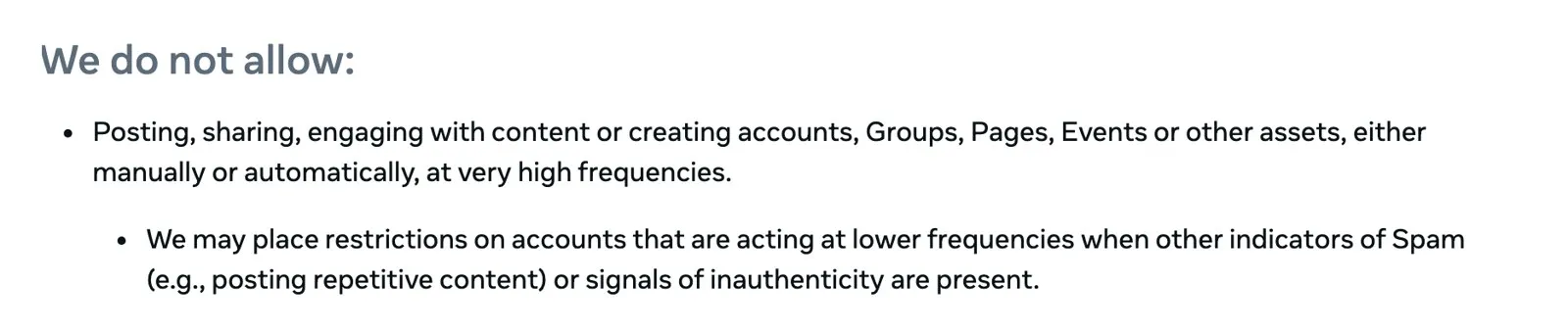
Meta’s Community Standards cover “Facebook, Instagram, Messenger and Threads,” and the spam policy in them does not allow “Posting, sharing, engaging with content or creating accounts, Groups, Pages, Events or other assets, either manually or automatically, at very high frequencies.” It adds that Meta “may place restrictions on accounts that are acting at lower frequencies when other indicators of Spam (e.g., posting repetitive content) or signals of inauthenticity are present.” A bot pasting one compliment under a thousand strangers’ posts hits both lines. Meta gives no number for “very high frequencies,” so a vendor quoting a safe daily limit is guessing.
One more clause matters if you run the second kind. Under exchanging for engagement, it lists “Requiring or claiming that users are required to engage with content (e.g., liking, sharing) before they are able to view or interact with promised content.” Its examples are liking and sharing, and a separate “Like/share-gating” line, which names follows too, sits in the policy’s list of deceptive links and landing pages.
Meta built Private Replies for comment-triggered messages and ships its own Comment to message automation, so I treat this flow as the path Meta built, not as a policy guarantee. What you control is the ask: never make a like, share or follow the price of the link, and vary any public replies so they do not repeat word for word.
When the Bots Are Commenting on You
If spam comments are piling up under your own posts, Instagram’s help center gives no checklist for spotting a bot account, but it does ship the filters.
Its help center lists Hide spam and Hide unwanted comments, plus Hidden Words, a custom list of “words, phrases, numbers, and emojis” you want hidden. Turn on Hide spam first, then add the phrases the bots keep repeating. Hidden comments still count toward your total, and the person who posted one is not told.
How to Set Up an Instagram Comment Bot on Your Own Posts
This is the Blotato version, and official-API tools follow the same trigger-and-reply pattern.
Step 1: Switch to a Professional Account
Official tools cannot connect a personal account. Switch to Business or Creator in Instagram’s settings.
Step 2: Connect Through Meta’s Login
In Blotato, open Settings, then Social Accounts, and connect Instagram on Meta’s own sign-in screen. If you connected before comments and messaging launched, reconnect so the account carries the new permissions.
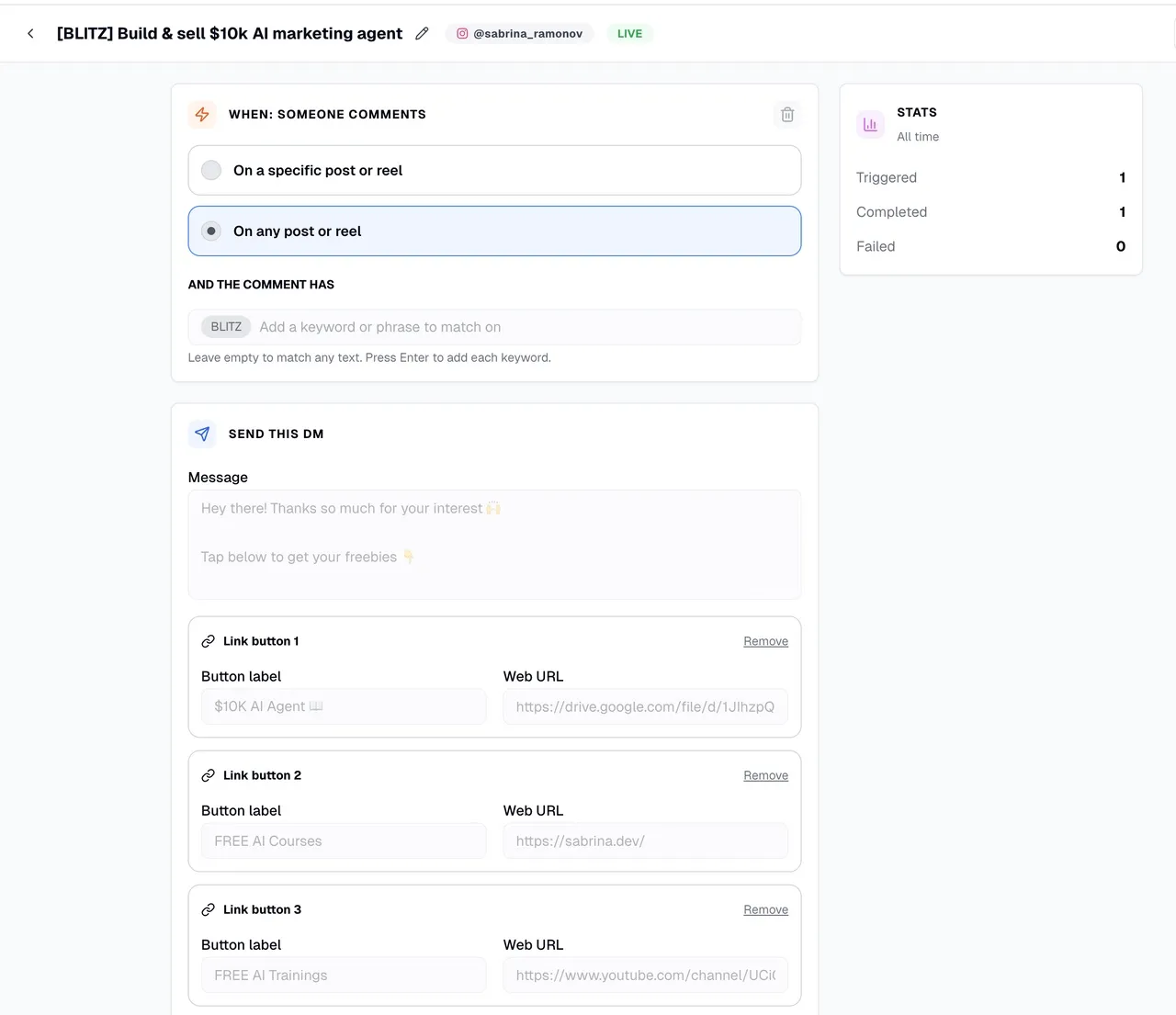
Step 3: Add a Comment Trigger and a Keyword
Open Automations, click New automation, pick the account, and add the keyword your post asks for. Matching ignores case and matches whole words, so “guide” catches GUIDE but not “guidelines.” Per-post targeting only covers posts published through Blotato, so for a reel posted in the Instagram app, let the keyword do the work.
Step 4: Write the Private Reply
You get up to 640 characters and up to three link buttons. Buttons show in the Instagram mobile app only, and a button plus a URL leaves the URL unclickable on desktop, so for a desktop audience use a text link and no buttons. The DM templates post has wording that reads well to a stranger.
Step 5: Test From a Second Account
Comments from the connected account never start a run. Comment the keyword from another account and watch the reply arrive.
See what each plan includes before you pick one, since the monthly contact allowance is the number that moves.
Where Blotato Fits, and Where It Stops
Blotato is agent infrastructure for social media marketing. The key that runs the comment bot also publishes the reel it hangs on, reaching nine platforms one post per account per call, so if you publish as well as reply, that is the reason to pick it over a DM-only tool.
The price is flat, the contact allowance is not. Plans are $29, $97 and $499 a month, with 1,000, 6,000 and 15,000 active contacts. A commenter counts only once you reply, and a send to a new person past the cap fails until the monthly reset or an upgrade.
Your agent can run it. Blotato’s hosted MCP server at https://mcp.blotato.com/mcp exposes blotato_create_automation and blotato_update_automation, so Claude can build a comment bot from one sentence and repoint every automation to a new offer from another. blotato_list_automation_runs shows whether each run completed, failed or expired, which is how you catch a reply that never landed.
A prompt as plain as “create an Instagram automation for the keyword GUIDE that sends this message and this link, as a draft” is enough. For public replies, blotato_post_comment answers under a top-level comment. Have the agent write each reply fresh, because Meta’s policy names repetitive content as a spam signal.
The limits are mine. Automation covers Instagram and Facebook only, and it replies, never cold-messages. It does not post a public reply on its own or trigger on new followers. Manychat covers more channels if your inbox lives beyond Instagram and Facebook, and the 7-day trial excludes the API, so an agent build starts on the Starter plan.
Start With One Post
Pick one post that already gets comments, because a comment bot converts attention you have rather than creating it. Send the link with no follow ask in front of it, then read a week of runs. Blotato’s plans start at $29 a month with a 7-day trial you can cancel anytime.
Instagram Comment Bot FAQs
Are bots illegal on Instagram?
Usually the question is Instagram’s rules, not the law: Meta’s spam policy covers engagement at very high frequencies or with repetitive content, whether a person or a script did it. Reply tools answer your own commenters through endpoints Meta built for it, under those same rules, while bots that comment across strangers’ posts at volume are what the spam policy describes.
Is there a free Instagram comment bot?
If you work on desktop and only need a keyword comment to trigger a message, Meta’s own Business Suite has a Comment to message automation, its trigger described as “specific keywords or phrases” on one help page and “specific hashtags” on another. A paid tool earns its place when you want an AI agent building and editing the replies, or one key that also publishes to nine platforms, which is where Blotato fits. A download that asks for your Instagram password is not using Meta’s official connection, whatever it calls itself.
How many commenters can an Instagram comment bot answer?
Every commenter who matches your keyword, once per comment, within 7 days of it and up to your plan’s monthly active-contact allowance. Each new matching comment starts a new run, and a person counts once a month on the same account however often they comment.