6 Instagram DM Templates for Social Media DM Automation
Free copy-paste Instagram DM templates for each step of a social media comment-to-DM automation: keyword reply, DM answers, email ask and link.
These Instagram DM templates cover the messages a comment-to-DM automation sends: the reply with your link, the answer to a DM question, the email ask, the delivery DM, and the Facebook version. Blotato’s email and follow asks repeat when someone answers them the wrong way, so they have to read well twice. Everything here answers people who commented or messaged you first. If you wanted a DM mockup graphic instead, Figma and Canva have those, and this post is the words that go inside.
My Read-Twice Rule for Automated DMs
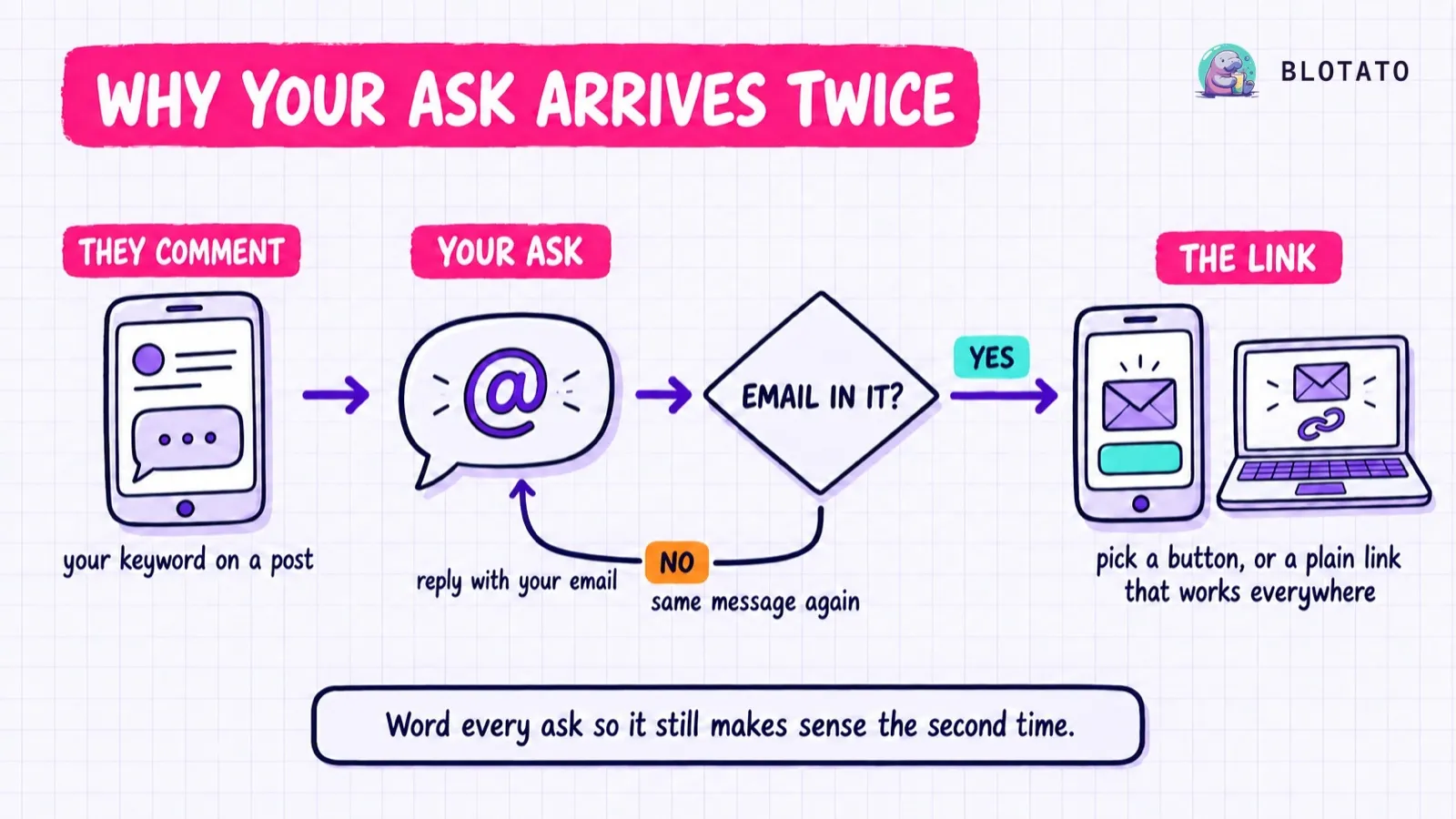
A comment-to-DM automation is a short sequence, and in Blotato it runs in a fixed order: the follow ask (Instagram only), the email ask, then the DM carrying your link. Both asks are optional, and both can repeat: answer one the wrong way and the same message comes back. Per the automation docs, the follow ask also goes out on every run, even to existing followers.
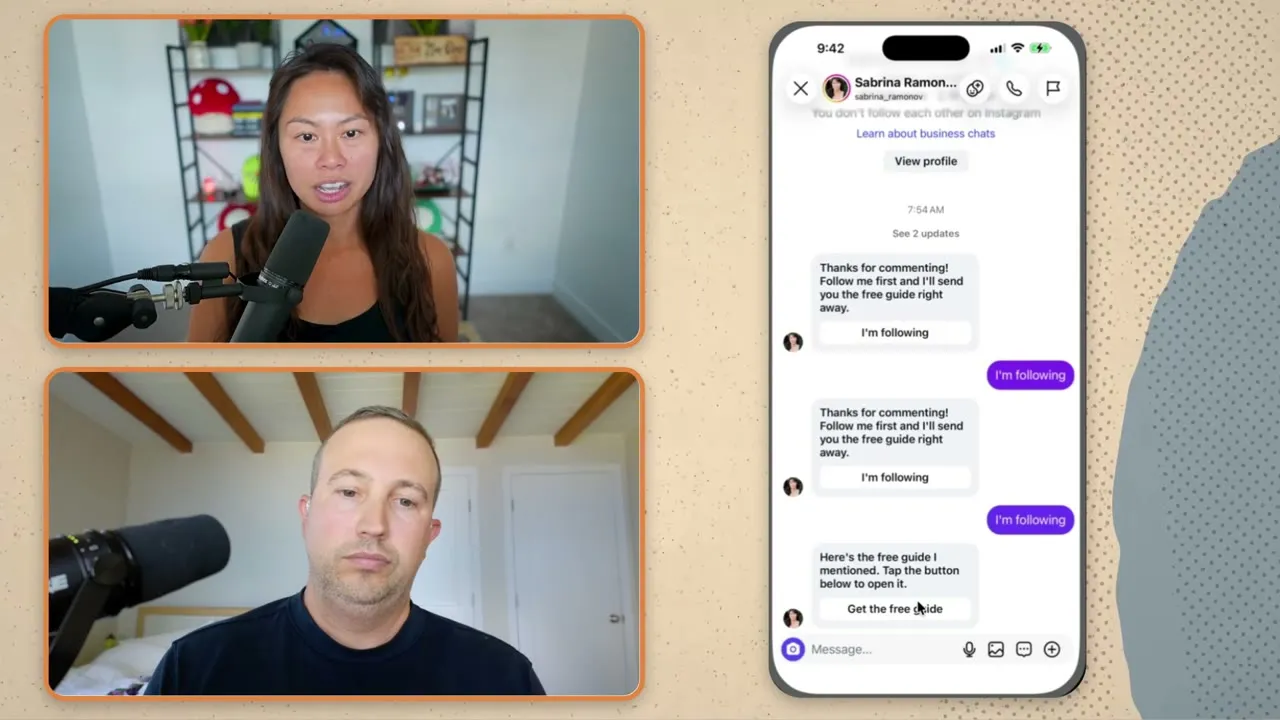
I saw it from the receiving end when I secret-shopped my own funnel from a second account: the follow message landed twice before the guide did. “Thanks for commenting!” reads like a glitch the second time. An instruction reads like the next step.
Three limits shape all six, two from Blotato and one from Meta:
- 640 characters per message box in Blotato. Instagram separately caps a message at 1,000 bytes, and emoji take several bytes each.
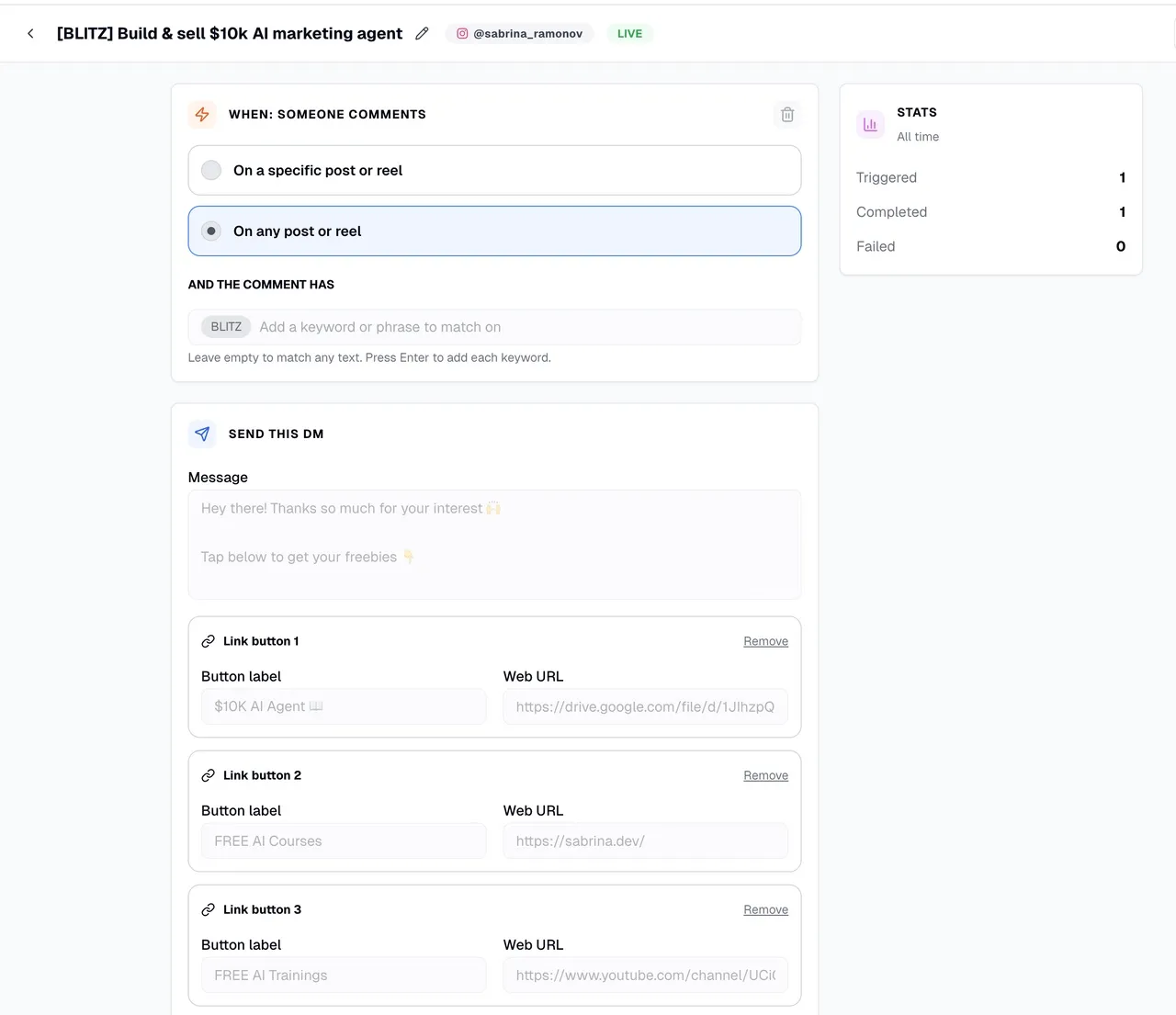
- Up to three optional link buttons in Blotato, labels of 20 characters or fewer. Instagram shows buttons in the mobile app only.
- One private reply per comment, within 7 days of it, per Meta’s private replies documentation. After that, nothing until they reply.
Every Blotato plan includes DM automations on Instagram and Facebook, and each template pastes straight into the builder. Blotato is an app I built. I founded the company, so take my read on it with whatever grain of salt feels right. The templates themselves are plain text and work in any comment-to-DM tool, Manychat included.
The 6 Instagram DM Templates and the Rule Behind Each
Here are all six Instagram direct message templates at a glance, with the rule each one is written around:
| Template | Sends when | Written around |
|---|---|---|
| 1. Keyword reply | Someone comments your keyword | Non-followers get it in Requests |
| 2. “Price” answer | Someone DMs you a keyword | Matches the whole word, not part of one |
| 3. Email ask | Before the link, if you collect emails | It repeats until the reply has an address |
| 4. Delivery DM | After the email ask, or on its own | Buttons show on mobile only |
| 5. Shared message | A comment or a DM on one automation | One message has to fit both |
| 6. Facebook version | Someone comments on your Page | No follow gate on Facebook |
Swap the bracketed parts for your own. Character counts include the brackets.
1. The Keyword Reply That Sends the Link Straight Away
Use this when the freebie is small and you want zero friction. No follow ask, no email ask, just the thing they commented for.
You commented [KEYWORD] on my post, so here's [the guide]. Tap the button below to open it.Button label: Get the guide
Meta delivers a private reply to a follower’s inbox but to a non-follower’s Requests folder, so for a stranger this arrives cold, under a line saying you messaged them about their comment. Naming their own comment and the freebie in one line is what makes it worth opening. For a desktop-heavy audience, use the plain-link version under template 4 instead.
The Blotato feature: comment-triggered DM automation
Length: 91 of 640 characters, plus a 13-character button label
Bottom line: One line that says why you are messaging and what they get, with nothing asked of them.
2. The Answer When Someone DMs You “Price”
Not every keyword comes from a comment. People DM you the same question over and over, and a message trigger can answer it the moment it lands.
Looking for prices? Here's the short version: [one-line summary]. Full details: [URL]

Something else about pricing on your mind? Reply here and I'll point you the right way.
Keyword matching is whole-word, so “price” does not catch “pricing.” Add both as keywords, and any one of them fires the automation. Someone typing “price” might also be complaining, which is why the second line leaves a door open. It answers inside Meta’s 24-hour window, which opens when they message you.
The Blotato feature: the message trigger
Length: 174 of 640 characters
Bottom line: Answer the question in the first line, then invite the reply that tells you what they actually need.
3. The Email Ask
The email gate reads the first email address anywhere in the reply. No address means the same message again, so tell them what a good reply looks like.
Reply with your email and I'll send [the guide] in my next message.

I'll also add you to [my newsletter], where I share [what they get] [how often].

If your reply has no email address in it, I'll ask again.
Say plainly that the address joins a list, if it does. I do exactly that in mine. The gate waits up to 72 hours and checks that the address is shaped like an email, not that it can receive mail. On automations published after September 14, 2026, a contact who already gave an email to an email ask on the same account skips this one.
The Blotato feature: the email gate plus a webhook, which is how the captured address reaches your list
Length: 208 of 640 characters
Bottom line: Name what the email is for and what a correct reply looks like, because a wrong reply costs them a second message.
4. The Delivery DM After the Asks
Once someone clears the email ask, this is the message that carries the link. It is the one place a second button earns its keep.
Here's [the guide]. The second button is [the bonus], if you want it too.Button labels: Get the guide / [Bonus, 20 max]
If a lot of your audience reads DMs on a laptop, set the automation to this desktop-safe version instead, with no buttons and the link in the text:
Here's [the guide]: [URL]Pick one per automation. Blotato’s docs note that buttons plus a pasted URL leave the URL unclickable on desktop. The missing buttons are Meta’s gap, not any one tool’s: Meta lists its button templates as unavailable on web, and Manychat’s community forum had creators asking for a desktop workaround back in 2024.
The Blotato feature: link buttons on the delivery DM, up to three per message
Length: 73 of 640 characters (the desktop version is 20 plus your URL)
Bottom line: Buttons for a mobile audience, a plain link for a desktop one, and never both in one message.
5. The One Message That Works for Comments and DMs
A Blotato automation can hold two triggers, one for a comment and one for a DM someone sends you with the keyword. Both triggers send the same message, so it cannot say “thanks for commenting.”
[The guide] is ready for you. One tap on the button below opens it.

Questions about it? Reply here and I'll read it.
Swap the button line for a plain link if your audience skews desktop. Keyword matching ignores case and matches whole words, so pick a word nobody types by accident. “Link” would fire on every DM that happens to contain it.
The Blotato feature: comment and message triggers on one automation
Length: 117 of 640 characters
Bottom line: If one automation listens in two places, write one message that fits both.
6. The Facebook Version
Blotato has no follow gate on Facebook, so nothing holds the link back for a follow. Put the follow ask in the delivery message as a soft line after the link.
Thanks for the comment. [The guide] is one tap away on the button below.

If it helps, follow the Page and you'll catch the next one.
The email gate works the same way on Facebook, and Blotato answers a Facebook comment with the same single private reply, so templates 3 and 4 carry over unchanged. Only the follow ask changes from a gate to a request.
The Blotato feature: Facebook Page DM automation
Length: 133 of 640 characters
Bottom line: On Facebook the follow is a request, so put it after the value instead of in front of it.
Where the Follow Gate Fits
Blotato can also hold the DM until someone follows you, on Instagram only. It sends a follow request with a confirm button on every run, accepts any typed reply in place of the tap, and, within that run, sends the request again to anyone who has not followed yet. Blotato rejects it on a Facebook automation.
Before you turn it on, know that Meta’s spam policy lists “like/share-gating,” requiring follows or other public engagement to get exclusive content, among the things it does not allow, in its list of deceptive links, next to a separate engagement clause that sits closer to comment-to-DM. The safer default is to deliver first: send template 1 or 4, and ask for the follow after the link, the way the Facebook version does.
Build These From Claude in One Prompt
If you run your accounts through an AI agent, skip the builder. Blotato’s MCP server has 8 DM-automation tools, and blotato_create_automation takes each ask, the DM text and the buttons as separate fields:
Create an Instagram DM automation in Blotato for the keyword GUIDE on any post. Email gate message: [template 3]. DM: [template 4], with a button labeled “Get the guide” linking to [URL]. Save it as a draft so I can check it before it goes live.
The payoff is the second prompt. Ask it to “for every DM automation with a second button, point that button to [URL], then list what you changed and what you skipped.” The agent lists your automations, then calls blotato_update_automation on each match, replacing its button set. Live automations change the moment it saves, so ask for a summary of what changed. Calvin Hia runs 46 automations from a template folder his agent reads before it builds.
Two things to plan for: the 7-day trial excludes the API, so plan on starting the Starter plan, and Blotato’s DM automation covers Instagram and Facebook only.
How to Get Started With These Templates
Pick one post that already gets comments. DM automation converts attention you already have.
Start with template 1 alone and no gates. Test it from a second account, because your own comments never start a run. Add the email ask only once you are handing over something that earns it. If you want a follow, ask for it after the link.
Key Takeaways
- Each automated message has to make sense on its own, because in Blotato a gate message can arrive twice.
- Meta’s windows are the real constraint: one private reply per comment within 7 days, then nothing until they reply.
- Buttons are a mobile feature, so desktop readers need a plain link without buttons.
One Template to Start With
If you only copy one, copy template 1. It asks nothing of anyone and shows you who comments before you decide whether an ask is worth adding. When you are ready to run it, Blotato’s plans start with a 7-day trial you can cancel anytime.
Instagram DM Templates FAQs
What should an Instagram DM say after someone comments a keyword?
Name the thing they asked for in the first sentence, then give one action: tap the button, open the link, or reply with an email. Keep it short enough to read in a notification. Skip a thank-you opener, which reads like a glitch if a gate ever sends it twice, and go easy on emoji, since Instagram counts every byte.
Why did my automated Instagram DM land in Requests?
Because the person does not follow you. Meta delivers a private reply to a follower’s inbox and to a non-follower’s Requests folder, and no tool can change where it lands. What you control is the first line. Name the keyword they commented and the thing they asked for, the way template 1 does, so the message makes sense to someone who has never heard of you.
Can I create automated direct messages on Instagram?
Yes. Meta Business Suite has free inbox automations, and comment-to-DM tools like Blotato connect through Meta’s official API to answer comments and DMs with your own wording. The templates above are that wording. What no official path does is message a stranger who has never interacted with your account, so anything promising cold DMs at scale is working outside Meta’s official API.
Do these templates work in Manychat?
Yes, the wording pastes into any comment-to-DM builder. The mechanics around it are Blotato’s: the repeated email ask, the 640-character boxes, and loading all six through an AI agent over Blotato’s MCP server. Other tools handle gates their own way, so check how yours repeats a message before you reuse the email ask word for word.