DM Automation API: Comment-to-DM on Social Media Platforms
Comment-to-DM runs on two social media platforms and no others. Which platforms a DM automation API can reach, and the Meta rules that break builds.
Picking a DM automation API is mostly a question about platforms, not about vendors. Most tools in this category will sell you keyword triggers and auto-replies. What few of them say out loud is that the feature you are shopping for exists on two social platforms, and that the limits you will hit are written by Meta rather than by whoever you pay.
I run Blotato, so I have spent a lot of time inside these endpoints. This post is the map I wish I had when we scoped ours: what is actually buildable per platform, which rules will break your build, and where a vendor genuinely helps versus where they are just reselling the same Graph API call you could make yourself.
Two things are worth knowing before you compare vendors: the platforms decide the coverage, not the vendors, and no API will let you cold-DM strangers.
What a DM Automation API Can Do on Each Social Platform
Two different jobs get sold under one name. Comment-to-DM watches a post for a keyword and privately messages whoever commented it. Auto-reply answers someone who messaged you first, and comes in three different forms on Instagram. Both sit on top of the same underlying ability to read and answer an inbox programmatically. They have different rules and different coverage.
| Platform | Comment-to-DM via API? | Reply to inbound DMs via API? | Platform rule that decides it |
|---|---|---|---|
| Yes | Yes | One private reply per comment, within 7 days | |
| Yes | Yes | Same Meta private-reply model, Page access token | |
| No | Yes | 24-hour service window, templates outside it | |
| X (Twitter) | No | Yes | DM access is tied to a paid API tier |
| Telegram | No | Yes | Bot API, user must start the chat |
| No | Partner only | Messaging is gated behind partnership | |
| TikTok | No | No | No public messaging API |
| YouTube | No | No | No direct messaging product |
| Threads | No | No | No public messaging API |
| No | No | No public messaging API | |
| Bluesky | No | No | No comment-to-DM path published |
Read the first column again, because it is the whole decision. Comment-to-DM is a Meta capability, so it runs on Instagram and Facebook and nowhere else, for every vendor in this category. It is exposed through Meta’s Private Replies documentation, which means a vendor can wrap it but cannot extend it, including the ones selling it hardest.
If your build only needs that Meta pair, you can start a week of Blotato and have an automation live today.
Free 7-day trial · Cancel anytime
One caveat that matters more than it looks, and I will come back to it: that trial does not include API access, so an API build is a paid Starter subscription from day one rather than a free evaluation.
The Meta Rules That Break Most Comment-to-DM Builds
These come from Meta’s own documentation, not from any vendor’s product decisions. Every tool inherits them, so budget for them before you write a line of code.
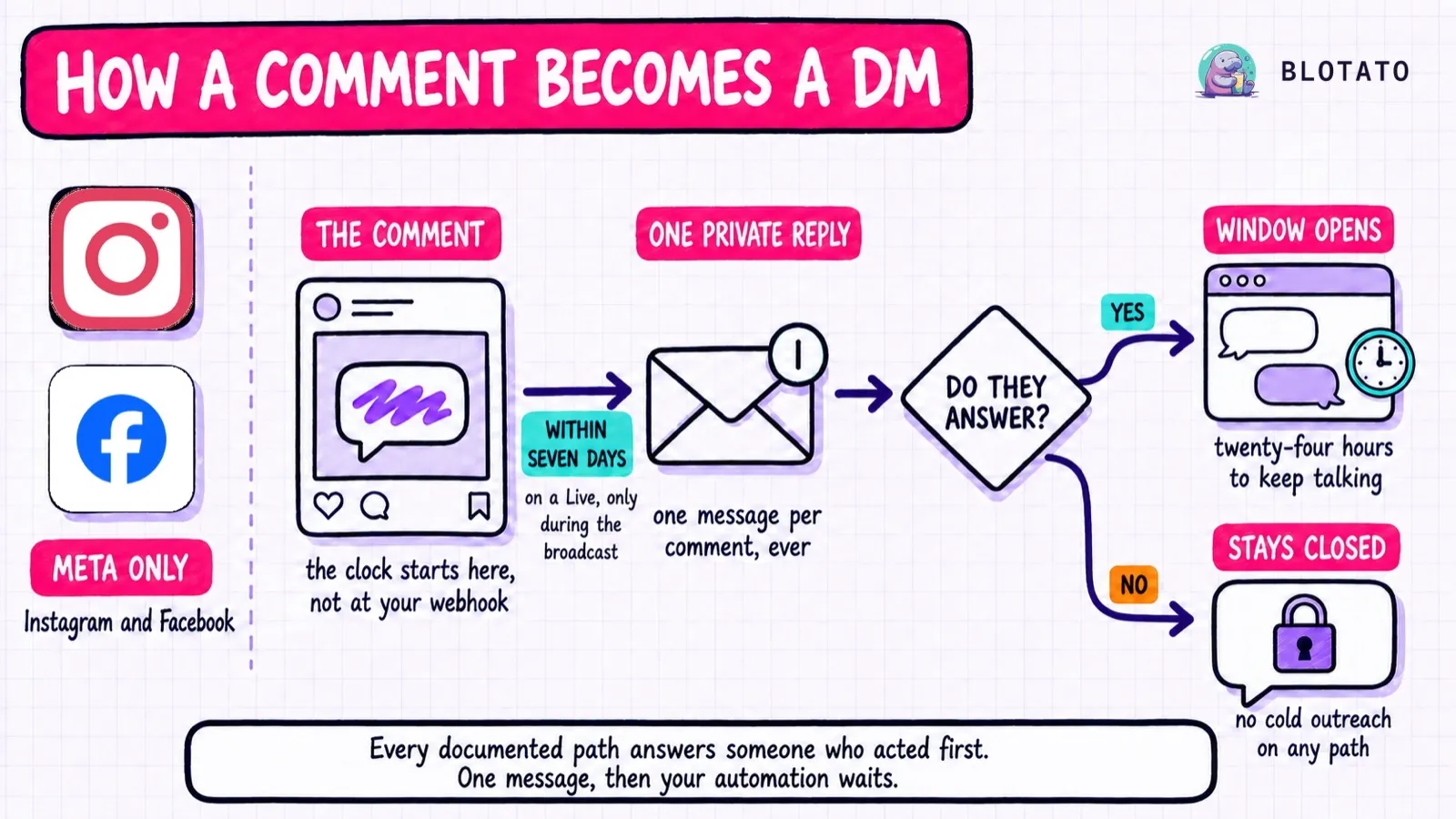
One private reply per comment, ever. Meta’s docs are blunt about it: “Only one message can be sent to the Instagram user who commented.” Not one per automation. One, total. A comment that already received a private reply, whether from your code or from a tool the account used last year, rejects the second attempt. This is the failure that surprises people migrating between vendors, because the old tool already spent the reply.
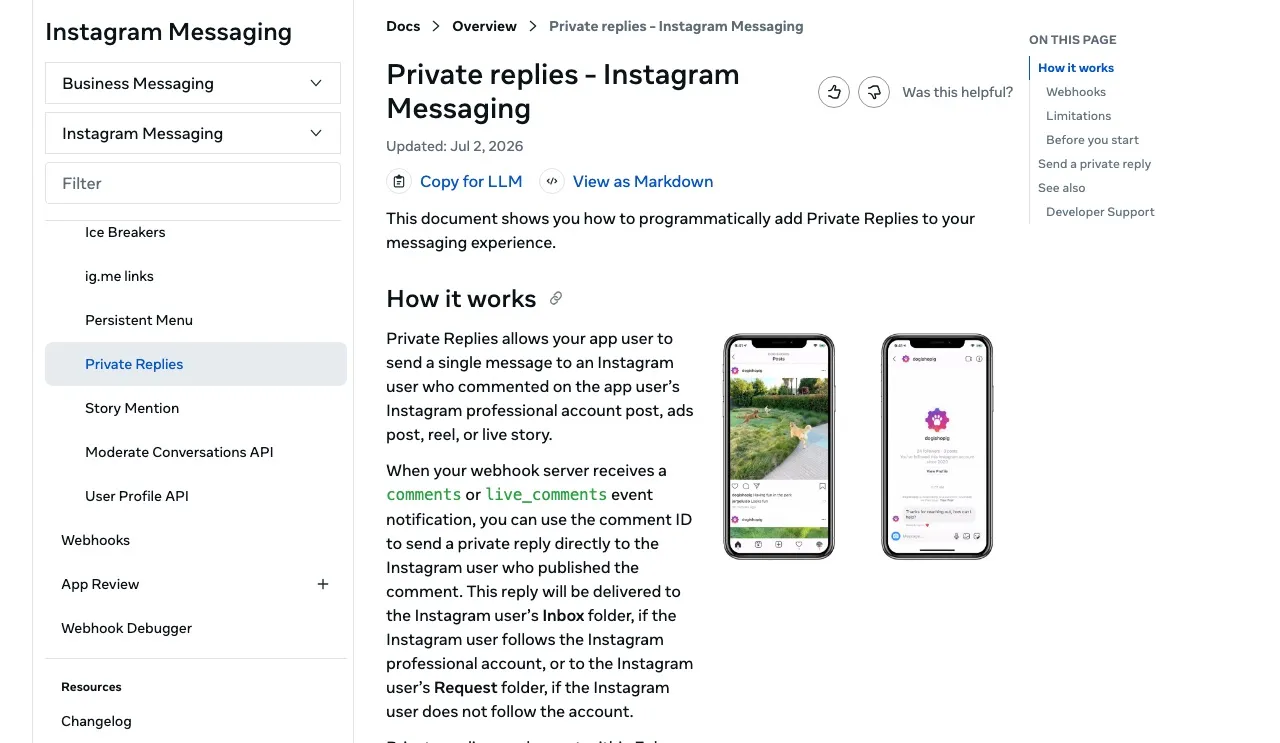
You have seven days from the comment, and the clock starts when the comment is created, not when your webhook picks it up. A queue that backs up over a long weekend quietly ages messages out of eligibility.
The 24-hour window opens only after they answer. Meta is explicit that continuing the conversation requires the person to respond to your private reply first. Your automation gets one message, and a conversation needs their reply to open the standard 24-hour messaging window.
Nothing here permits cold outreach. Every documented path answers someone who acted first. A whole tier of tools sends DMs by logging in with your session ID, which is browser automation against your own account rather than an approved API. No amount of proxy configuration makes that a supported integration, and account restrictions are the risk you carry for it. The same login tell exposes a spam Instagram comment bot.
The Instagram Live Rule That Silently Drops Replies
Meta runs a second, much shorter clock for one case, and it is the rule most likely to cost you messages without any error to tell you why.
Private replies to comments on an Instagram Live can only be sent during the broadcast. Meta’s documentation is explicit: once the live broadcast has ended, private replies can no longer be sent. There is no seven-day grace period here, and nothing in the response tells you a Live comment is different from any other comment.
That matters because of how most workers are built. If you queue comment events and flush the queue on a schedule, every Live comment you collected is already dead by the time you process it. The comment IDs look normal, the send is well formed, and the messages simply fail. A creator running a launch on Live is exactly the person who would notice the gap and blame your integration.
Two things make it survivable. Meta sends Live comments as live_comments events rather than comments, so you can branch on the event type and send Live replies immediately while everything else takes the normal path. Meta also warns that a Live spikes notification volume, so the same code path needs to absorb a burst rather than assume steady traffic.
Where the Vendor Layer Actually Earns Its Money
Given that Meta sets the rules, a fair question is why pay anyone. Having built this, here is the honest split.
The Graph API call itself is genuinely simple. It is one POST to /<PAGE_ID>/messages with recipient: { comment_id }, documented in Meta’s own send-a-private-reply reference, and if you only need that, a community walkthrough will get you there without paying a vendor.
What you are actually buying is everything around the call. You need instagram_manage_comments and pages_messaging permissions, a Page access token from a user holding the MESSAGING task, a webhook server that distinguishes comments from live_comments events, deduplication so one commenter is not messaged twice, and a retry story for the sends that fail. App Review sits on top of that if you serve accounts you do not own. I broke down which side of that fork you land on in the Instagram messaging API guide.
So the vendor question is not “can I make this call.” It is whether you want to own the webhook infrastructure, the token refresh, and the permission maintenance for as long as the feature lives.
How Blotato Models an Automation
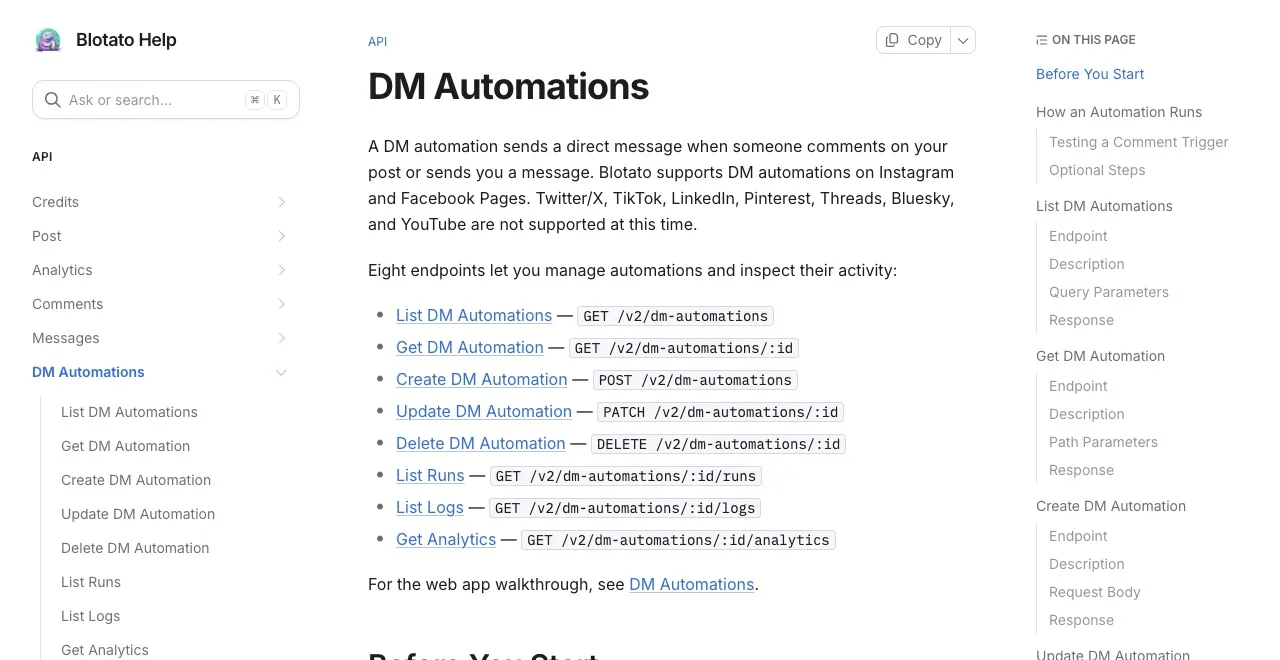
Blotato is agent infrastructure for social media marketing: one key covering publishing, the inbox and automations. It runs DM automations on Instagram professional accounts and Facebook Pages, reply-only, through nine REST endpoints and eight MCP tools. Our engagement surface stops at those two platforms while our publishing reaches nine, and that gap is the honest limit to weigh: if your inbox lives on Telegram, Reddit or X, the automation layer here will not reach it, and some social media APIs send DMs on more platforms than we do.
An automation is one object. Up to two triggers, at most one comment-received and one message-received, each with a keyword array where an empty array fires on everything, and a message of up to 640 characters with as many as three link buttons.
curl -X POST https://backend.blotato.com/v2/dm-automations \
  -H "blotato-api-key: YOUR_API_KEY" \
  -H "Content-Type: application/json" \
  -d '{
    "accountId": "YOUR_ACCOUNT_ID",
    "platform": "instagram",
    "target": { "targetType": "instagram" },
    "name": "Auto-DM the guide link",
    "triggers": [{ "type": "comment-received", "keywords": ["guide", "link"], "postId": null }],
    "dmMessage": "Thanks for commenting. Here is the guide.",
    "buttons": [{ "type": "url", "title": "Get the guide", "url": "https://example.com/guide" }],
    "isActive": true
  }'
accountId is not something you invent. Pull it from GET /users/me/accounts, or skip the lookup by pointing an agent at the MCP server, which lists your accounts so it can pass the one you name.
Four details worth knowing before you build against it:
Optional steps run in a fixed order. A follow gate, then an email gate, then your message, then your webhook. The follow gate asks the person to follow, waits up to 30 days for a reply, then checks follower status, and it is Instagram only, so setting it on a Facebook automation fails with error code 20303 on an HTTP 422. The email gate waits up to 72 hours for a reply carrying an address. A contact who never answers leaves the run at expired. Neither adds a charge and neither spends credits.
Per-post targeting starts from a Blotato post ID, not the native one. The web app’s post picker lists only posts published through Blotato. For an Instagram post published anywhere else, its first incoming comment creates a tracked Blotato post record, and an agent can scope the trigger to that comment’s postId. Before that first comment, or for a Facebook post published elsewhere, leave postId null and match on keywords across the account.
Runs are inspectable, which is the part I would not give up. Every trigger opens a run that moves through running and waiting before settling on one of four terminal states: completed, failed, expired, or superseded. GET /dm-automations/:id/runs plus /logs tell you which. A run reaches expired when the contact never answered a gate inside its window, and superseded when a newer run started waiting on the same contact, which is a distinction worth knowing before you go hunting for a bug. A failed run carries an error object, and 20102 (messaging window has expired) is the one you should expect to see first in testing. Debugging a silent automation without run states is guesswork.
Instagram renders buttons in the mobile app only. Someone reading on instagram.com in a desktop browser sees your text with no buttons at all. Set buttons or put the URL in the message text, never both, because a message carrying both leaves the URL unclickable on desktop.
Agents can drive all of this without the HTTP layer. Blotato runs a hosted MCP server at https://mcp.blotato.com/mcp, so Claude Code, Claude Desktop, Cowork or any MCP client can create an automation, read its runs and pause it as tool calls. That is the shape a lot of these builds take, and the same key backs the Blotato node in n8n if your workflow lives there. The full endpoint reference is in the API docs.
If you would rather watch the web app version of the same flow before writing any of this, I recorded one here.
What This Costs When Volume Arrives
Most vendors here price per contact, which means a post that performs well costs you more than one that does not. Blotato bills a flat plan: Starter $29, Creator $97, Agency $499 a month, with API access on all three. Automations, gates and webhooks consume no credits, because credits only pay for AI image and video generation.
The meter that does move is active contacts: 1,000 a month on Starter, 6,000 on Creator, 15,000 on Agency. An active contact is someone you reach, so a person who comments and never gets messaged is free, and reaching the same person twice in a month still counts once. The unit is per connected account, so the same person reached through two of your Facebook Pages counts as two contacts. Gate messages do not double-count them either. Past the cap a send fails with error code 20101 rather than billing you an overage, which I prefer to a surprise invoice, though it does mean a viral post can stop serving people mid-month on Starter.
Where this lands honestly: on cost per DM at high volume, a per-contact tool with cheap bulk tiers can beat us, and ManyChat is genuinely the cheaper tool once DMs are the whole business. What a flat plan buys is a bill that does not move when a post takes off, plus publishing to nine platforms and analytics on eight from the same key rather than a second vendor and a second approval.
Start a week of Blotato if that shape fits your build.
Choosing Between the Options on This Page
A rough decision tree, written to be useful even where it does not point at us.
Building comment-to-DM only, on Instagram or Facebook, inside your own product? Any Meta-based API works, so choose on billing shape and on whether you want to run the webhook server. Going direct to Meta is free and entirely reasonable if you already operate infrastructure.
Need DMs on platforms beyond Meta? Look at breadth first, because this is the criterion where we lose and several APIs cover more ground.
Already publishing through an API and adding DMs to it? This is where one key genuinely wins, because the alternative is a second vendor, a second approval and a second bill for a feature that shares the same accounts.
Want a visual flow builder your marketing team can edit? Buy ManyChat or a no-code tool. An API is the wrong shape for that job, and ManyChat’s own API leaves flow editing to the ManyChat editor.
The one option I would rule out is any tool automating DMs through a logged-in session rather than an approved API, however good the pricing looks.
The Part Worth Paying For, and the Part That Is Not
I am biased and the bias is worth naming: I built Blotato, so I have an interest in you consolidating. So here is the part I would not argue with. Once every vendor wraps the same Meta endpoint, the feature itself stops being the thing you are buying. What is left is billing shape, whether you can see inside a run when it fails, and how much other surface the same credential covers. If DMs are the entire product you are building, buy the tool that specializes in DMs, and I would be a bad founder if I pretended otherwise.
DM Automation API FAQs
Do I need Meta App Review to build DM automation?
Only if your app messages accounts you do not own or manage. Messaging your own professional account runs on Standard Access, which is why a lot of builders budget weeks for a review they never actually need. Advanced Access is the tier that triggers review, and it drags Business Verification along with it, which is a company-level process rather than a code one. Note also that Standard Access apps can only reach data for people who have a role on the app, so your testing accounts need roles assigned.
Is DM automation free?
Meta’s messaging endpoints are free. The operating cost is not. Meta charges nothing for the messaging endpoints, so a self-hosted build costs only your infrastructure and maintenance. Vendors charge either per contact reached or a flat plan, and several publish a free tier with a monthly message cap. Watch for per-contact pricing if a post might go viral, because that is where a small bill becomes a large one.
My LinkPlease vs Manychat cost table compares the monthly bill for one Instagram account messaging 10,000 people on each pricing model.
Why is my automation not firing on comments?
Three causes account for most of it. Testing from the same account the automation runs on will never fire, because a comment posted by the connected account is skipped even when the text matches. An account connected before comments and messaging permissions launched needs reconnecting before it receives the events at all. And on Instagram, the recipient’s own Message requests setting governs whether they can be reached at all, so a reply your logs record as sent can still be dropped before it lands.
What happens when two DM automation tools run on the same account?
The first one to answer a comment consumes the only private reply Meta permits, and the second attempt is rejected. This is the most common surprise when migrating between vendors or trialing a new one alongside an existing setup. Pause the old automations before you point a new tool at the same posts.
How long do I have to reply to a comment on Instagram?
Seven days from the moment the comment was created. Two things catch people out in testing: the clock runs from the comment rather than from when your webhook receives it, so a queue that backs up over a weekend ages messages out silently, and a comment left on an Instagram Live can only be answered while that broadcast is still running.
How many DMs can I send a day through an automation?
Fewer than the platform’s own published ceiling, because tools add their own anti-spam caps on top. Blotato does this too, so the number to plan against is your vendor’s documented limit rather than the figure in the platform’s developer docs. On the API side the endpoints allow 30 requests a minute on writes and 60 on reads, and the monthly active-contacts allowance is the limit most people actually hit. I pulled the real per-platform posting caps from primary docs if you need the publishing side of that picture.
Can an AI agent build a DM automation without writing code?
Yes, if the vendor ships an MCP server, and most now do, so treat it as a baseline expectation rather than a differentiator. The thing worth comparing is what sits behind the key: whether the same credential also publishes, reads analytics and answers the inbox, or whether that is three more vendors.