Instagram Posting API: The 2026 Integration Guide
Instagram posting api in 2026: the Graph API container flow, the app review trap, the post limit Meta states as both 100 and 50, and the one-call route for AI agents.
The Instagram posting api question has a two-part answer in 2026. The official route is Meta’s Instagram Graph API: free, powerful, and wrapped in a container-based publishing flow, a Business or Creator account requirement, and an app review process that can stretch for weeks. The alternative route is a unified layer like Blotato, where publishing to Instagram is one authenticated HTTP call, and where Claude or any AI agent can post through an MCP server without touching Meta’s auth flow.
Most guides get one thing wrong: if you only want to post to your own Instagram account, you don’t need app review at all. You can publish from a Meta app in development mode by giving your account an Instagram Tester role. The review gauntlet only starts when other people connect their accounts to your app. That distinction decides your whole integration plan, so I put it up front.
I’m the founder, so take this with whatever grain of salt feels right. I run my own Instagram posting through the same API I’m pitching, 3M+ followers and 500M+ views across platforms, and I still think the honest comparison is worth laying out in full.
Instagram Posting API at a Glance (2026)
| Access route | Cost | Best for | Key friction |
|---|---|---|---|
| Graph API, own account (development mode) | Free | Posting to your own IG Business or Creator account | Meta app setup, tokens, container flow, JPEG-only images |
| Graph API, other accounts (Advanced Access) | Free | SaaS products where users connect their own Instagram | Meta App Review with screencasts, business verification, weeks of waiting |
| Instagram API with Instagram Login | Free | Accounts with no Facebook Page | Newer path, no ads or partnership tagging features |
| Blotato unified API | From $29/mo | Builders and AI agents posting to Instagram plus 8 more platforms | Paid plan required for API access |
The pattern is the same one Meta uses across its platforms. The Instagram API itself costs nothing, but the approval process, the account requirements, and the format rules cost you time. If your product only publishes posts, a wrapper collapses all of that into one call. If you need deep Insights data or ad features, you go direct.
Want the one-call version first? See what Blotato costs. API access starts with a paid plan rather than the trial, so plan on starting the subscription rather than trialing it.
What Changed in 2026
Two things matter if you last looked at this API a year ago.
Instagram Login is now a real alternative to Facebook Login. Meta’s docs split integrations into two paths. The classic “Instagram API with Facebook Login” still requires your professional account to be linked to a Facebook Page. The newer “Instagram API with Instagram Login” drops the Facebook Page requirement entirely and serves accounts that exist only on Instagram, at the cost of ads and partnership features. The permission names differ between paths too, which trips up older tutorials: the newer path uses instagram_business_content_publish, per Meta’s permission reference.
Meta’s own docs now give two publishing limits. The limit started at 25 posts per day in 2021 and rose to 50. The content publishing page now says 100 API-published posts per 24-hour moving period in its rate-limit section, carousels counting as one, while the same page’s carousel section and the content_publishing_limit field reference still say 50. Query the content_publishing_limit endpoint for your account and trust the live number over either page. The publishing quota is also separate from the Graph API’s general rate limits, which scale with your account’s impressions, so a low-traffic account can hit call throttling long before the posting cap.
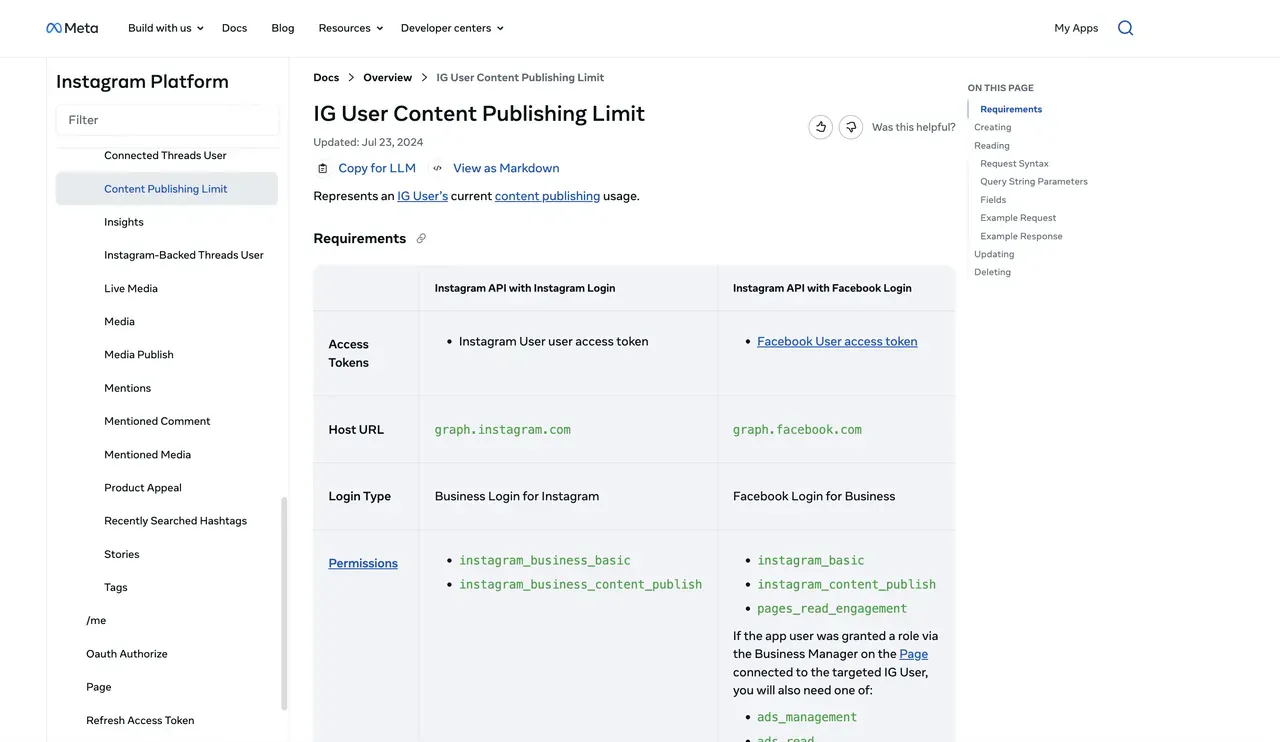
How Does the Official Instagram Posting API Publish a Post?
Meta’s official Instagram posting API, the Graph API, publishes through a two-step container flow, not a single upload call. First you create a media container by sending a POST request to /{ig-user-id}/media with your image or video URL and caption. Meta fetches the media from that URL, which means the file must already sit on a publicly reachable server. You can’t send the image bytes directly for a standard feed post.
Second, you publish the container with a POST to /{ig-user-id}/media_publish, passing the creation_id from step one. Videos process asynchronously, so you poll the container’s status_code field until it reads FINISHED before publishing. A container that sits unpublished for 24 hours expires and you start over.
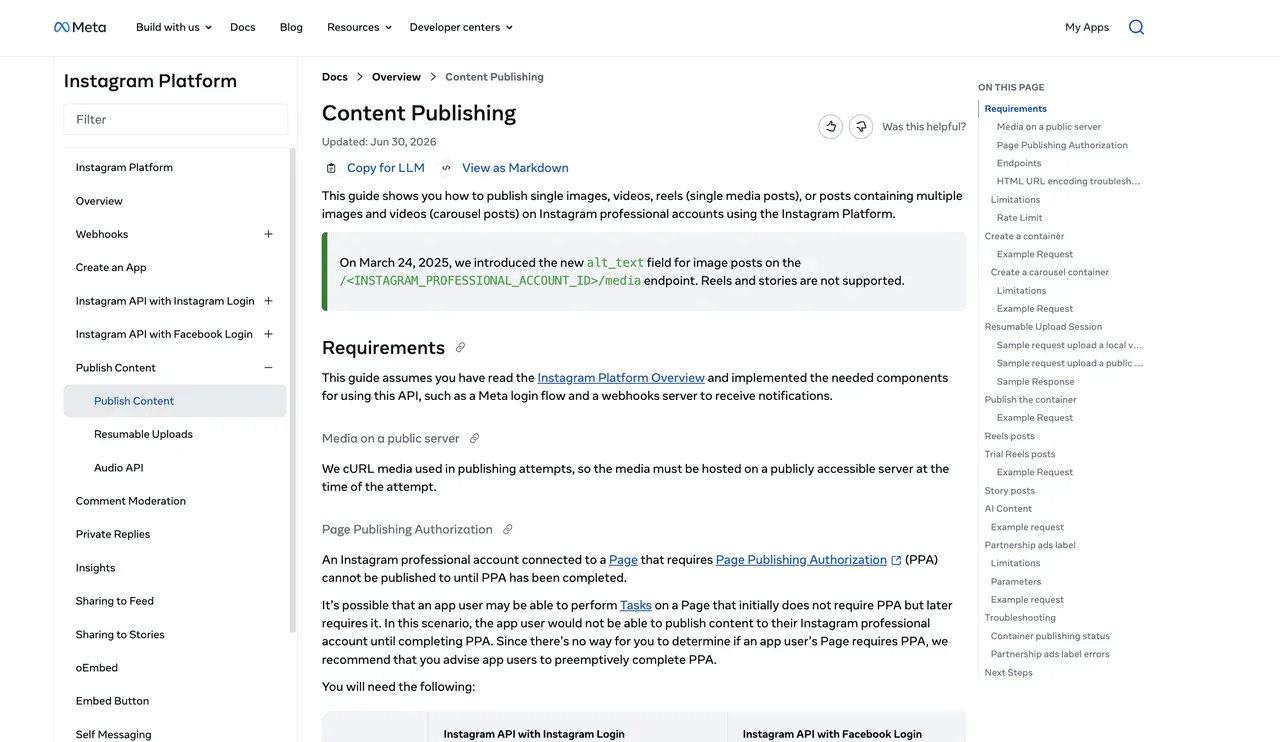
Carousels stack the same flow: one container per item, then a parent container with media_type: CAROUSEL, then publish the parent. Reels use media_type: REELS, Stories use media_type: STORIES. The mechanics are documented, and they work. What the docs undersell is everything wrapped around those two calls: app creation, the OAuth flow, exchanging short-lived tokens for long-lived ones that still expire after roughly 60 days, and the review process if anyone besides you connects an account.
Do You Need App Review to Post to Instagram via API?
App review is where Instagram posting projects go to stall. Rejections often arrive with little actionable feedback, resubmissions are the norm rather than the exception, and the process has a chicken-and-egg core: Meta wants a screencast of your app using the permission, but you need the permission to build the feature you’re supposed to record.
The correction that saves most solo builds: development mode is enough for your own account. Add your Instagram account as an Instagram Tester in the Meta app dashboard, accept the invite from your Instagram settings, and your app can publish to that account without ever entering review. Plenty of builders plan weeks around a review cycle they never actually needed.
The trap closes when your users connect their own accounts. That requires Advanced Access, which requires App Review plus business verification. Meta’s docs estimate 2 to 3 days per submission, but community reports put a real round at multiple weeks, and rejection restarts the clock. Budget for that if you’re building a product, not a personal automation.
What Format Rules Break Instagram API Posts?
Instagram’s media validation is stricter than any other major platform, and each rule below surfaces as a failed container rather than a helpful error.
- Feed images must be JPEG. PNG, WebP, and GIF URLs are rejected, per Meta’s media reference.
- Aspect ratio must land between 4:5 and 1.91:1 for feed posts. Square works. A tall 9:16 image fails as a feed post.
- Captions cap at 2,200 characters, 30 hashtags, and 20 @ tags.
- Carousel items are cropped to match the first image’s aspect ratio, so mixed-ratio carousels come out mangled unless you pre-crop.
- Videos want MP4 with H.264.
No single rule on that list is a hard problem. Together they mean your integration needs an image pipeline, not just an HTTP client, because real-world media arrives as PNGs, screenshots, and odd ratios.
Real-World Access Examples
The weekend build for your own account. Route: the official Instagram API in development mode. The integration stack is 1 Meta app + 1 Instagram Tester invite + 1 short-to-long token exchange = your first published container the same day. What you inherit permanently: the JPEG conversion step, the public media host, and a refresh job for the 60-day token. Reasonable for one account you control.
The product where users connect their own Instagram. Route: Graph API with Advanced Access, no way around it. The integration stack grows: 2 permissions × 1 screencast each + business verification + a working demo Meta reviewers can log into = a launch date you don’t control. You also inherit an onboarding doc, because every single user must arrive with a professional account, and a container status poller for every video any of them uploads.
The AI agent that posts on its own. Route: this is where the official path stops fitting entirely, because an agent needs a tool call, not an SDK project. Through Blotato the stack is 1 API key + 1 connected Instagram account = the agent posts in minutes, over REST or MCP, and the identical call reaches 8 more platforms. Meta offers no agent-shaped path at all, which is why this persona is the one that never goes direct.
The Honest Pitch: Skip the Container Flow and Use Blotato
I’d be a bad founder if I didn’t tell you the trade-off. If your product needs Instagram Insights data, ad management, or partnership tagging, you need the Graph API and the review process that comes with it. But if the job is publishing content, the entire container flow above compresses into this:
curl -X POST https://backend.blotato.com/v2/posts \
  -H "blotato-api-key: YOUR_API_KEY" \
  -H "Content-Type: application/json" \
  -d '{
    "post": {
      "accountId": "YOUR_INSTAGRAM_ACCOUNT_ID",
      "content": {
        "text": "Posted via the Blotato API.",
        "platform": "instagram",
        "mediaUrls": ["https://example.com/image.jpg"]
      },
      "target": {
        "targetType": "instagram",
        "firstComment": "Which of these would you try first?"
      }
    }
  }'
One API. Every social platform.
accountId is the one value you have to fetch first, and GET /users/me/accounts returns it. On MCP you never touch it: the agent lists your connected accounts itself and fills it in.
No Meta app, no container polling, no token refresh. Blotato holds the approved Instagram integration, and the same request shape posts to X, LinkedIn, TikTok, YouTube, Threads, Facebook, Pinterest, and Bluesky by swapping the targetType. Instagram-specific options ride along in the target object: Reels with custom covers, Stories, carousels, up to 3 collaborators (single images and reels only, not carousels), trial reels, and a firstComment field that posts your first comment automatically. Use it for a question or hashtags rather than a URL, since links in Instagram comments aren’t clickable. The full request reference lives at Blotato’s REST API quickstart.
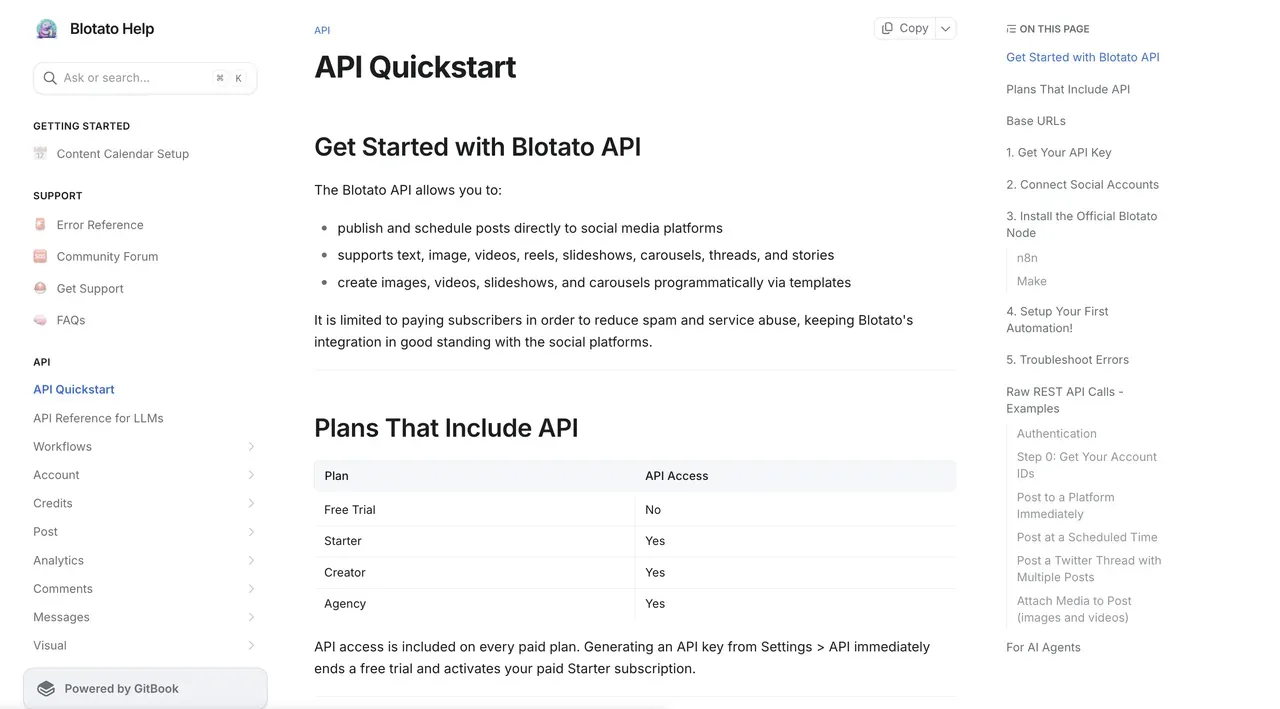
The shortest path of all skips HTTP entirely. Tell Claude to write tomorrow’s carousel and publish it, and the whole job finishes inside one conversation: Blotato’s MCP server at https://mcp.blotato.com/mcp hands Claude Code, Claude Desktop, and any MCP-compatible agent a ready-made posting tool, so the agent never sees a token, a container, or Meta’s auth screens. The same connection drives n8n and Make workflows through official Blotato nodes. Publishing is only half the surface too: the same key reads and answers Instagram and Facebook conversations, which I cover in the Instagram messaging API guide. I walk through the prompt-driven setup in How to Post to Instagram with Claude.
Ready to build against it? Blotato pricing starts at $29 a month. Generating an API key ends the trial and starts the paid plan, so treat the API as a paid feature from day one rather than something to evaluate inside the free week.
Sabrina’s Take
I’m biased, obviously. Still, my honest read is that the container flow is a fine weekend project and a terrible product dependency. Nobody chooses your tool because you hand-rolled token refresh and status polling. Go direct when Meta’s review buys you something real, like Insights data or ad features. When the job is publishing, one request against an integration someone else maintains puts the same post on the same grid, and your agent can send it without you in the room.
Instagram Posting API FAQs
How long does Meta app review take for Instagram publishing?
Meta’s App Review page estimates 2 to 3 days per submission, while community reports describe rounds stretching to weeks, especially after rejections. Review only applies when accounts you don’t own connect to your app. Posting to your own account from development mode skips it entirely.
Can I post to Instagram via API without app review?
Yes, to your own account. Add your Instagram account as an Instagram Tester on your Meta app and publish from development mode. App review only becomes mandatory when your app publishes on behalf of accounts you don’t own or manage.
How many posts can I publish per day through the API?
Going direct to Meta, the content publishing guide gives 100 API-published posts per 24-hour moving period in its rate-limit section, with carousels counting as one post, and 50 in its carousel section, and the content_publishing_limit reference says the quota is currently 50. Check your real quota with a GET request to /{ig-user-id}/content_publishing_limit. Whatever Meta’s figure, it does not carry over to every tool: publishing through Blotato, the cap is 50 posts per 24 hours per Instagram account, because Blotato sets its own anti-spam limit on top of Meta’s. Whichever route you take, the lower of the two numbers is the one that applies to you.
Can the API post Reels, Stories, and carousels?
Yes. All three use the container flow with different media_type values: REELS, STORIES, and CAROUSEL. Reels support trial mode, custom covers, and share-to-feed. Stories expire after 24 hours and can’t be extended via the API.
Is there an easier alternative to the Instagram Graph API for publishing posts?
Yes, if publishing is all you need. A unified social media API handles the container flow, the token refresh, and the JPEG conversion behind one call, and the same request shape reaches other platforms by changing the target. You give up the parts of the Graph API a wrapper does not expose, which mainly means Insights data, ad management, and partnership tagging. Choose on which of those two lists your feature depends: if it is publishing, the wrapper wins on time; if it is analytics or ads, go direct.
Is the Instagram Graph API free?
Yes. Meta charges nothing for Graph API calls, and there is no paid tier for publishing. The cost is time rather than money: app review when other people’s accounts connect to your app, business verification alongside it, and the engineering around tokens, containers, and media formats. Paid tools in this space are selling you past that work, not past a Meta invoice.
Do I need a Facebook Page to use the Instagram posting API?
Not anymore, if you use the newer Instagram API with Instagram Login, which serves accounts that exist only on Instagram. The classic Facebook Login path still requires a linked Facebook Page. Both paths require a Business or Creator account, so personal accounts stay excluded either way.