Instagram Messaging API: Social Media DMs Without App Review
Most Instagram messaging API builds do not need App Review. Which side of that fork you land on, and the reply windows every social media API hits.
The Instagram messaging API is not one product. It is a set of Meta permissions, two hard timing windows, and an App Review process whose length depends entirely on a question most guides never ask you: are you messaging from your own account, or from accounts other people connect to your app?
That question decides your access level, and the access level decides whether you ship against a sandbox this afternoon or wait on a review queue you do not control.
Below is the part of that surface you need to publish, read and answer conversations: the permissions, the eligibility windows that govern every send, and the route that puts the approval on someone else.
What the Instagram Messaging API Covers
Meta’s Instagram Platform messaging surface for professional accounts does three distinct things, and each one carries its own constraints:
| Capability | What it does | Permission (Instagram Login) | Timing constraint |
|---|---|---|---|
| Read conversations | Pull recent threads and messages for your account’s inbox | instagram_business_manage_messages | Not full history; retention is capped and varies by provider |
| Send a direct message | Reply to someone who messaged you | instagram_business_manage_messages | 24 hours from their last message |
| Private reply to a comment | Move a public comment into the DM inbox | instagram_business_manage_comments plus instagram_business_basic | Once per comment, within 7 days |
On Facebook Login the equivalents are instagram_manage_messages and instagram_manage_comments, plus pages_read_engagement. The account must be an Instagram professional account, which Meta defines as “for a business or creator.” A personal account cannot use any of this.
The thing to internalize before you design anything: there is no cold outreach. Every message you send is a reply inside a window the other person opened, whether by messaging you or by leaving a comment you are allowed to answer once. If your product plan involves reaching people who have taken no such action, the Instagram messaging API is not the tool, and no vendor can make it one.
If you would rather build against an integration where that approval is already held, Blotato exposes those same Instagram and Facebook conversations through the key that already publishes your posts. API access begins with a paid plan rather than the trial, so plan on starting the subscription rather than trialing it.
The Two Windows That Decide Your Architecture
Auth is the part people expect to be hard. Timing is the part that quietly breaks things later, because a call that worked in testing starts failing once a real conversation goes cold.
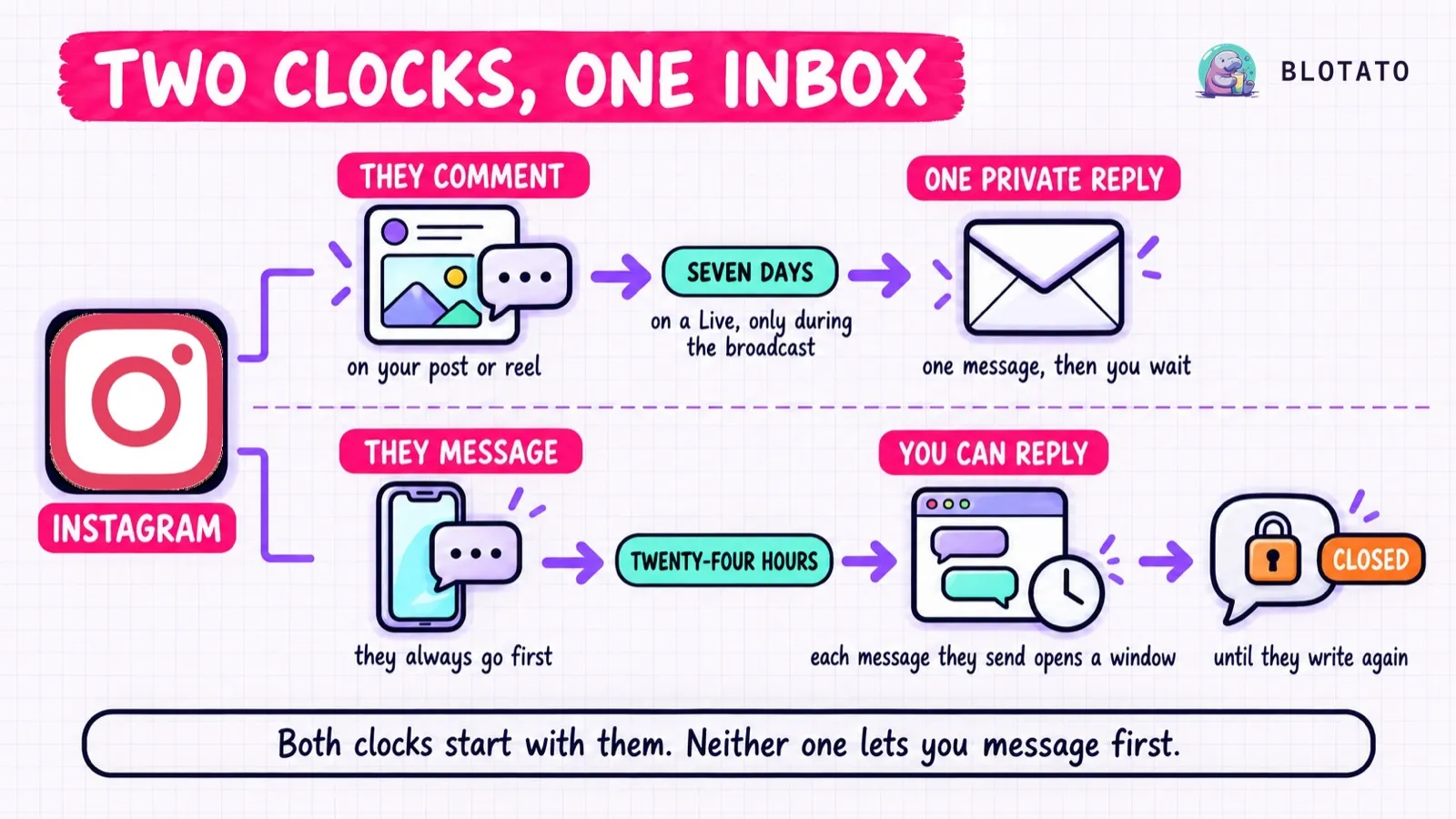
The 24-hour standard messaging window. After a person sends your account a message, you have 24 hours to respond. Meta’s messaging documentation is explicit: “Your app has 24 hours to respond to any message sent from an Instagram user to your app user.” Miss it and the send fails.
There is a third state people find in the docs and then misuse, so it is worth naming here: Meta’s human agent tag can extend the response window to 7 days. It is not an extension your agent can take. It requires its own App Review, and Meta scopes it to a human agent manually answering an inquiry that could not be resolved in the standard window, per the Human Agent feature reference. Automation sits outside that allowed usage rather than being called out as banned, which is a distinction worth knowing before you build on it. Design as though 24 hours is the hard limit for anything automated, because for automation it is.
The 7-day private-reply window. When someone comments on your post or reel, you can move that person into the DM inbox with a private reply. Meta’s private replies constraint is tight and worth quoting because people build against the wrong assumption: “The message must be sent within 7 days of the comment was made on the post or reel,” and “Only one message can be sent to the commenter.” One message. Not a thread, not a follow-up sequence. After that single private reply, you can only message that person again if they open a fresh 24-hour window by writing to you.
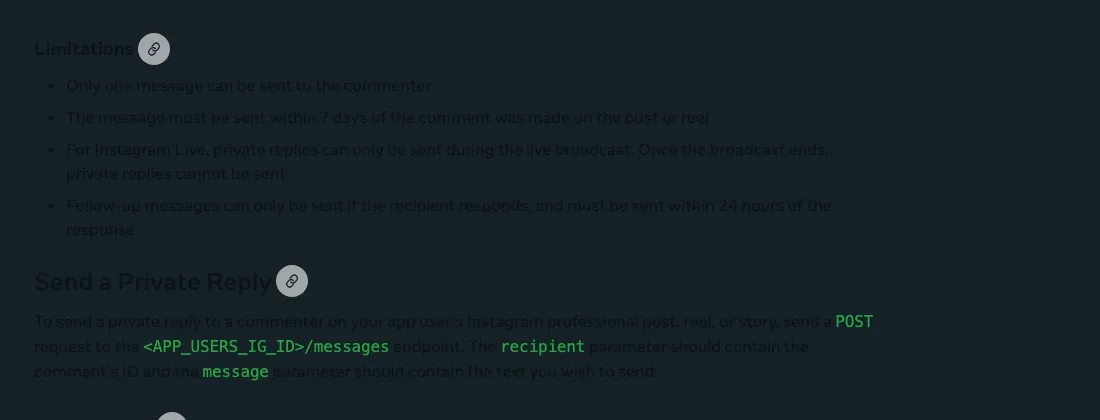
Meta rate-limits private replies at 750 calls per hour per Instagram professional account. Capacity-plan against that number rather than assuming it is out of reach: a post that lands can produce more qualifying comments in an hour than you expect, and the ceiling is per account, not per post.
These are separate clocks, not one shared 7-day rule: different triggers, different permissions, different allowed uses. That is why an inbox integration is a state machine rather than a send queue. Your code has to know which clock a given contact is on, and what it is still allowed to do.
Where App Review Actually Bites
This is the fork that determines your timeline.
If your app serves only your own Instagram professional account, or one you manage, Standard Access is enough. You can build and ship without a review cycle. This is the path most solo builders and internal tools are on, and it is dramatically faster than the internet’s collective folklore suggests.
If your app serves Instagram professional accounts you do not own or manage, Meta requires Advanced Access, which means App Review and Business Verification. Meta’s language is unambiguous: Advanced Access is mandated if “your app serves Instagram professional accounts that you don’t own or manage.”
That second path is the expensive one. You are demonstrating your use case in a screencast, justifying each permission separately, and waiting. Comments and messages are gated behind separate permissions, so an app that wants both is making two arguments, not one.
Nothing removes App Review from the world. What a hosted layer changes is whose review it is. When you publish and message through a vendor that already holds Advanced Access, the approval that matters has already happened, and your integration is an API key instead of a submission.
Reading and Answering Conversations Through One Key
Blotato’s social media API exposes the Instagram and Facebook conversation surface as plain REST, on the same key that publishes to nine platforms. Five endpoints cover reading and sending:
GET  /conversations                    List DM threads, cursor-paginated
GET  /conversations/:conversationId    A single thread
GET  /messages                         List messages, cursor-paginated
GET  /messages/:messageId              Poll send status
POST /messages                         Send a DM or a private reply to a comment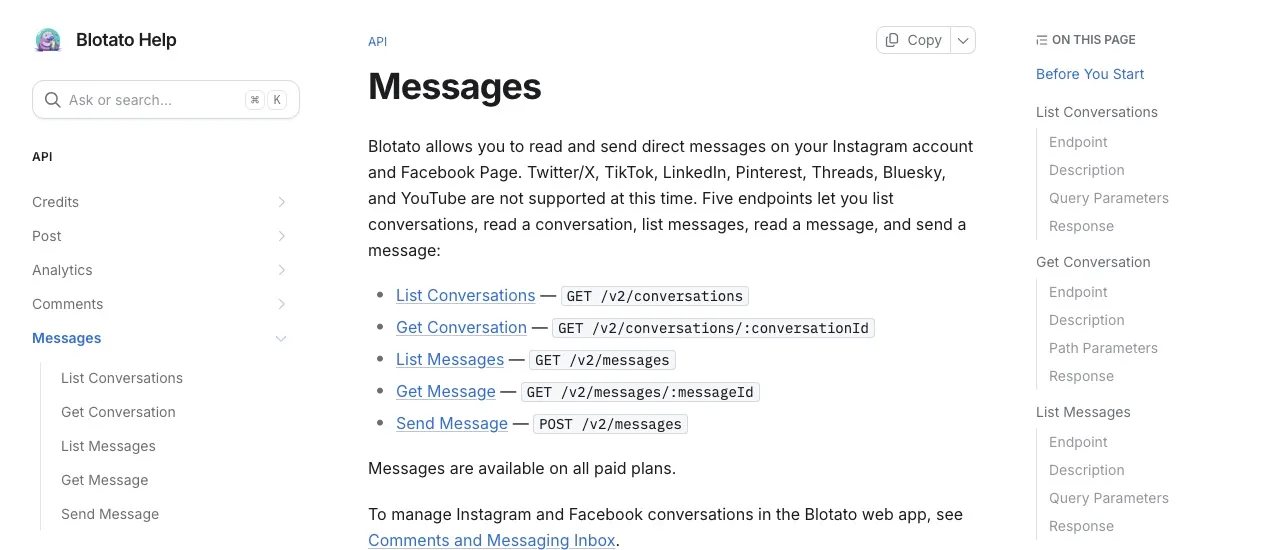
Sending is one call, and the shape of target is what distinguishes a standard DM from a private reply to a comment:
curl -X POST https://backend.blotato.com/v2/messages \
  -H "blotato-api-key: YOUR_API_KEY" \
  -H "Content-Type: application/json" \
  -d '{
    "accountId": "YOUR_INSTAGRAM_ACCOUNT_ID",
    "recipientId": "SENDER_ID_FROM_INCOMING_MESSAGE",
    "text": "Thanks for reaching out.",
    "target": { "targetType": "instagram" }
  }'
Both IDs in that call have a documented source, and neither is something you invent. accountId comes from GET /users/me/accounts. recipientId is the senderId on the incoming message you are answering, which you read from GET /messages or from the thread via GET /conversations. On MCP the agent resolves both itself and you never handle either ID.
Add target.commentId and the same endpoint sends a private reply to that comment instead, inside the 7-day window. In that case recipientId is the comment author’s id rather than a message sender.
Two operational details that will save you a debugging session. Sending is asynchronous: the response comes back queued, so poll GET /messages/:messageId until it settles.
Read the status enum by direction, because this is where people build a poller that hangs. An outgoing message moves through queued, processing, then sent or failed. Those last two are your terminal states. delivered is not a later stage of your send at all, it is the status an incoming message carries, so a loop waiting for an outgoing message to reach delivered waits forever. A failed message carries errorCode and errorMessage, and an expired messaging window is the one you should expect to hit first in testing.
Second, mind the size and shape limits: Instagram caps message text at 1000 bytes and Facebook at 2000 characters, and every Facebook message additionally requires target.pageId naming the Page it sends from.
Rate limits on this surface are 60 requests per minute on the reads and 30 per minute on the sends, which sit alongside the caps on every other endpoint.
If your agent is the thing answering the inbox, skip the HTTP layer entirely. Blotato runs a hosted MCP server at https://mcp.blotato.com/mcp, so Claude Code, Claude Desktop, Cowork or any MCP-compatible client can read a conversation and send the reply as tool calls, without you writing a request or handling an ID. That is the shape most of this reader base actually ships: the agent lists the accounts, pulls the thread, drafts the answer in context, and sends it. If your automation lives in n8n instead, call the messaging endpoints from an HTTP Request node with your Blotato API key, because the official Blotato node in n8n covers posts, media, sources and visuals but has no messaging operations.
Buttons, Quick Replies, and the Desktop Trap
You can attach up to three link buttons to a message, or up to 13 quick-reply chips, but never both in the same message. That returns a 422.
Attaching buttons also shrinks the message itself. Text is required with buttons set, and the limit drops to 640 characters, well under the 1000 bytes an Instagram message otherwise allows. Size the copy for 640 before you attach anything, or the send you added buttons to is the one that fails.
The trap is one nobody documents until it bites: Instagram renders these attachments in the mobile app only. Someone reading the conversation on instagram.com in a desktop browser sees your text with no buttons at all. Worse, if you send an attachment and also put a URL inside the text, the URL is left unclickable on desktop. Send an attachment or a URL in the text, never both. If your audience skews desktop, drop the attachment entirely and put the link in the message body.
Reading a tap back also differs by type. A quick-reply tap arrives as a real incoming text message carrying the chip label plus payload.selection. A postback button tap sends no text message at all and is recorded only as the payload. If your handler keys on message text, postback taps will look like silence.
Automating the Comment-to-DM Loop
The most common thing people actually want from this API is the comment-to-DM flow: someone comments a keyword, they get the link in their inbox. That is the job ManyChat has sold for years, and how the two stack up on price and scope is its own comparison. Worth knowing before you scope it across a wider stack: which platforms permit comment-to-DM at all is decided by the platforms, not by the tool you pick. Blotato ships that as its own resource rather than something you assemble from the messaging primitives, with nine endpoints:
GET     /dm-automations                    List automations
POST    /dm-automations                    Create an automation
GET     /dm-automations/:id                Read a single automation
PATCH   /dm-automations/:id                Update an automation
PATCH   /dm-automations/:flowId/triggers/:triggerId   Update one trigger
DELETE  /dm-automations/:id                Archive an automation
GET     /dm-automations/:id/runs           Execution runs
GET     /dm-automations/:id/logs           Execution logs
GET     /dm-automations/:id/analytics      All-time totals
The trigger is either comment-received or message-received, with case-insensitive keyword matching anywhere in the text, and an empty keyword array matches everything. A comment trigger answers with a private reply, inheriting the one-per-comment 7-day rule. A message trigger answers with a standard DM inside the 24-hour window. Optional steps run in a fixed order: follow gate, then email gate, then the message, then your webhook.
The follow gate is Instagram-only and passing it on a Facebook automation returns 422. It has a failure mode worth knowing: it depends on button-tap events the account subscribes to at connect time, so an account connected before this feature shipped may not receive taps, and runs quietly reach expired until the account is reconnected. Any reply advances the gate, so writing the gate message to ask for a typed reply is the desktop-safe version.
I wrote about the shape of that release when it shipped, in DM automations for Instagram and Facebook, and about the underlying comments and messaging endpoints separately.
The Honest Limits
I built Blotato, so read this section with that in mind. It is also the section I would want if I were evaluating this.
The engagement surface is Instagram and Facebook only. Not X, not LinkedIn, not TikTok. Publishing covers nine platforms; comments, DMs and DM automation cover two. If your inbox lives on LinkedIn, this does not solve your problem and you should not buy it expecting otherwise.
Automation-sent DMs count against a monthly active-contacts limit: 1,000 on Starter, 6,000 on Creator, 15,000 on Agency. Reaching a new person is what consumes the allowance, so a high-volume comment-to-DM campaign is the thing most likely to run into it. Read the unit carefully if you run several accounts: a contact is unique within one connected social account, so the same person interacting with two of your Facebook Pages counts twice. Reaching them again through the same account inside the month does not. Messages and comments are retained for 45 days, and there is no backfill, so the history starts when the account connects, not when the account was created.
And the constraint that no vendor can remove: Meta still governs the underlying permission. A hosted layer moves App Review off your desk. It does not repeal the 24-hour window, the one-private-reply-per-comment rule, or the ban on cold outreach.
Sabrina’s Read on Building This
If you are messaging from your own account, go direct to Meta first. Standard Access is real, the docs are decent, and you will understand the windows better for having hit them yourself.
The moment other people’s accounts enter the picture, the calculus flips hard. You are not choosing between writing code and buying a tool, you are choosing between a Business Verification submission plus permission-by-permission justification, and an API key. We built the messaging endpoints because Blotato already held the approval, and it was absurd that every customer had to go get their own.
Where I would push back on myself: two platforms is a narrow engagement surface, and I would rather tell you that now than have you find out in month two.
Instagram Messaging API FAQs
Is there an API for Instagram Direct messaging?
Yes, through Meta’s Instagram Platform for professional accounts, or through a provider that already holds the permission. The detail that catches most people mid-build is that it is reply-only by design, not by tier: no plan, partner status or spend unlocks messaging someone who has not contacted you first.
Can you automate DM on Instagram?
Yes, and the useful question is what fires it. A comment keyword or an incoming DM can trigger an automatic reply. What trips people up in testing is that your own comments never start a run, so testing from the account that owns the post looks like a broken automation. Use a second Instagram or Facebook account to test.
Do I need App Review to use the Instagram messaging API?
Only if your app serves accounts you do not own or manage. That single distinction is worth checking before you scope anything, because a large share of builders budget weeks for a review they never needed: messaging your own professional account runs on Standard Access. Advanced Access also drags Business Verification along with it, which is a company-level process, not a code one.
How long can you reply to an Instagram DM?
For anything automated, 24 hours from their most recent message, and the clock resets every time they write again. Meta’s human agent tag can extend that to 7 days, but it needs its own approval and is meant for a real person answering, not for an agent. So for an automated flow, treat a closed window as closed: nothing in your code reopens it, and only the contact writing again does.
Does the Instagram messaging API cover Facebook too?
Through Blotato, yes: conversations, messages and DM automation cover Instagram and Facebook. They cover no other platform. Every Facebook message also requires target.pageId naming the Page it sends from, which Instagram messages do not need.