LinkedIn Posting API: The 2026 Integration Guide
LinkedIn posting API in 2026: the Posts API request shape, the image URN flow, the deprecated ugcPosts trap, and the shortcut agents actually use.
The LinkedIn posting API question splits into two answers in 2026, and most tutorials only give you one of them. The official route is LinkedIn’s Posts API: a versioned REST surface that publishes text, images, video, and documents, reachable on your own profile without any partner approval. The second answer is Blotato’s unified layer, which turns a LinkedIn post into one authenticated HTTP call and gives AI agents an MCP route that never touches LinkedIn’s developer surface.
One correction saves most builds: you do not need Marketing Developer Platform approval to post to your own LinkedIn profile. Add the self-serve Share on LinkedIn product to a developer app and the w_member_social scope lets the authenticated member publish immediately. The partner queue only exists for company pages and posting on behalf of other people. Half the guides ranking for this topic bury that distinction or miss it entirely, so I put it first.
I’m the founder, so take this with whatever grain of salt feels right. My own accounts run on the same unified API I’m pitching, 3M+ followers and 500M+ views across platforms, and both routes get a fair hearing below.
LinkedIn Posting API at a Glance (2026)
| Access route | Cost | Best for | Key friction |
|---|---|---|---|
| Share on LinkedIn (own profile) | Free | Publishing to your own feed from your own app | OAuth setup, URN encoding, 150 posts per member per day |
| Community Management API (pages, clients) | Free, partner-gated | SaaS products and agencies posting to company pages | Marketing Developer Platform approval, months of waiting |
| Legacy ugcPosts endpoint | Deprecated | Nobody. Old tutorials still teach it | Replaced by the Posts API, yet still ranks in search |
| Blotato unified API | From $29/mo | Shipping LinkedIn publishing (and 8 other platforms) without the OAuth project | API sits on paid plans only |
The pattern matches the rest of LinkedIn’s developer surface: the API itself is free, and the real price is paid in setup steps, review queues, and maintenance. If your product only publishes content, a wrapper folds all of that into one request. If you need ads data or page analytics, you go direct and wait out the approval.
Prefer to skip straight to the single-request route? Start a free week of Blotato.
Free 7-day trial · Cancel anytime
What Changed Since Most Tutorials Were Written
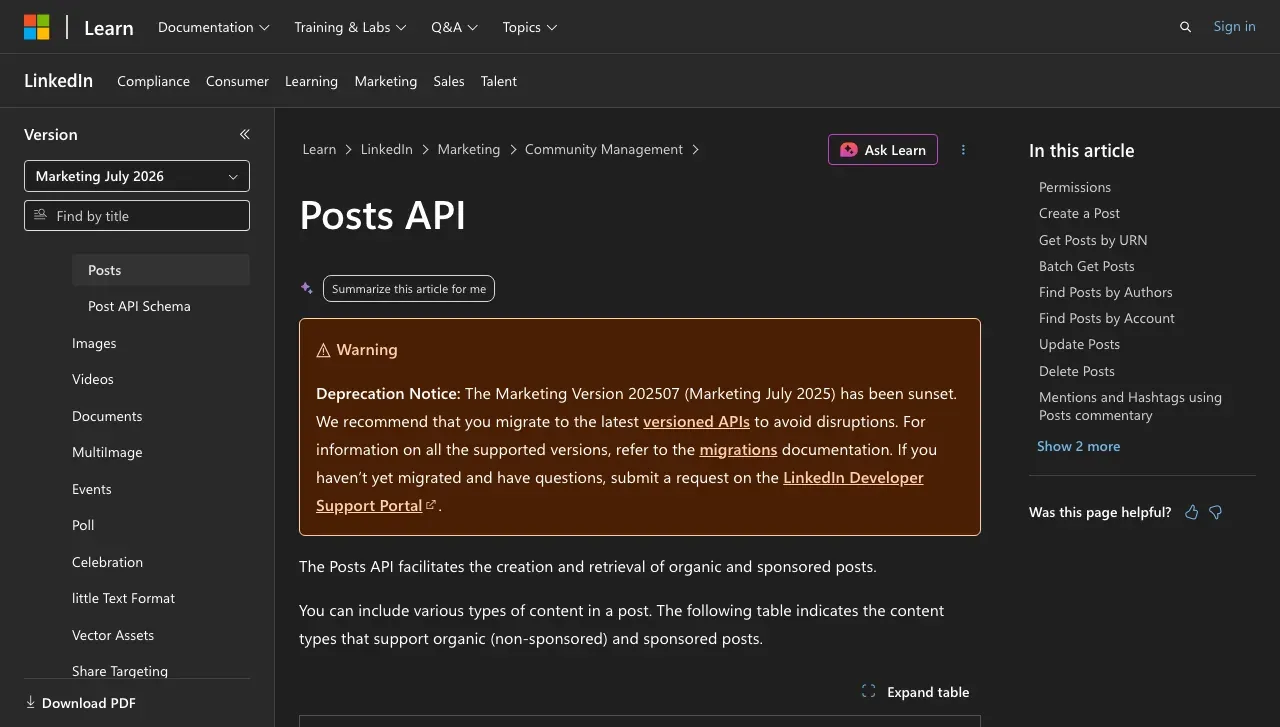
The single biggest source of broken LinkedIn integrations is not a rate limit. It is stale tutorials. LinkedIn retired the ugcPosts endpoint for new Marketing integrations back in June 2023 and replaced it with the Posts API, yet a large share of the code samples ranking in Google today, including accepted Stack Overflow answers, still build against /v2/ugcPosts. A ServiceNow consultant writing about this in January 2026 asked the obvious question: why are people still creating new content on the legacy API?
The modern Posts API also brought a versioning contract that older guides never mention. Every request carries two headers: LinkedIn-Version in YYYYMM format and X-Restli-Protocol-Version: 2.0.0. LinkedIn cuts a new version monthly and supports each one for a minimum of one year, so an integration with a hardcoded version string from 2024 is already past its support window. LinkedIn retired 25 versions between October 2024 and September 2026, and a request carrying a retired version header returns an error. If a tutorial’s sample request has neither header, the tutorial predates the API you should be building on. One source of confusion worth naming: LinkedIn’s consumer Share on LinkedIn docs still demonstrate the older unversioned /v2/ surface for own-feed posting, and it still works there. New builds should target /rest/posts with the versioned headers anyway, since that is the surface LinkedIn actively maintains, and it accepts personal-profile posting with the same w_member_social permission.
How Does the LinkedIn Posting API Publish a Post?
A text post through the Posts API is a single POST request to the /rest/posts endpoint. The body carries five fields that matter: author (a Person URN like urn:li:person:{id}, or an Organization URN for a page), commentary (your post text), visibility (PUBLIC or CONNECTIONS), distribution (feed placement), and lifecycleState. That last one trips people up: DRAFT, PUBLISH_REQUESTED, and PUBLISH_FAILED exist as states, but PUBLISHED is the only value the API accepts at creation. You cannot create a scheduled or draft post through the public Posts API, so any scheduling logic lives in your own app.
A successful create returns HTTP 201 with no body. The new post’s ID comes back in the x-restli-id response header as a share URN. Two mechanical details cause most first-request failures: URNs inside request paths must be URL-encoded, and mentions in commentary match against the entity’s name case-sensitively. Both fail with errors that do not name the actual problem.
How Do Images Get Into a LinkedIn API Post?
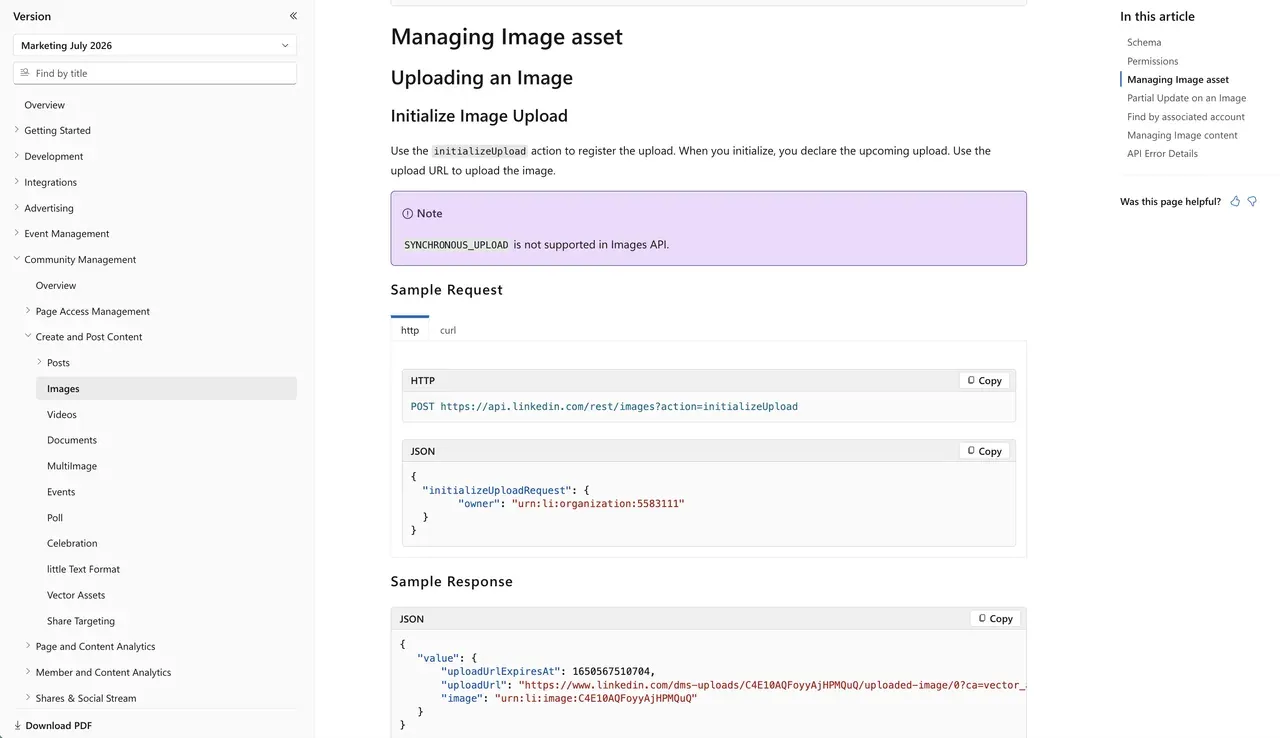
Image publishing is where the LinkedIn posting API stops being one call, and it is the part every ranking tutorial skips. Text-only examples are everywhere. The image flow is documented across two separate pages and works like this:
- Call the Images API with the
initializeUploadaction, passing the owner URN. LinkedIn returns an upload URL and an image URN in the formurn:li:image:{id}. - Send the image binary to that upload URL. The URL is single-use and the upload is asynchronous only, since the Images API does not support synchronous upload.
- Create the post through the Posts API with the image URN referenced in the content. For a multi-image post, repeat the upload per image and pass the URNs together, which publishes through the MultiImage flow.
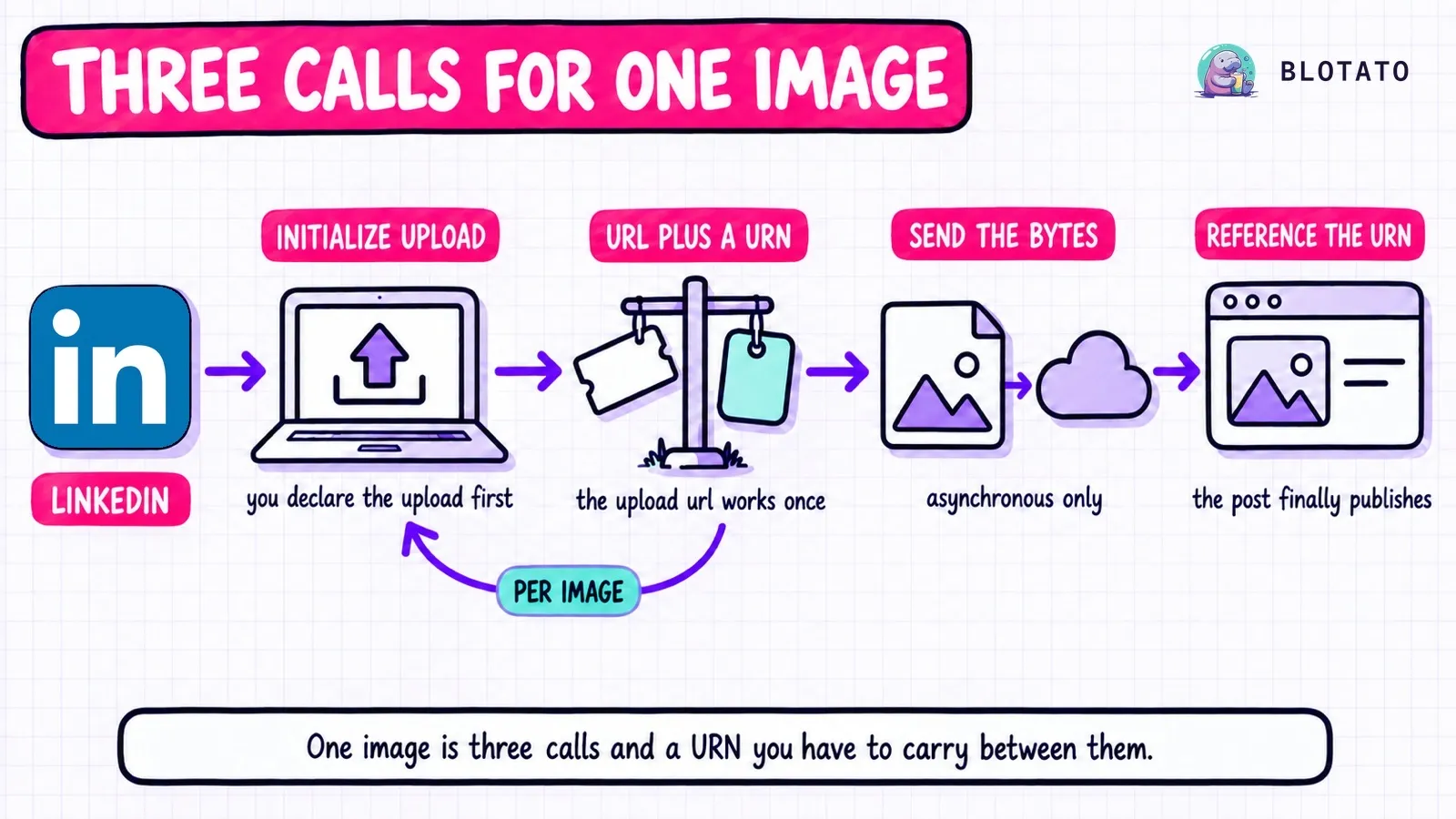
Format constraints are looser than Instagram’s JPEG-only rule but real: JPG, PNG, and GIF are accepted, images cap at just over 36 million pixels, and animated GIFs stop at 250 frames. Video and PDF documents follow the same initialize-upload-reference pattern with urn:li:video and urn:li:document URNs. The practical consequence: a “post with image” feature on LinkedIn is three HTTP calls, a binary upload, and URN bookkeeping, before you write any of the OAuth code that authorizes it.
Do You Need Partner Approval to Post via the API?
For your own profile, no. Create an app in the LinkedIn Developer Portal, add the self-serve Share on LinkedIn product, and the w_member_social permission arrives without any review conversation. Pair it with the Sign In with LinkedIn product and your OAuth request asks for the scopes openid profile w_member_social, the modern OpenID Connect set. Sharing rights and scope names are the top source of confusion in developer threads on this topic, because older answers reference retired scopes like r_liteprofile that no longer exist on new apps. One indie developer who wired this up put it plainly: they had assumed LinkedIn had no free personal posting API, and they were mistaken. Unlike LinkedIn’s Marketing surfaces, where limits are per-app and unpublished, the Share on LinkedIn product page prints its ceilings directly: 150 requests per member per day and 100,000 per application per day, reset daily on UTC time. That is far more headroom than any human posting schedule needs.
Company pages are the other side of the wall. Publishing to an organization page requires the w_organization_social scope, an admin role on the page, and Community Management API access through the Marketing Developer Platform partner program. That approval cycle runs weeks to months, and I break down the full tier-by-tier reality in LinkedIn API pricing. The short version for this post: own profile is a same-day build, pages are a quarter-long project.
Three content types stay locked regardless of your access tier: organic swipe carousels (a sponsored-only ad format), LinkedIn’s long-form Articles, and native reposts. None of them publish through any third-party tool either, because the restriction sits in the API itself. And token lifetime never stops being your problem: access tokens expire in about 60 days, and outside the partner program you refresh by re-authenticating, so a personal integration needs a token calendar or it silently dies in month three.
Real-World Access Examples
The developer automating their own feed. Route: Share on LinkedIn in a personal app. The stack is 1 developer app + 1 OAuth token + 1 POST request = your first published text post in an afternoon. What you inherit: the 60-day token expiry, URN encoding quirks, and the three-call image flow the moment a post needs a visual. A fair weekend project, as long as it stays text-first.
The SaaS product posting for users. Route: there is no shortcut, this is Community Management API territory with Marketing Developer Platform review. The stack becomes an access form + an end-to-end demo recording + test credentials + a commercial use case LinkedIn accepts = a launch gated on a review you cannot expedite. LinkedIn rejects applications that look like generic schedulers, which most posting products do.
The AI agent that publishes on its own. Route: the official path was never designed for one, since an agent wants a tool call and LinkedIn offers an OAuth ceremony plus URN bookkeeping. Blotato reduces the whole build to an API key and a connected LinkedIn account: the agent publishes within minutes over REST or MCP, hits a personal profile or a company page, and reuses the identical request on 8 other platforms. Of the three personas, this one has the least reason to ever go direct.
The Honest Pitch: Skip the URN Flow and Use Blotato
I’d be a bad founder if I didn’t tell you the trade-off. If your product needs LinkedIn ads data, page analytics, or Sales Navigator access, you need the official APIs and the partner process attached to them. But if the job is publishing, the entire pipeline above, versioned headers, initializeUpload, binary staging, URN references, collapses into one request:
curl -X POST https://backend.blotato.com/v2/posts \
  -H "blotato-api-key: YOUR_API_KEY" \
  -H "Content-Type: application/json" \
  -d '{
    "post": {
      "accountId": "YOUR_LINKEDIN_ACCOUNT_ID",
      "content": {
        "text": "Five lessons from building in public this quarter.",
        "platform": "linkedin",
        "mediaUrls": [
          "https://example.com/slide-1.png",
          "https://example.com/slide-2.png",
          "https://example.com/slide-3.png"
        ]
      },
      "target": { "targetType": "linkedin" }
    }
  }'
One API. Every social platform.
No developer app, no upload initialization, no version headers. Media is any publicly accessible URL, and passing 2 to 10 image URLs like the example above makes Blotato auto-build a LinkedIn document carousel, the modern PDF-based format viewers swipe through, which the official API makes you assemble yourself. Add a pageId to the target and the same request publishes to a company page instead of your profile, with no Marketing Developer Platform application on your side, since Blotato holds the approved integration. Requests are capped at 30 per minute, and the full schema lives at help.blotato.com/api/publish-post.
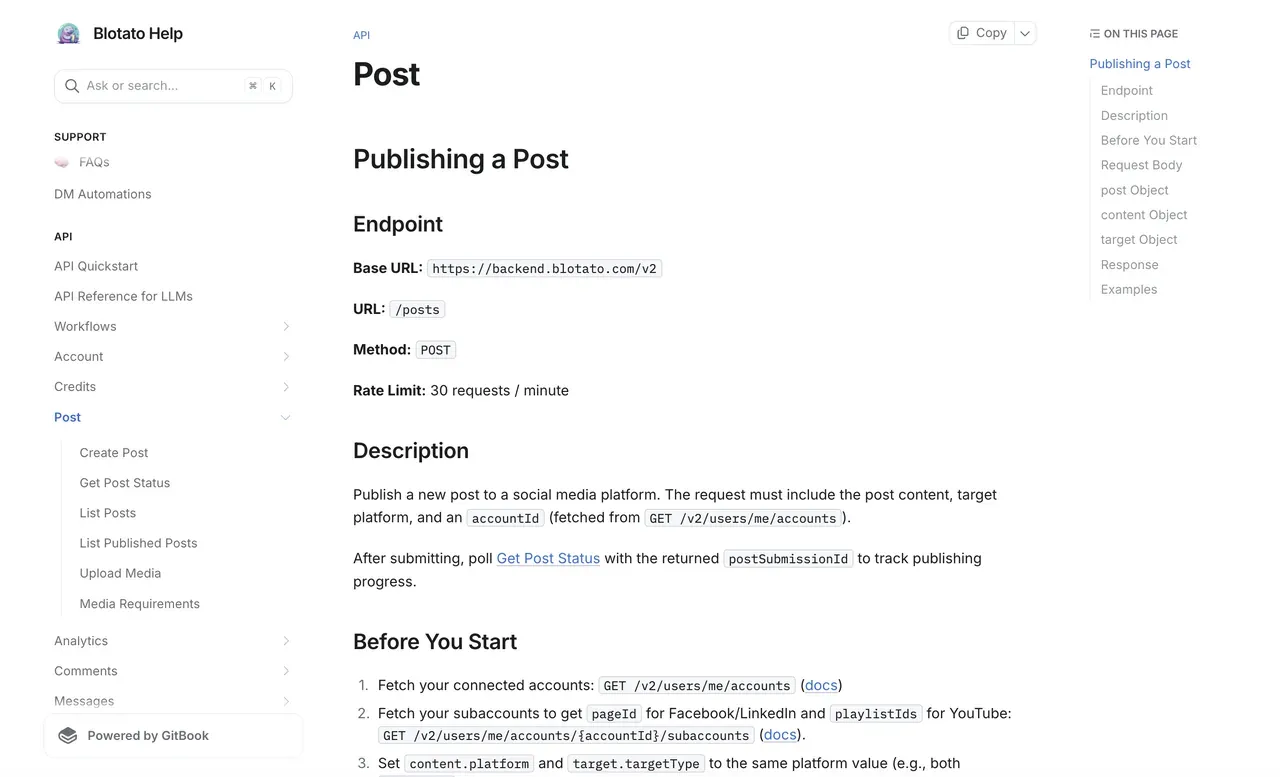
For agents, Blotato runs an MCP server at https://mcp.blotato.com/mcp, which means Claude Code, Claude Desktop, or any MCP-compatible agent can post to your LinkedIn account directly without touching LinkedIn’s auth flow at all. An agent drafts the post, calls one tool, and the same connection covers scheduling and the other eight platforms. The LinkedIn MCP server page lists the exact tools exposed for LinkedIn and what each one returns. The prompt-driven version of that workflow is in How to Post to LinkedIn with Claude.
If that beats maintaining URN plumbing, start a free week. One thing to know first: API access is a paid feature, so generating an API key ends the trial and starts the paid plan.
Sabrina’s Take
I’m biased, obviously. But I built Blotato because the per-platform integration tax is the wrong place to spend engineering time, and LinkedIn charges that tax in URNs and version headers. Going direct is the right call when the review process buys you something the wrapper cannot reach, like ads data or page analytics. When the job is putting posts on a feed, three calls per image against a monthly-versioned API is plumbing, not product. One request that someone else keeps current publishes the same post.
LinkedIn Posting API FAQs
Is the LinkedIn posting API free?
Yes. Posting to your own profile through Share on LinkedIn costs nothing, and even the partner-gated Community Management API has no listed price. The real costs are setup time and, for company pages, the partner approval cycle covered earlier in this guide.
Can I post to my own LinkedIn profile without partner approval?
Yes. Add the self-serve Share on LinkedIn product to your developer app and the w_member_social scope lets the authenticated member publish to their own feed the same day. Partner approval only enters the picture for company pages and posting on behalf of other users.
Why does my ugcPosts integration or tutorial fail?
LinkedIn replaced the ugcPosts API with the Posts API and retired ugcPosts for new Marketing integrations in June 2023. Old tutorials still rank and still show /v2/ugcPosts samples. Rebuild against /rest/posts with the LinkedIn-Version and X-Restli-Protocol-Version: 2.0.0 headers.
How many posts per day does the API allow?
The consumer Share on LinkedIn surface publishes limits directly: 150 requests per member per day and 100,000 per application per day, reset daily on UTC time. Community Management tiers work differently, with published Development-tier defaults and production limits shown in your Developer Portal Analytics tab.
Can the LinkedIn API post carousels?
Not the native swipe carousel, which is a sponsored-only ad format with no organic API support. The practical equivalents are a multi-image post, or a document post that readers page through. Through Blotato, passing 2 to 10 image URLs in one request auto-builds that document carousel for you.