Metricool Pricing 2026: The Ladder Inside Each Plan
Metricool pricing in 2026: the brand-count ladder hiding inside each tier, both billing columns, and why its MCP is free while its API is not.

Search Metricool pricing and you will be told it costs $20, $22, $25, $36, $67, $99 and $210 a month. That is seven different numbers for one product, across the vendor’s own pages and the write-ups ranking beside them.
Several were true when written. They answer different questions, because the page does two things at once: a monthly-versus-annual toggle above the cards, and a second price ladder inside each tier at the bottom of every card. So Metricool does not have three prices. It has eleven, and which one applies depends on a count most people have never made.
If you are wiring Metricool into an agent rather than logging into a dashboard, there is a twelfth number that decides more than any of those eleven, and it is $0 or $636 a year depending on one detail of how your client signs in. That is the part this post spends the most time on.
I have an obvious stake here, since Blotato competes with Metricool, so treat the ladder below as something to verify on the page rather than take from me. Everything came off Metricool’s own pricing page and help center on September 8, 2026.
Metricool Pricing in Brief
- Free 1 brand, $0 forever. No card. No LinkedIn, no X.
- Starter $20 per mo annual for up to 5 brands, $36 for up to 10. Monthly is $25 and $45.
- Advanced $53 annual for up to 15 brands, $85 for 25, $159 for 50. Monthly is $67, $107 and $210.
- Custom beyond 50 brands, quoted.
- The unit: a brand-count band, not a per-brand rate. A brand holds one profile per platform, so one business on nine networks is one brand.
- The quirk to know: Metricool’s MCP is free on every plan including Free when your client signs in with OAuth. Its API, and any client that authenticates with an API key, needs Advanced.
Count Your Brands First, Because That Is the Meter
Before any price makes sense you need Metricool’s unit, and it is not the one most schedulers use.
Metricool meters brands, and a brand is a container, not a profile. That is the opposite of tools like Blaze, which needs a whole separate workspace and subscription per brand. You are not charged a rate per brand either. You are charged a flat total for a band of them, which is why the effective cost per brand falls from $4.00 at five brands to $3.18 at fifty. Its help center puts the unit plainly: “One Brand = one profile per platform. Each Brand can only have one profile per social network or platform.” Metricool describes it as “a magical folder where you group everything digital for a client, company, or project.”
A single brand holds up to about fifteen connections: a website, Facebook Page, Instagram, Threads, X, Bluesky, LinkedIn, Pinterest, TikTok, Google Business Profile, YouTube, Twitch, and Meta, Google and TikTok Ads.
That is why Metricool can look absurdly cheap next to per-account tools. One business on nine networks is one brand, where a per-channel tool bills you nine times. Run it for an agency with fifteen single-network clients and it inverts, because that is fifteen brands.
One trap before you count: Metricool instructs you to create a separate brand for each Google Business Profile location. A ten-location franchise is ten brands, not one.
Both Ladders, Both Billing Columns
Every published Metricool price in one place. The pricing page loads on the annual toggle, so the left column is what you see first.
| Plan | Brands | Annual (per mo) | Monthly |
|---|---|---|---|
| Free | 1 | $0 | $0 |
| Starter | up to 5 | $20 | $25 |
| Starter | up to 10 | $36 | $45 |
| Advanced | up to 15 | $53 | $67 |
| Advanced | up to 25 | $85 | $107 |
| Advanced | up to 50 | $159 | $210 |
| Custom | 51+ | Quote | Quote |
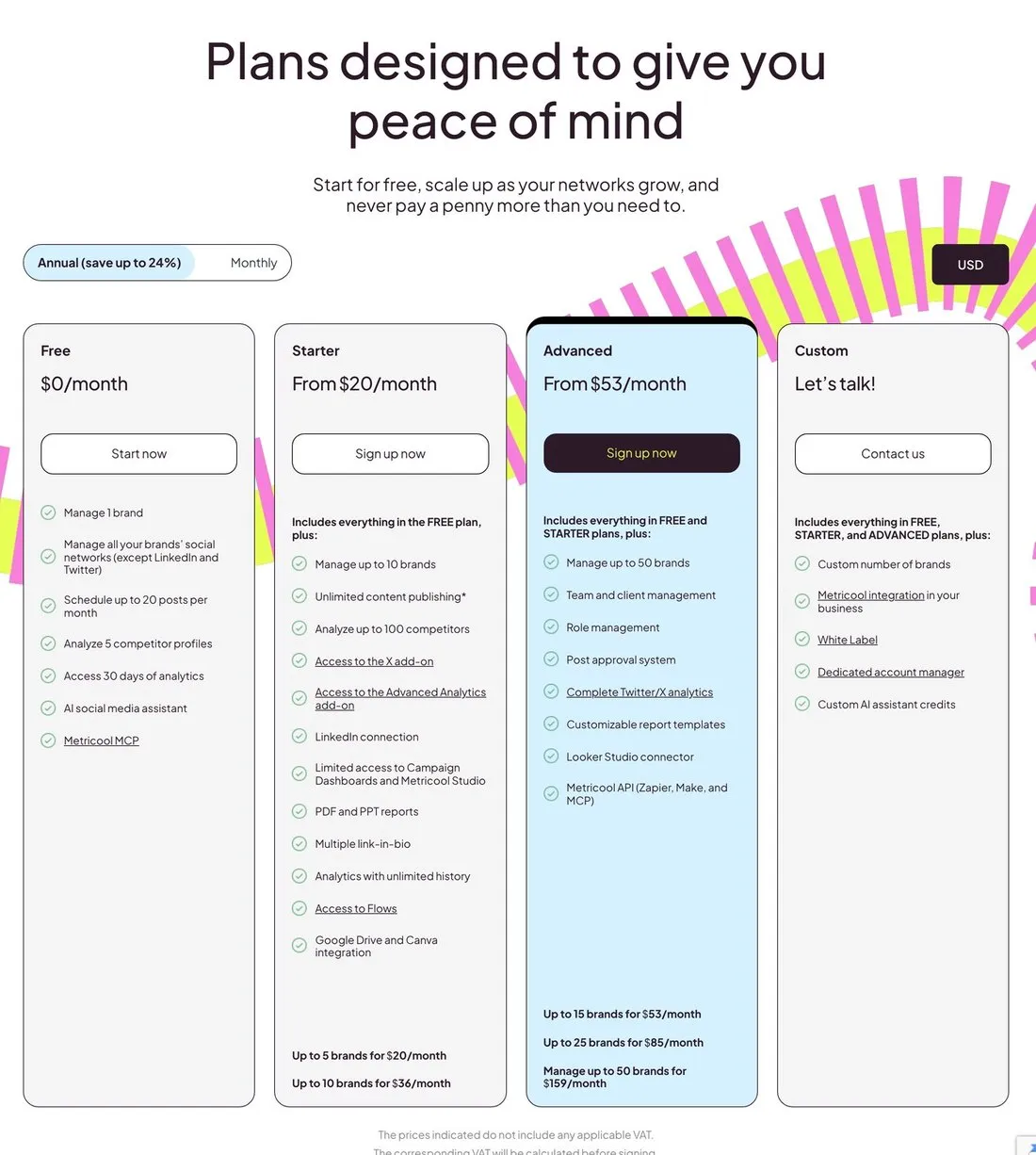
Every number in the ladder sits at the bottom of its card, below the feature list, which is why so many summaries quote only the headline price.
Now the seven numbers from the top resolve. $20 is annual Starter at 5 brands and $25 is the same plan monthly, $36 is annual Starter at 10, $67 is monthly Advanced at 15, and $210 is monthly Advanced at 50. The $22 and $99 figures come from older reviews quoting rate cards that have since moved.
The toggle is labeled “Annual (save up to 24%).” The real discount runs 20% to 21% at the first four steps and reaches 24.3% only at the 50-brand one, so treat “up to” as doing real work in that sentence. Quote the dollars, not the percentage.
The thing that actually costs people money here is the bracket, not the rate. You do not pay for 6 brands, you pay the 10-brand price. Land on your sixteenth brand and you pay for 25. Between brackets, every additional brand is genuinely free, and at a bracket edge one new client jumps you a whole step. On annual billing the four jumps are $16, $17, $32 and $74 a month, and on monthly they are $20, $22, $40 and $103, so the 26th brand is the most expensive client you will ever sign by a wide margin.
The Metricool API Sits Behind Advanced, the MCP Costs Nothing
At $53 a month billed annually ($67 monthly), the Advanced plan is the cheapest way to get the Metricool API, the HTTP API its Zapier, Make and Looker Studio connectors run on. The MCP server is a separate product with no plan gate, so a free account can use it, provided your AI client connects over OAuth.
The pricing page makes that split look like a vendor contradiction until you read it properly.
On the Free plan’s feature list, one line reads “Metricool MCP.” Two tiers up, on Advanced, another line reads “Metricool API (Zapier, Make).” Read quickly, the second looks like the paid version of the first.
It is not a mistake. Metricool publishes a help article titled “MCP vs API access: what is the difference?” with a plan-requirements table that settles it in two rows: Metricool MCP is available on “Any plan, including Free,” and the Metricool API is “Advanced or Custom only.”
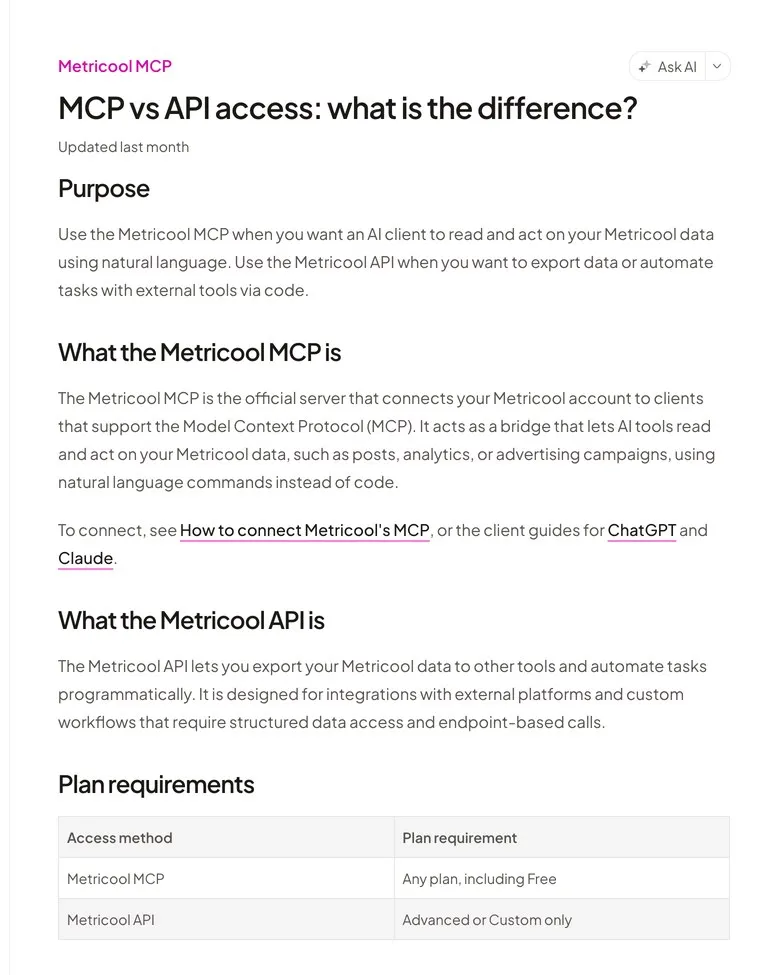
Metricool documents the split deliberately rather than leaving it to be inferred from the pricing page.
They are two products with two jobs. The MCP is for an AI client reading and acting on your data in natural language. The API is for exporting data and driving tasks with code, which is what Metricool’s native Zapier, Make and Looker Studio integrations all ride on. Note that Make and Zapier appear on both sides of this line, and it is not a contradiction: their native Metricool connectors use the API and need Advanced, while pointing either one at the MCP endpoint over OAuth does not. Gating the two paths differently is a decision, not an inconsistency, and Metricool deserves credit for writing it down. It also makes Metricool one of only 2 of 23 tools in the agent pricing study we ran across 58 vendors that charge more when the agent posts through the HTTP API.
And then there is the seam, which is where I would slow down. A companion article, “MCP limits and plan requirements,” spells it out: “Some AI clients offer a token-based connection that uses the Metricool API instead of MCP OAuth. That path requires Advanced and is not the same as MCP access on Free.”
So the free-MCP claim depends on how your client authenticates. Sign in with OAuth, as ChatGPT, Claude, Cursor, Make and Zapier’s URL connection do, and you are free.
n8n is the case worth checking before you budget. Metricool’s setup guide says n8n “uses header token authentication, not the URL-only OAuth flow used by most other clients,” and instructs you to set a header named X-Mc-Auth to your Metricool API key. Metricool never writes the words “n8n requires Advanced,” so treat this as a consequence rather than a quote: the key comes from the API, and the API is Advanced or Custom only, which is $53 a month billed annually.
If you have read that Metricool gives away MCP for free and you are an n8n user, that is the sentence that was going to cost you $636 a year.
What Free Actually Buys, and Where It Stops
The free MCP is real, and its ceiling is worth being precise about, because “free MCP server” oversells it.
A Free account gets 1 brand, 20 scheduled posts a month, 30 days of analytics history with a watermark, 5 fixed competitors, and 5 AI credits, and it cannot connect LinkedIn or X at all. Metricool is explicit that the MCP inherits every one of those limits: “Connecting MCP does not raise your Metricool plan limits.” So the free tier lets an agent publish to a handful of networks, twenty times a month, for one brand, with no LinkedIn. Useful sandbox, poor production system.
The same ceiling catches a paid account that drops to Free after a cancel. Its scheduled posts keep publishing up to 20 a month, and the allowance resets on the 1st, so disconnect each network before the plan lapses if you’re leaving.
What surprised me is how much the MCP can do within those limits. It can schedule and edit posts and read metrics, and its OAuth scopes include mcp:write, so this is not a read-only analytics connector, whatever the summaries say. Metricool’s own MCP limits page adds that the permission screen describes broader access than the MCP actually has, and that inbox messages, post comments and Google Business reviews are not available through it.
Metricool’s MCP page lists 27 named tools while its published Python package registers 28, the extra one being get_brands_complete, so cite the surface rather than a bare number.
The uncomfortable part, with the condition attached: if you need broad inbox reach on one brand and can live inside 20 posts a month, Metricool’s free inbox reaches comments, DMs and Google Business reviews where my own tool reaches Instagram and Facebook. That trade stops working the moment you need a second brand or a twenty-first post, which is where a free ceiling turns into a paid ladder.
Two Costs the Cards Do Not Show
X is an add-on on every paid tier. It is priced down in the comparison table rather than on the plan cards, at $10 per connected X account per month on top of your plan. Free cannot connect X at all, so the add-on starts at Starter, where a user running X for three brands pays $50 a month annually rather than $20. Advanced Analytics is a second add-on, from $12 a month on Starter and from $36 on Advanced and Custom alike.
“Unlimited content publishing” has an asterisk, and it resolves to a Fair Use Policy with an actual number in it: a base activity threshold of 600 posts per brand per month, above which Metricool reviews the account manually and says it is entitled to suspend posting for the current month. Generous for a human, worth knowing for an agent, because an automated schedule reaches 600 without anyone deciding to.
Metricool also publishes per-network daily ceilings: 50 Instagram posts, 30 Facebook Reels, 250 Threads posts and 1,000 replies per rolling 24 hours. Those come from the platforms rather than from Metricool, with one exception worth flagging, because it is Metricool’s own and it is tier-linked: YouTube is capped at 10 uploads a day on Free and 20 on paid plans, “based on available quotas.”
Worth checking against my own tool too, which sets its own per-network ceilings rather than passing the platform’s through. If your workflow runs up against a network’s limit, read both rate cards rather than assuming either inherits it.
Where Metricool Is the Cheapest Thing Available, and Where It Is Not
The bracket model produces two clean answers and one messy middle.
Metricool is hard to beat on price when you run few brands across many networks, because one business on nine networks is one brand rather than nine billable connections. The same shape holds on analytics depth per dollar, where its paid-ads reporting reaches further than most tools at this price. It gets expensive when your brand count is high and each brand is thin, because fifteen single-network clients is fifteen brands.
And near a bracket edge, the count decides it. At exactly 5, 10, 15, 25 or 50 brands you are paying for what you use. At 6, 11, 16 or 26 you are paying for capacity you asked nobody for. If you keep landing on that edge, I compared six tools that count a brand differently in Metricool alternatives priced by how they bill.
Here is fifteen social accounts priced across four billing models on their cheapest annual rates, grouped two ways: fifteen separate one-network clients, then five clients running three networks each. Same fifteen accounts, same work, different shape.
| Tool | Billing unit | 15 clients, 1 network each | 5 clients, 3 networks each |
|---|---|---|---|
| Metricool | Brand-count band | $53/mo (Advanced, 15 brands) | $20/mo (Starter, 5 brands) |
| Buffer Essentials | Per channel | $67/mo | $67/mo |
| Zernio | Per account | $63/mo | $63/mo |
| Blotato Starter | Flat, 20 accounts | $29/mo | $29/mo |
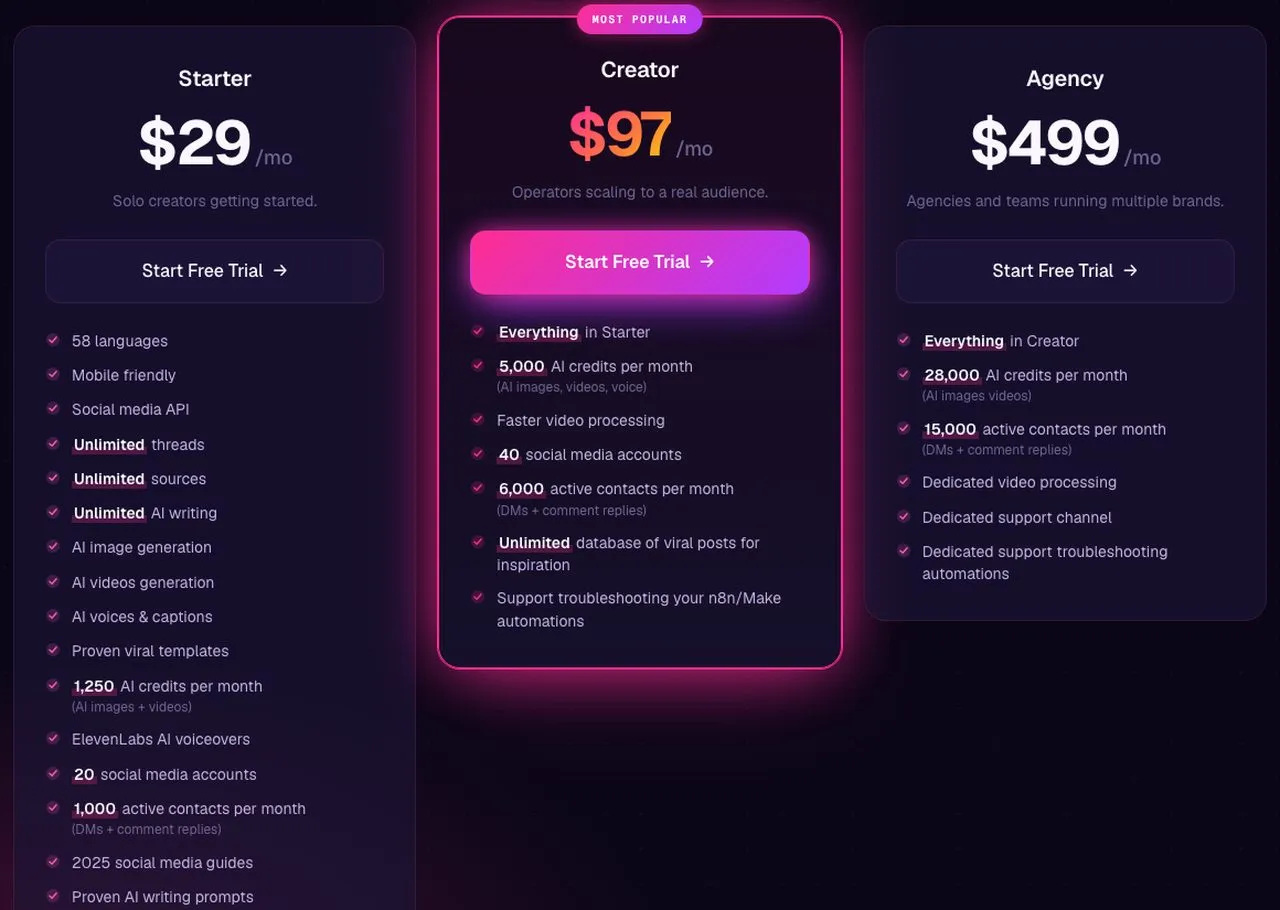
Blotato’s flat plan bundles the API rather than gating it to a higher tier, which is the line this table is really testing.
The two right-hand columns are the whole argument. Regroup the same fifteen accounts and Metricool’s bill falls by $33 a month, while the per-channel and per-account tools do not move at all and the flat tool cannot. No other row on that table cares how your accounts are organized. The bottom row comes with a conflict attached: I test and create on Blotato, so treat that line as an interested party’s arithmetic and rerun it against your own account list.
For an agent builder specifically: if one brand covers you and OAuth MCP is the route you will use, Metricool’s free tier gets an agent posting for nothing and I would not pretend otherwise. Past twenty posts a month you are on Starter at $20, and if you need the HTTP API or the n8n route you are on Advanced at $53. Then the part that costs us the sale: we sell no paid-ads analytics at all, where Metricool reports on Meta, Google and TikTok campaigns alongside organic, and we have no free tier to sit on indefinitely. If measurement is the job rather than publishing, that gap is structural and flat pricing does not close it.
Which Metricool Number Applies to You
Work it in this order and the seven conflicting figures collapse into one.
- Count your brands, remembering that one business on many networks is one brand and each Google Business location is its own.
- Round up to the next bracket. 5, 10, 15, 25, 50.
- Pick your billing column. Annual saves 20% to 21% at the first four steps and 24% at the 50-brand one.
- Add $10 per month for every X account you intend to connect.
- Decide MCP or API. OAuth-based clients are free at any tier. The n8n route passes a Metricool API key in an
X-Mc-Authheader, and since API keys are Advanced-only, budget Advanced for it.
Step five is the one that catches developers, and it is the only step where the cheapest correct answer might be $0 or $636 a year depending on a detail nobody thinks to check first.
Metricool Pricing FAQs
How much does Metricool cost per month?
Metricool costs $0 for 1 brand on Free, then $25 for up to 5 brands or $45 for up to 10 on Starter, and $67 for 15 brands, $107 for 25 or $210 for 50 on Advanced, all billed monthly. On annual billing those become $20, $36, $53, $85 and $159 per month. The pricing page displays the annual column by default, which is why published Metricool prices disagree so often.
Is the Metricool API free?
No. The Metricool API requires an Advanced or Custom plan, which starts at $53 per month billed annually or $67 billed monthly. Metricool’s help center states it directly: “The Metricool API is available only on Advanced and Custom.” Zapier, Make and the Looker Studio connector all run on that API, so they carry the same requirement.
Is Metricool’s MCP server free?
On any plan including Free, yes, but with a caveat that matters. Metricool’s MCP is free when your AI client connects over OAuth, which covers ChatGPT, Claude, Cursor, Make and Zapier’s URL connection. n8n connects with Metricool’s API key in an X-Mc-Auth header rather than over MCP OAuth, and because API keys are gated to Advanced, that route lands on the paid tier. Your free-tier plan limits also pass straight through to the MCP.
What counts as a brand in Metricool?
A brand is a container holding one profile per platform, so a single business running Instagram, TikTok, LinkedIn and a website is one brand rather than four connections billed separately. Each brand supports around fifteen connections including social networks, a website and Meta, Google and TikTok ad accounts. Metricool advises creating a separate brand for each Google Business Profile location.
What does the Metricool free plan include?
One brand, up to 20 scheduled posts per month, 30 days of analytics history with a watermark, 5 fixed competitor profiles, 5 AI credits per month, and Metricool MCP access. It excludes LinkedIn and X entirely, along with PDF and PPT report downloads, custom reports, SmartLinks, the hashtag finder, the post library, Canva and Google Drive integration, Looker Studio, and Make and Zapier. The post counter tracks published posts only and resets on the first of the month. It never expires and does not require a card.
Does Metricool limit how many posts you can schedule per day?
Yes, per rolling 24 hours: 50 Instagram posts, 30 Facebook Reels, and 250 Threads posts with 1,000 replies. Metricool attributes those to the networks themselves. YouTube is the exception and is Metricool’s own limit, set at 10 uploads a day on Free and 20 on paid plans. Paid plans advertise unlimited publishing subject to a Fair Use Policy.