Post Bridge Pricing 2026: All Four Tiers and the Agent Gap
Post Bridge pricing in 2026: all four tiers from $29 to $99, the real cost per account, and why its two pages disagree on the API add-on.

Post Bridge pricing depends on which page of their site you land on. Both the pricing page and the agents page open at $29 a month for Starter. Where they part company is whether the $5 REST API add-on can sit on top of that tier, and that gap is the part that costs money.
That is not a gotcha. It is the most useful thing to understand before you buy. The agents page sells Starter plus the REST API add-on as $34 a month, while the pricing page offers that add-on only from Creator up, which puts the cheapest documented REST path at $44.
This matters more than usual if a script does your posting rather than a person. Your plan is decided by two things: how many accounts your agent touches, and whether it calls REST or speaks MCP. Those two questions land on opposite sides of Post Bridge’s rate card.
This post breaks down every price Post Bridge charges today. It covers what each tier buys at real account counts, where the cost per account actually breaks, and which tier fits an agent rather than a person. One thing deserves saying up front. The product is genuinely cheap for what it does, and if raw account capacity is what you are buying, the $99 unlimited tier is priced better than anything I would put against it.
Post Bridge Pricing at a Glance
Creator: $39 a month, 15 connected social accounts.
Growth: $59 a month, 50 connected social accounts.
Pro: $99 a month, unlimited connected accounts.
Starter: $29 a month for 5 connected social accounts, with MCP access included and no REST API add-on listed against it.
API add-on: $5 a month, required for the REST API and CLI. The pricing page lists it on Creator, Growth and Pro, but not on Starter.
Trial and refunds: 7-day free trial, no charge on signup, cancel anytime, plus a 7-day no-questions refund window after a charge.
The ceiling to check before you build: 100 posts per hour per user, and the help center states the platform is not intended for large-scale bulk or programmatic use.
The number that decides your bill: cost per account swings hard inside a single tier. Growth charges $59 whether you connect 16 accounts or 50, which is $3.69 each at the bottom of that band and $1.18 at the top.
The structural quirk: MCP is included on every tier at no extra cost, while REST API access is the paid add-on. That is backwards from how most of this category gates access, and it makes the cheapest agent path the MCP path.
How Post Bridge’s Per-Account Pricing Actually Works
The billing unit is a connected social account, and Post Bridge defines it plainly in its own FAQ: connecting your Instagram account is one social account. There is no seat charge, no per-post fee, and no separate rate per platform. Posts are unlimited on every paid plan.
The part worth checking against your own setup is that multiple accounts on the same platform each count separately, and they all draw from one pool. Post Bridge spells this out with its own example: a 5-account cap can be five TikTok accounts, or three TikTok and two Instagram. If you run six client Instagram profiles, that is six accounts, not one platform.
That makes the tier boundaries the only real decision, and there are four of them.
| Connected accounts | Cheapest plan that fits | Monthly price |
|---|---|---|
| 1 to 5 | Starter | $29 |
| 6 to 15 | Creator | $39 |
| 16 to 50 | Growth | $59 |
| 51 and up | Pro | $99 |
The pricing page carries a yearly toggle advertising one month free, though it does not print a per-tier annual total next to each plan. Read the yearly figure off the toggle yourself before you commit.
The Agents Page and the Pricing Page Disagree on the API Add-On
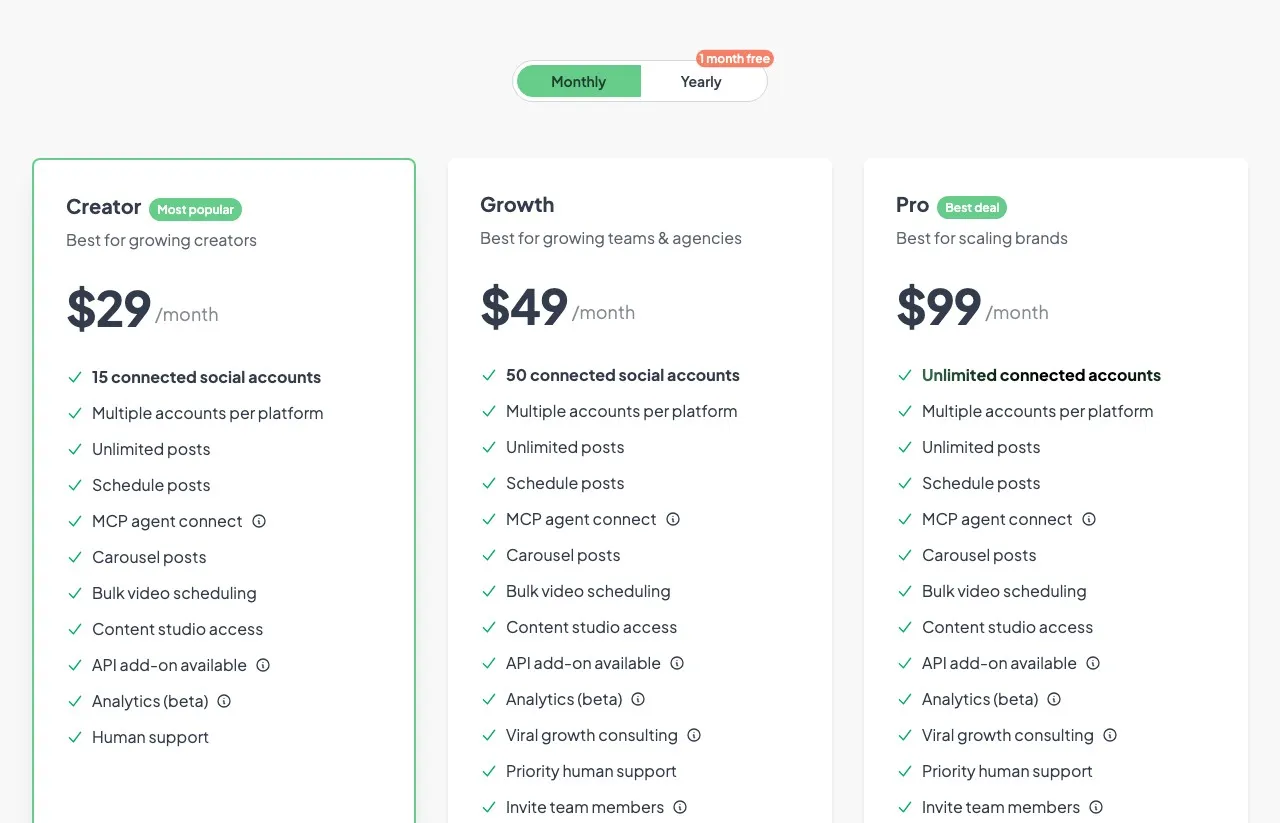
The agents page sells a Starter plan at $29 a month covering posting to every supported platform, scheduling, media uploads, and MCP access. It then adds the $5 API module and totals the pair at $34 a month for everything an agent needs.
The pricing page does not support that total. It shows “API add-on available” on Creator, Growth and Pro, and leaves it off Starter, while “MCP agent connect” appears on all four. Read together, MCP-only publishing starts at $29, and the cheapest REST path the pricing page documents is $39 plus $5. The card not listing the add-on on Starter is not the same as Post Bridge refusing to sell it there, so treat $34 as unconfirmed rather than wrong.
On the agents page the Starter card is labelled “Special offer, sign up to claim,” while the pricing page lists Starter as a plain tier with no such hedge. The help center documents a 5-account cap against Starter, which is the account count to plan around.
Post Bridge Creator, Growth, and Pro Plans
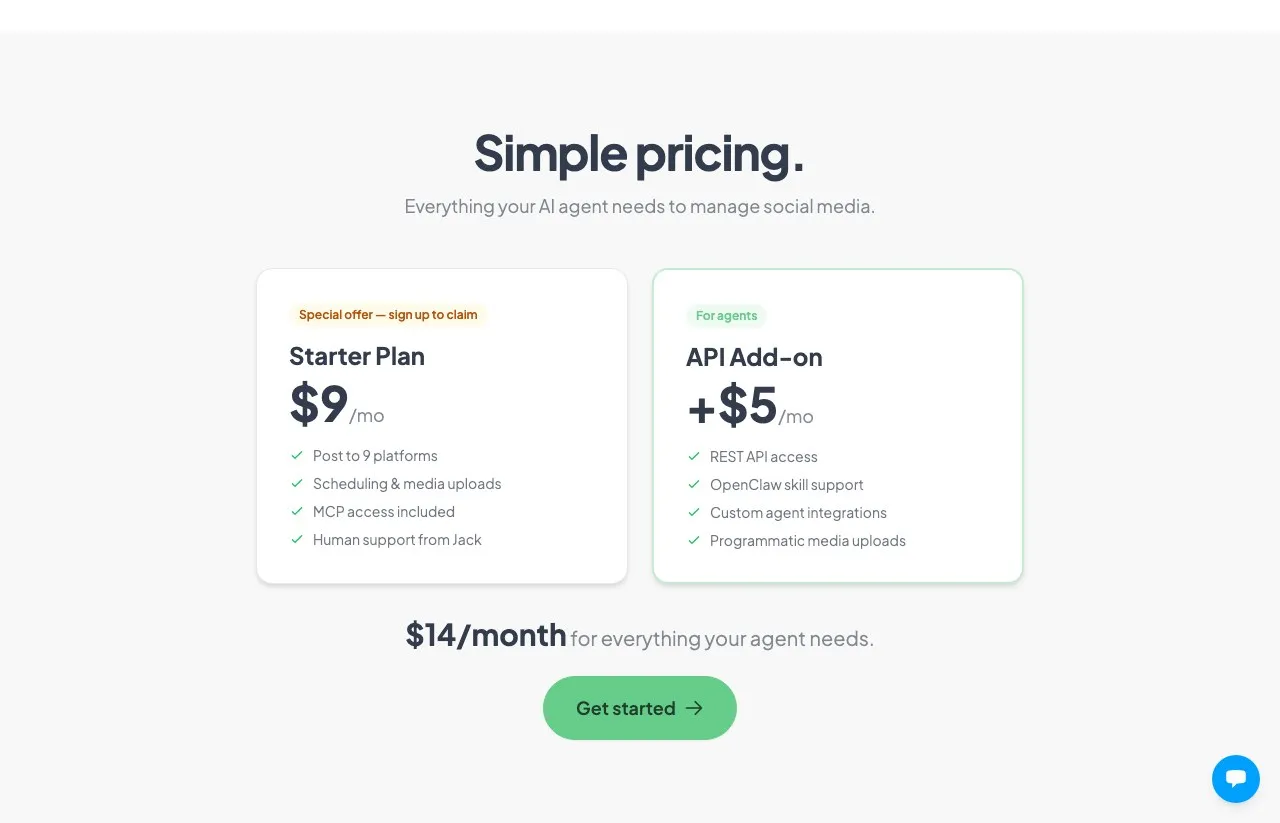
Creator at $39 covers 15 connected accounts and is the tier most solo operators land on. It includes unlimited posts, scheduling, carousel posts, bulk video scheduling, content studio access, analytics in beta, and MCP. Human support here means the founder answering directly, which is unusual at this price and worth something when a platform connection breaks.
Growth at $59 raises the cap to 50 accounts and adds team member invites, priority support, and viral growth consulting. The account jump is the reason to move: you are paying $20 more for 35 more accounts, which is the steepest value step on the card. If you are solo and under 15 accounts, the team features are not worth the upgrade on their own.
Pro at $99 removes the account cap entirely. Nothing else changes from Growth except the ceiling, so this tier is a pure capacity purchase. Unlimited accounts under $100 is a strong number if capacity is genuinely your binding constraint, which it is only when the content arrives finished and all you need is distribution.
The Real Cost at 5, 15, 30, 50, and 100 Accounts
Here is what each account count actually costs, monthly and annually, on the cheapest plan that fits it.
| Accounts | Plan | Monthly | Annual | With API add-on (monthly) |
|---|---|---|---|---|
| 5 | Starter | $29 | not published | no add-on listed |
| 15 | Creator | $39 | one month free | $44 |
| 30 | Growth | $59 | one month free | $64 |
| 50 | Growth | $59 | one month free | $64 |
| 100 | Pro | $99 | one month free | $104 |
The row that surprises people is 30 accounts. Growth bills the same $59 anywhere from 16 to 50 accounts, so the bill does not move but your cost per account does. At 30 accounts you are paying about $1.97 each. At 50 you are paying $1.18 for the same plan. Anyone sitting in the low twenties is buying headroom they have not used yet. The efficient places to sit on this card are right at 15, right at 50, or well past 51.
One thing to confirm at checkout rather than assume: the API module is documented only as $5 a month, and the help center does not say whether it can be billed annually alongside a yearly plan. If you are budgeting a full year of agent access, ask support before you commit.
What Post Bridge’s API and MCP Actually Cover
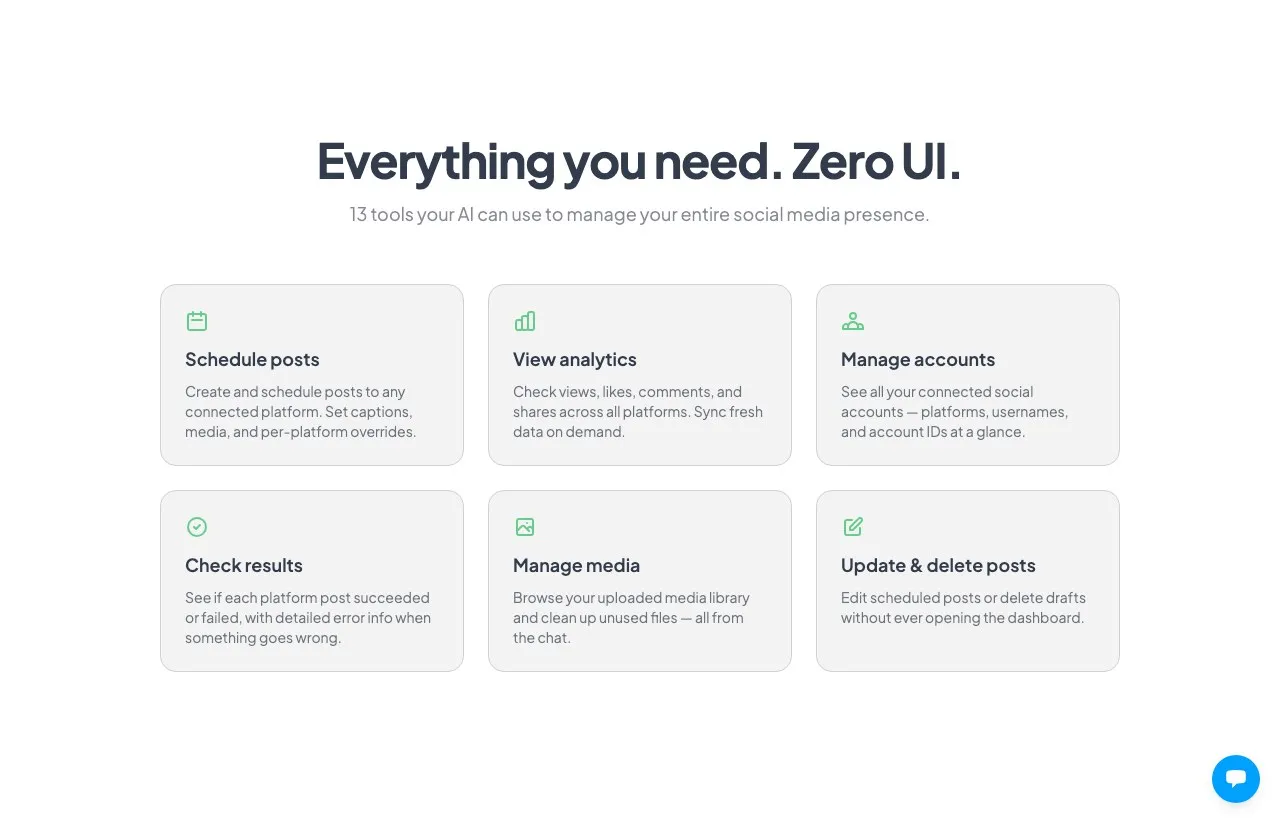
The MCP server is at https://www.post-bridge.com/api/mcp/mcp and exposes 15 tools: scheduling posts, viewing analytics, managing accounts, checking per-platform results, managing media, and updating or deleting scheduled posts. That is included on every tier, including Starter, with no add-on.
The REST API sits behind the $5 module. It covers posts, media, social accounts, post results, and analytics. Two limits are worth modelling before you build, and both are stated in the API reference.
Requests are capped at 10 per second per key, and there is no bulk or batch endpoint. Creating fifty posts means fifty calls, with backoff on any 429. For a scheduler working a queue overnight this is fine. For a burst job it is a design constraint.
There is a second ceiling that matters more, and it sits in the help center rather than the API docs: 100 posts per hour per user, counted against your login rather than your account count and reset hourly. A separate article says plainly that the platform is built for smaller businesses and teams rather than large-scale bulk or programmatic use, and that a high-volume API is still in development. Read both before you point a busy agent at it.
Where it stops is content creation. The documented API publishes, schedules, uploads and reports. It does not generate the asset. If your agent needs to make the image or the video, that happens somewhere else and gets uploaded.
Fifteen tools is a reasonable surface for a publishing layer. It is worth sizing against the other social media MCP servers before you commit a stack to one.
What’s Not Included in Any Post Bridge Plan
REST API and CLI access. It reads “API add-on available” rather than included, and only from Creator up. Budget the extra $5 a month if your agent calls REST.
Settled analytics. Analytics is marked beta on every tier that carries it, including the $99 one.
A reason to upgrade for the consulting alone. Viral growth consulting is real and documented: email access to the founder for advice on growing Instagram and TikTok views, delivered asynchronously, in Limited and Priority response tiers. Post Bridge’s own help center is refreshingly blunt about it. If that consulting is your main reason for eyeing Pro, the article says the Creator plan may suit you better.
A clearly documented free tier. The homepage FAQ says free users get 5 posts a month, while the agents page describes the free trial as the way to test things. The two surfaces do not agree, so plan on the 7-day trial rather than a permanent free plan.
When Post Bridge Pricing Makes Sense (and When It Doesn’t)
When it makes sense:
- You are running more than 50 connected accounts and the media already exists when your agent picks it up. At $99 flat that ceiling is excellent value, provided nothing upstream of the publish step still has to be built.
- Your agent talks MCP and never needs REST, in which case Post Bridge Starter matches our own $29 entry price for that specific job, and the decision comes down to account count and whether you also need the content made.
- You want a scheduler that does one thing reliably and bills like it, with the founder answering support.
- You already produce your images and videos elsewhere and just need them published.
When it starts to bite:
- You sit at 16 to 25 accounts, where Growth charges you for capacity to 50 that you are not using.
- Your agent needs to create the asset, not just publish it. That is a second vendor and a second bill.
- You need an inbox, comment replies, or DM handling, which the documented API does not cover.
- You need settled analytics rather than a beta surface for reporting a client actually sees.
- Your agent posts in high volume. The vendor caps you at 100 posts an hour per login and says outright that bulk programmatic use is not what this is for.
None of that makes Post Bridge a weak product. It is a publishing layer priced like a publishing layer, and it is very good at that job. The question is whether publishing is all your stack needs.
Post Bridge Pricing vs Common Alternatives
| Tool | Cheapest paid tier | What you get at entry tier |
|---|---|---|
| Post Bridge Creator | $39/mo | 15 accounts, unlimited posts, MCP included, REST API +$5 |
| Post Bridge Starter | $29/mo | 5 accounts, MCP included, REST add-on not listed on this tier |
| Buffer Essentials | $6/mo per channel | 1 channel, scheduling, basic analytics |
| Zernio | $6/mo per account | first 2 accounts free, then per-account, all features on every account |
| Blotato Starter | $29/mo flat | 20 accounts, full API on every plan, AI image and video generation |
Post Bridge buys more capacity per dollar than we do at the top of the card, where our 100-account ceiling is the real limit. That ranking holds as long as the asset already exists. Once your agent has to make the asset before it can post it, the comparison stops being $29 against $29 and becomes one bill against two.
The two per-unit models in that table behave very differently as you grow. I have broken both down separately, in Buffer’s per-channel pricing and Zernio’s graduated per-account rate card.
Weigh the last row knowing I founded Blotato. The honest limit on our side is the account ceiling. If you already have the media and your only constraint is account count, Blotato Agency caps at 100 for $499 and that is the wrong shape of bill for you. The comparison flips only when the asset has to be generated first, because a $99 publishing bill plus a generation vendor is not $99.
Sabrina’s Take on Post Bridge Pricing in 2026
Count your accounts first, because on this rate card that single number picks your plan and nothing else does.
What I keep coming back to is not the prices themselves, which are fair. It is how hard they are to find. Four live price points sit across two pages that never reference each other. The number you believe depends on which link you clicked.
This is also why third-party pages get it wrong so often. Post Bridge’s own llms.txt, the file its AI agents read, still lists three tiers and sells $29 as Creator with 15 accounts, where the pricing page sells $29 as Starter with 5. Same price, different plan, two live surfaces. Anything built on that file inherits the older shape. If a model cannot state what you charge, it cannot recommend you accurately either.
So the practical advice is short.
If you publish finished media across a lot of accounts, go look at Pro and check the annual toggle before you commit. If you are wiring up an agent and MCP covers what you need, Starter at $29 skips the API module entirely. And if your agent has to create the content as well as publish it, price the second vendor in before you decide anything. That second tool might be Blotato or something else. Either way, the cheapest sticker rarely survives contact with a two-vendor stack.
Post Bridge Pricing FAQs
Is Post Bridge free?
There is no clearly documented free plan. Post Bridge offers a 7-day free trial on all four published tiers, with no charge at signup, plus a 7-day refund window after a charge. Its homepage FAQ does mention free users getting 5 posts a month. The agents page describes the trial as the way to test the product instead, so the two surfaces disagree. Plan on the trial.
What does Post Bridge cost per month?
Starter is $29 for 5 connected social accounts, Creator is $39 for 15, Growth is $59 for 50, and Pro is $99 for unlimited accounts. The REST API is a $5 monthly add-on, listed on Creator and above but not on Starter.
Why does Post Bridge show different prices on different pages?
The pricing page lists Starter, Creator, Growth and Pro at $29, $39, $59 and $99, and shows the $5 API add-on from Creator up. The agents page instead totals Starter plus the add-on at $34. Both are live and they do not agree, so budget from the pricing page and confirm the $34 combination at checkout if you want it.
What is the difference between Creator and Growth?
Account capacity, mostly. Creator covers 15 connected accounts and Growth covers 50, for $20 more a month. Growth also adds team member invites, priority support, and viral growth consulting. If you are solo and under 15 accounts, the extra features rarely justify the upgrade on their own.
Does Post Bridge charge extra for API or MCP access?
MCP is included on every tier at no extra cost, including Starter. The REST API and CLI require a $5 a month add-on enabled in your billing settings, and it needs an active subscription. That is the reverse of how most tools in this category gate access, so the cheapest agent path here is the MCP path.
Is Post Bridge cheaper than Buffer?
Usually yes, and the gap widens with account count. Buffer bills per channel from $6 a month, so ten channels is $60 while Post Bridge covers 15 accounts for $39 and unlimited for $99. Buffer has the more established analytics and a real free plan. Post Bridge has the cheaper ceiling by a wide margin.