Switching From Postiz: What Its Social Media API Won't Hand Back
Switching from Postiz? Its API lists your social media queue but not the media or thread replies. Recover both, then shut the old queue off.
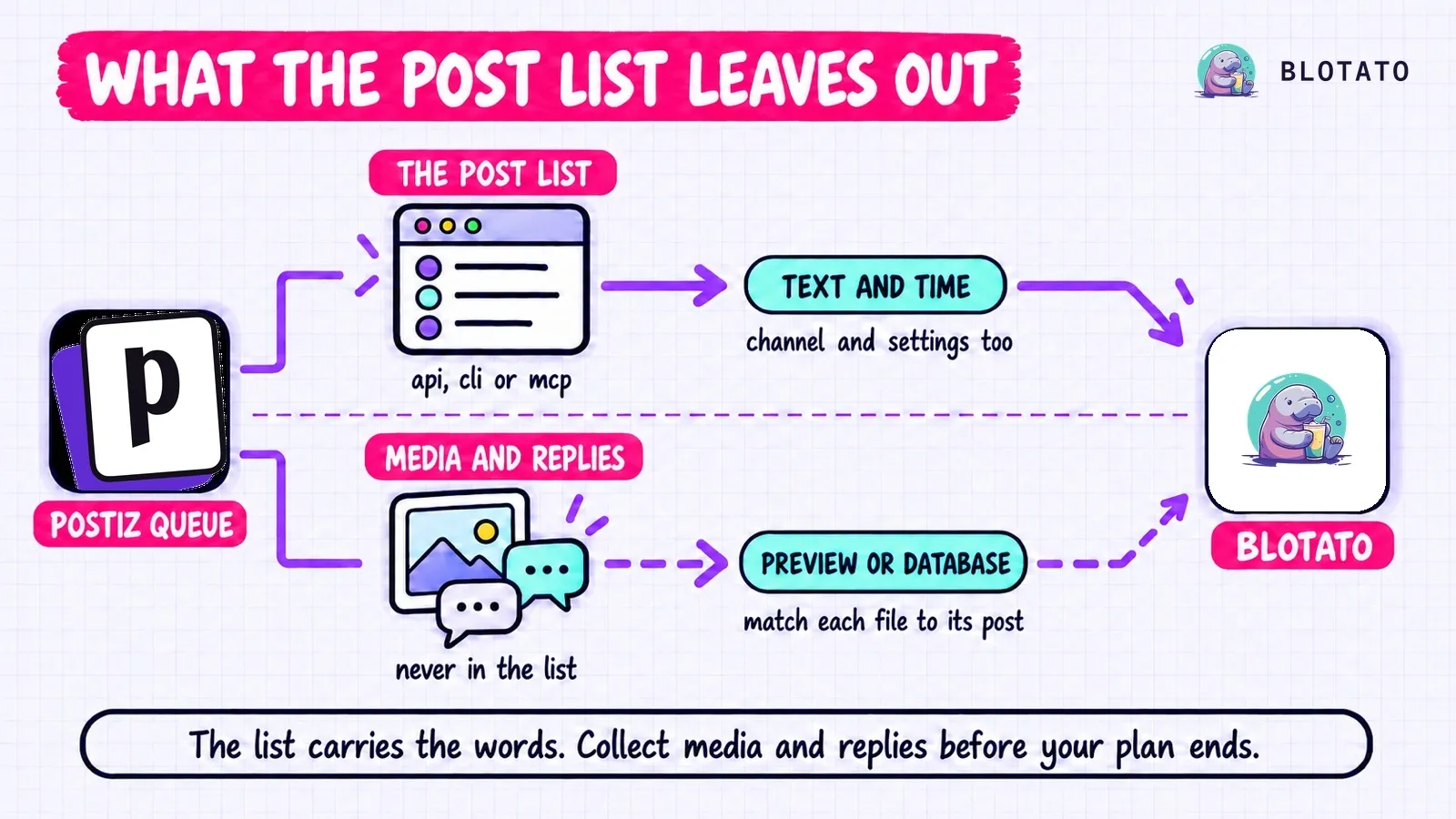
Switching from Postiz to Blotato comes down to one gap in how Postiz hands your queue back. Its API, CLI and MCP server all list your scheduled posts, but every list leaves out the images, videos and thread replies. I built Blotato, and it rebuilds that queue through its REST API or MCP server when your accounts sit on its 9 platforms. That route starts on the $29 Starter tier, since Blotato’s 7-day trial runs in the web app and doesn’t open the API or MCP.
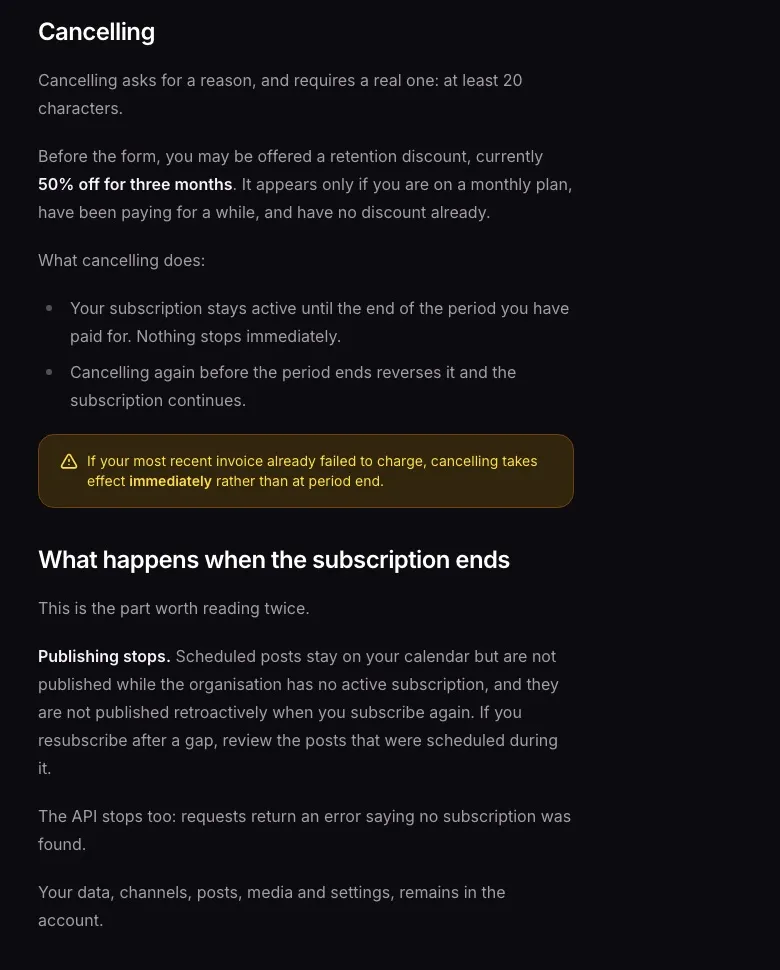
Once your subscription ends, “the API stops too,” per Postiz’s subscription docs. There’s no export button to fall back on either. Its support docs say “there is no self-serve account deletion or data export in Postiz today” and point you to email for a copy of your data. Nothing below waits on that reply.
The short version, in six steps:
- Connect your accounts to Blotato, which publishes to 9 platforms.
- Port and test any code that calls Postiz’s API.
- Send new posts to Blotato, stop anything else that adds posts to Postiz, and pull the queue.
- Recover the media and thread replies from each post’s Preview page.
- Rebuild the posts in Blotato, by hand or through its API or MCP server on a paid plan.
- Disable each Postiz channel you’ve moved at your cutover, then cancel.
Leaving Buffer, Metricool or Zernio instead? The Buffer guide, the Metricool walkthrough and the Zernio cutover order cover theirs.
If the October 21 Outage Is Why You’re Here
On October 21, 2026, Railway disclosed that an attacker may have accessed customers’ encrypted environment variables, and for some of them the decrypted contents. It paused all deployments while it investigated, and byteiota’s report covers the fallout for teams hosted there. Postiz’s hosted service runs on Railway. Its founder posted that he was shutting Postiz down for all customers after Anthropic and Stripe emailed him that the company’s keys were compromised, then posted the next morning that it was back up.
If you used Postiz during that window:
- Check each platform for the posts that were due during the shutdown. The platform is the record, not the Postiz calendar.
- If you self-host Postiz on Railway, roll every secret in its environment, as Railway recommends. That covers
JWT_SECRET(changing it signs everyone out), your database password,OPENAI_API_KEY, your storage keys, and the client secret of each developer app you registered, such asLINKEDIN_CLIENT_SECRETandFACEBOOK_APP_SECRET. Revoke the old values with whoever issued them, too. A new value only reaches Postiz on its next deploy, and Railway still had builds paused on October 22. - If your database credentials were in that environment, reconnect each channel as well. Postiz keeps every channel’s access and refresh tokens in its database.
- Save a copy of your queue with Step 3, whatever you decide.
If you were already planning to leave, the rest of this guide is the order to do it in.
The Fields a Postiz Post List Skips
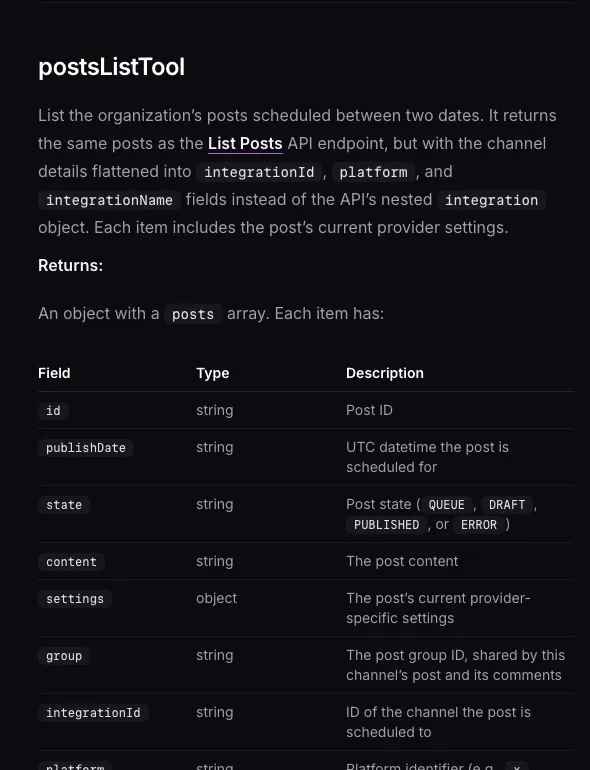
Postiz gives you three ways to read a queue (API, CLI and MCP), plus the database if you self-host. Postiz’s MCP docs say postsListTool “returns the same posts as the List Posts API endpoint,” and the CLI’s posts:list takes the same date filters.
| What a Postiz post holds | GET /posts, posts:list or postsListTool | The post’s Preview page | A self-hosted database |
|---|---|---|---|
| Text of the first part | Yes | Yes | content |
| Publish time | Yes, in UTC | Yes | publishDate |
| Channel and its settings (board, privacy, post type) | Yes | Not listed | integrationId, settings |
| State (queued, draft, published or error) | Yes | Not listed | state |
| Images and video | No | Yes | image |
| Thread replies and follow-up comments | No | Yes | Their own rows, chained by parentPostId |
Both gaps come from Postiz’s own code. Its list query selects text, date, state, settings and channel, with no field for images. It also skips every row that has a parent, which is how thread replies and comments are stored. Postiz’s API docs still suggest copying a post by fetching it with GET /posts and resubmitting it, which would drop its media.
The MCP tool also prints times with no timezone suffix, as in 2026-11-03T14:00:00. They are UTC, so an agent rebuilding the posts has to add the Z itself.
Where Each Postiz Field Goes in a Blotato Request
If your own app calls Postiz’s public API, most of the move is a field map. Blotato’s REST API lives at https://backend.blotato.com/v2 and takes your key in a blotato-api-key header. MCP users never look these IDs up by hand, because the agent lists accounts itself.
| Postiz call or field | Blotato equivalent |
|---|---|
Authorization header, one key per organization | blotato-api-key header |
GET /integrations for channel IDs | GET /users/me/accounts for each accountId |
settings.__type values x, linkedin-page, instagram-standalone | twitter, linkedin with a pageId, instagram, sent as both content.platform and target.targetType |
type: "schedule" with a date | scheduledTime with a timezone offset, at the top level beside post |
type: "now" | No scheduledTime and no useNextFreeSlot |
type: "draft" | No draft step in the create call, apart from TikTok’s isDraft. Drafts live in the web app |
A thread in value[] | content.additionalPosts[] on X, Bluesky and Threads |
| Follow-up comment parts | firstComment on Instagram and Facebook only |
GET /find-slot/{id} | useNextFreeSlot: true, once weekly slots exist |
POST /upload-from-url | The public URL goes straight into mediaUrls |
| A webhook when a post publishes | Poll GET /posts/:postSubmissionId for scheduled, published or failed |
| Create-post limit: 90 an hour on Postiz’s limits page (another page says 100, and the OpenAPI spec sets 30 an hour for the whole API) | 30 create requests a minute |
One row in that table can publish your whole queue at once. Blotato reads the scheduling fields only at the top level of the request. A request with neither scheduledTime nor useNextFreeSlot “PUBLISHES IMMEDIATELY,” per Blotato’s publishing reference. Nested inside post, they’re ignored with the same result.
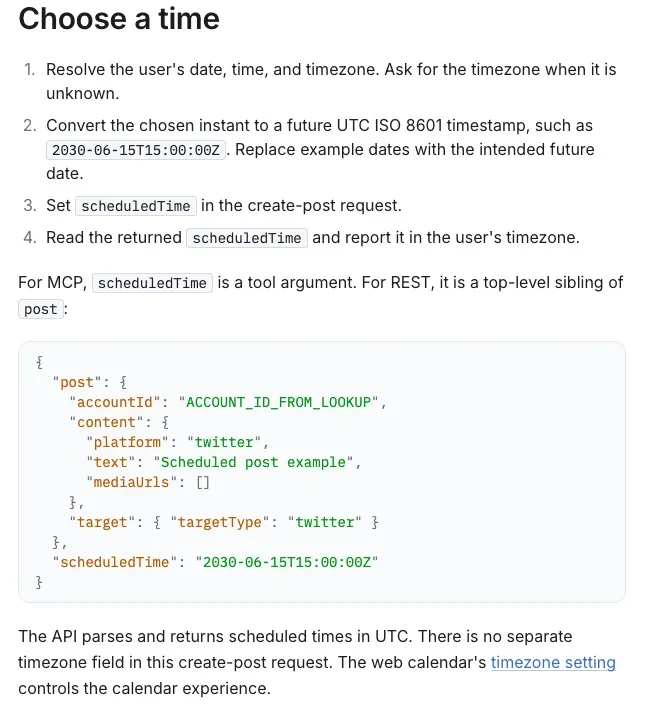
Map each platform’s required settings by hand, since the field names differ. Blotato needs a pageId for Facebook and a boardId for Pinterest. YouTube needs a title, a privacy status and a subscriber-notify choice. TikTok needs seven, from privacy and interaction choices to branded-content and AI-generated flags.
At 30 create requests a minute, Blotato allows 1,800 an hour, against the 90 an hour on Postiz’s limits page. Our Blotato vs Postiz comparison covers what that gap means for an agent working through a backlog.
What Has No Home in Blotato
Postiz lists between 27 and 34 platforms, depending on the docs page. Blotato publishes to 9: X, LinkedIn, Facebook Pages, Instagram, Pinterest, TikTok, Threads, Bluesky and YouTube. Reddit, Mastodon, Discord, Telegram, Google Business Profile, Medium, WordPress and the rest of Postiz’s list need another home. Instagram has to connect to Blotato as a Business or Creator account.
Some Postiz features don’t come along either:
| In Postiz | In Blotato |
|---|---|
| Self-hosting under AGPL-3.0 | Hosted only, with no source to run |
| RSS auto-posting (Team plan and up) | Blotato doesn’t auto-post from RSS |
| Auto-repost or auto-plug once a post hits a like count | No built-in rule |
| Client groups with invite links | No client invite flow |
| A public preview link for sign-off | No preview link |
| Repeating posts | Weekly slots repeat a time, and each post needs its own date |
A Postiz channel is one connected social account, and Blotato counts the same way: 20 accounts on Starter, 40 on Creator, 100 on Agency. Postiz stores one row per channel, so a launch sent to five channels counts as five.
Queue size is the other limit: Blotato holds 200 scheduled posts on Starter, 1,000 on Creator and 3,000 on Agency, up to 9 months out, per its plan limits. Anything already scheduled in Blotato uses part of that. Check your final count against them once duplicates and dropped channels come out. Then pick the plan that holds it.
How to Move From Postiz to Blotato
Under about a dozen posts, skip the tooling. Open the Postiz calendar, read each post’s Preview, then do Step 1, rebuild each post in Blotato’s Content Studio, and finish with Step 6. For a bigger queue, or an app built on Postiz’s API, follow every step. The Postiz CLI installs with npm install -g postiz.
Keep your Postiz plan active through the cutover, because Postiz still publishes everything due before it, and Steps 3 and 4 need its API. Pick the cutover in a quiet stretch, with at least an hour between the last post Postiz sends and the first one Blotato sends. If your latest Postiz invoice failed, cancelling ends the plan at once, so don’t cancel until Step 6.
Step 1: Connect each account to Blotato
Blotato’s Accounts page is where each one gets connected. Every connection authorizes Blotato’s own app, so nothing carries over from Postiz. Pair channels with accounts by platform and handle, since two channels can share a display name. Step 3 saves each Postiz channel’s handle, and Blotato’s account list shows a username.
Leave every channel connected in Postiz until you disable it in Step 6.
Step 2: Port and test your code before anything stops
Skip this if nothing of yours calls Postiz’s API. Otherwise your app keeps running on Postiz while you swap each call using the field map. Then send one post scheduled a day out through the new code. Once it shows under Scheduled in Blotato, delete it.
Step 3: Point new posts at Blotato, then pull the Postiz queue
Schedule anything new in Blotato from now on, and switch your app over now that its code is tested. Then stop everything else that adds posts to Postiz: an n8n or Make flow, an agent, and any RSS feed set to auto-post. The Postiz queue now only shrinks, so the file you pull stays complete.
Pick your cutover time and list every post from it to the furthest date you’ve scheduled. Ask for one month per call, since Postiz doesn’t document paging for this list. Your API key is under Settings, Developers, Public API in Postiz. The API and MCP tool require start and end dates, and the CLI’s are optional, so set them anyway:
export POSTIZ_API_KEY=your_api_key_here
# Postiz cloud. Self-hosted: https://your-domain/api/public/v1
export POSTIZ_API=https://api.postiz.com/public/v1

curl -H "Authorization: $POSTIZ_API_KEY" "$POSTIZ_API/integrations" > postiz-channels.json
# One call per month. Dates are UTC ISO, such as 2026-10-27T00:00:00Z
curl -H "Authorization: $POSTIZ_API_KEY" \
  "$POSTIZ_API/posts?startDate=[MONTH_START]&endDate=[MONTH_END]" > postiz-queue-1.json

# Or with the CLI (self-hosted: set POSTIZ_API_URL as Postiz's CLI docs show)
postiz posts:list --startDate "[MONTH_START]" --endDate "[MONTH_END]" > postiz-queue-1.json
Every later step works from those files. The channels file holds each channel’s handle as profile. Keep rows whose state is QUEUE, and drop rows that repeat with the same ID and the same date across files.
Repeating posts are the exception. Each call returns one entry per occurrence, all with the same ID, from the post’s first date up to that call’s end date. Once a repeating post has run, its entries read PUBLISHED, so a row dated after the cutover that reads PUBLISHED is a repeat occurrence to keep. Hold any DRAFT or ERROR repeat for a decision.
Step 4: Fill in the media and thread replies the list skips
Open each post’s Preview: hover it in the Postiz calendar and click Preview. Postiz’s approval docs say that page shows “the post rendered as it will appear, including media and all thread parts.”
Note which file belongs to which part, and in what order. Blotato’s first comment holds one text comment on an Instagram or Facebook post or reel, and stories don’t take one. List any post with more follow-up parts or a comment with media.
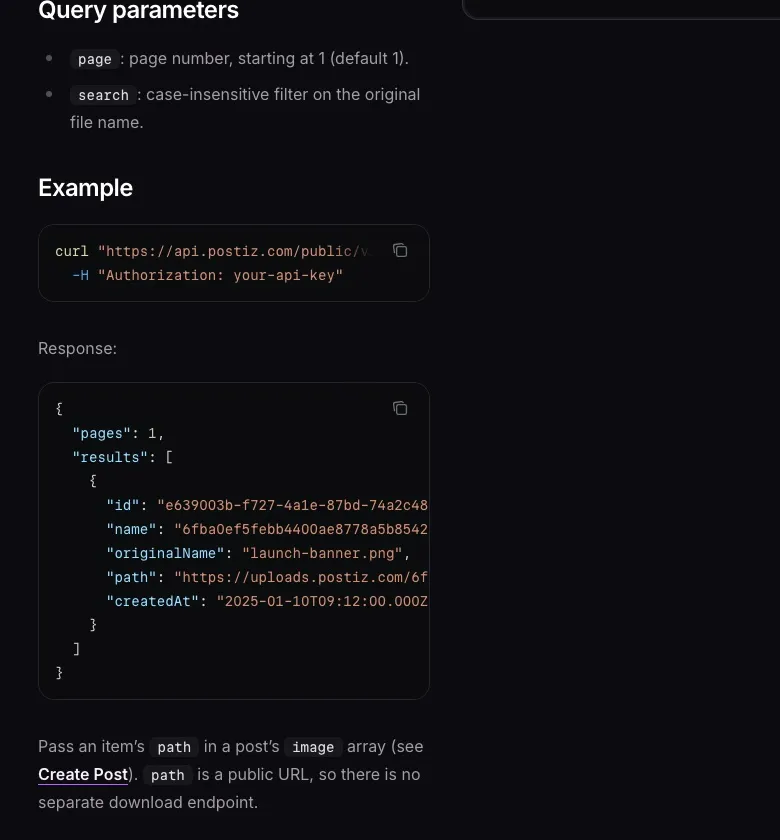
Postiz’s media library holds everything you uploaded or generated. Its GET /media call returns each file’s path, which Postiz calls “a public URL, so there is no separate download endpoint.” Blotato takes a public URL straight into mediaUrls, with no upload step.
Postiz says media stays in your account after a subscription ends but doesn’t say for how long. For posts due months out, download the files and send them to Blotato instead. blotato_create_presigned_upload_url returns an upload address and a public one. PUT the file’s bytes to the first, check that the PUT succeeded, then put the second in mediaUrls.
Check each file against Blotato’s media requirements for its platform too, since type, size and length limits differ.
Step 5: Rebuild the posts in Blotato
Use an AI client that can read your files, such as Claude Code, with Blotato on a paid plan that includes MCP. Blotato’s hosted MCP server is at mcp.blotato.com/mcp, with setup steps for each AI client. A client without file access can connect Postiz’s server too, at mcp.postiz.com/mcp, with your Postiz API key as a Bearer token. It then reads the queue through postsListTool.
The prompt runs in two phases, and nothing gets written until you’ve filled in and returned the manifest:
Phase 1, writes nothing:
- Build the manifest from the postiz-queue files (without file
  access, call postsListTool one month at a time, [CUTOVER] to [END]).
- One row per occurrence: Postiz id, publishDate with a Z added,
  platform, channel, text, Postiz settings, and empty columns for
  media URLs, thread parts, first comment and Blotato settings.
- Keep QUEUE rows dated after [CUTOVER]. A row dated after [CUTOVER]
  that reads PUBLISHED is a repeat occurrence: keep it and flag it.
  Hold DRAFT and ERROR rows. Drop exact repeats of ID and date.
- Pair each channel (handle from postiz-channels.json) with a
  blotato_list_accounts account by platform and username, plus the
  Page where one applies. Mark any pair you can't confirm, show me
  the pairs and the manifest, then stop.

Phase 2, after I return the filled manifest and confirm every pair:
- Check the rows fit my plan's queue cap and the 9-month horizon.
- Keep a log file, migration-log.csv: Postiz id, publishDate,
  account, postSubmissionId, status. Read it first and skip rows
  already logged.
- Create the first row, check it until it reads scheduled, and wait
  for my OK. Then create the remaining rows, at most 30 a minute.
- Each call: accountId, platform, text, mediaUrls ([] if none),
  additionalPosts on X, Bluesky or Threads, firstComment on an
  Instagram or Facebook post or reel, the Blotato settings column,
  and scheduledTime = publishDate.
- Skip and list a row that's in the past, has a blank Blotato
  setting, or would go out without scheduledTime.
- Log each postSubmissionId as soon as it returns, then check it
  with blotato_get_post_status up to five times, a minute apart.
  scheduled: done. failed: log the error, don't retry. published on
  a future row: stop everything. Still in-progress: list it and
  never resend it.
- If a create call returns no postSubmissionId, page through
  blotato_list_schedules. Exactly one post with the same account,
  time, text and media: log it. Anything else: list the row for me.
Blotato has no client-supplied idempotency key. A row goes back in only after you’ve confirmed its post never landed.
Step 6: Disable each Postiz channel, then cancel
Cancelling doesn’t stop Postiz on its own, because the subscription stays active until the paid period ends. Every post due before then still publishes, including the ones you just rebuilt in Blotato.
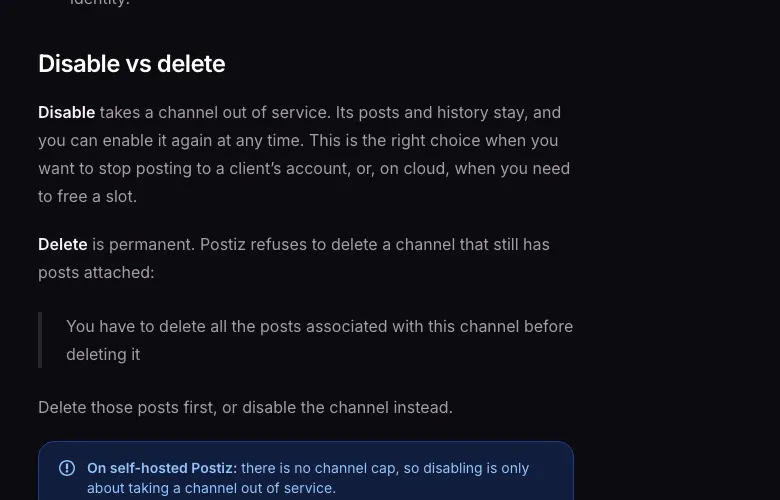
Disable each channel you’ve moved instead, and leave alone any channel whose posts are going somewhere other than Blotato. Do it at the cutover, after the last post Postiz still owns has gone out and before the first Blotato post is due. Wait until every row in your manifest, or every post you rebuilt by hand, shows as scheduled. Postiz’s downgrade notes say “scheduled posts on a disabled channel do not publish.”
Leave Delete alone. Postiz’s channel docs say it refuses to delete a channel that still has posts. Its API reference says deleting one also deletes its scheduled posts.
Compare both calendars for the day either side of the cutover, so each post has exactly one channel still set to publish it. As each early Blotato post comes due, blotato_get_post_status should move it from scheduled to published.
Cancel from Postiz’s billing page.
If You Self-Host Postiz
Your queue lives in your own Postgres database, which holds everything the API leaves out. Take a full pg_dump before you change anything. Each post is a row in "Post", and media sits in its image column as a JSON string.
A thread is a chain. Each reply or comment is its own row whose "parentPostId" points at the part before it, and every part shares the first part’s "publishDate". This query walks each chain and numbers the parts:
WITH RECURSIVE thread AS (
  SELECT p.*, 0 AS part FROM "Post" p
  WHERE p."deletedAt" IS NULL AND p."parentPostId" IS NULL
    AND ((p.state = 'QUEUE' AND p."publishDate" >= '[CUTOVER]')
         OR (p."intervalInDays" IS NOT NULL
             AND p.state IN ('QUEUE', 'PUBLISHED')))
  UNION ALL
  SELECT c.*, t.part + 1 FROM "Post" c
  JOIN thread t ON c."parentPostId" = t.id
  WHERE c."deletedAt" IS NULL
)
SELECT t."group", t.part, t.id, t."publishDate", t."intervalInDays",
       t.content, t.image, t.settings,
       i."providerIdentifier", i.name AS channel
FROM thread t
JOIN "Integration" i ON i.id = t."integrationId"
WHERE i."deletedAt" IS NULL
ORDER BY t."publishDate", t."group", t.part;
Rows with an intervalInDays value are repeating posts. Their publishDate is the first occurrence and their state may read PUBLISHED, so add the interval to find the dates after your cutover. Media paths point at your own storage, either the UPLOAD_DIRECTORY volume or a Cloudflare R2 bucket. If your instance isn’t reachable from the internet, Blotato can’t fetch those URLs, so upload the files instead.
For most platforms, self-hosting also meant registering your own developer app, while a few, such as Bluesky, only take credentials in the Postiz dialog. Blotato connects through its own apps, so you can retire those keys once the cutover passes. Until then, Postiz still publishes through them.
Disable the channels at the cutover as in Step 6. Shut the stack down once Blotato’s first posts are live, and keep the dump and the uploads volume. If running your own instance is the reason you chose Postiz, Blotato can’t give you that. The alternatives I ranked for people leaving Postiz include Mixpost, a self-hosted pick.
Postiz Migration FAQs
Can I export my posts from Postiz?
Postiz has no self-serve export button, and its support docs point you to email for a copy of your data. You can still save your scheduled posts as JSON through its API or CLI, or query the database if you self-host. The JSON leaves out images and thread replies, which come from each post’s Preview page or the database.
Which Postiz tool lets an AI agent read my scheduled posts?
postsListTool on Postiz’s MCP server. It returns each post’s text, time, channel, state and settings for a date range. An agent connected to Blotato’s MCP server too, on a paid Blotato plan, can recreate them with blotato_create_post for accounts on Blotato’s 9 platforms. The tool doesn’t return images or thread replies, so fill those in from each post’s Preview page before the agent writes anything.
When does Postiz stop publishing my scheduled posts?
When the organization no longer has an active subscription. That’s the end of a cancelled period, or right away if you cancel after a failed invoice. Scheduled posts stay on the calendar without publishing, and they aren’t sent later if you resubscribe. To stop a channel sooner, disable it in Postiz.
Do my connected social accounts carry over from Postiz?
No. Each account connects to Blotato through Blotato’s own app, and Postiz’s channel IDs have no meaning there. Leave each one connected in Postiz until your cutover, because Postiz still publishes everything due before it. Self-hosters can retire the developer apps they registered for Postiz once the cutover passes.
Can I keep my Postiz integration code and change the base URL?
No, the request shapes differ. Blotato uses an accountId, a matching platform and targetType, and a top-level scheduledTime, where Postiz uses channel IDs, a type field and a date. A Blotato request with no scheduling field at all publishes immediately, so send one test post before porting the rest.