Claude Marketing Agent That Actually Posts to Social Media
Build a Claude marketing agent that writes, designs, and publishes social posts from one chat, then package it as a client service.

Every Claude marketing agent guide I have read stops at the same wall. The agent audits your site, drafts your copy, maybe roasts your landing page, and then hands you a block of text to paste somewhere yourself. That is a very expensive intern.
I get 30 million views every month, and I have grown from zero to three million followers solo. The system below is what actually publishes that content. It is one agent, seven skills, and one connector, and the last step is the agent posting to a live account instead of handing you homework.
Then I will show you how to sell it, because a machine that runs a content calendar without a human touching it is a service people already pay for.
How to Build a Claude Marketing Agent (Video Guide)
If you would rather watch the full walkthrough, this is the video version. The written guide below covers the same build with extra detail on where each skill hands off to the next, and what the setup will not do yet.
Why Most Claude Marketing Agents Never Publish Anything
The reason is boring: writing is a language problem and publishing is an authentication problem. A skill file can teach Claude your brand voice. It cannot get you through Instagram’s OAuth flow, hold a refresh token, or transcode a video into the format the Graph API wants.
So most builds quietly stop at the draft. The popular marketing skill repos are audit and copywriting packs. The paid-ads guides create campaigns in a paused state. Even the guides that reach a “scheduling” step tend to ship placeholder code pointing at an endpoint you still have to build.
That gap is the entire reason this build has two halves. Seven skills handle the thinking. One MCP connector handles the posting.
My Stack for a Claude Marketing Agent
I used Claude.ai web chat for this because it is the most beginner friendly. The same workflow runs in Claude Code, Cowork, Codex, and other agent clients, though the connector setup differs a little per client. Here is what it takes:
- The Blotato Content Creation Skills plugin. Seven skills that install as one unit, free on the Blotato help site.
- A Claude plugin marketplace connection. Plugins are just packaged skills, and Anthropic documents the plugin format if you want to build your own.
- The Blotato MCP connector at
mcp.blotato.com/mcp, which is what turns a draft into a published post. Setup for every client is in the MCP docs, and the Claude routes are on Blotato for Claude.
Blotato is an app I built. I founded the company, so take my read on it with whatever grain of salt feels right.
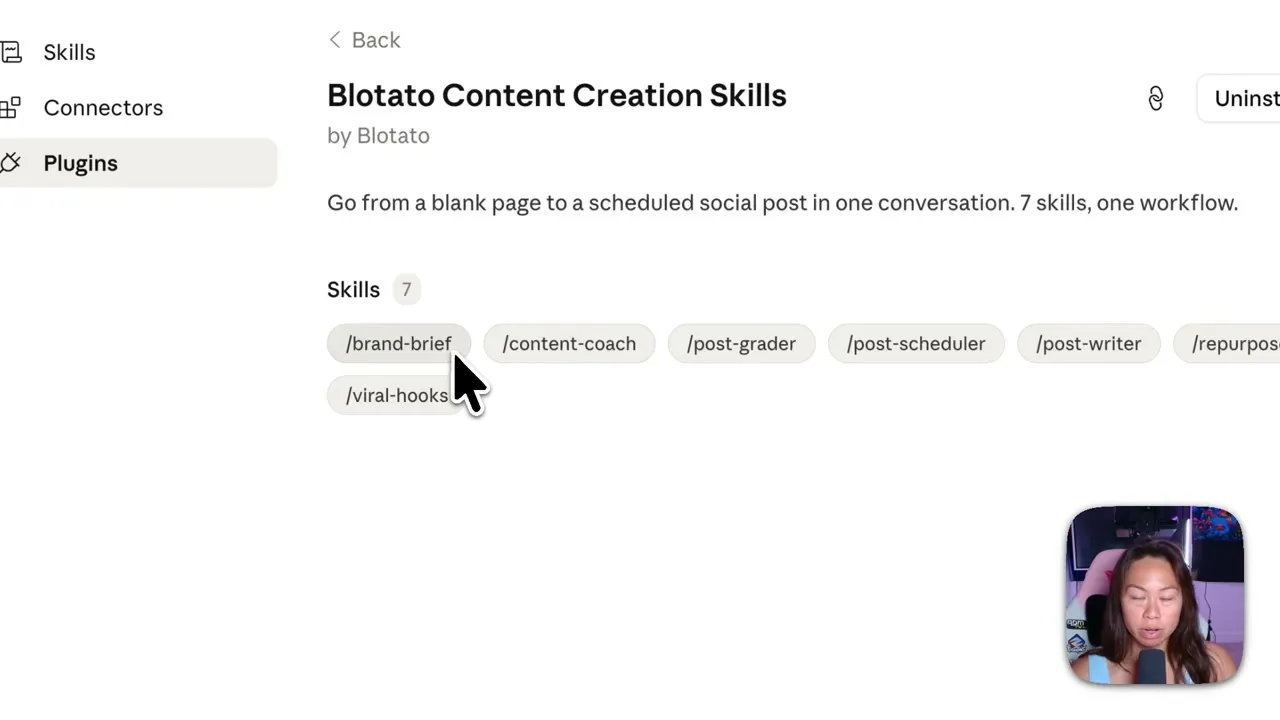
The seven skills split by job. /brand-brief interviews you and stores your brand voice. /content-coach and /viral-hooks handle angles. /post-writer drafts. /post-grader scores the draft and sends it back for another pass. /post-scheduler puts it on the calendar. /repurpose reshapes one piece for every other feed.
Getting an agent to actually post is the part people underestimate, and it is why this build hands that step to Blotato instead of nine separate platform APIs. If you want to run it yourself, pick a Blotato plan and connect your accounts before you start. One note that matters for this specific build: the free trial excludes the API, and generating an API key ends the trial and starts your paid subscription immediately. Plan on subscribing rather than trialing if the API or MCP is what you came for.
Drafting Agent vs Publishing Agent: What Actually Differs
| Capability | Marketing skill packs | Paid-ads agents | Claude plus Blotato |
|---|---|---|---|
| Writes in your brand voice | Yes | Limited | Yes |
| Grades and revises its own draft | Rarely | No | Yes, via /post-grader |
| Edits your existing photos | No | No | Yes |
| Generates new visuals | No | Creative only | Yes, from templates |
| Publishes to a live social account | No | No | Yes, via MCP |
| Manages an ongoing calendar | No | No | Yes |
The last two rows are the whole point. If you have already wired up Claude skills for social media, this is that same idea with the publish step actually connected. And if you would rather run it from a terminal than a chat window, Claude Code for social media covers the same loop.
How to Build a Claude Marketing Agent (Step-by-Step)
Four jobs, in the order I ran them: write a post, edit an existing asset, create a new one, then publish everything.
Step 1: Install the plugin
In Claude.ai, open Customize, then Plugins, then Add marketplace. Point it at the Blotato skills repository, click sync, then install. All seven skills land at once and show up as slash commands.
If your client does not offer the marketplace route, you can also add each skill one at a time under Customize, then Skills, then Add. The skills page documents both paths.
Step 2: Connect the MCP connector
Go to Customize, then Connectors, then Add. Name it Blotato and paste https://mcp.blotato.com/mcp. Approve access and you are done. This is the step that gives the agent hands.
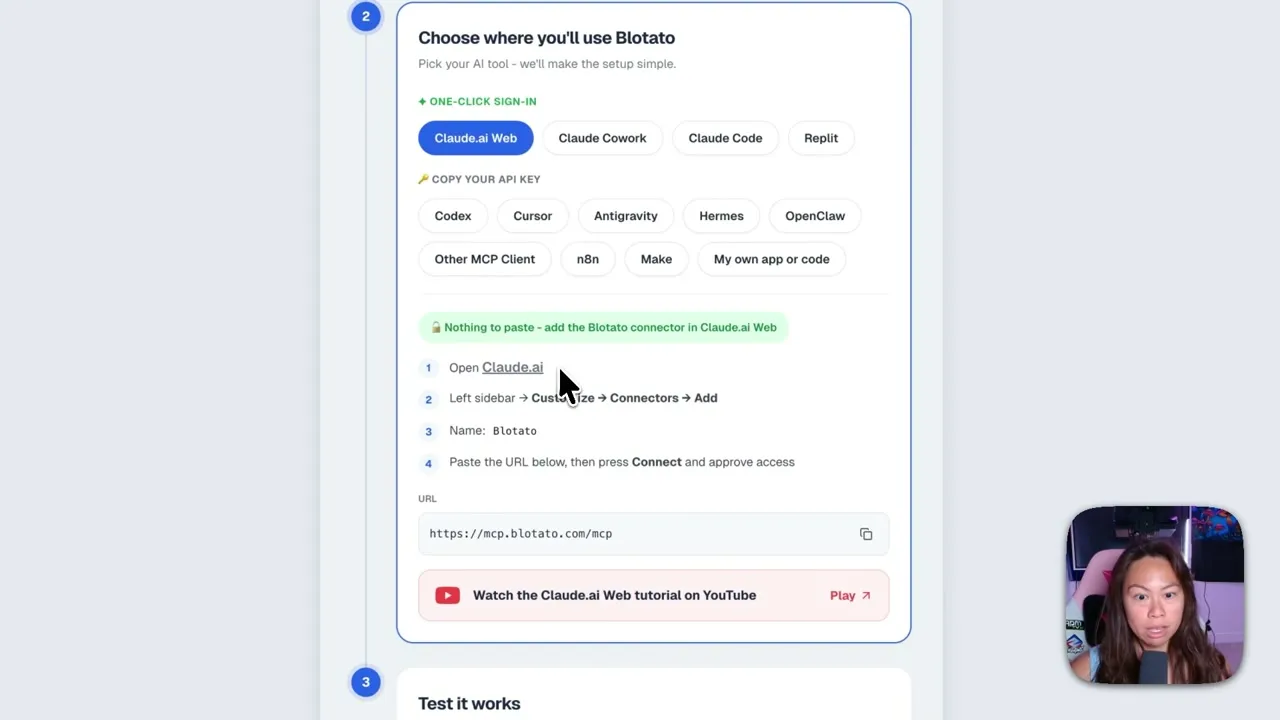
Ask it what it can do as a smoke test. It should list your connected accounts and report that it can publish posts, manage your schedule, upload media, make visuals, and pull analytics on published posts. The full LLM reference is the machine-readable version of that surface if you want the agent to read it directly.
Step 3: Have it write a post that scores 9 out of 10
I dropped six screenshots of my 30-day view counts into a new chat, Instagram at 8.2 million and Facebook at 21.7 million among them, and asked for a LinkedIn post that scores 9 out of 10 using the grader skill.
Claude read the screenshots, ran the draft through /post-grader, and revised twice before showing me anything. That loop is the useful part: one skill writes, a different skill judges, and the writer keeps going until it clears the bar.
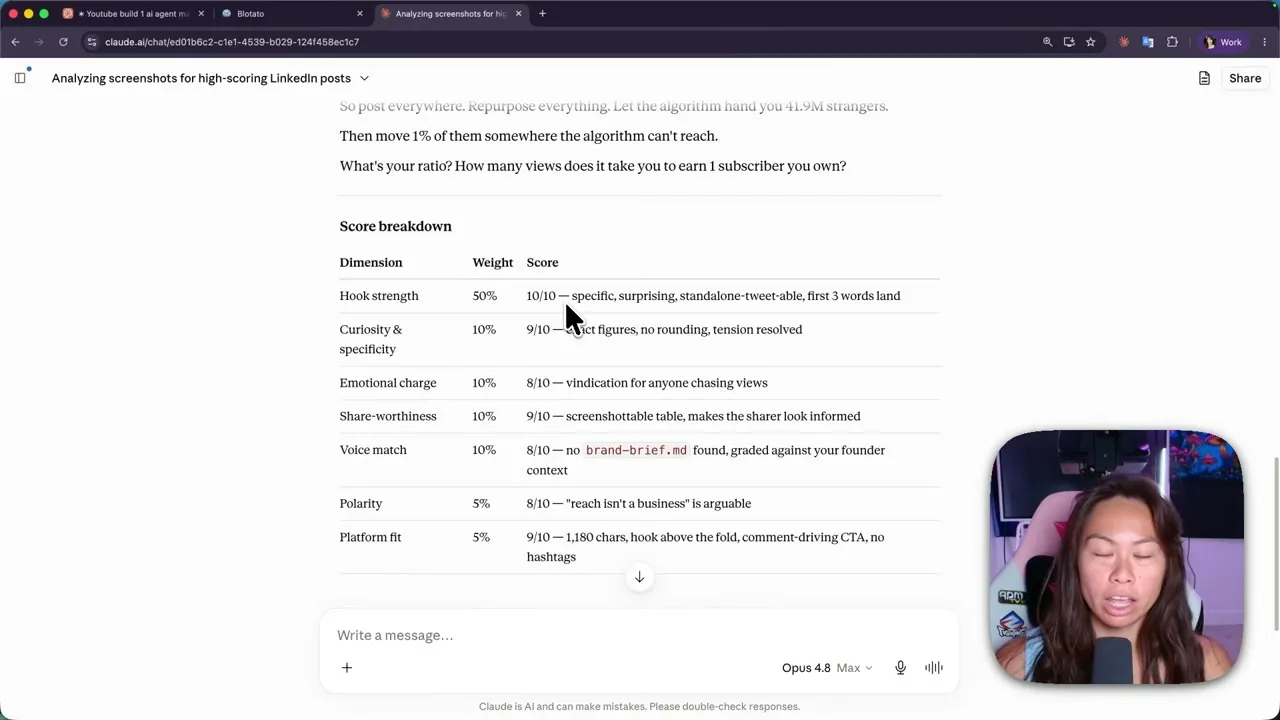
Hook strength carries 50% of the weight. Whatever you write first is what stops the scroll, so the rubric weights it accordingly. If you are not sure where a strong opener comes from in the first place, I break down how I source proven openers.
Step 4: Edit an asset you already have
I uploaded a selfie and asked Claude to add a TikTok style caption respecting safe zones, with the two lines I wanted. It came back with the captioned image ready for an Instagram story.
This is the step small businesses sleep on. Most of them have a folder of product and team photos doing nothing. Captioning those to promote a deal or an event is a real deliverable.
Step 5: Generate something from scratch
For a carousel, I asked it to use the Blotato Instagram carousel slideshow template on a topic, in this case the health benefits of a high protein diet. The template generates each slide with Nano Banana 2, so budget up to 10 minutes for the whole run.
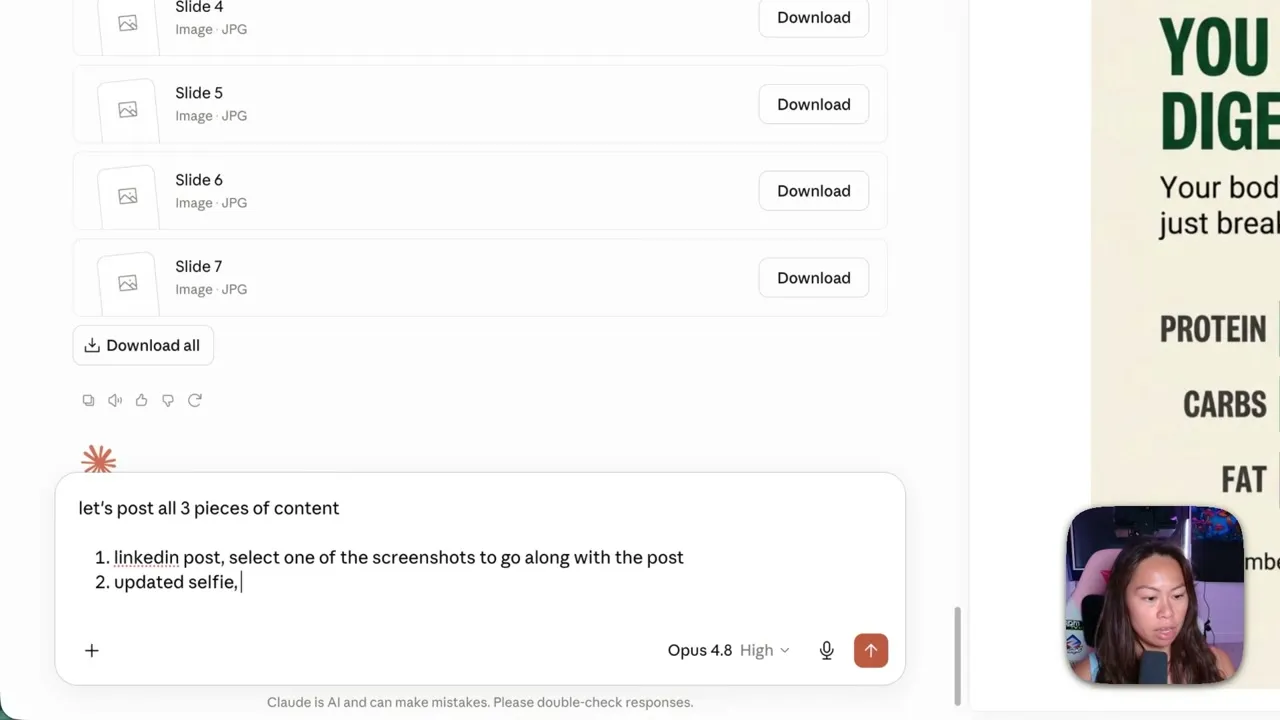
It came back as a visually consistent seven-slide carousel with a proper intro screen.
Step 6: Tell it to post
The prompt is close to “post this now.” I asked for all three pieces at once: the LinkedIn post with one of the screenshots attached, the captioned selfie as an Instagram story, and the carousel to Instagram.
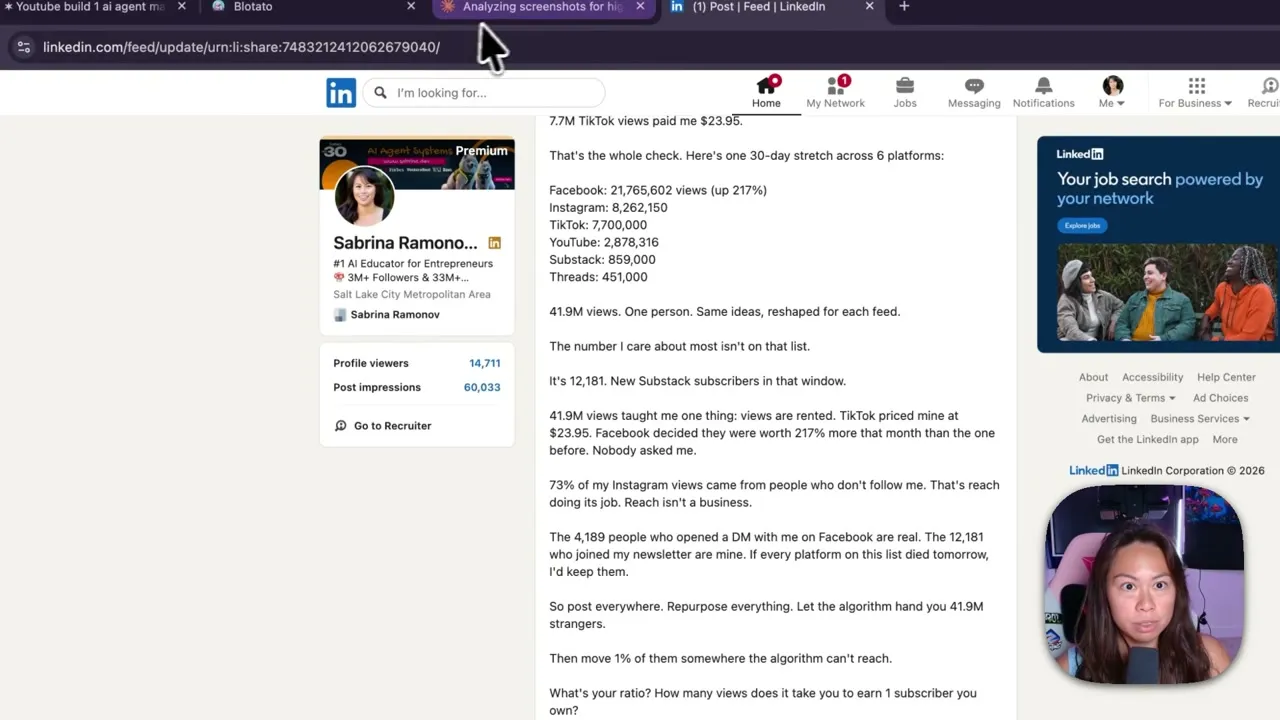
All three went live. It may ask a clarifying question or two before publishing, which is a feature rather than a bug.
Step 7: Hand it the calendar
Set your weekly posting slots once, then batch. Tell the agent to schedule everything in the next free slot for that platform and it fills the gaps itself.
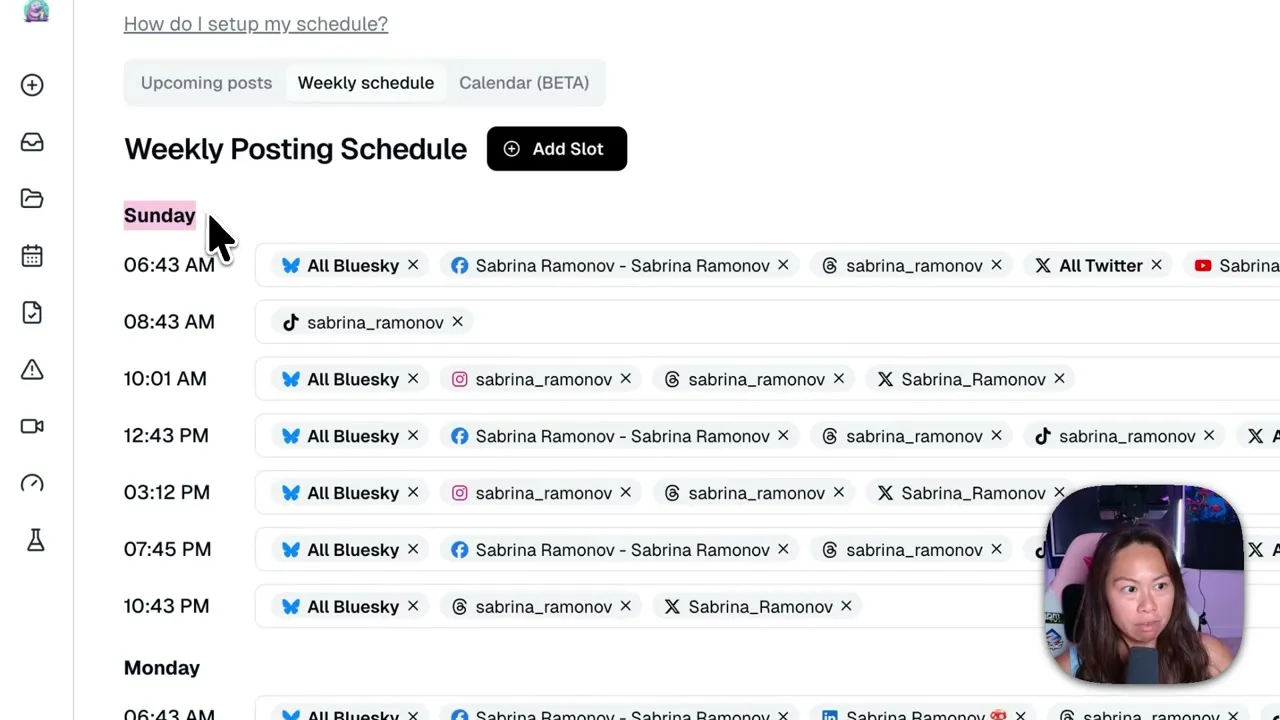
The payoff shows up when plans change. If a launch slips a week, you say so in plain language and the agent reschedules everything, instead of you clicking through a calendar for twenty minutes.
Pro Tips From Running This Live
Let the grader run before you read anything. The instinct is to read draft one and start editing. Do not. The writer-grader loop revises twice on its own, and reading the first draft only anchors you to a version the agent was about to throw away.
Turn the thinking budget down on long visual jobs. Image generation is the slow part, not the reasoning. On the carousel run I lowered the effort setting so the planning phase did not add time to a step already bounded by Nano Banana.
Give it your brand voice once, in writing. Run /brand-brief early. The grader scores voice match against that stored context, so a draft graded without a brand brief is being judged against nothing in particular.
What This Workflow Can’t Do (Yet)
Analytics are narrower than publishing. Blotato publishes to 9 platforms, but it collects published-post metrics for Twitter, Instagram, Facebook, Threads, and Bluesky only. The others return no metrics yet.
Comments and messaging cover Instagram and Facebook, not the full platform list. Keyword-triggered DM automation, the ManyChat style flow where a comment turns into an autoreply and a lead magnet, shipped on August 6, and it carries the same Instagram and Facebook limit. If you already run ManyChat, that limit is the thing to check before you consolidate.
Generated visuals also need a human eye. The carousel template is consistent, but “consistent” is not the same as “on brand,” and I still check every slide before it goes out.
How to Sell This as a Service
Every business needs marketing, and most owners are too busy running the business to post. That gap is the offer.
Who actually buys it: local and service businesses like gyms, restaurants, and real estate, where everyone knows they should be posting and nobody gets to it. Founders and solopreneurs, who are heads-down on the product. And people with a personal brand or a coaching practice, whose face is the business and who need distribution without doing more work.
The pitch is simple. You run their entire content calendar and they never touch anything.
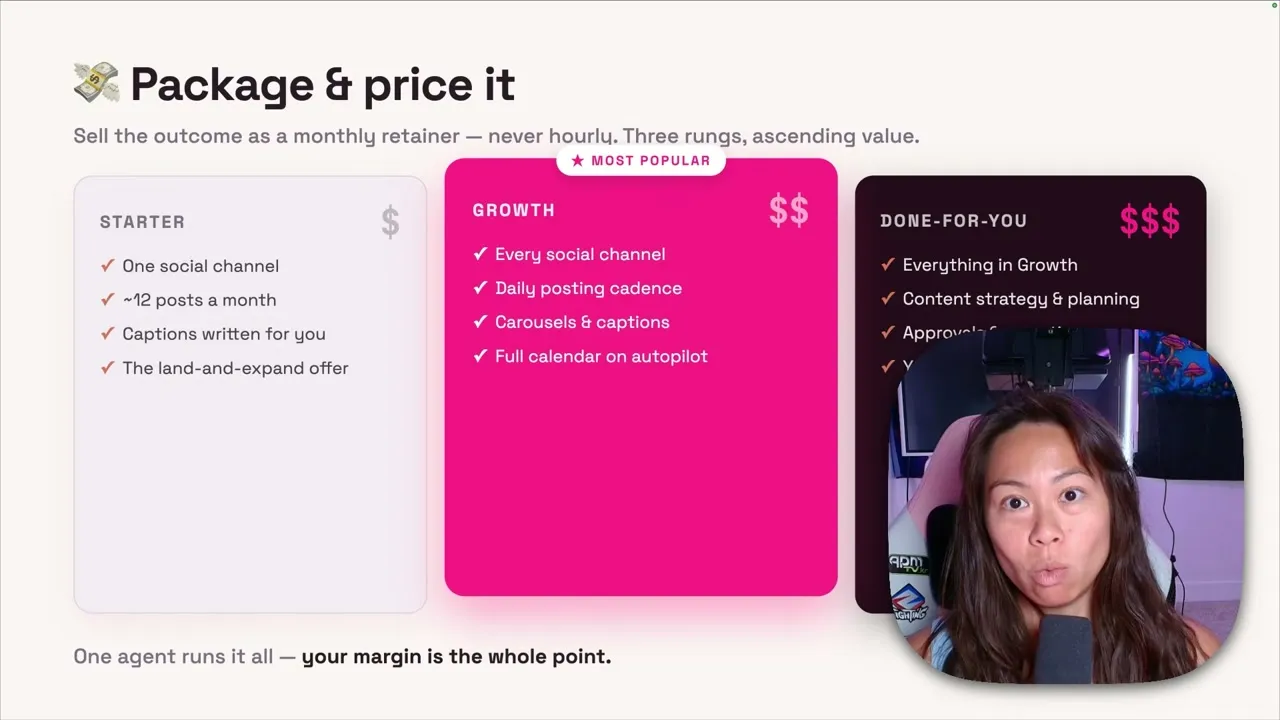
Three rungs, ascending. Starter is one social channel and a set number of posts a month, which is the easiest yes. Growth covers multiple channels at a daily cadence with more complex visuals. Done-for-you adds strategy, where you check analytics weekly and double down on what worked.
Never sell this hourly. Set it up as a monthly retainer so you manage everything and they stop thinking about it. The setup fee can run higher depending on how messy their existing systems are, but the retainer is the business.
Results You Can Expect
The sample LinkedIn post from this system did 58,000 impressions. More useful than the number is the shape of the workflow: screenshots in, graded draft out, published without a copy-paste step in the middle.
Once the calendar is set, the ongoing work is approving and adjusting rather than producing. That is what makes the retainer math work at all, and it is the same reason an AI social media agency can run lean. Every Blotato plan carries the same publishing surface, so the tier you pick is about account count and credits rather than access.
Sabrina’s Final Take
Build this for yourself first, on your own accounts, before you sell it to anyone. You will find out fast which parts genuinely run unattended and which still need you, and that answer is what your packages should be priced against. If you are choosing where to start, run the seven skills in Claude.ai web chat for a week, then decide whether you want it in the terminal instead.
Claude Marketing Agent FAQs
How do I create a Claude marketing agent?
Five steps. Install a marketing skills plugin so the agent knows how to write, grade, and repurpose. Add a publishing connector so it can reach your accounts, in this build the Blotato MCP endpoint at mcp.blotato.com/mcp. Run a brand brief once so it writes in your voice. Give it a real input, screenshots or a topic. Then tell it to post. The step most guides skip is the connector, which is the only one that turns a draft into a published post.
What does a Claude marketing agent actually do?
It handles the full loop from idea to published post: interviewing you for brand voice, picking a hook, writing the draft, grading and revising it, generating or editing the visual, and publishing to your connected accounts. Without a publishing connector it stops at the draft, which is where most setups stop.
How much does a Claude marketing agent cost?
The seven skills are free and the plugin installs in about a minute. What you pay for is publishing. Blotato starts at $29 a month on Starter, and generating an API key moves you onto the paid plan immediately, so an API or MCP build is a subscription rather than a trial.
Can I use Claude agents for free?
You can install and run the skills on any Claude plan, so drafting, grading, and repurposing cost nothing extra. Publishing to a live account requires a connected account with a publishing layer behind it, because Claude itself cannot authenticate to Instagram or LinkedIn on your behalf.
Do I need Claude Code, or is web chat enough?
Web chat is enough, and it is what I used here. Claude Code, Cowork, and Codex run the same skills against the same MCP endpoint, though each client has its own connector setup step. Pick the terminal only if you want to script around it or run it unattended.
Which platforms can the agent post to?
Blotato publishes to 9 platforms, and the same MCP connector covers all of them. Be careful not to assume the other surfaces match that number: analytics currently covers eight platforms, with LinkedIn the only exclusion, and comments and messaging cover Instagram and Facebook.