LinkPlease vs Manychat: Is Flat Social Media Automation Enough?
LinkPlease vs Manychat: a flat price per Instagram account against contact-based social media DM automation, and when the cheaper plan is enough.
On one Instagram account, LinkPlease vs Manychat is not a close call on price. LinkPlease Pro costs $14.99 a month with no cap on the people you message, while Manychat’s current Pro plan for new accounts costs $39 for 2,500 people a month.
What the extra money buys is reach and depth. Manychat connects up to seven channels on its higher plans and builds branching conversations. LinkPlease stays on Instagram, Facebook comments and Messenger, and adds a few Instagram tools I could not find in Manychat’s docs.
Fair warning before you read on: I founded Blotato, and Blotato sells DM automation for Instagram and Facebook too. That makes me a competitor of both tools here, which is why every price below links to the vendor page it came from. Blotato’s case comes after the comparison, under its own heading.
LinkPlease vs Manychat: Start With Your Inbox
One check comes first. If your posts are not drawing keyword comments yet, comment-to-DM has little to answer, so keep posting until they do.
First, where do people message you? If the answer is Instagram, plus maybe Messenger, LinkPlease covers it for less. If WhatsApp, TikTok, SMS or email are on the list, Manychat is the tool built for that.
Second, does your funnel branch? A keyword that sends one link fits LinkPlease well. A conversation that asks a question and routes people to different offers is what Manychat’s builder exists for.
Two Ways to Answer a Comment
Both tools handle the moment that made this category: someone comments a keyword under a Reel and gets a DM with your link. LinkPlease is a Meta Verified Tech Provider on Instagram’s official Graph API, and Manychat calls itself an official Meta-approved partner. The difference is how much each one builds around that moment.
LinkPlease describes itself as a tool for “creators, brands, and agencies” and keeps setup short. You pick a post, add keywords, write the public reply and the DM, and switch it on. Its own Manychat page acknowledges the difference: “ManyChat spans more channels and offers a deeper flow builder for complex multi-step journeys.”
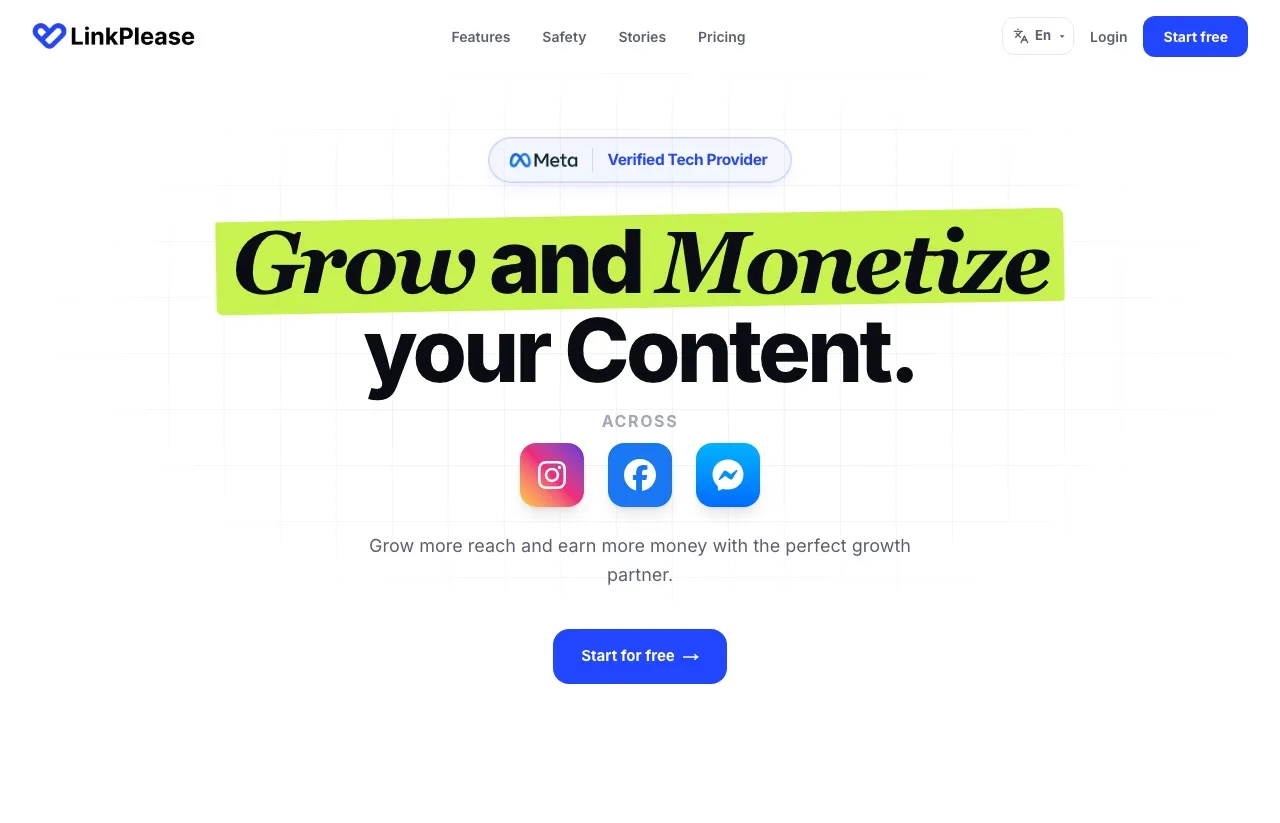
Manychat is the category incumbent. It is a visual automation builder best known for Instagram, with Messenger, TikTok, Telegram, WhatsApp, SMS and email available by plan. Higher plans add channels, features and larger contact allowances.
LinkPlease Pricing Against Manychat’s Ladder
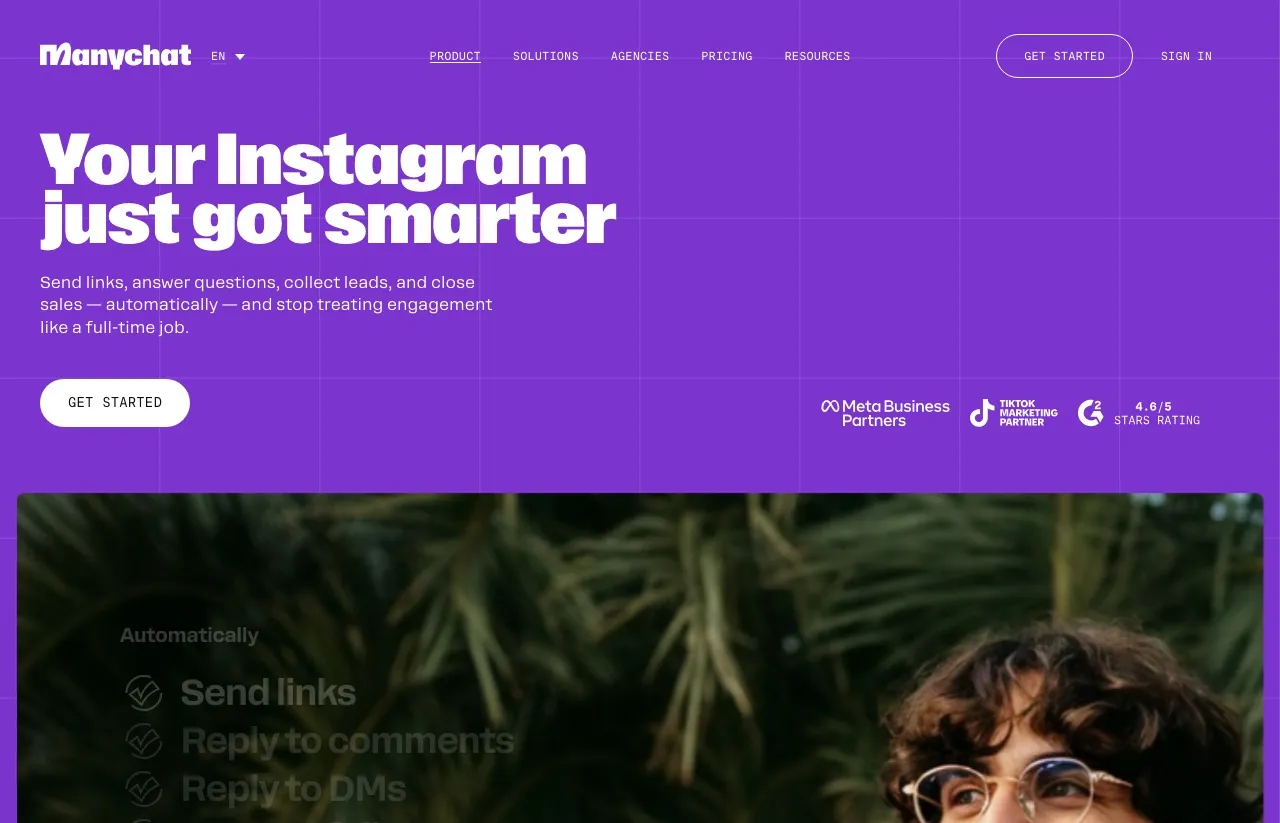
LinkPlease bills per Instagram account, and its pricing page lists four self-serve plans, plus a custom Enterprise tier for agencies:
| LinkPlease plan | USD monthly | USD yearly total | INR monthly | INR yearly total | Features and limits |
|---|---|---|---|---|---|
| Free | $0 | $0 | ₹0 | ₹0 | Unlimited automations, 1,000 DMs and 1,000 contacts a month, no Ask for Follow, Re-trigger or lead collection |
| Pro | $14.99 | $139.99 | ₹499 | ₹4,788 | Unlimited DMs and contacts, Ask for Follow, Re-trigger, Collect user data |
| Super | $34.99 | $334.99 | ₹999 | ₹9,590 | Pro plus AI message rotation, Collab DMs brand deal detector, Comment Guard AI moderation |
| Max | $39.99 | $383.99 | ₹1,199 | ₹10,788 | Super plus IG Shield AI account protection, priority WhatsApp support |
₹399 is Pro’s monthly equivalent on yearly billing, and Pro billed monthly is ₹499. The pricing page shows the yearly figure first, which is why ₹399 often gets quoted as the monthly price.
Manychat bills by Active Contacts, the people you interact with in a month. Its pricing page runs Free at 25 contacts, Essential at $17 for 250, Pro at $39 for 2,500, Business at $99 for 7,500 and Advanced at $199 for 25,000, billed monthly. Past the included pool you pay per extra person, from $0.10 on Essential down to $0.004 or less on Advanced.
One caveat comes before the table. Manychat says this ladder applies to accounts opened since March 2, 2026, and it is moving older accounts over country by country, so a long-time Manychat customer may be on different prices.
The table compares contact capacity, not features. It assumes one Instagram account, unique people each month, one DM per person and nothing else using up the allowance, and shows LinkPlease vs Manychat at the cheapest plan that covers each row, on monthly billing:
| People you message a month | LinkPlease | Manychat (cheapest plan) |
|---|---|---|
| 25 | $0 (Free) | $0 (Free) |
| 250 | $0 (Free) | $17 (Essential) |
| 1,000 | $0 (Free) | $39 (Pro) |
| 2,500 | $14.99 (Pro) | $39 (Pro) |
| 5,000 | $14.99 (Pro) | $99 (Business) |
| 10,000 | $14.99 (Pro) | $161.50 (Business plus 2,500 extra contacts) |
| 25,000 | $14.99 (Pro) | $199 (Advanced) |
Under those assumptions, LinkPlease is the smaller bill in every row above 25 people, and its paid price stays flat as the count climbs. Yearly billing keeps the order: LinkPlease Pro is $139.99 a year against $348 for Manychat Pro.
Manychat’s pricing page also opens on yearly billing, which is why its cards show $14 and $29 rather than $17 and $39.
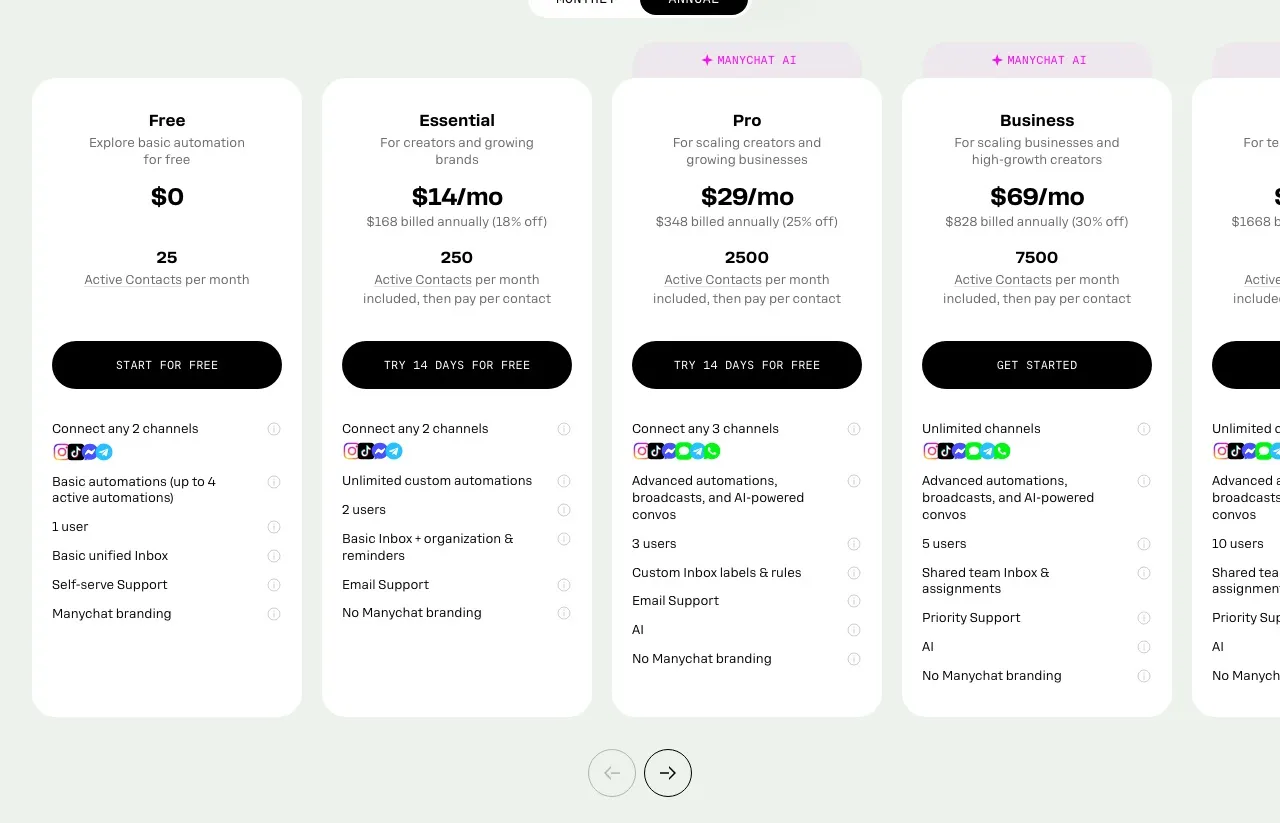
If your list sits between these rows, my Manychat overage math by contact count covers more of them.
Checking LinkPlease’s Own Manychat Comparison
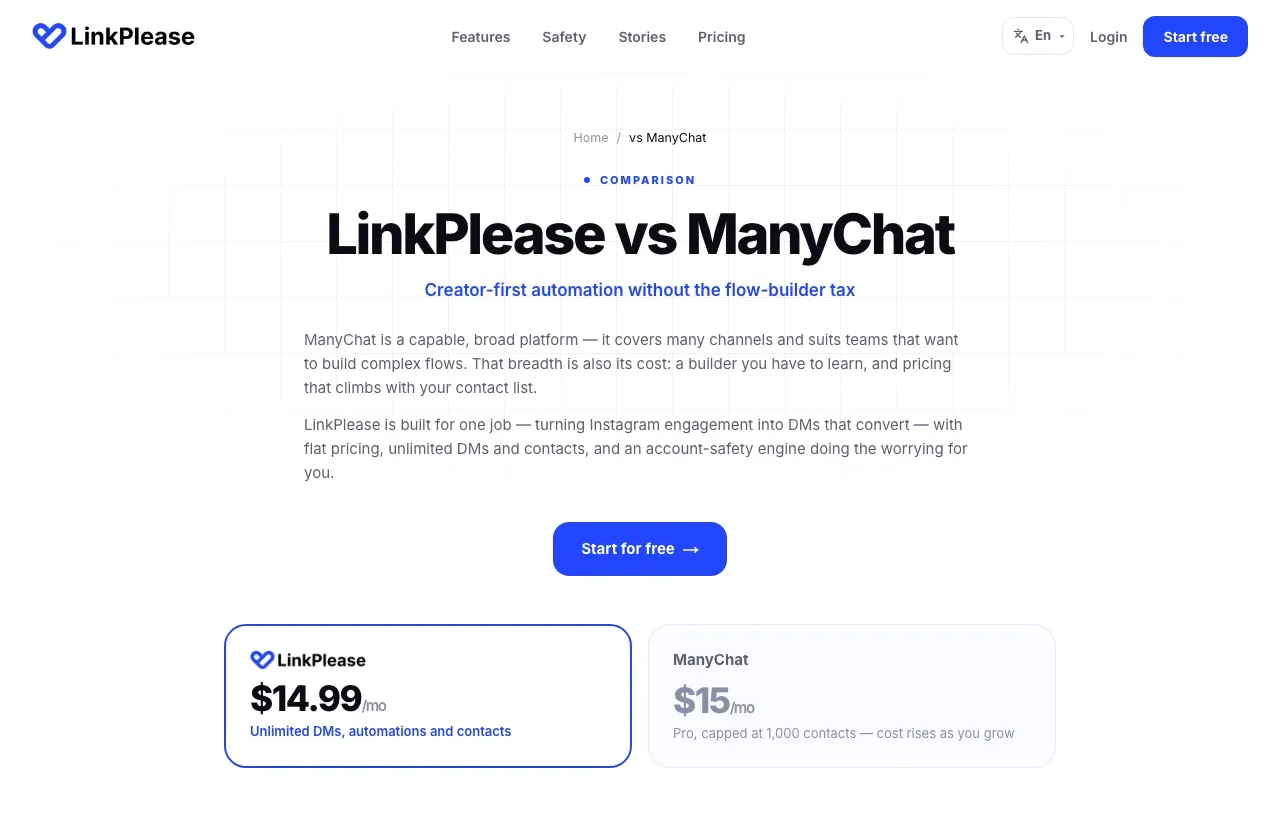
LinkPlease publishes its own LinkPlease vs ManyChat page, and much of it is fair. It defines “Not documented” as “we could not find the capability publicly stated.” Two rows still disagree with Manychat’s own documentation:
| What LinkPlease’s page says | What Manychat publishes | Where to check |
|---|---|---|
| Manychat “$15/mo” with “Pro, capped at 1,000 contacts” | For accounts on the current pricing, Pro is $39 a month, or $29 billed yearly, with 2,500 contacts included and paid overage after that | Manychat Pro plan article |
| Viral spike throttling “Not documented” for Manychat | Manychat says it automatically enables a backend mechanism so continuous auto-replies do not trip spam detection | Manychat comment trigger article |
One row is closer than it looks. LinkPlease marks Share to DM “Not documented” for Manychat, and Manychat does have an article titled “Share to DM trigger.” That trigger fires when someone shares your post to their Story, while LinkPlease’s version fires when someone sends your post to your DMs. Same name, different moment.
Question One: Who Messages You Outside Instagram?
Manychat’s channel list is the clearest reason to pay its prices. It supports Instagram, Messenger, TikTok, Telegram, WhatsApp, SMS and email. Free and Essential connect two channels and exclude WhatsApp, SMS and email. Pro connects three, and Business and Advanced connect all seven.
LinkPlease covers Instagram, Facebook post comments and Messenger. For a creator running a keyword-to-link funnel on Instagram, that may cover the whole job. For a store that answers WhatsApp orders or a coach who follows up by email, it is a gap no plan closes.
Question Two: Does Your Funnel Branch?
Manychat’s builder handles branching paths, conditions and multi-step sequences. It also starts conversations LinkPlease does not list, including Follow to DM, a beta trigger for new followers where Meta decides which accounts qualify. Pro adds Manychat AI, also labeled beta, and the Manychat API. The API reads and updates contacts, tags and custom fields, sends messages and fires existing flows, and my Manychat API walkthrough maps the rest.
LinkPlease builds forward from the comment instead. Paid plans add an Ask for Follow gate and lead forms inside the DM with exportable contacts. Its homepage also pitches selling digital products and taking payment inside Instagram DMs. I found no documented visual builder for branching, multi-step flows.
One caution applies to both tools’ follow checks. Meta’s spam policy lists “Requiring or claiming that users are required to engage with content (e.g., liking, sharing) before they are able to view or interact with promised content.” The clause does not name follow gates, and both tools run them through Meta’s own messaging tools, but the wording is close. Weigh that before making a follow the price of your free guide.
Teams are the other split. Manychat includes two users on Essential, three on Pro, five on Business and ten on Advanced. Its Pro plan article lists two inbox seats with room for a third, and the pricing page labels Business and Advanced as multi-user inboxes. LinkPlease lets one login manage several Instagram accounts, and I found no seat count on its pricing page.
Question Three: What Happens When a Post Takes Off?
This is where LinkPlease’s design pays off. Pro has no contact meter, so a Reel that brings in 10,000 commenters does not change the invoice. LinkPlease says every send is “queued and paced below Meta’s rate limits,” and Meta allows 750 private replies to comments per hour per account, per my breakdown of Meta’s private reply limits. At that ceiling, 10,000 commenters take about 13 hours to answer on any tool.
The free plan is the exception to watch. Its help center says automations pause once you use up the monthly contact limit, so a Reel that brings in 1,500 new people who match your keyword stops answering partway through the spike. If a launch could go past what is left of your free allowance, upgrade before you post.
LinkPlease also covers the post you forgot to set up. Re-trigger, on paid plans, runs an automation over comments from the previous seven days. I did not find a matching feature in the Manychat help articles I read.
On Manychat, a viral week raises the bill once it pushes Active Contacts past your plan’s allowance. A Business account that reaches 10,000 people pays $161.50 for the month, and Manychat applies its own backend mechanism to keep the flood of auto-replies from tripping spam detection.
The Two Tools on One Grid
| LinkPlease | Manychat | |
|---|---|---|
| Channels | Instagram, Facebook comments, Messenger | Instagram, Messenger, TikTok, Telegram, WhatsApp, SMS, email (by plan) |
| Billing unit | Per Instagram account, flat | Per Active Contact, plan pools plus overage |
| Cost at 2,500 people a month, monthly billing | $14.99 (Pro) | $39 (Pro) |
| Free plan | 1,000 DMs and 1,000 contacts a month | 25 Active Contacts, up to 4 live triggers |
| Comment-to-DM on posts and Reels | Yes | Yes |
| Story and Live automation | Yes | Yes |
| Follow gate before the promised link | Yes (paid plans) | Yes |
| Trigger on a new follower | Not listed | Yes (beta, Meta decides eligibility) |
| Re-run over older comments | Yes, previous 7 days (paid plans) | Not found in the help articles I read |
| Trigger when someone shares your post | Post or Reel sent into your DMs | Post or Reel shared to their Story |
| Conversation design | Keyword trigger, gates, lead form, DM | Visual builder with branching |
| Public API | None documented | Pro and up, contacts, tags, messages, existing flows |
| Users | Seats not documented, several accounts per login | 1 to 10 users by plan |
| Trial | Free plan, no card | 14 days on Essential and Pro |
Match Your Setup to a Tool
| If this is you | Better fit |
|---|---|
| You run a keyword-to-link funnel on one Instagram account | LinkPlease |
| You want one monthly price no matter how many people a Reel brings in | LinkPlease |
| You want 1,000 free contacts a month while you test a funnel | LinkPlease |
| You sometimes post before switching an automation on | LinkPlease |
| You also answer WhatsApp, SMS or email | Manychat (Pro or higher) |
| You also run DM automation on TikTok | Manychat |
| Your DMs ask questions and route people to different offers | Manychat |
| You want to message new followers and can accept a beta | Manychat |
| Two or more people work the same inbox | Manychat (Pro or higher) |
Running More Than One Instagram Account
LinkPlease’s pricing page says plans are “per Instagram account,” even though several accounts can sit under one login. Three accounts on Pro cost $44.97 a month.
For Manychat, the clearest statement is a help article written before the March pricing change. It says each Instagram account needs its own Manychat account, and “each account will have its own settings and billing.” If that still holds, three accounts on Pro would run $117 a month.
Either way, the DM tool is one more subscription beside whatever you use to publish the posts that start every funnel.
Where Blotato Fits Next to Both
Blotato comes at the comment from the publishing side. It is agent infrastructure for social media marketing, built so the agent that publishes your Reel to Instagram, and to 8 other platforms, can create the keyword automation for that exact post in the same session.
Neither tool above offers that second step through a documented API. LinkPlease documents no API, and Manychat’s API can fire an existing flow but cannot create or edit one. Blotato’s MCP server includes 8 DM automation tools, among them blotato_create_automation and blotato_update_automation, so an agent can also repoint every automation’s link before a launch.
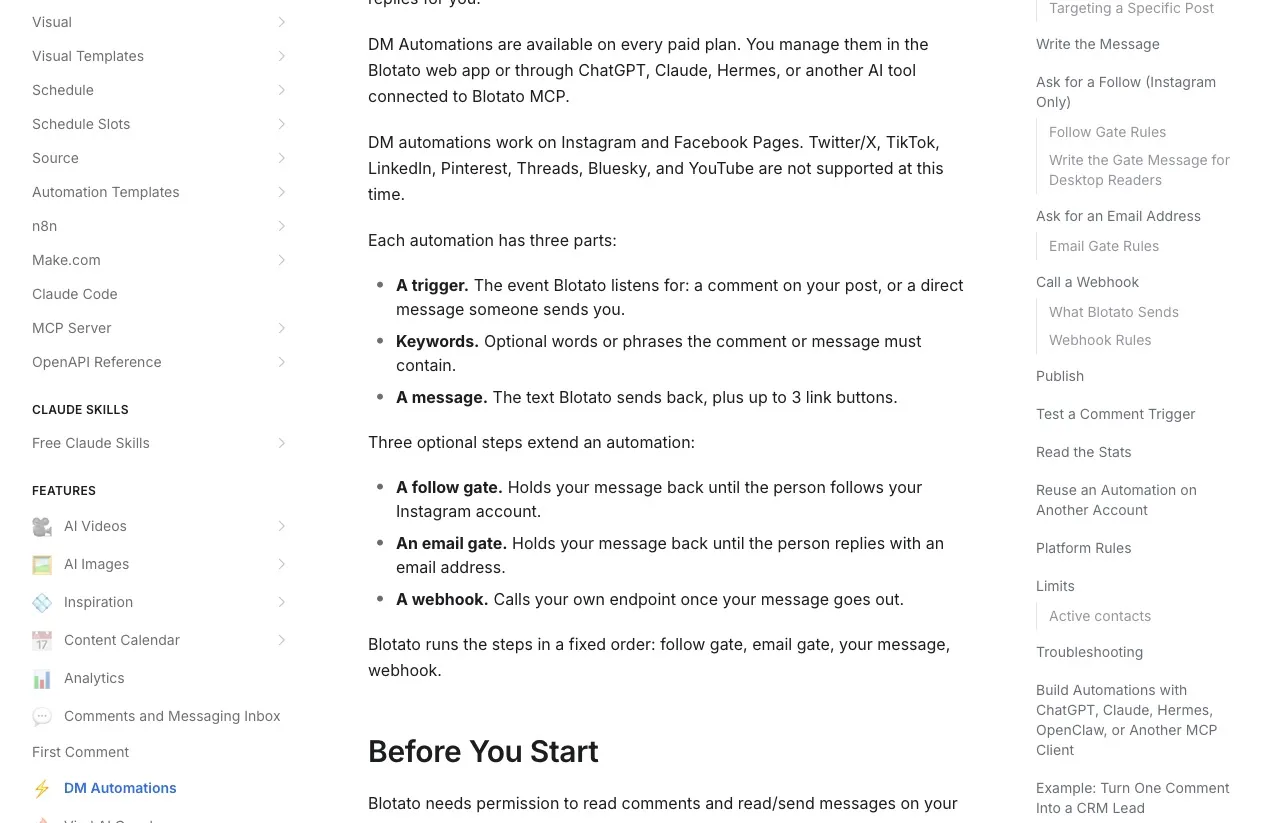
Blotato has clear limits here too. Its docs describe no re-run over comments you missed, and it has no trigger for new followers.
Each automation sends one fixed message, with an optional email gate or an Instagram-only follow gate first, instead of a branching flow. That follow gate carries the same Meta caution as any other.
Blotato’s DM automation covers Instagram and Facebook only, and only after someone writes first. A matching comment gets a private DM and no public reply under it, so if you want that public reply too, an agent has to post it separately with Blotato’s comment tool. Pick one specific post and the picker lists only posts you published through Blotato.
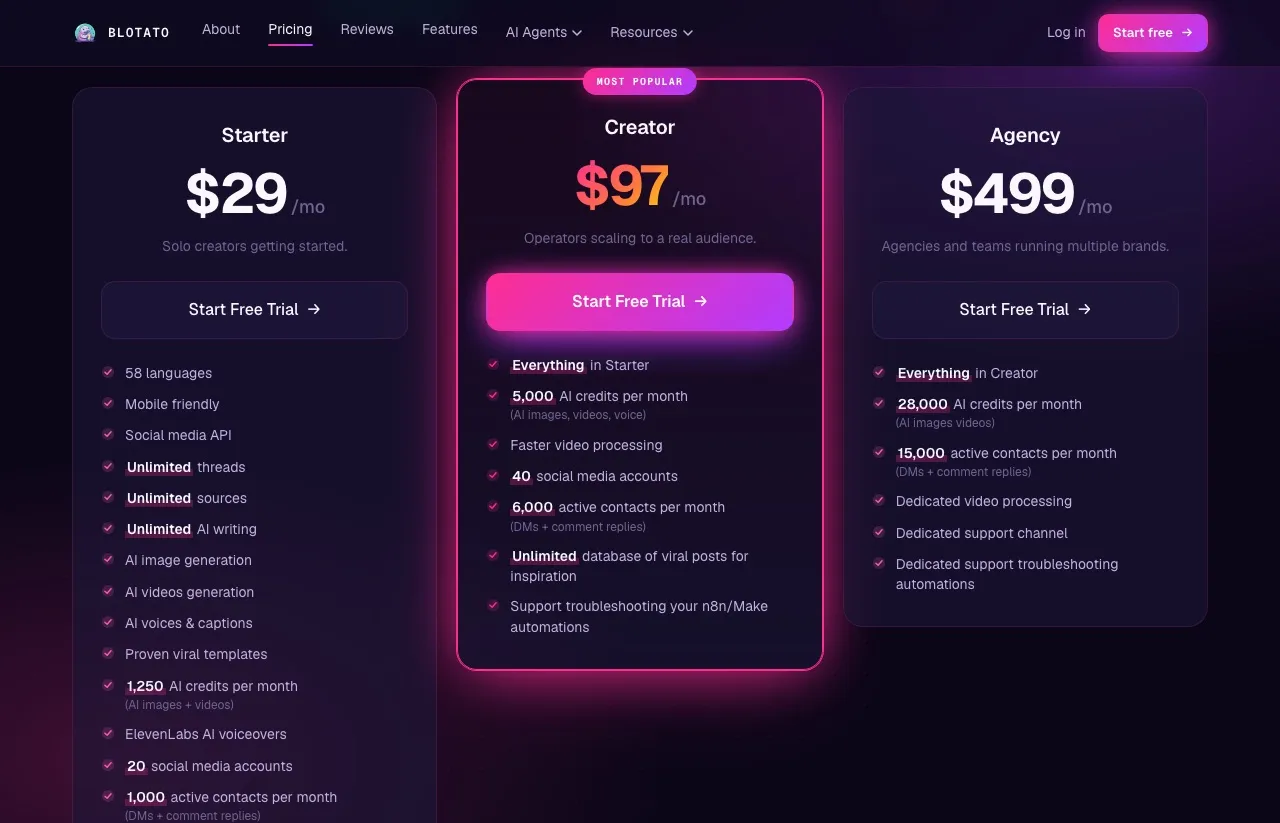
If DMs on one Instagram account are the whole job, Blotato costs more than LinkPlease Pro. Starter costs $29 a month for 1,000 Active Contacts across 20 accounts, Creator is $97 for 6,000 and Agency is $499 for 15,000. It makes sense if you want one tool, and one agent, to publish your posts and DM the people who comment on them.
The week-long Blotato trial runs in the web app. An agent works through the API or MCP server, and the trial does not include API access, so agent builders should start on the Starter plan.
Decide by Your Inbox List, Then by Your Funnel
Write down every place your audience messages you. If the list is Instagram and maybe Messenger, and your funnel is a keyword that sends a link, LinkPlease does that job for less on a single account, and its free plan lets you prove it before you pay. If WhatsApp, TikTok or email are on the list, or your DMs need to branch, Manychat’s ladder is the cost of that reach, so price the plan that covers your channels before you compare anything else.
LinkPlease Pricing and Setup FAQs
How much does LinkPlease cost a month?
LinkPlease Pro costs $14.99 a month per Instagram account in US dollars, Super $34.99 and Max $39.99, or $139.99, $334.99 and $383.99 billed yearly. In India, Pro is ₹499 monthly or ₹4,788 a year. Paid plans include unlimited DMs and contacts, and there is a free plan.
What does LinkPlease’s free plan include?
The free plan costs nothing, needs no card and includes unlimited automations with 1,000 DMs and 1,000 contacts a month. It leaves out Ask for Follow, Re-trigger and lead collection. When you hit the monthly limit, automations pause until the next month resets it or you upgrade.
Can I move my Manychat automations to LinkPlease?
Not by import. LinkPlease says you connect Instagram through Meta’s login and recreate each keyword trigger, which it puts at a few minutes per automation. It also advises against running both tools on the same comments while you switch, since two replies per comment doubles your send rate.
Does LinkPlease have an API?
I found no documented API or MCP route for building LinkPlease automations on its site, its llms.txt file or its help center, so plan on setting them up in its dashboard. Manychat’s API, on Pro and up, can fire existing flows but cannot create or edit one.
What are the alternatives to LinkPlease?
Manychat is the broad option, covering up to seven channels with a branching builder on its higher plans. If you want another Instagram-focused tool with uncapped DMs, my roundup of LinkDM alternatives compares several, with each one’s DM limits checked at the vendor. If you also want a store and checkout behind the DM, SuperProfile weighed against Manychat looks at a tool that bundles both.