6 Best Make Alternatives for Social Media Automation in 2026
The best Make.com alternatives in 2026, ranked for creators who post daily and want predictable cost. Tested by Sabrina Ramonov.

If you are hunting for Make.com alternatives in 2026, you have probably just watched a workflow you thought was simple quietly eat your monthly credits. Make is a genuinely powerful automation builder, but it bills on metered usage, and a daily posting habit is exactly the behavior that runs the meter up. I post hundreds of times a week across my own accounts, so I have felt this firsthand. My top pick is Blotato, the tool I built to publish content without wiring up a single scenario, and I will be upfront that I am the founder, so judge that entry on the math.
Quick Comparison: 6 Best Make.com Alternatives
| Tool | Best For | Starting Price | Key Strength |
|---|---|---|---|
| Blotato | Creators who just want to publish everywhere | $29/mo | Native multi-platform posting, no flows to build |
| n8n | Technical creators who want to self-host free | $0 self-hosted | Pays per workflow run, not per step |
| Zapier | Connecting many apps with zero code | $19.99/mo | The largest app catalog anywhere |
| Pipedream | Developers wiring custom social APIs | $0 (100 credits/mo) | Code-first builder with a generous free tier |
| Activepieces | Open-source fans who want unlimited runs | $0 (10 active flows) | Pays per active flow, runs are unlimited |
| Latenode | Light, bursty automations on a budget | $0 (10k CPU-sec/mo) | Bills runtime, not every operation |
Why People Are Looking for Make.com Alternatives
Make recently rebranded its pricing, moving from “operations” to “credits.” That sounds cosmetic, but the underlying pain is the same: you pay for execution volume, and posting content all day is high volume. Every module that runs in a scenario consumes credits, including triggers, filters, and the branches of a router. A flow that looks like three steps on the canvas can burn far more than three credits per run.
The second complaint is the learning curve. Make’s visual builder is flexible, but iterators, aggregators, and branching logic take real time to master. Reviewers consistently say it is harder to pick up than Zapier, and debugging a broken scenario is painful when there is no clean test mode and failures are opaque.
Support is the third sore spot. Make’s Trustpilot rating is low, and users on cheaper plans report slow or absent help. When you are running unattended social automations and a Meta connection drops, slow support turns a small problem into days of missed posts. None of this means Make is bad. It means it is built for general business automation, not for someone whose main job is publishing content. If you want the wider view, I keep a running list of the social media automation tools I actually trust.
Best Make.com Alternatives for 2026
I ranked these by the one thing that matters to a creator leaving Make: getting your content live on every platform without the cost or complexity scaling against you. Here are the six I would actually recommend.
1. Blotato: Best for creators who just want to publish everywhere

Blotato bundles 20 social accounts into the $29 Starter plan, with flat pricing instead of a usage meter.
I built Blotato because I was tired of wiring scenarios just to get one post live on nine platforms. So take this entry with a grain of salt, then look at the math. Blotato is a native social publisher, not an automation canvas, which means you write or generate a post and it goes out to X, LinkedIn, Facebook, Instagram, Pinterest, TikTok, Threads, Bluesky, and YouTube without a single module to configure. There are no per-post fees and no credit meter ticking in the background.
For the people who still love automation, Blotato ships official n8n and Make nodes and a native API plus MCP server, so you can let your automation tool handle the logic and use Blotato as the part that actually publishes. That is the honest bridge: keep Make for your business workflows if you want, and let Blotato own the social-posting step that Make keeps breaking on.
Blotato is not a general automation platform. If you need to move data between a CRM and a spreadsheet, this is not your tool. The free trial also excludes the API, so developers should plan to start on a paid plan to test it properly.
Pricing: Starter $29/mo (20 social accounts, 1,250 AI credits), Creator $97/mo (40 accounts, 5,000 credits), Agency $499/mo (28,000 credits). 7-day free trial, cancel anytime.
Ideal for: Solo creators and small teams who want content published across every platform without building or maintaining automations.
Bottom line: If your real goal is posting, not plumbing, Blotato removes the entire workflow layer. Start a free trial and post to all nine platforms today.
2. n8n: Best for technical creators who want to self-host free
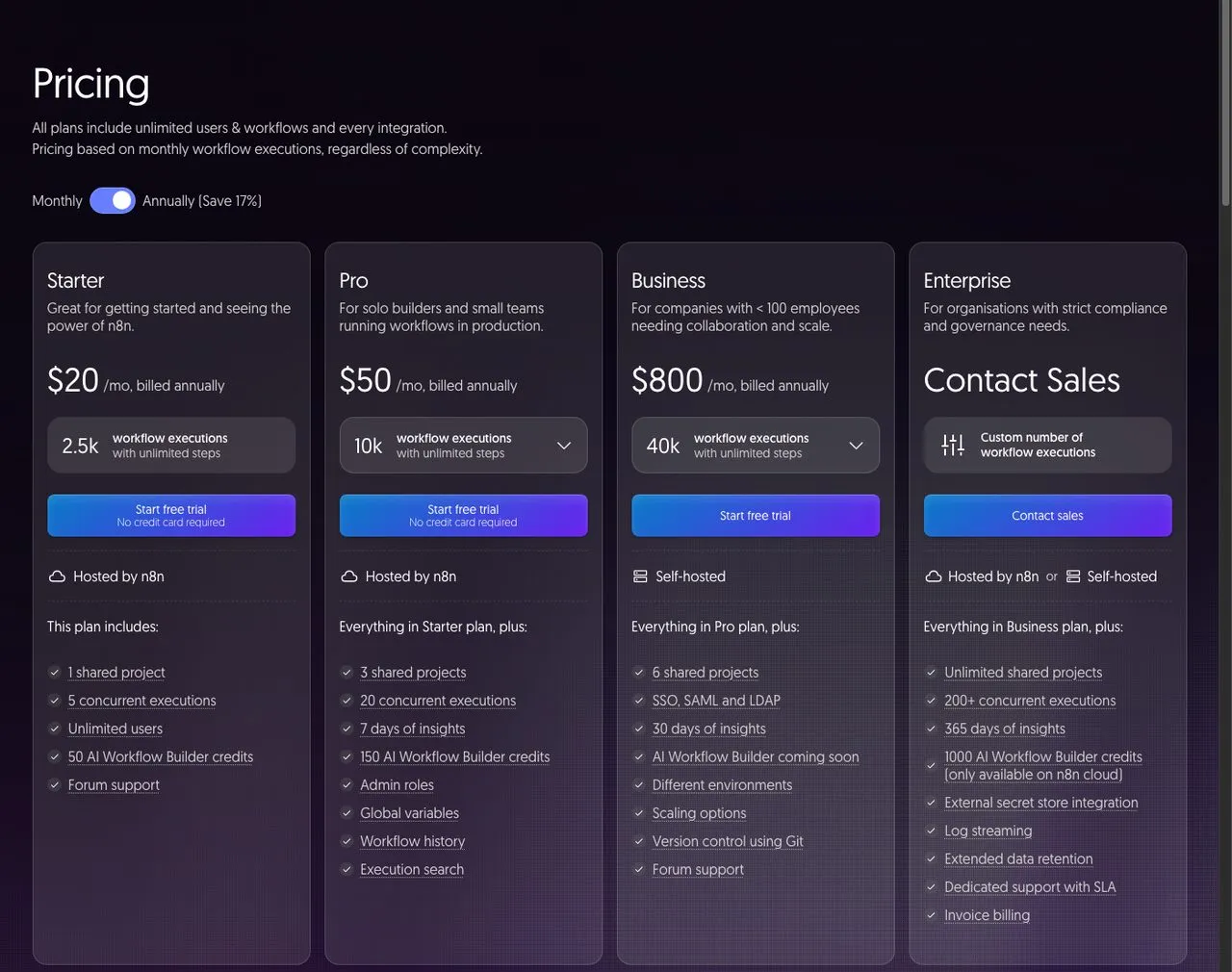
n8n charges per full workflow execution and lets you self-host the open-source version for free.
n8n is the alternative most technical users land on when they leave Make, and the reason is pricing philosophy. It bills per full workflow execution, not per step, so a complex flow that loops over a dozen items costs the same as a simple one. For high-volume posting, that math is far friendlier than a per-credit model. You can also self-host the community edition for free, which is the route a lot of developers take.
The trade-off is the build curve. n8n expects you to understand APIs, webhooks, and JSON, and it has no native publisher for some platforms, so you end up making raw HTTP calls to post. Reviewers also report silent failures, where a workflow shows green checkmarks but nothing actually published. That is the exact failure mode a purpose-built publisher avoids.
Pros:
- Pays per execution, so complexity does not multiply your bill
- Free, unlimited self-hosting for the technical
- Huge flexibility through HTTP and code nodes
Cons:
- Steep learning curve for non-developers
- Missing native connectors for some social platforms
Pricing: Self-hosted community edition free. Cloud Starter $20/mo (2,500 executions, billed annually), Pro $50/mo (10,000 executions), Business $800/mo. Free trial, no card required.
Ideal for: Developers and technical creators comfortable building and hosting their own workflows.
Bottom line: The best value for high-volume automation if you have the skills to run it, and a natural partner for Blotato as the publishing endpoint. I broke down that exact pairing in my n8n vs Make vs MCP comparison.
3. Zapier: Best for connecting many apps with zero code
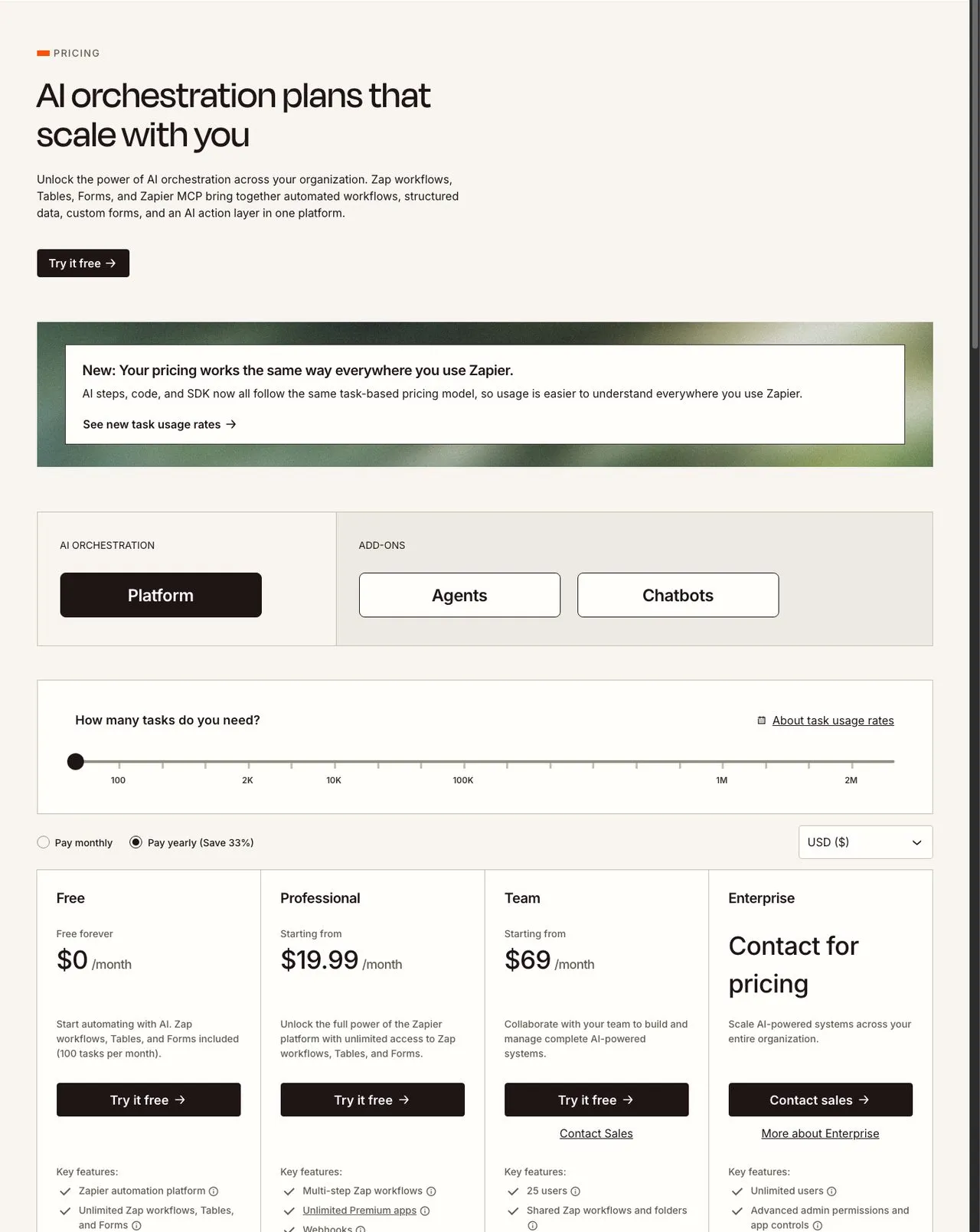
Zapier offers the largest app catalog but bills on tasks, which scales up with posting volume.
Zapier is the most popular automation tool on earth and the easiest no-code builder, with the biggest app catalog of anyone here. If your reason for leaving Make is the learning curve rather than the cost, Zapier is gentler to start with. It connects almost any app to almost any other, which makes it a safe default for general automation.
The trade-off is the pricing model, which is the same reason a lot of people leave Make: it bills on tasks, and every action step counts. For daily multi-platform posting, the task meter climbs fast, and the free plan’s 100 tasks a month runs out quickly. Like the others, it is also not a native social publisher, so you are still building Zaps to post, usually with a Webhooks step that calls a publishing API.
Pros:
- Easiest builder for non-technical users
- The largest integration catalog available
- Reliable and well-documented
Cons:
- Task-based pricing escalates with posting volume
- Free tier is limited and not social-native
Pricing: Free $0 (100 tasks/mo), Professional from $19.99/mo, Team from $69/mo, Enterprise contact sales. Prices shown for annual billing.
Ideal for: Beginners connecting many business apps who post at modest volume.
Bottom line: The friendliest on-ramp, but the task meter makes it an odd choice if heavy posting is the whole point.
4. Pipedream: Best for developers wiring custom social APIs
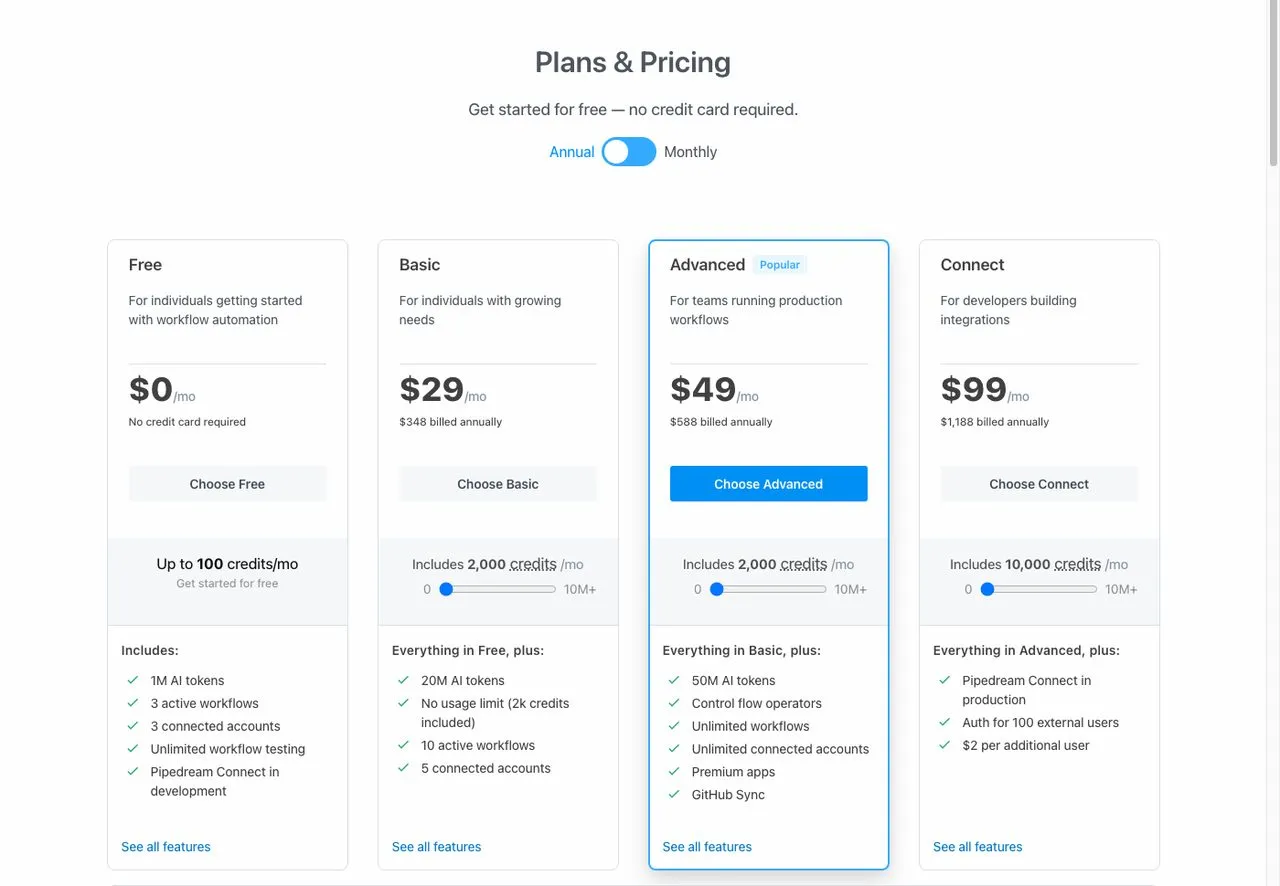
Pipedream pairs a code-first builder with a free tier that includes 100 credits a month.
Pipedream is the developer’s pick. It is a code-first automation platform where you can drop Node.js, Python, or Go directly into a workflow, which makes it powerful for anyone hitting social APIs that no-code tools handle poorly. The free tier is generous, and the paid plans are priced on credits rather than per-task, which suits bursty posting schedules. Note that Pipedream has joined Workday, so it is now backed by a much larger company.
The catch is that Pipedream assumes you can code. If you are a creator who wants a visual canvas and pre-built blocks, this will feel like overkill. It is built for engineers automating integrations, not for someone batching a week of captions.
Pros:
- Code-first flexibility for custom API work
- Free tier with 100 credits a month, no card needed
- Credit-based pricing rather than per-task billing
Cons:
- Steep for non-developers
- Not a social publisher, so you build the posting logic yourself
Pricing: Free $0 (100 credits/mo), Basic $29/mo (2,000 credits), Advanced $49/mo, Connect $99/mo, Business custom.
Ideal for: Developers who want to script social integrations rather than click through a builder.
Bottom line: A strong Make replacement if you live in code, but the wrong altitude if you just want to post.
5. Activepieces: Best for open-source fans who want unlimited runs
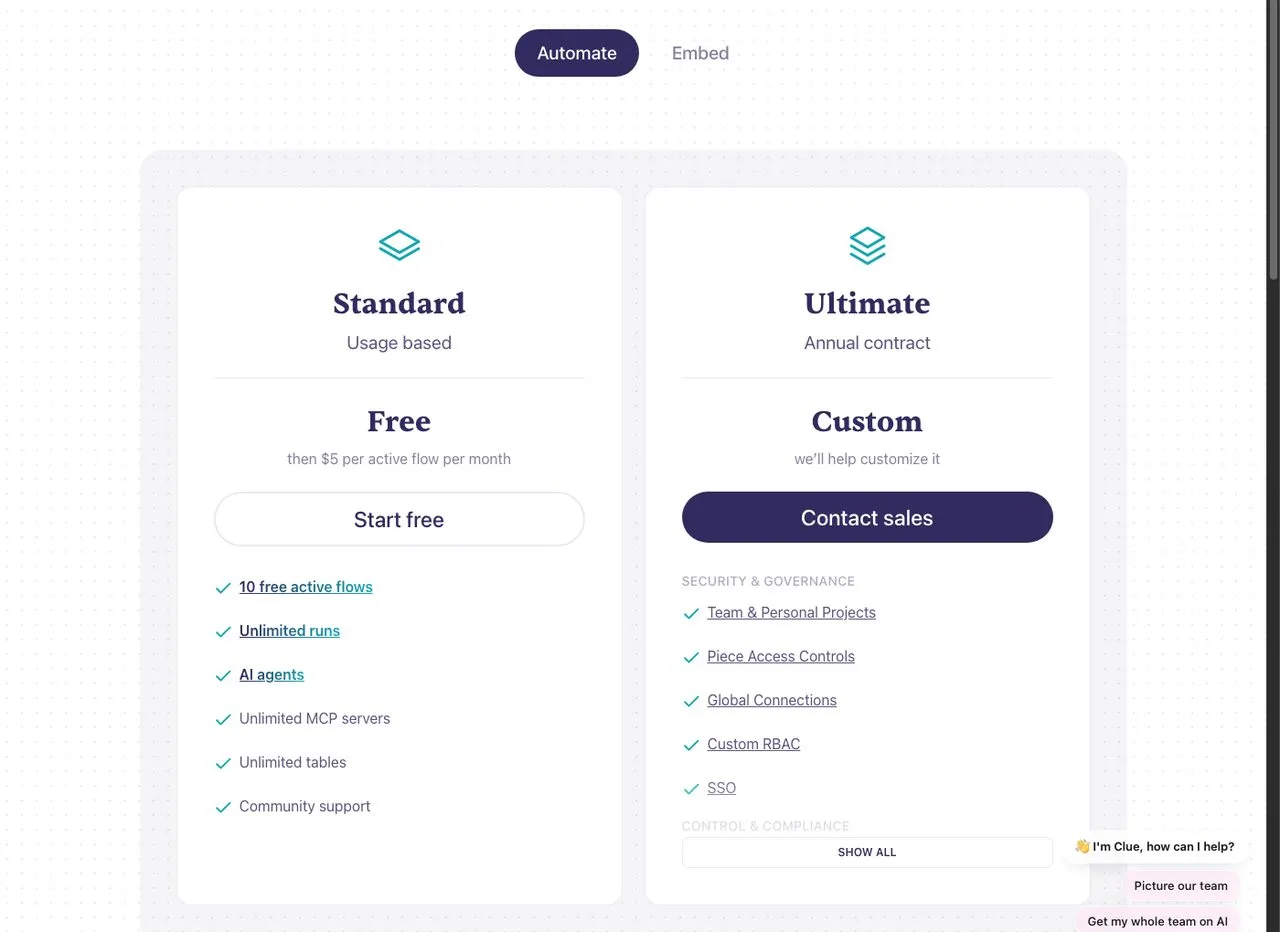
Activepieces bills per active flow and leaves the number of runs unlimited.
Activepieces flips the usual model. Instead of charging per task or per credit, it charges per active flow, and your runs are unlimited. For a creator who triggers the same posting workflow hundreds of times a month, that removes the volume anxiety entirely. It is open-source, so you can self-host for free, and reviewers often describe it as the approachable version of n8n.
The limitation is the integration catalog. Activepieces has fewer native connectors than Make or Zapier, so you may fall back on webhooks for the platform you want. Documentation for building custom pieces is thin, and the top tier hides behind a contact-sales wall.
Pros:
- Unlimited runs, so high posting volume does not raise the bill
- Open-source with free self-hosting
- Cleaner, more approachable builder than most
Cons:
- Smaller native integration library
- Sparse docs for custom connectors
Pricing: Standard usage-based, free to start with 10 active flows and unlimited runs, then $5 per active flow per month. Ultimate is custom on an annual contract. Self-hosting is free.
Ideal for: Open-source-minded creators who run a few flows constantly and hate per-run metering.
Bottom line: The cheapest path if you keep your flow count low and your run count high.
6. Latenode: Best for light, bursty automations on a budget
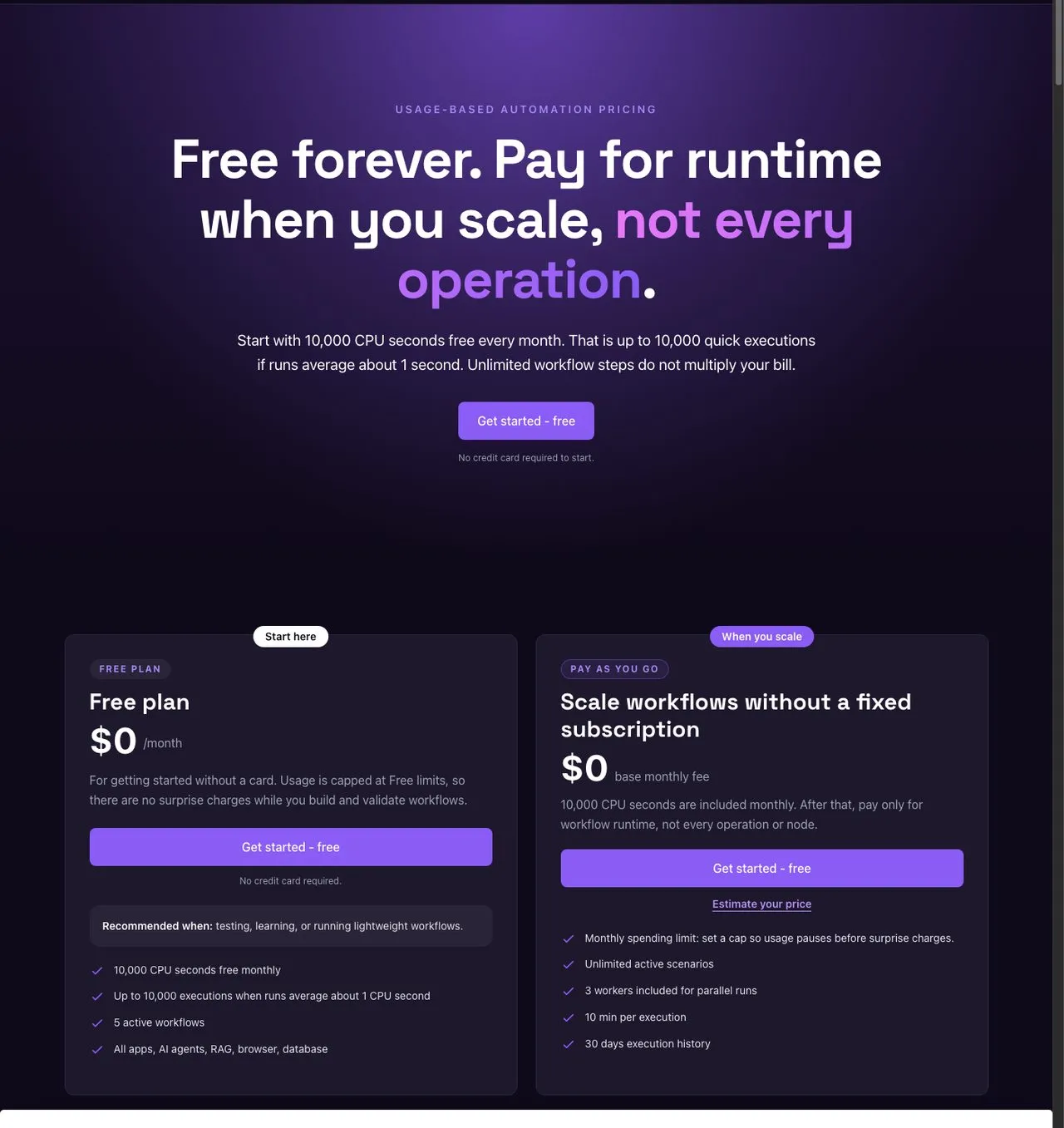
Latenode meters actual runtime in CPU-seconds rather than charging for every operation.
Latenode takes the most unusual approach on this list: it bills by runtime, measured in CPU-seconds, rather than by operation or task. Its own tagline is “pay for runtime when you scale, not every operation,” which is a direct shot at Make’s model. For light, fast-running social automations, this can be very cheap, and the free tier gives you 10,000 CPU-seconds a month with no card.
The downside is predictability. CPU-second billing is hard to forecast if you are not technical, and a heavier workflow can cost more than you expect. The integration ecosystem is also smaller than the incumbents, so check that your platforms are covered before committing.
Pros:
- Runtime-based pricing is cheap for light, quick workflows
- Free tier with no credit card
- Built-in AI and browser automation
Cons:
- CPU-second billing is hard to budget for non-technical users
- Smaller integration ecosystem
Pricing: Free $0 (10,000 CPU-seconds/mo, 5 active workflows). Pay-as-you-go starts at $0 base, then you pay only for workflow runtime with unlimited active scenarios.
Ideal for: Budget-conscious users running short, frequent automations who do not mind usage-based billing.
Bottom line: A clever cost model for light workloads, though the runtime meter trades one kind of unpredictability for another.
How I Chose These Make.com Alternatives
I did not rank these by how close they sit to Blotato. I ranked them by what a creator actually feels when leaving Make. Here is the criteria I used:
- Cost at posting volume. Does the pricing model punish you for posting daily, or stay flat as volume climbs?
- How little you have to build. Can you get publishing fast, or do you have to wire scenarios first?
- Native social publishing. Does it post to platforms directly, or force you into raw API calls?
- Free tier and trial. Can you validate it without a card and without surprise charges?
- Honest fit. Who is each tool genuinely built for, beyond the marketing?
How to Choose the Right Make.com Alternative
The right pick depends less on features and more on what you are trying to do:
- If you just want your content live everywhere, skip the automation layer entirely and use Blotato. Posting is the product, not a side effect of a workflow.
- If you are technical and want maximum control on a budget, self-host n8n or Activepieces, then point them at Blotato to handle the actual publishing.
- If you live in code, Pipedream gives you the most flexibility for custom API work.
- If your workflows are light and bursty, Latenode’s runtime pricing can be the cheapest.
- If you want the gentlest no-code start, Zapier is the easiest builder, as long as your posting volume stays modest. See our Zapier alternatives guide for more options if you outgrow it.
Sabrina’s Final Thoughts
Most people leaving Make are not leaving because it cannot do the job. They are leaving because the credit meter and the build complexity scale against a daily posting habit. If your main job is publishing content, the honest answer is to stop treating posting as an automation problem and use a tool built to publish. That is why I made Blotato my number one, and you can test it free for 7 days and judge the result yourself.
Make.com Alternatives FAQs
What is the best free Make.com alternative for social media?
For free automation, n8n’s self-hosted community edition and Activepieces both cost nothing to run, and Latenode offers a generous free tier with no card. For posting specifically, Blotato is the most direct because it publishes natively, and its 7-day trial lets you test it before paying.
Is n8n cheaper than Make.com?
Often, yes. n8n bills per full workflow execution rather than per step, so complex flows that loop over many items do not multiply your cost the way Make’s credit model can. Self-hosting n8n is free entirely, though it requires technical setup. If you are weighing n8n itself, I cover its own replacements in my n8n alternatives guide.
Why is Make.com so expensive for posting content?
Make bills on credits, and posting content all day is high-volume work. Triggers, filters, and router branches all consume credits, so a workflow that looks simple can run the meter up quickly. Flat-rate or native publishing tools avoid that volume penalty.
Can I use Make.com alternatives together with Blotato?
Yes. Blotato ships official n8n and Make nodes plus an API and MCP server, so you can keep your automation tool for logic and let Blotato handle the publishing step. That combination fixes the most common complaint about automating social posts: the post silently failing at the platform level.