7 Best Zapier Alternatives for Automating Social Media (2026)
The best Zapier alternatives for social media automation in 2026, compared on pricing, task limits, and ease of use. Tested by Sabrina Ramonov.
If you’re searching for Zapier alternatives in 2026, you’ve probably just done the math on what daily social media posting actually costs. Zapier charges per task, and every action step in your workflow counts. A simple “post to three platforms” automation burns three tasks per run. Do that twice a day, and you’re at 180 tasks a week before you’ve touched anything else.
Full disclosure: I’m the founder of Blotato, which I put at #1 on this list, so judge it on the math and not my byline. I built it precisely because I hit this wall myself. The alternatives below are the ones I’d genuinely hand a creator who wants to automate social posting without watching a task meter climb.
Quick Comparison: 7 Best Zapier Alternatives
| Tool | Best For | Starting Price | Key Strength |
|---|---|---|---|
| Blotato | Creators who want flat-rate social posting | $29/mo | No per-task pricing, 9 platforms, AI-native |
| n8n | Technical teams who want zero per-task fees | Free (self-hosted) | Unlimited executions, full code access |
| Make.com | Visual builders who want Zapier at half the cost | $12/mo | Drag-and-drop scenarios, 3,000+ apps |
| Pipedream | Developers building custom integrations | Free | Code-first workflows, no per-step billing |
| Integrately | Non-technical users who want pre-built automations | $19.99/mo | 20M+ one-click automations |
| Activepieces | Teams prioritizing data control and compliance | Free (self-hosted) | Open-source, MIT license, unlimited runs |
| IFTTT | Personal automation on the tightest budget | $2.99/mo | Simple applets, lowest cost option |
Why People Are Looking for Zapier Alternatives
Zapier’s per-task pricing model is the core issue. Every successful action step in your workflow counts against your monthly limit. Triggers, filters and Formatter steps don’t, but actions add up fast. A Zap with five action steps that runs 30 times a day burns 150 tasks daily, or 4,500 per month. On Zapier’s Professional plan, that kind of volume blows past your task allotment before the month is half over, and the next tier up gets expensive fast.
The math hits social media users hardest. Cross-posting to multiple platforms multiplies your task count with every run. Users report invoices jumping from $30/month to $300-600/month within six months of scaling their social media automation schedule.
The free tier compounds the frustration. You get 100 tasks and can only build 2-step Zaps (one trigger, one action). That rules out any workflow with conditional logic, formatting steps, or multi-platform distribution.
Best Zapier Alternatives for 2026
1. Blotato: Best for Creators Who Want Flat-Rate Social Posting
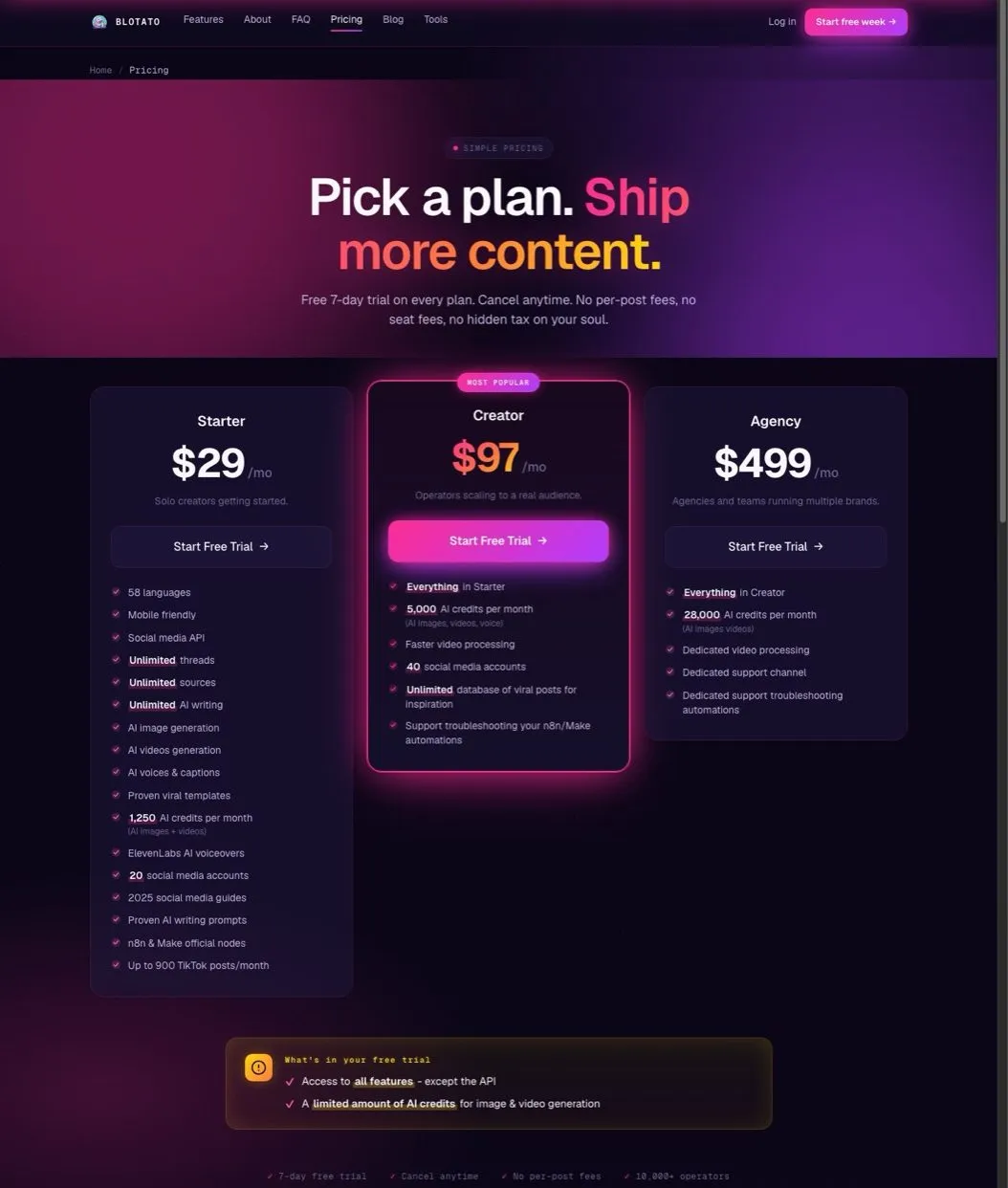
Blotato’s pricing: $29/mo Starter, $97/mo Creator, $499/mo Agency. No per-task fees.
I built Blotato because I was tired of designing workflows around billing instead of results. The entire platform runs on flat monthly pricing. Post 10 times a day or 100 times a day, and your bill stays the same.
The difference from Zapier is structural. Blotato isn’t a general automation platform. It’s purpose-built for social media. You connect your accounts, and it handles posting to X, LinkedIn, Facebook, Instagram, Pinterest, TikTok, Threads, Bluesky, and YouTube. No task counting, no operation limits, no surprise invoices.
The MCP server is where it gets interesting for Claude Code and AI tool users. You can draft and publish posts through natural language commands. “Post this to LinkedIn and schedule it for tomorrow at 9am” just works. That’s not possible with Zapier’s trigger-action model.
Pros:
- Flat $29/mo for 20 social accounts
- No per-task or per-operation pricing
- 9 platforms including Threads and Bluesky
- Full REST API with official n8n and Make nodes
Cons:
- Social media only, so any Zap that also touches your CRM, your billing, or a spreadsheet still needs Zapier or n8n underneath it (Blotato joins a Zap through a Webhooks step that calls its API), and you are adding a tool rather than cancelling one
- Publishes to 9 platforms against Zapier’s thousands of app integrations, which is the whole trade: depth on one job instead of reach across all of them
- No branching or conditional logic, so “if the post fails, notify me in Slack and retry with the backup image” is a Zap, not a prompt
- Testing the MCP workflow means subscribing first, since the trial excludes API access and issuing a key starts Starter billing
Pricing: Starter $29/mo (20 accounts, 1,250 AI credits), Creator $97/mo (40 accounts, 5,000 credits), Agency $499/mo (28,000 credits). 7-day free trial on all plans.
Ideal for: Creators and solopreneurs who post daily across multiple platforms and want predictable costs.
Bottom line: If your Zapier bill keeps climbing because of social posting, Blotato removes the meter entirely.
2. n8n: Best for Technical Teams Who Want Zero Per-Task Fees
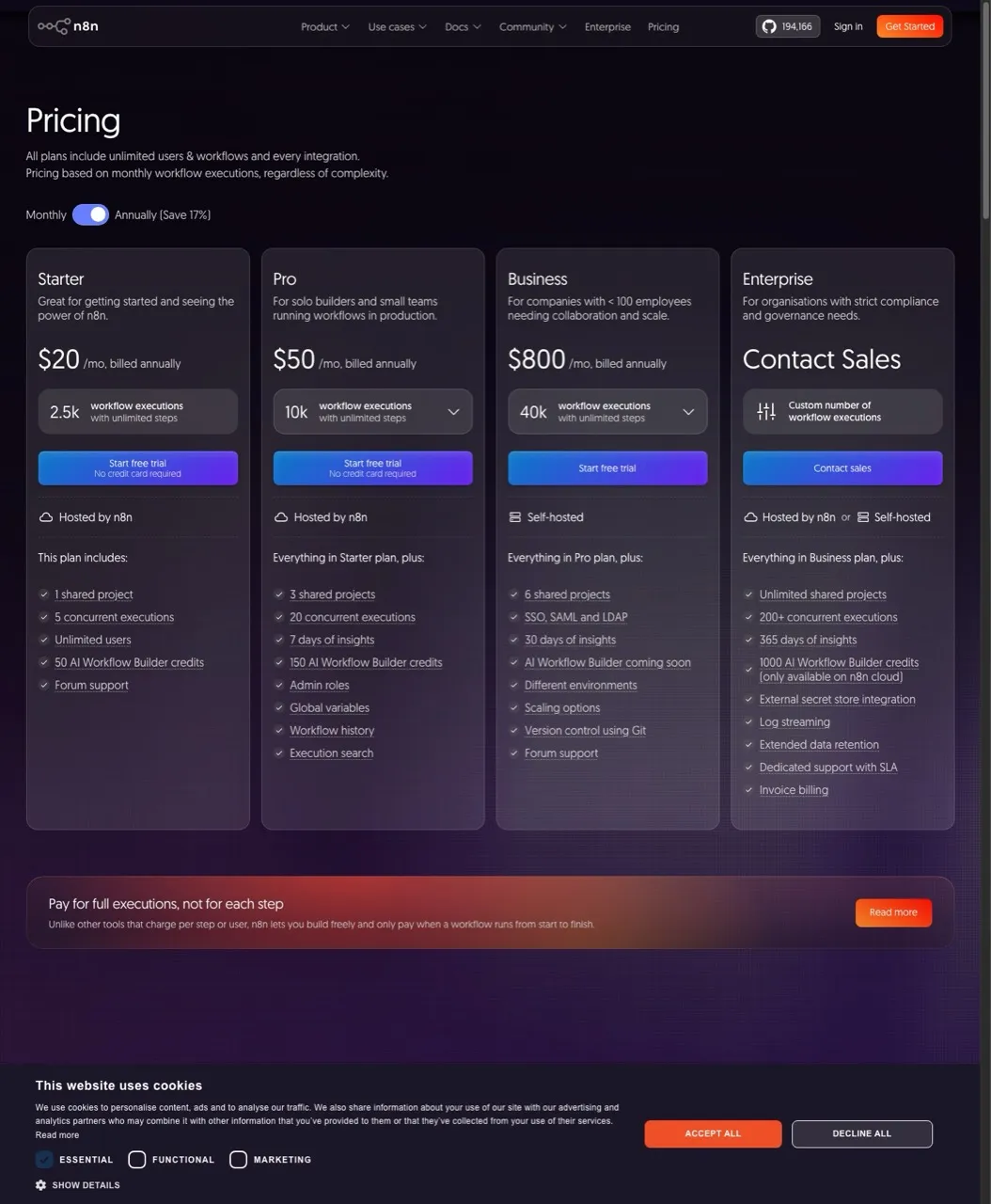
n8n pricing: self-hosted is free, cloud starts at $20/mo for 2,500 executions.
n8n flips the pricing model entirely. Self-host it on a $5-10/month VPS and you pay nothing for the software, with unlimited workflow executions. For a deeper comparison, see Blotato vs n8n. A 50-step workflow that runs 1,000 times costs exactly as much as a 2-step workflow that runs once: zero.
The “execution” counting on their cloud plans is also friendlier than Zapier’s “task” model. One execution equals one complete workflow run, regardless of how many steps it contains. That five-action automation counts as 1 execution, not 5 tasks.
For social posting, n8n pairs cleanly with a dedicated publishing layer. You can run your content logic in n8n, then push to every platform through the Blotato node instead of maintaining nine separate platform integrations yourself.
Pros:
- Self-hosted version is completely free
- Unlimited executions on self-hosted
- Full JavaScript/Python code access
- Execution-based pricing (not per-step)
Cons:
- Steep learning curve for non-technical users
- Debugging can be frustrating
- Cloud version removed its free tier
- Self-hosting requires server maintenance
Pricing: Community (self-hosted) Free, Starter $20/mo (2,500 executions), Pro $50/mo (10,000 executions), Business $800/mo (40,000 executions). Annual pricing shown.
Ideal for: Development teams or agencies with technical resources who want maximum control and zero marginal cost per automation.
Bottom line: If you can handle the setup, n8n is the only option where scaling costs nothing extra.
3. Make.com: Best for Visual Builders Who Want Zapier at Half the Cost
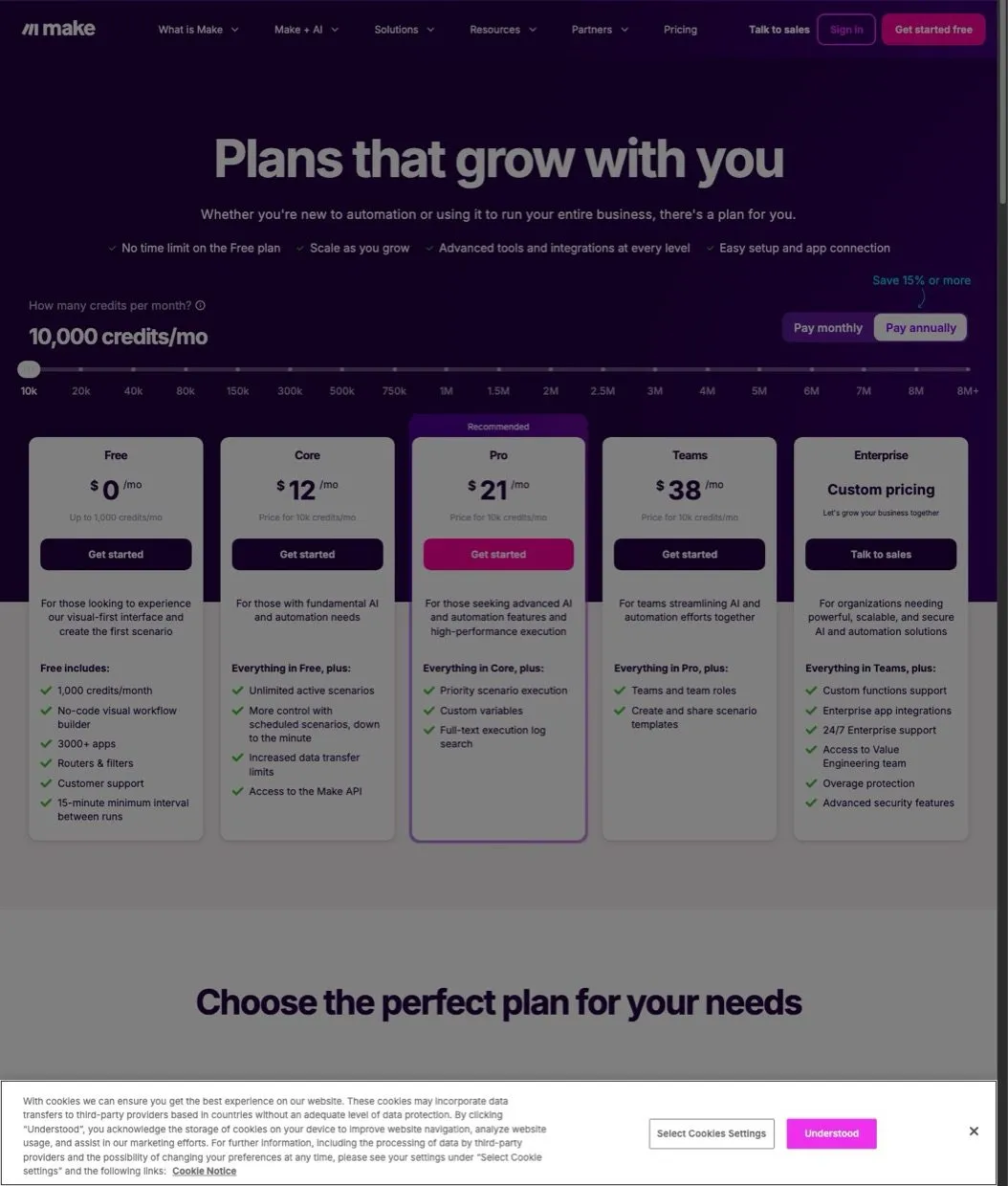
Make.com pricing starts at $12/mo for 10,000 credits.
Make (formerly Integromat) is the closest direct replacement for Zapier. The visual scenario builder works similarly, but the pricing model is far more generous. You get 10,000 credits for $12/month versus Zapier’s 750 tasks for $19.99/month.
Make now counts usage in “credits,” but internal steps like routers and filters are free. That means a complex workflow with branching logic costs the same as a simple one with the same number of actions.
Pros:
- Visual drag-and-drop builder
- 3,000+ app integrations
- Internal operations (filters, routers) don’t count
- Significantly cheaper than Zapier at scale
Cons:
- Still usage-based pricing (just lower)
- Interface has a learning curve
- Some users report billing disputes
Pricing: Free (1,000 credits), Core $12/mo (10,000 credits), Pro $21/mo (10,000 credits with priority execution), Teams $38/mo (10,000 credits with collaboration). Annual pricing shown.
Ideal for: Teams already comfortable with visual workflow builders who want to cut costs without changing their automation style.
Bottom line: Make is Zapier with better math. Same approach, lower bill.
4. Pipedream: Best for Developers Building Custom Integrations
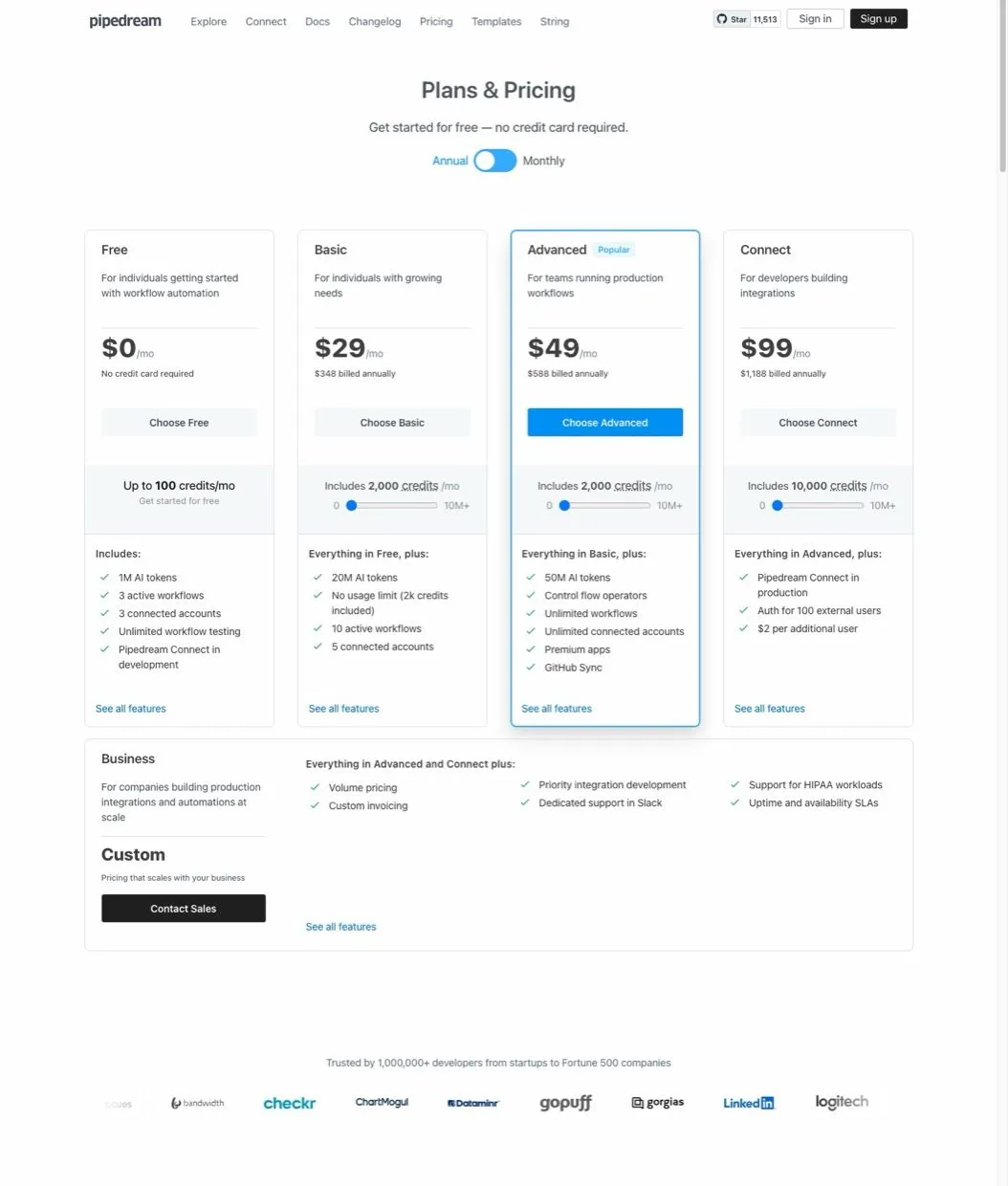
Pipedream pricing: Free tier with 100 credits/mo, paid plans start at $29/mo.
Pipedream is built for developers who want to write code, not drag boxes. Every workflow is backed by Node.js, and you can write custom logic directly in the editor. The free tier gives you 100 credits per month with no time limit.
For social media automation, Pipedream works well as a middle layer. Connect it to your content sources, run your custom formatting logic, then push to a posting tool like Blotato or directly to platform APIs.
Pros:
- Code-first approach with full Node.js access
- Free tier with no time limit
- Pre-built actions for 2,400+ apps
- Real-time event processing
Cons:
- Requires coding knowledge
- Not suitable for non-developers
- Less visual than Make or Zapier
Pricing: Free (100 credits/mo), Basic $29/mo (2,000 credits), Advanced $49/mo (5,000 credits), Connect $99/mo (10,000 credits).
Ideal for: Developers who want the flexibility to write custom code without building everything from scratch.
Bottom line: Pipedream is what Zapier would look like if it were designed by developers, for developers.
5. Integrately: Best for Non-Technical Users Who Want Pre-Built Automations
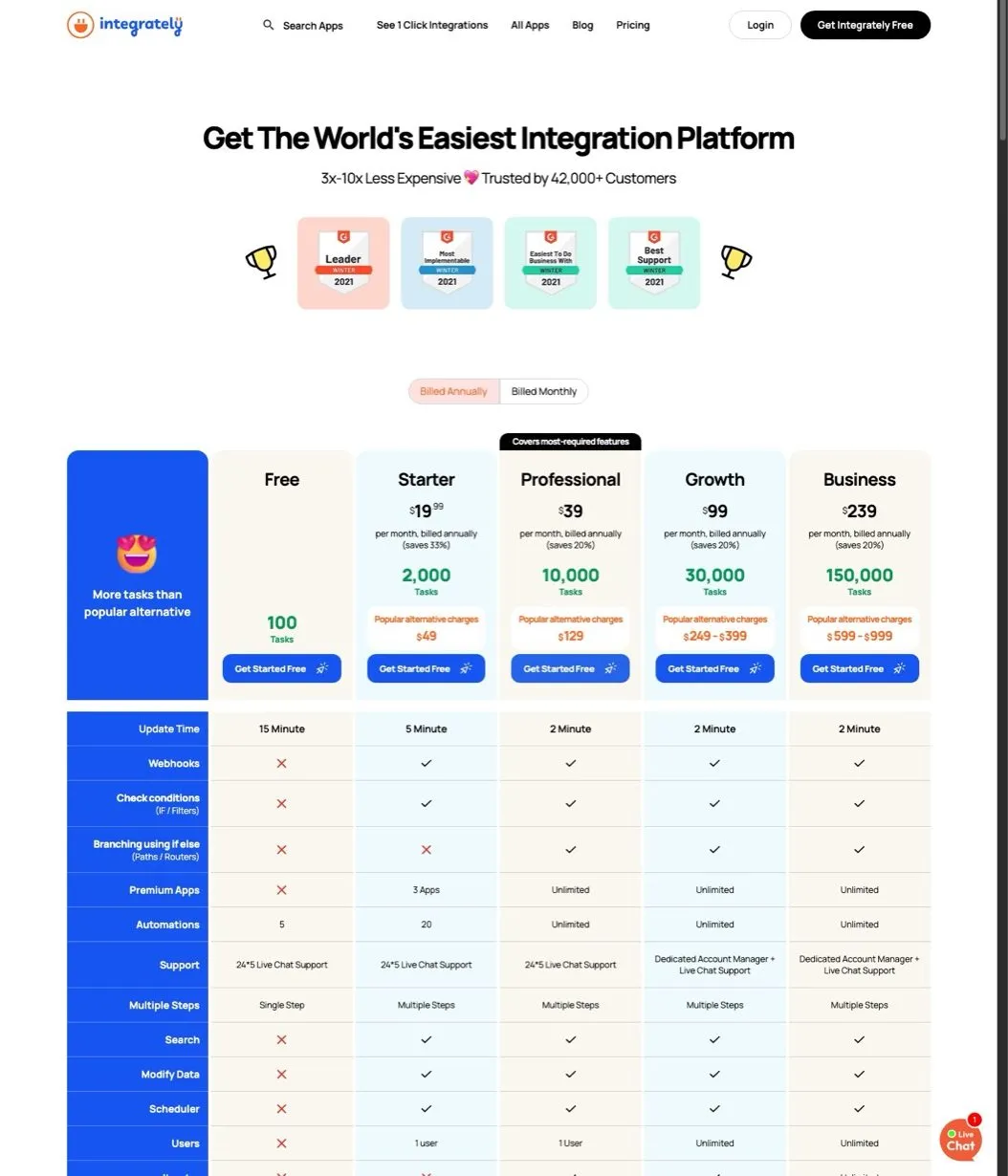
Integrately pricing starts at $19.99/mo for 2,000 tasks.
Integrately’s pitch is simplicity. They’ve pre-built over 20 million automations that you can activate with one click. Search for a flow like “Instagram to Twitter” and you’ll find ready-made templates you can turn on without touching a settings panel.
Be honest about the fit: Integrately is a general business-app connector first, with deep CRM, lead, and marketing-app coverage. Its native social-posting depth is thinner than a purpose-built poster, so it suits cross-app workflows more than heavy multi-account scheduling. The pricing is task-based like Zapier, but triggers are free and failed actions don’t count, which makes the effective cost lower than the sticker price suggests.
Pros:
- 20M+ pre-built one-click automations
- Triggers don’t count against limits
- Failed actions don’t count
- Strong customer support (G2 rating: 4.7/5)
Cons:
- Still per-task pricing model
- Social-posting integrations are thinner than dedicated tools
- Trustpilot reviews (around 3.4/5) trail its G2 score
Pricing: Free (100 tasks), Starter $19.99/mo (2,000 tasks), Professional $39/mo (10,000 tasks), Growth $99/mo (30,000 tasks), Business $239/mo (150,000 tasks).
Ideal for: Non-technical users who want to connect business apps without learning a workflow builder.
Bottom line: Integrately is the “I just want it to work” option. Less flexible, but faster to get running.
6. Activepieces: Best for Teams Prioritizing Data Control
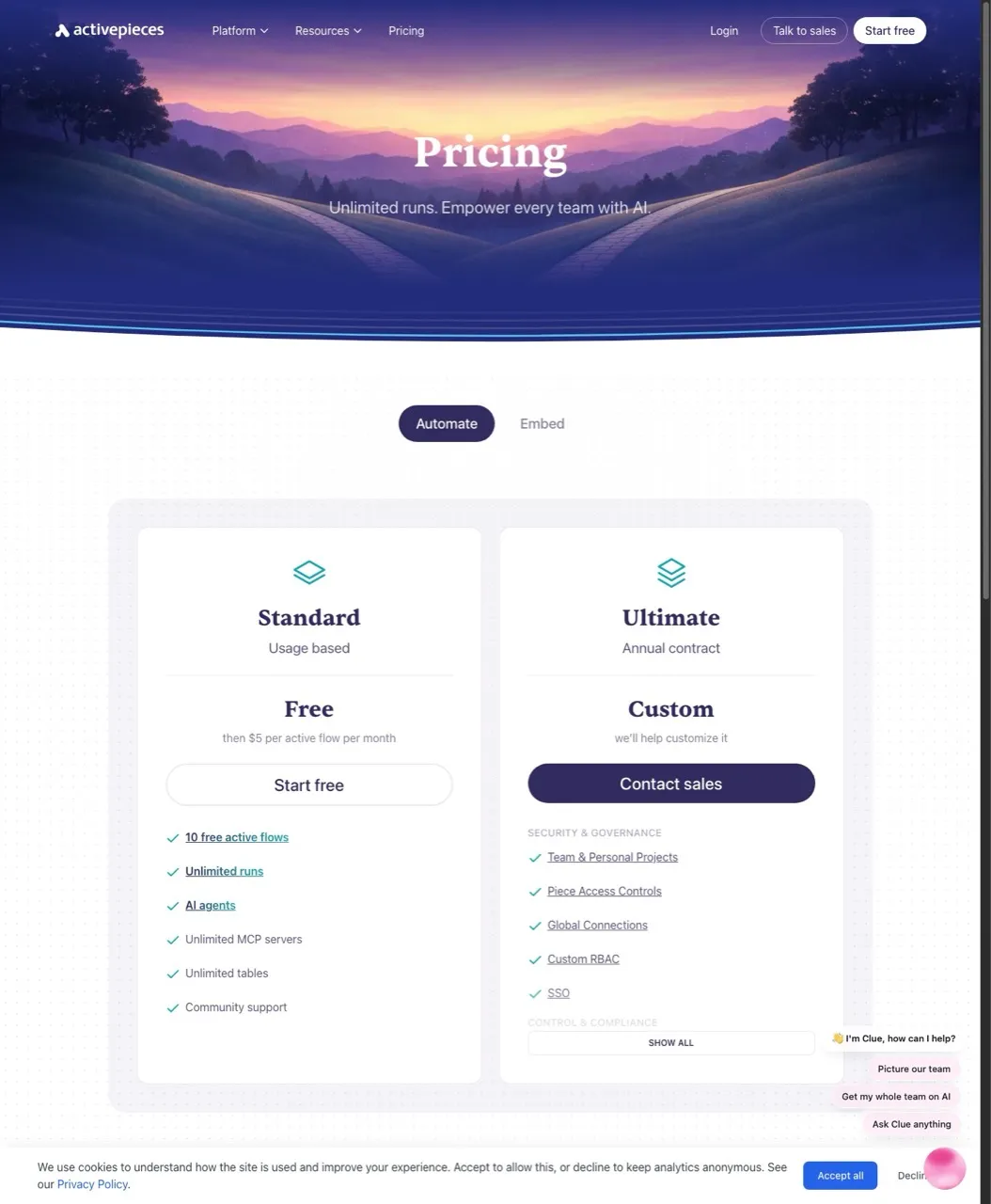
Activepieces: Standard cloud is free for 10 active flows, then $5 per active flow per month. Self-hosting is free and unlimited.
Activepieces is the open-source alternative. Self-host it under the MIT license and you get unlimited workflow runs with no task counting at all, and your data never leaves your servers. On their hosted cloud, the Standard tier is free for up to 10 active flows, then runs $5 per active flow each month.
For compliance-heavy teams or anyone who doesn’t want workflow data flowing through third-party services, the self-hosted route keeps everything in-house. Its social-posting pieces exist but are not its strength, so treat it as a general open-source connector rather than a social-first poster.
Pros:
- Open-source with MIT license
- Self-hosted = unlimited runs, $0 software cost
- Unlimited runs on every tier (no per-task meter)
- Full data control
Cons:
- Smaller integration library than Zapier
- Social-posting pieces are limited
- Self-hosting requires technical setup
Pricing: Standard free for 10 active flows, then $5 per active flow/mo (unlimited runs). Ultimate is custom pricing. Self-hosted Community edition is free under MIT.
Ideal for: Teams with compliance requirements or anyone who wants full ownership of their automation infrastructure.
Bottom line: Activepieces is n8n’s open-source competitor with an even friendlier license.
7. IFTTT: Best for Personal Automation on the Tightest Budget
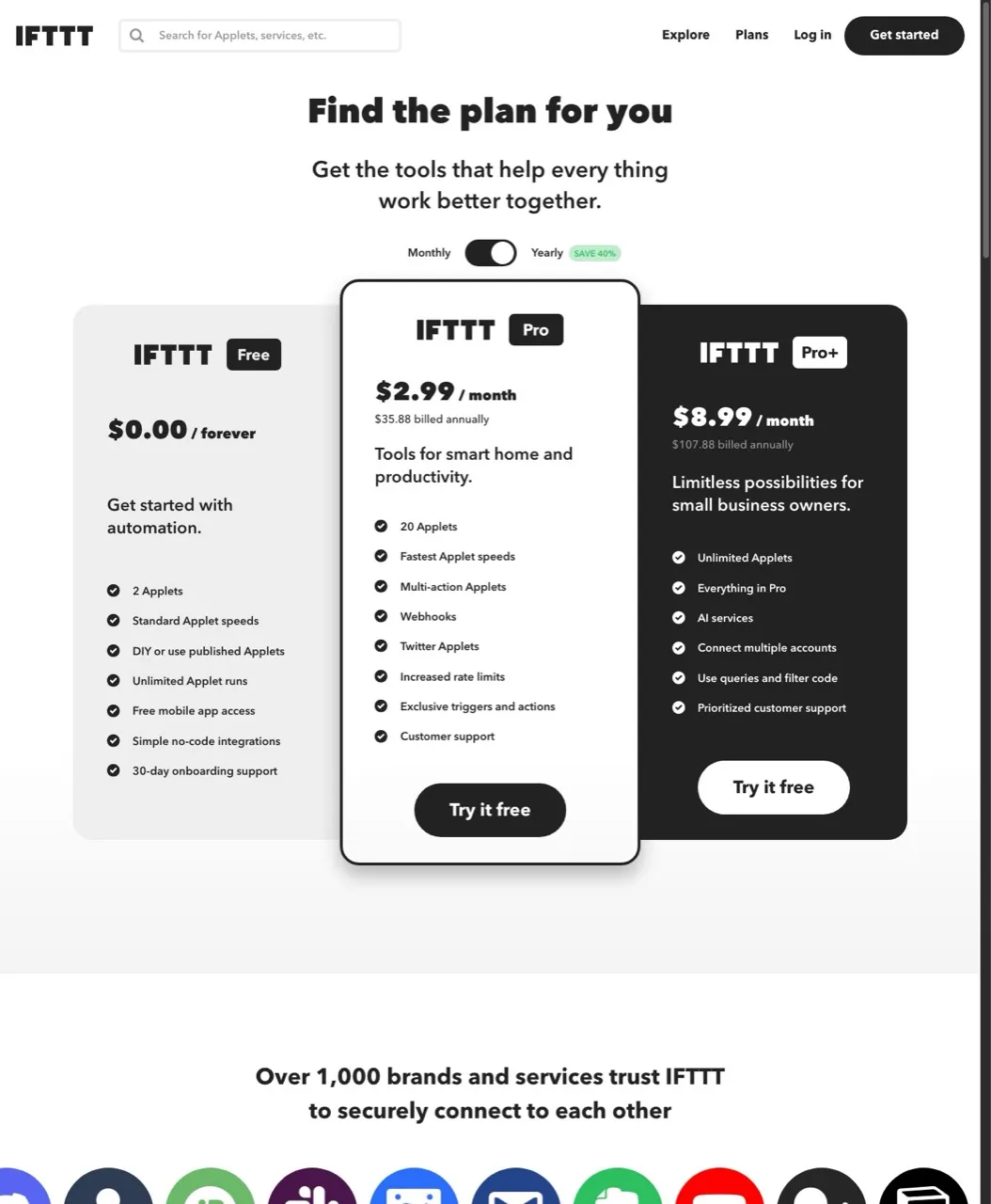
IFTTT pricing: Free for 2 applets, Pro $2.99/mo for 20 applets, Pro+ $8.99/mo for unlimited.
IFTTT (If This Then That) predates Zapier and remains the simplest option. The applet model is limited to single triggers and actions, but for basic automations, that’s often enough.
At $2.99/month for 20 applets, it’s the cheapest paid option on this list. The free tier only allows 2 applets, which limits practical use.
Pros:
- Extremely affordable ($2.99-$8.99/mo)
- Simple, intuitive interface
- Fast 5-minute polling on paid plans
- Good for basic “if this then that” logic
Cons:
- Limited to simple applets (no complex workflows)
- Free tier only allows 2 applets
- Fewer integrations than enterprise tools
Pricing: Free (2 applets), Pro $2.99/mo (20 applets), Pro+ $8.99/mo (unlimited applets, filter code).
Ideal for: Personal users who need basic automations and want the lowest possible price.
Bottom line: IFTTT works for simple personal automations, but serious social media posting needs more power.
How I Chose These Zapier Alternatives
I evaluated each tool on five criteria specific to social media automation:
- Pricing model: Does it penalize high-volume posting?
- Social platform coverage: Does it support X, LinkedIn, Instagram, TikTok, and emerging platforms?
- Ease of setup: How fast can you go from signup to first automated post?
- Reliability: Do automations run consistently without manual intervention?
- Flexibility: Can you customize formatting and timing per platform?
Enterprise tools like Microsoft Power Automate and Workato didn’t make the list. They’re built for IT departments, not creators, and their pricing reflects that.
How to Choose the Right Zapier Alternative
If you post to social media daily and hate task math: Blotato. Flat pricing, purpose-built for posting.
If you want Zapier’s visual builder at lower cost: Make.com. Same approach, better economics.
If you have developers and want zero marginal costs: n8n self-hosted. Unlimited executions, full control.
If you’re a developer who prefers code to drag-and-drop: Pipedream. Node.js workflows with a generous free tier.
If you just want pre-built automations that work: Integrately. One-click setup, minimal configuration.
If data control and compliance matter most: Activepieces. Open-source, self-hosted, MIT license.
If you need the cheapest option for basic personal use: IFTTT. $2.99/month for simple automations.
Sabrina’s Final Thoughts
Most people leaving Zapier are leaving because the per-task model quietly ate their budget. The fix depends on what you’re automating. General automation users should look at Make or n8n. But if your main use case is social media posting, tools like Blotato that are built specifically for that job remove the task-counting problem entirely.
The Claude MCP path is worth considering if you’re already using AI tools. Being able to say “post this everywhere” in natural language and have it actually happen is a different workflow than building Zap chains. It’s the direction automation is heading.
Zapier Alternatives FAQs
What is the best free alternative to Zapier?
n8n self-hosted is the most powerful free option. You get unlimited workflow executions with full code access. The tradeoff is that you need to manage your own server. For a simpler free option, Activepieces offers 10 active flows with unlimited runs on their Standard tier.
Is Make.com really cheaper than Zapier?
Yes. Make.com gives you 10,000 credits for $12/month versus Zapier’s 750 tasks for $19.99/month. Internal steps like filters and routers are also free on Make. Zapier doesn’t bill filters either, but every successful action step there is a task. At scale, Make typically costs 50-70% less than Zapier for equivalent workflows.
Can I use Zapier alternatives for social media automation?
Yes, but purpose-built tools often work better. General automation platforms like Make and n8n can connect to social APIs, but you’ll build and maintain those integrations yourself. Tools like Blotato handle the social posting layer directly, so you’re not rebuilding platform connections every time an API changes. See our n8n alternatives and Make alternatives guides for more options.
What happened to Zapier’s free tier?
Zapier still offers a free tier, but it’s severely limited: 100 tasks per month and only 2-step Zaps (one trigger plus one action). You can’t build workflows with conditional logic, formatting steps, or multi-platform distribution on the free plan. Most serious automation users hit these limits within the first week.
Which Zapier alternative is easiest to learn?
Integrately is the easiest for non-technical users. Their 20 million pre-built automations mean you can often activate a workflow with one click instead of building it from scratch. IFTTT is also simple but limited to basic trigger-action pairs. For more complex needs, Make.com has the gentlest learning curve among visual builders.