7 Best Submagic Alternatives for Creating Shorts With AI (2026)
The 7 best Submagic alternatives for creating shorts with AI in 2026, compared on captions, clipping, pricing, and publishing. Tested by Sabrina Ramonov.
Every Submagic alternative on this list exists because auto-captions have converged. Submagic adds animated text, trendy templates, and emoji highlights. So does Opus Clip. So does Vizard. So does everyone. When every tool produces the same look, your personal brand disappears into the feed. That sameness is death when you are posting 250 pieces a week and trying to stand out.
I tested these seven tools while building Blotato, and I ranked them by the question most creators never ask: what happens after the short is edited? Submagic is a strong editing suite, and it added clipping and basic scheduling in 2026. But it still lives inside the editing step. You write each caption, manage one account stack, and lean on another system once you want AI to write the post copy and publish across every platform from one place. The alternatives below close that gap in different ways. Blotato is my pick at number one, and I am the founder, so judge that entry on the workflow math, not my word.
| Tool | Best For | Starting Price | Key Strength |
|---|---|---|---|
| Blotato | Creators who want AI to write and publish the post, not just caption the clip | $29/mo | 20 social accounts plus unlimited AI writing, image, and video at one flat price |
| Opus Clip | Talking-head creators who want AI to pick the best clips automatically | $15/mo | AI clipping by spoken words, emotion, and virality scoring |
| Captions | Mobile-first creators who want AI-generated video with digital twins | $24.99/mo | Eye contact correction and AI avatar consistency |
| Descript | Podcasters and long-form creators who edit video like a document | $16/mo | Text-based editing with filler word removal and voice clones |
| Vizard | Agencies and teams who need brand consistency with API access included | $14.50/mo annual | Custom fonts and API on the Creator tier, full Brand Kit one step up |
| CapCut | Beginners making Reels and TikToks who want a free starting point | Free | TikTok-native templates and easy mobile editing |
| VEED.io | Quick browser-based edits with solid auto-subtitles | ~$12/mo annual | 50+ language subtitle translation without installing software |
Why People Are Looking for Submagic Alternatives
The first reason is template sameness. Submagic offers 35+ caption templates, and most creators end up using the same three because they perform. Scroll any Reels feed and you will spot the identical word-pop animation on every third video. When your captions look like everyone else’s, the algorithm stops rewarding you for standing out.
The second reason is pricing friction. Submagic’s Starter plan is $19 per month for 15 videos with a 2-minute cap per video. Pro is $39 per month for 40 videos at 5 minutes each. If you post daily across multiple platforms, you burn through that video count fast. Add the Magic Clips add-on at $19 per month and the bill keeps climbing.
The third reason is the publishing and automation gap. Submagic now edits, clips, and offers basic scheduling, but it is built around the editing seat. It does not write the post copy for each platform, and it has no public API or MCP server to drive posting from a tool like Claude. If you publish at volume across Instagram, TikTok, LinkedIn, and YouTube, you still bolt on a separate writing and scheduling layer. That handoff eats hours every week.
Best Submagic Alternatives for 2026
I ranked these seven against the one thing that actually matters for high-volume creators: can you go from raw video to published post without switching tools or losing your brand voice along the way? Each tool earns its spot for a different workflow.
1. Blotato: Best for creators who want AI to write and publish the post, not just caption the clip
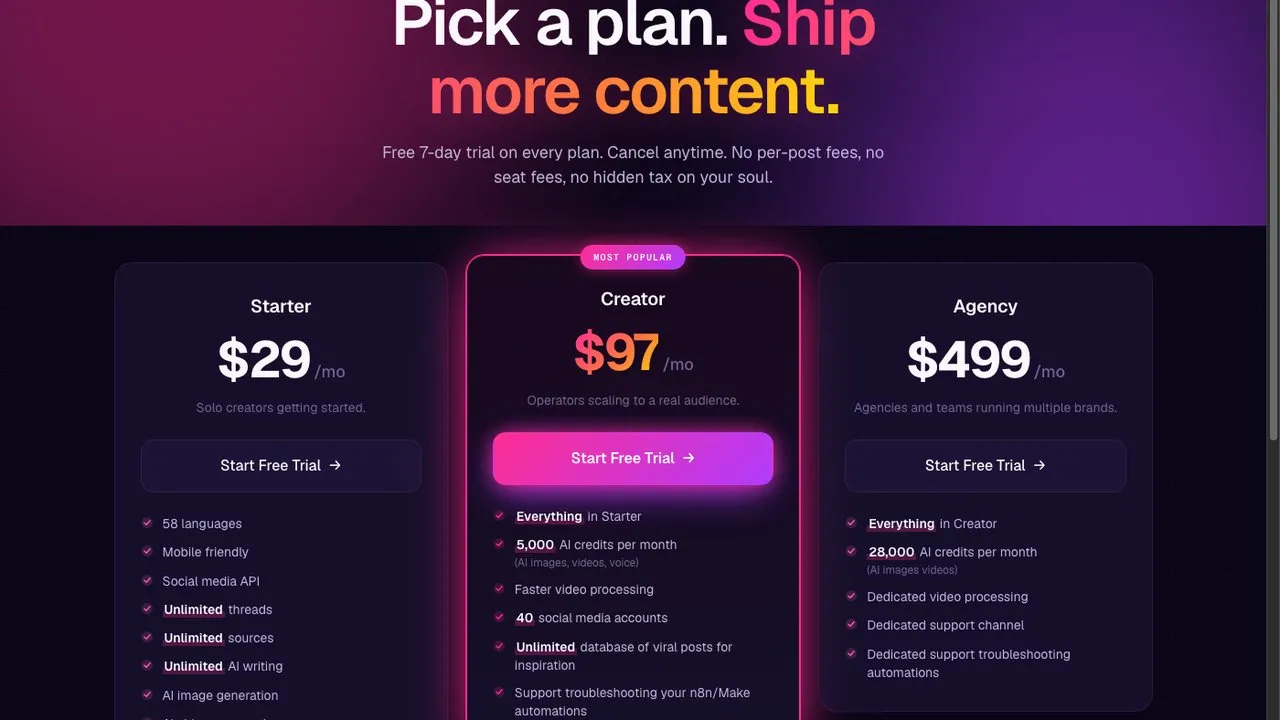
I am the founder of Blotato, so take this entry with that context and judge it on the workflow. Blotato is a different category from Submagic. It does not edit your video frame by frame. It takes your content and turns it into posts across every platform, written and scheduled, with AI handling the copy and the publish. The Starter plan is $29 per month for 20 social accounts with unlimited AI writing, AI image generation, and AI video. Compare that to stacking Submagic plus a scheduler plus a copywriting tool.
The real edge is programmatic control. Blotato has a full REST API and MCP server integration that lets Claude Code or Claude Desktop publish directly without manual formatting. If you are posting 250 pieces a week, you need a system that does not require you to click “post” 250 times. That is the gap Blotato fills.
Pros:
-
20 social accounts on the $29 entry plan with no per-seat or per-video fees
-
Unlimited AI writing on every plan, so you never pay extra for captions or post copy
-
API and MCP integration for programmatic posting from Claude
-
Flat pricing that stays predictable at high volume
Cons:
-
Keeps Submagic in your stack rather than replacing it, because Blotato does not burn captions into a clip or cut it frame by frame, so if styled captions were the only thing you came for then Submagic stays and this entry costs you $29 you did not need to spend
-
Writes the caption but does not judge the edit, so nothing here tells you a hook is weak or a cut lands badly, which is the specific thing Opus Clip’s virality scoring attempts
-
No frame-level control at all, so a clip that needs a caption repositioned or a beat trimmed goes back to the editor before it comes here
-
The 7-day trial covers the web app but not the API, and creating a key converts you to paid Starter, so programmatic posting cannot be evaluated for free
Pricing: Starter $29/mo, Creator $97/mo, Agency $499/mo. 7-day free trial.
Best for: Creators and small agencies who post across many platforms and want AI to handle the writing and scheduling, not just the captions.
Bottom line: If Submagic leaves you with a clip and no post, Blotato picks up where it stops and publishes everywhere at one flat rate.
Try Blotato free for 7 days on the flat-rate Blotato pricing page.
2. Opus Clip: Best for talking-head creators who want AI to pick the best clips automatically
Opus Clip is the closest direct alternative to Submagic if your workflow is long-form video to short clips. It uses AI to find the best moments by analyzing spoken words, visual objects, sound, and emotion detection. The virality scoring tells you which clips are most likely to perform before you post them.
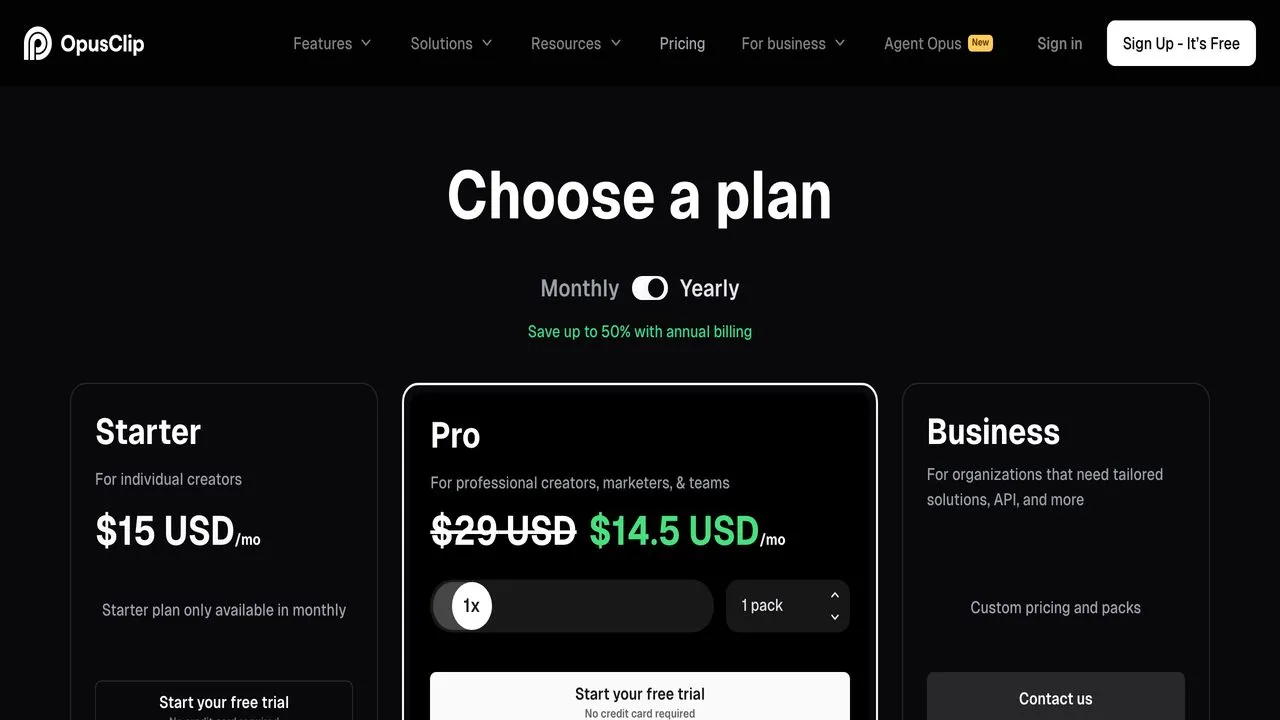
The Free tier is watermarked with 3-day storage. Paid plans remove the watermark and unlock more monthly minutes. Starter at $15 per month adds multi-source import from YouTube, Vimeo, Zoom, and Google Drive. Pro at $29 per month adds more processing minutes, AI B-roll, and reframing. Business pricing is custom and includes API access with an MCP connector for Claude integration.
Pros:
-
AI clipping by spoken words, emotion, and virality scoring
-
Filler word and pause removal built in
-
Auto video import from verified YouTube accounts
-
Social posting to Shorts, TikTok, and Instagram included
Cons:
-
Watermarked exports on Free tier
-
Storage expires after 3 to 29 days depending on plan
-
The AI picks clips, not always the best clips, so a review pass is still required
-
Some users report quality regression after the June 2024 editor update
Pricing: Free, Starter $15/mo, Pro $29/mo, Business custom. No annual discount shown.
Best for: Talking-head creators with long-form content who want AI to select the best clips automatically.
Bottom line: Opus Clip is strong on AI clip selection but leaves the final post copy and multi-platform scheduling to you. See the full breakdown in our Blotato vs Opus Clip comparison.
3. Captions: Best for mobile-first creators who want AI-generated video with digital twins
Captions takes a different approach. Instead of just captioning existing video, it can generate video from scratch using AI avatars and digital twins. The eye contact correction feature is the standout. It makes you look directly at the camera even when you were reading a script off to the side.
Pricing is credit-based and available across iOS, Android, and web. Max is $24.99 per month for 500 credits. Scale tiers run from $69.99 to $279.99 per month for higher credit volumes. Credits roll over monthly with a cap tied to your plan allowance. The Free tier has basic editing but no access to generative AI features.
Pros:
-
Digital twins and AI avatars for consistent on-camera presence
-
Eye contact correction that works surprisingly well
-
Chat-based editor for conversational video editing
-
Full video production from prompts, not just captioning
Cons:
-
Credit-based system creates unpredictable costs at scale
-
Processing wait times up to 360 minutes after 6 projects per month on some tiers
-
No generative AI on the free tier
Pricing: Max $24.99/mo (500 credits), Scale 1x $69.99/mo, Scale 2x $139.99/mo, Scale 4x $279.99/mo. Enterprise custom.
Best for: Mobile-first creators who want AI-generated video and consistent avatar presence without filming every take.
Bottom line: Captions is powerful for AI video generation but the credit caps make costs unpredictable for high-volume multi-platform workflows.
4. Descript: Best for podcasters and long-form creators who edit video like a document
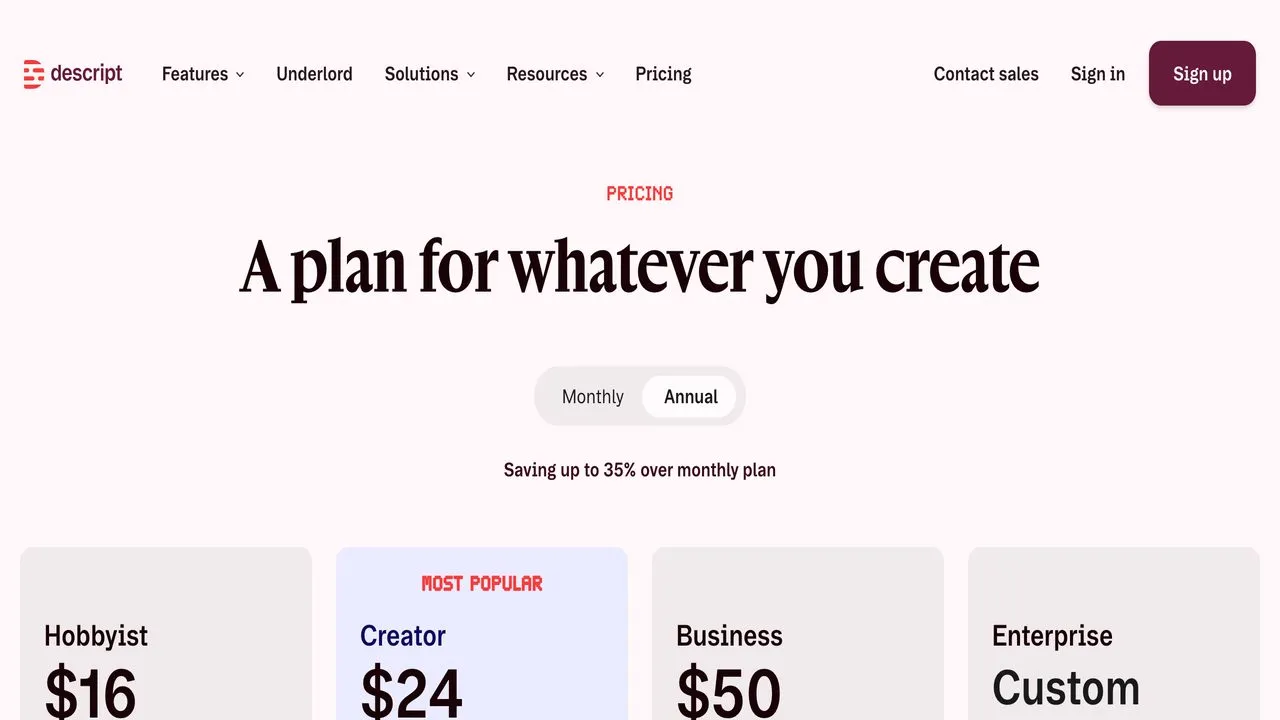
Descript is not really a Submagic competitor. It is a full production tool that happens to do captions. The core feature is text-based editing. You edit your video by editing the transcript like a document. Delete a sentence and the video cuts. The filler word removal is automatic, and the voice clones let you fix mistakes without re-recording.
Hobbyist is $24 per month, or $16 per month billed annually, with 10 hours of media per month. Creator is $35 per month, or $24 annually, with 30 hours and full Underlord AI access. Business is $65 per month, or $50 annually, with Brand Studio, 30+ language translation, and custom avatars. The Free tier gives you 60 minutes per month with watermarked exports.
Pros:
-
Text-based editing changes how you think about video production
-
Studio Sound AI audio cleanup is best in class
-
Filler word removal is automatic and accurate
-
Voice clones for consistent narration without re-recording
Cons:
-
Resource-heavy and can slow down with long projects
-
Media hours cap limits throughput for high-volume workflows
-
Per-user billing on team tiers
-
More focused on podcasts and long-form than shortform social
Pricing: Free (60 min/mo), Hobbyist $24/mo or $16 annual, Creator $35/mo or $24 annual, Business $65/mo or $50 annual.
Best for: Podcasters and long-form creators who want text-based editing and AI audio cleanup.
Bottom line: Descript is excellent for production but overkill if you just need captions and quick posts. See how it compares to repurposing tools in our AI content repurposing tools guide.
5. Vizard: Best for agencies and teams who need brand consistency with API access included
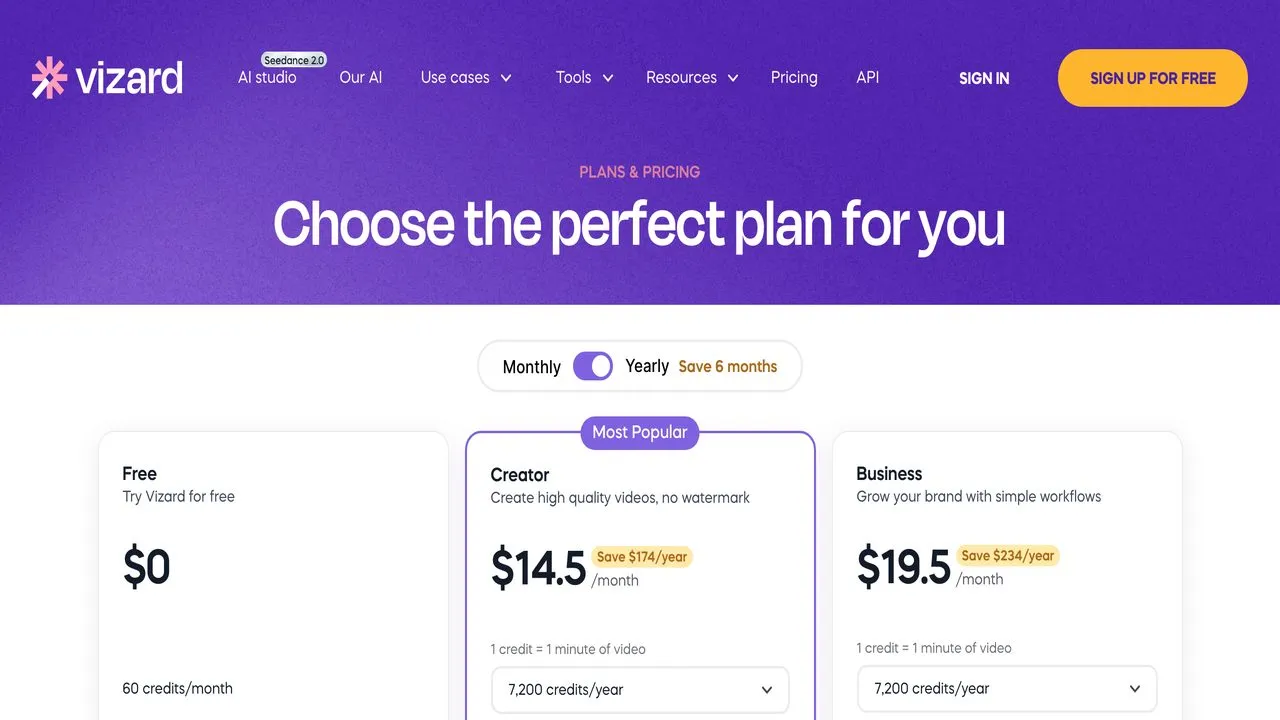
Vizard is the strongest value play on this list for brand control. The Creator tier at $14.50 per month on annual billing includes custom fonts, API access, and scheduled posting to 6 social accounts. Business at $19.50 per month annual adds the full Brand Kit and team collaboration with $0 per additional seat, which is rare in this category.
The Free tier is limited to 60 credits per month, 720p exports, and 3-day storage. But the annual pricing is aggressive. Vizard markets it as “5 months free” and the math checks out.
Pros:
-
Custom fonts on the Creator tier, with the full Brand Kit on Business, neither gated to enterprise
-
API access included on Creator tier with reasonable rate limits
-
$0 per additional team seat on Business tier
-
AI clipping, reframing, emoji and keyword highlighting, B-roll generation
Cons:
-
Credit-based system still applies
-
Free tier is very limited
-
Must commit to annual billing for the best rates
-
Monthly pricing is $29 per month, double the annual rate
Pricing: Free, Creator $29/mo or $14.50/mo annual, Business $39/mo or $19.50/mo annual.
Best for: Agencies and teams who want brand consistency, custom fonts, and API access without enterprise pricing.
Bottom line: If brand control at scale is your priority, Vizard is the best value on this list with API on the Creator tier and the full Brand Kit one step up.
6. CapCut: Best for beginners making Reels and TikToks who want a free starting point
CapCut is the free option everyone starts with. ByteDance owns it, so the TikTok integration is native. The template library is huge, the mobile app is fast, and auto-captions are included. For a beginner making their first Reels, CapCut is the obvious choice.
The catch is the template trap. CapCut templates look like CapCut templates. Use them and your video looks like every other TikTok on the feed. That is fine for learning, but it is the opposite of brand differentiation at scale.
Standard is $9.99 per month. Pro is $19.99 per month or $179.99 per year. The Free tier has watermarks on some features and limited AI access.
Pros:
-
Genuinely free tier with usable features
-
TikTok-native integration from the same parent company
-
Easy mobile editing for beginners
-
Templates, captions, transitions, and filters all built in
Cons:
-
Templates create the sameness problem this whole list is trying to solve
-
More features moving behind the Pro paywall
-
Watermarks on free exports
-
Glitchy web performance and browser support issues
Pricing: Free, Standard $9.99/mo, Pro $19.99/mo or $15/mo annual, Team plans around $25/user/mo.
Best for: Beginners making their first Reels and TikToks who want to learn editing without paying upfront.
Bottom line: CapCut is where you start, not where you stay. The templates that make it easy also make your content look like everyone else’s.
7. VEED.io: Best for quick browser-based edits with solid auto-subtitles
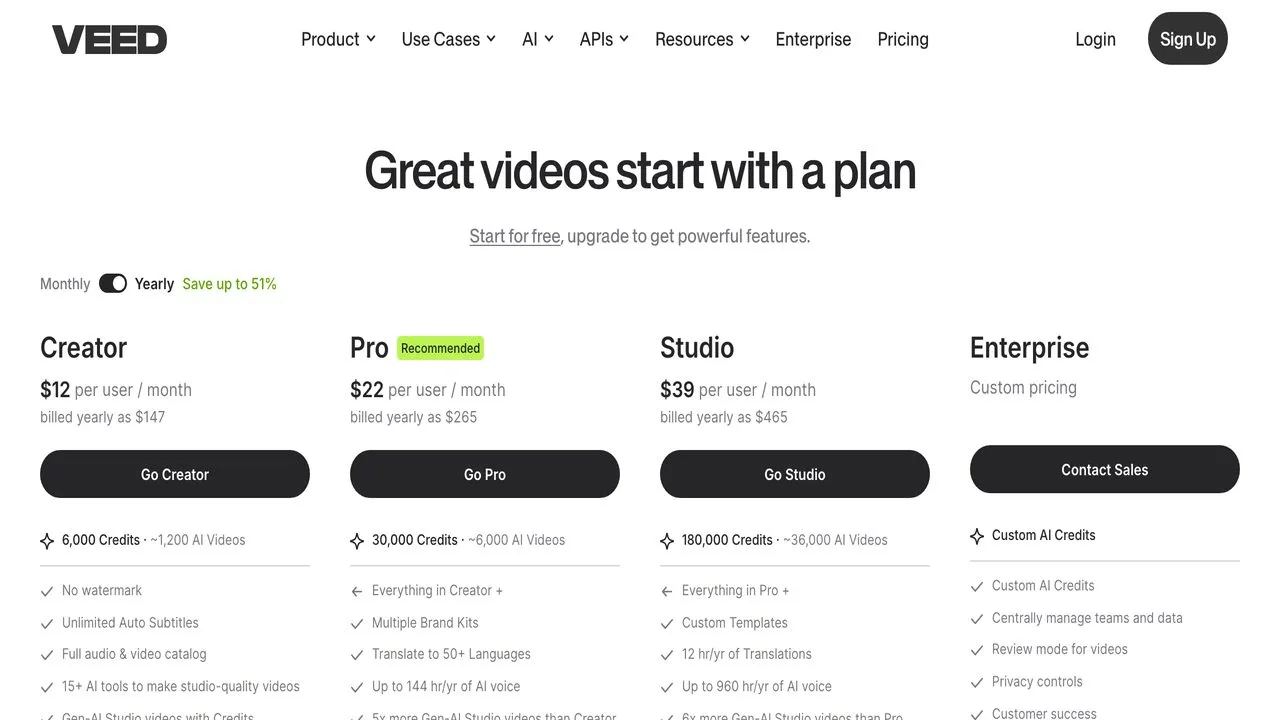
VEED.io is browser-based, which means no install and no waiting for downloads. Open a tab, upload your video, add subtitles in 50+ languages, export. The subtitle accuracy is strong and the interface is clean. Video hosting and analytics are included on paid tiers.
VEED restructured its plans in 2026, so check the live pricing page before you commit. The entry paid tier runs around $12 to $18 per month on annual billing, the mid tier around $24 per month with 4K export and AI characters, and the top tier around $59 per month with Brand Kit access. The Free tier is watermarked with limited AI features.
Pros:
-
Browser-based with no software install
-
Auto-subtitles with 50+ language translation
-
AI avatars and characters on Pro tier
-
Video hosting and analytics included
Cons:
-
Performance issues with longer videos (buffering and lag)
-
AI credit system adds cost unpredictability on top of tier pricing, the same trap that makes credit-based video pricing hard to compare
-
Brand Kit gated to the top tier around $59 per month
-
Bugs noted in recent reviews
Pricing: Free, entry tier around $12 to $18/mo annual, mid tier around $24/mo, top tier around $59/mo. Verify current tiers on VEED’s pricing page.
Best for: Quick browser-based edits with solid subtitle accuracy when you do not want to install software.
Bottom line: VEED is convenient for one-off edits but the AI credit system and performance issues make it less suited for high-volume daily workflows.
How I Evaluated These Submagic Alternatives
I evaluated each tool on the criteria that matter for creators posting at volume:
-
Whether captions and clips stay on-brand or converge to the same template look everyone else uses
-
Whether the tool handles just captioning or also the writing and scheduling that eats the rest of your day
-
Whether pricing stays predictable at scale or climbs with every video and team member
-
Whether API or programmatic access exists for automation workflows
-
How the review corpus (G2, Capterra, Trustpilot) describes real user experience with each tool
How to Choose the Right Submagic Alternative
Match the tool to your actual workflow:
-
If you want AI to write the post and publish everywhere, not just caption the clip, start with Blotato. The social media automation tools roundup shows how it fits into a full posting system.
-
If you have long-form talking-head video and want AI to pick the best clips, use Opus Clip.
-
If you want AI-generated video with digital twins and consistent on-camera presence, try Captions.
-
If you edit podcasts or long-form and want to edit video like a document, Descript is the category leader.
-
If you need brand control with custom fonts and API access on a budget, Vizard at $14.50 per month annual is the best value.
-
If you are just starting out and want to learn free, CapCut is the obvious first step.
-
If you need quick browser-based subtitle work without installing anything, VEED handles it.
Sabrina’s Final Thoughts
Submagic is a strong editing tool. So is Opus Clip. So is Vizard. The problem is not the edit. The problem is what happens after you have a finished short. You still have to write platform-specific copy, manage the publishing across every channel, and do it again for every piece of content you create. The editing tools each own one slice of that and leave the rest to you.
That handoff is where creators lose hours every week. The best Submagic alternative for high-volume workflows is not a better captioning tool. It is a tool that finishes the job. That is why I built Blotato to handle the writing and publishing, not just the edit. Try the 7-day free trial at blotato.com/pricing and see if it closes the gap for your workflow.
Best Submagic Alternatives FAQs
What is the best free Submagic alternative?
CapCut is the best free Submagic alternative for beginners. It includes auto-captions, templates, and TikTok-native integration at no cost. The trade-off is that CapCut templates create the sameness problem that makes it hard to stand out. Vizard also has a free tier with 60 credits per month if you want AI clipping with brand options.
Why are creators leaving Submagic?
Creators leave Submagic for three reasons: template sameness that makes every video look identical, pricing that climbs with video count and add-ons, and the publishing gap. Submagic now edits and schedules, but it does not write platform-specific post copy or expose a public API or MCP server to automate posting at volume. Many creators want one system that carries the short all the way to published.
Does Submagic have an API?
Yes, but it is a video-processing API for captioning and editing, billed by the minute. Submagic offers it on the Business tier at $69 per month for 100 minutes, with credit packs from $75 per month (500 min) to $1,000 per month (10,000 min). It is not a publishing API. Blotato and Vizard include API access on lower-priced tiers, and Blotato adds an MCP server so Claude can write and publish posts programmatically.
What is the best Submagic alternative for teams?
Vizard is the best Submagic alternative for teams because the Business tier charges $0 per additional team seat. Most competitors multiply the full plan cost per user. Vizard also includes the full Brand Kit on Business so teams can maintain consistency without enterprise pricing.