How to Automate Instagram DMs With Claude (No ManyChat)
Keyword-triggered Instagram DM automation built by your AI agent instead of a funnel builder, including how I create six at once from a spreadsheet.
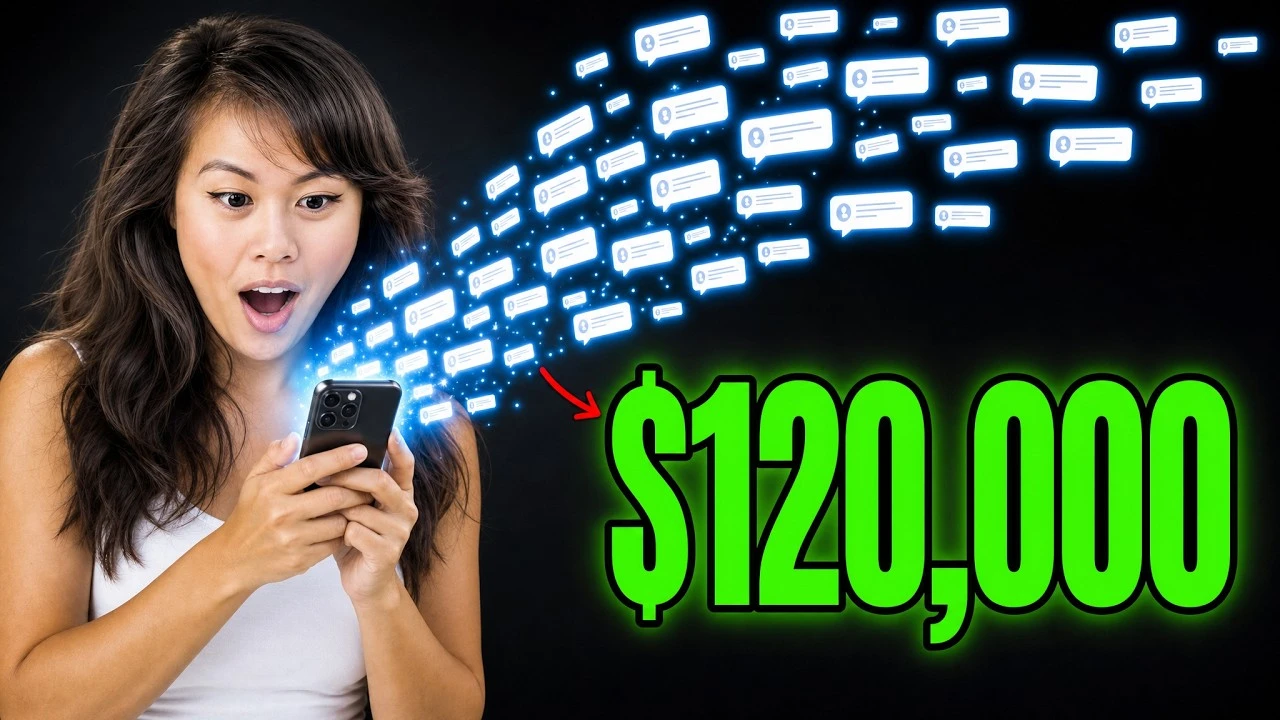
Instagram DM automation is the reason one of my reels brought in $10,000 in net new MRR. Someone comments a keyword, my account replies with a private message holding the link, and the reel keeps doing that at three in the morning while I sleep. That one reel also brought in 100,000 followers, and over 100,000 people have commented on it to get the lead magnet.
Building one flow is the easy part. It takes about four minutes and every tool in this category does it, ManyChat included.
The question that comes next is what happens when you want twenty of them. A keyword for the summer promo, a keyword for the YouTube playlist, a keyword for the winter sale, each one live on both Instagram and Facebook. Building those by hand is forty clicks of the same form, which is why I stopped opening the form and started describing what I wanted to Claude instead.
If you run a one-person business, a creator account, or a small agency, the bulk path below is the part worth your time.
How to Set Up Instagram DM Automation (Video Guide)
If you would rather watch, that is the full walkthrough. The written version below adds the platform difference between Instagram and Facebook that trips people up, and the exact prompts I use for bulk work.
Why One Flow at a Time Stops Working
A comment-to-DM flow is three pieces. A trigger, an optional keyword, and the message that goes out.
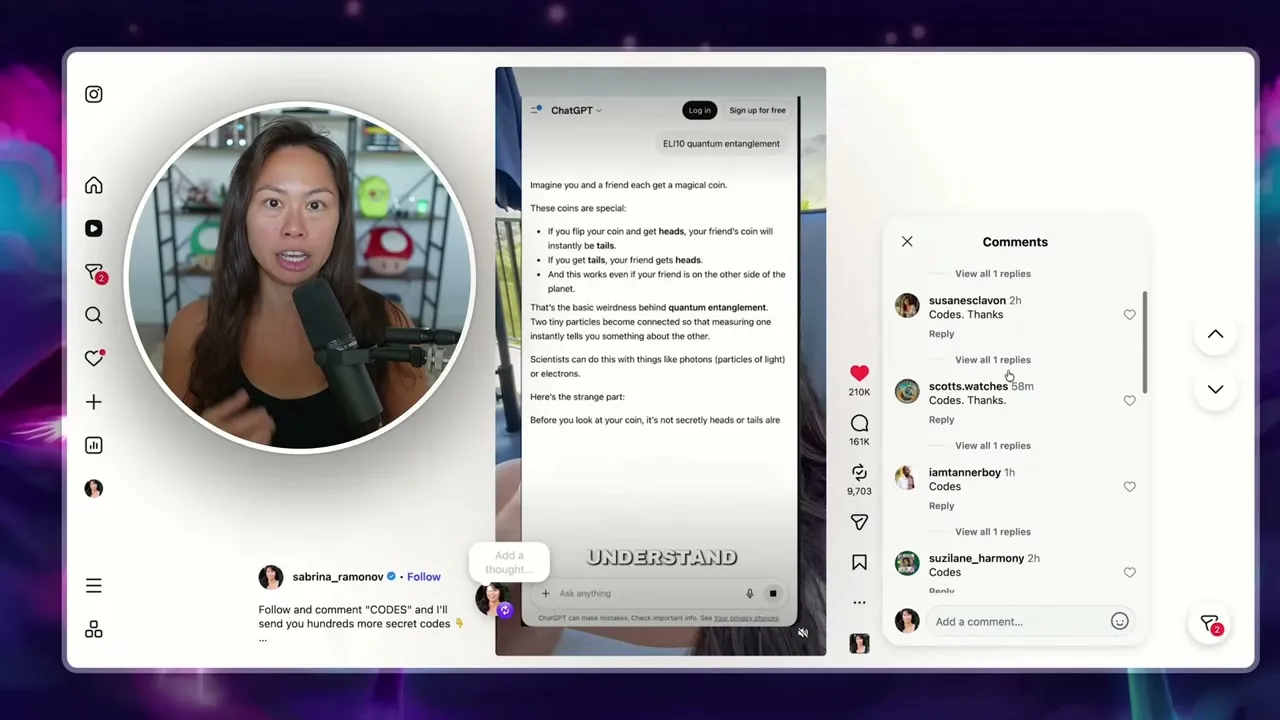
That is the mechanic every tool in this category sells, and it works. What none of them solved for me is volume. I do not run one lead magnet. I run a keyword for each offer, each playlist, each promo window, and I want them live on Instagram and Facebook at the same time.
At that point the builder form is the bottleneck. Not because it is bad, but because I am filling in the same six fields over and over, and every seasonal promo means going back and editing all of them by hand.
Blotato is the app I built. I founded the company, so take my read on it with whatever grain of salt feels right. It is also how I have grown from zero to almost 3.5 million followers without a team, and the bulk path below is the specific thing I built because I was tired of the form.
My Stack for Instagram DM Automation
Three pieces, and two of them you already have.
- Blotato holds the automations and talks to Meta. It runs the trigger, the optional follow and email gates, the message, and the webhook.
- An AI agent. I use Claude, and the same steps work in Claude Code and Cowork. ChatGPT connects too. The agent is what makes bulk work possible.
- A spreadsheet. I keep mine in Airtable, one row per keyword with the link it should send. A CSV works exactly the same.
The reason the agent matters is not novelty. It is that a spreadsheet row and a DM automation hold the same information, so once the agent can read the sheet, twenty flows cost the same effort as one. Calvin Hia runs 46 of them this way and pulled 3,000 leads in 30 days.
Worth naming before you start: DM automations are Instagram and Facebook Pages only. X, TikTok, LinkedIn, Pinterest, Threads, Bluesky, and YouTube are not supported. If your DM funnel lives somewhere else, this build will not reach it. One thing to know before you generate an API key: doing so immediately ends the free trial and starts a paid Starter subscription, so pick the plan first if you intend to drive this from an agent.
Builder, Agent, or Spreadsheet: Which One to Use
| You want to | Use | Why |
|---|---|---|
| Build your first flow and see the fields | The web app builder | Every option is visible, nothing to configure |
| Build one flow while you are already in a chat | Your agent, one prompt | Faster than opening the app, same result |
| Build many flows at once | A spreadsheet plus your agent | One row per keyword, all platforms in one pass |
| Change a link across every live flow | Your agent, one prompt | Editing by hand does not scale past about five |
Start in the builder once so you know what the fields do, then move to the agent for anything repeated. If you have wired an agent to publishing before, this is the same connection doing a different job, and posting to Instagram from Claude uses the identical setup.
How to Set Up Instagram DM Automation (Step-by-Step)
The first three steps build one flow in the app. Steps four through six are the part that scales.
Step 1: Create the Flow
Open Automations, then click New automation. Pick the connected account it runs on and give the flow a name.
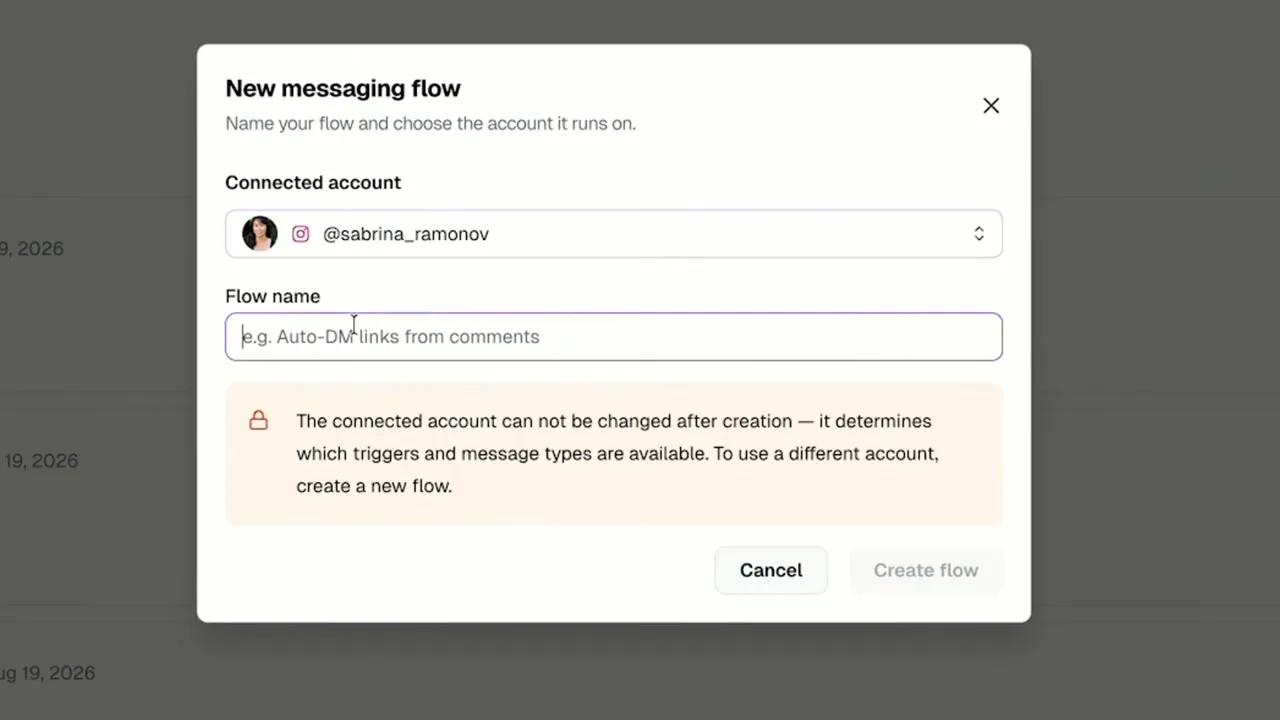
One thing that catches people: the connected account cannot be changed after you create the flow, because it determines which triggers and message types are available. Pick the right account now or you will be making a second flow.
Step 2: Set the Trigger and Keyword
Choose whether the flow fires when someone comments or when someone messages you. For comments, add the keyword you want to match on.
Matching ignores case and finds the keyword anywhere in the text, and any one keyword firing is enough. Leave the keyword field empty and every comment matches, which is almost never what you want on a busy account.
Step 3: Write the DM and Add Your Links
Turn on the follow ask if you want it, add the email ask if you want the address, then write the message that goes out.
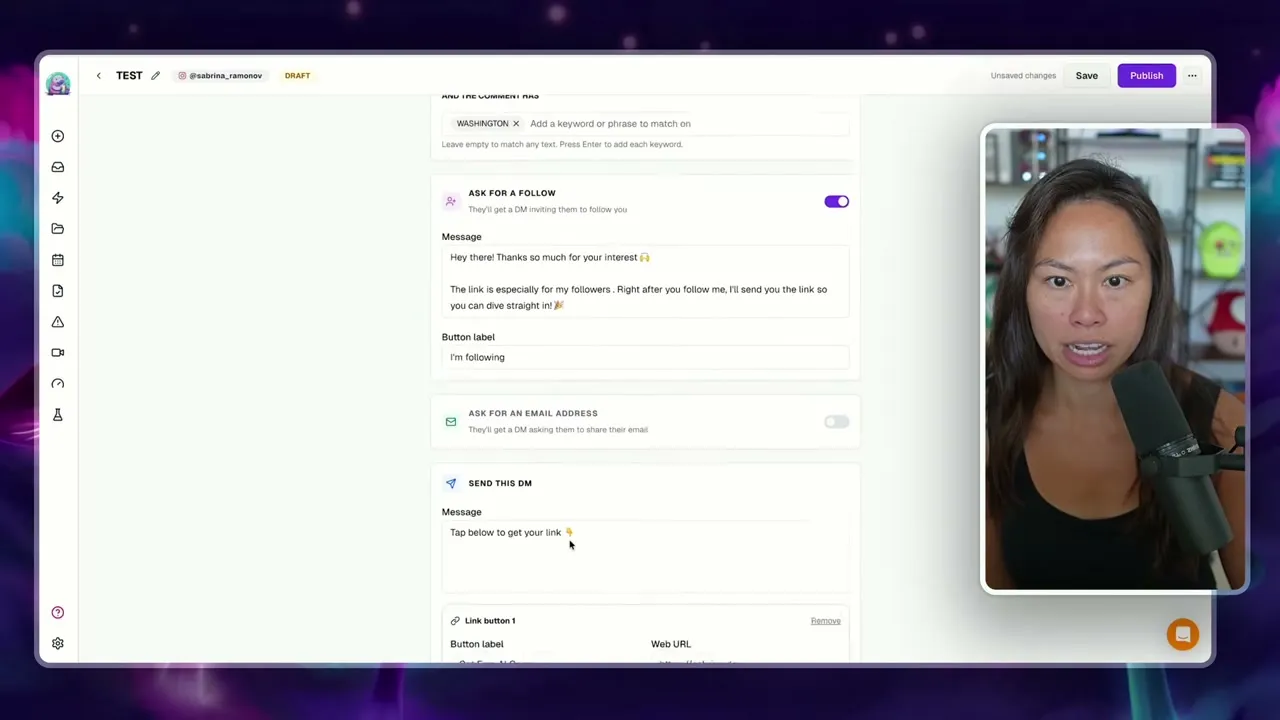
The message runs up to 640 characters and carries up to three link buttons at 20 characters per label. Three buttons is more useful than it sounds. I mix one guide, one promo, and one YouTube video rather than sending everyone to the same place.
Click Publish and the flow is live. Test it from a different account, because a comment from the account connected to the automation is skipped even when the text matches.
Step 4: Connect Your Agent
In Blotato, open Settings, then API, and generate an API key if you do not have one.
Then in Claude, open Customize, then Connectors, click Add, and choose Add custom connector.
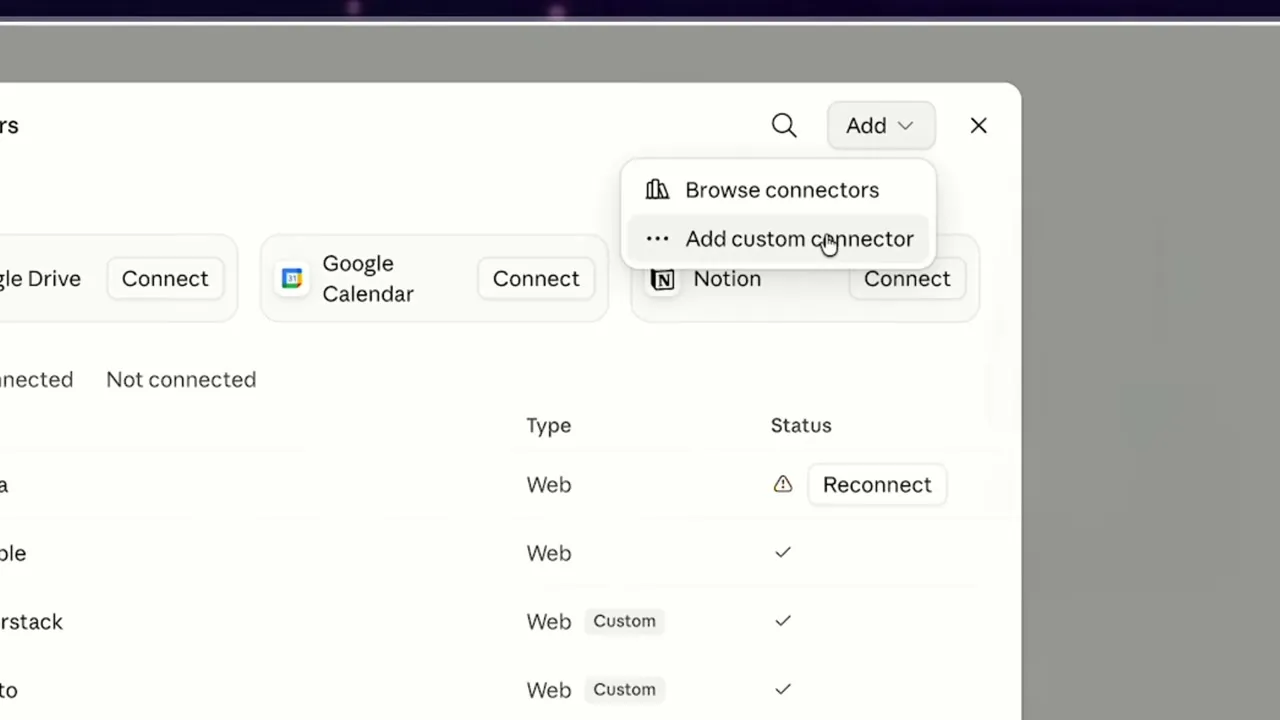
The server URL is https://mcp.blotato.com/mcp. Authenticate, then confirm it worked by asking your agent to list your connected social media accounts. The setup docs carry a section per client, including Claude.ai web, Claude Desktop, Cowork, Claude Code, Cursor, Codex, Antigravity, and Replit Agent. ChatGPT takes the same URL under Settings, Plugins, MCPs, with your API key in a blotato-api-key header instead of an OAuth login.
Step 5: Build a Flow by Describing It
Now you can skip the form. Describe the flow you want and the agent builds it.
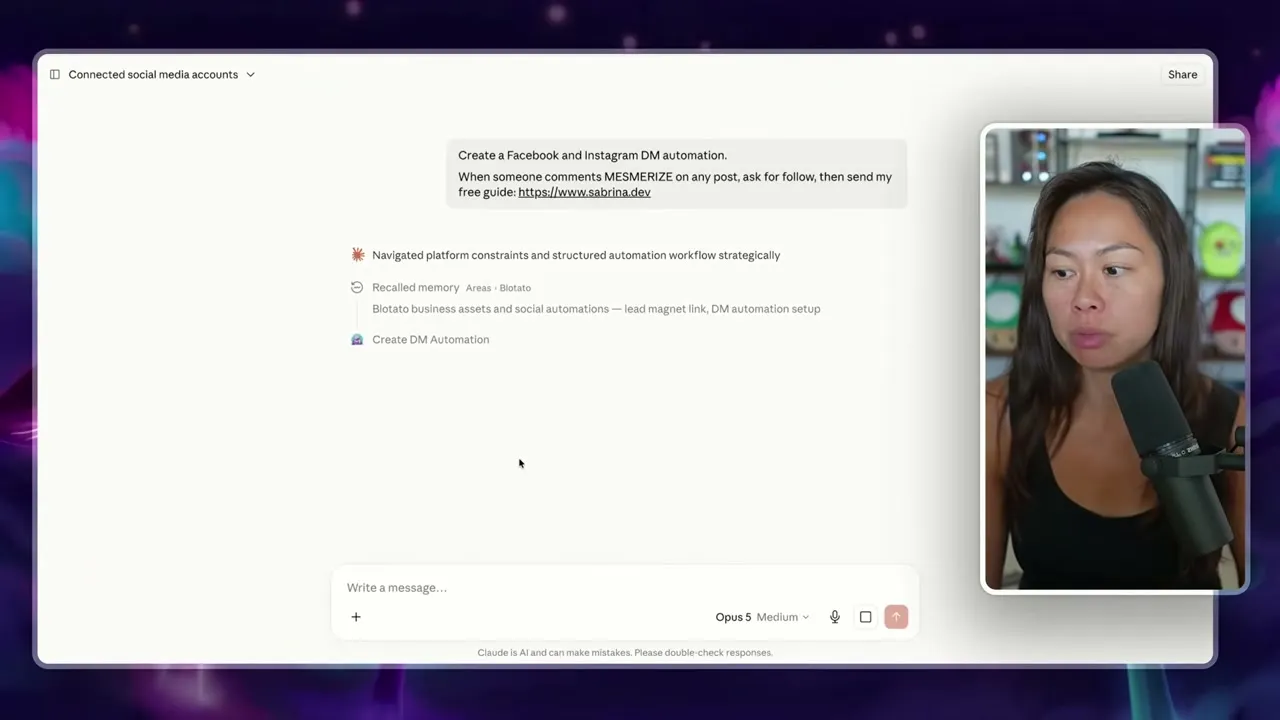
Here is where the platform difference shows up. The follow gate is Instagram only. Facebook rejects it outright. Ask for both and the agent reports the substitution rather than failing silently:
Instagram: full flow as you asked, the follow gate goes out first, and the guide only sends after they tap “I’m following.” Facebook: the follow gate is Instagram-only, so Facebook rejects it. I folded the follow ask into the DM text itself as a soft line after the link, since there’s no way to actually withhold the guide until they follow.
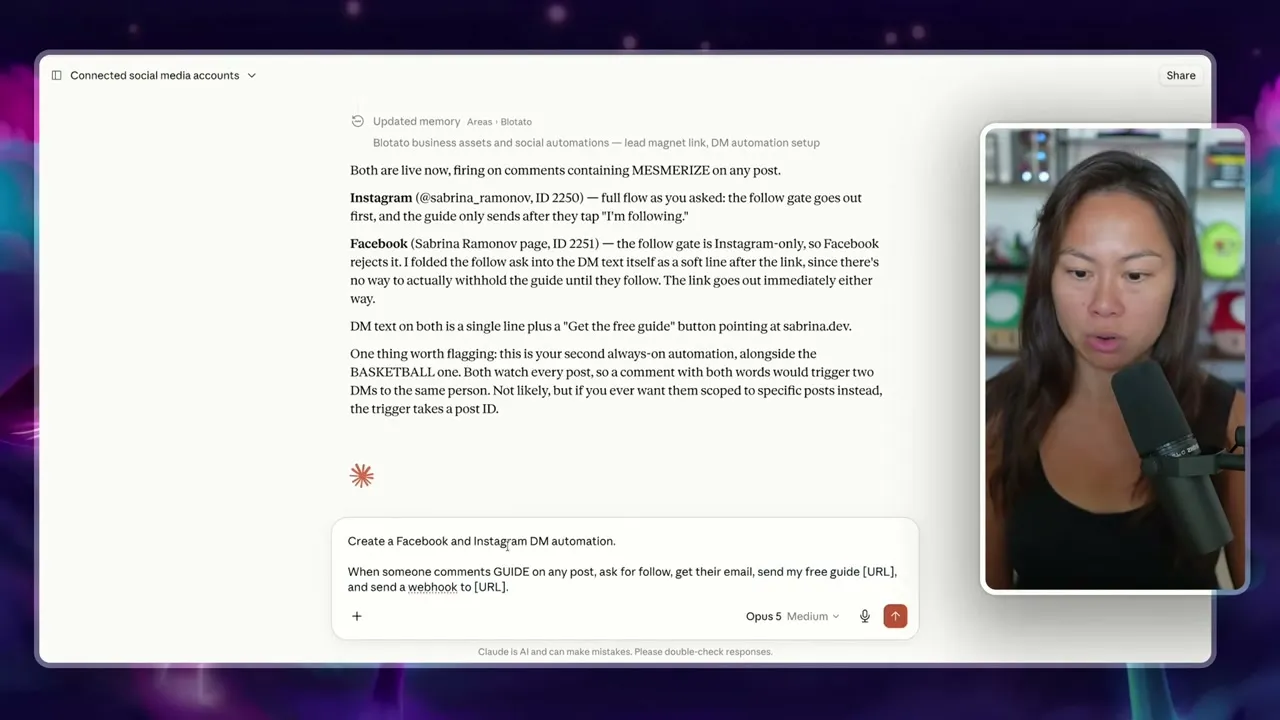
That is a real behavioral difference between your two platforms, not a bug. On Instagram the follow is enforced. On Facebook it is a request. Anyone promising you identical gated funnels on both is wrong, and the wider per-platform picture is just as uneven.
Step 6: Build Them All From a Spreadsheet
I keep an Airtable with one row per keyword and the link it points at. Keyword summer goes to a lead magnet, fall goes to a YouTube playlist, winter goes to a tracking link so I can see paid conversions.
Screenshot the sheet, drop it into the chat, and ask for the automations.
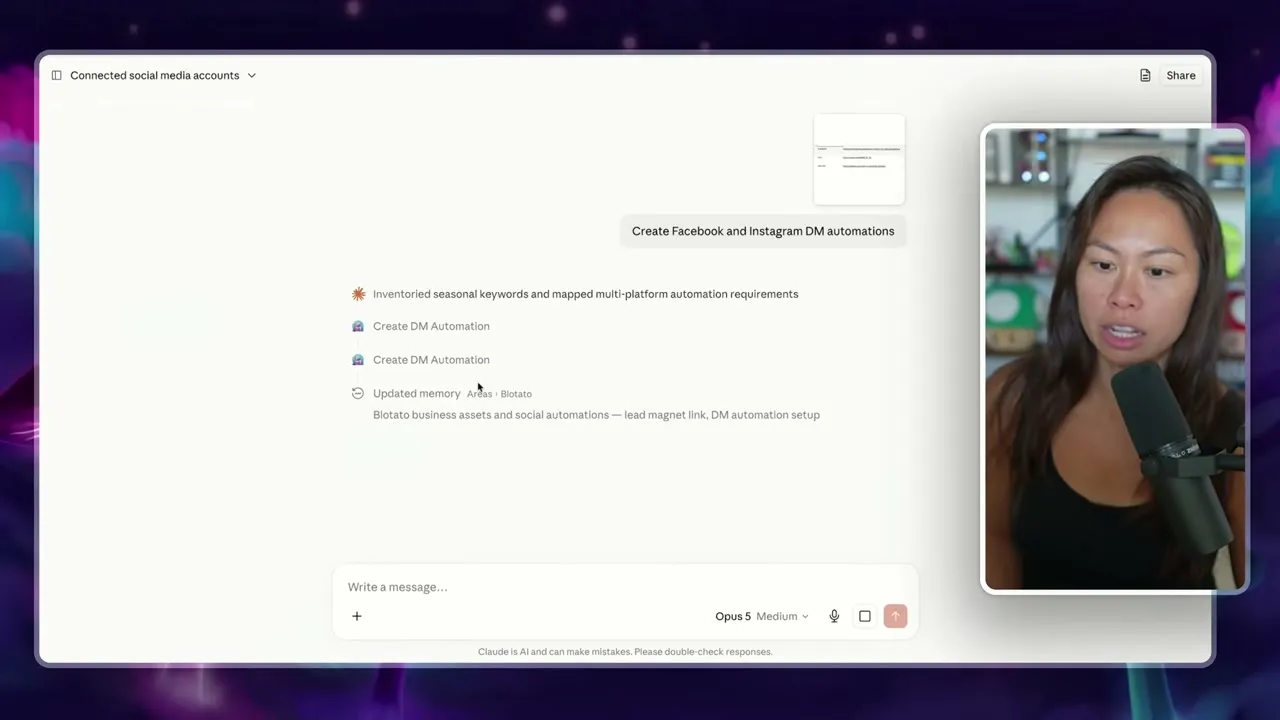
Three keywords across two platforms is six live automations from one message. A CSV or an uploaded spreadsheet works the same way.
Everything stays in sync in both directions. Edit a flow in the dashboard and your agent sees it. Ask your agent to change something and the dashboard shows the current version.
Pro Tips for Instagram DM Automation
Send them somewhere that is not always a lead magnet. Promo deals, a YouTube tutorial, a newsletter issue, even a news article or a tool you like. It does not have to be an elaborate guide every time.
Point one button at a tracking link. My winter keyword goes to a tracked URL specifically so I can tie paid conversions back to the comment that started them. With three buttons available, one of them can carry the measurement.
Send the data to a webhook if you collect emails. Paste your webhook URL into the flow and every completed run pushes to your CRM, Zapier, Make, or n8n. Without it the email you just collected sits in Blotato instead of your list.
What This Workflow Can’t Do
The messaging windows belong to Meta, not to any tool you buy. A private reply to a comment is allowed once per comment, within seven days. A reply to a message has to land within 24 hours of that person’s last message. Miss the window and the send fails. That one-reply-per-comment rule is per comment, not per tool, so if another platform already replied to a comment, yours gets rejected. Those windows are not a Blotato constraint you can buy your way out of: they apply the same way to anything built directly against the Instagram messaging API, and reading and answering DMs in your own code runs through the comments and messaging endpoints rather than the automation builder.
No cold outreach. An automation only answers people who contacted you first.
Every DM counts toward your plan’s monthly active-contacts limit. Reach a new person past that limit and the send fails with error 20101, so the run ends as failed rather than the message going out. The DM automations launch post has the full limits, the per-plan contact numbers, and the API endpoint list if you want the reference version.
One more thing that costs people clicks: Instagram renders those link buttons in the mobile app only. Someone reading your DM on instagram.com in a desktop browser sees the text and no buttons at all. If your audience skews desktop, drop the buttons and put the URL in the message text instead, and Instagram renders it as a clickable link. Do not do both, because a message carrying buttons and a URL leaves the URL unclickable.
If you connected your Instagram or Facebook account before comments and messaging launched, reconnect it. An older connection does not carry the permissions and the runs will quietly expire.
Results You Can Expect
The reel at the top of this post is the honest version of what this does at scale: 100,000 followers and $10,000 in net new MRR from one reel paired with one automation. Yours will not start there, because the automation is a multiplier on the reach you already have rather than a source of it.
What it does from day one is stop you losing the people who did comment. Every keyword comment that matches, and clears the windows above, gets answered in seconds without you in the loop.
Once the flows are live, four prompts cover almost everything I do afterward. Copy them as they are:
- Build in bulk: “Create multiple DM automations for Facebook & Instagram”
- Update in bulk: “Update all my Blotato DM automations so that the second link goes to: [URL]”
- Check performance: “Get my DM automation analytics and tell me which ones are winning”
- Improve the copy: “Improve the copy in my last 3 DM automations to increase CTR”
Bulk updating is the one I underrated. When a promo goes live for a week, I change the second button across every automation with one sentence instead of opening each flow. The analytics prompt is what tells me which keyword to put in the next reel, though note the numbers it returns are all-time totals per automation, triggered, completed and failed, not a date range you can slice.
Sabrina’s Final Take
Build the first flow in the app so you understand the fields, then move to your agent and stay there. The builder is fine for one automation and slow for ten, and ten is where this actually pays. If you are still deciding which tool to run this on, this comparison of Instagram DM automation tools ranks nine of them on comment-to-DM and compares their follow gates and whether an agent can build the automations. If DMs are the entire business and you need a deeper flow builder across more channels, ManyChat is the more specialized tool and here is where the two actually overlap, but if the DMs are downstream of posts you are already publishing, running the publishing and the DMs from one key is the reason I built this instead of buying it.
Instagram DM Automation FAQs
Is Instagram DM automation allowed?
Meta documents a supported path for it, with limits. An approved app can send one Private Reply within 7 days of a comment, and can message a person within 24 hours of a message they sent. It cannot start a conversation with someone who has neither commented nor messaged. Meta’s Developer Policies, which apply to all use of its Platform, and its Spam standard still apply. Scrapers and browser extensions that simulate a human fall under Instagram’s terms on automated access.
What triggers an auto DM?
Two events, and the difference decides what you are allowed to send back. A comment trigger fires when someone comments on your post and matches one of your keywords, and Blotato answers with a private reply to that comment. A message trigger fires when someone sends your account a DM. Your own comments never start a run, which is why testing from the account that owns the automation looks broken until you try a second account. Optional follow and email gates sit between the trigger and the DM: the gate message goes out first and waits for a reply, up to 30 days on the follow gate and 72 hours on the email gate, and the run expires if nobody answers. A button tap on its own never starts a run.
Is there a free Instagram DM automation tool?
Yes, with real limits. ReplyRush runs a free plan capped at 1,500 DMs a month, though comment auto-reply is switched off until the $10 tier, which is the trigger most people want. LinkDM gives 1,000 DMs a month free, and what it costs once you outgrow that is its own breakdown. InstantDM and CreatorFlow give 500 each, and Manychat’s free tier is 25 active contacts, though those two meters are not comparable in the way most write-ups assume, as I show in Manychat vs LinkDM. Chatfuel’s pricing page shows only a 7-day trial, though its help center lists a free plan limited to comment replies, and its paid plans meter AI usage rather than contacts, which I compare in Manychat vs Chatfuel. Blotato is not one of the free options: it runs a 7-day trial with a card at signup, and that trial excludes API access, so generating an API key ends the trial and starts the paid Starter plan at $29. If you plan to drive this from an agent rather than the web app, budget for Starter rather than expecting to test it free. The wider roundup compares what each free tier actually includes.
Why is my automation firing but no DM arrives?
Check the run status before you touch the flow. Two causes cover most of it. The messaging window may have closed, since a private reply is only allowed within seven days of the comment and a message reply within 24 hours of their last message. Or you are past your monthly active-contacts limit, where a new person fails the send with error 20101 and the run ends as failed.
Can I run two automations on the same post?
Yes, and it is worth knowing what happens when both match. Automations that watch every post run independently, so a comment containing two different trigger keywords starts a run on each one and sends that person two DMs. If you want them kept apart, scope the trigger to a specific post ID rather than the whole account.
Do I need to know how to code to run this from an agent?
No. Connecting the agent is pasting a URL into a connector setting and authenticating once. After that you describe what you want in plain sentences, and the agent calls the tools.
What happens if someone comments the keyword twice?
Meta allows one private reply per comment, so a second reply to the same comment is rejected. A new comment is a new event and starts a new run. The same person reached again in the same month does not add another active contact.