How to Post to Instagram from ChatGPT (Reels and Carousels)
How to post to Instagram from ChatGPT: plugin setup, prompts for Reels, carousels and Stories, media links, and the social media automation limits.
You can post to Instagram from ChatGPT today, as long as a publishing plugin holds the connection to your account. Blotato is listed in ChatGPT’s official Plugins directory and publishes Reels, carousels and Stories from the chat. ChatGPT can’t publish on its own, but a plugin can, so older answers that say it only writes captions are out of date.
Here is the short version. With a publishing plugin like Blotato, ChatGPT can publish a single photo, a carousel, a Reel or a Story, schedule it for later, and set up comment-to-DM automations. It cannot post to a personal Instagram account, add music from Instagram’s library, or put a link sticker on a Story.
This guide uses the Blotato plugin, which I built, so read my take with that in mind. I’ll show you the setup, the exact prompt for each format, and the limits that trip people up on the first try.
How to Post to Instagram from ChatGPT at a Glance (2026)
Five routes come up when people connect ChatGPT and Instagram, and two of them publish from inside the chat.
| Path | What it does on Instagram | Setup | Where it breaks |
|---|---|---|---|
| Plain ChatGPT | Writes captions, hooks and image ideas | Nothing | It can’t publish. You copy and paste |
| Analytics connectors (Windsor.ai, Supermetrics) | Pulls your Instagram stats into the chat | Connect an account | Reporting only |
| A publishing plugin from the directory | Publishes and schedules from the chat | Install the plugin, approve access | Needs a professional account and the vendor’s plan |
| A custom MCP server | A publishing server you add by URL, such as Blotato’s | Added on ChatGPT web, by an admin on Business | Publishing needs Business or Enterprise/Edu |
| Zapier or Make in the middle | Posts when a workflow runs | Build a workflow per action | Lives outside the chat |
Several vendors list a publishing plugin. Blotato, Upload-Post and Metricool all post to more than one network, and Buzzfy is an Instagram-only plugin. I compare them side by side in the best ChatGPT plugins for social media.
Blotato starts at $29 a month on Solo for 5 connected accounts. That price doesn’t change with how many posts ChatGPT sends. Solo does hold at most 200 queued scheduled posts, and each account has posting caps covered below.
If ChatGPT is where you want to run Instagram from, start Blotato on Solo and connect your account.
Plugin access starts on a paid plan · Cancel anytime
What Your Instagram Account Needs First
Three things have to be true before ChatGPT can publish anything.
- A professional Instagram account. Business or Creator, not personal. Blotato connects with Instagram Login and does not need a linked Facebook Page. If you see “Sorry, something went wrong” when connecting, the account is usually personal or brand new. Blotato’s guides suggest using a new account by hand for at least a week or two first.
- A paid Blotato plan. The 7-day trial covers the web app but not the API and MCP server, and the plugin runs on MCP. So plan on starting a subscription rather than testing the plugin during the trial.
- A ChatGPT account that can use plugins. The Blotato plugin runs on ChatGPT Free, per Blotato’s MCP setup page. OpenAI’s plugin rules still vary by plan, region and workspace role. If your company workspace blocks directory plugins, a Business or Enterprise admin can add Blotato as a custom MCP server. My ChatGPT walkthrough (linked below) has those steps.
Connect the Blotato Plugin in ChatGPT
Getting set up to post to Instagram from ChatGPT takes a few minutes and happens in two places: Blotato holds the Instagram connection, and ChatGPT holds the plugin.
Connect Instagram in Blotato
Open Accounts in Blotato, select Connect account, then Instagram. Sign in with your Instagram login, not your Facebook login, and approve the permissions. Approve comments and messaging too if you plan to use DM automations.
Install the plugin
In ChatGPT, open Plugins and search for Blotato, or open the Blotato listing directly. Select Install plugin, then Connect Blotato. Sign in to Blotato if asked and approve access. The plugin needs no API key.
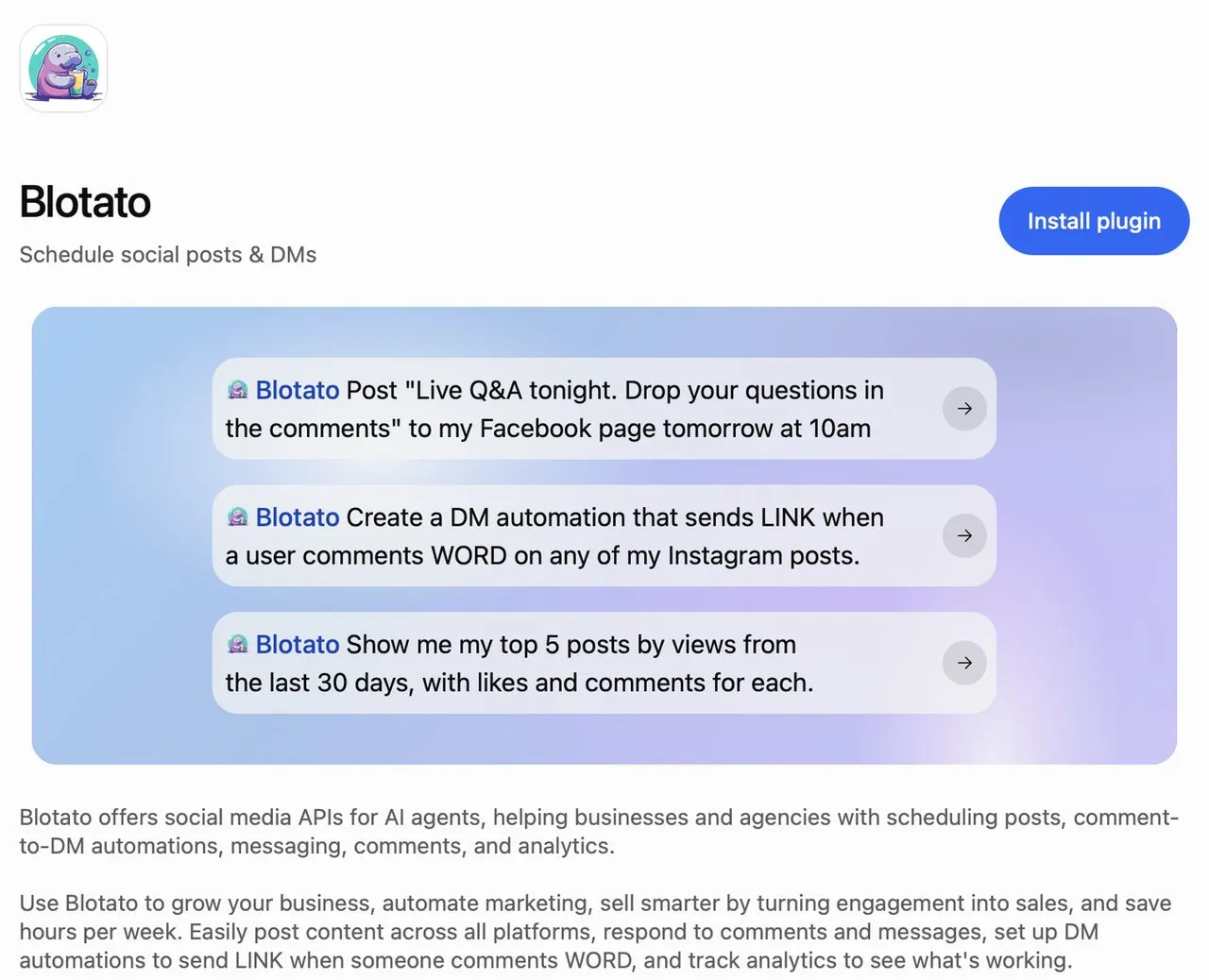
Confirm ChatGPT can see the account
Type “List my connected Blotato accounts.” ChatGPT calls blotato_list_accounts and returns your platforms with an ID for each. If Instagram is in the list, ChatGPT can see the account and post to it.
If the list comes back empty, the plugin works but no social accounts are connected in Blotato yet, so connect Instagram there first. If the call fails because no Blotato account is authorized, open Settings, then Plugins, then Blotato in ChatGPT, and select Connect another account.
Prompts That Publish a Reel, a Carousel and a Story
ChatGPT publishes all four Instagram formats through one tool, blotato_create_post, and the format is set by what you attach and the word you use. Every Instagram post needs at least one photo or video, given as a link that opens without a login (the next section covers how). A caption alone fails.
| Format | What to give ChatGPT | Example prompt | Options |
|---|---|---|---|
| Single photo | One image link | ”Post this photo to my Instagram with the caption: Sunday reset, three habits that stuck.” | Alt text, up to 3 collaborators, first comment |
| Carousel | 2 to 10 image or video links | ”Post these five images to Instagram as a carousel, in this order.” | First comment. No collaborators through Blotato |
| Reel | One video link | ”Post this video to Instagram as a Reel and share it to my feed.” | Cover image, audio name, trial Reel, up to 3 collaborators, first comment |
| Story | One image or video link | ”Post this image to my Instagram Story.” | None. No caption, no first comment |
Three details from Blotato’s Instagram limitations page and its publishing docs save a failed post. A single video that isn’t marked as a Story publishes as a Reel, so say “Story” when you mean one. Blotato doesn’t support collaborators on carousels, so a carousel that names one fails. Single photos and Reels take them fine, and you can add a collaborator to a published carousel in the Instagram app.
Stories ignore captions, so put any text on the image or video itself before you post.
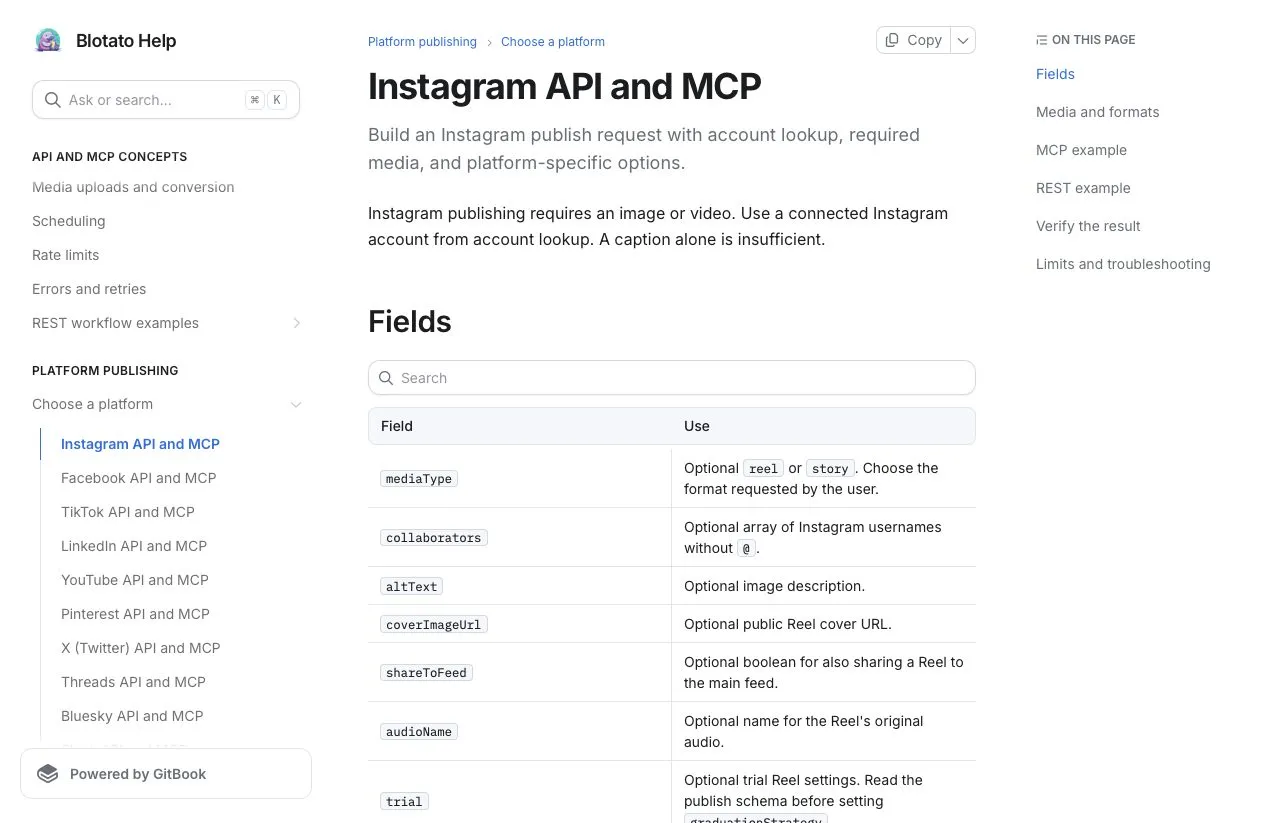
Trial Reels go to non-followers first. Ask for a trial Reel and ChatGPT sets the trial option. You then choose whether you’ll move it to your followers by hand, or let Instagram decide based on how it performs.
Hashtags can go in the first comment. If you prefer a clean caption, ask ChatGPT to “put the hashtags in the first comment” and they post right after the main post. A first comment can run up to 2,200 characters.
Scheduling works the same way. Add a day, time and timezone to any prompt, such as “schedule it for Friday at 9am Eastern,” and ChatGPT passes a scheduledTime to Blotato. If you’ve set up a weekly posting schedule in Blotato, you can ask for “my next free slot” instead. The post waits in your Blotato queue and goes out whether or not the chat is still open.
Getting Your Photo or Video to ChatGPT
Instagram fetches your media from a URL, so the link has to open the file itself without a login. This is the step that tripped up my first attempt.
In a regular chat, paste a public link. A Google Drive file shared with anyone who has the link is the usual choice. Blotato converts Drive share links into direct downloads, but Drive sometimes returns a warning page instead. A direct file URL from your own site or storage is safer. Public links go straight into the post with no upload step.
In ChatGPT’s Work mode, attach the file. Work is for eligible paid ChatGPT plans. When I recorded my ChatGPT posting walkthrough, the Drive link failed once with a media-server error, and attaching the file in Work mode worked. Blotato uploaded it to its own storage before publishing.
Check the file before you send it. Blotato’s media requirements put images at 8 MB max with an aspect ratio between 4:5 and 1.91:1, square being the safest. Videos run up to 300 MB, at least 3 seconds, up to 15 minutes for a Reel and 60 seconds for a Story. On a carousel, the first slide sets the crop for every slide after it.
Keep ChatGPT Asking Before It Posts
ChatGPT can ask for your approval before a plugin takes an action. When I published from ChatGPT on camera, it showed a prompt describing exactly what was about to go out, and I chose whether to allow it.
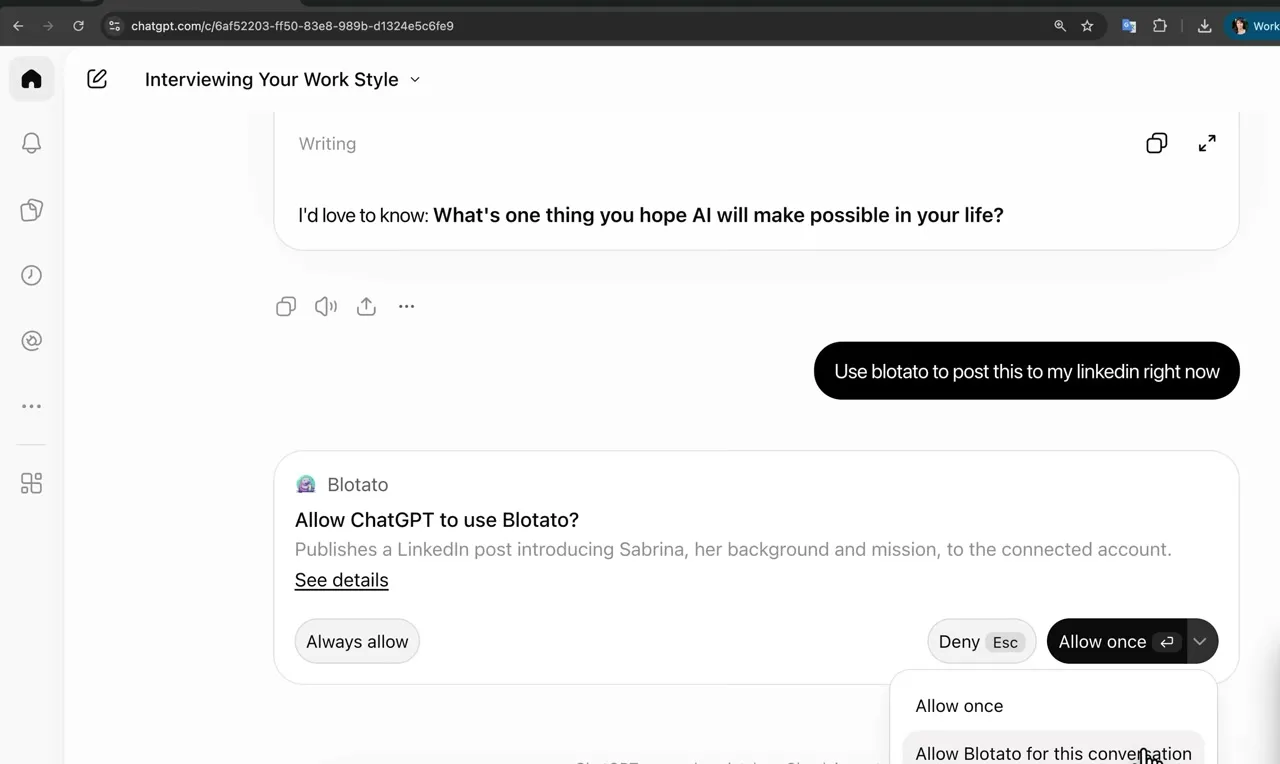
Depending on your account and workspace, OpenAI’s permission settings for a plugin range from always asking to letting some actions run without a prompt. Check them in ChatGPT under Settings, then Plugins, then Blotato. I’d keep Blotato on always ask for your first few weeks. The approval prompt is your last chance to catch a wrong caption or the wrong account before the post goes live.
Publishing is also asynchronous. The first response only confirms that Blotato received the post. Ask ChatGPT to check the status, and it calls blotato_get_post_status until it sees published, with a link if one comes back, scheduled, or failed with the error.
A post with no photo or video fails outright. Meta’s generic “media could not be fetched” error often clears on a retry, and if it doesn’t, check the aspect ratio next.
The Instagram Limits ChatGPT Can’t Get Around
No prompt changes these, so know them before you plan to post to Instagram from ChatGPT every day.
- 50 posts per 24 hours. Blotato caps each Instagram account at 50 posts per 24-hour window as an anti-spam guard. Meta’s content publishing docs state its own limit as 100 API-published posts in one place and 50 in another, and Meta counts a carousel as one post.
- Blotato’s carousel limit sits below Meta’s. Blotato takes up to 10 items, while Meta’s API now accepts 20.
- No music from Instagram’s library. Outside tools can’t reach it. Bake the audio into your Reel before you send it. Video slides inside a carousel lose their audio.
- No link stickers on Stories, and no Story mentions through Blotato. Instagram’s API doesn’t take link stickers. Blotato’s help suggests publishing the Story and adding the sticker or mention in the Instagram app.
- No way to set Meta’s AI disclosure flag yet. Meta’s API accepts one, and Blotato doesn’t pass it through yet.
One more limit is scope. ChatGPT can publish to all 9 social platforms Blotato supports, but comments, DMs and automations stop at Instagram and Facebook.
Turn Instagram Comments Into DMs From the Same Chat
Once your account already gets regular comments, the same plugin can answer them.
The Blotato listing ships with this example: “Create a DM automation that sends LINK when a user comments WORD on any of my Instagram posts.” ChatGPT turns that into a blotato_create_automation call. Here is what happens when someone comments the keyword.
- They get a private reply. Instagram allows one private reply per comment, within 7 days of the comment, and only on top-level comments on posts your account owns.
- A public reply posts too, by default. Blotato posts a short public reply under the comment right after the DM, picked from three preset replies. Each tells the person to check their Message Requests. Ask ChatGPT to turn the public reply off if you don’t want one.
- The keyword match is loose. It matches inside other words and ignores case and accents, so “red” also fires on “shared.” Pick a keyword that can’t hide inside common words.
- The automation starts as a draft by default. It stays inactive until you switch it on, so tell ChatGPT when you want it live.
Each person you message counts toward your monthly active contacts: 3,000 on Solo, 10,000 on Team, 25,000 on Agency. Someone who comments doesn’t count until you reply. For prompts and setups beyond the basics, see Blotato’s DM automation tools.
The Honest Pitch: One Plugin, Nine Platforms
I’d be a bad founder if I didn’t tell you the trade-off. If you only post to one Instagram account a few times a week, Metricool’s ChatGPT app on its Free plan, with one brand and 20 scheduled posts a month, will do the job. Blotato earns its price when ChatGPT is running Instagram plus other networks, plus the comment-to-DM side, on one flat bill.
One API. Every social platform.
The plugin is a front end to Blotato’s API. The same Instagram Reel your prompt publishes is one request to the REST endpoint, which is how n8n, Make or your own scripts do it:
curl -X POST https://backend.blotato.com/v2/posts \
  -H "blotato-api-key: YOUR_API_KEY" \
  -H "Content-Type: application/json" \
  -d '{
    "post": {
      "accountId": "YOUR_INSTAGRAM_ACCOUNT_ID",
      "content": {
        "platform": "instagram",
        "text": "A caption for your Reel.",
        "mediaUrls": ["https://example.com/video.mp4"]
      },
      "target": { "targetType": "instagram", "mediaType": "reel" }
    }
  }'
Your account ID comes from GET /v2/users/me/accounts. ChatGPT users never touch it, because the plugin lists your accounts and passes the right ID itself. The full reference is in Blotato’s agent docs.
The plugin runs on Blotato’s MCP server at https://mcp.blotato.com/mcp, the same server Claude, Cursor and Codex connect to.
If you also work in Claude, here is how to post to Instagram with Claude on the same connection. Plenty of tools ship an MCP server now. What I’d weigh is breadth: one Blotato account covers publishing to 9 social platforms, analytics on 8 of them, and the Instagram and Facebook inbox with DM automations. If your agent needs all of that, you skip stitching together five vendors.
See Blotato’s plans and connect ChatGPT to your Instagram account.
Sabrina’s Take
I’m biased, obviously. But I built Blotato because, as a creator, handing a finished post off to every platform was my bottleneck. Posting from ChatGPT removes that step, as long as you respect Instagram’s rules: a professional account, public media links, and a human glance at the approval prompt. Start with one Reel, check its status, and only then let ChatGPT schedule a week of posts.
How to Post to Instagram from ChatGPT FAQs
Can ChatGPT post to Instagram by itself?
No. ChatGPT has no access to your Instagram account on its own, so it can only draft the post. With a publishing plugin installed and your account connected, it can publish and schedule photos, carousels, Reels and Stories from the chat.
Can ChatGPT post a Reel or a carousel to Instagram?
Yes. Give ChatGPT a public video link and say “Reel,” or give it 2 to 10 image or video links and say “carousel.” Through Blotato, a single video not marked as a Story publishes as a Reel, and carousels don’t take collaborators.
Can ChatGPT schedule Instagram posts for later?
Yes. Add a day, time and timezone to your request and ChatGPT passes it to Blotato as a scheduled time. Asking for your next free slot also works once you’ve set up a weekly posting schedule in Blotato. The scheduled post waits in your Blotato queue, where you can move or delete it before it goes out.
Do I need an Instagram business account to post from ChatGPT?
You need a professional account, either Business or Creator. Instagram blocks third-party publishing to personal accounts. Through Blotato you connect with your Instagram login, and you don’t need a linked Facebook Page.
Does posting to Instagram from ChatGPT work on the free ChatGPT plan?
Yes, the Blotato plugin runs on ChatGPT Free, though OpenAI’s plugin access still varies by plan, workspace and region. Attaching files directly uses Work mode, which needs an eligible paid ChatGPT plan. You still need a paid Blotato plan, since the trial excludes the plugin.
Will Instagram flag posts published from ChatGPT?
Posts published this way go through Instagram’s official publishing API, the same route scheduling tools use, so the method itself isn’t a workaround. Instagram still judges your content and posting behavior, and Blotato adds its own cap of 50 posts per account per 24 hours as a guard. In my view, browser bots that click through the Instagram app carry far more risk.