Meta One Link Limits: What Changes for Social Media Automation
Meta One now caps links on some Facebook Pages and gates clickable Instagram post links. What the monthly limits mean for social media automation.
Meta One is Meta’s new subscription service, announced on September 15 and rolling out gradually, and it comes with published link limits. Facebook Pages that see the limit can put links in 2 organic posts or comments a month for free, and clickable links on Instagram posts and reels start at the Meta One Advanced plan. Beyond that, both apps put links behind Meta One Advanced and up.
If an agent posts your content, every Facebook Page post or comment it writes with a link may now draw on a monthly allowance. I work on the publishing layer agents use to post to nine platforms, so these limits land on my customers too.
Meta One Link Allowances by Plan
Meta publishes both allowances, in its Facebook Page link limits article and its Instagram links help page:
| Meta One plan | US price | Facebook Page posts or comments with links | Instagram posts with links | Instagram reels with links |
|---|---|---|---|---|
| No subscription | $0 | 2 per month | Not available | Not available |
| Essential | $14.99/mo | 2 per month | Not listed | Not listed |
| Advanced | $49.99/mo | 8 per month | Up to 4 per month | Up to 4 per month |
| Expert | $149.99/mo | 20 per month | Up to 8 per month | Up to 8 per month |
| Max | $499.99/mo | Unlimited | Up to 12 per month | Up to 12 per month |
Prices are from the Facebook help article. Meta’s Meta One announcement lists Expert and Max as “starting at” $149 and $499, and both pages say pricing varies by region.
On Instagram, the link goes in through an “Add link” button in the composer. URLs typed into the caption stay plain text. Posts and reels have separate allowances, you can’t edit a link after the post goes live, and unused links don’t roll over. Links to Meta’s own apps, catalog product links and links in ads don’t count.
How the Facebook Limit Counts Links
This started as a December 2025 test that Meta called “a limited test”. In that test, comment links reportedly didn’t count and Meta Verified subscribers weren’t affected. The current rules count comment links and don’t mention Meta Verified. By mid-September, Social Media Today reported Page managers seeing the cap tied to Meta One, and Meta’s help article now spells out the rules.
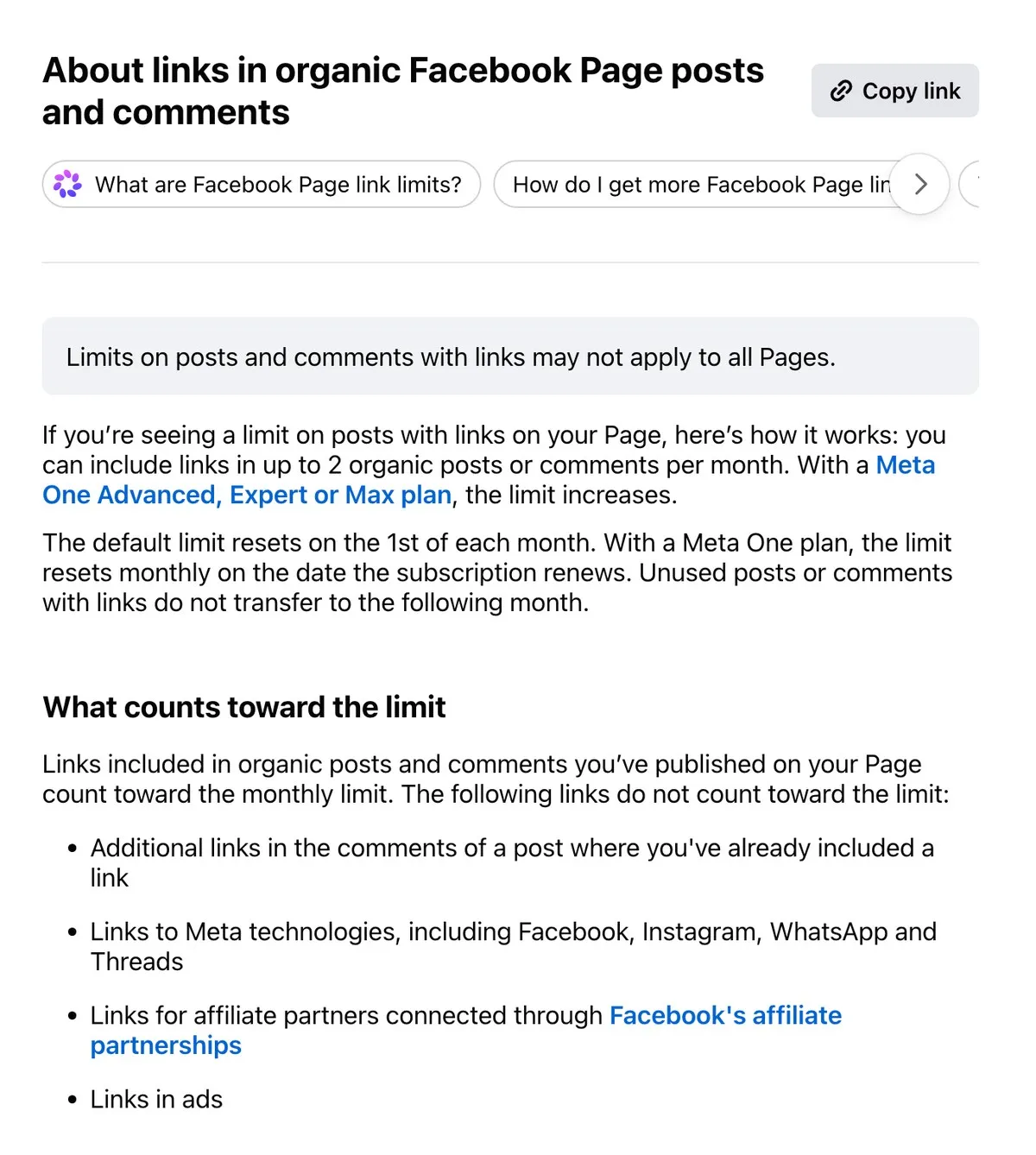
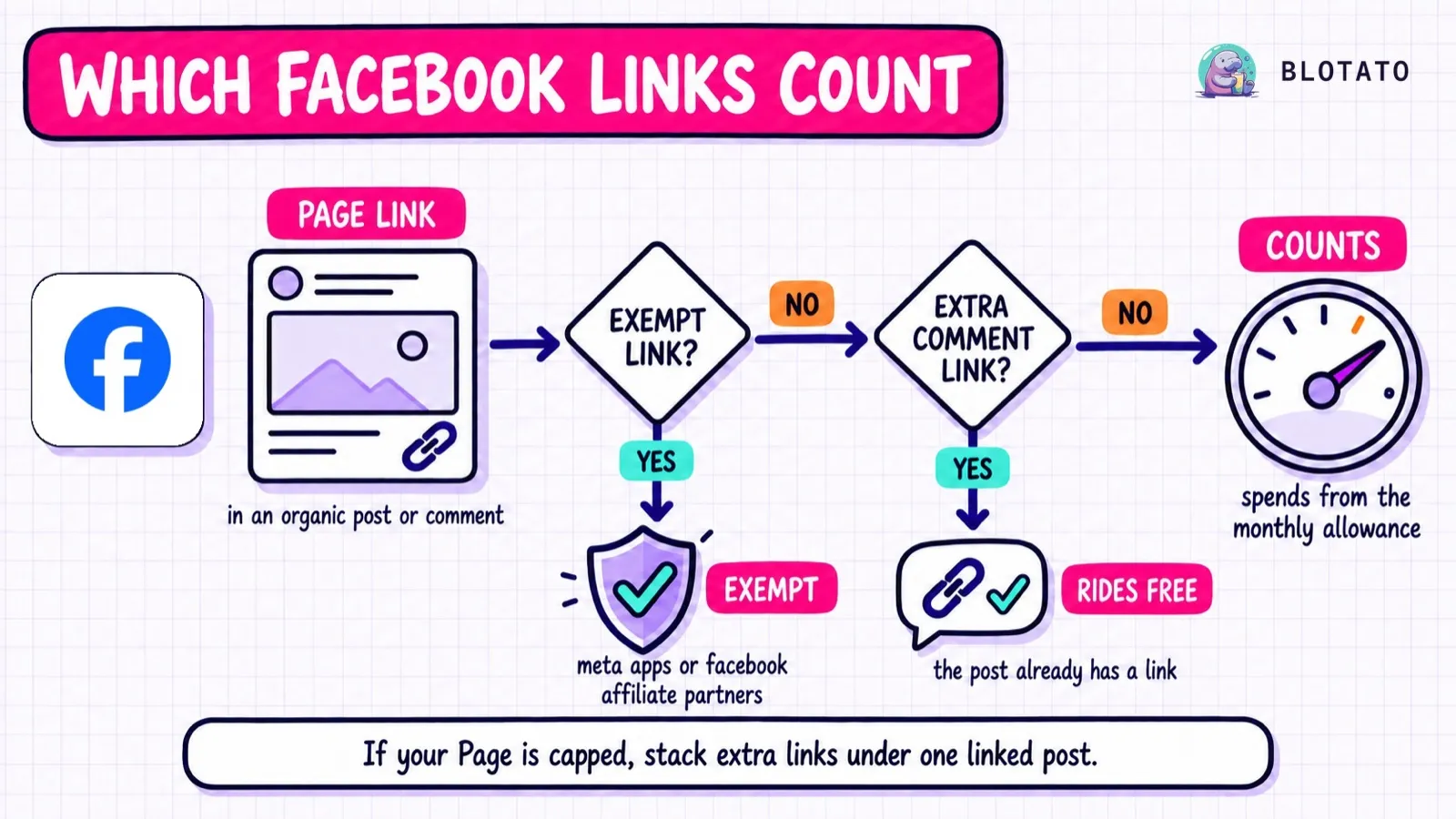
A link in a post counts. So does a link in a comment you publish from the Page. Four kinds of links are free:
- Additional links in the comments of a post that already has a link
- Links to Meta’s own apps, including Instagram, WhatsApp and Threads
- Affiliate links connected through Facebook’s affiliate partnerships
- Links in ads
The free allowance resets on the 1st of each month. A Meta One allowance resets on your renewal date. Meta also says the limit may not apply to every Page, so check yours.
Meta’s plan page also lists links in Facebook reels: 8 on Advanced, 20 on Expert, unlimited on Max. The figures match the table, but Meta doesn’t say whether reels share that allowance or have their own. That matters for agents, because Blotato publishes Facebook video as a Reel.
Meta Verified doesn’t appear in the table at all. Meta says nothing changes for current Meta Verified subscribers for now, while it plans their move to Meta One.
What It Means If Your Agent Publishes the Links
Meta’s public docs don’t say whether posts published through the API count differently. Neither help article mentions the API or third-party tools. I would assume they count the same, because that is the safe way to plan.
That turns links into a monthly budget your agent has to manage:
- Stack links on one post. Once a post carries a link, more links in its comments are free.
blotato_create_posttakes afirstCommentfield that posts right after publishing, so put the extra resources there. A first-comment link on a post with no other link still counts as one, so it doesn’t save you anything on its own. The Facebook setup for Claude covers thepageIdpart. - Keep the tally yourself. As of September 23, nothing in Meta’s API documentation hands your agent the remaining count, and the allowance belongs to the Page, not the agent. Count every published post or Page comment carrying a non-exempt link,
linkpreviews included, since the last reset, including ones a person or another tool posted. - Point to Meta surfaces when it fits. A link to your Instagram, WhatsApp or Threads doesn’t count at all.
- Send Instagram links by DM. Meta’s Instagram publishing reference documents no way to attach a link, so an agent can’t reach the Add link button. On Instagram, links in comments aren’t clickable either. One working route is a comment keyword that triggers a DM carrying the link, which Blotato’s DM automations handle on Instagram and Facebook, reply-only.
Meta also hasn’t documented what happens when a capped Page publishes one more link. It could be blocked, or go out without the link. When blotato_get_post_status returns published, it carries a publicUrl, so open it and confirm the link survived before the agent marks the link as shipped. That check shows the link is live, not whether Meta counted it.
The comment route needs people already commenting, and every new person it replies to counts toward your monthly active-contacts limit. The Instagram DM automation walkthrough covers the keyword setup.
Also Shipped in September: LinkedIn, Threads and Adobe
LinkedIn is testing a Network tab. Chief Product Officer Hari Srinivasan described it as a place to “stay connected to your network, ie the people you have explicitly connected or followed,” per Social Media Today. His wording names people. LinkedIn hasn’t said whether Company Page posts appear there, so don’t rebuild a Page strategy around it yet.
Threads ads no longer need a matching Instagram account. Starting in September 2026, businesses without an Instagram profile can run ads from their Threads profile, and matching usernames aren’t required, per Meta’s Threads ads help page. Meta says it is rolling out gradually.
Adobe Premiere is free on Android. Adobe launched it on September 22 with watermark-free exports up to 4K, plus paid upgrades for extra generative credits and storage.
Threads added podcast tools. Meta expanded the Threads podcast toolkit with profile and post banners, an episode picker with tappable link cards, transcript and guest cards, share reminders, saved episodes, and Podcast Insights. The latest entry in the Threads API changelog, dated August 12, mentions none of it, so treat these as in-app features.